"ae2217ad8e73450c"{"id":"1003010","slug":"character-customizer","title":"Character Customizer","category":"Characters \u0026 Creatures","engine":"4.26+,5.0+","assetVersion":"","engineVersion":"Engine Version: 4.26+,5.0+","tag":"Characters","accent":"blue","visual":"character","summary":"Character Customizer handles male and female presets, networked runtime edits, NPC crowds, MetaHuman-compatible proportions, and 44 tintable clothing meshes.","platform":"Unreal Engine","indexPolicy":"index","publishedAt":"2026-11-25T16:15:33.755Z","updatedAt":"2026-11-25T16:15:33.755Z","sourceNotes":[],"fileContents":[],"compatibility":["Unreal Engine","Engine Version: 4.26+,5.0+"],"featuredImage":{"alt":"Character Customizer","src":"/wp-content/uploads/published/2026/11/be29b3fb7240-37ce9eff-3201-4de4-ba71-0daad84911e0-7507e6b01f.webp"},"hasDownloadLink":true,"downloads":0,"terms":[{"taxonomy":"category","slug":"characters-and-creatures","name":"Characters \u0026 Creatures"}],"galleryImages":[{"src":"/wp-content/uploads/published/2026/11/51c88990cba7-7d363b3e-8bf5-4981-bed8-4a26cbee4294-69889d0a6a.webp","alt":"Character Customizer"},{"src":"/wp-content/uploads/published/2026/11/7c50182ce653-98f70387-08cd-4009-9eca-73c53bf6f0f1-2a868dd48e.webp","alt":"Character Customizer"},{"src":"/wp-content/uploads/published/2026/11/8486a57f27d5-9d52a0c7-b783-4644-98e1-667d12a598de-4ec7befac1.webp","alt":"Character Customizer"},{"src":"/wp-content/uploads/published/2026/11/b49a912db666-fdca4619-dd71-42f7-8088-e9fd4345498b-9321f76296.webp","alt":"Character Customizer"},{"src":"/wp-content/uploads/published/2026/11/5ff73eed9d40-4c75cac3-25c1-4712-bc53-9a07aae7dc4c-44a88be9cd.webp","alt":"Character Customizer"}],"accessPanel":{"kind":"resource","title":"Get this resource","safetyNote":"Resources are manually reviewed before listing to improve quality and reduce obvious risks.","fileName":"Character Customizer.7z","resourceType":"Resource archive","versions":[]},"contentHtml":"\u003cp\u003eA character can be a saved preset, a player-controlled avatar, or one body in a crowd. Character Customizer is a customization system for those jobs: character presets, crowds of NPCs, and characters customized by the player at runtime. Male and female customizable characters are included, and the customization is fully networked.\u003c/p\u003e\u003cp\u003eThe setup is not limited to a pre-game editor. The same menu logic has to serve authored presets, randomly generated NPCs, and edits made while play is running. That makes the first design question a menu question: which options stay visible, which bodies are available, and how custom heads change the option set.\u003c/p\u003e\u003ch2\u003eSetting Up a Character Preset Menu\u003c/h2\u003e\u003cp\u003ePresets are managed as characters, with male and female options available in the same menu. Custom MetaHuman heads can be added to that menu. The restriction is specific: when a custom head is added, only certain customization options will be available. The menu therefore needs states for the standard character and for a custom-head character, because the visible option set is not identical.\u003c/p\u003e\u003cp\u003eRandom NPC generation is also described as easy, and the menu is meant for crowd NPCs as well as player characters. An NPC can be a fully featured character rather than a stripped-down stand-in. Random generation can fill a scene from the same character pool that supplies presets and player-selectable options.\u003c/p\u003e\u003ch2\u003eNetworked Character Edits at Runtime\u003c/h2\u003e\u003cp\u003eCustomization is fully networked. That detail changes the implementation path for player edits, because a runtime change is part of the character's networked representation, not only a local menu preview. The network layer is in the customization system itself.\u003c/p\u003e\u003cp\u003eFor a multiplayer scene, the menu and the runtime character have to share the same customization state. A player who changes a character while the session is active needs that change to travel with the character. Full networking is part of the feature set, so the menu is intended to sit inside that flow rather than beside it.\u003c/p\u003e\u003ch2\u003eNPC Character Crowds and Random Generation\u003c/h2\u003e\u003cp\u003eTwo separate jobs sit under the crowd heading. Easy random NPC generation supplies variation, while crowd spawning and optimization support large crowds of fully featured characters with reasonable performance. Generation fills the scene; optimization keeps the crowd viable as it grows.\u003c/p\u003e\u003cp\u003eMale and female characters both feed that crowd, and the clothing set adds visible variety across the group. The stated performance target is a large crowd of fully featured characters, not a crowd of simplified bodies. A scene can use random NPCs for background population and still retain the same character options used in the menu.\u003c/p\u003e\u003ch2\u003eMetaHuman Proportions and UV Compatibility\u003c/h2\u003e\u003cp\u003eCharacters are shaped to the proportions of the MetaHuman tall and normalweight presets. Characters and textures are UV compatible with MetaHumans, which keeps the clothing and surface work aligned with that character family. The proportions establish the body scale for the male and female characters.\u003c/p\u003e\u003cp\u003eCustom MetaHuman heads can be brought into the menu, with the stated limitation that only certain customization options will be available. A project using MetaHuman heads has a defined trade-off: the custom head enters the preset and NPC system, but the customization menu must account for the reduced option set. The choice is visible at setup, not hidden inside the runtime menu.\u003c/p\u003e\u003ch2\u003eThe Character Wardrobe: 44 Tintable Meshes\u003c/h2\u003e\u003cp\u003eThe wardrobe contains 44 tintable clothes meshes. The apparel list covers tops, outerwear, bottoms, swimwear, footwear, and eyewear for male and female characters. A playable demo includes the Modern Clothes Pack.\u003c/p\u003e\u003cul\u003e\u003cli\u003eTops and outerwear: Hoodie; T-shirt (female); T-shirt (male); Vest (female); Shirt (female); Shirt (male); Polo shirt (male); Tank top (male); Casual shirt (male); Crop top (female); Sleeveless shirt (female); Sweater (female); Suit jacket (male); Denim jacket (female); Leather jacket (female); Field jacket (male).\u003c/li\u003e\u003cli\u003eBottoms and swimwear: Jeans (female); Baggy jeans (female); Jeans (male); Jogging pants (female); Cargo pants (male); Swimming trunks (male); Suit pants (male).\u003c/li\u003e\u003cli\u003eFootwear: Sneakers 1; Sneakers 2; Boots; Ankle boots (female); Sandals (female); Sandals (male); High heels (female); Dress shoes.\u003c/li\u003e\u003cli\u003eEyewear: Glasses; Sunglasses; Aviator glasses.\u003c/li\u003e\u003c/ul\u003e\u003cp\u003eThe gender labels are explicit on many pieces: some tops, jackets, pants, and shoes are marked female or male, while several footwear and eyewear items are listed without a gender label. Tinting is part of the clothing setup; the list distinguishes gender-specific garments from items without a gender label.\u003c/p\u003e\u003ch2\u003eCharacter Faces, Version Fit, and Production Use\u003c/h2\u003e\u003cp\u003eViseme support follows the OVR standard, and ARKit facial animation is also supported. Those facial channels sit alongside body and clothing customization. For dialogue scenes, a speaking crowd can use viseme support; for projects using ARKit facial animation, the same character system has a second route for facial performance.\u003c/p\u003e\u003cp\u003eThe version mapping is three-step: 5.1 and newer use version 6, 4.26 through 5.0 use version 5, and 4.25 and earlier use version 4. Check that mapping before placing the asset in a branch, since the correct version depends on the project's release line. The tags around the release name character, first-person, modular, shooter, photorealistic, menu, interactive, female, script, NPC, male, MetaHuman, melee, and animation blueprint contexts.\u003c/p\u003e\u003cp\u003eIn a production, the menu, the NPC crowd, and the player avatar can draw from the same preset and clothing data. A first-person or melee project gets a networked character menu and crowd population path; a MetaHuman-based project gets matching proportions, UV compatibility, and optional custom heads with a narrower option set. The wardrobe supplies the visible variation, and the facial support covers speaking characters. That combination is where Character Customizer fits: at the point where a character menu, a crowd system, and a runtime avatar stop being separate tasks.\u003c/p\u003e\n\n\u003ch2\u003eMore From The Same Workflow\u003c/h2\u003e\n\u003cul\u003e\n\u003cli\u003e\u003ca href=\"https://3dcghub.com/stylized-male-and-female-characters-assets-only/\" rel=\"noopener noreferrer\"\u003eStylized Male and Female characters (assets only)\u003c/a\u003e\u003c/li\u003e\n\u003cli\u003e\u003ca href=\"https://3dcghub.com/stylized-modular-character/\" rel=\"noopener noreferrer\"\u003eStylized Modular Character\u003c/a\u003e\u003c/li\u003e\n\u003cli\u003e\u003ca href=\"https://3dcghub.com/swordswoman/\" rel=\"noopener noreferrer\"\u003eSwordswoman\u003c/a\u003e\u003c/li\u003e\n\u003cli\u003e\u003ca href=\"https://3dcghub.com/male-realistic-character-pack-01/\" rel=\"noopener noreferrer\"\u003eMale Realistic Character Pack 01\u003c/a\u003e\u003c/li\u003e\n\u003cli\u003e\u003ca href=\"https://3dcghub.com/styled-characters-pack-military-male-female/\" rel=\"noopener noreferrer\"\u003eStyled Characters Pack: Military Male/Female\u003c/a\u003e\u003c/li\u003e\n\u003c/ul\u003e","contentTextLength":6230,"navigation":{"current":34,"total":4964,"previous":{"id":"1003011","slug":"character-interaction-add-on-vol-01","title":"Character Interaction Add-On Vol.01","category":"Combat","platform":"Unreal Engine","updatedAt":"2026-11-25T16:16:13.765Z"},"next":{"id":"1003009","slug":"character-abilities","title":"Character Abilities","category":"Weapons \u0026 Combat","platform":"Unreal Engine","updatedAt":"2026-11-25T16:14:52.932Z"}},"relatedResources":[{"id":"1000689","slug":"stylized-male-and-female-characters-assets-only","title":"Stylized Male and Female characters (assets only)","category":"Characters \u0026 Creatures","engine":"4.26+,5.0+","assetVersion":"","engineVersion":"Engine Version: 4.26+,5.0+","tag":"Characters","accent":"blue","visual":"character","summary":"Modular stylized character bundle for Unreal Engine with ethnic heads, clothing, hair, and accessories across 9 skeleton variants including MetaHuman and Lyra.","platform":"Unreal Engine","indexPolicy":"index","publishedAt":"2026-07-23T08:13:25.624Z","updatedAt":"2026-07-23T08:13:25.624Z","sourceNotes":[],"fileContents":[],"compatibility":["Unreal Engine","Engine Version: 4.26+,5.0+"],"featuredImage":{"alt":"Stylized Male and Female characters (assets only)","src":"/wp-content/uploads/published/2026/07/93efe5652ae8-968589b3-b5d7-4626-b43c-0b74970fe905-b28ff1fc25.webp"},"fileSizeBytes":355702905,"hasDownloadLink":true,"downloads":1},{"id":"1001911","slug":"stylized-modular-character","title":"Stylized Modular Character","category":"Characters \u0026 Creatures","engine":"4.26+,5.0+","assetVersion":"","engineVersion":"Engine Version: 4.26+,5.0+","tag":"Characters","accent":"blue","visual":"character","summary":"Explore Stylized Modular Character, a modular asset pack featuring male and female meshes, Epic Skeleton rigging, blink morph targets, and varied thematic parts","platform":"Unreal Engine","indexPolicy":"index","publishedAt":"2026-10-22T11:49:16.504Z","updatedAt":"2026-10-22T11:49:16.504Z","sourceNotes":[],"fileContents":[],"compatibility":["Unreal Engine","Engine Version: 4.26+,5.0+"],"featuredImage":{"alt":"Stylized Modular Character","src":"/wp-content/uploads/published/2026/10/c4a9b3bd1032-7ef4a671-1514-4b14-823b-399dff7865ef-5c5d634b00.webp"},"fileSizeBytes":889753531,"hasDownloadLink":true,"downloads":0},{"id":"24789","slug":"swordswoman","title":"Swordswoman","category":"Characters \u0026 Creatures","engine":"4.26+,5.0+","assetVersion":"Engine version: 4.26+,5.0+","engineVersion":"","tag":"Characters","accent":"blue","visual":"character","summary":"Swordswoman is set up as a modular female character with a UE4 skeleton, facial expressions, and separated armor, hair, body, and clothing parts. It also includes a full body without seams plus multiple 4K texture sets for the main components.","platform":"Unreal Engine","indexPolicy":"index","publishedAt":"2026-04-17T08:47:00.000Z","updatedAt":"2026-11-14T10:16:22.497Z","sourceNotes":[],"fileContents":[],"compatibility":["Unreal Engine","Engine version: 4.26+,5.0+"],"featuredImage":{"alt":"Swordswoman","src":"https://3dcghub.com/wp-content/uploads/2026/04/ed75dd13c63a_b31ab841-8674-4ec4-a28d-0844fb43f8f2.webp"},"fileSizeBytes":394766010,"hasDownloadLink":true,"downloads":1}]}[{"id":4225,"sourceId":4225,"taxonomyId":4225,"taxonomy":"category","slug":"asset-library","name":"Asset Library","parentId":null,"count":4817,"hasChildren":true,"href":"/","seoTitle":"Free Game Assets Library | 3DCGHUB","seoDescription":"Browse free Unreal Engine, Unity, Blender assets and game development tutorials on 3DCGHUB with previews, compatibility notes, and secure downloads.","sitemapEnabled":true,"children":[{"id":4227,"sourceId":4227,"taxonomyId":4227,"taxonomy":"category","slug":"blender-add-ons-plugins","name":"Blender Add-ons \u0026 Plugins","parentId":4225,"count":10,"hasChildren":false,"href":"/category/blender-add-ons-plugins/","seoTitle":"Free Blender Add-ons \u0026 Plugins | 3DCGHUB","seoDescription":"Browse free Blender Add-ons \u0026 Plugins tools for Blender on 3DCGHUB: curated downloads with preview images, compatibility notes and secure download access.","sitemapEnabled":true},{"id":514,"sourceId":514,"taxonomyId":514,"taxonomy":"category","slug":"unity-2","name":"Unity","parentId":4225,"count":453,"hasChildren":true,"href":"/category/unity-2/","seoTitle":"Free Unity Assets | 3DCGHUB","seoDescription":"Browse free Unity resources on 3DCGHUB: curated downloads with preview images, compatibility notes and secure download access.","sitemapEnabled":true,"children":[{"id":523,"sourceId":523,"taxonomyId":523,"taxonomy":"category","slug":"2d","name":"2D","parentId":514,"count":1,"hasChildren":true,"href":"/category/2d/","seoTitle":"Free Unity 2D | 3DCGHUB","seoDescription":"Browse free 2D assets for Unity on 3DCGHUB: curated downloads with preview images, compatibility notes and secure download access.","sitemapEnabled":true},{"id":515,"sourceId":515,"taxonomyId":515,"taxonomy":"category","slug":"3d-unity-2","name":"3D","parentId":514,"count":162,"hasChildren":true,"href":"/category/3d-unity-2/","seoTitle":"Free Unity 3D Assets | 3DCGHUB","seoDescription":"Browse free 3D assets for Unity on 3DCGHUB: curated downloads with preview images, compatibility notes and secure download access.","sitemapEnabled":true},{"id":565,"sourceId":565,"taxonomyId":565,"taxonomy":"category","slug":"add-ons","name":"Add-Ons","parentId":514,"count":2,"hasChildren":false,"href":"/category/add-ons/","seoTitle":"Free Unity Add-Ons | 3DCGHUB","seoDescription":"Browse free Add-Ons assets for Unity on 3DCGHUB: curated downloads with preview images, compatibility notes and secure download access.","sitemapEnabled":true},{"id":529,"sourceId":529,"taxonomyId":529,"taxonomy":"category","slug":"audio-unity-2","name":"Audio","parentId":514,"count":1,"hasChildren":true,"href":"/category/audio-unity-2/","seoTitle":"Free Unity Audio | 3DCGHUB","seoDescription":"Browse free Audio for Unity on 3DCGHUB: curated downloads with preview images, compatibility notes and secure download access.","sitemapEnabled":true},{"id":557,"sourceId":557,"taxonomyId":557,"taxonomy":"category","slug":"templates","name":"Templates","parentId":514,"count":36,"hasChildren":true,"href":"/category/templates/","seoTitle":"Free Unity Templates | 3DCGHUB","seoDescription":"Browse free Unity project templates on 3DCGHUB. Starter kits with previews, compatibility notes, and secure download access.","sitemapEnabled":true},{"id":533,"sourceId":533,"taxonomyId":533,"taxonomy":"category","slug":"tools-unity-2","name":"Tools","parentId":514,"count":0,"hasChildren":true,"href":"/category/tools-unity-2/","sitemapEnabled":true},{"id":554,"sourceId":554,"taxonomyId":554,"taxonomy":"category","slug":"vfx-unity-2","name":"VFX","parentId":514,"count":4,"hasChildren":true,"href":"/category/vfx-unity-2/","seoTitle":"Free Unity VFX | 3DCGHUB","seoDescription":"Browse free VFX for Unity on 3DCGHUB: curated downloads with preview images, compatibility notes and secure download access.","sitemapEnabled":true}]},{"id":511,"sourceId":511,"taxonomyId":511,"taxonomy":"category","slug":"unreal-engine-2","name":"Unreal Engine","parentId":4225,"count":4355,"hasChildren":true,"href":"/category/unreal-engine-2/","seoTitle":"Free Unreal Engine Assets | 3DCGHUB","seoDescription":"Browse free Unreal Engine resources on 3DCGHUB: curated downloads with preview images, compatibility notes and secure download access.","sitemapEnabled":true,"children":[{"id":54,"sourceId":54,"taxonomyId":54,"taxonomy":"category","slug":"3d","name":"3D","parentId":511,"count":2441,"hasChildren":true,"href":"/category/3d/","seoTitle":"Free Unreal Engine 3D | 3DCGHUB","seoDescription":"Browse free 3D assets for Unreal Engine on 3DCGHUB: curated downloads with preview images, compatibility notes and secure download access.","sitemapEnabled":true},{"id":441,"sourceId":441,"taxonomyId":441,"taxonomy":"category","slug":"animations","name":"Animations","parentId":511,"count":269,"hasChildren":true,"href":"/category/animations/","seoTitle":"Free Unreal Engine Animations | 3DCGHUB","seoDescription":"Browse free Animations for Unreal Engine on 3DCGHUB: curated downloads with preview images, compatibility notes and secure download access.","sitemapEnabled":true},{"id":446,"sourceId":446,"taxonomyId":446,"taxonomy":"category","slug":"audio","name":"Audio","parentId":511,"count":63,"hasChildren":true,"href":"/category/audio/","seoTitle":"Free Unreal Engine Audio Resources | 3DCGHUB","seoDescription":"Browse free Unreal Engine audio resources including sound effects, voices, dialogue, and ambient sounds. Curated free downloads on 3DCGHUB.","sitemapEnabled":true},{"id":466,"sourceId":466,"taxonomyId":466,"taxonomy":"category","slug":"game-systems","name":"Game Systems","parentId":511,"count":381,"hasChildren":true,"href":"/category/game-systems/","seoTitle":"Free Unreal Engine Game Systems | 3DCGHUB","seoDescription":"Browse free Game Systems tools for Unreal Engine on 3DCGHUB: curated downloads with preview images, compatibility notes and secure download access.","sitemapEnabled":true},{"id":478,"sourceId":478,"taxonomyId":478,"taxonomy":"category","slug":"game-templates","name":"Game Templates","parentId":511,"count":155,"hasChildren":true,"href":"/category/game-templates/","seoTitle":"Free Unreal Engine Game Templates | 3DCGHUB","seoDescription":"Browse free Game Templates for Unreal Engine on 3DCGHUB: curated downloads with preview images, compatibility notes and secure download access.","sitemapEnabled":true},{"id":432,"sourceId":432,"taxonomyId":432,"taxonomy":"category","slug":"hdri","name":"HDRI","parentId":511,"count":6,"hasChildren":true,"href":"/category/hdri/","seoTitle":"Free Unreal Engine HDRI | 3DCGHUB","seoDescription":"Browse free Unreal Engine HDRI skies and lighting maps on 3DCGHUB. Environment lighting with previews and secure downloads.","sitemapEnabled":true},{"id":228,"sourceId":228,"taxonomyId":228,"taxonomy":"category","slug":"material-and-textures","name":"Material \u0026 Textures","parentId":511,"count":172,"hasChildren":true,"href":"/category/material-and-textures/","seoTitle":"Free Unreal Engine Material \u0026 Textures | 3DCGHUB","seoDescription":"Browse free Material \u0026 Textures for Unreal Engine on 3DCGHUB: curated downloads with preview images, compatibility notes and secure download access.","sitemapEnabled":true},{"id":298,"sourceId":298,"taxonomyId":298,"taxonomy":"category","slug":"sprites-and-flipbooks","name":"Sprites \u0026 Flipbooks","parentId":511,"count":18,"hasChildren":true,"href":"/category/sprites-and-flipbooks/","seoTitle":"Free Unreal Engine Sprites \u0026 Flipbooks | 3DCGHUB","seoDescription":"Browse free Sprites \u0026 Flipbooks assets for Unreal Engine on 3DCGHUB: curated downloads with preview images, compatibility notes and secure download access.","sitemapEnabled":true},{"id":489,"sourceId":489,"taxonomyId":489,"taxonomy":"category","slug":"tools-and-plugins","name":"Tools \u0026 Plugins","parentId":511,"count":390,"hasChildren":true,"href":"/category/tools-and-plugins/","seoTitle":"Free Unreal Engine Tools \u0026 Plugins | 3DCGHUB","seoDescription":"Browse free Tools \u0026 Plugins for Unreal Engine on 3DCGHUB: curated downloads with preview images, compatibility notes and secure download access.","sitemapEnabled":true},{"id":459,"sourceId":459,"taxonomyId":459,"taxonomy":"category","slug":"ui","name":"UI","parentId":511,"count":47,"hasChildren":true,"href":"/category/ui/","seoTitle":"Free Unreal Engine UI | 3DCGHUB","seoDescription":"Browse free UI for Unreal Engine on 3DCGHUB: curated downloads with preview images, compatibility notes and secure download access.","sitemapEnabled":true},{"id":450,"sourceId":450,"taxonomyId":450,"taxonomy":"category","slug":"vfx","name":"VFX","parentId":511,"count":413,"hasChildren":true,"href":"/category/vfx/","seoTitle":"Free Unreal Engine VFX | 3DCGHUB","seoDescription":"Browse free VFX for Unreal Engine on 3DCGHUB: curated downloads with preview images, compatibility notes and secure download access.","sitemapEnabled":true}]}]},{"id":4222,"sourceId":4222,"taxonomyId":4222,"taxonomy":"category","slug":"tutorial-library","name":"Tutorial Library","parentId":null,"count":117,"hasChildren":false,"href":"/tutorials/","seoTitle":"Free Game Development Tutorial Library | 3DCGHUB","seoDescription":"Browse free game development tutorials for Unreal Engine, Unity, Blender, and more on 3DCGHUB with practical workflows and secure downloads.","sitemapEnabled":true}]
Resource screenshots
1 / 5
Asset drops
Daily Asset Drops
Follow 3DCGHUB on Telegram for daily Unreal, Unity & Blender drops and curated CC0 releases.
Resources are manually reviewed before listing to improve quality and reduce obvious risks.
Reviewed archive
Characters
Character Customizer
Character Customizer handles male and female presets, networked runtime edits, NPC crowds, MetaHuman-compatible proportions, and 44 tintable clothing meshes.
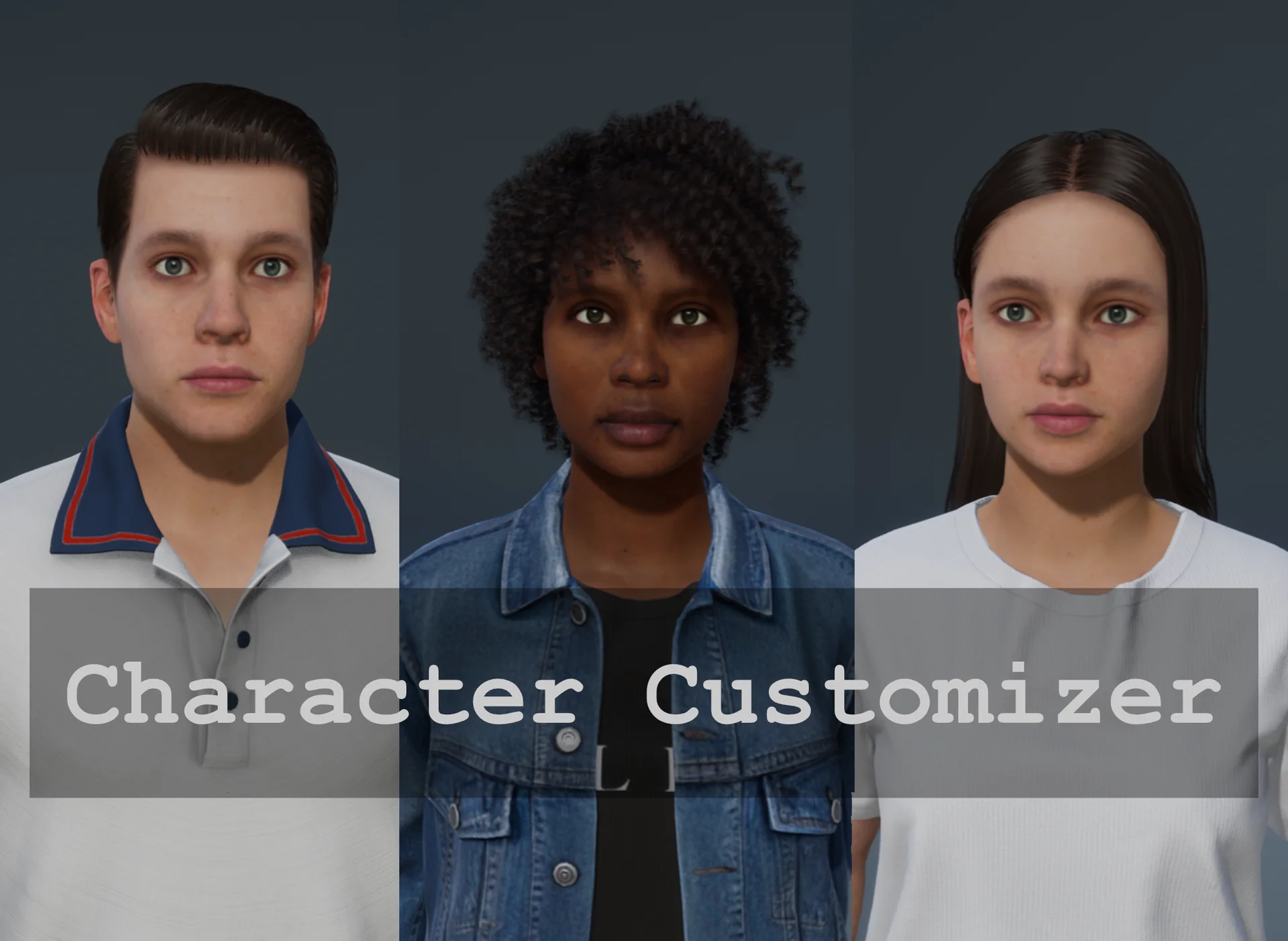
A character can be a saved preset, a player-controlled avatar, or one body in a crowd. Character Customizer is a customization system for those jobs: character presets, crowds of NPCs, and characters customized by the player at runtime. Male and female customizable characters are included, and the customization is fully networked.
The setup is not limited to a pre-game editor. The same menu logic has to serve authored presets, randomly generated NPCs, and edits made while play is running. That makes the first design question a menu question: which options stay visible, which bodies are available, and how custom heads change the option set.
Setting Up a Character Preset Menu
Presets are managed as characters, with male and female options available in the same menu. Custom MetaHuman heads can be added to that menu. The restriction is specific: when a custom head is added, only certain customization options will be available. The menu therefore needs states for the standard character and for a custom-head character, because the visible option set is not identical.
Random NPC generation is also described as easy, and the menu is meant for crowd NPCs as well as player characters. An NPC can be a fully featured character rather than a stripped-down stand-in. Random generation can fill a scene from the same character pool that supplies presets and player-selectable options.
Networked Character Edits at Runtime
Customization is fully networked. That detail changes the implementation path for player edits, because a runtime change is part of the character's networked representation, not only a local menu preview. The network layer is in the customization system itself.
For a multiplayer scene, the menu and the runtime character have to share the same customization state. A player who changes a character while the session is active needs that change to travel with the character. Full networking is part of the feature set, so the menu is intended to sit inside that flow rather than beside it.
NPC Character Crowds and Random Generation
Two separate jobs sit under the crowd heading. Easy random NPC generation supplies variation, while crowd spawning and optimization support large crowds of fully featured characters with reasonable performance. Generation fills the scene; optimization keeps the crowd viable as it grows.
Male and female characters both feed that crowd, and the clothing set adds visible variety across the group. The stated performance target is a large crowd of fully featured characters, not a crowd of simplified bodies. A scene can use random NPCs for background population and still retain the same character options used in the menu.
MetaHuman Proportions and UV Compatibility
Characters are shaped to the proportions of the MetaHuman tall and normalweight presets. Characters and textures are UV compatible with MetaHumans, which keeps the clothing and surface work aligned with that character family. The proportions establish the body scale for the male and female characters.
Custom MetaHuman heads can be brought into the menu, with the stated limitation that only certain customization options will be available. A project using MetaHuman heads has a defined trade-off: the custom head enters the preset and NPC system, but the customization menu must account for the reduced option set. The choice is visible at setup, not hidden inside the runtime menu.
The Character Wardrobe: 44 Tintable Meshes
The wardrobe contains 44 tintable clothes meshes. The apparel list covers tops, outerwear, bottoms, swimwear, footwear, and eyewear for male and female characters. A playable demo includes the Modern Clothes Pack.
Tops and outerwear: Hoodie; T-shirt (female); T-shirt (male); Vest (female); Shirt (female); Shirt (male); Polo shirt (male); Tank top (male); Casual shirt (male); Crop top (female); Sleeveless shirt (female); Sweater (female); Suit jacket (male); Denim jacket (female); Leather jacket (female); Field jacket (male).
The gender labels are explicit on many pieces: some tops, jackets, pants, and shoes are marked female or male, while several footwear and eyewear items are listed without a gender label. Tinting is part of the clothing setup; the list distinguishes gender-specific garments from items without a gender label.
Character Faces, Version Fit, and Production Use
Viseme support follows the OVR standard, and ARKit facial animation is also supported. Those facial channels sit alongside body and clothing customization. For dialogue scenes, a speaking crowd can use viseme support; for projects using ARKit facial animation, the same character system has a second route for facial performance.
The version mapping is three-step: 5.1 and newer use version 6, 4.26 through 5.0 use version 5, and 4.25 and earlier use version 4. Check that mapping before placing the asset in a branch, since the correct version depends on the project's release line. The tags around the release name character, first-person, modular, shooter, photorealistic, menu, interactive, female, script, NPC, male, MetaHuman, melee, and animation blueprint contexts.
In a production, the menu, the NPC crowd, and the player avatar can draw from the same preset and clothing data. A first-person or melee project gets a networked character menu and crowd population path; a MetaHuman-based project gets matching proportions, UV compatibility, and optional custom heads with a narrower option set. The wardrobe supplies the visible variation, and the facial support covers speaking characters. That combination is where Character Customizer fits: at the point where a character menu, a crowd system, and a runtime avatar stop being separate tasks.
 Characters
 Characters
 Characters