"6f9bd6df1f44a86f"{"id":"1000800","slug":"cgr-basnpr","title":"CGr BASnpR","category":"Guns","engine":"5.1+","assetVersion":"","engineVersion":"Engine Version: 5.1+","tag":"Guns","accent":"blue","visual":"mech","summary":"Customizable sniper rifle asset pack for Unreal Engine 5 with procedural aiming, recoil, body-part damage, grenades, and Manny retargeted animations.","platform":"Unreal Engine","indexPolicy":"index","publishedAt":"2026-07-30T22:59:50.063Z","updatedAt":"2026-07-30T22:59:50.063Z","sourceNotes":[],"fileContents":[],"compatibility":["Unreal Engine","Engine Version: 5.1+"],"featuredImage":{"alt":"CGr BASnpR","src":"/wp-content/uploads/published/2026/07/1592ab78ebb1-e181ced0-2b2e-4e7f-b917-4f903811c272-5238ede6c2.webp"},"hasDownloadLink":true,"downloads":2,"terms":[{"taxonomy":"category","slug":"guns","name":"Guns"}],"galleryImages":[{"src":"/wp-content/uploads/published/2026/07/019d04aef5f3-7d8e2b10-f721-483e-affb-e21a11dac6ae-4129baeabf.webp","alt":"CGr BASnpR"},{"src":"/wp-content/uploads/published/2026/07/7e492ae2b34b-2c615a30-9d42-4263-a729-028d037bae39-0acbbe5800.webp","alt":"CGr BASnpR"},{"src":"/wp-content/uploads/published/2026/07/05161819df62-4ced41c3-3b7f-49c3-a76b-886617c842ac-2c8372974e.webp","alt":"CGr BASnpR"},{"src":"/wp-content/uploads/published/2026/07/855b69a063b9-5c4759ce-11e4-4c5e-a199-9c24492841c6-a3c8907196.webp","alt":"CGr BASnpR"},{"src":"/wp-content/uploads/published/2026/07/fb093e3e8864-893dbc52-64f6-481c-8934-463fb3affdd8-1d0ca577d5.webp","alt":"CGr BASnpR"},{"src":"/wp-content/uploads/published/2026/07/6cefa72d98ed-9d109c0d-c759-4459-a90a-c03cd6e4e1e9-f4aa50054c.webp","alt":"CGr BASnpR"},{"src":"/wp-content/uploads/published/2026/07/beba21bc95bb-aa47b151-4178-4c2f-8a4b-cca42e298860-e0576295b3.webp","alt":"CGr BASnpR"},{"src":"/wp-content/uploads/published/2026/07/f8137db3e1a0-27985d9b-13b2-467c-bc51-2dd663bc83e9-3a63a50a59.webp","alt":"CGr BASnpR"},{"src":"/wp-content/uploads/published/2026/07/d369db5a1a16-1e9b8fe7-1fec-4c0d-b8ad-eefe1edea780-3f3a84cac9.webp","alt":"CGr BASnpR"},{"src":"/wp-content/uploads/published/2026/07/371aef00e4c3-43f6389a-b141-4341-aba8-b668627e3267-871d68dd43.webp","alt":"CGr BASnpR"}],"accessPanel":{"kind":"resource","title":"Download this resource","eyebrow":"Free Download","message":"Log in or create a free account to start your download.","fileName":"CGrBASnpRr231.7z","safetyNote":"Resources are manually reviewed before listing to improve quality and reduce obvious risks.","actionLabel":"Download Free","resourceType":"Resource archive"},"contentHtml":"\u003cp\u003e\u003cem\u003eCGr BASnpR\u003c/em\u003e is a remastered Customizable Guns project built for Unreal Engine 5. At its core sits one sniper rifle represented by a Skeletal Mesh, accompanied by a set of attachments including a scope, laser/flashlight, compensator, and suppressor. The attachments are not cosmetic extras bolted onto a static model. They function as modular components that let you assemble different configurations of the same weapon, shortening or lengthening the rifle to produce distinct visual variants. This constructor approach extends to gameplay tuning: you can adjust the accuracy of the weapon alongside its appearance.\u003c/p\u003e\n\n\u003ch2\u003eMaterial Layering and Weapon Appearance\u003c/h2\u003e\n\u003cp\u003eThe visual system runs on a material layering setup that lets you apply different patterns to the weapon without leaving the editor. You can swap finishes to change the look entirely, or shift only the tint for subtler variation. Raindrops also appear on the weapon surface, adding an environmental detail layer that reacts contextually rather than relying on a static texture.\u003c/p\u003e\n\n\u003ch2\u003eProcedural Aiming, Recoil, and True FPS Integration\u003c/h2\u003e\n\u003cp\u003eAiming and recoil are handled procedurally. Rather than relying entirely on baked animation poses, the system drives weapon behavior in real time, which means the weapon responds dynamically to input and movement. The project is built as a True FPS setup. The character Blueprint includes the full UE5 Manny mannequin, not just the first-person arms, so the entire body is present and animated.\u003c/p\u003e\n\n\u003cp\u003eAll animations have been retargeted for the Manny mannequin and adjusted to fit that skeleton. Because Manny's Animation Blueprint splits into upper and lower body parts, the older \u003ccode\u003eIk_hand_gun\u003c/code\u003e bone is no longer used in the core animations, though it remains necessary for the procedural aiming system. The older animations that animated the \u003ccode\u003eIk_hand_gun\u003c/code\u003e bone were preserved in a \u003ccode\u003eLegacy\u003c/code\u003e folder. The new animation set replaces those analogues with a system called \u003ccode\u003eGunMainBoneMove\u003c/code\u003e, where the weapon's \u003ccode\u003eMain\u003c/code\u003e bone is animated while the weapon itself stays attached to the right-hand socket.\u003c/p\u003e\n\n\u003cp\u003eDuring playback of certain animations in this project and in \u003cem\u003eSAShotgun\u003c/em\u003e, the weapon dynamically attaches to a socket on the left hand. That left-hand socket is required for these projects to function correctly. The Data Table was updated in connection with these animation changes.\u003c/p\u003e\n\n\u003ch2\u003eCharacter Movement, Grenades, and Combat Systems\u003c/h2\u003e\n\u003cp\u003eCharacter handling goes beyond standard walking. The project includes procedural walking, crouching, and sliding mechanics. Weapon deflection triggers when the character approaches an object, pushing the rifle away from the surface instead of clipping through it.\u003c/p\u003e\n\n\u003cp\u003eThree grenade types ship with the project: fragmentation, flashbang, and smoke. Each carries its own effect set, including explosions, blinding, and concussion. On the ballistic side, bullet projectiles are affected by gravity, so they follow an arc rather than traveling infinitely in a straight line.\u003c/p\u003e\n\n\u003cp\u003eEnemy damage is region-based. Hits register differently depending on the body part struck. A headshot kills an enemy in fewer hits than a shot to the arm or leg, which means the damage model rewards precision without requiring a separate health system per enemy type.\u003c/p\u003e\n\n\u003ch2\u003eCombining CGr Projects and Shotgun Reload Logic\u003c/h2\u003e\n\u003cp\u003eIn all Animation Blueprints except \u003cem\u003eFaLMG\u003c/em\u003e, \u003ccode\u003eCast To\u003c/code\u003e nodes have been replaced with Interfaces as part of the UE5 update. This change affects how the different CGr projects communicate with one another when combined.\u003c/p\u003e\n\n\u003cp\u003eThe project does not include reload logic for \u003cem\u003eSAShotgun\u003c/em\u003e or \u003cem\u003ePAShotgun\u003c/em\u003e. To merge this sniper rifle project with those shotguns, two dedicated components were created: \u003ccode\u003eSAShotgunReloadComponent\u003c/code\u003e and \u003ccode\u003ePAShotgunReloadComponent\u003c/code\u003e. Importing those components and connecting their functions provides the full reload logic for the shotguns without duplicating code inside the sniper project itself.\u003c/p\u003e\n\n\u003ch2\u003eAsset Pack Scope and Blueprint Configuration\u003c/h2\u003e\n\u003cp\u003e\u003cem\u003eCGr BASnpR\u003c/em\u003e was designed as an asset pack rather than a finished game. The intent is to give developers animation, weapon models, and usable logic to fold into a more advanced project. The Blueprints are configured for presentation purposes, and the creator notes that advanced developers can improve on them, while beginners may find the project complicated.\u003c/p\u003e\n\n\u003cp\u003eSeveral structural details matter when working inside the project. Custom collision presets live in the Project Settings and play a role in how the weapon and projectiles interact with the environment. Animation Montages contain notifications that drive gameplay events during playback. Weapon-specific changes are centralized in the \u003ccode\u003eDT_Weapon_DataTable\u003c/code\u003e. For convenience, some variables were moved from the Data Table into the weapon Blueprints' Construction Script, so you can tweak values and see changes in real time.\u003c/p\u003e\n\n\u003ch2\u003eBonus Animations Directory\u003c/h2\u003e\n\u003cp\u003eA \u003ccode\u003eBONUS\u003c/code\u003e directory contains animations not wired into the main project. These include a frag grenade throw animation, a stun grenade throw animation, and a weapon jamming animation. The directory also holds weapon block idle animations and movements that are not implemented in the core Blueprint but are available for developers who want to integrate them.\u003c/p\u003e\n\n\u003ch2\u003eTexture Resolution and UE5.5 Considerations\u003c/h2\u003e\n\u003cp\u003eIn Unreal Engine 5.5 and higher, the project may experience freezes or material disappearance. The fix is to reduce texture resolutions, dropping 4096×4096 textures down to 2048×2048 and some 2048×2048 textures down to 1024×1024. Updated project files already include lower-resolution textures, while the original high-resolution textures are stored in a separate folder for cases where maximum fidelity is needed.\u003c/p\u003e\n\n\u003cp\u003eTwo additional fixes are available for known issues. If the image shifts to the right, a fix exists for correcting the offset. If a ragdoll slides on the floor after death, a separate fix addresses that behavior.\u003c/p\u003e\n\n\u003ch2\u003eWeapon Orientation on the X-Axis\u003c/h2\u003e\n\u003cp\u003eThe weapon is oriented on the X-axis within this project. If your project requires the weapon on the Y-axis, the conversion is straightforward. Export the weapon model, re-import it with a rotation of -90° on the Z-axis, and repeat the same rotation adjustment for the weapon animation. Alternatively, you can manually rotate the weapon by -90° in each animation and set the keyframe.\u003c/p\u003e\n\n\u003cp\u003e\u003cem\u003eCGr BASnpR\u003c/em\u003e is set up to be disassembled and reconfigured. It provides a modular weapon constructor, procedural systems, and combat logic that can be pulled into a larger UE5 production without locking you into the default configuration.\u003c/p\u003e\n\n\u003ch2\u003eMore From The Same Workflow\u003c/h2\u003e\n\u003cul\u003e\n\u003cli\u003e\u003ca href=\"https://3dcghub.com/cgr-armod-pack/\" rel=\"noopener noreferrer\"\u003eCGr ARMod Pack\u003c/a\u003e\u003c/li\u003e\n\u003cli\u003e\u003ca href=\"https://3dcghub.com/cgr-shotguns-pack/\" rel=\"noopener noreferrer\"\u003eCGr Shotguns Pack\u003c/a\u003e\u003c/li\u003e\n\u003cli\u003e\u003ca href=\"https://3dcghub.com/cgr-handgun/\" rel=\"noopener noreferrer\"\u003eCGr Handgun\u003c/a\u003e\u003c/li\u003e\n\u003cli\u003e\u003ca href=\"https://3dcghub.com/custom-ar-15-style-rifle/\" rel=\"noopener noreferrer\"\u003eCustom AR-15 Style Rifle\u003c/a\u003e\u003c/li\u003e\n\u003cli\u003e\u003ca href=\"https://3dcghub.com/gun-weapon-grenade/\" rel=\"noopener noreferrer\"\u003eGun Weapon Grenade\u003c/a\u003e\u003c/li\u003e\n\u003c/ul\u003e","contentTextLength":6632,"navigation":{"current":1564,"total":4218,"previous":{"id":"1000801","slug":"cgr-pcc-pack","title":"CGr PCC Pack","category":"Guns","platform":"Unreal Engine","updatedAt":"2026-07-30T23:06:31.513Z"},"next":{"id":"1000799","slug":"caustics-texture","title":"Caustics Texture","category":"Water","platform":"Unreal Engine","updatedAt":"2026-07-30T22:47:36.563Z"}},"relatedResources":[{"id":"1000801","slug":"cgr-pcc-pack","title":"CGr PCC Pack","category":"Guns","engine":"5.5+","assetVersion":"","engineVersion":"Engine Version: 5.5+","tag":"Guns","accent":"blue","visual":"mech","summary":"Unreal Engine 5 asset pack featuring a customizable Pistol Caliber Carbine with procedural aiming/recoil, material layering, grenades, and True FPS Manny integr","platform":"Unreal Engine","indexPolicy":"index","publishedAt":"2026-07-30T23:06:31.513Z","updatedAt":"2026-07-30T23:06:31.513Z","sourceNotes":[],"fileContents":[],"compatibility":["Unreal Engine","Engine Version: 5.5+"],"featuredImage":{"alt":"CGr PCC Pack","src":"/wp-content/uploads/published/2026/07/c44af81a37d3-e7cb14e3-eb6e-45a7-ad82-30dd3618792e-170b9a7e23.webp"},"hasDownloadLink":true,"downloads":5},{"id":"1000039","slug":"cgr-armod-pack","title":"CGr ARMod Pack","category":"Guns","engine":"5.0+","assetVersion":"","engineVersion":"5.0+","tag":"Guns","accent":"blue","visual":"mech","summary":"A customizable assault rifle pack for UE5 with attachments, firing modes, procedural aiming and recoil, body-part damage, grenades, and True FPS updates.","platform":"Unreal Engine","indexPolicy":"index","publishedAt":"2026-05-22T07:18:43.799Z","updatedAt":"2026-05-22T07:18:43.799Z","sourceNotes":[],"fileContents":[],"compatibility":["Unreal Engine","Engine version: 5.0+"],"featuredImage":{"alt":"CGr ARMod Pack","src":"/wp-content/uploads/published/2026/05/ff5c526bd35e-8fdcf341-9ce6-4ba7-a55f-2db28777c818-d26139c75b.webp"},"hasDownloadLink":true,"downloads":8},{"id":"1000040","slug":"cgr-shotguns-pack","title":"CGr Shotguns Pack","category":"Guns","engine":"5.0+","assetVersion":"","engineVersion":"5.0+","tag":"Guns","accent":"blue","visual":"mech","summary":"A UE5 shotgun asset pack with three shotgun types, attachments, animations, assembly blueprints, projectile logic, and presentation-ready FPS systems.","platform":"Unreal Engine","indexPolicy":"index","publishedAt":"2026-05-22T07:23:04.999Z","updatedAt":"2026-05-22T07:23:04.999Z","sourceNotes":[],"fileContents":[],"compatibility":["Unreal Engine","Engine version: 5.0+"],"featuredImage":{"alt":"CGr Shotguns Pack","src":"/wp-content/uploads/published/2026/05/e6eaeb9374b9-7540bf76-ac2f-4dbb-bf8b-3fee8c709309-5aca621bb2.webp"},"hasDownloadLink":true,"downloads":2}]}
Guns
CGr BASnpR
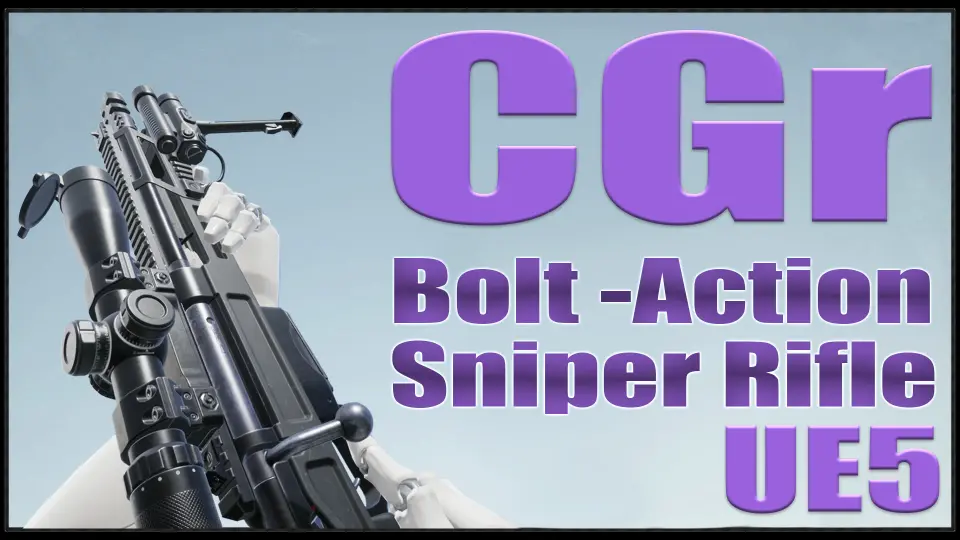
Customizable sniper rifle asset pack for Unreal Engine 5 with procedural aiming, recoil, body-part damage, grenades, and Manny retargeted animations.
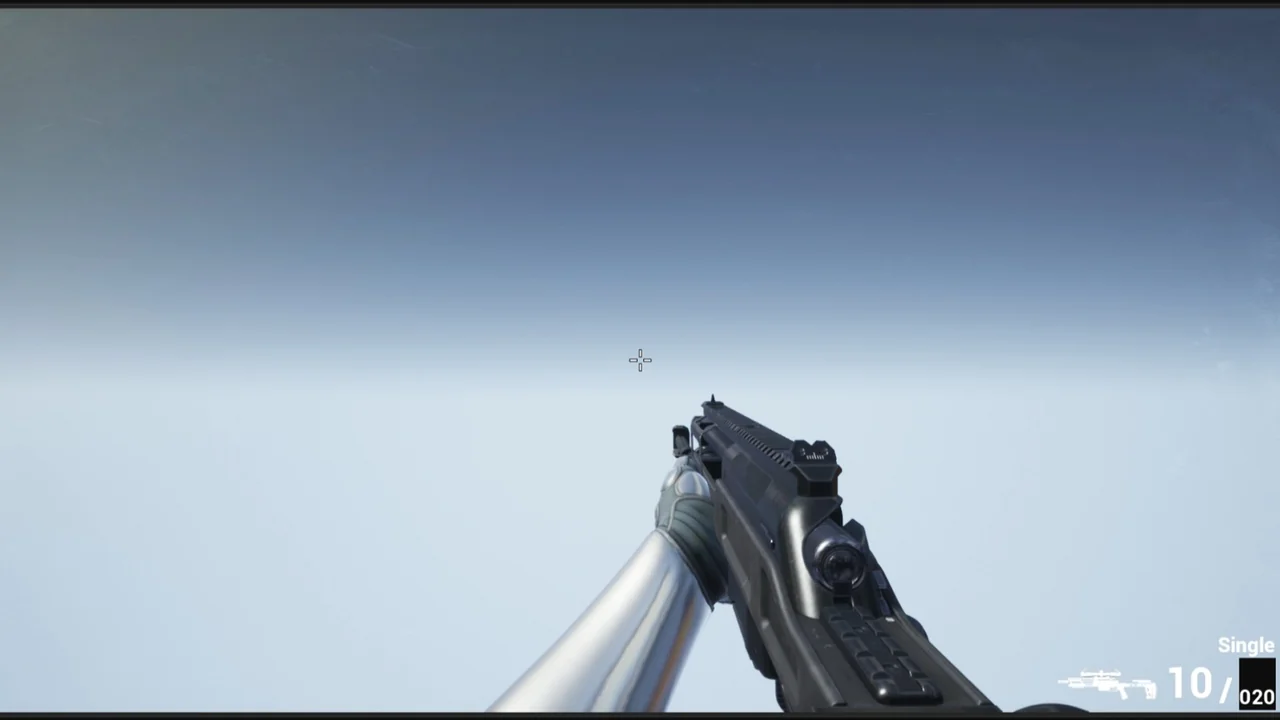
CGr BASnpR is a remastered Customizable Guns project built for Unreal Engine 5. At its core sits one sniper rifle represented by a Skeletal Mesh, accompanied by a set of attachments including a scope, laser/flashlight, compensator, and suppressor. The attachments are not cosmetic extras bolted onto a static model. They function as modular components that let you assemble different configurations of the same weapon, shortening or lengthening the rifle to produce distinct visual variants. This constructor approach extends to gameplay tuning: you can adjust the accuracy of the weapon alongside its appearance.
Material Layering and Weapon Appearance
The visual system runs on a material layering setup that lets you apply different patterns to the weapon without leaving the editor. You can swap finishes to change the look entirely, or shift only the tint for subtler variation. Raindrops also appear on the weapon surface, adding an environmental detail layer that reacts contextually rather than relying on a static texture.
Procedural Aiming, Recoil, and True FPS Integration
Aiming and recoil are handled procedurally. Rather than relying entirely on baked animation poses, the system drives weapon behavior in real time, which means the weapon responds dynamically to input and movement. The project is built as a True FPS setup. The character Blueprint includes the full UE5 Manny mannequin, not just the first-person arms, so the entire body is present and animated.
All animations have been retargeted for the Manny mannequin and adjusted to fit that skeleton. Because Manny's Animation Blueprint splits into upper and lower body parts, the older Ik_hand_gun bone is no longer used in the core animations, though it remains necessary for the procedural aiming system. The older animations that animated the Ik_hand_gun bone were preserved in a Legacy folder. The new animation set replaces those analogues with a system called GunMainBoneMove, where the weapon's Main bone is animated while the weapon itself stays attached to the right-hand socket.
During playback of certain animations in this project and in SAShotgun, the weapon dynamically attaches to a socket on the left hand. That left-hand socket is required for these projects to function correctly. The Data Table was updated in connection with these animation changes.
Character Movement, Grenades, and Combat Systems
Character handling goes beyond standard walking. The project includes procedural walking, crouching, and sliding mechanics. Weapon deflection triggers when the character approaches an object, pushing the rifle away from the surface instead of clipping through it.
Three grenade types ship with the project: fragmentation, flashbang, and smoke. Each carries its own effect set, including explosions, blinding, and concussion. On the ballistic side, bullet projectiles are affected by gravity, so they follow an arc rather than traveling infinitely in a straight line.
Enemy damage is region-based. Hits register differently depending on the body part struck. A headshot kills an enemy in fewer hits than a shot to the arm or leg, which means the damage model rewards precision without requiring a separate health system per enemy type.
Combining CGr Projects and Shotgun Reload Logic
In all Animation Blueprints except FaLMG, Cast To nodes have been replaced with Interfaces as part of the UE5 update. This change affects how the different CGr projects communicate with one another when combined.
The project does not include reload logic for SAShotgun or PAShotgun. To merge this sniper rifle project with those shotguns, two dedicated components were created: SAShotgunReloadComponent and PAShotgunReloadComponent. Importing those components and connecting their functions provides the full reload logic for the shotguns without duplicating code inside the sniper project itself.
Asset Pack Scope and Blueprint Configuration
CGr BASnpR was designed as an asset pack rather than a finished game. The intent is to give developers animation, weapon models, and usable logic to fold into a more advanced project. The Blueprints are configured for presentation purposes, and the creator notes that advanced developers can improve on them, while beginners may find the project complicated.
Several structural details matter when working inside the project. Custom collision presets live in the Project Settings and play a role in how the weapon and projectiles interact with the environment. Animation Montages contain notifications that drive gameplay events during playback. Weapon-specific changes are centralized in the DT_Weapon_DataTable. For convenience, some variables were moved from the Data Table into the weapon Blueprints' Construction Script, so you can tweak values and see changes in real time.
Bonus Animations Directory
A BONUS directory contains animations not wired into the main project. These include a frag grenade throw animation, a stun grenade throw animation, and a weapon jamming animation. The directory also holds weapon block idle animations and movements that are not implemented in the core Blueprint but are available for developers who want to integrate them.
Texture Resolution and UE5.5 Considerations
In Unreal Engine 5.5 and higher, the project may experience freezes or material disappearance. The fix is to reduce texture resolutions, dropping 4096×4096 textures down to 2048×2048 and some 2048×2048 textures down to 1024×1024. Updated project files already include lower-resolution textures, while the original high-resolution textures are stored in a separate folder for cases where maximum fidelity is needed.
Two additional fixes are available for known issues. If the image shifts to the right, a fix exists for correcting the offset. If a ragdoll slides on the floor after death, a separate fix addresses that behavior.
Weapon Orientation on the X-Axis
The weapon is oriented on the X-axis within this project. If your project requires the weapon on the Y-axis, the conversion is straightforward. Export the weapon model, re-import it with a rotation of -90° on the Z-axis, and repeat the same rotation adjustment for the weapon animation. Alternatively, you can manually rotate the weapon by -90° in each animation and set the keyframe.
CGr BASnpR is set up to be disassembled and reconfigured. It provides a modular weapon constructor, procedural systems, and combat logic that can be pulled into a larger UE5 production without locking you into the default configuration.
 Guns
Guns