"7b46a695175d8694"{"id":"1000040","slug":"cgr-shotguns-pack","title":"CGr Shotguns Pack","category":"Guns","engine":"5.0+","assetVersion":"","engineVersion":"5.0+","tag":"Guns","accent":"blue","visual":"mech","summary":"A UE5 shotgun asset pack with three shotgun types, attachments, animations, assembly blueprints, projectile logic, and presentation-ready FPS systems.","platform":"Unreal Engine","publishedAt":"2026-05-22T07:23:04.999Z","updatedAt":"2026-05-22T07:23:04.999Z","sourceNotes":[],"fileContents":[],"compatibility":["Unreal Engine","Engine version: 5.0+"],"featuredImage":{"alt":"CGr Shotguns Pack","src":"/wp-content/uploads/published/2026/05/e6eaeb9374b9-7540bf76-ac2f-4dbb-bf8b-3fee8c709309-5aca621bb2.webp"},"hasDownloadLink":true,"downloads":1,"terms":[{"taxonomy":"category","slug":"guns","name":"Guns"}],"galleryImages":[{"src":"/wp-content/uploads/published/2026/05/e97bde5da76b-6d037079-7fda-48fc-869e-502607b6af36-1defd88e4f.webp","alt":"CGr Shotguns Pack"},{"src":"/wp-content/uploads/published/2026/05/a66e8dbbec1d-7a755a3f-cacc-4818-a823-d079acb3719b-b93dd550eb.webp","alt":"CGr Shotguns Pack"},{"src":"/wp-content/uploads/published/2026/05/a61591f50abe-df757471-49d5-416b-9844-a807ce2523c5-1f3342affe.webp","alt":"CGr Shotguns Pack"},{"src":"/wp-content/uploads/published/2026/05/32ad4291d052-0fb7a635-b572-4d08-b075-b16fdc21919f-b689c05a1f.webp","alt":"CGr Shotguns Pack"},{"src":"/wp-content/uploads/published/2026/05/ba91de0cf7be-2f2c1db2-bc7b-4dae-8ea6-6e10c2de8dc2-fff508a022.webp","alt":"CGr Shotguns Pack"},{"src":"/wp-content/uploads/published/2026/05/f276801e9076-fa6b784b-30e7-444a-b50f-ef0ed2a4d3c2-ea94fdbd75.webp","alt":"CGr Shotguns Pack"},{"src":"/wp-content/uploads/published/2026/05/637ea94dca4d-e3f92442-fd78-4bc1-9bb8-c0723d8cc2c4-b58ad68840.webp","alt":"CGr Shotguns Pack"},{"src":"/wp-content/uploads/published/2026/05/e61b6a4391de-3d28f209-2f35-46d8-972a-f4293b4b3604-3fc9cea4b3.webp","alt":"CGr Shotguns Pack"},{"src":"/wp-content/uploads/published/2026/05/6a1aef738007-7e3d9e19-09f8-4487-98a8-9ea17aa7385e-581714b194.webp","alt":"CGr Shotguns Pack"},{"src":"/wp-content/uploads/published/2026/05/ef53641ed375-2be2dcb7-8f53-4c88-a992-fe23abe215ab-051791a738.webp","alt":"CGr Shotguns Pack"}],"accessPanel":{"kind":"resource","title":"Access this resource","eyebrow":"Free Download","message":"Log in or create a free account to start your download.","fileName":"CG_Shotguns_Pack5.7z","safetyNote":"Resources are manually reviewed before listing to improve quality and reduce obvious risks.","actionLabel":"Download Free","resourceType":"Resource archive"},"contentHtml":"\u003cp\u003eFor first-person shooter scenes that need more than a static firearm model, \u003cstrong\u003eCGr Shotguns Pack\u003c/strong\u003e Is aimed at the point where weapon presentation, handling, and gameplay logic all need to meet. It is not limited to shotgun meshes alone. The pack includes the animations and logic needed to start building a game setup around realistic shotguns, along with example blueprints for assembly.\u003c/p\u003e\u003cp\u003eThat makes it most relevant for projects where the weapon has to do real work on screen: close-quarters combat, first-person combat prototypes, character animation tests, and presentation scenes that need firing behavior, recoil, movement response, and damage logic instead of a display-only prop. The project is framed as an asset pack rather than a complete game system, but it still reaches well beyond a simple model collection.\u003c/p\u003e\u003ch2\u003eThree shotgun types and the attachments around them\u003c/h2\u003e\u003cp\u003eThe core of the pack is a set of three different shotgun types: a semi-automatic shotgun, a pump-action shotgun, and a double-barrel shotgun. Around them is a group of attachments that changes both appearance and behavior. The included attachment set covers a holo sight, a laser/flashlight, three kinds of choke, and a suppressor.\u003c/p\u003e\u003cp\u003eThe choke options are not cosmetic only. Each choke changes the angle of pellet dispersion, which gives the shotguns different spread behavior. In a practical gameplay context, that makes the pack useful for testing how a weapon feels across tighter or wider pellet patterns rather than keeping every shotgun shot identical. The package then offers a setup where the weapons can be differentiated through handling and output, not just their silhouettes.\u003c/p\u003e\u003cp\u003eAssembly is also part of the package through example blueprints. That matters for developers who want a working basis for combining weapon parts instead of building every assembly step from scratch. Since the project includes both weapon models and logic, it can serve as a foundation for scenes where attachment changes, alternate weapon setups, or variant shotgun presentations need to be shown clearly.\u003c/p\u003e\u003ch2\u003eWhere CGr Shotguns Pack fits in an FPS scene\u003c/h2\u003e\u003cp\u003eThis pack suits projects that want visible weapon behavior in motion. The included systems cover procedural walking, character crouching, sliding, and weapon deflection when the character approaches an object. Those details place the pack in a more active gameplay context than a passive firearm showcase. A shotgun held close to walls or obstacles does not remain rigidly posed; the project accounts for that kind of first-person interaction.\u003c/p\u003e\u003cp\u003eRaindrops appearing on weapons add another layer for scenes that need environmental response on the gun itself. The material system also supports visual variation through layered materials, allowing different looks with different patterns, while also letting the user change only a tint. For teams making several weapon finishes or trying to match the same shotgun model to different visual themes, that gives room to restyle the weapon surface without changing the underlying asset set.\u003c/p\u003e\u003cp\u003eProjectile behavior is treated with more physical grounding than a simple hitscan placeholder. Bullet projectiles are affected by gravity and do not continue infinitely. For shotgun-focused gameplay tests, that gives a more concrete base for experimenting with range feel and impact behavior. Damage is also tied to body-part hits. A head hit causes an enemy to die in fewer hits than a hit to the arm or leg, which makes the included damage logic better suited to projects that want location-based response instead of one flat damage result.\u003c/p\u003e\u003ch2\u003eGrenades, recoil, and other systems that push it beyond weapon models\u003c/h2\u003e\u003cp\u003eThe project includes more than shotgun firing. It also contains grenades in three forms: fragmentation, flashbang, and smoke. Their related effects are part of the package too, including explosions, blinding, and concussion effects. This extends the pack from a narrow shotgun set into a broader combat presentation toolkit for short FPS encounters or feature demonstrations where weapon use and tactical throwable effects need to appear in the same environment.\u003c/p\u003e\u003cp\u003eProcedural aiming and procedural recoil are also part of the project. Those systems are important to how the weapons read in first person because they affect the way the gun moves in relation to the character and the shot. Alongside the main implemented content, there is also bonus animation coverage: a frag grenade throw animation, a stun grenade throw animation, and an animation of weapon jamming.\u003c/p\u003e\u003cp\u003eThere is even a \u003cstrong\u003eBONUS\u003c/strong\u003e Directory containing animations that are not implemented in the project, including \u003cem\u003eWeapon Block Idle Animations\u003c/em\u003e And \u003cem\u003eMovements\u003c/em\u003e. For developers exploring the pack as a starting point, those extras can matter as much as the finished pieces. They indicate that the project is not only about what is already wired up in the presentation, but also about giving additional animation material that may be useful in a more customized setup.\u003c/p\u003e\u003ch2\u003eUE5 remaster changes: Manny, True FPS, and animation handling\u003c/h2\u003e\u003cp\u003eThe project has been updated on the UE5 side as a remaster, with the update affecting UE5 versions. All animations have been retargeted for UE5 Manny and adjusted for that mannequin. The project is now True FPS, which means the character blueprint includes the entire mannequin rather than only the arms. That is a significant practical shift for developers who want body-aware first-person presentation instead of a detached weapon-and-arms setup.\u003c/p\u003e\u003cp\u003eAnimation handling changed with that update. Because Manny's animation blueprint is split into upper and lower body parts, the \u003cem\u003eIk_hand_gun\u003c/em\u003e Bone is no longer used in animations, though it is still needed for procedural aiming. Older animation equivalents where that bone is animated were retained and placed in a \u003cem\u003eLegacy\u003c/em\u003e Folder. The newer replacements use \u003cem\u003eGunMainBoneMove\u003c/em\u003e, where the weapon's \u003cem\u003eMain\u003c/em\u003e Bone is animated while the weapon remains attached to the right-hand socket.\u003c/p\u003e\u003cp\u003eSome projects in the set handle things differently during certain animations. In \u003cem\u003eSAShotgun\u003c/em\u003e, for example, the weapon is dynamically attached to the left-hand socket during playback of some animations, and that left-hand socket is necessary there. The Data Table was changed along with these newer project-side updates, so the remaster is not just a visual refresh. It also affects how animation and weapon data are handled inside the setup.\u003c/p\u003e\u003ch2\u003eWorking with the blueprints and project structure\u003c/h2\u003e\u003cp\u003eThe blueprints are configured for presentation, not as a finished all-purpose gameplay framework. The project is presented as an asset pack that developers can use for weapon models, animation, and some logic inside a more advanced project. That creates a clear dividing line: there is a substantial working base here, but it is not positioned as a full game solution.\u003c/p\u003e\u003cp\u003eAdvanced developers are expected to get more from it than beginners. The project may feel complicated to newcomers, and the places that need attention are spelled out with some specificity. Custom collision presets in project settings matter. Notifications in animation montages matter. Changes for different weapon types are meant to be made in \u003cem\u003eDT_Weapon_DataTable\u003c/em\u003e.\u003c/p\u003e\u003cp\u003eAt the same time, some variables have been moved from the Data Table into weapon blueprints for convenience, so they can be changed with real-time visible results. Those variables can be found in the weapon blueprint construction script. For someone iterating on shotgun behavior or presentation, that means not every adjustment has to remain hidden inside a data table workflow.\u003c/p\u003e\u003ch2\u003ePractical notes for CGr Shotguns Pack users\u003c/h2\u003e\u003cp\u003eA few implementation notes are especially relevant if this pack is being folded into an active UE5 project. In UE5.5 and possibly higher, freezes and material disappearance may occur. The stated fix is to reduce texture resolutions, such as changing 4096x4096 textures to 2048x2048 and some 2048x2048 textures to 1024x1024. Updated projects include lower-resolution textures, while high-resolution textures are kept in the appropriate folder.\u003c/p\u003e\u003cp\u003eThe project also includes troubleshooting guidance for a shifted image and for ragdoll sliding on the floor. Another practical note concerns weapon orientation. The weapon is positioned on the X-axis. If a Y-axis orientation is needed, the workflow is to export the weapon model and import it back with a rotation of -90 degrees on the Z-axis. The same must then be done for the weapon animation, or the weapon must be manually rotated by -90 degrees in each animation with a key set.\u003c/p\u003e\u003cp\u003eDevelopers who will get the most from \u003cstrong\u003eCGr Shotguns Pack\u003c/strong\u003e Are the ones who want realistic shotgun assets with working first-person behavior already in place, and who are comfortable refining presentation blueprints into something more project-specific. It fits best when the goal is to start from assembled weapons, retargeted UE5 animation work, and concrete combat logic rather than from raw firearm models alone.\u003c/p\u003e\n\n\u003ch2\u003eExplore Similar Assets\u003c/h2\u003e\n\u003cul\u003e\n\u003cli\u003e\u003ca href=\"https://3dcghub.com/cgr-armod-pack/\" title=\"CGr ARMod Pack\"\u003eCGr ARMod Pack\u003c/a\u003e\u003c/li\u003e\n\u003cli\u003e\u003ca href=\"https://3dcghub.com/cgr-handgun/\" title=\"CGr Handgun\"\u003eCGr Handgun\u003c/a\u003e\u003c/li\u003e\n\u003cli\u003e\u003ca href=\"https://3dcghub.com/custom-ar-15-style-rifle/\" title=\"Custom AR-15 Style Rifle\"\u003eCustom AR-15 Style Rifle\u003c/a\u003e\u003c/li\u003e\n\u003cli\u003e\u003ca href=\"https://3dcghub.com/animated-fps-loaded-3-pistol-guns-pack/\" title=\"Animated FPS Loaded 3-Pistol Guns Pack\"\u003eAnimated FPS Loaded 3-Pistol Guns Pack\u003c/a\u003e\u003c/li\u003e\n\u003cli\u003e\u003ca href=\"https://3dcghub.com/gun-weapon-grenade/\" title=\"Gun Weapon Grenade\"\u003eGun Weapon Grenade\u003c/a\u003e\u003c/li\u003e\n\u003c/ul\u003e","contentTextLength":9083,"navigation":{"current":1585,"total":3481,"previous":{"id":"1000041","slug":"chinese-alley-environment-chinese-alley-alley-alley-chinese-alley-chinese-3d","title":"Chinese Alley Environment ( Chinese Alley Alley Alley Chinese Alley Chinese 3D )","category":"Streets \u0026 Construction","platform":"Unreal Engine","updatedAt":"2026-05-22T07:46:25.262Z"},"next":{"id":"1000039","slug":"cgr-armod-pack","title":"CGr ARMod Pack","category":"Guns","platform":"Unreal Engine","updatedAt":"2026-05-22T07:18:43.799Z"}},"relatedResources":[{"id":"1000801","slug":"cgr-pcc-pack","title":"CGr PCC Pack","category":"Guns","engine":"5.5+","assetVersion":"","engineVersion":"Engine Version: 5.5+","tag":"Guns","accent":"blue","visual":"mech","summary":"Unreal Engine 5 asset pack featuring a customizable Pistol Caliber Carbine with procedural aiming/recoil, material layering, grenades, and True FPS Manny integr","platform":"Unreal Engine","publishedAt":"2026-07-30T23:06:31.513Z","updatedAt":"2026-07-30T23:06:31.513Z","sourceNotes":[],"fileContents":[],"compatibility":["Unreal Engine","Engine Version: 5.5+"],"featuredImage":{"alt":"CGr PCC Pack","src":"/wp-content/uploads/published/2026/07/c44af81a37d3-e7cb14e3-eb6e-45a7-ad82-30dd3618792e-170b9a7e23.webp"},"hasDownloadLink":true,"downloads":4},{"id":"1000800","slug":"cgr-basnpr","title":"CGr BASnpR","category":"Guns","engine":"5.1+","assetVersion":"","engineVersion":"Engine Version: 5.1+","tag":"Guns","accent":"blue","visual":"mech","summary":"Customizable sniper rifle asset pack for Unreal Engine 5 with procedural aiming, recoil, body-part damage, grenades, and Manny retargeted animations.","platform":"Unreal Engine","publishedAt":"2026-07-30T22:59:50.063Z","updatedAt":"2026-07-30T22:59:50.063Z","sourceNotes":[],"fileContents":[],"compatibility":["Unreal Engine","Engine Version: 5.1+"],"featuredImage":{"alt":"CGr BASnpR","src":"/wp-content/uploads/published/2026/07/1592ab78ebb1-e181ced0-2b2e-4e7f-b917-4f903811c272-5238ede6c2.webp"},"hasDownloadLink":true,"downloads":2},{"id":"1000039","slug":"cgr-armod-pack","title":"CGr ARMod Pack","category":"Guns","engine":"5.0+","assetVersion":"","engineVersion":"5.0+","tag":"Guns","accent":"blue","visual":"mech","summary":"A customizable assault rifle pack for UE5 with attachments, firing modes, procedural aiming and recoil, body-part damage, grenades, and True FPS updates.","platform":"Unreal Engine","publishedAt":"2026-05-22T07:18:43.799Z","updatedAt":"2026-05-22T07:18:43.799Z","sourceNotes":[],"fileContents":[],"compatibility":["Unreal Engine","Engine version: 5.0+"],"featuredImage":{"alt":"CGr ARMod Pack","src":"/wp-content/uploads/published/2026/05/ff5c526bd35e-8fdcf341-9ce6-4ba7-a55f-2db28777c818-d26139c75b.webp"},"hasDownloadLink":true,"downloads":7}]}
Guns
CGr Shotguns Pack
A UE5 shotgun asset pack with three shotgun types, attachments, animations, assembly blueprints, projectile logic, and presentation-ready FPS systems.
Category:Unreal Engine,GunsPlatform: Unreal EngineEngine version: 5.0+Published: May 22, 2026
Guns
Resource overview
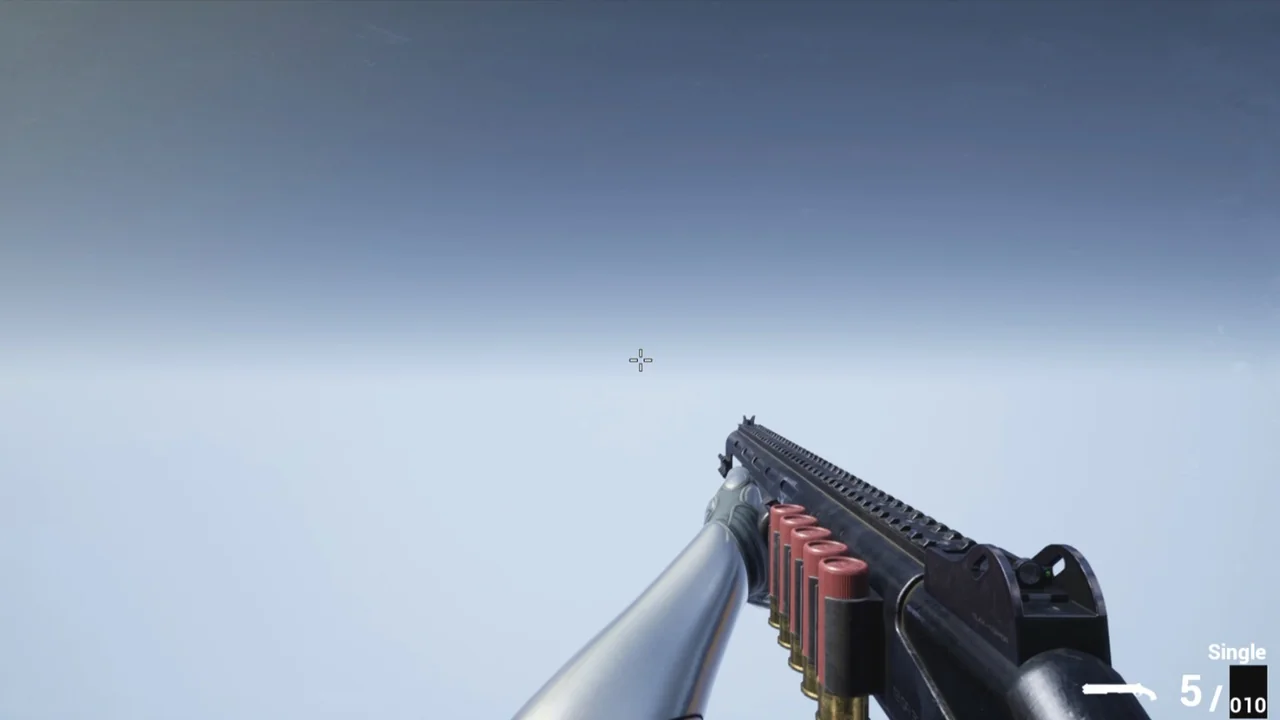
For first-person shooter scenes that need more than a static firearm model, CGr Shotguns Pack Is aimed at the point where weapon presentation, handling, and gameplay logic all need to meet. It is not limited to shotgun meshes alone. The pack includes the animations and logic needed to start building a game setup around realistic shotguns, along with example blueprints for assembly.
That makes it most relevant for projects where the weapon has to do real work on screen: close-quarters combat, first-person combat prototypes, character animation tests, and presentation scenes that need firing behavior, recoil, movement response, and damage logic instead of a display-only prop. The project is framed as an asset pack rather than a complete game system, but it still reaches well beyond a simple model collection.
Three shotgun types and the attachments around them
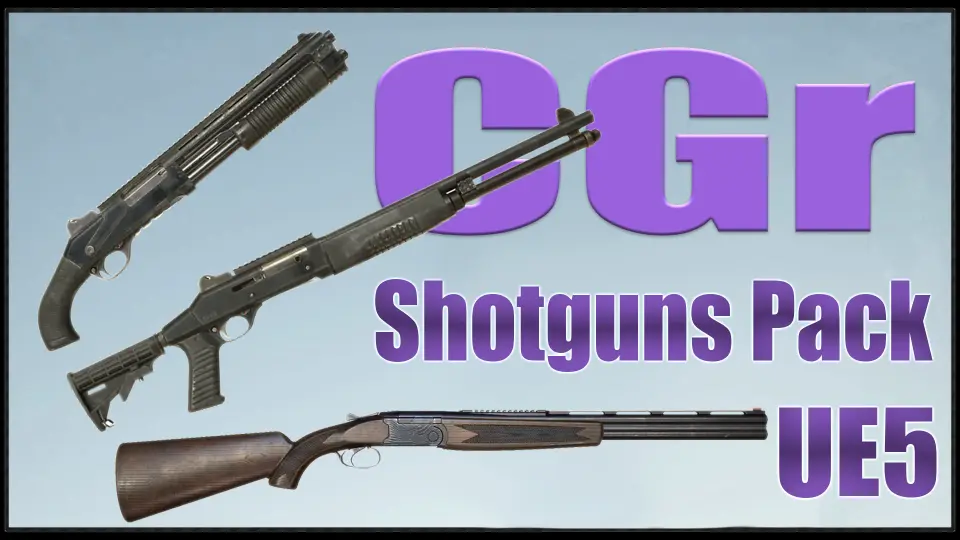
The core of the pack is a set of three different shotgun types: a semi-automatic shotgun, a pump-action shotgun, and a double-barrel shotgun. Around them is a group of attachments that changes both appearance and behavior. The included attachment set covers a holo sight, a laser/flashlight, three kinds of choke, and a suppressor.
The choke options are not cosmetic only. Each choke changes the angle of pellet dispersion, which gives the shotguns different spread behavior. In a practical gameplay context, that makes the pack useful for testing how a weapon feels across tighter or wider pellet patterns rather than keeping every shotgun shot identical. The package then offers a setup where the weapons can be differentiated through handling and output, not just their silhouettes.
Assembly is also part of the package through example blueprints. That matters for developers who want a working basis for combining weapon parts instead of building every assembly step from scratch. Since the project includes both weapon models and logic, it can serve as a foundation for scenes where attachment changes, alternate weapon setups, or variant shotgun presentations need to be shown clearly.
Where CGr Shotguns Pack fits in an FPS scene
This pack suits projects that want visible weapon behavior in motion. The included systems cover procedural walking, character crouching, sliding, and weapon deflection when the character approaches an object. Those details place the pack in a more active gameplay context than a passive firearm showcase. A shotgun held close to walls or obstacles does not remain rigidly posed; the project accounts for that kind of first-person interaction.
Raindrops appearing on weapons add another layer for scenes that need environmental response on the gun itself. The material system also supports visual variation through layered materials, allowing different looks with different patterns, while also letting the user change only a tint. For teams making several weapon finishes or trying to match the same shotgun model to different visual themes, that gives room to restyle the weapon surface without changing the underlying asset set.
Projectile behavior is treated with more physical grounding than a simple hitscan placeholder. Bullet projectiles are affected by gravity and do not continue infinitely. For shotgun-focused gameplay tests, that gives a more concrete base for experimenting with range feel and impact behavior. Damage is also tied to body-part hits. A head hit causes an enemy to die in fewer hits than a hit to the arm or leg, which makes the included damage logic better suited to projects that want location-based response instead of one flat damage result.
Grenades, recoil, and other systems that push it beyond weapon models
The project includes more than shotgun firing. It also contains grenades in three forms: fragmentation, flashbang, and smoke. Their related effects are part of the package too, including explosions, blinding, and concussion effects. This extends the pack from a narrow shotgun set into a broader combat presentation toolkit for short FPS encounters or feature demonstrations where weapon use and tactical throwable effects need to appear in the same environment.
Procedural aiming and procedural recoil are also part of the project. Those systems are important to how the weapons read in first person because they affect the way the gun moves in relation to the character and the shot. Alongside the main implemented content, there is also bonus animation coverage: a frag grenade throw animation, a stun grenade throw animation, and an animation of weapon jamming.
There is even a BONUS Directory containing animations that are not implemented in the project, including Weapon Block Idle Animations And Movements. For developers exploring the pack as a starting point, those extras can matter as much as the finished pieces. They indicate that the project is not only about what is already wired up in the presentation, but also about giving additional animation material that may be useful in a more customized setup.
UE5 remaster changes: Manny, True FPS, and animation handling
The project has been updated on the UE5 side as a remaster, with the update affecting UE5 versions. All animations have been retargeted for UE5 Manny and adjusted for that mannequin. The project is now True FPS, which means the character blueprint includes the entire mannequin rather than only the arms. That is a significant practical shift for developers who want body-aware first-person presentation instead of a detached weapon-and-arms setup.
Animation handling changed with that update. Because Manny's animation blueprint is split into upper and lower body parts, the Ik_hand_gun Bone is no longer used in animations, though it is still needed for procedural aiming. Older animation equivalents where that bone is animated were retained and placed in a Legacy Folder. The newer replacements use GunMainBoneMove, where the weapon's Main Bone is animated while the weapon remains attached to the right-hand socket.
Some projects in the set handle things differently during certain animations. In SAShotgun, for example, the weapon is dynamically attached to the left-hand socket during playback of some animations, and that left-hand socket is necessary there. The Data Table was changed along with these newer project-side updates, so the remaster is not just a visual refresh. It also affects how animation and weapon data are handled inside the setup.
Working with the blueprints and project structure
The blueprints are configured for presentation, not as a finished all-purpose gameplay framework. The project is presented as an asset pack that developers can use for weapon models, animation, and some logic inside a more advanced project. That creates a clear dividing line: there is a substantial working base here, but it is not positioned as a full game solution.
Advanced developers are expected to get more from it than beginners. The project may feel complicated to newcomers, and the places that need attention are spelled out with some specificity. Custom collision presets in project settings matter. Notifications in animation montages matter. Changes for different weapon types are meant to be made in DT_Weapon_DataTable.
At the same time, some variables have been moved from the Data Table into weapon blueprints for convenience, so they can be changed with real-time visible results. Those variables can be found in the weapon blueprint construction script. For someone iterating on shotgun behavior or presentation, that means not every adjustment has to remain hidden inside a data table workflow.
Practical notes for CGr Shotguns Pack users
A few implementation notes are especially relevant if this pack is being folded into an active UE5 project. In UE5.5 and possibly higher, freezes and material disappearance may occur. The stated fix is to reduce texture resolutions, such as changing 4096x4096 textures to 2048x2048 and some 2048x2048 textures to 1024x1024. Updated projects include lower-resolution textures, while high-resolution textures are kept in the appropriate folder.
The project also includes troubleshooting guidance for a shifted image and for ragdoll sliding on the floor. Another practical note concerns weapon orientation. The weapon is positioned on the X-axis. If a Y-axis orientation is needed, the workflow is to export the weapon model and import it back with a rotation of -90 degrees on the Z-axis. The same must then be done for the weapon animation, or the weapon must be manually rotated by -90 degrees in each animation with a key set.
Developers who will get the most from CGr Shotguns Pack Are the ones who want realistic shotgun assets with working first-person behavior already in place, and who are comfortable refining presentation blueprints into something more project-specific. It fits best when the goal is to start from assembled weapons, retargeted UE5 animation work, and concrete combat logic rather than from raw firearm models alone.
 Guns
Guns