"0341a2901a4ae9aa"{"id":"27470","slug":"cgr-handgun","title":"CGr Handgun","category":"Guns","engine":"4.26+,5.0+","assetVersion":"Engine version: 4.26+,5.0+","engineVersion":"","tag":"Guns","accent":"blue","visual":"city","summary":"CGr Handgun combines a modular handgun model with animation, gameplay logic, and UE5-focused updates. It includes weapon variants, procedural movement systems, damage behavior, and bonus grenade and jamming animations. The package is set up as an asset pack...","platform":"Unreal Engine","publishedAt":"2026-04-26T05:53:45.000Z","updatedAt":"2026-04-26T05:53:55.000Z","sourceNotes":[],"fileContents":[],"compatibility":["Unreal Engine","Engine version: 4.26+,5.0+"],"featuredImage":{"alt":"CGr Handgun","src":"https://3dcghub.com/wp-content/uploads/2026/04/3a8cac118801_75bb288d-a47f-4518-8c87-2833a9aa9940.webp"},"hasDownloadLink":true,"downloads":4,"terms":[{"taxonomy":"category","slug":"guns","name":"Guns"},{"taxonomy":"post_tag","slug":"animation","name":"Animation"},{"taxonomy":"post_tag","slug":"unreal-engine-5","name":"Unreal Engine 5"},{"taxonomy":"post_tag","slug":"weapons","name":"Weapons"}],"galleryImages":[{"src":"https://3dcghub.com/wp-content/uploads/2026/04/49006ebece90_0af1fb4f-c9aa-4c39-99c4-c858621c0569.webp","alt":"CGr Handgun"},{"src":"https://3dcghub.com/wp-content/uploads/2026/04/4fd790c787e1_2e01cbba-845c-4d59-b095-d8e7db0d584c.webp","alt":"CGr Handgun"},{"src":"https://3dcghub.com/wp-content/uploads/2026/04/75accfbee86c_18979734-9f42-4655-8344-0024a562d76f.webp","alt":"CGr Handgun"},{"src":"https://3dcghub.com/wp-content/uploads/2026/04/6f4381edf6d8_7e11b0f9-3d4a-45f2-b5f1-e7a926bc6b31.webp","alt":"CGr Handgun"},{"src":"https://3dcghub.com/wp-content/uploads/2026/04/3f0589a4c2b4_411ba3e8-df7b-470b-ba32-dc9fcb14b854.webp","alt":"CGr Handgun"},{"src":"https://3dcghub.com/wp-content/uploads/2026/04/a2495c26a6b8_9fc23fc7-3e51-423c-b1b0-9b176bc4183a.webp","alt":"CGr Handgun"},{"src":"https://3dcghub.com/wp-content/uploads/2026/04/3c835fc93a3d_9ecb59ba-096c-4eb0-8de8-57c130a3a520.webp","alt":"CGr Handgun"},{"src":"https://3dcghub.com/wp-content/uploads/2026/04/11207adfa32e_171debcf-ed0e-4cdf-8662-b44ea91bfaf1.webp","alt":"CGr Handgun"},{"src":"https://3dcghub.com/wp-content/uploads/2026/04/270728f1a897_06917ae5-1e5a-40c4-9cb8-80db7f65d7fe.webp","alt":"CGr Handgun"},{"src":"https://3dcghub.com/wp-content/uploads/2026/04/36380afd0ac0_bdabdaad-696a-4a0e-a30d-f45cde7c7c7b.webp","alt":"CGr Handgun"}],"accessPanel":{"kind":"free-resource","title":"Access this resource","eyebrow":"Free Download","message":"Log in or create a free account to start your download.","fileName":"CG_Handgun5.7z","safetyNote":"All resources are 100% manually reviewed to eliminate all risks.","actionLabel":"Download Free","resourceType":"Resource archive"},"contentHtml":"\u003ch2\u003eCGr Handgun meshes, attachments, and weapon setup\u003c/h2\u003e\n\u003cp\u003eCGr Handgun combines a handgun model with the animations and logic needed to use it inside a game project. The weapon comes with several mesh options, including a regular magazine, a drum magazine, a holo sight, a laser or flashlight, a compensator, and a suppressor. It also supports different firing modes, and the weapon accuracy can be customized.\u003c/p\u003e\n\u003cp\u003eThe setup is more than a single static prop. It is organized so the handgun can be adjusted for different combat roles and presentation styles, while still staying inside one weapon framework. That makes it useful when a project needs a firearm that can be swapped, tuned, and animated without rebuilding the core behavior from scratch.\u003c/p\u003e \u003ch2\u003eMaterial layering and CGr Handgun visual variation\u003c/h2\u003e\n\u003cp\u003eThe handgun uses a material layering system, which allows different looks through patterns rather than forcing a single surface treatment. The weapon can also be recolored by changing only a tint. That gives the asset a straightforward way to support multiple visual styles while keeping the same underlying weapon setup.\u003c/p\u003e\n\u003cp\u003eRaindrops can appear on the weapon as part of the presentation, adding another layer of surface detail. Because the visual variation is handled through the weapon itself, the same handgun can be reused in different scenes without needing separate models for every appearance change. It fits well in projects where the same firearm may need to read as clean, worn, tactical, or customized.\u003c/p\u003e \u003ch2\u003eProcedural aiming, recoil, and body-part damage\u003c/h2\u003e\n\u003cp\u003eThe project uses procedural aiming and procedural recoil. That means the weapon does not rely only on fixed motion; it also includes logic that reacts during use. The project also includes procedural walking, character crouching, sliding, and weapon deflection when the character approaches an object.\u003c/p\u003e\n\u003cp\u003eCombat behavior is also part of the package. Bullet projectiles are affected by gravity and do not fly off into infinity. The enemy damage system depends on where the hit lands on the body, so a hit to the head causes the enemy to die in fewer hits than a hit to the arm or leg. Grenades are covered too, with fragmentation, flashbang, and smoke effects, along with explosions, blinding, and concussion effects.\u003c/p\u003e \u003ch2\u003eUE5 Manny, True FPS, and the remaster changes\u003c/h2\u003e\n\u003cp\u003eThe project was updated for UE5, and all animations were retargeted for the UE5 Manny mannequin. The project is now True FPS, meaning the character Blueprint includes the entire mannequin instead of only the arms. Because Manny’s animation blueprint is split into upper and lower body parts, the \"ik_hand_gun\" bone is no longer used in animations, though it is still needed for procedural aiming.\u003c/p\u003e\n\u003cp\u003eThe animation setup changed along with that update. The older animation analogues, where the \"ik_hand_gun\" bone is animated, were kept in a Legacy folder. In the newer animations, those parts were replaced with \"GunMainBoneMove,\" where the main bone of the weapon is animated while the weapon remains attached to the socket of the right hand. The Data Table was changed at the same time to match the new setup.\u003c/p\u003e \u003ch2\u003eBlueprints, DT_Weapon_DataTable, and bonus animations\u003c/h2\u003e\n\u003cp\u003eThe project includes Blueprints, meshes, materials, and textures that are not used directly in it but are used in other projects. That makes the structure easier to combine with related work. The Blueprints are configured for presentation only, so the package reads like an asset pack that can be expanded inside a more advanced project rather than a complete finished system.\u003c/p\u003e\n\u003cp\u003eWeapon changes for different types must be made in \u003cstrong\u003eDT_Weapon_DataTable\u003c/strong\u003e. Some variables were moved from the Data Table into the weapon Blueprints, so the values can be changed and seen in real time from the weapon Blueprint construction script. Custom collision presets in the project settings and notifications in animation montages also matter here, since they are part of how the setup behaves in practice.\u003c/p\u003e\n\u003cp\u003eThere are also bonus animations for a frag grenade throw, a stun grenade throw, and weapon jamming. In the BONUS directory, there are animations that are not implemented in the project, including Weapon Block Idle Animations and Movements. The weapon is located on the X-axis, and moving it to the Y-axis requires exporting the weapon model and reimporting it with a -90 degree Z rotation, then doing the same for the weapon animation or rotating the weapon manually in each animation.\u003c/p\u003e\n\u003cp\u003eFor a production workflow, this package fits best as a reusable handgun foundation inside a larger UE5 shooter setup. It already handles the weapon’s look, core motion, and combat behavior, while still leaving room for developers to expand the Blueprints and adapt the weapon to a broader project.\u003c/p\u003e\n\n\u003ch2\u003eMore From The Same Workflow\u003c/h2\u003e\n\u003cul\u003e\n\u003cli\u003e\u003ca href=\"https://3dcghub.com/military-animation-pack-i-unarmed/\" title=\"Military Animation Pack I (Unarmed)\"\u003eMilitary Animation Pack I (Unarmed)\u003c/a\u003e\u003c/li\u003e\n\u003cli\u003e\u003ca href=\"https://3dcghub.com/mixamo-animation-retargeting-2/\" title=\"Mixamo Animation Retargeting 2\"\u003eMixamo Animation Retargeting 2\u003c/a\u003e\u003c/li\u003e\n\u003cli\u003e\u003ca href=\"https://3dcghub.com/post-apocalyptic-melee-weapons/\" title=\"Post Apocalyptic Melee Weapons\"\u003ePost Apocalyptic Melee Weapons\u003c/a\u003e\u003c/li\u003e\n\u003cli\u003e\u003ca href=\"https://3dcghub.com/r-tune-vehicle-physics-2-0-vehicle-system-for-games-animation/\" title=\"R-Tune Vehicle Physics 2.0 – Vehicle System for Games \u0026amp;amp; Animation\"\u003eR-Tune Vehicle Physics 2.0 – Vehicle System for Games \u0026amp; Animation\u003c/a\u003e\u003c/li\u003e\n\u003cli\u003e\u003ca href=\"https://3dcghub.com/stylized-staves-rpg-weapons/\" title=\"Stylized Staves – RPG Weapons\"\u003eStylized Staves – RPG Weapons\u003c/a\u003e\u003c/li\u003e\n\u003c/ul\u003e","contentTextLength":5001,"navigation":{"current":2258,"total":4017,"previous":{"id":"27483","slug":"city-sim-animation-pack","title":"CiTY SIM ANIMATION PACK","category":"Variety","platform":"Unreal Engine","updatedAt":"2026-04-26T06:01:52.000Z"},"next":{"id":"27457","slug":"cartoon-street","title":"Cartoon Street","category":"Streets \u0026 Construction","platform":"Unreal Engine","updatedAt":"2026-04-26T05:41:39.000Z"}},"relatedResources":[{"id":"1000801","slug":"cgr-pcc-pack","title":"CGr PCC Pack","category":"Guns","engine":"5.5+","assetVersion":"","engineVersion":"Engine Version: 5.5+","tag":"Guns","accent":"blue","visual":"mech","summary":"Unreal Engine 5 asset pack featuring a customizable Pistol Caliber Carbine with procedural aiming/recoil, material layering, grenades, and True FPS Manny integr","platform":"Unreal Engine","publishedAt":"2026-07-30T23:06:31.513Z","updatedAt":"2026-07-30T23:06:31.513Z","sourceNotes":[],"fileContents":[],"compatibility":["Unreal Engine","Engine Version: 5.5+"],"featuredImage":{"alt":"CGr PCC Pack","src":"/wp-content/uploads/published/2026/07/c44af81a37d3-e7cb14e3-eb6e-45a7-ad82-30dd3618792e-170b9a7e23.webp"},"hasDownloadLink":true,"downloads":5},{"id":"1000800","slug":"cgr-basnpr","title":"CGr BASnpR","category":"Guns","engine":"5.1+","assetVersion":"","engineVersion":"Engine Version: 5.1+","tag":"Guns","accent":"blue","visual":"mech","summary":"Customizable sniper rifle asset pack for Unreal Engine 5 with procedural aiming, recoil, body-part damage, grenades, and Manny retargeted animations.","platform":"Unreal Engine","publishedAt":"2026-07-30T22:59:50.063Z","updatedAt":"2026-07-30T22:59:50.063Z","sourceNotes":[],"fileContents":[],"compatibility":["Unreal Engine","Engine Version: 5.1+"],"featuredImage":{"alt":"CGr BASnpR","src":"/wp-content/uploads/published/2026/07/1592ab78ebb1-e181ced0-2b2e-4e7f-b917-4f903811c272-5238ede6c2.webp"},"hasDownloadLink":true,"downloads":2},{"id":"1000039","slug":"cgr-armod-pack","title":"CGr ARMod Pack","category":"Guns","engine":"5.0+","assetVersion":"","engineVersion":"5.0+","tag":"Guns","accent":"blue","visual":"mech","summary":"A customizable assault rifle pack for UE5 with attachments, firing modes, procedural aiming and recoil, body-part damage, grenades, and True FPS updates.","platform":"Unreal Engine","publishedAt":"2026-05-22T07:18:43.799Z","updatedAt":"2026-05-22T07:18:43.799Z","sourceNotes":[],"fileContents":[],"compatibility":["Unreal Engine","Engine version: 5.0+"],"featuredImage":{"alt":"CGr ARMod Pack","src":"/wp-content/uploads/published/2026/05/ff5c526bd35e-8fdcf341-9ce6-4ba7-a55f-2db28777c818-d26139c75b.webp"},"hasDownloadLink":true,"downloads":8}]}
Guns
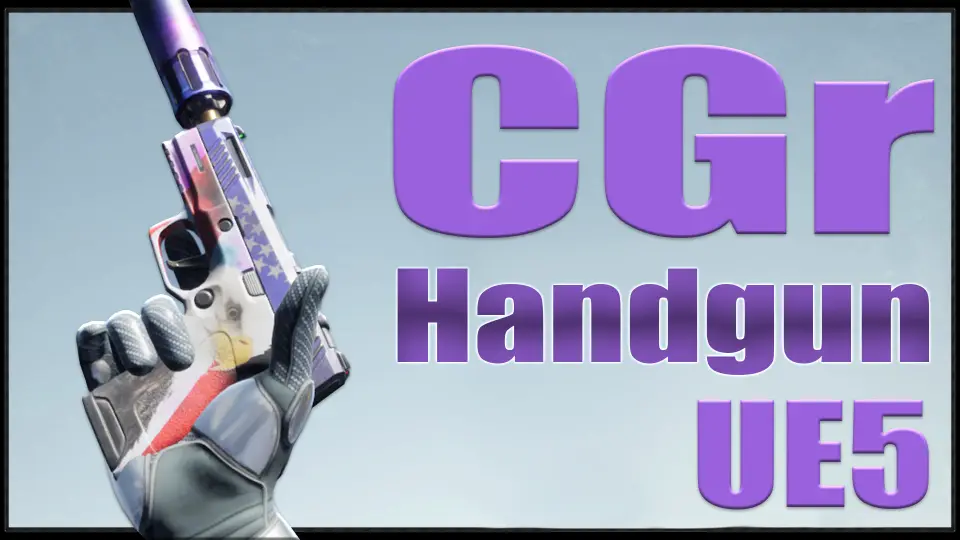
CGr Handgun
CGr Handgun combines a modular handgun model with animation, gameplay logic, and UE5-focused updates. It includes weapon variants, procedural movement systems, damage behavior, and bonus grenade and jamming animations. The package is set up as an asset pack...
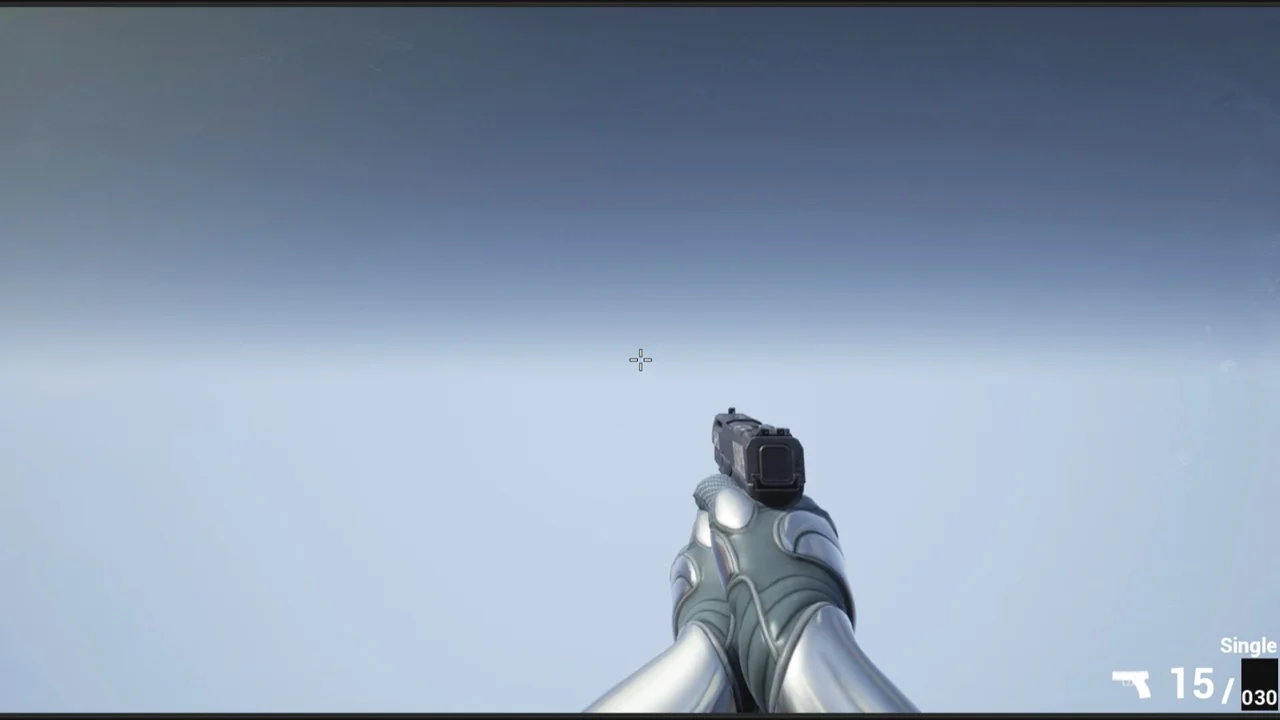
CGr Handgun combines a handgun model with the animations and logic needed to use it inside a game project. The weapon comes with several mesh options, including a regular magazine, a drum magazine, a holo sight, a laser or flashlight, a compensator, and a suppressor. It also supports different firing modes, and the weapon accuracy can be customized.
The setup is more than a single static prop. It is organized so the handgun can be adjusted for different combat roles and presentation styles, while still staying inside one weapon framework. That makes it useful when a project needs a firearm that can be swapped, tuned, and animated without rebuilding the core behavior from scratch.
Material layering and CGr Handgun visual variation
The handgun uses a material layering system, which allows different looks through patterns rather than forcing a single surface treatment. The weapon can also be recolored by changing only a tint. That gives the asset a straightforward way to support multiple visual styles while keeping the same underlying weapon setup.
Raindrops can appear on the weapon as part of the presentation, adding another layer of surface detail. Because the visual variation is handled through the weapon itself, the same handgun can be reused in different scenes without needing separate models for every appearance change. It fits well in projects where the same firearm may need to read as clean, worn, tactical, or customized.
Procedural aiming, recoil, and body-part damage
The project uses procedural aiming and procedural recoil. That means the weapon does not rely only on fixed motion; it also includes logic that reacts during use. The project also includes procedural walking, character crouching, sliding, and weapon deflection when the character approaches an object.
Combat behavior is also part of the package. Bullet projectiles are affected by gravity and do not fly off into infinity. The enemy damage system depends on where the hit lands on the body, so a hit to the head causes the enemy to die in fewer hits than a hit to the arm or leg. Grenades are covered too, with fragmentation, flashbang, and smoke effects, along with explosions, blinding, and concussion effects.
UE5 Manny, True FPS, and the remaster changes
The project was updated for UE5, and all animations were retargeted for the UE5 Manny mannequin. The project is now True FPS, meaning the character Blueprint includes the entire mannequin instead of only the arms. Because Manny’s animation blueprint is split into upper and lower body parts, the "ik_hand_gun" bone is no longer used in animations, though it is still needed for procedural aiming.
The animation setup changed along with that update. The older animation analogues, where the "ik_hand_gun" bone is animated, were kept in a Legacy folder. In the newer animations, those parts were replaced with "GunMainBoneMove," where the main bone of the weapon is animated while the weapon remains attached to the socket of the right hand. The Data Table was changed at the same time to match the new setup.
Blueprints, DT_Weapon_DataTable, and bonus animations
The project includes Blueprints, meshes, materials, and textures that are not used directly in it but are used in other projects. That makes the structure easier to combine with related work. The Blueprints are configured for presentation only, so the package reads like an asset pack that can be expanded inside a more advanced project rather than a complete finished system.
Weapon changes for different types must be made in DT_Weapon_DataTable. Some variables were moved from the Data Table into the weapon Blueprints, so the values can be changed and seen in real time from the weapon Blueprint construction script. Custom collision presets in the project settings and notifications in animation montages also matter here, since they are part of how the setup behaves in practice.
There are also bonus animations for a frag grenade throw, a stun grenade throw, and weapon jamming. In the BONUS directory, there are animations that are not implemented in the project, including Weapon Block Idle Animations and Movements. The weapon is located on the X-axis, and moving it to the Y-axis requires exporting the weapon model and reimporting it with a -90 degree Z rotation, then doing the same for the weapon animation or rotating the weapon manually in each animation.
For a production workflow, this package fits best as a reusable handgun foundation inside a larger UE5 shooter setup. It already handles the weapon’s look, core motion, and combat behavior, while still leaving room for developers to expand the Blueprints and adapt the weapon to a broader project.
 Guns
Guns