"7066dd76da796369"{"id":"27457","slug":"cartoon-street","title":"Cartoon Street","category":"Streets \u0026 Construction","engine":"5.1+","assetVersion":"Engine version: 5.1+","engineVersion":"","tag":"Streets","accent":"blue","visual":"city","summary":"Cartoon Street brings a stylized street environment into Unreal Engine 5.1 and later with Lumen and Nanite support, day, dusk, and night lighting presets, and nearly 100 unique meshes. Its integer-sized basic pieces and building blueprints make it easier to...","platform":"Unreal Engine","publishedAt":"2026-04-26T05:41:38.000Z","updatedAt":"2026-04-26T05:41:39.000Z","sourceNotes":[],"fileContents":[],"compatibility":["Unreal Engine","Engine version: 5.1+"],"featuredImage":{"alt":"Cartoon Street","src":"https://3dcghub.com/wp-content/uploads/2026/04/4370ef41898d_8003b807-ce67-486e-a73b-e1681eabd641.webp"},"hasDownloadLink":true,"downloads":3,"terms":[{"taxonomy":"category","slug":"streets-and-construction","name":"Streets \u0026 Construction"},{"taxonomy":"post_tag","slug":"animation","name":"Animation"},{"taxonomy":"post_tag","slug":"environment","name":"Environment"},{"taxonomy":"post_tag","slug":"unreal-engine-5","name":"Unreal Engine 5"}],"galleryImages":[{"src":"https://3dcghub.com/wp-content/uploads/2026/04/cb6780a0bc2b_7aab7788-987b-460e-9bbf-eade06ccce8a.webp","alt":"Cartoon Street"},{"src":"https://3dcghub.com/wp-content/uploads/2026/04/0face3530c56_1d112199-e0fa-4bea-9935-0fa180b2200b.webp","alt":"Cartoon Street"},{"src":"https://3dcghub.com/wp-content/uploads/2026/04/e4af11942342_ad8a6473-77a6-467f-8313-f48a441424e2.webp","alt":"Cartoon Street"},{"src":"https://3dcghub.com/wp-content/uploads/2026/04/6d85a55b1e93_87d3e288-1d05-4f48-8bee-d350de109a53.webp","alt":"Cartoon Street"},{"src":"https://3dcghub.com/wp-content/uploads/2026/04/eafc8600cdd1_dca6b932-ee13-4d5e-8d91-b6f859137273.webp","alt":"Cartoon Street"},{"src":"https://3dcghub.com/wp-content/uploads/2026/04/0c6df5b5fdc1_4c5d2c3c-8f46-4d88-933f-cc57cff45e30.webp","alt":"Cartoon Street"},{"src":"https://3dcghub.com/wp-content/uploads/2026/04/96e8c4938099_6db44cd1-7093-4708-aeaa-3b3c4ccac035.webp","alt":"Cartoon Street"},{"src":"https://3dcghub.com/wp-content/uploads/2026/04/92ed7e1848bc_436cd728-b318-4e94-8608-82ea7ecf77e6.webp","alt":"Cartoon Street"},{"src":"https://3dcghub.com/wp-content/uploads/2026/04/250297f110be_f7409c81-ce8f-40b3-99c7-ed427cc0d39f.webp","alt":"Cartoon Street"},{"src":"https://3dcghub.com/wp-content/uploads/2026/04/e32a5f65d371_de96e64a-23f8-4032-87b5-65321722a014.webp","alt":"Cartoon Street"}],"accessPanel":{"kind":"resource","title":"Access this resource","eyebrow":"Free Download","message":"Log in or create a free account to start your download.","fileName":"Content.7z","safetyNote":"All resources are 100% manually reviewed to eliminate all risks.","actionLabel":"Download Free","resourceType":"Resource archive"},"contentHtml":"\u003ch2\u003eCartoon Street in Unreal Engine 5.1+\u003c/h2\u003e\n\u003cp\u003eCartoon Street is set up for a scene-building workflow in Unreal Engine 5.1 and later. It supports Lumen and Nanite, so the environment is already aligned with the current UE5 feature set rather than being presented as a separate offline concept. That matters when the goal is to place a stylized street directly into an engine scene and keep moving without rebuilding every part from scratch.\u003c/p\u003e\n\u003cp\u003eThe environment is shown as a third-person scene, which makes its intended use easy to understand. It is meant to hold up in a playable or animated camera view, not only as a static display. The screenshots are real-time rendered in UE5, so the street is shown in the same context where it would actually be used. That gives a clearer read on how the environment sits inside the engine and how its stylized look behaves in motion.\u003c/p\u003e\n\u003cp\u003eBecause the package is presented this way, it feels oriented toward actual scene assembly. The combination of UE5.1+ support, Lumen, Nanite, and real-time presentation gives the street a practical engine-first structure. Instead of treating the asset as a collection of isolated parts, the setup points toward a complete environment that can be placed, lit, and viewed as a working street scene.\u003c/p\u003e \u003ch2\u003eDay, dusk, and night lighting presets\u003c/h2\u003e\n\u003cp\u003eOne of the most direct practical elements in Cartoon Street is its lighting setup. The package includes presets for daytime, dusk, and night scenes, giving the street multiple time-of-day states to work from. Those presets can serve as reference points when adjusting lighting in a project, especially when a scene needs a clear starting point for mood, contrast, and overall readability.\u003c/p\u003e\n\u003cp\u003eThe street is not limited to a single lighting condition. It is a day-and-night environment, which means the same location can be shown across different moments of the day. A daylight version can support clearer visibility across the environment, while dusk and night versions can shift the same street toward a stronger atmosphere. That flexibility is useful when the location needs to be reused across shots or scene beats without losing visual consistency.\u003c/p\u003e\n\u003cp\u003eBecause the lighting presets are framed as references for scene lighting settings, they help establish a consistent look across the environment. That makes the street easier to manage as a whole, rather than forcing each area to be lit separately from zero. The result is a more direct path from asset placement to a readable in-engine scene, which is important when the environment needs to stay clear in real-time view.\u003c/p\u003e \u003ch2\u003eNearly 100 meshes, integer sizes, and blueprint buildings\u003c/h2\u003e\n\u003cp\u003eCartoon Street includes nearly 100 unique meshes. That gives the package enough variety to populate a street without immediately repeating the same forms. The meshes are intended for animation production, game scenes, and educational purposes, so the asset package is not limited to a single kind of use. It is structured as a street environment that can be brought into different kinds of Unreal Engine work.\u003c/p\u003e\n\u003cp\u003eThe basic meshes are made according to integer sizes. That detail matters during assembly because integer sizing makes alignment easier when parts are placed together in a street layout. When a scene depends on matching edges, consistent spacing, and clean facades, that kind of measurement discipline can make the environment easier to build out. It does not remove the work of arranging the scene, but it does give the layout a more organized base.\u003c/p\u003e\n\u003cp\u003eDifferent types of buildings also have blueprint presets. Those presets can be used directly to fill the scene with completed buildings, which is a practical option when the goal is to block in a street quickly and keep the environment visually complete. Instead of placing every part manually, the blueprint presets provide a more direct route to finished-looking buildings inside the layout. That helps the street feel assembled rather than scattered, especially when the scene needs to read well as a whole.\u003c/p\u003e\n\u003cp\u003eSeen together, the nearly 100 meshes, the integer-based sizing, and the building blueprint presets make the package easier to approach as a scene assembly tool. There is enough material to shape a stylized street, enough structure to keep the parts aligned, and enough preset support to move from individual pieces toward a complete street environment. The package is strongest when treated as a set of building blocks that can fill out a level or shot efficiently inside Unreal Engine.\u003c/p\u003e \u003ch2\u003eLine drawing, highlight edges, and hand-drawn cartoon texture\u003c/h2\u003e\n\u003cp\u003eThe visual style leans toward cartoon rendering rather than realistic surface treatment. Cartoon Street includes line drawing, highlight edges, and a hand-drawn cartoon highlight texture. Those elements define the look quickly, so the street reads as stylized at a glance. They also help separate the environment from a realistic urban set, making the visual identity clearer from the first in-engine view.\u003c/p\u003e\n\u003cp\u003eThat stylized direction is paired with good performance, which matters in a street environment that uses many meshes. A large environment can become heavy quickly, so performance becomes part of how usable the scene feels once it is inside the engine. Cartoon Street aims to keep the cartoon look while remaining practical for a working scene, which is important when the environment has to stay readable in real time.\u003c/p\u003e\n\u003cp\u003eBecause the images are real-time rendered screenshots from UE5, the style is not being presented as an offline illustration target. It is shown as an in-engine result, so the line drawing, highlight edges, and hand-drawn texture can be judged in the same context where the street would be used. That makes the cartoon treatment easier to evaluate as part of the scene rather than as a separate visual idea.\u003c/p\u003e \u003ch2\u003eHow Cartoon Street fits into scene assembly\u003c/h2\u003e\n\u003cp\u003eCartoon Street fits cleanly into projects that need a stylized street environment with visible structure and quick scene population. Since the asset package supports animation production, game scenes, and educational purposes, it can sit in more than one kind of Unreal Engine workflow. The common thread is the need for a street set that can be built, lit, and read clearly in engine.\u003c/p\u003e\n\u003cp\u003eThe strongest workflow advantage is the way the pieces work together. The nearly 100 meshes supply enough variation to build the street, the building blueprints speed up scene completion, and the day, dusk, and night lighting presets provide a practical base for lighting decisions. None of those parts has to stand alone; they work as a set of tools for moving from layout toward a finished-looking street.\u003c/p\u003e\n\u003cp\u003eFor creators who want a stylized environment that can be shown across different times of day, Cartoon Street offers a direct route into Unreal Engine 5.1+ scene work. It keeps the cartoon identity visible through line drawing and hand-drawn texture, while still giving the street the structure needed for a playable or animated camera view. That balance between style and scene assembly is what makes the package easy to understand as a working environment rather than just a collection of props.\u003c/p\u003e\n\n\u003ch2\u003eExplore Similar Assets\u003c/h2\u003e\n\u003cul\u003e\n\u003cli\u003e\u003ca href=\"https://3dcghub.com/shootlikeme-unreal-engine-third-person-shooter-template/\" title=\"ShootLikeMe – Unreal Engine Third Person Shooter Template\"\u003eShootLikeMe – Unreal Engine Third Person Shooter Template\u003c/a\u003e\u003c/li\u003e\n\u003cli\u003e\u003ca href=\"https://3dcghub.com/advanced-unreal-engine-5-multiplayer-gameplay-programming/\" title=\"Advanced Unreal Engine 5 Multiplayer Gameplay Programming\"\u003eAdvanced Unreal Engine 5 Multiplayer Gameplay Programming\u003c/a\u003e\u003c/li\u003e\n\u003cli\u003e\u003ca href=\"https://3dcghub.com/niagara-beginners-to-advanced-in-unreal-engine-5/\" title=\"Niagara Beginners to advanced in Unreal Engine 5\"\u003eNiagara Beginners to advanced in Unreal Engine 5\u003c/a\u003e\u003c/li\u003e\n\u003cli\u003e\u003ca href=\"https://3dcghub.com/create-zelda-like-skills-with-c-in-unreal-engine-5-2/\" title=\"Create Zelda-like skills with C++ in unreal engine 5\"\u003eCreate Zelda-like skills with C++ in unreal engine 5\u003c/a\u003e\u003c/li\u003e\n\u003cli\u003e\u003ca href=\"https://3dcghub.com/main-menus-beginner-class-unreal-engine-5/\" title=\"Main Menus Beginner Class – Unreal Engine 5\"\u003eMain Menus Beginner Class – Unreal Engine 5\u003c/a\u003e\u003c/li\u003e\n\u003c/ul\u003e","contentTextLength":7432,"navigation":{"current":2258,"total":4016,"previous":{"id":"27470","slug":"cgr-handgun","title":"CGr Handgun","category":"Guns","platform":"Unreal Engine","updatedAt":"2026-04-26T05:53:55.000Z"},"next":{"id":"14982","slug":"auto-mesh-outline","title":"Auto Mesh Outline","category":"Gameplay Features","platform":"Unreal Engine","updatedAt":"2026-04-25T11:35:59.000Z"}},"relatedResources":[{"id":"28113","slug":"polygon-street-racer","title":"POLYGON - Street Racer","category":"Streets \u0026 Construction","engine":"4.26+,5.0+","assetVersion":"Engine version: 4.26+,5.0+","engineVersion":"","tag":"Streets","accent":"blue","visual":"city","summary":"POLYGON - Street Racer brings together modular vehicles, characters, props, and dockyard environment pieces in a single low poly package. It covers both underground street racing scenes and broader port or container yard production needs, with more than 100...","platform":"Unreal Engine","publishedAt":"2026-05-04T08:50:26.000Z","updatedAt":"2026-05-04T08:50:35.000Z","sourceNotes":[],"fileContents":[],"compatibility":["Unreal Engine","Engine version: 4.26+,5.0+"],"featuredImage":{"alt":"POLYGON - Street Racer","src":"https://3dcghub.com/wp-content/uploads/2026/05/29c5386a2572_878aaf91-dcf3-4d21-b7e5-b69ff21d2534.webp"},"hasDownloadLink":true,"downloads":2},{"id":"1001585","slug":"butcher-s-alley-palmetro-future-city-nanite-lp","title":"Butcher's Alley Palmetro Future City (Nanite + LP)","category":"Streets \u0026 Construction","engine":"5.3+","assetVersion":"","engineVersion":"Engine Version: 5.3+","tag":"Streets","accent":"blue","visual":"city","summary":"A comprehensive Unreal Engine 5 environment pack featuring 958 Nanite and low-poly meshes, 4K textures, Lumen lighting, and modular cyberpunk city assets.","platform":"Unreal Engine","publishedAt":"2026-10-10T11:14:38.761Z","updatedAt":"2026-10-10T11:14:38.761Z","sourceNotes":[],"fileContents":[],"compatibility":["Unreal Engine","Engine Version: 5.3+"],"featuredImage":{"alt":"Butcher's Alley Palmetro Future City (Nanite + LP)","src":"/wp-content/uploads/published/2026/10/ee80998c1c63-64158675-48a1-4445-8ac8-b5c586398787-47197da7b1.webp"},"hasDownloadLink":true,"downloads":1},{"id":"1001571","slug":"racing-track","title":"Racing Track","category":"Streets \u0026 Construction","engine":"5.3+","assetVersion":"","engineVersion":"Engine Version: 5.3+","tag":"Streets","accent":"blue","visual":"mech","summary":"Build high-speed motorsport environments with Racing Track, featuring 10 spline blueprints, 127 unique props, pit stops, and an 8-layer landscape.","platform":"Unreal Engine","publishedAt":"2026-10-10T04:05:33.498Z","updatedAt":"2026-10-10T04:05:33.498Z","sourceNotes":[],"fileContents":[],"compatibility":["Unreal Engine","Engine Version: 5.3+"],"featuredImage":{"alt":"Racing Track","src":"/wp-content/uploads/published/2026/10/7ad9820a0bc6-4157f003-82f4-43af-b369-c672cdfaa999-bff01b44fa.webp"},"hasDownloadLink":true,"downloads":0}]}
Streets
Cartoon Street
Cartoon Street brings a stylized street environment into Unreal Engine 5.1 and later with Lumen and Nanite support, day, dusk, and night lighting presets, and nearly 100 unique meshes. Its integer-sized basic pieces and building blueprints make it easier to...
Cartoon Street is set up for a scene-building workflow in Unreal Engine 5.1 and later. It supports Lumen and Nanite, so the environment is already aligned with the current UE5 feature set rather than being presented as a separate offline concept. That matters when the goal is to place a stylized street directly into an engine scene and keep moving without rebuilding every part from scratch.
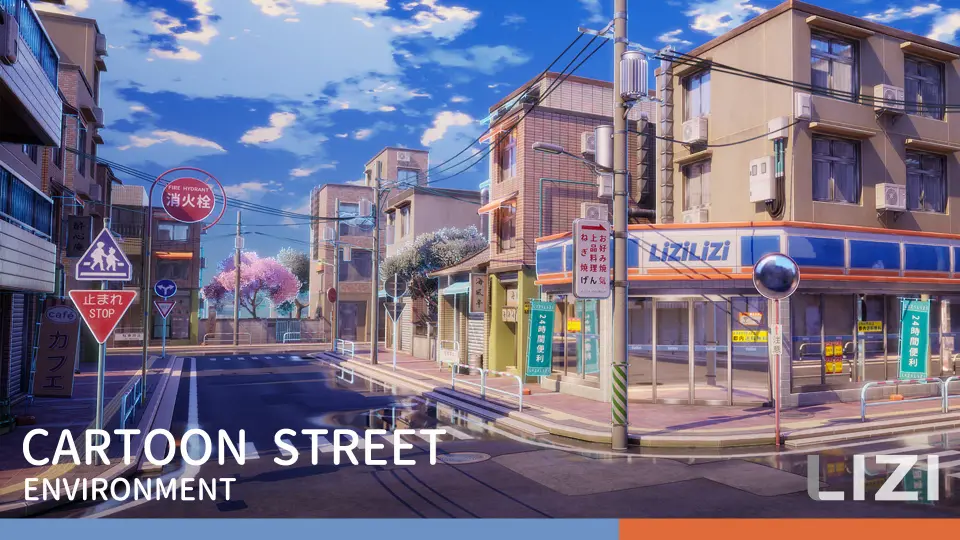
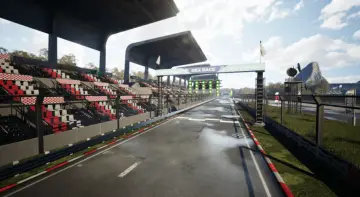
The environment is shown as a third-person scene, which makes its intended use easy to understand. It is meant to hold up in a playable or animated camera view, not only as a static display. The screenshots are real-time rendered in UE5, so the street is shown in the same context where it would actually be used. That gives a clearer read on how the environment sits inside the engine and how its stylized look behaves in motion.
Because the package is presented this way, it feels oriented toward actual scene assembly. The combination of UE5.1+ support, Lumen, Nanite, and real-time presentation gives the street a practical engine-first structure. Instead of treating the asset as a collection of isolated parts, the setup points toward a complete environment that can be placed, lit, and viewed as a working street scene.
Day, dusk, and night lighting presets
One of the most direct practical elements in Cartoon Street is its lighting setup. The package includes presets for daytime, dusk, and night scenes, giving the street multiple time-of-day states to work from. Those presets can serve as reference points when adjusting lighting in a project, especially when a scene needs a clear starting point for mood, contrast, and overall readability.
The street is not limited to a single lighting condition. It is a day-and-night environment, which means the same location can be shown across different moments of the day. A daylight version can support clearer visibility across the environment, while dusk and night versions can shift the same street toward a stronger atmosphere. That flexibility is useful when the location needs to be reused across shots or scene beats without losing visual consistency.
Because the lighting presets are framed as references for scene lighting settings, they help establish a consistent look across the environment. That makes the street easier to manage as a whole, rather than forcing each area to be lit separately from zero. The result is a more direct path from asset placement to a readable in-engine scene, which is important when the environment needs to stay clear in real-time view.
Nearly 100 meshes, integer sizes, and blueprint buildings
Cartoon Street includes nearly 100 unique meshes. That gives the package enough variety to populate a street without immediately repeating the same forms. The meshes are intended for animation production, game scenes, and educational purposes, so the asset package is not limited to a single kind of use. It is structured as a street environment that can be brought into different kinds of Unreal Engine work.
The basic meshes are made according to integer sizes. That detail matters during assembly because integer sizing makes alignment easier when parts are placed together in a street layout. When a scene depends on matching edges, consistent spacing, and clean facades, that kind of measurement discipline can make the environment easier to build out. It does not remove the work of arranging the scene, but it does give the layout a more organized base.
Different types of buildings also have blueprint presets. Those presets can be used directly to fill the scene with completed buildings, which is a practical option when the goal is to block in a street quickly and keep the environment visually complete. Instead of placing every part manually, the blueprint presets provide a more direct route to finished-looking buildings inside the layout. That helps the street feel assembled rather than scattered, especially when the scene needs to read well as a whole.
Seen together, the nearly 100 meshes, the integer-based sizing, and the building blueprint presets make the package easier to approach as a scene assembly tool. There is enough material to shape a stylized street, enough structure to keep the parts aligned, and enough preset support to move from individual pieces toward a complete street environment. The package is strongest when treated as a set of building blocks that can fill out a level or shot efficiently inside Unreal Engine.
Line drawing, highlight edges, and hand-drawn cartoon texture
The visual style leans toward cartoon rendering rather than realistic surface treatment. Cartoon Street includes line drawing, highlight edges, and a hand-drawn cartoon highlight texture. Those elements define the look quickly, so the street reads as stylized at a glance. They also help separate the environment from a realistic urban set, making the visual identity clearer from the first in-engine view.
That stylized direction is paired with good performance, which matters in a street environment that uses many meshes. A large environment can become heavy quickly, so performance becomes part of how usable the scene feels once it is inside the engine. Cartoon Street aims to keep the cartoon look while remaining practical for a working scene, which is important when the environment has to stay readable in real time.
Because the images are real-time rendered screenshots from UE5, the style is not being presented as an offline illustration target. It is shown as an in-engine result, so the line drawing, highlight edges, and hand-drawn texture can be judged in the same context where the street would be used. That makes the cartoon treatment easier to evaluate as part of the scene rather than as a separate visual idea.
How Cartoon Street fits into scene assembly
Cartoon Street fits cleanly into projects that need a stylized street environment with visible structure and quick scene population. Since the asset package supports animation production, game scenes, and educational purposes, it can sit in more than one kind of Unreal Engine workflow. The common thread is the need for a street set that can be built, lit, and read clearly in engine.
The strongest workflow advantage is the way the pieces work together. The nearly 100 meshes supply enough variation to build the street, the building blueprints speed up scene completion, and the day, dusk, and night lighting presets provide a practical base for lighting decisions. None of those parts has to stand alone; they work as a set of tools for moving from layout toward a finished-looking street.
For creators who want a stylized environment that can be shown across different times of day, Cartoon Street offers a direct route into Unreal Engine 5.1+ scene work. It keeps the cartoon identity visible through line drawing and hand-drawn texture, while still giving the street the structure needed for a playable or animated camera view. That balance between style and scene assembly is what makes the package easy to understand as a working environment rather than just a collection of props.
 Streets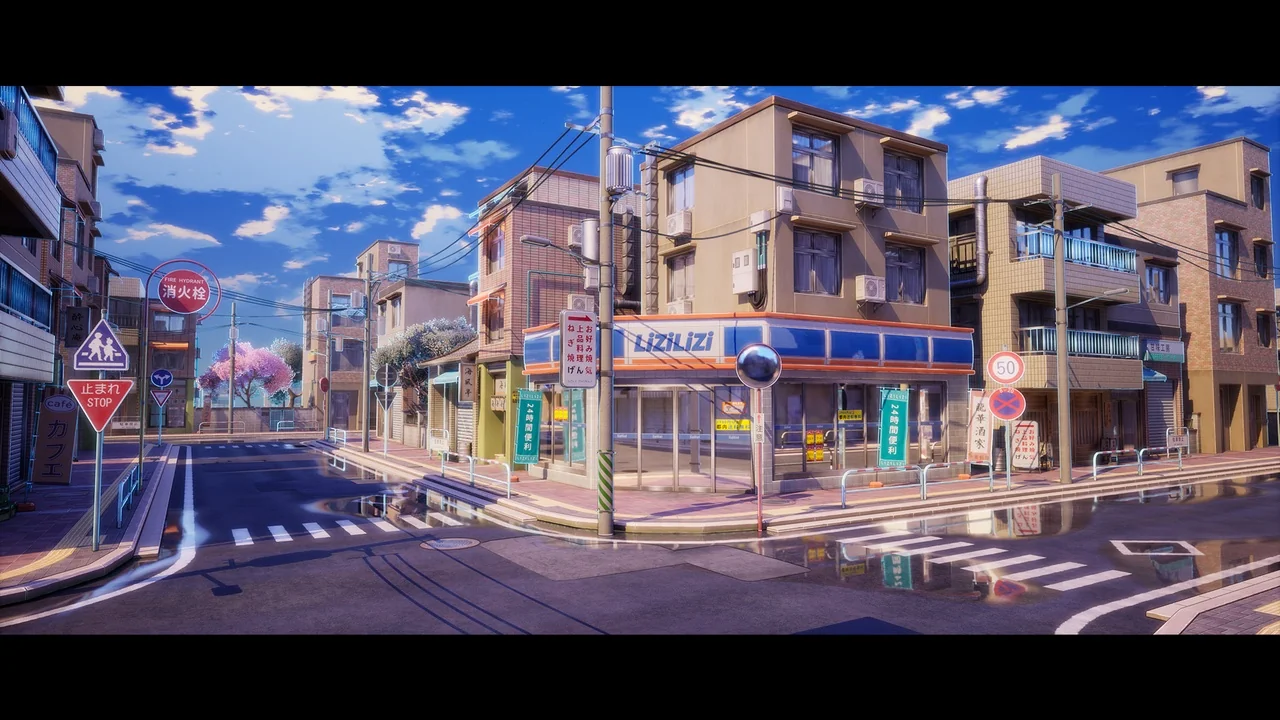
 Streets
 Streets
 Streets