"1062d43bc714d570"{"id":"1001430","slug":"brushify-scifi-buildings-pack","title":"Brushify - SciFi Buildings Pack","category":"Cities","engine":"4.24+,5.0+","assetVersion":"","engineVersion":"Engine Version: 4.24+,5.0+","tag":"Cities","accent":"blue","visual":"mech","summary":"Examine the technical layout, trimsheet memory optimizations, prefab blueprints, and terrain tools in the Brushify SciFi Buildings Pack.","platform":"Unreal Engine","publishedAt":"2026-10-07T06:08:31.244Z","updatedAt":"2026-10-07T06:08:31.244Z","sourceNotes":[],"fileContents":[],"compatibility":["Unreal Engine","Engine Version: 4.24+,5.0+"],"featuredImage":{"alt":"Brushify - SciFi Buildings Pack","src":"/wp-content/uploads/published/2026/10/a80b9e060f1b-f1cbb356-a763-417c-86f4-e5a56557e1c4-2a5a559eb8.webp"},"hasDownloadLink":true,"downloads":1,"terms":[{"taxonomy":"category","slug":"cities","name":"Cities"}],"galleryImages":[{"src":"/wp-content/uploads/published/2026/10/0e99da7a1287-38cc8e80-1447-4d59-9ec8-0d6cae105bde-4c883f9e97.webp","alt":"Brushify - SciFi Buildings Pack"},{"src":"/wp-content/uploads/published/2026/10/5a16651ca51b-413a523e-c520-40b1-a1f5-8fa5630db551-1391c33e06.webp","alt":"Brushify - SciFi Buildings Pack"},{"src":"/wp-content/uploads/published/2026/10/f7d3e57d857c-3922591d-67f8-4674-b72f-ef9d632f6eb1-770ae6fdca.webp","alt":"Brushify - SciFi Buildings Pack"},{"src":"/wp-content/uploads/published/2026/10/3ba78bbc2fdb-7c1062e8-9d13-4901-94f6-2d25846b96d6-dd847f25f0.webp","alt":"Brushify - SciFi Buildings Pack"},{"src":"/wp-content/uploads/published/2026/10/fc17de1f17cb-375b57af-b710-4f63-831d-70aa2486ad98-8ceefea532.webp","alt":"Brushify - SciFi Buildings Pack"},{"src":"/wp-content/uploads/published/2026/10/df3e43ed8218-e49dcf2c-5d7d-431d-a664-0393c2d7a6c3-f49be94459.webp","alt":"Brushify - SciFi Buildings Pack"},{"src":"/wp-content/uploads/published/2026/10/e2d254731eaa-20f78e4b-94ef-4857-892f-f0f6930d786c-e2575bc386.webp","alt":"Brushify - SciFi Buildings Pack"},{"src":"/wp-content/uploads/published/2026/10/39fd7f2923e2-c6a2f0e6-df6c-4caa-afab-95b693f4024a-b38a138973.webp","alt":"Brushify - SciFi Buildings Pack"}],"accessPanel":{"kind":"resource","title":"Download this resource","eyebrow":"Free Download","message":"Log in or create a free account to start your download.","fileName":"Content.7z","safetyNote":"Resources are manually reviewed before listing to improve quality and reduce obvious risks.","actionLabel":"Download Free","resourceType":"Resource archive"},"contentHtml":"\u003cp\u003eA library of 24 blueprint prefabs, 93 modular structural pieces, greebles, and custom highway spline blueprints forms the core of the Brushify SciFi Buildings Pack. The system supplies everything needed to assemble sprawling urban vistas, ranging from high-rise skyscraper clusters visible on the horizon to street-level walkways and playable transit networks. Alongside the modular geometric modules, the package incorporates an auto-material landscape system equipped with 11 biome layers, raw 3D mesh files, and an example playable city level set up with its own lighting and skydome.\u003c/p\u003e \u003ch2\u003eBlueprint Prefabs, Modular Pieces, and Highway Splines\u003c/h2\u003e\n\u003cp\u003eUrban generation within the package relies on modularity at two scales: pre-assembled blueprint compounds and individual component meshes. The 24 prefabs function as drop-in architectural modules that combine multiple sub-meshes, exterior greebles, and decorative accents into single actors. Working with these blueprint structures lets developers modify building heights by adjusting floor counts, reposition exterior decorative elements, and assign alternative surface presets directly inside the Unreal Engine viewport without breaking the broader structural alignment.\u003c/p\u003e \u003cp\u003eThe individual asset catalog features 93 distinct modular pieces. These consist of structural building blocks, low-poly distance skyscrapers for horizon backgrounds, and a wide collection of surface props. Environmental details include crates, storage boxes, antennas, canisters, ladders, railings, and suspended walkways. To connect disparate building blocks into functional urban districts, the pack includes advanced scripted spline blueprints engineered specifically for highways. These splines allow roads and transit lanes to bend, climb, and weave between high-rise structures while maintaining continuous mesh distribution across irregular city elevations.\u003c/p\u003e \u003ch2\u003eTrimsheet Memory Optimization and the 256MB VRAM Footprint\u003c/h2\u003e\n\u003cp\u003eLarge-scale architectural environments frequently suffer from memory bottlenecks due to unique texture draws per building facade. This pack resolves high overhead by running the entire city architecture through a single master trimsheet texture. The sheet contains high-density mechanical greebles, nuts, bolts, vehicle tracks, surface panels, cylinders, rectangular extrusions, and recurring sci-fi geometric forms. Secondary surface variations are applied using tiling damage and detail maps layered over the structural geometry.\u003c/p\u003e \u003cp\u003eRelying on this coordinated trimsheet pipeline allows an entire example city scene to render while consuming only approximately 256MB of GPU memory. Performance is elevated further when setting the project Default RHI to DirectX 12 (DX12) within project settings. For scenes demanding aggressive optimization, individual static meshes placed throughout an exterior sector can be merged directly inside the Unreal Editor to decrease draw calls across complex skylines.\u003c/p\u003e \u003ch2\u003eMaster Material Shaders, Surface Blend Masks, and Source Files\u003c/h2\u003e\n\u003cp\u003eSurface treatment across the buildings is handled by an advanced master material bundled with 32 presets spanning metal, wood, stone wall, and mud wall appearances. The system supplies 24 custom textures, including dedicated normal and height maps, all authored at 2048x2048 resolution or higher. Material functions give creators granular control over surface tinting, pattern tiling rates, and normal intensity.\u003c/p\u003e\n\u003cp\u003eThe master material includes several integrated shading features:\u003c/p\u003e\n\u003cul\u003e \u003cli\u003e\u003cstrong\u003eUV-Less Mapping:\u003c/strong\u003e Supports workflows that apply textures cleanly across meshes without requiring custom UV unwrap unwinding.\u003c/li\u003e \u003cli\u003e\u003cstrong\u003eBlend Shader:\u003c/strong\u003e Employs blend masks to combine two distinct textures seamlessly on shared surfaces.\u003c/li\u003e \u003cli\u003e\u003cstrong\u003eDamage Shader:\u003c/strong\u003e Injects localized wear, scratches, and physical breakdown into structural geometry.\u003c/li\u003e \u003cli\u003e\u003cstrong\u003eParallax Occlusion Mapping (POM):\u003c/strong\u003e Adds optical depth to surface panels and mechanical recesses without relying on added geometric edge loops.\u003c/li\u003e\n\u003c/ul\u003e\n\u003cp\u003eBeyond the engine-ready uassets, the package provides raw source files in both FBX and native Blender formats. This inclusion allows technical artists to modify structural silhouettes, adjust modular pivot alignments, or construct custom structural components matching the trimsheet layout outside the engine.\u003c/p\u003e \u003ch2\u003eLandscape Auto Material Biomes and Terrain Shading\u003c/h2\u003e\n\u003cp\u003eTo ground urban structures in natural terrain, the pack includes the Brushify Landscape Auto Material. This shader features an automatic paint layer setup dividing landscape surfaces across 11 biomes: Grass, Desert, Forest, Snow, Beach, Dunes, Mud, and Craters. Applying the material to any terrain heightmap automatically textures the surface while scattering biome-specific rocks and grass meshes without requiring manual foliage painting.\u003c/p\u003e \u003cp\u003eThe terrain shader features technical optimizations intended for open-world scales. It includes Runtime Virtual Texturing (RVT) support, Tri-planar mapping, Parallax Occlusion Mapping, Tessellation and height-based blending, surface roughness control, and flow mapping. Distance-dependent tiling reduction keeps large landforms from showing repetitive grid patterns, backed by a 3-stage Level of Detail (LOD) system covering near, medium, and far distances. Shader overdraw is optimized out-of-the-box, and the modular structure of the landscape material allows unused functions to be severed to maintain high frame rates.\u003c/p\u003e \u003ch2\u003eMulti-Pack Merging and Project Setup\u003c/h2\u003e\n\u003cp\u003eThe package comes with a complete, playable sci-fi city level containing active skydome and lighting setups. The level acts as a practical benchmark for testing character movement, setting up cinematics, or inspecting how the prefabs interlock with terrain layers. When integrating the assets alongside other Brushify landscape collections, users add the files via the Epic Games launcher and select the overwrite option, ensuring that common shaders, parent materials, and global helper functions remain synchronized throughout the project directory.\u003c/p\u003e\n\n\u003ch2\u003eRelated Resources Worth Checking\u003c/h2\u003e\n\u003cul\u003e\n\u003cli\u003e\u003ca href=\"https://3dcghub.com/stylized-lowpoly-cyberpunk-city-stylized-stylised-cyber-cyberpunk-scifi-3d/\" title=\"Stylized Lowpoly Cyberpunk City ( Stylized Stylised Cyber Cyberpunk Scifi 3D )\"\u003eStylized Lowpoly Cyberpunk City ( Stylized Stylised Cyber Cyberpunk Scifi 3D )\u003c/a\u003e\u003c/li\u003e\n\u003cli\u003e\u003ca href=\"https://3dcghub.com/brushify-urban-buildings-pack/\" title=\"Brushify - Urban Buildings Pack\"\u003eBrushify - Urban Buildings Pack\u003c/a\u003e\u003c/li\u003e\n\u003cli\u003e\u003ca href=\"https://3dcghub.com/nordic-harbour-modular-city-building-kit/\" title=\"Nordic Harbour - Modular City Building Kit\"\u003eNordic Harbour - Modular City Building Kit\u003c/a\u003e\u003c/li\u003e\n\u003cli\u003e\u003ca href=\"https://3dcghub.com/urban-background-buildings-vol-1/\" title=\"Urban Background Buildings - VOL.1\"\u003eUrban Background Buildings - VOL.1\u003c/a\u003e\u003c/li\u003e\n\u003cli\u003e\u003ca href=\"https://3dcghub.com/modular-post-soviet-building/\" title=\"Modular Post Soviet Building\"\u003eModular Post Soviet Building\u003c/a\u003e\u003c/li\u003e\n\u003c/ul\u003e","contentTextLength":6210,"navigation":{"current":14,"total":3379,"previous":{"id":"1001431","slug":"cartoon-anime-japanese-school","title":"Cartoon anime Japanese school","category":"Interior","platform":"Unreal Engine","updatedAt":"2026-10-07T06:09:15.062Z"},"next":{"id":"1001429","slug":"brooke-industrial-town","title":"Brooke Industrial Town","category":"Industrial","platform":"Unreal Engine","updatedAt":"2026-10-07T06:06:41.396Z"}},"relatedResources":[{"id":"1000103","slug":"stylized-lowpoly-cyberpunk-city-stylized-stylised-cyber-cyberpunk-scifi-3d","title":"Stylized Lowpoly Cyberpunk City ( Stylized Stylised Cyber Cyberpunk Scifi 3D )","category":"Cities","engine":"Engine Version: 4.27,5.0+","assetVersion":"Engine Version: 4.27,5.0+","engineVersion":"","tag":"Cities","accent":"blue","visual":"city","summary":"A low poly cyberpunk city environment with props, vehicles, characters, and buildings, optimized for game-ready projects and compatible with ULAT.","platform":"Unreal Engine","publishedAt":"2026-06-07T15:58:50.126Z","updatedAt":"2026-06-07T15:58:50.126Z","sourceNotes":[],"fileContents":[],"compatibility":["Unreal Engine","Engine Version: 4.27,5.0+"],"featuredImage":{"alt":"Stylized Lowpoly Cyberpunk City ( Stylized Stylised Cyber Cyberpunk Scifi 3D )","src":"/wp-content/uploads/published/2026/06/2332b6a7469b-3ed0854a-db36-4a8a-b80c-b053ee8e1197-67c66d6338.webp"},"hasDownloadLink":true,"downloads":0},{"id":"7047","slug":"brushify-urban-buildings-pack","title":"Brushify - Urban Buildings Pack","category":"Cities","engine":"5.1+","assetVersion":"Engine version: 5.1+","engineVersion":"4.24","tag":"Cities","accent":"blue","visual":"city","summary":"The Brushify - Urban Buildings Pack is a professional modular system designed for rapid city creation. It features optimized prefabs, advanced materials, and a complete playable level.","platform":"Unreal Engine","publishedAt":"2026-02-20T17:20:17.000Z","updatedAt":"2026-04-19T15:56:04.000Z","sourceNotes":[],"fileContents":[],"compatibility":["Unreal Engine"],"featuredImage":{"alt":"Brushify - Urban Buildings Pack","src":"https://3dcghub.com/wp-content/uploads/2026/02/bdee9f1c-eaa0-48d9-ae74-60f362a886e6.webp"},"hasDownloadLink":true,"downloads":0},{"id":"1000533","slug":"nordic-harbour-modular-city-building-kit","title":"Nordic Harbour - Modular City Building Kit","category":"Cities","engine":"4.26+,5.0+","assetVersion":"","engineVersion":"Engine Version: 4.26+,5.0+","tag":"Cities","accent":"blue","visual":"city","summary":"Modular Nordic harbour building kit with 44 building modules, 15 prefab buildings, street furniture, foliage, traffic signs, parallax window interiors, and 4K m","platform":"Unreal Engine","publishedAt":"2026-07-14T17:52:33.396Z","updatedAt":"2026-07-14T17:52:33.396Z","sourceNotes":[],"fileContents":[],"compatibility":["Unreal Engine","Engine Version: 4.26+,5.0+"],"featuredImage":{"alt":"Nordic Harbour - Modular City Building Kit","src":"/wp-content/uploads/published/2026/07/04d7e8fae6d7-7912198b-61be-4f5a-8eba-99f9d0878dc1-c01f2c54b8.webp"},"hasDownloadLink":true,"downloads":1}]}
Cities
Brushify - SciFi Buildings Pack
Examine the technical layout, trimsheet memory optimizations, prefab blueprints, and terrain tools in the Brushify SciFi Buildings Pack.
Category:Unreal Engine,CitiesPlatform: Unreal EngineEngine Version: 4.24+,5.0+Published: Oct 7, 2026
Cities
Resource overview
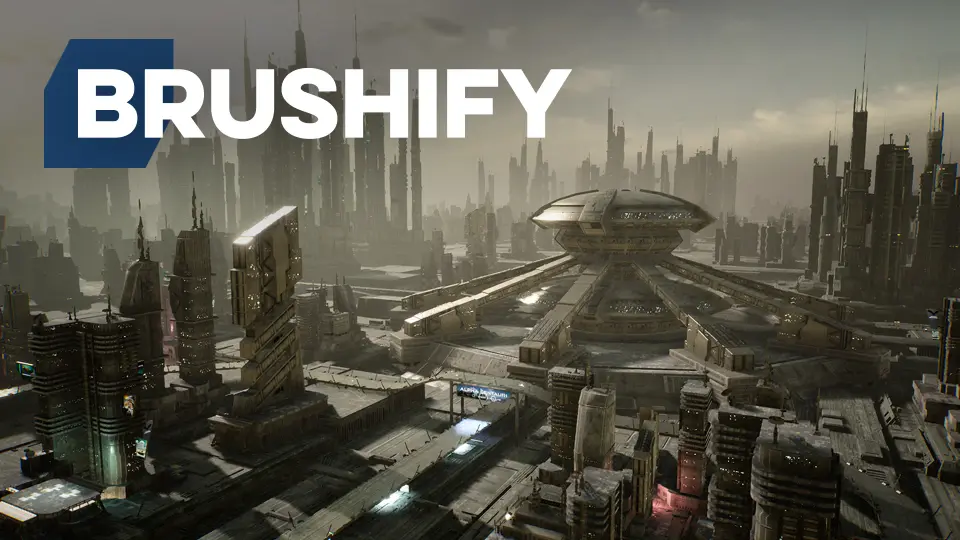
A library of 24 blueprint prefabs, 93 modular structural pieces, greebles, and custom highway spline blueprints forms the core of the Brushify SciFi Buildings Pack. The system supplies everything needed to assemble sprawling urban vistas, ranging from high-rise skyscraper clusters visible on the horizon to street-level walkways and playable transit networks. Alongside the modular geometric modules, the package incorporates an auto-material landscape system equipped with 11 biome layers, raw 3D mesh files, and an example playable city level set up with its own lighting and skydome.
Blueprint Prefabs, Modular Pieces, and Highway Splines
Urban generation within the package relies on modularity at two scales: pre-assembled blueprint compounds and individual component meshes. The 24 prefabs function as drop-in architectural modules that combine multiple sub-meshes, exterior greebles, and decorative accents into single actors. Working with these blueprint structures lets developers modify building heights by adjusting floor counts, reposition exterior decorative elements, and assign alternative surface presets directly inside the Unreal Engine viewport without breaking the broader structural alignment.
The individual asset catalog features 93 distinct modular pieces. These consist of structural building blocks, low-poly distance skyscrapers for horizon backgrounds, and a wide collection of surface props. Environmental details include crates, storage boxes, antennas, canisters, ladders, railings, and suspended walkways. To connect disparate building blocks into functional urban districts, the pack includes advanced scripted spline blueprints engineered specifically for highways. These splines allow roads and transit lanes to bend, climb, and weave between high-rise structures while maintaining continuous mesh distribution across irregular city elevations.
Trimsheet Memory Optimization and the 256MB VRAM Footprint
Large-scale architectural environments frequently suffer from memory bottlenecks due to unique texture draws per building facade. This pack resolves high overhead by running the entire city architecture through a single master trimsheet texture. The sheet contains high-density mechanical greebles, nuts, bolts, vehicle tracks, surface panels, cylinders, rectangular extrusions, and recurring sci-fi geometric forms. Secondary surface variations are applied using tiling damage and detail maps layered over the structural geometry.
Relying on this coordinated trimsheet pipeline allows an entire example city scene to render while consuming only approximately 256MB of GPU memory. Performance is elevated further when setting the project Default RHI to DirectX 12 (DX12) within project settings. For scenes demanding aggressive optimization, individual static meshes placed throughout an exterior sector can be merged directly inside the Unreal Editor to decrease draw calls across complex skylines.
Master Material Shaders, Surface Blend Masks, and Source Files
Surface treatment across the buildings is handled by an advanced master material bundled with 32 presets spanning metal, wood, stone wall, and mud wall appearances. The system supplies 24 custom textures, including dedicated normal and height maps, all authored at 2048x2048 resolution or higher. Material functions give creators granular control over surface tinting, pattern tiling rates, and normal intensity.
The master material includes several integrated shading features:
UV-Less Mapping: Supports workflows that apply textures cleanly across meshes without requiring custom UV unwrap unwinding.
Blend Shader: Employs blend masks to combine two distinct textures seamlessly on shared surfaces.
Damage Shader: Injects localized wear, scratches, and physical breakdown into structural geometry.
Parallax Occlusion Mapping (POM): Adds optical depth to surface panels and mechanical recesses without relying on added geometric edge loops.
Beyond the engine-ready uassets, the package provides raw source files in both FBX and native Blender formats. This inclusion allows technical artists to modify structural silhouettes, adjust modular pivot alignments, or construct custom structural components matching the trimsheet layout outside the engine.
Landscape Auto Material Biomes and Terrain Shading
To ground urban structures in natural terrain, the pack includes the Brushify Landscape Auto Material. This shader features an automatic paint layer setup dividing landscape surfaces across 11 biomes: Grass, Desert, Forest, Snow, Beach, Dunes, Mud, and Craters. Applying the material to any terrain heightmap automatically textures the surface while scattering biome-specific rocks and grass meshes without requiring manual foliage painting.
The terrain shader features technical optimizations intended for open-world scales. It includes Runtime Virtual Texturing (RVT) support, Tri-planar mapping, Parallax Occlusion Mapping, Tessellation and height-based blending, surface roughness control, and flow mapping. Distance-dependent tiling reduction keeps large landforms from showing repetitive grid patterns, backed by a 3-stage Level of Detail (LOD) system covering near, medium, and far distances. Shader overdraw is optimized out-of-the-box, and the modular structure of the landscape material allows unused functions to be severed to maintain high frame rates.
Multi-Pack Merging and Project Setup
The package comes with a complete, playable sci-fi city level containing active skydome and lighting setups. The level acts as a practical benchmark for testing character movement, setting up cinematics, or inspecting how the prefabs interlock with terrain layers. When integrating the assets alongside other Brushify landscape collections, users add the files via the Epic Games launcher and select the overwrite option, ensuring that common shaders, parent materials, and global helper functions remain synchronized throughout the project directory.
 Cities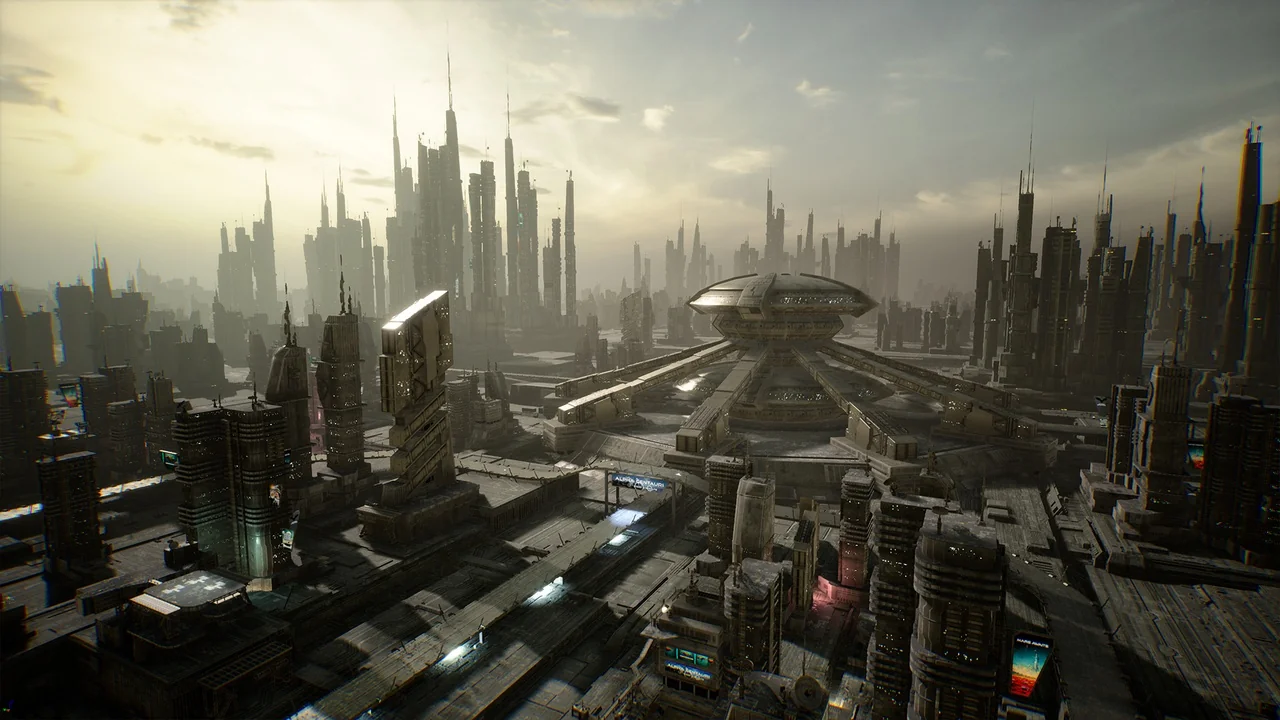
 Cities
 Cities
 Cities