"b00678cacce53329"{"id":"1002774","slug":"aurora-borealis","title":"Aurora Borealis","category":"Game Development Resource","engine":"4.15+,5.0+","assetVersion":"","engineVersion":"Engine Version: 4.15+,5.0+","tag":"Game Development R","accent":"blue","visual":"mech","summary":"Create customizable northern lights using spline ribbons, an instant spiral setup, dynamic Blueprints, and an included shooting star particle effect.","platform":"Unreal Engine","indexPolicy":"index","publishedAt":"2026-11-20T06:53:18.862Z","updatedAt":"2026-11-20T06:53:18.862Z","sourceNotes":[],"fileContents":[],"compatibility":["Unreal Engine","Engine Version: 4.15+,5.0+"],"featuredImage":{"alt":"Aurora Borealis","src":"/wp-content/uploads/published/2026/11/ba5e06e7ac87-78d31ae3-e4ee-4f24-b4ec-2bbf0deeac8d-f9c217fdb2.webp"},"fileSizeBytes":40973089,"hasDownloadLink":true,"downloads":0,"terms":[],"galleryImages":[{"src":"/wp-content/uploads/published/2026/11/c0d419e25a82-226987b4-5e44-4b78-b9aa-8151315d9c74-4d9ec01474.webp","alt":"Aurora Borealis"},{"src":"/wp-content/uploads/published/2026/11/27f1bfb12dae-a09dad06-7c29-4e52-9e21-d8b7d2720914-e2dd605fba.webp","alt":"Aurora Borealis"},{"src":"/wp-content/uploads/published/2026/11/ffe97d1567d1-508e85dd-723f-4983-88b3-edc379df5192-834ac08c09.webp","alt":"Aurora Borealis"},{"src":"/wp-content/uploads/published/2026/11/9fc390d950a6-bddb70f0-d8a7-47e9-a37d-98398b42bcb7-d0e74a5d5d.webp","alt":"Aurora Borealis"},{"src":"/wp-content/uploads/published/2026/11/b5e507dd1db1-95269a79-c2f1-4b24-8df4-1a5dcda821cb-037f9ac994.webp","alt":"Aurora Borealis"},{"src":"/wp-content/uploads/published/2026/11/54c34613420f-1d4af705-348d-4448-9631-d2691f1eadcc-d37e47f66a.webp","alt":"Aurora Borealis"}],"accessPanel":{"kind":"resource","title":"Get this resource","safetyNote":"Resources are manually reviewed before listing to improve quality and reduce obvious risks.","fileName":"Content.7z","resourceType":"Resource archive","versions":[]},"contentHtml":"\u003ch2\u003eConfiguring Spline Paths and Spiral Systems\u003c/h2\u003e\u003cp\u003eConstructing natural atmospheric light curtains begins with defining their flow across the sky. The toolkit provides two distinct geometrical approaches for generating these celestial ribbons: full custom pathing through splines and a rapid-deployment spiral system. When utilizing the spline-based lines, scene creators gain direct control over each section of the effect. Moving individual spline control points reshapes the arc of the light, twisting the splines alters the ribbon orientation relative to the horizon, and scaling modifies the vertical reach and presence of the curtain across the skybox.\u003c/p\u003e\u003cp\u003eThis manual manipulation accommodates specific scene requirements, whether that involves wrapping an atmospheric band around mountain ridges or extending long curtains across open tundra levels. For production scenarios prioritizing speed or centralized sky phenomena, an included aurora spiral provides an instant alternative. The spiral asset removes the need to manually shape vertices and twist angles from scratch, presenting a structured formation that deploys immediately into a level while retaining the underlying movement and shading logic found in the spline variants.\u003c/p\u003e\u003ch2\u003eModulating Dynamic Colors Across the Aurora Borealis\u003c/h2\u003e\u003cp\u003eNatural northern lights rarely maintain a static color distribution or a fixed intensity. To mirror the shifting nature of charged particles entering Earth's magnetosphere, the asset relies on Blueprint controls capable of altering color and opacity values dynamically over time. These controls operate on an individual basis, enabling separate ribbons or spiral layers to cycle through independent color spectrums rather than forcing the entire sky into uniform shifts.\u003c/p\u003e\u003cp\u003eVarying opacity over time creates the undulating, fading, and brightening behavior characteristic of real-world auroras and stylized fantasy night skies. By exposing these color and transparency settings in the Blueprints, light behavior can transition between sharp, focused bands of light and soft, diffused atmospheric glows. This temporal control ensures the sky remains continuously active, avoiding the artificial rigidity common in purely static skybox meshes.\u003c/p\u003e\u003ch2\u003eStructure of Aurora Materials and Blueprint Logic\u003c/h2\u003e\u003cp\u003eWorking within visual effect packages often requires adjusting core shading values to suit project-specific environmental rendering. Everything in this package can be adjusted across its material instances, base materials, and accompanying Blueprints. The internal node structures across these elements are neatly aligned and fully commented, preventing the maintenance friction that often accompanies dense visual effect networks.\u003c/p\u003e\u003cp\u003eMaterial instances allow for direct iteration on visual properties without triggering long recompilation passes, making fine-tuning of brightness, glow balance, and edge falloff straightforward. Artists needing deeper alterations to how the curtains react can step directly into the commented master materials to inspect the texture blending and parameter inputs. The neat alignment within the Blueprints ensures that logic flows controlling timeline variables, opacity shifts, and color switching remain clear and easy to follow when adapting the system for custom gameplay triggers or environment managers.\u003c/p\u003e\u003ch2\u003eLayering Shooting Stars in Night Sky Environments\u003c/h2\u003e\u003cp\u003eBeyond the ribbon meshes and spiral geometries, the pack includes a standalone particle effect designed to produce shooting stars. Adding shooting stars introduces transient motion into the night sky, creating localized bursts of speed that contrast against the slow, sweeping presence of the main light ribbons. This particle setup contributes extra visual detail, breaking up empty regions between atmospheric bands and ground geometry.\u003c/p\u003e\u003cp\u003eThe combination of sweeping atmospheric curtains and quick celestial streaks serves dual purposes. In realistic natural environments, the elements work together to build convincing polar night conditions. In fantasy RPG projects, where unusual sky phenomena are standard elements of worldbuilding, combining persistent ribbons with sudden particle streaks establishes an active, believable celestial canopy.\u003c/p\u003e\u003ch2\u003eThe Non-PBR Fjord Demonstration Scene\u003c/h2\u003e\u003cp\u003eTo provide a clear baseline for implementation, the package supplies an assembled demonstration scene depicting a night-time fjord. This level showcases both the primary ribbon effects and the shooting star particle system operating within a unified space. Notably, the fjord environment utilizes a non-PBR-based shading setup rather than standard physically based rendering workflows.\u003c/p\u003e\u003cp\u003eBy arranging the light bands above reflective water planes and surrounding terrain, the demonstration environment illustrates how the glowing shapes interact with dark landscape silhouettes. It highlights spatial balance, demonstrating how spline twisting can be used to follow the contour of fjords or valleys while keeping the primary visual focal point firmly overhead. Exploring the included scene provides a direct look at how the author arranged the splines, configured the master Blueprints, and deployed the particle systems to produce a cohesive night atmosphere.\u003c/p\u003e\u003ch2\u003eAtmospheric Context and Worldbuilding Options\u003c/h2\u003e\u003cp\u003eIn physical nature, the Aurora Borealis occurs near Earth's north pole when charged solar particles encounter the magnetosphere, mirrored by the Aurora Australis at the south pole. Recreating these phenomena visually requires tools that support both physical atmospheric recreation and stylized fantasy expressions. The underlying spline and spiral mechanics provide the physical movement needed for realistic natural simulations, while the exposed Blueprint controls for color shifting give environment artists the freedom to apply non-traditional hues suited to high-fantasy RPG worlds.\u003c/p\u003e\u003cp\u003eBecause the controls allow independent tuning of pathing, rotation, scaling, color, and opacity, the effect can scale from subtle green arcs on an Arctic coastline to towering, multi-layered visual centerpieces over an otherworldly ruin. The combination of clean node organization and adaptable geometry ensures the system can be deployed directly from the pre-built spiral or extensively customized through custom spline curves.\u003c/p\u003e\n\n\u003ch2\u003eMore From The Same Workflow\u003c/h2\u003e\n\u003cul\u003e\n\u003cli\u003e\u003ca href=\"https://3dcghub.com/arctic-aurora-landscape/\" rel=\"noopener noreferrer\"\u003eArctic Aurora Landscape\u003c/a\u003e\u003c/li\u003e\n\u003cli\u003e\u003ca href=\"https://3dcghub.com/cooking-game-sound-effects/\" rel=\"noopener noreferrer\"\u003eCooking Game Sound Effects\u003c/a\u003e\u003c/li\u003e\n\u003cli\u003e\u003ca href=\"https://3dcghub.com/sci-fi-gastaroid-queen/\" rel=\"noopener noreferrer\"\u003eSCI FI: GASTAROID QUEEN\u003c/a\u003e\u003c/li\u003e\n\u003cli\u003e\u003ca href=\"https://3dcghub.com/advanced-magic-fx-15/\" rel=\"noopener noreferrer\"\u003eAdvanced Magic FX 15\u003c/a\u003e\u003c/li\u003e\n\u003cli\u003e\u003ca href=\"https://3dcghub.com/parasite-spider/\" rel=\"noopener noreferrer\"\u003eParasite_Spider\u003c/a\u003e\u003c/li\u003e\n\u003c/ul\u003e","contentTextLength":6413,"navigation":{"current":106,"total":4797,"previous":{"id":"1002775","slug":"background-vfx","title":"Background VFX","category":"Transition","platform":"Unreal Engine","updatedAt":"2026-11-20T06:54:03.591Z"},"next":{"id":"1002773","slug":"art-of-explosions-with-sounds","title":"Art of Explosions with Sounds","category":"Fire \u0026 Explosions","platform":"Unreal Engine","updatedAt":"2026-11-20T06:52:30.031Z"}},"relatedResources":[{"id":"28484","slug":"arctic-aurora-landscape","title":"Arctic Aurora Landscape","category":"Mountain","engine":"4.26+,5.0+","assetVersion":"Engine version: 4.26+,5.0+","engineVersion":"","tag":"Mountain","accent":"blue","visual":"city","summary":"Arctic Aurora Landscape centers on a realistic snowy mountain scene shaped by layered terrain, aurora-filled skies, and atmospheric particles. It combines detailed landscape shaders, snow-covered vegetation, distant mountain backdrops, and lighting settings...","platform":"Unreal Engine","indexPolicy":"index","publishedAt":"2026-05-15T17:17:38.000Z","updatedAt":"2026-05-15T17:17:39.000Z","sourceNotes":[],"fileContents":[],"compatibility":["Unreal Engine","Engine version: 4.26+,5.0+"],"featuredImage":{"alt":"Arctic Aurora Landscape","src":"https://3dcghub.com/wp-content/uploads/2026/05/e519b62c651a_7fcc4b27-978c-4834-9de9-f4fe863e8487.webp"},"fileSizeBytes":1397068870,"hasDownloadLink":true,"downloads":4},{"id":"1002850","slug":"the-explosions-mega-pack","title":"The Explosions Mega Pack","category":"Game Development Resource","engine":"4.15+,5.0+","assetVersion":"","engineVersion":"Engine Version: 4.15+,5.0+","tag":"Game Development R","accent":"blue","visual":"mech","summary":"Explore The Explosions Mega Pack for Unreal Engine 4, featuring 48 particle systems, 354 emitters, and simulations built with SideFX Houdini 3D.","platform":"Unreal Engine","indexPolicy":"index","publishedAt":"2026-11-20T12:32:31.940Z","updatedAt":"2026-11-20T12:32:31.940Z","sourceNotes":[],"fileContents":[],"compatibility":["Unreal Engine","Engine Version: 4.15+,5.0+"],"featuredImage":{"alt":"The Explosions Mega Pack","src":"/wp-content/uploads/published/2026/11/516b34416f6d-777a811f-2605-40a3-ad42-60c61c40cb74-b28a39a96e.webp"},"fileSizeBytes":167122171,"hasDownloadLink":true,"downloads":0},{"id":"1001989","slug":"cooking-game-sound-effects","title":"Cooking Game Sound Effects","category":"Game Development Resource","engine":"4.15+,5.0+","assetVersion":"","engineVersion":"Engine Version: 4.15+,5.0+","tag":"Game Development R","accent":"blue","visual":"mech","summary":"Comprehensive audio library featuring 662 cooking sound effects, organic kitchen foley, character emotes, UI cues, and ambient loops for simulation games.","platform":"Unreal Engine","indexPolicy":"index","publishedAt":"2026-10-24T15:51:55.005Z","updatedAt":"2026-10-24T15:51:55.005Z","sourceNotes":[],"fileContents":[],"compatibility":["Unreal Engine","Engine Version: 4.15+,5.0+"],"featuredImage":{"alt":"Cooking Game Sound Effects","src":"/wp-content/uploads/published/2026/10/966fc8ee1b71-e63fc6df-bfa1-4d4b-9bd9-59746edf19f0-e7ac2c3d9c.webp"},"fileSizeBytes":195953426,"hasDownloadLink":true,"downloads":0}]}
Resource screenshots
1 / 6
Join our channel
Follow 3DCGHUB on Telegram for new resource drops, migration updates, and community notices.
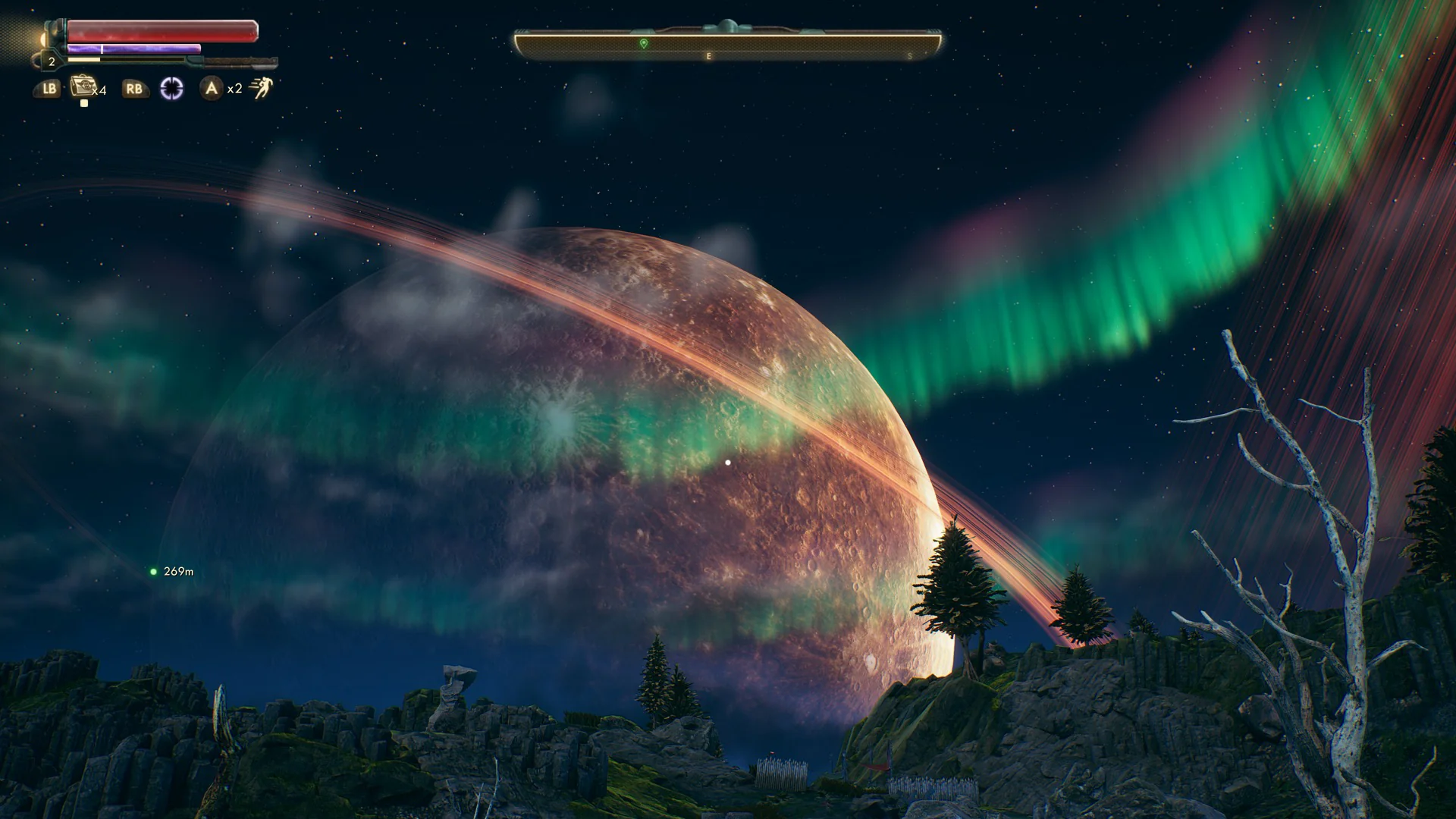
Constructing natural atmospheric light curtains begins with defining their flow across the sky. The toolkit provides two distinct geometrical approaches for generating these celestial ribbons: full custom pathing through splines and a rapid-deployment spiral system. When utilizing the spline-based lines, scene creators gain direct control over each section of the effect. Moving individual spline control points reshapes the arc of the light, twisting the splines alters the ribbon orientation relative to the horizon, and scaling modifies the vertical reach and presence of the curtain across the skybox.
This manual manipulation accommodates specific scene requirements, whether that involves wrapping an atmospheric band around mountain ridges or extending long curtains across open tundra levels. For production scenarios prioritizing speed or centralized sky phenomena, an included aurora spiral provides an instant alternative. The spiral asset removes the need to manually shape vertices and twist angles from scratch, presenting a structured formation that deploys immediately into a level while retaining the underlying movement and shading logic found in the spline variants.
Modulating Dynamic Colors Across the Aurora Borealis
Natural northern lights rarely maintain a static color distribution or a fixed intensity. To mirror the shifting nature of charged particles entering Earth's magnetosphere, the asset relies on Blueprint controls capable of altering color and opacity values dynamically over time. These controls operate on an individual basis, enabling separate ribbons or spiral layers to cycle through independent color spectrums rather than forcing the entire sky into uniform shifts.
Varying opacity over time creates the undulating, fading, and brightening behavior characteristic of real-world auroras and stylized fantasy night skies. By exposing these color and transparency settings in the Blueprints, light behavior can transition between sharp, focused bands of light and soft, diffused atmospheric glows. This temporal control ensures the sky remains continuously active, avoiding the artificial rigidity common in purely static skybox meshes.
Structure of Aurora Materials and Blueprint Logic
Working within visual effect packages often requires adjusting core shading values to suit project-specific environmental rendering. Everything in this package can be adjusted across its material instances, base materials, and accompanying Blueprints. The internal node structures across these elements are neatly aligned and fully commented, preventing the maintenance friction that often accompanies dense visual effect networks.
Material instances allow for direct iteration on visual properties without triggering long recompilation passes, making fine-tuning of brightness, glow balance, and edge falloff straightforward. Artists needing deeper alterations to how the curtains react can step directly into the commented master materials to inspect the texture blending and parameter inputs. The neat alignment within the Blueprints ensures that logic flows controlling timeline variables, opacity shifts, and color switching remain clear and easy to follow when adapting the system for custom gameplay triggers or environment managers.
Layering Shooting Stars in Night Sky Environments
Beyond the ribbon meshes and spiral geometries, the pack includes a standalone particle effect designed to produce shooting stars. Adding shooting stars introduces transient motion into the night sky, creating localized bursts of speed that contrast against the slow, sweeping presence of the main light ribbons. This particle setup contributes extra visual detail, breaking up empty regions between atmospheric bands and ground geometry.
The combination of sweeping atmospheric curtains and quick celestial streaks serves dual purposes. In realistic natural environments, the elements work together to build convincing polar night conditions. In fantasy RPG projects, where unusual sky phenomena are standard elements of worldbuilding, combining persistent ribbons with sudden particle streaks establishes an active, believable celestial canopy.
The Non-PBR Fjord Demonstration Scene
To provide a clear baseline for implementation, the package supplies an assembled demonstration scene depicting a night-time fjord. This level showcases both the primary ribbon effects and the shooting star particle system operating within a unified space. Notably, the fjord environment utilizes a non-PBR-based shading setup rather than standard physically based rendering workflows.
By arranging the light bands above reflective water planes and surrounding terrain, the demonstration environment illustrates how the glowing shapes interact with dark landscape silhouettes. It highlights spatial balance, demonstrating how spline twisting can be used to follow the contour of fjords or valleys while keeping the primary visual focal point firmly overhead. Exploring the included scene provides a direct look at how the author arranged the splines, configured the master Blueprints, and deployed the particle systems to produce a cohesive night atmosphere.
Atmospheric Context and Worldbuilding Options
In physical nature, the Aurora Borealis occurs near Earth's north pole when charged solar particles encounter the magnetosphere, mirrored by the Aurora Australis at the south pole. Recreating these phenomena visually requires tools that support both physical atmospheric recreation and stylized fantasy expressions. The underlying spline and spiral mechanics provide the physical movement needed for realistic natural simulations, while the exposed Blueprint controls for color shifting give environment artists the freedom to apply non-traditional hues suited to high-fantasy RPG worlds.
Because the controls allow independent tuning of pathing, rotation, scaling, color, and opacity, the effect can scale from subtle green arcs on an Arctic coastline to towering, multi-layered visual centerpieces over an otherworldly ruin. The combination of clean node organization and adaptable geometry ensures the system can be deployed directly from the pre-built spiral or extensively customized through custom spline curves.
 Mountain
 Game Development R
 Game Development R