"8652e693bd7bbc55"{"id":"1002990","slug":"arcade-vehicle-system","title":"Arcade Vehicle System","category":"Engine Tools","engine":"4.25","assetVersion":"Asset Version: 1.1","engineVersion":"Engine Version: 4.25","tag":"Engine Tools","accent":"blue","visual":"mech","summary":"Arcade Vehicle System derives vehicle motion from the PawnMovement component, so ArcadeVehicleMovementComponent drops into an existing blueprint and drives.","platform":"Unreal Engine","indexPolicy":"index","publishedAt":"2026-11-25T09:56:54.245Z","updatedAt":"2026-11-25T09:56:54.245Z","sourceNotes":[],"fileContents":[],"compatibility":["Unreal Engine","Asset Version: 1.1","Engine Version: 4.25"],"featuredImage":{"alt":"Arcade Vehicle System","src":"/wp-content/uploads/published/2026/11/1cb7539ee187-8df58369-97aa-4303-959e-af5c16ee12e2-e54cf853cb.webp"},"hasDownloadLink":true,"downloads":0,"terms":[{"taxonomy":"category","slug":"engine-tools-tools-and-plugins","name":"Engine Tools"}],"galleryImages":[{"src":"/wp-content/uploads/published/2026/11/25d68a6b5fad-c8e94ffd-c8c1-4932-9cd8-fd0b0c5885e7-904b4de9c8.webp","alt":"Arcade Vehicle System"},{"src":"/wp-content/uploads/published/2026/11/b2cafecdaf5a-9662915c-47f8-4e40-8475-10d718c3359a-50620ad510.webp","alt":"Arcade Vehicle System"},{"src":"/wp-content/uploads/published/2026/11/c43383dcc853-1e2bafcd-c913-483d-8e95-35ab2342f1a8-a9a07227aa.webp","alt":"Arcade Vehicle System"},{"src":"/wp-content/uploads/published/2026/11/eb2f966da359-798c7e9b-7fca-412c-b05f-f402c2cb94b7-af1fad5af4.webp","alt":"Arcade Vehicle System"},{"src":"/wp-content/uploads/published/2026/11/dfc6ca43f6f8-e2f6704c-4fc7-4358-a9a1-775141cd9991-c8be165490.webp","alt":"Arcade Vehicle System"},{"src":"/wp-content/uploads/published/2026/11/66964cc1191f-70e280ce-f691-4eb9-bec4-abb84fd8c6b8-e1aaa15370.webp","alt":"Arcade Vehicle System"},{"src":"/wp-content/uploads/published/2026/11/f08656328716-d5ce845f-e9b3-46a9-983d-0265f2040f03-f682f95b43.webp","alt":"Arcade Vehicle System"}],"accessPanel":{"kind":"resource","title":"Get this resource","safetyNote":"Resources are manually reviewed before listing to improve quality and reduce obvious risks.","fileName":"Arcade Vehicle System.7z","resourceType":"Resource archive","versions":[]},"contentHtml":"\u003cp\u003eVehicle handling in an arcade project is often a rebuild rather than an addition: a new pawn, a dedicated movement component, and a fresh wiring of whatever input and replication the vehicle actor already carried. Arcade Vehicle System takes the opposite approach. Its vehicle motion derives from the PawnMovement component, which means the piece added to a vehicle actor is ArcadeVehicleMovementComponent. Attach it to the vehicle blueprint already in the project, configure it, and the thing drives. No parallel vehicle class to maintain.\u003c/p\u003e \u003ch2\u003eDropping ArcadeVehicleMovementComponent Into an Existing Blueprint\u003c/h2\u003e \u003cp\u003eThe integration path is deliberately short. Because movement comes from PawnMovement rather than a bespoke framework, the plugin slots into the existing pawn instead of asking you to gut it. That is the whole reason the component-based structure exists: the vehicle keeps its own identity, its own input handling, its own attached meshes, and simply gains arcade motion underneath.\u003c/p\u003e \u003cp\u003eSetup happens in the blueprint. The component is added, tuned, and left to handle movement while the rest of the actor stays as it was. For teams with a vehicle actor that already works — a buggy body, wheels, a camera rig, an input mapping — this avoids the usual migration problem where the old pawn has to be abandoned for the plugin's version of it.\u003c/p\u003e \u003cp\u003eNothing forces a from-scratch build either. Example blueprints ship already configured for anyone who wants to see a working vehicle before wiring up their own, so the first test drive can happen without touching an existing project at all.\u003c/p\u003e \u003ch2\u003eWhy PawnMovement Sits Under the Arcade Vehicle System\u003c/h2\u003e \u003cp\u003eBuilding on PawnMovement is a structural decision with practical consequences. PawnMovement is the layer the engine already expects pawns to move through, so a vehicle that derives from it behaves like a citizen of the existing pawn pipeline rather than a guest. The movement component is the integration point, and everything the plugin does for arcade handling runs through that component.\u003c/p\u003e \u003cp\u003eThat same structure keeps the system flexible. Arcade handling is not a single fixed tuning — the movement component is where the feel of the vehicle is configured, and it is exposed for adjustment rather than locked behind a separate module. The same component serves road-style vehicles and looser arcade machinery, which is where suspension and wheel behaviour become part of the setup conversation rather than an afterthought.\u003c/p\u003e \u003ch2\u003eBlueprint and C++ Paths Through the Arcade Vehicle System\u003c/h2\u003e \u003cp\u003eProjects built purely in Blueprints and projects built in C++ are both covered. The plugin integrates and extends from either side, which matters for teams that prototype in Blueprints and then move logic down into code later — the vehicle does not have to be rewritten to make that transition.\u003c/p\u003e \u003cp\u003eExtension follows the same component structure. Blueprint-side work adds behaviour on top of the movement component; C++-side work reaches the same system from the code layer. Neither path is a second-class citizen, and the example blueprints serve as a reference for how the pieces are meant to be assembled.\u003c/p\u003e \u003ch2\u003eNetworking Behaviour in the Arcade Vehicle System\u003c/h2\u003e \u003cp\u003eMultiplayer is where this plugin spent the most effort. Getting vehicle movement to replicate cleanly on UE4's Nvidia PhysX was not straightforward, because of the engine's semi-fixed time-step. That timing behaviour interferes with the assumptions a networked movement component would prefer to make, and working around it took substantial work. This gives an implementation that, in the developer's own assessment, feels pretty good in motion.\u003c/p\u003e \u003cp\u003eThe current model is client-authoritative. Each client owns the movement of its vehicle, which keeps responsiveness high and avoids the input lag that server-authoritative vehicle motion tends to introduce. The trade-off is the usual one: a client-authoritative setup trusts the client.\u003c/p\u003e \u003cp\u003eThat trade-off is left open on purpose. Adding some form of server-side verification to catch cheating is described as extremely simple to implement, so a project that needs stricter authority can layer checks on top without replacing the movement system. Racing projects can ship with the responsive default and tighten later; competitive projects can add verification before launch.\u003c/p\u003e \u003ch3\u003eAsync Physics Is Not Supported\u003c/h3\u003e \u003cp\u003eOne boundary is stated plainly. The plugin does not currently support Async Physics. Any project planning to lean on asynchronous physics for vehicle simulation should treat that as a hard constraint of this system as it stands, not as something to be discovered mid-production.\u003c/p\u003e \u003ch2\u003eReference Material for Getting the Arcade Vehicle System Running\u003c/h2\u003e \u003cp\u003eSeveral pieces of material support the first session with the plugin. A tutorial video walks through installing a UE plugin for anyone who has not done it before. A showcase video demonstrates how the vehicles look and move. Example projects are provided for 4.26 and 4.27, giving a working reference build for two engine versions instead of one snapshot.\u003c/p\u003e \u003cp\u003eFor judging the handling itself, a free demo game exists — a way to feel how the vehicles drive before committing the system to a project. Handling is difficult to evaluate from video alone, and arcade tuning especially so, which makes the demo the most direct test available.\u003c/p\u003e \u003cp\u003eThe developer also frames the plugin as one that will keep changing, inviting feedback and stating an intent to improve it in the future. For a production plan, that reads as active development rather than a frozen release: useful, but worth accounting for if the vehicle system sits at the centre of a long project.\u003c/p\u003e \u003cp\u003eWhere the system fits is fairly clear once the constraints are on the table. It suits projects that already have a vehicle blueprint and want arcade motion added underneath it without a rebuild, teams working in either Blueprints or C++, and multiplayer work that can live with client-authoritative movement plus optional server-side checks. Plan around the missing Async Physics support, use the 4.26 and 4.27 example projects as the reference point, and test the driving feel on the demo rather than from video.\u003c/p\u003e\n\n\u003ch2\u003eExplore Similar Assets\u003c/h2\u003e\n\u003cul\u003e\n\u003cli\u003e\u003ca href=\"https://3dcghub.com/fgear-vehicle-physics/\" rel=\"noopener noreferrer\"\u003eFGear Vehicle Physics\u003c/a\u003e\u003c/li\u003e\n\u003cli\u003e\u003ca href=\"https://3dcghub.com/advanced-vehicle-system-replicated-modular-vehicle-physics/\" rel=\"noopener noreferrer\"\u003eAdvanced Vehicle System - [Replicated Modular Vehicle Physics]\u003c/a\u003e\u003c/li\u003e\n\u003cli\u003e\u003ca href=\"https://3dcghub.com/r-tune-vehicle-physics-2-0-vehicle-system-for-games-animation/\" rel=\"noopener noreferrer\"\u003eR-Tune Vehicle Physics 2.0 - Vehicle System for Games \u0026amp; Animation\u003c/a\u003e\u003c/li\u003e\n\u003cli\u003e\u003ca href=\"https://3dcghub.com/easy-vehicle-suspension-v2/\" rel=\"noopener noreferrer\"\u003eEasy Vehicle Suspension [v2]\u003c/a\u003e\u003c/li\u003e\n\u003cli\u003e\u003ca href=\"https://3dcghub.com/modular-movement/\" rel=\"noopener noreferrer\"\u003eModular Movement\u003c/a\u003e\u003c/li\u003e\n\u003c/ul\u003e","contentTextLength":6355,"navigation":{"current":1,"total":4911,"next":{"id":"1002989","slug":"anime-toon-shading","title":"Anime Toon Shading","category":"Shaders","platform":"Unreal Engine","updatedAt":"2026-11-25T09:52:00.556Z"}},"relatedResources":[{"id":"1000000","slug":"fgear-vehicle-physics","title":"FGear Vehicle Physics","category":"Engine Tools","engine":"5.1, 5.3 - 5.6","assetVersion":"1.6.1 - 1.8.3","engineVersion":"5.1, 5.3 - 5.6","tag":"Engine Tools","accent":"blue","visual":"mech","summary":"FGear Vehicle Physics is a custom vehicle physics solution for arcade and semi-arcade racing games, balancing realism, control, demos, docs, and example use.","platform":"Unreal Engine","indexPolicy":"index","publishedAt":"2026-05-19T08:25:16.034Z","updatedAt":"2026-05-19T14:42:25.560Z","sourceNotes":[],"fileContents":[],"compatibility":["Unreal Engine","Asset Version: 1.6.1 - 1.8.3","Engine version: 5.1, 5.3 - 5.6"],"featuredImage":{"alt":"FGear Vehicle Physics","src":"/wp-content/uploads/published/2026/05/5158990cfbe4-d351fdd6-e983-4b6d-b3d9-50ebc7959814-61b2dd7e26.webp"},"fileSizeBytes":170670348,"hasDownloadLink":true,"downloads":2},{"id":"1000781","slug":"advanced-vehicle-system-replicated-modular-vehicle-physics","title":"Advanced Vehicle System - [Replicated Modular Vehicle Physics]","category":"Engine Tools","engine":"4.26 - 5.7","assetVersion":"Asset Version: 1.2.7 - 1.4.5","engineVersion":"Engine Version: 4.26 - 5.7","tag":"Engine Tools","accent":"blue","visual":"mech","summary":"AVS Vehicle Physics bundles modular replicated driving, suspension, engine audio, tire smoke, skid marks, and trailer support into a single drop-in package.","platform":"Unreal Engine","indexPolicy":"index","publishedAt":"2026-07-30T10:29:04.441Z","updatedAt":"2026-07-30T10:29:04.441Z","sourceNotes":[],"fileContents":[],"compatibility":["Unreal Engine","Asset Version: 1.2.7 - 1.4.5","Engine Version: 4.26 - 5.7"],"featuredImage":{"alt":"Advanced Vehicle System - [Replicated Modular Vehicle Physics]","src":"/wp-content/uploads/published/2026/07/4b8b08c58b35-110cea5f-1d83-40f0-a17f-c6525039a95d-05124decc3.webp"},"fileSizeBytes":274172912,"hasDownloadLink":true,"downloads":1},{"id":"14404","slug":"r-tune-vehicle-physics-2-0-vehicle-system-for-games-animation","title":"R-Tune Vehicle Physics 2.0 - Vehicle System for Games \u0026 Animation","category":"Engine Tools","engine":"5.5 - 5.6","assetVersion":"Engine version: 5.5 - 5.6","engineVersion":"Asset Version:1.3.2 - 2.0","tag":"Engine Tools","accent":"blue","visual":"animation","summary":"Discover R-Tune Vehicle Physics 2.0, a powerful and flexible vehicle system built from scratch in C++ for Unreal Engine 5. This system simplifies vehicle creation using static meshes and offers frame-rate independent physics for professional game development.","platform":"Unreal Engine","indexPolicy":"noindex","publishedAt":"2026-03-11T17:55:23.000Z","updatedAt":"2026-04-19T15:45:47.000Z","sourceNotes":[],"fileContents":[],"compatibility":["Unreal Engine","Engine version: 5.5 - 5.6","Asset Version: 1.3.2 - 2.0"],"featuredImage":{"alt":"R-Tune Vehicle Physics 2.0 - Vehicle System for Games \u0026 Animation","src":"https://3dcghub.com/wp-content/uploads/2026/03/402ca51c-6e8f-4369-b575-12014c2be5a0.webp"},"fileSizeBytes":122746399,"hasDownloadLink":true,"downloads":2}]}[{"id":4225,"sourceId":4225,"taxonomyId":4225,"taxonomy":"category","slug":"asset-library","name":"Asset Library","parentId":null,"count":4765,"hasChildren":true,"href":"/","seoTitle":"Free Game Assets Library | 3DCGHUB","seoDescription":"Browse free Unreal Engine, Unity, Blender assets and game development tutorials on 3DCGHUB with previews, compatibility notes, and secure downloads.","sitemapEnabled":true,"children":[{"id":4227,"sourceId":4227,"taxonomyId":4227,"taxonomy":"category","slug":"blender-add-ons-plugins","name":"Blender Add-ons \u0026 Plugins","parentId":4225,"count":10,"hasChildren":false,"href":"/category/blender-add-ons-plugins/","seoTitle":"Free Blender Add-ons \u0026 Plugins | 3DCGHUB","seoDescription":"Browse free Blender Add-ons \u0026 Plugins tools for Blender on 3DCGHUB: curated downloads with preview images, compatibility notes and secure download access.","sitemapEnabled":true},{"id":514,"sourceId":514,"taxonomyId":514,"taxonomy":"category","slug":"unity-2","name":"Unity","parentId":4225,"count":453,"hasChildren":true,"href":"/category/unity-2/","seoTitle":"Free Unity Assets | 3DCGHUB","seoDescription":"Browse free Unity resources on 3DCGHUB: curated downloads with preview images, compatibility notes and secure download access.","sitemapEnabled":true,"children":[{"id":523,"sourceId":523,"taxonomyId":523,"taxonomy":"category","slug":"2d","name":"2D","parentId":514,"count":1,"hasChildren":true,"href":"/category/2d/","seoTitle":"Free Unity 2D | 3DCGHUB","seoDescription":"Browse free 2D assets for Unity on 3DCGHUB: curated downloads with preview images, compatibility notes and secure download access.","sitemapEnabled":true},{"id":515,"sourceId":515,"taxonomyId":515,"taxonomy":"category","slug":"3d-unity-2","name":"3D","parentId":514,"count":162,"hasChildren":true,"href":"/category/3d-unity-2/","seoTitle":"Free Unity 3D Assets | 3DCGHUB","seoDescription":"Browse free 3D assets for Unity on 3DCGHUB: curated downloads with preview images, compatibility notes and secure download access.","sitemapEnabled":true},{"id":565,"sourceId":565,"taxonomyId":565,"taxonomy":"category","slug":"add-ons","name":"Add-Ons","parentId":514,"count":2,"hasChildren":false,"href":"/category/add-ons/","seoTitle":"Free Unity Add-Ons | 3DCGHUB","seoDescription":"Browse free Add-Ons assets for Unity on 3DCGHUB: curated downloads with preview images, compatibility notes and secure download access.","sitemapEnabled":true},{"id":529,"sourceId":529,"taxonomyId":529,"taxonomy":"category","slug":"audio-unity-2","name":"Audio","parentId":514,"count":1,"hasChildren":true,"href":"/category/audio-unity-2/","seoTitle":"Free Unity Audio | 3DCGHUB","seoDescription":"Browse free Audio for Unity on 3DCGHUB: curated downloads with preview images, compatibility notes and secure download access.","sitemapEnabled":true},{"id":557,"sourceId":557,"taxonomyId":557,"taxonomy":"category","slug":"templates","name":"Templates","parentId":514,"count":36,"hasChildren":true,"href":"/category/templates/","seoTitle":"Free Unity Templates | 3DCGHUB","seoDescription":"Browse free Unity project templates on 3DCGHUB. Starter kits with previews, compatibility notes, and secure download access.","sitemapEnabled":true},{"id":533,"sourceId":533,"taxonomyId":533,"taxonomy":"category","slug":"tools-unity-2","name":"Tools","parentId":514,"count":0,"hasChildren":true,"href":"/category/tools-unity-2/","sitemapEnabled":true},{"id":554,"sourceId":554,"taxonomyId":554,"taxonomy":"category","slug":"vfx-unity-2","name":"VFX","parentId":514,"count":4,"hasChildren":true,"href":"/category/vfx-unity-2/","seoTitle":"Free Unity VFX | 3DCGHUB","seoDescription":"Browse free VFX for Unity on 3DCGHUB: curated downloads with preview images, compatibility notes and secure download access.","sitemapEnabled":true}]},{"id":511,"sourceId":511,"taxonomyId":511,"taxonomy":"category","slug":"unreal-engine-2","name":"Unreal Engine","parentId":4225,"count":4303,"hasChildren":true,"href":"/category/unreal-engine-2/","seoTitle":"Free Unreal Engine Assets | 3DCGHUB","seoDescription":"Browse free Unreal Engine resources on 3DCGHUB: curated downloads with preview images, compatibility notes and secure download access.","sitemapEnabled":true,"children":[{"id":54,"sourceId":54,"taxonomyId":54,"taxonomy":"category","slug":"3d","name":"3D","parentId":511,"count":2434,"hasChildren":true,"href":"/category/3d/","seoTitle":"Free Unreal Engine 3D | 3DCGHUB","seoDescription":"Browse free 3D assets for Unreal Engine on 3DCGHUB: curated downloads with preview images, compatibility notes and secure download access.","sitemapEnabled":true},{"id":441,"sourceId":441,"taxonomyId":441,"taxonomy":"category","slug":"animations","name":"Animations","parentId":511,"count":245,"hasChildren":true,"href":"/category/animations/","seoTitle":"Free Unreal Engine Animations | 3DCGHUB","seoDescription":"Browse free Animations for Unreal Engine on 3DCGHUB: curated downloads with preview images, compatibility notes and secure download access.","sitemapEnabled":true},{"id":446,"sourceId":446,"taxonomyId":446,"taxonomy":"category","slug":"audio","name":"Audio","parentId":511,"count":63,"hasChildren":true,"href":"/category/audio/","seoTitle":"Free Unreal Engine Audio Resources | 3DCGHUB","seoDescription":"Browse free Unreal Engine audio resources including sound effects, voices, dialogue, and ambient sounds. Curated free downloads on 3DCGHUB.","sitemapEnabled":true},{"id":466,"sourceId":466,"taxonomyId":466,"taxonomy":"category","slug":"game-systems","name":"Game Systems","parentId":511,"count":366,"hasChildren":true,"href":"/category/game-systems/","seoTitle":"Free Unreal Engine Game Systems | 3DCGHUB","seoDescription":"Browse free Game Systems tools for Unreal Engine on 3DCGHUB: curated downloads with preview images, compatibility notes and secure download access.","sitemapEnabled":true},{"id":478,"sourceId":478,"taxonomyId":478,"taxonomy":"category","slug":"game-templates","name":"Game Templates","parentId":511,"count":151,"hasChildren":true,"href":"/category/game-templates/","seoTitle":"Free Unreal Engine Game Templates | 3DCGHUB","seoDescription":"Browse free Game Templates for Unreal Engine on 3DCGHUB: curated downloads with preview images, compatibility notes and secure download access.","sitemapEnabled":true},{"id":432,"sourceId":432,"taxonomyId":432,"taxonomy":"category","slug":"hdri","name":"HDRI","parentId":511,"count":6,"hasChildren":true,"href":"/category/hdri/","seoTitle":"Free Unreal Engine HDRI | 3DCGHUB","seoDescription":"Browse free Unreal Engine HDRI skies and lighting maps on 3DCGHUB. Environment lighting with previews and secure downloads.","sitemapEnabled":true},{"id":228,"sourceId":228,"taxonomyId":228,"taxonomy":"category","slug":"material-and-textures","name":"Material \u0026 Textures","parentId":511,"count":172,"hasChildren":true,"href":"/category/material-and-textures/","seoTitle":"Free Unreal Engine Material \u0026 Textures | 3DCGHUB","seoDescription":"Browse free Material \u0026 Textures for Unreal Engine on 3DCGHUB: curated downloads with preview images, compatibility notes and secure download access.","sitemapEnabled":true},{"id":298,"sourceId":298,"taxonomyId":298,"taxonomy":"category","slug":"sprites-and-flipbooks","name":"Sprites \u0026 Flipbooks","parentId":511,"count":18,"hasChildren":true,"href":"/category/sprites-and-flipbooks/","seoTitle":"Free Unreal Engine Sprites \u0026 Flipbooks | 3DCGHUB","seoDescription":"Browse free Sprites \u0026 Flipbooks assets for Unreal Engine on 3DCGHUB: curated downloads with preview images, compatibility notes and secure download access.","sitemapEnabled":true},{"id":489,"sourceId":489,"taxonomyId":489,"taxonomy":"category","slug":"tools-and-plugins","name":"Tools \u0026 Plugins","parentId":511,"count":390,"hasChildren":true,"href":"/category/tools-and-plugins/","seoTitle":"Free Unreal Engine Tools \u0026 Plugins | 3DCGHUB","seoDescription":"Browse free Tools \u0026 Plugins for Unreal Engine on 3DCGHUB: curated downloads with preview images, compatibility notes and secure download access.","sitemapEnabled":true},{"id":459,"sourceId":459,"taxonomyId":459,"taxonomy":"category","slug":"ui","name":"UI","parentId":511,"count":45,"hasChildren":true,"href":"/category/ui/","seoTitle":"Free Unreal Engine UI | 3DCGHUB","seoDescription":"Browse free UI for Unreal Engine on 3DCGHUB: curated downloads with preview images, compatibility notes and secure download access.","sitemapEnabled":true},{"id":450,"sourceId":450,"taxonomyId":450,"taxonomy":"category","slug":"vfx","name":"VFX","parentId":511,"count":413,"hasChildren":true,"href":"/category/vfx/","seoTitle":"Free Unreal Engine VFX | 3DCGHUB","seoDescription":"Browse free VFX for Unreal Engine on 3DCGHUB: curated downloads with preview images, compatibility notes and secure download access.","sitemapEnabled":true}]}]},{"id":4222,"sourceId":4222,"taxonomyId":4222,"taxonomy":"category","slug":"tutorial-library","name":"Tutorial Library","parentId":null,"count":117,"hasChildren":false,"href":"/tutorials/","seoTitle":"Free Game Development Tutorial Library | 3DCGHUB","seoDescription":"Browse free game development tutorials for Unreal Engine, Unity, Blender, and more on 3DCGHUB with practical workflows and secure downloads.","sitemapEnabled":true}]
Resource screenshots
1 / 7
Asset drops
Daily Asset Drops
Follow 3DCGHUB on Telegram for daily Unreal, Unity & Blender drops and curated CC0 releases.
Resources are manually reviewed before listing to improve quality and reduce obvious risks.
Reviewed archive
Engine Tools
Arcade Vehicle System
Arcade Vehicle System derives vehicle motion from the PawnMovement component, so ArcadeVehicleMovementComponent drops into an existing blueprint and drives.
Vehicle handling in an arcade project is often a rebuild rather than an addition: a new pawn, a dedicated movement component, and a fresh wiring of whatever input and replication the vehicle actor already carried. Arcade Vehicle System takes the opposite approach. Its vehicle motion derives from the PawnMovement component, which means the piece added to a vehicle actor is ArcadeVehicleMovementComponent. Attach it to the vehicle blueprint already in the project, configure it, and the thing drives. No parallel vehicle class to maintain.
Dropping ArcadeVehicleMovementComponent Into an Existing Blueprint
The integration path is deliberately short. Because movement comes from PawnMovement rather than a bespoke framework, the plugin slots into the existing pawn instead of asking you to gut it. That is the whole reason the component-based structure exists: the vehicle keeps its own identity, its own input handling, its own attached meshes, and simply gains arcade motion underneath.
Setup happens in the blueprint. The component is added, tuned, and left to handle movement while the rest of the actor stays as it was. For teams with a vehicle actor that already works — a buggy body, wheels, a camera rig, an input mapping — this avoids the usual migration problem where the old pawn has to be abandoned for the plugin's version of it.
Nothing forces a from-scratch build either. Example blueprints ship already configured for anyone who wants to see a working vehicle before wiring up their own, so the first test drive can happen without touching an existing project at all.
Why PawnMovement Sits Under the Arcade Vehicle System
Building on PawnMovement is a structural decision with practical consequences. PawnMovement is the layer the engine already expects pawns to move through, so a vehicle that derives from it behaves like a citizen of the existing pawn pipeline rather than a guest. The movement component is the integration point, and everything the plugin does for arcade handling runs through that component.
That same structure keeps the system flexible. Arcade handling is not a single fixed tuning — the movement component is where the feel of the vehicle is configured, and it is exposed for adjustment rather than locked behind a separate module. The same component serves road-style vehicles and looser arcade machinery, which is where suspension and wheel behaviour become part of the setup conversation rather than an afterthought.
Blueprint and C++ Paths Through the Arcade Vehicle System
Projects built purely in Blueprints and projects built in C++ are both covered. The plugin integrates and extends from either side, which matters for teams that prototype in Blueprints and then move logic down into code later — the vehicle does not have to be rewritten to make that transition.
Extension follows the same component structure. Blueprint-side work adds behaviour on top of the movement component; C++-side work reaches the same system from the code layer. Neither path is a second-class citizen, and the example blueprints serve as a reference for how the pieces are meant to be assembled.
Networking Behaviour in the Arcade Vehicle System
Multiplayer is where this plugin spent the most effort. Getting vehicle movement to replicate cleanly on UE4's Nvidia PhysX was not straightforward, because of the engine's semi-fixed time-step. That timing behaviour interferes with the assumptions a networked movement component would prefer to make, and working around it took substantial work. This gives an implementation that, in the developer's own assessment, feels pretty good in motion.
The current model is client-authoritative. Each client owns the movement of its vehicle, which keeps responsiveness high and avoids the input lag that server-authoritative vehicle motion tends to introduce. The trade-off is the usual one: a client-authoritative setup trusts the client.
That trade-off is left open on purpose. Adding some form of server-side verification to catch cheating is described as extremely simple to implement, so a project that needs stricter authority can layer checks on top without replacing the movement system. Racing projects can ship with the responsive default and tighten later; competitive projects can add verification before launch.
Async Physics Is Not Supported
One boundary is stated plainly. The plugin does not currently support Async Physics. Any project planning to lean on asynchronous physics for vehicle simulation should treat that as a hard constraint of this system as it stands, not as something to be discovered mid-production.
Reference Material for Getting the Arcade Vehicle System Running
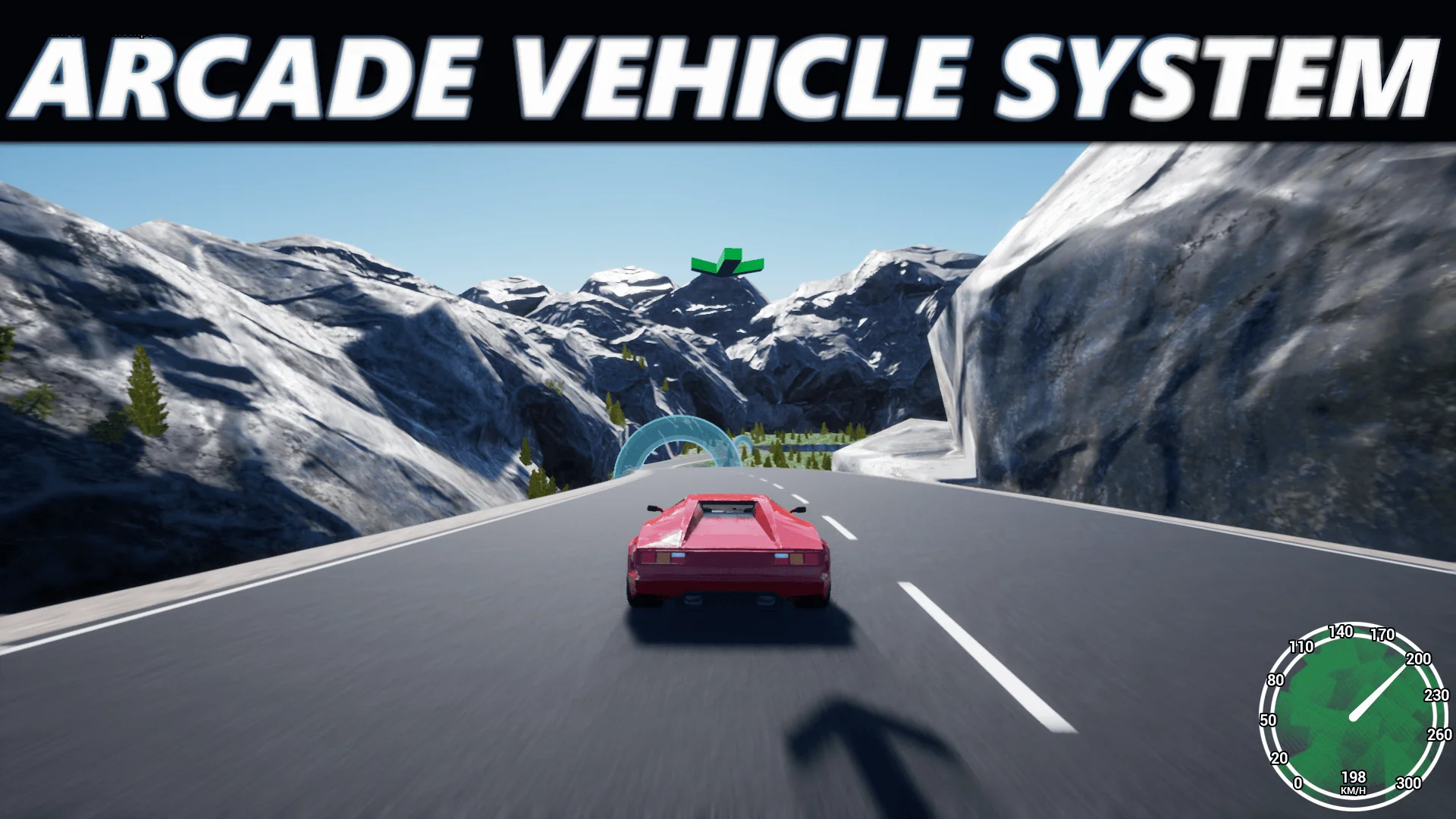
Several pieces of material support the first session with the plugin. A tutorial video walks through installing a UE plugin for anyone who has not done it before. A showcase video demonstrates how the vehicles look and move. Example projects are provided for 4.26 and 4.27, giving a working reference build for two engine versions instead of one snapshot.
For judging the handling itself, a free demo game exists — a way to feel how the vehicles drive before committing the system to a project. Handling is difficult to evaluate from video alone, and arcade tuning especially so, which makes the demo the most direct test available.
The developer also frames the plugin as one that will keep changing, inviting feedback and stating an intent to improve it in the future. For a production plan, that reads as active development rather than a frozen release: useful, but worth accounting for if the vehicle system sits at the centre of a long project.
Where the system fits is fairly clear once the constraints are on the table. It suits projects that already have a vehicle blueprint and want arcade motion added underneath it without a rebuild, teams working in either Blueprints or C++, and multiplayer work that can live with client-authoritative movement plus optional server-side checks. Plan around the missing Async Physics support, use the 4.26 and 4.27 example projects as the reference point, and test the driving feel on the demo rather than from video.
 Engine Tools
 Engine Tools
 Engine Tools