"8652e693bd7bbc55"{"id":"1002989","slug":"anime-toon-shading","title":"Anime Toon Shading","category":"Shaders","engine":"4.18+,5.0+","assetVersion":"","engineVersion":"Engine Version: 4.18+,5.0+","tag":"Shaders","accent":"blue","visual":"mech","summary":"A geometry-based Anime Toon Shading package with per-object specular, shading and outline control, dynamic light support, outline shells and gradient tools.","platform":"Unreal Engine","indexPolicy":"index","publishedAt":"2026-11-25T09:52:00.556Z","updatedAt":"2026-11-25T09:52:00.556Z","sourceNotes":[],"fileContents":[],"compatibility":["Unreal Engine","Engine Version: 4.18+,5.0+"],"featuredImage":{"alt":"Anime Toon Shading","src":"/wp-content/uploads/published/2026/11/004f165e61e1-4c965bce-a96f-4422-905d-e5f06bbfede3-b75a5c1973.webp"},"hasDownloadLink":true,"downloads":0,"terms":[{"taxonomy":"category","slug":"shaders","name":"Shaders"}],"galleryImages":[{"src":"/wp-content/uploads/published/2026/11/3f7cfda008ee-423336f8-26ec-46a3-86fa-adec708a16cd-0d974de352.webp","alt":"Anime Toon Shading"},{"src":"/wp-content/uploads/published/2026/11/01d1a2a9e258-225d9dbe-440e-4311-b2c1-34118335626f-24f6ad9f0d.webp","alt":"Anime Toon Shading"},{"src":"/wp-content/uploads/published/2026/11/46f3de9a90bb-a110c921-1633-41bf-9b42-18281663faee-2968d81de9.webp","alt":"Anime Toon Shading"},{"src":"/wp-content/uploads/published/2026/11/f65459904559-02964844-59cb-4cb1-b87b-cb2acfc08f4b-0d0b665656.webp","alt":"Anime Toon Shading"},{"src":"/wp-content/uploads/published/2026/11/92de66e9014c-7e98b1f5-46bd-416b-9fbc-13e179215d35-dc410bf785.webp","alt":"Anime Toon Shading"},{"src":"/wp-content/uploads/published/2026/11/2a10ea62b86d-0404927d-c4db-46d3-850f-c0621cb68252-b0167954c2.webp","alt":"Anime Toon Shading"},{"src":"/wp-content/uploads/published/2026/11/9c9e194847d4-2a53f52c-49fb-4ffe-900d-3bb313deb8db-f9a547ace9.webp","alt":"Anime Toon Shading"}],"accessPanel":{"kind":"resource","title":"Get this resource","safetyNote":"Resources are manually reviewed before listing to improve quality and reduce obvious risks.","fileName":"Content.7z","resourceType":"Resource archive","versions":[]},"contentHtml":"\u003cp\u003eSwapping a post-process stack for a geometry-based model changes where the work actually happens. With Anime Toon Shading, the cartoon response is authored on the mesh rather than layered over the finished frame, which means a scene can hold characters lit under completely different toon conditions at the same time. The two references behind the look are \u003cem\u003eGravity Rush\u003c/em\u003e And \u003cem\u003eDragon Ball FighterZ\u003c/em\u003e, and the package is pitched as a starting point for anyone chasing that kind of dynamic cartoon lighting inside their own game.\u003c/p\u003e \u003ch2\u003eWhere the Anime Toon Shading Model Sits in the Render Path\u003c/h2\u003e \u003cp\u003eThe defining choice is that this is a post-process independent approach to cartoon style effects. Nothing in the toon response depends on a full-screen pass reading the finished color buffer. Instead, a geometry-based shading model handles the stylization, and that single decision cascades into everything else the package does.\u003c/p\u003e \u003cp\u003eBecause the shading is resolved per piece of geometry, every character on the scene can be customized to its own specific lighting conditions. A hero standing in a warm key light and a background fighter under a cool rim do not have to compromise through one shared screen-space treatment. Each one gets parameters set for the situation it is in.\u003c/p\u003e \u003cp\u003eIt also runs cleanly in forward rendering mode, which is the second structural point worth understanding before anything else is configured. Forward rendering keeps the transparency and multi-light behavior close to the geometry, so the toon response and the renderer are not fighting each other over when the effect gets applied.\u003c/p\u003e \u003ch2\u003eInstancing Specular, Shading and Outline Per Object\u003c/h2\u003e \u003cp\u003eMaterial configuration is described as advanced and instanced per object, covering specular, shading and outline as a set. Rather than editing one global look and hoping it survives contact with the scene, you set the values on the character that needs them. The package ships with a spread of parameters designed specifically around customizing shading on characters, so the tuning surface is deeper than a single color ramp.\u003c/p\u003e \u003cp\u003eThat instancing arrangement is what makes a mixed cast practical. A stylized outfit, a metal accessory and a head of hair can all sit on the same actor while pulling different values from the material setup. The outline is part of the same per-object configuration, so silhouette weight can be adjusted alongside the shading rather than in a separate system.\u003c/p\u003e \u003ch2\u003eDynamic Lights That Reach the Toon Response\u003c/h2\u003e \u003cp\u003eLighting is not baked into the look. A dynamic directional light and multiple dynamic point lights can affect actors, which means the toon shading responds to lights that move, change intensity, or appear mid-scene. For action-heavy sequences, that is the difference between a static cel look and one that reacts as the camera and choreography shift.\u003c/p\u003e \u003cp\u003eThere is also an interface built for easily combining the dynamic toon lighting system with any actor. The intent is that a new character does not require a bespoke lighting rig of its own — it plugs into the existing dynamic setup and inherits the behavior. Blueprint-level control keeps that integration workable during production, where characters arrive in batches and get swapped between scenes.\u003c/p\u003e \u003ch3\u003eOutline Shells and the Two-Dimensional Gradient\u003c/h3\u003e \u003cp\u003eSilhouettes come from an outline shell mesh — an additional mesh rendered from inside. That is a concrete geometry solution rather than a screen-space edge filter, and it fits the rest of the package's philosophy: the toon read is built from things that exist in the scene, not from a pass over the finished image.\u003c/p\u003e \u003cp\u003eThe shading gradients are equally hands-on. A gradient texture creator is included, so the ramps used by the toon response can be generated rather than sourced. The fresnel and shadow response is two-dimensional, giving separate control over how the surface falls off at grazing angles and how the shadowed side resolves. Together with the per-object parameter set, this is where most of the character-specific styling gets dialed in.\u003c/p\u003e \u003ch2\u003eHair, Eyes, Metal and Translucent Surfaces\u003c/h2\u003e \u003cp\u003eAnime Toon Shading covers material types that typically break a generic cel shader. Anisotropic specular handles hair, following the directional sheen that strands need instead of flattening into a single band. Mat caps support eyes and metal, giving those surfaces a readable highlight that stays stable as the camera moves.\u003c/p\u003e \u003cp\u003eTranslucent materials are supported in both alpha and masked forms, which matters for cloth edges, hair cards and any element that needs to sit between opaque and fully cut out. The material function itself can be used as either an unlit or a lit material, so a surface can opt out of scene lighting entirely or stay in the light where the dynamic setup should affect it.\u003c/p\u003e \u003ch2\u003eParagon Meshes, Forward Rendering and Headroom\u003c/h2\u003e \u003cp\u003eThe package was tested on meshes from \u003cem\u003eParagon\u003c/em\u003e, which the documentation calls out as a good source for assets that take well to stylizing. Testing against that kind of dense, realistically shaded character geometry is a useful signal: the shading model has been exercised on meshes that were not authored for a cartoon look in the first place.\u003c/p\u003e \u003cp\u003ePerformance is described as very fast and GPU-friendly, and forward rendering mode works in VR and mobile. Those are the two contexts where a heavy full-screen effect tends to be the first thing cut, so a geometry-based approach that avoids the post-process pass has a practical advantage there. When a project does want an external post-process on top, the package is built to integrate easily with one rather than blocking it.\u003c/p\u003e \u003cp\u003eFor a team setting up a stylized title, the order of work is straightforward: confirm the forward rendering path, configure the per-object material instances for each character, wire the actors into the dynamic lighting interface, then tune outlines and the two-dimensional gradient to taste. The \u003cem\u003eGravity Rush\u003c/em\u003e And \u003cem\u003eDragon Ball FighterZ\u003c/em\u003e References set the target; the shell mesh, gradient creator and per-object parameters are the tools that get a project there.\u003c/p\u003e\n\n\u003ch2\u003eExplore Similar Assets\u003c/h2\u003e\n\u003cul\u003e\n\u003cli\u003e\u003ca href=\"https://3dcghub.com/easy-impact-frames/\" rel=\"noopener noreferrer\"\u003eEasy Impact Frames\u003c/a\u003e\u003c/li\u003e\n\u003cli\u003e\u003ca href=\"https://3dcghub.com/stylized-rendering-system-cel-shader/\" rel=\"noopener noreferrer\"\u003eStylized Rendering System (Cel-Shader)\u003c/a\u003e\u003c/li\u003e\n\u003cli\u003e\u003ca href=\"https://3dcghub.com/cartoonists-studio/\" rel=\"noopener noreferrer\"\u003eCartoonist\u0026#039;s Studio\u003c/a\u003e\u003c/li\u003e\n\u003cli\u003e\u003ca href=\"https://3dcghub.com/shield-system-pack/\" rel=\"noopener noreferrer\"\u003eShield System pack\u003c/a\u003e\u003c/li\u003e\n\u003cli\u003e\u003ca href=\"https://3dcghub.com/realtoon-pro-anime-toon-shader/\" rel=\"noopener noreferrer\"\u003eRealToon (Pro Anime/Toon Shader)\u003c/a\u003e\u003c/li\u003e\n\u003c/ul\u003e","contentTextLength":6202,"navigation":{"current":2,"total":4911,"previous":{"id":"1002990","slug":"arcade-vehicle-system","title":"Arcade Vehicle System","category":"Engine Tools","platform":"Unreal Engine","updatedAt":"2026-11-25T09:56:54.245Z"},"next":{"id":"1002988","slug":"animated-modern-civilian-hands-pack","title":"Animated Modern Civilian Hands Pack","category":"Humans","platform":"Unreal Engine","updatedAt":"2026-11-25T09:51:16.864Z"}},"relatedResources":[{"id":"1002571","slug":"easy-impact-frames","title":"Easy Impact Frames","category":"Shaders","engine":"5.0+","assetVersion":"","engineVersion":"Engine Version: 5.0+","tag":"Shaders","accent":"blue","visual":"mech","summary":"Explore Easy Impact Frames, a stylized VFX package delivering screen flashes, dynamic materials, and drag-and-drop systems for anime combat games.","platform":"Unreal Engine","indexPolicy":"index","publishedAt":"2026-11-13T18:07:36.408Z","updatedAt":"2026-11-13T18:07:36.408Z","sourceNotes":[],"fileContents":[],"compatibility":["Unreal Engine","Engine Version: 5.0+"],"featuredImage":{"alt":"Easy Impact Frames","src":"/wp-content/uploads/published/2026/11/6f5d3adba137-5c615008-47ea-4f52-b9b3-17cb22d5da08-ece2865eb1.webp"},"fileSizeBytes":112096064,"hasDownloadLink":true,"downloads":0},{"id":"15951","slug":"stylized-rendering-system-cel-shader","title":"Stylized Rendering System (Cel-Shader)","category":"Shaders","engine":"5.0+","assetVersion":"Engine version: 5.0+","engineVersion":"4.26","tag":"Shaders","accent":"blue","visual":"city","summary":"Transform your project with the Stylized Rendering System (Cel-Shader), featuring 25 outline styles and easy drag-and-drop setup for anime and manga aesthetics.","platform":"Unreal Engine","indexPolicy":"noindex","publishedAt":"2026-03-12T13:33:25.000Z","updatedAt":"2026-04-19T15:44:38.000Z","sourceNotes":[],"fileContents":[],"compatibility":["Unreal Engine","Engine version: 5.0+"],"featuredImage":{"alt":"Stylized Rendering System (Cel-Shader)","src":"https://3dcghub.com/wp-content/uploads/2026/03/e9e51600-f665-4ee5-95a5-93a70a539615.webp"},"fileSizeBytes":196321270,"hasDownloadLink":true,"downloads":5},{"id":"4554","slug":"cartoonists-studio","title":"Cartoonist's Studio","category":"Tools, Objects \u0026 Decor","engine":"5.1+","assetVersion":"Engine version: 5.1+","engineVersion":"5.1","tag":"Tools","accent":"blue","visual":"animation","summary":"Enhance your project with a stylized Cartoonist's Studio. Features toon shading, post-processing effects, and line materials for a perfect retro game look.","platform":"Unreal Engine","indexPolicy":"noindex","publishedAt":"2026-02-13T08:42:42.000Z","updatedAt":"2026-04-19T15:57:07.000Z","sourceNotes":[],"fileContents":[],"compatibility":["Unreal Engine","Engine version: 5.1+"],"featuredImage":{"alt":"Cartoonist's Studio","src":"https://3dcghub.com/wp-content/uploads/2026/02/28aaa245-161c-4346-b09f-ed2cdced2797.webp"},"fileSizeBytes":124468305,"hasDownloadLink":true,"downloads":0}]}[{"id":4225,"sourceId":4225,"taxonomyId":4225,"taxonomy":"category","slug":"asset-library","name":"Asset Library","parentId":null,"count":4765,"hasChildren":true,"href":"/","seoTitle":"Free Game Assets Library | 3DCGHUB","seoDescription":"Browse free Unreal Engine, Unity, Blender assets and game development tutorials on 3DCGHUB with previews, compatibility notes, and secure downloads.","sitemapEnabled":true,"children":[{"id":4227,"sourceId":4227,"taxonomyId":4227,"taxonomy":"category","slug":"blender-add-ons-plugins","name":"Blender Add-ons \u0026 Plugins","parentId":4225,"count":10,"hasChildren":false,"href":"/category/blender-add-ons-plugins/","seoTitle":"Free Blender Add-ons \u0026 Plugins | 3DCGHUB","seoDescription":"Browse free Blender Add-ons \u0026 Plugins tools for Blender on 3DCGHUB: curated downloads with preview images, compatibility notes and secure download access.","sitemapEnabled":true},{"id":514,"sourceId":514,"taxonomyId":514,"taxonomy":"category","slug":"unity-2","name":"Unity","parentId":4225,"count":453,"hasChildren":true,"href":"/category/unity-2/","seoTitle":"Free Unity Assets | 3DCGHUB","seoDescription":"Browse free Unity resources on 3DCGHUB: curated downloads with preview images, compatibility notes and secure download access.","sitemapEnabled":true,"children":[{"id":523,"sourceId":523,"taxonomyId":523,"taxonomy":"category","slug":"2d","name":"2D","parentId":514,"count":1,"hasChildren":true,"href":"/category/2d/","seoTitle":"Free Unity 2D | 3DCGHUB","seoDescription":"Browse free 2D assets for Unity on 3DCGHUB: curated downloads with preview images, compatibility notes and secure download access.","sitemapEnabled":true},{"id":515,"sourceId":515,"taxonomyId":515,"taxonomy":"category","slug":"3d-unity-2","name":"3D","parentId":514,"count":162,"hasChildren":true,"href":"/category/3d-unity-2/","seoTitle":"Free Unity 3D Assets | 3DCGHUB","seoDescription":"Browse free 3D assets for Unity on 3DCGHUB: curated downloads with preview images, compatibility notes and secure download access.","sitemapEnabled":true},{"id":565,"sourceId":565,"taxonomyId":565,"taxonomy":"category","slug":"add-ons","name":"Add-Ons","parentId":514,"count":2,"hasChildren":false,"href":"/category/add-ons/","seoTitle":"Free Unity Add-Ons | 3DCGHUB","seoDescription":"Browse free Add-Ons assets for Unity on 3DCGHUB: curated downloads with preview images, compatibility notes and secure download access.","sitemapEnabled":true},{"id":529,"sourceId":529,"taxonomyId":529,"taxonomy":"category","slug":"audio-unity-2","name":"Audio","parentId":514,"count":1,"hasChildren":true,"href":"/category/audio-unity-2/","seoTitle":"Free Unity Audio | 3DCGHUB","seoDescription":"Browse free Audio for Unity on 3DCGHUB: curated downloads with preview images, compatibility notes and secure download access.","sitemapEnabled":true},{"id":557,"sourceId":557,"taxonomyId":557,"taxonomy":"category","slug":"templates","name":"Templates","parentId":514,"count":36,"hasChildren":true,"href":"/category/templates/","seoTitle":"Free Unity Templates | 3DCGHUB","seoDescription":"Browse free Unity project templates on 3DCGHUB. Starter kits with previews, compatibility notes, and secure download access.","sitemapEnabled":true},{"id":533,"sourceId":533,"taxonomyId":533,"taxonomy":"category","slug":"tools-unity-2","name":"Tools","parentId":514,"count":0,"hasChildren":true,"href":"/category/tools-unity-2/","sitemapEnabled":true},{"id":554,"sourceId":554,"taxonomyId":554,"taxonomy":"category","slug":"vfx-unity-2","name":"VFX","parentId":514,"count":4,"hasChildren":true,"href":"/category/vfx-unity-2/","seoTitle":"Free Unity VFX | 3DCGHUB","seoDescription":"Browse free VFX for Unity on 3DCGHUB: curated downloads with preview images, compatibility notes and secure download access.","sitemapEnabled":true}]},{"id":511,"sourceId":511,"taxonomyId":511,"taxonomy":"category","slug":"unreal-engine-2","name":"Unreal Engine","parentId":4225,"count":4303,"hasChildren":true,"href":"/category/unreal-engine-2/","seoTitle":"Free Unreal Engine Assets | 3DCGHUB","seoDescription":"Browse free Unreal Engine resources on 3DCGHUB: curated downloads with preview images, compatibility notes and secure download access.","sitemapEnabled":true,"children":[{"id":54,"sourceId":54,"taxonomyId":54,"taxonomy":"category","slug":"3d","name":"3D","parentId":511,"count":2434,"hasChildren":true,"href":"/category/3d/","seoTitle":"Free Unreal Engine 3D | 3DCGHUB","seoDescription":"Browse free 3D assets for Unreal Engine on 3DCGHUB: curated downloads with preview images, compatibility notes and secure download access.","sitemapEnabled":true},{"id":441,"sourceId":441,"taxonomyId":441,"taxonomy":"category","slug":"animations","name":"Animations","parentId":511,"count":245,"hasChildren":true,"href":"/category/animations/","seoTitle":"Free Unreal Engine Animations | 3DCGHUB","seoDescription":"Browse free Animations for Unreal Engine on 3DCGHUB: curated downloads with preview images, compatibility notes and secure download access.","sitemapEnabled":true},{"id":446,"sourceId":446,"taxonomyId":446,"taxonomy":"category","slug":"audio","name":"Audio","parentId":511,"count":63,"hasChildren":true,"href":"/category/audio/","seoTitle":"Free Unreal Engine Audio Resources | 3DCGHUB","seoDescription":"Browse free Unreal Engine audio resources including sound effects, voices, dialogue, and ambient sounds. Curated free downloads on 3DCGHUB.","sitemapEnabled":true},{"id":466,"sourceId":466,"taxonomyId":466,"taxonomy":"category","slug":"game-systems","name":"Game Systems","parentId":511,"count":366,"hasChildren":true,"href":"/category/game-systems/","seoTitle":"Free Unreal Engine Game Systems | 3DCGHUB","seoDescription":"Browse free Game Systems tools for Unreal Engine on 3DCGHUB: curated downloads with preview images, compatibility notes and secure download access.","sitemapEnabled":true},{"id":478,"sourceId":478,"taxonomyId":478,"taxonomy":"category","slug":"game-templates","name":"Game Templates","parentId":511,"count":151,"hasChildren":true,"href":"/category/game-templates/","seoTitle":"Free Unreal Engine Game Templates | 3DCGHUB","seoDescription":"Browse free Game Templates for Unreal Engine on 3DCGHUB: curated downloads with preview images, compatibility notes and secure download access.","sitemapEnabled":true},{"id":432,"sourceId":432,"taxonomyId":432,"taxonomy":"category","slug":"hdri","name":"HDRI","parentId":511,"count":6,"hasChildren":true,"href":"/category/hdri/","seoTitle":"Free Unreal Engine HDRI | 3DCGHUB","seoDescription":"Browse free Unreal Engine HDRI skies and lighting maps on 3DCGHUB. Environment lighting with previews and secure downloads.","sitemapEnabled":true},{"id":228,"sourceId":228,"taxonomyId":228,"taxonomy":"category","slug":"material-and-textures","name":"Material \u0026 Textures","parentId":511,"count":172,"hasChildren":true,"href":"/category/material-and-textures/","seoTitle":"Free Unreal Engine Material \u0026 Textures | 3DCGHUB","seoDescription":"Browse free Material \u0026 Textures for Unreal Engine on 3DCGHUB: curated downloads with preview images, compatibility notes and secure download access.","sitemapEnabled":true},{"id":298,"sourceId":298,"taxonomyId":298,"taxonomy":"category","slug":"sprites-and-flipbooks","name":"Sprites \u0026 Flipbooks","parentId":511,"count":18,"hasChildren":true,"href":"/category/sprites-and-flipbooks/","seoTitle":"Free Unreal Engine Sprites \u0026 Flipbooks | 3DCGHUB","seoDescription":"Browse free Sprites \u0026 Flipbooks assets for Unreal Engine on 3DCGHUB: curated downloads with preview images, compatibility notes and secure download access.","sitemapEnabled":true},{"id":489,"sourceId":489,"taxonomyId":489,"taxonomy":"category","slug":"tools-and-plugins","name":"Tools \u0026 Plugins","parentId":511,"count":390,"hasChildren":true,"href":"/category/tools-and-plugins/","seoTitle":"Free Unreal Engine Tools \u0026 Plugins | 3DCGHUB","seoDescription":"Browse free Tools \u0026 Plugins for Unreal Engine on 3DCGHUB: curated downloads with preview images, compatibility notes and secure download access.","sitemapEnabled":true},{"id":459,"sourceId":459,"taxonomyId":459,"taxonomy":"category","slug":"ui","name":"UI","parentId":511,"count":45,"hasChildren":true,"href":"/category/ui/","seoTitle":"Free Unreal Engine UI | 3DCGHUB","seoDescription":"Browse free UI for Unreal Engine on 3DCGHUB: curated downloads with preview images, compatibility notes and secure download access.","sitemapEnabled":true},{"id":450,"sourceId":450,"taxonomyId":450,"taxonomy":"category","slug":"vfx","name":"VFX","parentId":511,"count":413,"hasChildren":true,"href":"/category/vfx/","seoTitle":"Free Unreal Engine VFX | 3DCGHUB","seoDescription":"Browse free VFX for Unreal Engine on 3DCGHUB: curated downloads with preview images, compatibility notes and secure download access.","sitemapEnabled":true}]}]},{"id":4222,"sourceId":4222,"taxonomyId":4222,"taxonomy":"category","slug":"tutorial-library","name":"Tutorial Library","parentId":null,"count":117,"hasChildren":false,"href":"/tutorials/","seoTitle":"Free Game Development Tutorial Library | 3DCGHUB","seoDescription":"Browse free game development tutorials for Unreal Engine, Unity, Blender, and more on 3DCGHUB with practical workflows and secure downloads.","sitemapEnabled":true}]
Resource screenshots
1 / 7
Asset drops
Daily Asset Drops
Follow 3DCGHUB on Telegram for daily Unreal, Unity & Blender drops and curated CC0 releases.
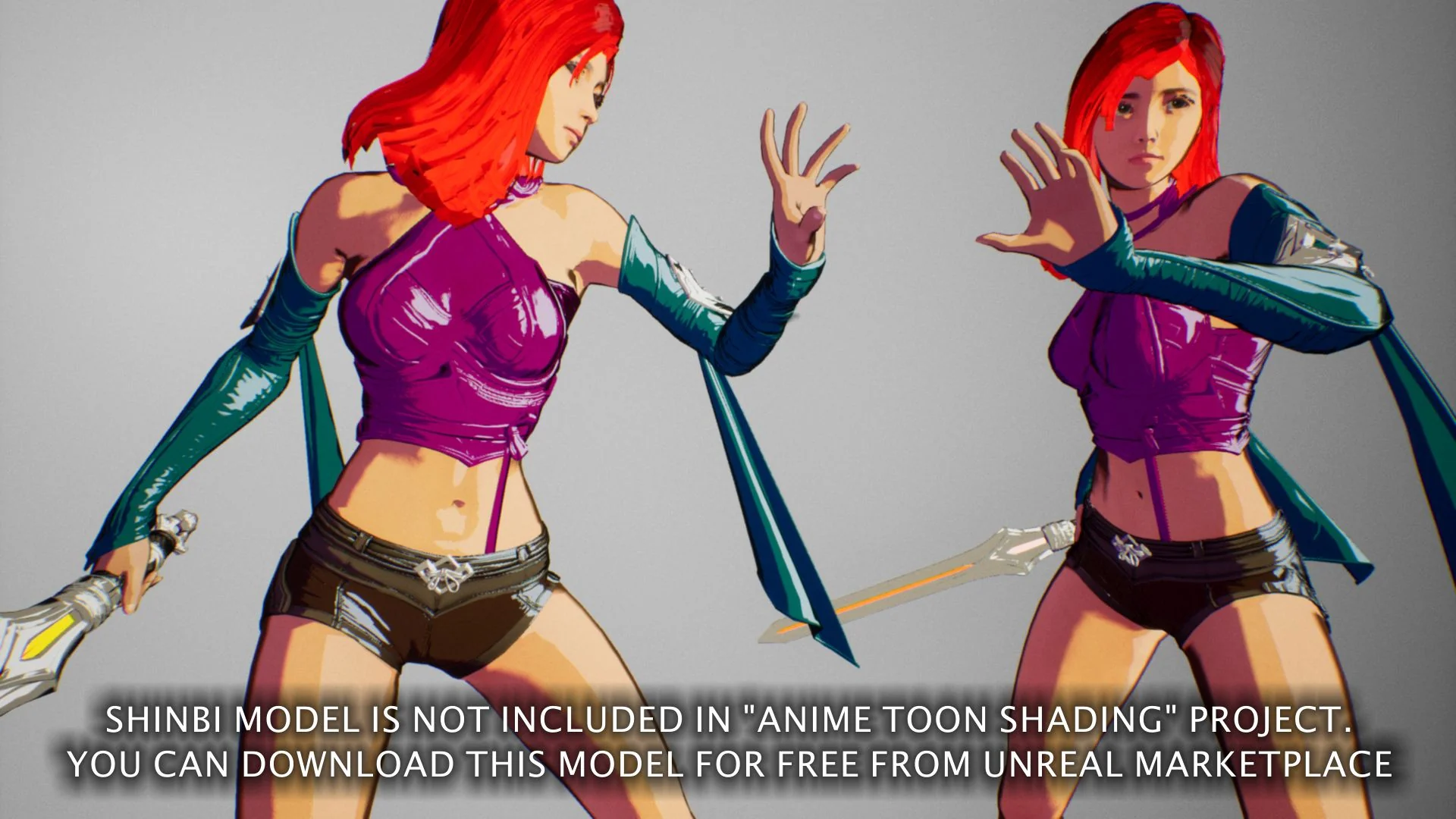
Swapping a post-process stack for a geometry-based model changes where the work actually happens. With Anime Toon Shading, the cartoon response is authored on the mesh rather than layered over the finished frame, which means a scene can hold characters lit under completely different toon conditions at the same time. The two references behind the look are Gravity Rush And Dragon Ball FighterZ, and the package is pitched as a starting point for anyone chasing that kind of dynamic cartoon lighting inside their own game.
Where the Anime Toon Shading Model Sits in the Render Path
The defining choice is that this is a post-process independent approach to cartoon style effects. Nothing in the toon response depends on a full-screen pass reading the finished color buffer. Instead, a geometry-based shading model handles the stylization, and that single decision cascades into everything else the package does.
Because the shading is resolved per piece of geometry, every character on the scene can be customized to its own specific lighting conditions. A hero standing in a warm key light and a background fighter under a cool rim do not have to compromise through one shared screen-space treatment. Each one gets parameters set for the situation it is in.
It also runs cleanly in forward rendering mode, which is the second structural point worth understanding before anything else is configured. Forward rendering keeps the transparency and multi-light behavior close to the geometry, so the toon response and the renderer are not fighting each other over when the effect gets applied.
Instancing Specular, Shading and Outline Per Object
Material configuration is described as advanced and instanced per object, covering specular, shading and outline as a set. Rather than editing one global look and hoping it survives contact with the scene, you set the values on the character that needs them. The package ships with a spread of parameters designed specifically around customizing shading on characters, so the tuning surface is deeper than a single color ramp.
That instancing arrangement is what makes a mixed cast practical. A stylized outfit, a metal accessory and a head of hair can all sit on the same actor while pulling different values from the material setup. The outline is part of the same per-object configuration, so silhouette weight can be adjusted alongside the shading rather than in a separate system.
Dynamic Lights That Reach the Toon Response
Lighting is not baked into the look. A dynamic directional light and multiple dynamic point lights can affect actors, which means the toon shading responds to lights that move, change intensity, or appear mid-scene. For action-heavy sequences, that is the difference between a static cel look and one that reacts as the camera and choreography shift.
There is also an interface built for easily combining the dynamic toon lighting system with any actor. The intent is that a new character does not require a bespoke lighting rig of its own — it plugs into the existing dynamic setup and inherits the behavior. Blueprint-level control keeps that integration workable during production, where characters arrive in batches and get swapped between scenes.
Outline Shells and the Two-Dimensional Gradient
Silhouettes come from an outline shell mesh — an additional mesh rendered from inside. That is a concrete geometry solution rather than a screen-space edge filter, and it fits the rest of the package's philosophy: the toon read is built from things that exist in the scene, not from a pass over the finished image.
The shading gradients are equally hands-on. A gradient texture creator is included, so the ramps used by the toon response can be generated rather than sourced. The fresnel and shadow response is two-dimensional, giving separate control over how the surface falls off at grazing angles and how the shadowed side resolves. Together with the per-object parameter set, this is where most of the character-specific styling gets dialed in.
Hair, Eyes, Metal and Translucent Surfaces
Anime Toon Shading covers material types that typically break a generic cel shader. Anisotropic specular handles hair, following the directional sheen that strands need instead of flattening into a single band. Mat caps support eyes and metal, giving those surfaces a readable highlight that stays stable as the camera moves.
Translucent materials are supported in both alpha and masked forms, which matters for cloth edges, hair cards and any element that needs to sit between opaque and fully cut out. The material function itself can be used as either an unlit or a lit material, so a surface can opt out of scene lighting entirely or stay in the light where the dynamic setup should affect it.
Paragon Meshes, Forward Rendering and Headroom
The package was tested on meshes from Paragon, which the documentation calls out as a good source for assets that take well to stylizing. Testing against that kind of dense, realistically shaded character geometry is a useful signal: the shading model has been exercised on meshes that were not authored for a cartoon look in the first place.
Performance is described as very fast and GPU-friendly, and forward rendering mode works in VR and mobile. Those are the two contexts where a heavy full-screen effect tends to be the first thing cut, so a geometry-based approach that avoids the post-process pass has a practical advantage there. When a project does want an external post-process on top, the package is built to integrate easily with one rather than blocking it.
For a team setting up a stylized title, the order of work is straightforward: confirm the forward rendering path, configure the per-object material instances for each character, wire the actors into the dynamic lighting interface, then tune outlines and the two-dimensional gradient to taste. The Gravity Rush And Dragon Ball FighterZ References set the target; the shell mesh, gradient creator and per-object parameters are the tools that get a project there.
 Shaders
 Shaders
 Tools