"7aa4acc705f0d80b"{"id":"1001940","slug":"advanced-progress-bar","title":"Advanced Progress Bar","category":"Game Mechanics","engine":"4.26+,5.0+","assetVersion":"","engineVersion":"Engine Version: 4.26+,5.0+","tag":"Game Mechanics","accent":"blue","visual":"mech","summary":"Advanced Progress Bar delivers a flexible material workflow using static switches, Blueprint logic, and integrated animations for realistic status displays.","platform":"Unreal Engine","publishedAt":"2026-10-24T11:16:02.552Z","updatedAt":"2026-10-24T11:16:02.552Z","sourceNotes":[],"fileContents":[],"compatibility":["Unreal Engine","Engine Version: 4.26+,5.0+"],"featuredImage":{"alt":"Advanced Progress Bar","src":"/wp-content/uploads/published/2026/10/5e7a86354daa-ce48fc29-847d-458f-8302-5470c2487996-ded32b2804.webp"},"hasDownloadLink":true,"downloads":0,"terms":[{"taxonomy":"category","slug":"game-mechanics","name":"Game Mechanics"}],"galleryImages":[{"src":"/wp-content/uploads/published/2026/10/a5c07201845c-b1fd6218-9083-4994-8286-38d8952ad409-623e6bc14f.webp","alt":"Advanced Progress Bar"},{"src":"/wp-content/uploads/published/2026/10/35e9dfb0df0d-e191007f-f7cb-4306-805b-f3a24b26dc2a-4c85105ea4.webp","alt":"Advanced Progress Bar"},{"src":"/wp-content/uploads/published/2026/10/7d41416c7c73-40b7f3d6-70ae-49f9-8a34-d2617d1062cb-384df4b23a.webp","alt":"Advanced Progress Bar"},{"src":"/wp-content/uploads/published/2026/10/9a3dd50832e3-c32a9f14-750c-41bf-8689-8db574d243b8-5e9c4f7ac8.webp","alt":"Advanced Progress Bar"},{"src":"/wp-content/uploads/published/2026/10/118a1ead1839-6d86fff9-354f-4b4f-93b4-267839c994a6-fe4c1598d1.webp","alt":"Advanced Progress Bar"},{"src":"/wp-content/uploads/published/2026/10/5bf251694ed1-9adb699c-eafe-4053-8275-f3f5b9793fe1-a2d2a5af8a.webp","alt":"Advanced Progress Bar"},{"src":"/wp-content/uploads/published/2026/10/793cd1f4bb74-9bed623b-b01e-4684-82bf-a8f5c74e6f32-75f08b7f0e.webp","alt":"Advanced Progress Bar"},{"src":"/wp-content/uploads/published/2026/10/b56c742c1813-894a9684-d1c3-46c8-a917-b5a945b7b9bf-74e3c405a7.webp","alt":"Advanced Progress Bar"},{"src":"/wp-content/uploads/published/2026/10/da8b0f5e260b-cf83b914-8d89-4303-898c-d5d899945a41-78054cd61d.webp","alt":"Advanced Progress Bar"},{"src":"/wp-content/uploads/published/2026/10/4dcf983ae075-8887d780-dbf6-49b9-b34a-e2aa5e050ec8-a89b6bb532.webp","alt":"Advanced Progress Bar"}],"accessPanel":{"kind":"resource","title":"Download this resource","eyebrow":"Free Download","message":"Log in or create a free account to start your download.","fileName":"Content.7z","safetyNote":"Resources are manually reviewed before listing to improve quality and reduce obvious risks.","actionLabel":"Download Free","resourceType":"Resource archive"},"contentHtml":"\u003ch2\u003eDynamic Status Tracking and Flexible Material Customization\u003c/h2\u003e\n\u003cp\u003eAction games, exploratory adventures, and systems-heavy simulations require responsive visual feedback for changing gameplay variables. Gauges that track health, energy, cooldowns, or interaction timers sit at the center of how players read the immediate state of an encounter. Advanced Progress Bar addresses these interface demands through a flexible material framework designed specifically for dynamic meters, including health bars and standard progress trackers.\u003c/p\u003e\n\u003cp\u003eInterface art often struggles between uniform visual presentation and distinct functional roles. A stamina meter may demand a completely different visual density, edge treatment, or opacity profile than a main health bar, yet building disconnected visual assets for each meter fragments development. By establishing a unified, flexible material system, the resource gives creators the means to customize distinct progress indicators while keeping the visual identity consistent and realistic across all hud components.\u003c/p\u003e \u003ch2\u003eStatic Switches and Material Instance Performance in Advanced Progress Bar\u003c/h2\u003e\n\u003cp\u003eAt the center of the package is a single core material built with static switches. Static switches function by compiling out unused shader logic at development time rather than forcing the GPU to evaluate dynamic branches every frame during UI rendering. This internal structure allows developers to generate custom material instances tailored for individual interface elements without paying a performance penalty for features those specific elements do not use.\u003c/p\u003e\n\u003cp\u003eThrough this setup, a health bar instance can activate specific aesthetic properties, while an environmental progress bar or minor interaction ring can strip those switches away in its own instance. The system allows developers to set each custom material instance to strike an exact balance between high visual effect and runtime performance. Because all variations stem from one well-structured material, maintenance across multiple screen layouts remains clean and organized, avoiding the need to juggle separate master shaders for every meter type.\u003c/p\u003e \u003ch2\u003eElevating Interface Quality with Two New Animations\u003c/h2\u003e\n\u003cp\u003eStatic fills often fail to deliver the responsiveness needed during sudden gameplay changes, such as taking spike damage, expending a reserve meter, or charging an ability. Movement helps communicate change to the player immediately. Advanced Progress Bar incorporates two new animations developed to bring a higher level of visual quality to health bars, progress indicators, and related HUD gauges.\u003c/p\u003e\n\u003cp\u003eThese animations enrich the transition states of progress meters beyond flat fill percentages. Incorporating motion within the material pipeline ensures that sudden shifts in value feel tactile and integrated with the realistic art style of modern titles. Whether tracking the slow, measured crawl of a secondary progress bar or the sharp drop of a combat health bar, the animated states provide clarity during high-intensity moments on screen.\u003c/p\u003e \u003ch2\u003eBlueprint Workflow and Realistic Visual Execution\u003c/h2\u003e\n\u003cp\u003eThe package carries dedicated tags for Flexible, Animated, Realistic, and Blueprint implementations. The inclusion of Blueprint functionality links the underlying visual shaders directly with game logic. Progress displays must continuously adapt to numerical values driven by gameplay mechanics, whether driven by player statistics, environmental interactions, or vehicle parameters. The Blueprint-ready setup facilitates linking these gameplay numbers directly to the material instance parameters that drive the fill percentage and visual states.\u003c/p\u003e\n\u003cp\u003eThe emphasis on a realistic aesthetic ensures that the gauges integrate smoothly into high-fidelity environments without appearing as detached, flat overlays. Developers can tune material instances to present solid, glowing, or finely textured fills that suit realistic sci-fi, modern military, or detailed fantasy UI styles. The combination of flexible material logic and Blueprint communication lets artists sculpt the look while programmers hook into dependable display parameters.\u003c/p\u003e \u003ch2\u003eTraverse System Compatibility and System Suitability\u003c/h2\u003e\n\u003cp\u003eIn addition to standalone UI deployments, Advanced Progress Bar features verified compatibility with Traverse System setups. When integrating traversal mechanics, character movement suites frequently demand dedicated progress monitoring—such as stamina management during climbs, ledge grab holds, or dynamic obstacle interaction bars. Having native compatibility with the Traverse System ensures that developers deploying these traversal tools can wire health and interaction bars directly into their existing movement mechanics without rebuilding core visual widgets from scratch.\u003c/p\u003e\n\u003cp\u003eDevelopers who benefit most from Advanced Progress Bar are technical artists and gameplay programmers seeking a unified, performant foundation for on-screen metrics. By pairing static switch architecture with custom material instances, Blueprint integration, Traverse System compatibility, and dedicated animations, the asset serves as an adaptable framework for projects that require clean visual quality, realistic UI design, and rigorous runtime efficiency.\u003c/p\u003e\n\n\u003ch2\u003eExplore Similar Assets\u003c/h2\u003e\n\u003cul\u003e\n\u003cli\u003e\u003ca href=\"https://3dcghub.com/extended-progress-bar/\" title=\"Extended Progress Bar\"\u003eExtended Progress Bar\u003c/a\u003e\u003c/li\u003e\n\u003cli\u003e\u003ca href=\"https://3dcghub.com/city-skyline-restaurant-and-piano-bar/\" title=\"City Skyline Restaurant \u0026amp; Piano Bar\"\u003eCity Skyline Restaurant \u0026amp; Piano Bar\u003c/a\u003e\u003c/li\u003e\n\u003cli\u003e\u003ca href=\"https://3dcghub.com/pool-arcade-and-bar-item-pack/\" title=\"Pool Arcade and Bar Item Pack\"\u003ePool Arcade and Bar Item Pack\u003c/a\u003e\u003c/li\u003e\n\u003cli\u003e\u003ca href=\"https://3dcghub.com/hqui-progress-bars/\" title=\"HQUI: Progress Bars\"\u003eHQUI: Progress Bars\u003c/a\u003e\u003c/li\u003e\n\u003cli\u003e\u003ca href=\"https://3dcghub.com/earth-simulator/\" title=\"Earth Simulator\"\u003eEarth Simulator\u003c/a\u003e\u003c/li\u003e\n\u003c/ul\u003e","contentTextLength":5366,"navigation":{"current":50,"total":3925,"previous":{"id":"1001941","slug":"adventure-music-vol-i","title":"Adventure Music Vol. I","category":"Music","platform":"Unreal Engine","updatedAt":"2026-10-24T11:16:53.425Z"},"next":{"id":"1001939","slug":"advanced-platformer","title":"Advanced Platformer","category":"Platformer","platform":"Unreal Engine","updatedAt":"2026-10-24T11:15:01.946Z"}},"relatedResources":[{"id":"15467","slug":"extended-progress-bar","title":"Extended Progress Bar","category":"Widgets \u0026 Controls","engine":"4.26+,5.0+","assetVersion":"Engine version: 4.26+,5.0+","engineVersion":"4.24","tag":"Widgets \u0026 Controls","accent":"blue","visual":"character","summary":"Enhance your game's user interface with the Extended Progress Bar. This plugin simplifies the process of creating animated bars for health, mana, and stamina with deep customization options.","platform":"Unreal Engine","publishedAt":"2026-03-12T09:07:55.000Z","updatedAt":"2026-04-19T15:44:46.000Z","sourceNotes":[],"fileContents":[],"compatibility":["Unreal Engine","Engine version: 4.26+,5.0+"],"featuredImage":{"alt":"Extended Progress Bar","src":"https://3dcghub.com/wp-content/uploads/2026/03/2ae124bc-cc48-4d29-ba9a-8d3040b25849.webp"},"hasDownloadLink":true,"downloads":1},{"id":"1001507","slug":"city-skyline-restaurant-and-piano-bar","title":"City Skyline Restaurant \u0026 Piano Bar","category":"Sci-Fi","engine":"4.26+,5.0+","assetVersion":"","engineVersion":"Engine Version: 4.26+,5.0+","tag":"Sci-Fi","accent":"blue","visual":"city","summary":"Technical breakdown of the City Skyline Restaurant \u0026 Piano Bar environment, featuring 131 modular meshes, channel-packed materials, and multiplatform support.","platform":"Unreal Engine","publishedAt":"2026-10-09T13:08:04.836Z","updatedAt":"2026-10-09T13:08:04.836Z","sourceNotes":[],"fileContents":[],"compatibility":["Unreal Engine","Engine Version: 4.26+,5.0+"],"featuredImage":{"alt":"City Skyline Restaurant \u0026 Piano Bar","src":"/wp-content/uploads/published/2026/10/94101f86d0bc-7d549485-2c18-4321-bac6-08097ac83c9f-8b4ed3f54d.webp"},"hasDownloadLink":true,"downloads":1},{"id":"1001946","slug":"american-bar","title":"American Bar","category":"Tools, Objects \u0026 Decor","engine":"4.26+,5.0+","assetVersion":"","engineVersion":"Engine Version: 4.26+,5.0+","tag":"Tools","accent":"blue","visual":"mech","summary":"Configure the American Bar game props kit with custom materials on static mesh surfaces and manage surface adjustments through object properties.","platform":"Unreal Engine","publishedAt":"2026-10-24T11:20:17.570Z","updatedAt":"2026-10-24T11:20:17.570Z","sourceNotes":[],"fileContents":[],"compatibility":["Unreal Engine","Engine Version: 4.26+,5.0+"],"featuredImage":{"alt":"American Bar","src":"/wp-content/uploads/published/2026/10/5568197c90f3-e1a448bb-84b8-4700-ae13-10824c578603-ca43e406ad.webp"},"hasDownloadLink":true,"downloads":0}]}
Game Mechanics
Advanced Progress Bar
Advanced Progress Bar delivers a flexible material workflow using static switches, Blueprint logic, and integrated animations for realistic status displays.
Category:Unreal Engine,Game MechanicsPlatform: Unreal EngineEngine Version: 4.26+,5.0+Published: Oct 24, 2026
Game Mechanics
Resource overview
Dynamic Status Tracking and Flexible Material Customization
Action games, exploratory adventures, and systems-heavy simulations require responsive visual feedback for changing gameplay variables. Gauges that track health, energy, cooldowns, or interaction timers sit at the center of how players read the immediate state of an encounter. Advanced Progress Bar addresses these interface demands through a flexible material framework designed specifically for dynamic meters, including health bars and standard progress trackers.
Interface art often struggles between uniform visual presentation and distinct functional roles. A stamina meter may demand a completely different visual density, edge treatment, or opacity profile than a main health bar, yet building disconnected visual assets for each meter fragments development. By establishing a unified, flexible material system, the resource gives creators the means to customize distinct progress indicators while keeping the visual identity consistent and realistic across all hud components.
Static Switches and Material Instance Performance in Advanced Progress Bar
At the center of the package is a single core material built with static switches. Static switches function by compiling out unused shader logic at development time rather than forcing the GPU to evaluate dynamic branches every frame during UI rendering. This internal structure allows developers to generate custom material instances tailored for individual interface elements without paying a performance penalty for features those specific elements do not use.
Through this setup, a health bar instance can activate specific aesthetic properties, while an environmental progress bar or minor interaction ring can strip those switches away in its own instance. The system allows developers to set each custom material instance to strike an exact balance between high visual effect and runtime performance. Because all variations stem from one well-structured material, maintenance across multiple screen layouts remains clean and organized, avoiding the need to juggle separate master shaders for every meter type.
Elevating Interface Quality with Two New Animations
Static fills often fail to deliver the responsiveness needed during sudden gameplay changes, such as taking spike damage, expending a reserve meter, or charging an ability. Movement helps communicate change to the player immediately. Advanced Progress Bar incorporates two new animations developed to bring a higher level of visual quality to health bars, progress indicators, and related HUD gauges.
These animations enrich the transition states of progress meters beyond flat fill percentages. Incorporating motion within the material pipeline ensures that sudden shifts in value feel tactile and integrated with the realistic art style of modern titles. Whether tracking the slow, measured crawl of a secondary progress bar or the sharp drop of a combat health bar, the animated states provide clarity during high-intensity moments on screen.
Blueprint Workflow and Realistic Visual Execution
The package carries dedicated tags for Flexible, Animated, Realistic, and Blueprint implementations. The inclusion of Blueprint functionality links the underlying visual shaders directly with game logic. Progress displays must continuously adapt to numerical values driven by gameplay mechanics, whether driven by player statistics, environmental interactions, or vehicle parameters. The Blueprint-ready setup facilitates linking these gameplay numbers directly to the material instance parameters that drive the fill percentage and visual states.
The emphasis on a realistic aesthetic ensures that the gauges integrate smoothly into high-fidelity environments without appearing as detached, flat overlays. Developers can tune material instances to present solid, glowing, or finely textured fills that suit realistic sci-fi, modern military, or detailed fantasy UI styles. The combination of flexible material logic and Blueprint communication lets artists sculpt the look while programmers hook into dependable display parameters.
Traverse System Compatibility and System Suitability
In addition to standalone UI deployments, Advanced Progress Bar features verified compatibility with Traverse System setups. When integrating traversal mechanics, character movement suites frequently demand dedicated progress monitoring—such as stamina management during climbs, ledge grab holds, or dynamic obstacle interaction bars. Having native compatibility with the Traverse System ensures that developers deploying these traversal tools can wire health and interaction bars directly into their existing movement mechanics without rebuilding core visual widgets from scratch.
Developers who benefit most from Advanced Progress Bar are technical artists and gameplay programmers seeking a unified, performant foundation for on-screen metrics. By pairing static switch architecture with custom material instances, Blueprint integration, Traverse System compatibility, and dedicated animations, the asset serves as an adaptable framework for projects that require clean visual quality, realistic UI design, and rigorous runtime efficiency.
 Game Mechanics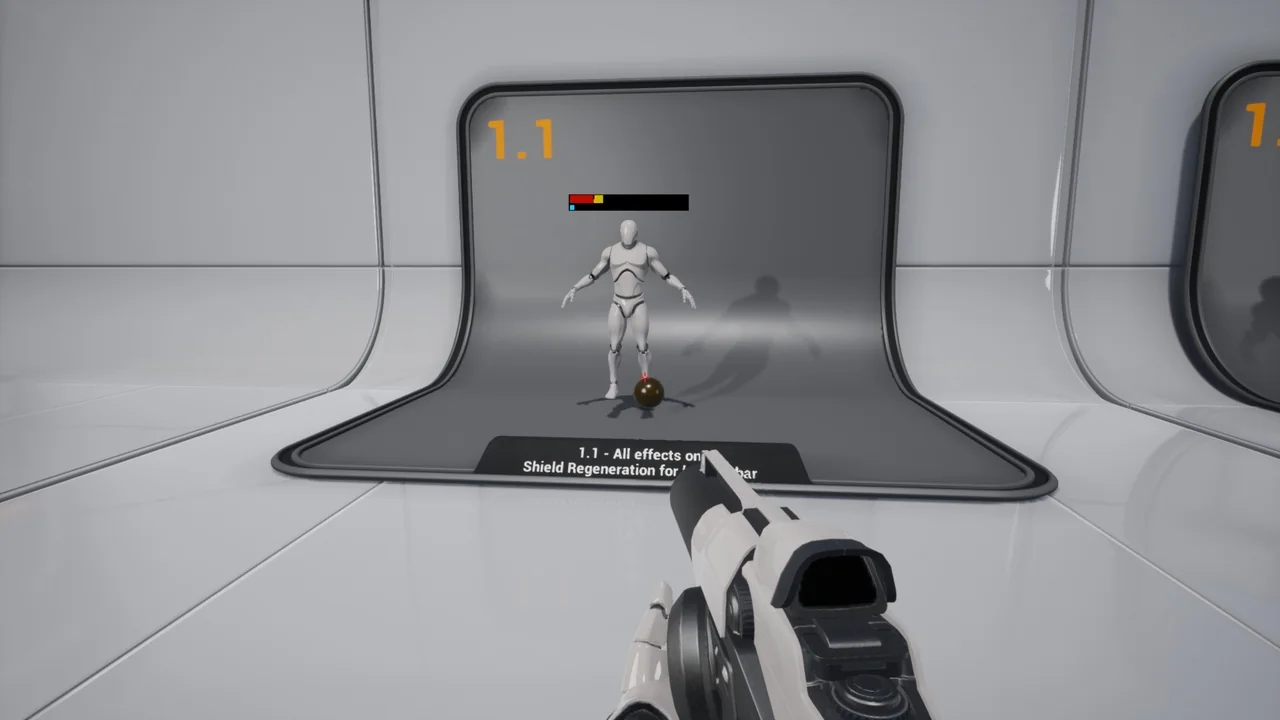
 Widgets & Controls
 Sci-Fi
 Tools
Tools