"b00678cacce53329"{"id":"1002755","slug":"20-gun-impact-particles","title":"20+ Gun Impact Particles","category":"Variety","engine":"4.5+,5.0+","assetVersion":"","engineVersion":"Engine Version: 4.5+,5.0+","tag":"Variety","accent":"blue","visual":"mech","summary":"Explore 20+ Gun Impact Particles, featuring X-axis aligned hit trace integration, exposed reflection vector parameters, and dynamic impact responses.","platform":"Unreal Engine","indexPolicy":"index","publishedAt":"2026-11-20T06:27:40.384Z","updatedAt":"2026-11-20T06:27:40.384Z","sourceNotes":[],"fileContents":[],"compatibility":["Unreal Engine","Engine Version: 4.5+,5.0+"],"featuredImage":{"alt":"20+ Gun Impact Particles","src":"/wp-content/uploads/published/2026/11/e2a1e55fdbcc-d06df706-b32e-492e-a76b-45f9d7292514-c1a104de10.webp"},"fileSizeBytes":147882760,"hasDownloadLink":true,"downloads":0,"terms":[{"taxonomy":"category","slug":"variety-vfx","name":"Variety"}],"galleryImages":[{"src":"/wp-content/uploads/published/2026/11/85fa4dea39da-d1e97f70-fb78-41e6-950b-bd49a15c08ba-72ddcb21a3.webp","alt":"20+ Gun Impact Particles"},{"src":"/wp-content/uploads/published/2026/11/46a630ab7398-80d41b28-5afc-4014-b22f-9650c02686aa-8fe77045a5.webp","alt":"20+ Gun Impact Particles"},{"src":"/wp-content/uploads/published/2026/11/65b7c0452f99-644e7e08-c674-4aed-bcfe-77616c823a46-aa471794ac.webp","alt":"20+ Gun Impact Particles"},{"src":"/wp-content/uploads/published/2026/11/b8c42d637ac2-4d09de29-1ed3-44ba-b45a-64c71e46e9e0-973710ec0c.webp","alt":"20+ Gun Impact Particles"},{"src":"/wp-content/uploads/published/2026/11/06df73acda55-5c736dae-dbc8-4016-8a65-dcc2ec31e468-c585d22f8e.webp","alt":"20+ Gun Impact Particles"},{"src":"/wp-content/uploads/published/2026/11/c775694fc447-6bac2c2d-3d02-46a5-91f7-8781d3407175-f43ba6eac9.webp","alt":"20+ Gun Impact Particles"}],"accessPanel":{"kind":"resource","title":"Get this resource","safetyNote":"Resources are manually reviewed before listing to improve quality and reduce obvious risks.","fileName":"Content.7z","resourceType":"Resource archive","versions":[]},"contentHtml":"\u003ch2\u003eDynamic Collision Feedback Across Interactive Environments\u003c/h2\u003e\u003cp\u003eHigh-intensity combat sequences depend on immediate, clear physical feedback to give projectile weapons a sense of weight and environmental presence. Whether a firefight unfolds across industrial warehouses lined with sheet metal, weathered outdoor ruins embedded in packed dirt and sand, or interior office corridors framed by brittle plaster, the reaction of the struck surface defines the tactile quality of the gunplay. 20+ Gun Impact Particles is structured to solve this visual feedback challenge by providing a versatile suite of physical impact bursts, debris scatterings, and fluid reactions configured specifically for real-time projectile collisions.\u003c/p\u003e\u003cp\u003eInstead of relying on disconnected, static visual effects that look identical regardless of where or how a bullet hits, this collection delivers responsive behaviors tailored to specific material types. Weapon strikes disperse distinct sprays, particulate plumes, and splatters that give players immediate visual confirmation of their hits while reinforcing the material identity of the game world.\u003c/p\u003e\u003ch2\u003eGun Impact Alignment and HitTrace Architecture\u003c/h2\u003e\u003cp\u003eOne of the most persistent bottlenecks when implementing projectile impact effects in game development is orienting the particle burst correctly against collision geometry. Standard raycasting routines cast a trace through the scene to pinpoint the exact location and surface normal where a projectile intersects an obstacle. In many particle libraries, reconciling the orientation of the spawned effect with the returned hit normal requires custom math nodes, coordinate inversions, or manual rotational offsets to prevent the burst from firing sideways or clipping back inside the hit object.\u003c/p\u003e\u003cp\u003eAll particle systems in this package are built with standardized X-axis alignment. Because the forward emission axis is locked directly to the positive X-axis, the assets are completely plug-and-play with HitTraces. Developers can take the hit result from an engine line trace or collision event, pass the resulting rotation directly into the spawn transform, and immediately achieve accurate surface orientation. This direct alignment saves substantial time during character and weapon Blueprint setup, removing the need for intermediary transformation wrappers and guaranteeing that sparks, dust, and shrapnel project cleanly away from the struck face.\u003c/p\u003e\u003ch2\u003eReflection Vectors and Dynamic Impact Angles\u003c/h2\u003e\u003cp\u003eBeyond standard surface normal orientation, realistic ballistic feedback requires particle systems to account for the incoming trajectory of the round. When a high-velocity projectile strikes a hard obstacle at a steep angle, the resulting debris and ricochet sparks do not travel purely perpendicular to the wall. Instead, kinetic energy redirects the fragments outward along an angle of reflection determined by the incoming velocity.\u003c/p\u003e\u003cp\u003eTo support this behavior, every effect in the collection comes with exposed Vector Parameters dedicated to reflection vectors. Rather than being constrained to a fixed directional cone based strictly on the surface normal, these particles are dynamically influenced by the angle of impact itself. When integrated with trace calculation logic, the system computes the deflection angle and feeds it into the particle's exposed parameters. The package then offers an impact response that visibly reacts to shallow grazing hits, acute angles, and direct head-on impacts with realistic directional variation, adding physical nuance to ricochets, dust drift, and secondary debris spray.\u003c/p\u003e\u003ch2\u003eSurface Varieties from Water Splatter to Solid Debris\u003c/h2\u003e\u003cp\u003eThe collection provides distinct presets configured for a broad spectrum of common gameplay surfaces, allowing developers to set up differentiated material responses across complex levels:\u003c/p\u003e\u003cul\u003e\u003cli\u003e\u003cstrong\u003eConcrete:\u003c/strong\u003e Heavy particulate clouds combined with high-velocity fragments, pulverized stone dust, and brittle debris dispersal suitable for masonry, roads, and structural walls.\u003c/li\u003e\u003cli\u003e\u003cstrong\u003eMetal:\u003c/strong\u003e Crisp, energetic spark showers and glowing incandescent flecks that convey hard ricochets and intense kinetic friction against industrial plating and machinery.\u003c/li\u003e\u003cli\u003e\u003cstrong\u003eDirt:\u003c/strong\u003e Thick, opaque soil displacement with low-velocity dirt clods and expanding dust plumes tailored to off-road paths, earthworks, and unpaved terrain.\u003c/li\u003e\u003cli\u003e\u003cstrong\u003eSand:\u003c/strong\u003e Fine-grain displacement sprays, localized dust billows, and looser granular scattering appropriate for deserts, dunes, and shoreline environments.\u003c/li\u003e\u003cli\u003e\u003cstrong\u003ePlaster:\u003c/strong\u003e High-frequency pulverization producing white chalky bursts and small crumbly debris chunks typical of damaged interior drywall and architectural moldings.\u003c/li\u003e\u003cli\u003e\u003cstrong\u003eWater:\u003c/strong\u003e Vertical fluid columns, fine liquid misting, directional droplet spray, and surface-level splatters that register clean hits in aquatic bodies and shallow puddles.\u003c/li\u003e\u003cli\u003e\u003cstrong\u003eMany More Surfaces:\u003c/strong\u003e Additional surface profiles designed to round out diverse material types and maintain visual consistency throughout varied operational theaters.\u003c/li\u003e\u003c/ul\u003e\u003ch2\u003eModifying and Combining Particles for Custom Calibers\u003c/h2\u003e\u003cp\u003eBeyond operating as ready-to-use individual presets, the pack is architected as a flexible foundation for broader ballistic VFX needs. Developers can combine, scale, or reconstruct new impact variations by blending the modular components included in each system. Because the underlying emitters separate fine spray, primary bursts, lingering dust, and physical debris, teams can rebalance individual elements to match the ballistic characteristics of specific weapon types.\u003c/p\u003e\u003cp\u003eA heavy-caliber sniper rifle striking concrete can combine high-scale debris chunks with dense, expansive dust plumes to sell structural destruction. Conversely, a rapid-fire compact submachine gun or small-caliber sidearm can scale down particle count, lifespan, and velocity to maintain gameplay clarity and keep screen space readable during intense firefights. The ability to layer these assets makes it easy to maintain visual coherence across an entire weapon roster without needing completely isolated VFX pipelines for every individual gun.\u003c/p\u003e\u003ch2\u003eBlueprint Implementation and Workflow Support\u003c/h2\u003e\u003cp\u003eTo demonstrate practical implementation, an example setup is included within the demo. This setup showcases how the particle systems, exposed Vector Parameters, and HitTrace collision calls connect inside gameplay Blueprints. Developers can study the sample integration to see how hit data is passed into the particle parameters, providing an accessible reference for embedding the assets into proprietary combat frameworks, custom projectile classes, or trace-based hitscan code.\u003c/p\u003e\u003cp\u003eImplementation is further backed by a structured set of reference and support channels. Comprehensive documentation and setup guides outline the integration steps required to establish surface-aware impact logic. Dedicated training videos provide visual walk-throughs of parameter management, dynamic angle configuration, and asset scaling. For real-time troubleshooting and workflow assistance, developers can utilize Discord support, while ongoing development information and updates are distributed through the W3 Studios newsletter signup. These resources ensure that teams can smoothly integrate the effects into active production environments and scale their impact systems as project demands expand.\u003c/p\u003e\n\n\u003ch2\u003eExplore Similar Assets\u003c/h2\u003e\n\u003cul\u003e\n\u003cli\u003e\u003ca href=\"https://3dcghub.com/various-fireworks-vfx2/\" rel=\"noopener noreferrer\"\u003eVarious Fireworks VFX2\u003c/a\u003e\u003c/li\u003e\n\u003cli\u003e\u003ca href=\"https://3dcghub.com/butterfly-particles/\" rel=\"noopener noreferrer\"\u003eButterfly Particles\u003c/a\u003e\u003c/li\u003e\n\u003cli\u003e\u003ca href=\"https://3dcghub.com/cartoony-impact-fx-second-edition/\" rel=\"noopener noreferrer\"\u003eCartoony Impact FX - Second Edition\u003c/a\u003e\u003c/li\u003e\n\u003cli\u003e\u003ca href=\"https://3dcghub.com/vfx-impacts/\" rel=\"noopener noreferrer\"\u003eVFX Impacts\u003c/a\u003e\u003c/li\u003e\n\u003cli\u003e\u003ca href=\"https://3dcghub.com/50-vector-particles/\" rel=\"noopener noreferrer\"\u003e50+ Vector Particles\u003c/a\u003e\u003c/li\u003e\n\u003c/ul\u003e","contentTextLength":7419,"navigation":{"current":125,"total":4797,"previous":{"id":"1002756","slug":"advanced-magic-circle-1","title":"Advanced Magic Circle 1","category":"Spells \u0026 Combat","platform":"Unreal Engine","updatedAt":"2026-11-20T06:29:13.038Z"},"next":{"id":"1001657","slug":"runesvfx","title":"RunesVFX","category":"Variety","platform":"Unreal Engine","updatedAt":"2026-11-19T15:58:17.762Z"}},"relatedResources":[{"id":"1002859","slug":"weapon-impact-fx","title":"Weapon Impact FX","category":"Variety","engine":"4.20+,5.0+","assetVersion":"","engineVersion":"Engine Version: 4.20+,5.0+","tag":"Variety","accent":"blue","visual":"mech","summary":"Technical breakdown of Weapon Impact FX, featuring 58 particle variations across 10 surface categories with X-axis alignment and omnidirectional setups.","platform":"Unreal Engine","indexPolicy":"index","publishedAt":"2026-11-20T12:39:48.939Z","updatedAt":"2026-11-20T12:39:48.939Z","sourceNotes":[],"fileContents":[],"compatibility":["Unreal Engine","Engine Version: 4.20+,5.0+"],"featuredImage":{"alt":"Weapon Impact FX","src":"/wp-content/uploads/published/2026/11/1390cba7a756-7842c32e-0221-4276-a750-0c78af87e955-ab38025abb.webp"},"fileSizeBytes":294366774,"hasDownloadLink":true,"downloads":0},{"id":"1002778","slug":"cartoony-impact-stylized-particle-simulation-1","title":"Cartoony Impact - Stylized Particle Simulation #1","category":"Variety","engine":"4.15+,5.0+","assetVersion":"","engineVersion":"Engine Version: 4.15+,5.0+","tag":"Variety","accent":"blue","visual":"mech","summary":"Explore Cartoony Impact - Stylized Particle Simulation #1, featuring 18 modular systems and over 100 visual variations for isometric and shooter projects.","platform":"Unreal Engine","indexPolicy":"index","publishedAt":"2026-11-20T06:57:02.071Z","updatedAt":"2026-11-20T06:57:02.071Z","sourceNotes":[],"fileContents":[],"compatibility":["Unreal Engine","Engine Version: 4.15+,5.0+"],"featuredImage":{"alt":"Cartoony Impact - Stylized Particle Simulation #1","src":"/wp-content/uploads/published/2026/11/d478f3f89045-67c65fcf-fb17-4de2-bc19-19482e0079af-6f9013af8c.webp"},"fileSizeBytes":7311656,"hasDownloadLink":true,"downloads":0},{"id":"17515","slug":"various-fireworks-vfx2","title":"Various Fireworks VFX2","category":"Variety","engine":"5.1+","assetVersion":"Engine version: 5.1+","engineVersion":"5.1","tag":"Variety","accent":"blue","visual":"mech","summary":"Enhance your digital environments with Various Fireworks VFX2, a collection of high-quality firework effects. This pack offers a blend of realistic and stylized designs optimized for high performance and visual impact.","platform":"Unreal Engine","indexPolicy":"noindex","publishedAt":"2026-03-13T14:45:31.000Z","updatedAt":"2026-04-19T15:43:31.000Z","sourceNotes":[],"fileContents":[],"compatibility":["Unreal Engine","Engine version: 5.1+"],"featuredImage":{"alt":"Various Fireworks VFX2","src":"https://3dcghub.com/wp-content/uploads/2026/03/69d8369a-759f-429f-be98-00c69538afc5.webp"},"fileSizeBytes":190731050,"hasDownloadLink":true,"downloads":0}]}
Resource screenshots
1 / 6
Join our channel
Follow 3DCGHUB on Telegram for new resource drops, migration updates, and community notices.
Dynamic Collision Feedback Across Interactive Environments
High-intensity combat sequences depend on immediate, clear physical feedback to give projectile weapons a sense of weight and environmental presence. Whether a firefight unfolds across industrial warehouses lined with sheet metal, weathered outdoor ruins embedded in packed dirt and sand, or interior office corridors framed by brittle plaster, the reaction of the struck surface defines the tactile quality of the gunplay. 20+ Gun Impact Particles is structured to solve this visual feedback challenge by providing a versatile suite of physical impact bursts, debris scatterings, and fluid reactions configured specifically for real-time projectile collisions.
Instead of relying on disconnected, static visual effects that look identical regardless of where or how a bullet hits, this collection delivers responsive behaviors tailored to specific material types. Weapon strikes disperse distinct sprays, particulate plumes, and splatters that give players immediate visual confirmation of their hits while reinforcing the material identity of the game world.
Gun Impact Alignment and HitTrace Architecture
One of the most persistent bottlenecks when implementing projectile impact effects in game development is orienting the particle burst correctly against collision geometry. Standard raycasting routines cast a trace through the scene to pinpoint the exact location and surface normal where a projectile intersects an obstacle. In many particle libraries, reconciling the orientation of the spawned effect with the returned hit normal requires custom math nodes, coordinate inversions, or manual rotational offsets to prevent the burst from firing sideways or clipping back inside the hit object.
All particle systems in this package are built with standardized X-axis alignment. Because the forward emission axis is locked directly to the positive X-axis, the assets are completely plug-and-play with HitTraces. Developers can take the hit result from an engine line trace or collision event, pass the resulting rotation directly into the spawn transform, and immediately achieve accurate surface orientation. This direct alignment saves substantial time during character and weapon Blueprint setup, removing the need for intermediary transformation wrappers and guaranteeing that sparks, dust, and shrapnel project cleanly away from the struck face.
Reflection Vectors and Dynamic Impact Angles
Beyond standard surface normal orientation, realistic ballistic feedback requires particle systems to account for the incoming trajectory of the round. When a high-velocity projectile strikes a hard obstacle at a steep angle, the resulting debris and ricochet sparks do not travel purely perpendicular to the wall. Instead, kinetic energy redirects the fragments outward along an angle of reflection determined by the incoming velocity.
To support this behavior, every effect in the collection comes with exposed Vector Parameters dedicated to reflection vectors. Rather than being constrained to a fixed directional cone based strictly on the surface normal, these particles are dynamically influenced by the angle of impact itself. When integrated with trace calculation logic, the system computes the deflection angle and feeds it into the particle's exposed parameters. The package then offers an impact response that visibly reacts to shallow grazing hits, acute angles, and direct head-on impacts with realistic directional variation, adding physical nuance to ricochets, dust drift, and secondary debris spray.
Surface Varieties from Water Splatter to Solid Debris
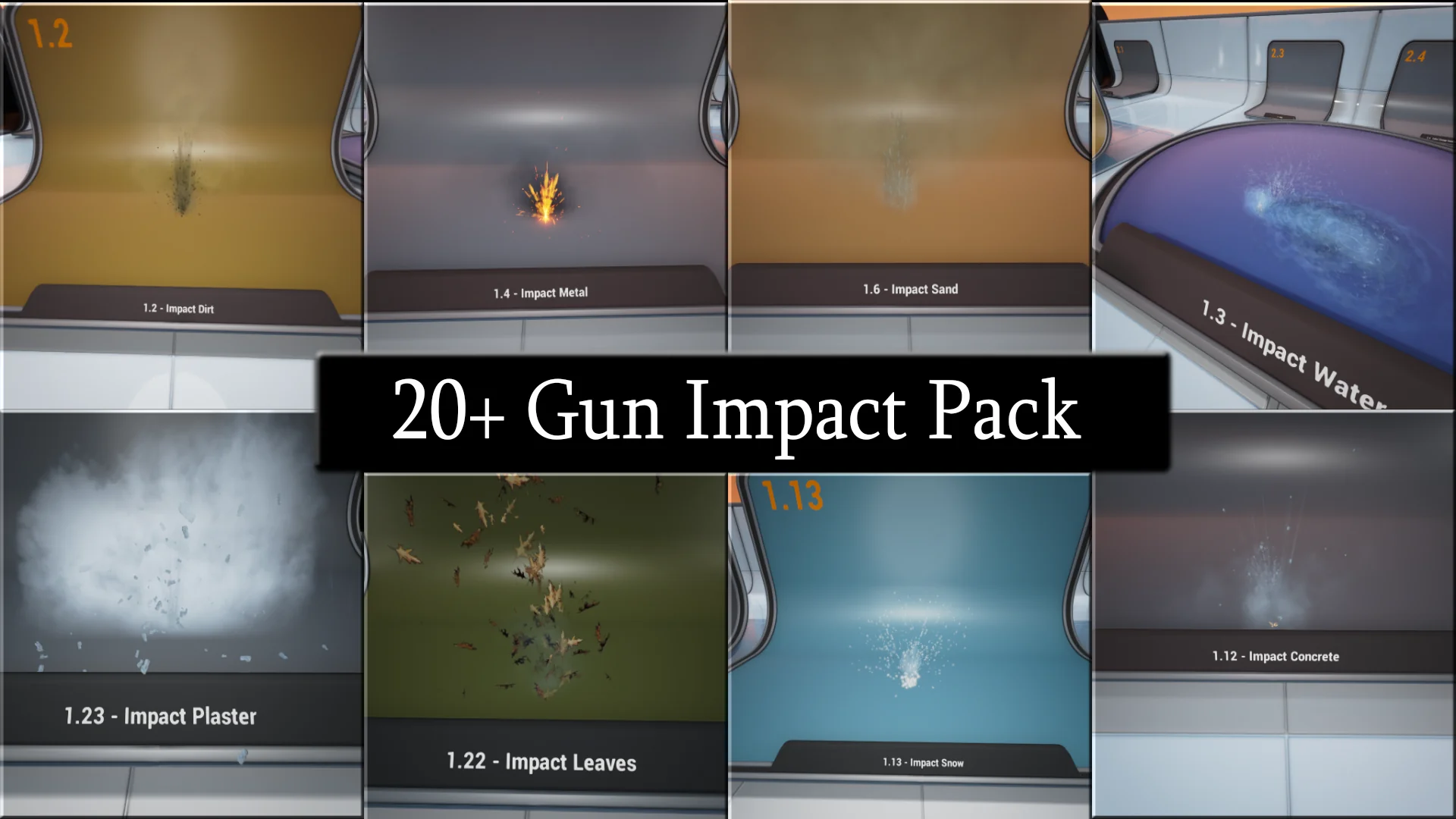
The collection provides distinct presets configured for a broad spectrum of common gameplay surfaces, allowing developers to set up differentiated material responses across complex levels:
Concrete: Heavy particulate clouds combined with high-velocity fragments, pulverized stone dust, and brittle debris dispersal suitable for masonry, roads, and structural walls.
Metal: Crisp, energetic spark showers and glowing incandescent flecks that convey hard ricochets and intense kinetic friction against industrial plating and machinery.
Dirt: Thick, opaque soil displacement with low-velocity dirt clods and expanding dust plumes tailored to off-road paths, earthworks, and unpaved terrain.
Sand: Fine-grain displacement sprays, localized dust billows, and looser granular scattering appropriate for deserts, dunes, and shoreline environments.
Plaster: High-frequency pulverization producing white chalky bursts and small crumbly debris chunks typical of damaged interior drywall and architectural moldings.
Water: Vertical fluid columns, fine liquid misting, directional droplet spray, and surface-level splatters that register clean hits in aquatic bodies and shallow puddles.
Many More Surfaces: Additional surface profiles designed to round out diverse material types and maintain visual consistency throughout varied operational theaters.
Modifying and Combining Particles for Custom Calibers
Beyond operating as ready-to-use individual presets, the pack is architected as a flexible foundation for broader ballistic VFX needs. Developers can combine, scale, or reconstruct new impact variations by blending the modular components included in each system. Because the underlying emitters separate fine spray, primary bursts, lingering dust, and physical debris, teams can rebalance individual elements to match the ballistic characteristics of specific weapon types.
A heavy-caliber sniper rifle striking concrete can combine high-scale debris chunks with dense, expansive dust plumes to sell structural destruction. Conversely, a rapid-fire compact submachine gun or small-caliber sidearm can scale down particle count, lifespan, and velocity to maintain gameplay clarity and keep screen space readable during intense firefights. The ability to layer these assets makes it easy to maintain visual coherence across an entire weapon roster without needing completely isolated VFX pipelines for every individual gun.
Blueprint Implementation and Workflow Support
To demonstrate practical implementation, an example setup is included within the demo. This setup showcases how the particle systems, exposed Vector Parameters, and HitTrace collision calls connect inside gameplay Blueprints. Developers can study the sample integration to see how hit data is passed into the particle parameters, providing an accessible reference for embedding the assets into proprietary combat frameworks, custom projectile classes, or trace-based hitscan code.
Implementation is further backed by a structured set of reference and support channels. Comprehensive documentation and setup guides outline the integration steps required to establish surface-aware impact logic. Dedicated training videos provide visual walk-throughs of parameter management, dynamic angle configuration, and asset scaling. For real-time troubleshooting and workflow assistance, developers can utilize Discord support, while ongoing development information and updates are distributed through the W3 Studios newsletter signup. These resources ensure that teams can smoothly integrate the effects into active production environments and scale their impact systems as project demands expand.
 Variety
 Variety
 Variety