"fb5ea1e7d1b41445"{"id":"1002401","slug":"z-mech-robot-giant","title":"Z-Mech Robot Giant","category":"Characters \u0026 Creatures","engine":"4.26+,5.0+","assetVersion":"","engineVersion":"Engine Version: 4.26+,5.0+","tag":"Characters","accent":"blue","visual":"character","summary":"Examine the Z-Mech Robot Giant character mesh, its Epic skeleton integration, animation blueprint setup, and Combat Missile Pack compatibility.","platform":"Unreal Engine","indexPolicy":"index","publishedAt":"2026-11-10T04:31:06.426Z","updatedAt":"2026-11-10T04:31:06.426Z","sourceNotes":[],"fileContents":[],"compatibility":["Unreal Engine","Engine Version: 4.26+,5.0+"],"featuredImage":{"alt":"Z-Mech Robot Giant","src":"/wp-content/uploads/published/2026/11/a82c9967c4ca-d8a647fc-dded-41f7-8fdd-5727d7de6f38-2dfc2f2420.webp"},"hasDownloadLink":true,"downloads":0,"terms":[{"taxonomy":"category","slug":"characters-and-creatures","name":"Characters \u0026 Creatures"}],"galleryImages":[{"src":"/wp-content/uploads/published/2026/11/15f431c0abf9-22079bec-e3c2-4794-885f-e9a5dd0b803b-de506c113a.webp","alt":"Z-Mech Robot Giant"},{"src":"/wp-content/uploads/published/2026/11/e20f49781d11-b5606eb8-1f8d-4ea4-92a8-282171eb2b4c-c393d589e4.webp","alt":"Z-Mech Robot Giant"},{"src":"/wp-content/uploads/published/2026/11/5736e3f45b75-d88e9bb1-b216-4808-b5bb-129b2a5a27b1-54bb8870d3.webp","alt":"Z-Mech Robot Giant"},{"src":"/wp-content/uploads/published/2026/11/0fd3cacd1801-caab709a-7ee0-42ca-af5a-bbadf4b5ff14-35c0bc4d82.webp","alt":"Z-Mech Robot Giant"},{"src":"/wp-content/uploads/published/2026/11/257fb1d1c08b-48dcd7aa-0fa5-4090-8c1f-c1bbb40c94e4-60c65d834e.webp","alt":"Z-Mech Robot Giant"},{"src":"/wp-content/uploads/published/2026/11/159608b29b1d-72718751-c953-48a6-9641-9f44809bff45-d1ab6abd60.webp","alt":"Z-Mech Robot Giant"}],"accessPanel":{"kind":"resource","title":"Get this resource","eyebrow":"Free resource","message":"Download this resource in your browser.","fileName":"Content.7z","safetyNote":"Resources are manually reviewed before listing to improve quality and reduce obvious risks.","actionLabel":"Get this resource","resourceType":"Resource archive","versions":[]},"contentHtml":"\u003cp\u003eIntegrating massive mechanical units into a project often introduces friction during skeletal setup and blueprint assembly. The Z-Mech Robot Giant addresses that pipeline hurdle by offering a giant mecha character designed to swap directly into standard third-person blueprint environments. Because it relies on the standardized Epic skeleton hierarchy, the asset allows creators to bypass the tedious process of custom bone mapping during initial prototyping, letting teams test mechanical player avatars or automated adversaries without rebuilding baseline character logic from scratch.\u003c/p\u003e\u003ch2\u003eGrounding the Z-Mech in Third-Person Templates\u003c/h2\u003e\u003cp\u003eThird-person blueprint templates form the foundational starting point for a vast number of real-time combat systems, exploration mechanics, and locomotion tests. Replacing the default grey mannequin with a massive combat platform like the Z-Mech Robot Giant transforms the spatial reading of an environment instantly. When a project transitions from an organic humanoid form to a heavy mechanized frame, camera arm lengths, capsule collision boundaries, and spatial perspectives must reflect the scale of the chassis.\u003c/p\u003e\u003cp\u003eBecause the unit is tailored to slot cleanly into standard template character blueprints with minimal configuration steps, testing gameplay loops happens rapidly. Instead of creating distinct movement logic or custom inputs, developers can select the existing character blueprint, point the skeletal mesh component to the mecha asset, and immediately walk the machine through the graybox level. This streamlined substitution maintains standard directional input, camera orbits, and character movement component properties while altering the visual identity of the project completely.\u003c/p\u003e\u003ch2\u003eEpic Skeleton Rigging and Animation Blueprint Structure\u003c/h2\u003e\u003cp\u003eThe core utility of the character rests on its integration with the Epic skeleton. Adhering to this structural standard guarantees that standard animation sequences, locomotion blend spaces, and procedural poses transfer over without extensive bone renaming or complex retargeting graphs. For teams with existing libraries of walks, runs, idles, turns, and jump cycles built for standard mannequins, the mecha can evaluate those same state machines directly.\u003c/p\u003e\u003cp\u003eThe package incorporates an Animation Blueprint along with associated scripts, providing the logic required to drive the mechanical frame across varied locomotion states. The script and animation blueprint architecture ensures that parameters such as ground speed, velocity vectors, falling states, and stance transitions feed straight into the state machine nodes. When working with mechanical characters, this blueprint-driven structure simplifies the process of layering mechanical flourishes—such as heavier additive footstep shakes or upper-body torso twists—on top of standardized movement states without corrupting the baseline locomotion graph.\u003c/p\u003e\u003ch2\u003eResolving Skeletal Mesh Alignment and Stoppages on the Robot Giant\u003c/h2\u003e\u003cp\u003eEven in streamlined workflows, swapping skeletal meshes inside established blueprints can produce minor operational hitches. Two documented challenges frequently arise when substituting the default template mannequin with the Z-Mech: character animations may unexpectedly cease functioning, or the mechanical mesh may sit visibly offset into the floor plane. Both issues stem from the way character blueprint components store relative transforms and animation class assignments.\u003c/p\u003e\u003cp\u003eWhen an animation ceases playing after assigning the new mesh, the issue almost universally traces back to the Animation Mode or Anim Class reference within the Skeletal Mesh Component properties. Swapping a mesh often clears or decouples the assigned Animation Blueprint, leaving the character in a rigid reference pose. Verifying that the Anim Class parameter specifically targets the Z-Mech animation blueprint restores full pose evaluation immediately. If the mesh still refuses to sample inputs, inspecting the skeletal mesh assignment inside the blueprint viewport ensures the skeleton asset itself matches the animation sequences driving it.\u003c/p\u003e\u003cp\u003eFloor offset issues occur when root bone origins or capsule collision dimensions clash during the swap. The default mannequin capsule component possesses hardcoded half-height and radius values calibrated for human proportions. Because this asset represents a giant mecha, placing the mesh inside a default capsule can force the root transform lower than the base of the collision shape, causing the feet to sink through the collision plane. Correcting this involves checking the relative Z-axis location of the Skeletal Mesh component within the Character Blueprint hierarchy, nudging the mesh upward until the soles of the mechanical feet align flush with the bottom hemisphere of the collision capsule. Consulting designated skeletal mesh troubleshooting guidelines provides systematic visual walkthroughs for confirming these coordinate alignments and re-establishing clean ground contact.\u003c/p\u003e\u003ch2\u003ePairing Z-Mech Deployments with the Combat Missile Pack\u003c/h2\u003e\u003cp\u003eA giant mecha character demands offensive capabilities suited to its scale. The Z-Mech Robot Giant features verified compatibility with the Combat Missile Pack, establishing a natural mechanical pairing between heavy chassis locomotion and ordnance delivery. This compatibility allows developers to attach projectile systems directly to the robot's frame to construct fully realized mechanized combat encounters.\u003c/p\u003e\u003cp\u003eImplementing the Combat Missile Pack alongside the robot relies on the Epic skeleton bone hierarchy and blueprint scripting tags included with the character. Sockets can be established along the shoulders, arms, or back plating of the mecha skeleton, serving as precise transform targets for spawning missile pods, tracking target vectors, and firing kinematic projectiles. Because the character includes script and blueprint hooks, firing triggers can be tied directly into player input mappings or AI behavior trees, enabling the robot to loose salvos during movement, execute defensive counter-artillery strikes, or act as a formidable boss unit within an arena setting.\u003c/p\u003e\u003ch2\u003eTarget Workflows and Practical Implementations\u003c/h2\u003e\u003cp\u003eThis package fits best within production pipelines where rapid mechanical character prototyping is required without the time investment of bespoke rigging and skinning. Independent developers building sci-fi combat games, top-down shooters, or tactical mecha action titles can use the asset to establish scale, movement physics, and weapon handling early in development.\u003c/p\u003e\u003cp\u003eTechnical animators and blueprint developers also benefit from having an Epic-skeleton-compliant mechanical rig. It acts as an effective test bed for verifying weapon attachment sockets, testing heavy projectile systems like the Combat Missile Pack, and validating multi-layered animation blueprints before committing to full-scale character production runs. By combining standardized skeletal structures with immediate template drop-in capabilities, the Z-Mech delivers an efficient foundation for mechanized real-time action.\u003c/p\u003e\n\n\u003ch2\u003eRelated Resources Worth Checking\u003c/h2\u003e\n\u003cul\u003e\n\u003cli\u003e\u003ca href=\"https://3dcghub.com/robot-spider/\" rel=\"noopener noreferrer\"\u003eRobot Spider\u003c/a\u003e\u003c/li\u003e\n\u003cli\u003e\u003ca href=\"https://3dcghub.com/android-robot/\" rel=\"noopener noreferrer\"\u003eAndroid Robot\u003c/a\u003e\u003c/li\u003e\n\u003cli\u003e\u003ca href=\"https://3dcghub.com/crash-test-robot-dummy/\" rel=\"noopener noreferrer\"\u003eCrash Test Robot Dummy\u003c/a\u003e\u003c/li\u003e\n\u003cli\u003e\u003ca href=\"https://3dcghub.com/robot-bee/\" rel=\"noopener noreferrer\"\u003eRobot Bee\u003c/a\u003e\u003c/li\u003e\n\u003cli\u003e\u003ca href=\"https://3dcghub.com/robot-robbie-01/\" rel=\"noopener noreferrer\"\u003eRobot Robbie 01\u003c/a\u003e\u003c/li\u003e\n\u003c/ul\u003e","contentTextLength":7192,"navigation":{"current":18,"total":4340,"previous":{"id":"1002402","slug":"g2-mercenaries","title":"G2: Mercenaries","category":"Humans","platform":"Unreal Engine","updatedAt":"2026-11-10T04:54:18.684Z"},"next":{"id":"1002400","slug":"vampire-girl-remaster","title":"Vampire Girl Remaster","category":"Characters \u0026 Creatures","platform":"Unreal Engine","updatedAt":"2026-11-10T04:29:40.350Z"}},"relatedResources":[{"id":"1002174","slug":"robot-spider","title":"Robot Spider","category":"Characters \u0026 Creatures","engine":"4.19+,5.0+","assetVersion":"","engineVersion":"Engine Version: 4.19+,5.0+","tag":"Characters","accent":"blue","visual":"character","summary":"Examine the Robot Spider character model, featuring 4K PBR metallic-roughness textures, 13 animations, turret articulation, and an included damage variant.","platform":"Unreal Engine","indexPolicy":"index","publishedAt":"2026-10-29T10:54:47.040Z","updatedAt":"2026-10-29T10:54:47.040Z","sourceNotes":[],"fileContents":[],"compatibility":["Unreal Engine","Engine Version: 4.19+,5.0+"],"featuredImage":{"alt":"Robot Spider","src":"/wp-content/uploads/published/2026/10/c97535cddc0a-84eee4c7-f51c-4fc6-8d32-755f9175da17-3e3c630c50.webp"},"hasDownloadLink":true,"downloads":1},{"id":"1002378","slug":"android-robot","title":"Android Robot","category":"Characters \u0026 Creatures","engine":"4.17+,5.0+","assetVersion":"","engineVersion":"Engine Version: 4.17+,5.0+","tag":"Characters","accent":"blue","visual":"character","summary":"Examine the technical details of the Android Robot, featuring three LOD levels, four 4K PBR texture sets, full skeletal rigging, and sixteen animations.","platform":"Unreal Engine","indexPolicy":"index","publishedAt":"2026-11-10T03:54:44.127Z","updatedAt":"2026-11-10T03:54:44.127Z","sourceNotes":[],"fileContents":[],"compatibility":["Unreal Engine","Engine Version: 4.17+,5.0+"],"featuredImage":{"alt":"Android Robot","src":"/wp-content/uploads/published/2026/11/e52ed5e4e773-5786987b-f513-4126-ac35-0fbf86d982e0-165186e3c3.webp"},"hasDownloadLink":true,"downloads":0},{"id":"1002312","slug":"crash-test-robot-dummy","title":"Crash Test Robot Dummy","category":"Characters \u0026 Creatures","engine":"4.12+,5.0+","assetVersion":"","engineVersion":"Engine Version: 4.12+,5.0+","tag":"Characters","accent":"blue","visual":"character","summary":"A rigged Unreal robot character with LODs, a physics asset, retargetable mannequin animations, customizable materials, and commented example blueprints.","platform":"Unreal Engine","indexPolicy":"index","publishedAt":"2026-11-06T06:15:02.722Z","updatedAt":"2026-11-06T06:15:02.722Z","sourceNotes":[],"fileContents":[],"compatibility":["Unreal Engine","Engine Version: 4.12+,5.0+"],"featuredImage":{"alt":"Crash Test Robot Dummy","src":"/wp-content/uploads/published/2026/11/3290a1b6fe56-217be32f-70ba-4a20-9099-909aaa640be1-3f80cc9255.webp"},"hasDownloadLink":true,"downloads":0}]}
Characters
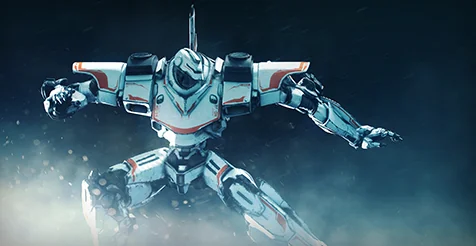
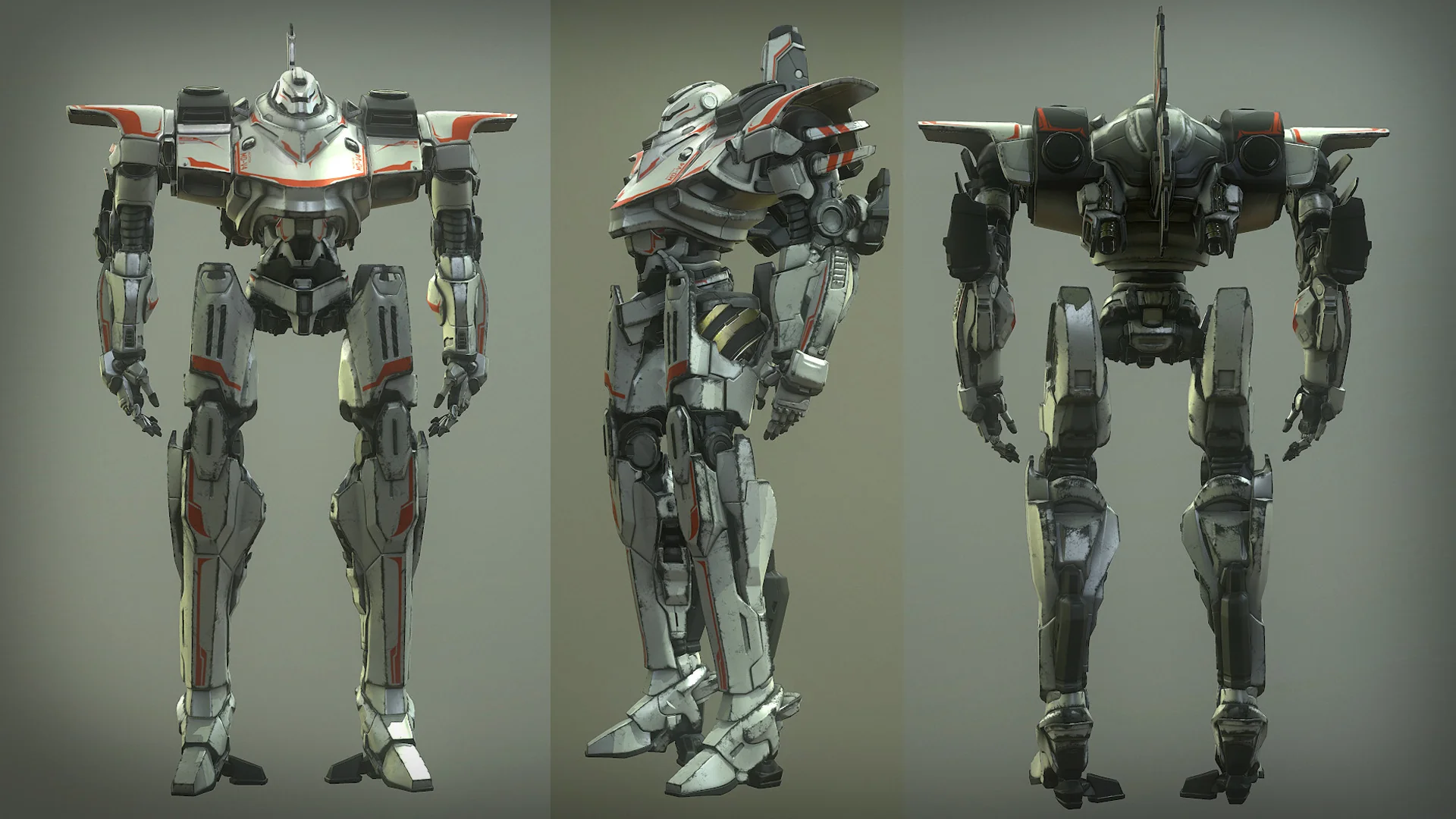
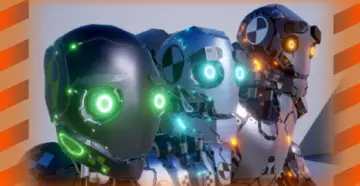
Z-Mech Robot Giant
Examine the Z-Mech Robot Giant character mesh, its Epic skeleton integration, animation blueprint setup, and Combat Missile Pack compatibility.
Integrating massive mechanical units into a project often introduces friction during skeletal setup and blueprint assembly. The Z-Mech Robot Giant addresses that pipeline hurdle by offering a giant mecha character designed to swap directly into standard third-person blueprint environments. Because it relies on the standardized Epic skeleton hierarchy, the asset allows creators to bypass the tedious process of custom bone mapping during initial prototyping, letting teams test mechanical player avatars or automated adversaries without rebuilding baseline character logic from scratch.
Grounding the Z-Mech in Third-Person Templates
Third-person blueprint templates form the foundational starting point for a vast number of real-time combat systems, exploration mechanics, and locomotion tests. Replacing the default grey mannequin with a massive combat platform like the Z-Mech Robot Giant transforms the spatial reading of an environment instantly. When a project transitions from an organic humanoid form to a heavy mechanized frame, camera arm lengths, capsule collision boundaries, and spatial perspectives must reflect the scale of the chassis.
Because the unit is tailored to slot cleanly into standard template character blueprints with minimal configuration steps, testing gameplay loops happens rapidly. Instead of creating distinct movement logic or custom inputs, developers can select the existing character blueprint, point the skeletal mesh component to the mecha asset, and immediately walk the machine through the graybox level. This streamlined substitution maintains standard directional input, camera orbits, and character movement component properties while altering the visual identity of the project completely.
Epic Skeleton Rigging and Animation Blueprint Structure
The core utility of the character rests on its integration with the Epic skeleton. Adhering to this structural standard guarantees that standard animation sequences, locomotion blend spaces, and procedural poses transfer over without extensive bone renaming or complex retargeting graphs. For teams with existing libraries of walks, runs, idles, turns, and jump cycles built for standard mannequins, the mecha can evaluate those same state machines directly.
The package incorporates an Animation Blueprint along with associated scripts, providing the logic required to drive the mechanical frame across varied locomotion states. The script and animation blueprint architecture ensures that parameters such as ground speed, velocity vectors, falling states, and stance transitions feed straight into the state machine nodes. When working with mechanical characters, this blueprint-driven structure simplifies the process of layering mechanical flourishes—such as heavier additive footstep shakes or upper-body torso twists—on top of standardized movement states without corrupting the baseline locomotion graph.
Resolving Skeletal Mesh Alignment and Stoppages on the Robot Giant
Even in streamlined workflows, swapping skeletal meshes inside established blueprints can produce minor operational hitches. Two documented challenges frequently arise when substituting the default template mannequin with the Z-Mech: character animations may unexpectedly cease functioning, or the mechanical mesh may sit visibly offset into the floor plane. Both issues stem from the way character blueprint components store relative transforms and animation class assignments.
When an animation ceases playing after assigning the new mesh, the issue almost universally traces back to the Animation Mode or Anim Class reference within the Skeletal Mesh Component properties. Swapping a mesh often clears or decouples the assigned Animation Blueprint, leaving the character in a rigid reference pose. Verifying that the Anim Class parameter specifically targets the Z-Mech animation blueprint restores full pose evaluation immediately. If the mesh still refuses to sample inputs, inspecting the skeletal mesh assignment inside the blueprint viewport ensures the skeleton asset itself matches the animation sequences driving it.
Floor offset issues occur when root bone origins or capsule collision dimensions clash during the swap. The default mannequin capsule component possesses hardcoded half-height and radius values calibrated for human proportions. Because this asset represents a giant mecha, placing the mesh inside a default capsule can force the root transform lower than the base of the collision shape, causing the feet to sink through the collision plane. Correcting this involves checking the relative Z-axis location of the Skeletal Mesh component within the Character Blueprint hierarchy, nudging the mesh upward until the soles of the mechanical feet align flush with the bottom hemisphere of the collision capsule. Consulting designated skeletal mesh troubleshooting guidelines provides systematic visual walkthroughs for confirming these coordinate alignments and re-establishing clean ground contact.
Pairing Z-Mech Deployments with the Combat Missile Pack
A giant mecha character demands offensive capabilities suited to its scale. The Z-Mech Robot Giant features verified compatibility with the Combat Missile Pack, establishing a natural mechanical pairing between heavy chassis locomotion and ordnance delivery. This compatibility allows developers to attach projectile systems directly to the robot's frame to construct fully realized mechanized combat encounters.
Implementing the Combat Missile Pack alongside the robot relies on the Epic skeleton bone hierarchy and blueprint scripting tags included with the character. Sockets can be established along the shoulders, arms, or back plating of the mecha skeleton, serving as precise transform targets for spawning missile pods, tracking target vectors, and firing kinematic projectiles. Because the character includes script and blueprint hooks, firing triggers can be tied directly into player input mappings or AI behavior trees, enabling the robot to loose salvos during movement, execute defensive counter-artillery strikes, or act as a formidable boss unit within an arena setting.
Target Workflows and Practical Implementations
This package fits best within production pipelines where rapid mechanical character prototyping is required without the time investment of bespoke rigging and skinning. Independent developers building sci-fi combat games, top-down shooters, or tactical mecha action titles can use the asset to establish scale, movement physics, and weapon handling early in development.
Technical animators and blueprint developers also benefit from having an Epic-skeleton-compliant mechanical rig. It acts as an effective test bed for verifying weapon attachment sockets, testing heavy projectile systems like the Combat Missile Pack, and validating multi-layered animation blueprints before committing to full-scale character production runs. By combining standardized skeletal structures with immediate template drop-in capabilities, the Z-Mech delivers an efficient foundation for mechanized real-time action.
 Characters
 Characters
 Characters
 Characters