"95fdaf16012263fa"{"id":"1002312","slug":"crash-test-robot-dummy","title":"Crash Test Robot Dummy","category":"Characters \u0026 Creatures","engine":"4.12+,5.0+","assetVersion":"","engineVersion":"Engine Version: 4.12+,5.0+","tag":"Characters","accent":"blue","visual":"character","summary":"A rigged Unreal robot character with LODs, a physics asset, retargetable mannequin animations, customizable materials, and commented example blueprints.","platform":"Unreal Engine","indexPolicy":"index","publishedAt":"2026-11-06T06:15:02.722Z","updatedAt":"2026-11-06T06:15:02.722Z","sourceNotes":[],"fileContents":[],"compatibility":["Unreal Engine","Engine Version: 4.12+,5.0+"],"featuredImage":{"alt":"Crash Test Robot Dummy","src":"/wp-content/uploads/published/2026/11/3290a1b6fe56-217be32f-70ba-4a20-9099-909aaa640be1-3f80cc9255.webp"},"hasDownloadLink":true,"downloads":0,"terms":[{"taxonomy":"category","slug":"characters-and-creatures","name":"Characters \u0026 Creatures"}],"galleryImages":[{"src":"/wp-content/uploads/published/2026/11/0f119c8b078a-b874b6b7-2af8-40e3-93ff-360995a06525-4a578c0e4c.webp","alt":"Crash Test Robot Dummy"},{"src":"/wp-content/uploads/published/2026/11/80eb6ff1a7c2-85a7579f-fb25-4fa6-bf10-9b44fd158a3c-da1ee26518.webp","alt":"Crash Test Robot Dummy"},{"src":"/wp-content/uploads/published/2026/11/28e95c4acb63-02cfaaf0-f1a7-47ec-8338-8bcd2a0857b5-10f4d0b86c.webp","alt":"Crash Test Robot Dummy"},{"src":"/wp-content/uploads/published/2026/11/04398820701b-39ad4a58-0ed0-4e2b-b7dc-9abc14c8fb16-68fda115c8.webp","alt":"Crash Test Robot Dummy"},{"src":"/wp-content/uploads/published/2026/11/cc11661339c7-7cc6bc08-95bc-4f6f-afb8-168d4f00f6f8-2c292dc9ac.webp","alt":"Crash Test Robot Dummy"}],"accessPanel":{"kind":"resource","title":"Get this resource","eyebrow":"Free resource","message":"3DCGHUB is the service provider for this listing. Access is fulfilled through the official publisher channel.","fileName":"Content.7z","safetyNote":"Resources are manually reviewed before listing to improve quality and reduce obvious risks.","actionLabel":"Get this resource","resourceType":"Resource archive","versions":[]},"contentHtml":"\u003cp\u003eGetting a humanoid robot to move convincingly in Unreal means clearing a few hurdles in order: a skeleton that agrees with the engine's animation systems, locomotion states to test it against, materials with exposed parameters so variations don't require new shaders, and a physics setup that holds up when the character meets the level. Crash Test Robot Dummy arrives with each of those already in place, which turns the job from assembly into adjustment.\u003c/p\u003e \u003ch2\u003eA rig with the movement states already covered\u003c/h2\u003e\n\u003cp\u003eThe character is rigged for Unreal and comes with its own animation set rather than an empty skeleton. Four states are authored: idle, crouch walk, crouch idle, and slide. Together they cover standing still, moving at a low profile, holding that low profile, and a fast traversal move that reads as a deliberate burst rather than a walk cycle.\u003c/p\u003e\n\u003cp\u003eRetargeted animations for basic movement fill in the rest, so the character can cross ground without you authoring a single keyframe first. If you drop the dummy into a test level to check scale, camera framing, or a sci-fi corridor's proportions, it walks and crouches immediately — a useful property when a scene needs a moving body before it needs a final character.\u003c/p\u003e \u003ch2\u003eRetargeting mannequin animations onto the dummy\u003c/h2\u003e\n\u003cp\u003eThe rig is retargetable to the Unreal mannequin, which is the detail that extends the animation set well past the four authored states. Locomotion packs written for the mannequin can be applied to this character, so a marketplace animation library becomes usable on a robot rather than staying locked to a human silhouette.\u003c/p\u003e\n\u003cp\u003eThat matters most during iteration. A crouch walk that reads well on a mannequin may look wrong on a heavier mechanical frame, and retargeting lets you audition alternatives instead of rebuilding poses by hand. The authored crouch and slide animations give you a baseline for comparison; the retargeted mannequin clips give you range.\u003c/p\u003e \u003ch2\u003eMaterial controls for color, metalness, roughness, and emissive\u003c/h2\u003e\n\u003cp\u003eThe materials expose controls tied to different parts of the textures. Colors, metalness, roughness, and emissive values can each be adjusted, which is enough to push the same mesh toward a clean lab android, a scuffed industrial unit, or something with lit panels and seams.\u003c/p\u003e\n\u003cp\u003eBecause the controls sit at the texture level rather than being baked into a single flat shader, variations can stay in one material setup. Roughness and metalness in particular do the heavy lifting on a mechanical character — the difference between painted plating and bare alloy is mostly those two sliders, and emissive handles any surface that should read as powered.\u003c/p\u003e \u003ch2\u003eCommented animation and character blueprints, with a working key set\u003c/h2\u003e\n\u003cp\u003eTwo blueprints come with the character: an animation blueprint and a character blueprint, both commented and set up as an example of character control. The comments are the practical part — they make the logic readable when you open the graph to strip out an input, add a state, or move control into your own player class.\u003c/p\u003e\n\u003cp\u003eThe example control scheme is playable as shipped:\u003c/p\u003e\n\u003cul\u003e\n\u003cli\u003e[W] [A] [S] [D] for movement\u003c/li\u003e\n\u003cli\u003eHold [SHIFT] to run\u003c/li\u003e\n\u003cli\u003e[C] to crouch\u003c/li\u003e\n\u003cli\u003e[SHIFT] + [W] + [C] to slide\u003c/li\u003e\n\u003cli\u003e[1], [2], [3] to switch between the models\u003c/li\u003e\n\u003c/ul\u003e\n\u003cp\u003eThat combination is a compact test harness. Crouch and slide sit next to each other on the same modifier, so the transition between a crouch walk and a slide can be evaluated in one continuous input rather than through separate debug setups. The number keys swap between the included models, which is handy for comparing how the same rig and materials read across variants before committing to one.\u003c/p\u003e \u003ch2\u003eLODs, physics asset, and scene weight\u003c/h2\u003e\n\u003cp\u003eLODs are included, so distant instances of the character don't carry the full mesh cost when a scene fills up with them. A physics asset is present as well, giving the skeleton collision bodies that support physical interaction in the level.\u003c/p\u003e\n\u003cp\u003eThe character is tagged for both realistic and stylized treatment, and for science, space, and android themes — a spread that reflects how the model is likely to be used, from grounded laboratory scenes to broader sci-fi set dressing. It is also tagged as an enemy character, which fits a machine that can be duplicated across a level and given the same movement set. Compatibility is flagged for Biotech - Hornet.\u003c/p\u003e \u003ch2\u003eWhere the dummy lands in a production\u003c/h2\u003e\n\u003cp\u003eThis is a character that slots in early and stays useful later. In pre-production it acts as a stand-in that already moves correctly, so level geometry and camera work can be judged against something with real proportions and real locomotion. In a finished scene it works as an enemy or background unit, particularly in science and space settings where a crash-test-styled machine reads as intentional rather than placeholder.\u003c/p\u003e\n\u003cp\u003eThe blueprint setup is the part worth keeping around even if the model itself is swapped out. A commented character blueprint with movement, run, crouch, and slide wired to concrete keys, paired with an animation blueprint that handles the state changes, is a reference implementation you can lift into your own project and expand from. Pair that with retargetable mannequin animations and adjustable material controls, and the character covers the gap between a test asset and something shipped.\u003c/p\u003e\n\n\u003ch2\u003eContinue Browsing Similar Packs\u003c/h2\u003e\n\u003cul\u003e\n\u003cli\u003e\u003ca href=\"https://3dcghub.com/robot-spider/\" rel=\"noopener noreferrer\"\u003eRobot Spider\u003c/a\u003e\u003c/li\u003e\n\u003cli\u003e\u003ca href=\"https://3dcghub.com/robot-bee/\" rel=\"noopener noreferrer\"\u003eRobot Bee\u003c/a\u003e\u003c/li\u003e\n\u003cli\u003e\u003ca href=\"https://3dcghub.com/robot-robbie-01/\" rel=\"noopener noreferrer\"\u003eRobot Robbie 01\u003c/a\u003e\u003c/li\u003e\n\u003cli\u003e\u003ca href=\"https://3dcghub.com/sci-fi-robot/\" rel=\"noopener noreferrer\"\u003eSci Fi Robot\u003c/a\u003e\u003c/li\u003e\n\u003cli\u003e\u003ca href=\"https://3dcghub.com/etasphera17/\" rel=\"noopener noreferrer\"\u003eEtasphera17\u003c/a\u003e\u003c/li\u003e\n\u003c/ul\u003e","contentTextLength":5366,"navigation":{"current":56,"total":4291,"previous":{"id":"1002313","slug":"cute-hamsters","title":"Cute Hamsters","category":"Animals","platform":"Unreal Engine","updatedAt":"2026-11-06T06:15:37.558Z"},"next":{"id":"1002311","slug":"circle-damage-indicator-component","title":"Circle Damage Indicator Component","category":"Widgets \u0026 Controls","platform":"Unreal Engine","updatedAt":"2026-11-06T06:13:47.602Z"}},"relatedResources":[{"id":"1002174","slug":"robot-spider","title":"Robot Spider","category":"Characters \u0026 Creatures","engine":"4.19+,5.0+","assetVersion":"","engineVersion":"Engine Version: 4.19+,5.0+","tag":"Characters","accent":"blue","visual":"character","summary":"Examine the Robot Spider character model, featuring 4K PBR metallic-roughness textures, 13 animations, turret articulation, and an included damage variant.","platform":"Unreal Engine","indexPolicy":"index","publishedAt":"2026-10-29T10:54:47.040Z","updatedAt":"2026-10-29T10:54:47.040Z","sourceNotes":[],"fileContents":[],"compatibility":["Unreal Engine","Engine Version: 4.19+,5.0+"],"featuredImage":{"alt":"Robot Spider","src":"/wp-content/uploads/published/2026/10/c97535cddc0a-84eee4c7-f51c-4fc6-8d32-755f9175da17-3e3c630c50.webp"},"hasDownloadLink":true,"downloads":1},{"id":"1002172","slug":"robot-bee","title":"Robot Bee","category":"Characters \u0026 Creatures","engine":"4.19+,5.0+","assetVersion":"","engineVersion":"Engine Version: 4.19+,5.0+","tag":"Characters","accent":"blue","visual":"character","summary":"Rigged and animated Robot Bee low-poly character model featuring 4K PBR metallic-roughness textures, full flight, walking, and weapon combat animations.","platform":"Unreal Engine","indexPolicy":"index","publishedAt":"2026-10-29T10:15:34.621Z","updatedAt":"2026-10-29T10:15:34.621Z","sourceNotes":[],"fileContents":[],"compatibility":["Unreal Engine","Engine Version: 4.19+,5.0+"],"featuredImage":{"alt":"Robot Bee","src":"/wp-content/uploads/published/2026/10/e2c941f553b6-24c810ad-37cb-43fa-8ee9-d1406a377a32-03d7e5bdb8.webp"},"hasDownloadLink":true,"downloads":0},{"id":"1001829","slug":"robot-robbie-01","title":"Robot Robbie 01","category":"Characters \u0026 Creatures","engine":"4.19+,5.0+","assetVersion":"","engineVersion":"Engine Version: 4.19+,5.0+","tag":"Characters","accent":"blue","visual":"character","summary":"Low-poly humanoid mecha Robot Robbie 01 features 4K PBR textures, Epic skeleton UE4 rigging, v1.1 eye morph targets, and a versatile animation suite.","platform":"Unreal Engine","indexPolicy":"index","publishedAt":"2026-10-21T08:21:32.204Z","updatedAt":"2026-10-21T08:21:32.204Z","sourceNotes":[],"fileContents":[],"compatibility":["Unreal Engine","Engine Version: 4.19+,5.0+"],"featuredImage":{"alt":"Robot Robbie 01","src":"/wp-content/uploads/published/2026/10/275ed59aa92f-b883a61c-8b35-4617-8f13-d93248ca4634-a2ab406c41.webp"},"hasDownloadLink":true,"downloads":0}]}
Characters
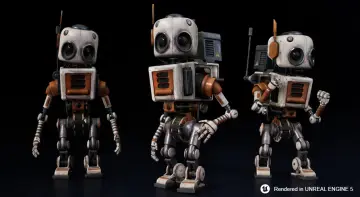
Crash Test Robot Dummy
A rigged Unreal robot character with LODs, a physics asset, retargetable mannequin animations, customizable materials, and commented example blueprints.
Getting a humanoid robot to move convincingly in Unreal means clearing a few hurdles in order: a skeleton that agrees with the engine's animation systems, locomotion states to test it against, materials with exposed parameters so variations don't require new shaders, and a physics setup that holds up when the character meets the level. Crash Test Robot Dummy arrives with each of those already in place, which turns the job from assembly into adjustment.
A rig with the movement states already covered
The character is rigged for Unreal and comes with its own animation set rather than an empty skeleton. Four states are authored: idle, crouch walk, crouch idle, and slide. Together they cover standing still, moving at a low profile, holding that low profile, and a fast traversal move that reads as a deliberate burst rather than a walk cycle.
Retargeted animations for basic movement fill in the rest, so the character can cross ground without you authoring a single keyframe first. If you drop the dummy into a test level to check scale, camera framing, or a sci-fi corridor's proportions, it walks and crouches immediately — a useful property when a scene needs a moving body before it needs a final character.
Retargeting mannequin animations onto the dummy
The rig is retargetable to the Unreal mannequin, which is the detail that extends the animation set well past the four authored states. Locomotion packs written for the mannequin can be applied to this character, so a marketplace animation library becomes usable on a robot rather than staying locked to a human silhouette.
That matters most during iteration. A crouch walk that reads well on a mannequin may look wrong on a heavier mechanical frame, and retargeting lets you audition alternatives instead of rebuilding poses by hand. The authored crouch and slide animations give you a baseline for comparison; the retargeted mannequin clips give you range.
Material controls for color, metalness, roughness, and emissive
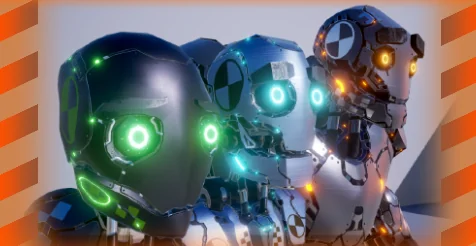
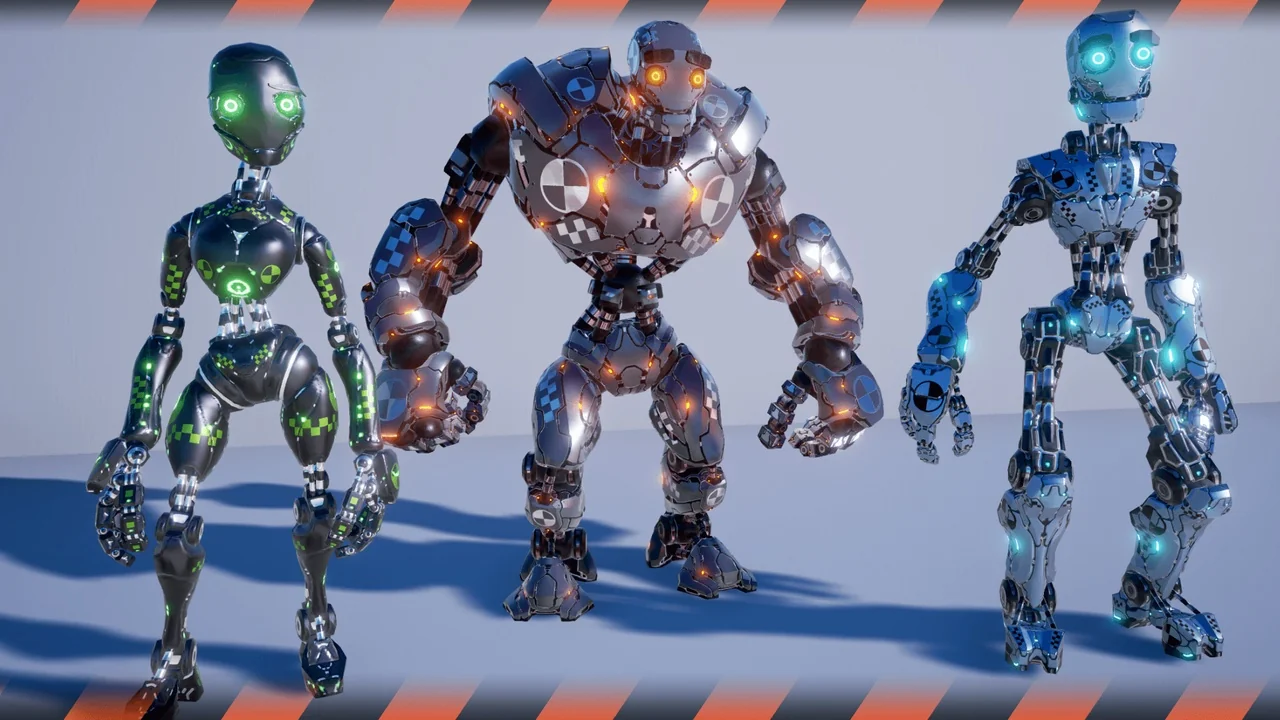
The materials expose controls tied to different parts of the textures. Colors, metalness, roughness, and emissive values can each be adjusted, which is enough to push the same mesh toward a clean lab android, a scuffed industrial unit, or something with lit panels and seams.
Because the controls sit at the texture level rather than being baked into a single flat shader, variations can stay in one material setup. Roughness and metalness in particular do the heavy lifting on a mechanical character — the difference between painted plating and bare alloy is mostly those two sliders, and emissive handles any surface that should read as powered.
Commented animation and character blueprints, with a working key set
Two blueprints come with the character: an animation blueprint and a character blueprint, both commented and set up as an example of character control. The comments are the practical part — they make the logic readable when you open the graph to strip out an input, add a state, or move control into your own player class.
The example control scheme is playable as shipped:
[W] [A] [S] [D] for movement
Hold [SHIFT] to run
[C] to crouch
[SHIFT] + [W] + [C] to slide
[1], [2], [3] to switch between the models
That combination is a compact test harness. Crouch and slide sit next to each other on the same modifier, so the transition between a crouch walk and a slide can be evaluated in one continuous input rather than through separate debug setups. The number keys swap between the included models, which is handy for comparing how the same rig and materials read across variants before committing to one.
LODs, physics asset, and scene weight
LODs are included, so distant instances of the character don't carry the full mesh cost when a scene fills up with them. A physics asset is present as well, giving the skeleton collision bodies that support physical interaction in the level.
The character is tagged for both realistic and stylized treatment, and for science, space, and android themes — a spread that reflects how the model is likely to be used, from grounded laboratory scenes to broader sci-fi set dressing. It is also tagged as an enemy character, which fits a machine that can be duplicated across a level and given the same movement set. Compatibility is flagged for Biotech - Hornet.
Where the dummy lands in a production
This is a character that slots in early and stays useful later. In pre-production it acts as a stand-in that already moves correctly, so level geometry and camera work can be judged against something with real proportions and real locomotion. In a finished scene it works as an enemy or background unit, particularly in science and space settings where a crash-test-styled machine reads as intentional rather than placeholder.
The blueprint setup is the part worth keeping around even if the model itself is swapped out. A commented character blueprint with movement, run, crouch, and slide wired to concrete keys, paired with an animation blueprint that handles the state changes, is a reference implementation you can lift into your own project and expand from. Pair that with retargetable mannequin animations and adjustable material controls, and the character covers the gap between a test asset and something shipped.
 Characters
 Characters
 Characters
 Characters