"95fdaf16012263fa"{"id":"1002365","slug":"workout-gym","title":"Workout gym","category":"Tools, Objects \u0026 Decor","engine":"4.24+,5.0+","assetVersion":"","engineVersion":"Engine Version: 4.24+,5.0+","tag":"Tools","accent":"blue","visual":"mech","summary":"Workout gym is a modular set of 33 sports-equipment objects with 49 materials and instance materials, made for game levels and architectural visualization.","platform":"Unreal Engine","indexPolicy":"index","publishedAt":"2026-11-06T07:24:02.887Z","updatedAt":"2026-11-06T07:24:02.887Z","sourceNotes":[],"fileContents":[],"compatibility":["Unreal Engine","Engine Version: 4.24+,5.0+"],"featuredImage":{"alt":"Workout gym","src":"/wp-content/uploads/published/2026/11/93625b7d8fb5-d258c4c4-1666-41e3-a04a-a8bd88b6664b-7c3442038d.webp"},"hasDownloadLink":true,"downloads":0,"terms":[{"taxonomy":"category","slug":"tools-objects-and-decor","name":"Tools, Objects \u0026 Decor"}],"galleryImages":[{"src":"/wp-content/uploads/published/2026/11/e59f13c7f535-9c301b86-609d-4312-93b3-2e05ffddf0e0-37937b675d.webp","alt":"Workout gym"},{"src":"/wp-content/uploads/published/2026/11/5fc6f0e196cb-f6bfb02b-8aed-4ecb-a809-4dd33e5ad3c3-2565928594.webp","alt":"Workout gym"},{"src":"/wp-content/uploads/published/2026/11/c3699552cab6-391d3bb4-45df-48f9-95c3-42034527aa84-4b77de4e68.webp","alt":"Workout gym"},{"src":"/wp-content/uploads/published/2026/11/8890ef8cba59-0ce7dded-7fff-4eb2-8e85-0eb6be92635e-db9759f600.webp","alt":"Workout gym"},{"src":"/wp-content/uploads/published/2026/11/60045712208e-0824a7fb-f3f0-4b1b-95ed-51098745fe6b-932bbbc7cb.webp","alt":"Workout gym"},{"src":"/wp-content/uploads/published/2026/11/bdd741ff84dc-ad77c042-7724-4004-9bd2-e8f4e3ea573d-59dccc085f.webp","alt":"Workout gym"}],"accessPanel":{"kind":"resource","title":"Get this resource","eyebrow":"Free resource","message":"3DCGHUB is the service provider for this listing. Access is fulfilled through the official publisher channel.","fileName":"Content.7z","safetyNote":"Resources are manually reviewed before listing to improve quality and reduce obvious risks.","actionLabel":"Get this resource","resourceType":"Resource archive","versions":[]},"contentHtml":"\u003cp\u003eA gym is one of those interiors that has to work twice over. In a game level it becomes a space players move through, so the pieces need to hold up in real time and read clearly from any angle. In an architectural visualization it carries the whole frame, and the eye lands on materials, color, and how the equipment sits in the room. The Workout gym set is put together with both of those situations in mind rather than committing to one.\u003c/p\u003e \u003cp\u003eWhat's actually in the package is straightforward: 33 objects covering sports equipment, and 49 materials and instance materials. The set is tagged modular, realistic, sport, and workout. Those four words describe how it is meant to be assembled more than they describe a style.\u003c/p\u003e \u003ch2\u003eSports equipment as 33 separate objects\u003c/h2\u003e \u003cp\u003eThe count matters more than it looks. Thirty-three objects means the equipment is not delivered as one merged prop or a single baked scene. Each piece can be placed, shifted, rotated, or left out. A layout with equipment clustered into one zone and open floor around it is possible. So is a denser arrangement that fills the space.\u003c/p\u003e \u003cp\u003eThat separateness is what the modular tag is pointing at. Modular in this context means the gym is assembled from parts, and you decide the arrangement. Need a room that reads as a working gym from the doorway? Place most of the objects. Need a smaller training corner inside a larger building? Use a subset and let the rest of the package sit unused. The same 33 objects cover both cases without re-authoring anything.\u003c/p\u003e \u003cp\u003eFor level work, that granularity also keeps collision and placement decisions in your hands. For visualization, it lets you match the equipment layout to the floor plan instead of forcing the plan to fit a fixed asset.\u003c/p\u003e \u003ch2\u003eChanging the color of the gym\u003c/h2\u003e \u003cp\u003eThe set lets you choose and change the color of the gym. That is the detail that most affects how the asset gets used day to day, because it means the same gym can appear in more than one project without looking like the same room twice.\u003c/p\u003e \u003cp\u003eThe 49 materials and instance materials are what makes that practical. Instance materials exist to sit on top of a base material and vary it — which is exactly the structure a recolor workflow needs. Rather than rebuilding materials from scratch for each variation, the color decision happens at the instance level and the underlying material stays intact.\u003c/p\u003e \u003cp\u003eIn practice this gives a few different habits. A project might lock in one palette early and keep it consistent across every room that uses the set. Another might push color toward a specific mood — cooler and more clinical in one scene, warmer in another. Because the change happens through materials, swapping a palette does not require touching object placement at all. The layout you built survives the recolor.\u003c/p\u003e \u003ch3\u003eTwo palettes from one set of 33 objects\u003c/h3\u003e \u003cp\u003eIt is worth thinking about the color feature alongside the object count rather than separately. Thirty-three placeable objects give you layout variety; the material layer gives you palette variety. Combined, one gym set can produce interiors that differ in both arrangement and tone, which is a meaningful amount of variation to get from a single package. If two scenes in the same project both need a gym, they don't have to look like duplicates.\u003c/p\u003e \u003ch2\u003eWhere the realistic tag earns its place\u003c/h2\u003e \u003cp\u003eRealistic is the other tag worth taking literally. It sets an expectation about proportion and surface treatment — equipment that reads as actual gym hardware rather than stylized stand-ins. That matters most in architectural visualization, where the gym is usually one room inside a larger building and has to sit convincingly next to everything else in the render.\u003c/p\u003e \u003cp\u003eFor game work, realism tends to be a question of degree. A realistic gym set fits a contemporary setting, an urban interior, a training facility — environments where the player expects the space to look like somewhere real. The visual style carries across the equipment and the materials together, so a scene assembled from these parts stays coherent instead of mixing register.\u003c/p\u003e \u003ch2\u003eAssembling a gym for a game versus a render\u003c/h2\u003e \u003cp\u003eThe two target uses pull the set in slightly different directions, and it helps to know which one you're building for before you start placing objects.\u003c/p\u003e \u003cp\u003eIn a game, the priority is the player's path through the space. That means deciding early which equipment sits against walls and which stands in open floor, and using the 33 objects to shape movement rather than just to fill area. The modular structure supports this directly — pieces are independent, so the layout can be revised without rebuilding the room.\u003c/p\u003e \u003cp\u003eIn architectural visualization, the priority shifts to completeness and color harmony. A visualization usually wants the gym to look fully equipped when viewed from the camera angles that matter, and it wants the palette to belong to the rest of the building. Here the recolor capability does most of the work: match the gym's color to the surrounding interior, then adjust equipment placement to suit the floor plan and sightlines.\u003c/p\u003e \u003cp\u003eNeither approach requires the full 33 objects. Both benefit from the fact that the choice is yours.\u003c/p\u003e \u003ch2\u003eWho gets the most out of it\u003c/h2\u003e \u003cp\u003eEnvironment artists building game interiors who need a gym that can be rearranged per level will find the object-level structure the useful part. Architectural visualization artists will lean harder on the material side, since color matching and a fully equipped look are what a rendered interior demands. Anyone working on a project that needs a gym in more than one place gets the strongest case: 33 objects, 49 materials and instance materials, and a color scheme you can change rather than accept as fixed.\u003c/p\u003e\n\n\u003ch2\u003eMore From The Same Workflow\u003c/h2\u003e\n\u003cul\u003e\n\u003cli\u003e\u003ca href=\"https://3dcghub.com/scifi-capsules-props-3/\" rel=\"noopener noreferrer\"\u003eSciFi Capsules Props 3\u003c/a\u003e\u003c/li\u003e\n\u003cli\u003e\u003ca href=\"https://3dcghub.com/crystals/\" rel=\"noopener noreferrer\"\u003eCrystals\u003c/a\u003e\u003c/li\u003e\n\u003cli\u003e\u003ca href=\"https://3dcghub.com/american-bar/\" rel=\"noopener noreferrer\"\u003eAmerican Bar\u003c/a\u003e\u003c/li\u003e\n\u003cli\u003e\u003ca href=\"https://3dcghub.com/survival-horror-inventory-props-pack/\" rel=\"noopener noreferrer\"\u003eSurvival Horror Inventory Props Pack\u003c/a\u003e\u003c/li\u003e\n\u003cli\u003e\u003ca href=\"https://3dcghub.com/sci-fi-shrine-props-vol-5/\" rel=\"noopener noreferrer\"\u003eSci-Fi Shrine props VOL 5\u003c/a\u003e\u003c/li\u003e\n\u003c/ul\u003e","contentTextLength":5808,"navigation":{"current":3,"total":4291,"previous":{"id":"1002366","slug":"yippy-kawaii","title":"Yippy Kawaii","category":"Animals","platform":"Unreal Engine","updatedAt":"2026-11-06T07:25:01.140Z"},"next":{"id":"1002364","slug":"weapon-system","title":"Weapon System","category":"Humans","platform":"Unreal Engine","updatedAt":"2026-11-06T07:23:16.717Z"}},"relatedResources":[{"id":"1002193","slug":"scifi-capsules-props-3","title":"SciFi Capsules Props 3","category":"Tools, Objects \u0026 Decor","engine":"4.20+,5.0+","assetVersion":"","engineVersion":"Engine Version: 4.20+,5.0+","tag":"Tools","accent":"blue","visual":"mech","summary":"Discover SciFi Capsules Props 3, featuring 14 game-ready capsules, 9 caps, dual-material glass setups, and blueprints for rapid level variation.","platform":"Unreal Engine","indexPolicy":"index","publishedAt":"2026-10-29T14:37:02.306Z","updatedAt":"2026-10-29T14:37:02.306Z","sourceNotes":[],"fileContents":[],"compatibility":["Unreal Engine","Engine Version: 4.20+,5.0+"],"featuredImage":{"alt":"SciFi Capsules Props 3","src":"/wp-content/uploads/published/2026/10/62c1867b2e52-01ebe196-49ba-4cd7-bcc3-ad0adddd9b4f-bdc88a98f8.webp"},"hasDownloadLink":true,"downloads":1},{"id":"1002084","slug":"crystals","title":"Crystals","category":"Tools, Objects \u0026 Decor","engine":"4.22+,5.0+","assetVersion":"","engineVersion":"Engine Version: 4.22+,5.0+","tag":"Tools","accent":"blue","visual":"mech","summary":"A close look at Crystals, featuring ten dynamic crystal materials with integrated visual shader effects, character appearance use, and dissolve behaviors.","platform":"Unreal Engine","indexPolicy":"index","publishedAt":"2026-10-26T15:53:48.524Z","updatedAt":"2026-10-26T15:53:48.524Z","sourceNotes":[],"fileContents":[],"compatibility":["Unreal Engine","Engine Version: 4.22+,5.0+"],"featuredImage":{"alt":"Crystals","src":"/wp-content/uploads/published/2026/10/3d3f811432f4-9db3a354-b1c7-4c83-a6d9-ed03c8d2dd66-15ba8596de.webp"},"hasDownloadLink":true,"downloads":1},{"id":"1001946","slug":"american-bar","title":"American Bar","category":"Tools, Objects \u0026 Decor","engine":"4.26+,5.0+","assetVersion":"","engineVersion":"Engine Version: 4.26+,5.0+","tag":"Tools","accent":"blue","visual":"mech","summary":"Configure the American Bar game props kit with custom materials on static mesh surfaces and manage surface adjustments through object properties.","platform":"Unreal Engine","indexPolicy":"index","publishedAt":"2026-10-24T11:20:17.570Z","updatedAt":"2026-10-24T11:20:17.570Z","sourceNotes":[],"fileContents":[],"compatibility":["Unreal Engine","Engine Version: 4.26+,5.0+"],"featuredImage":{"alt":"American Bar","src":"/wp-content/uploads/published/2026/10/5568197c90f3-e1a448bb-84b8-4700-ae13-10824c578603-ca43e406ad.webp"},"hasDownloadLink":true,"downloads":1}]}
Tools
Workout gym
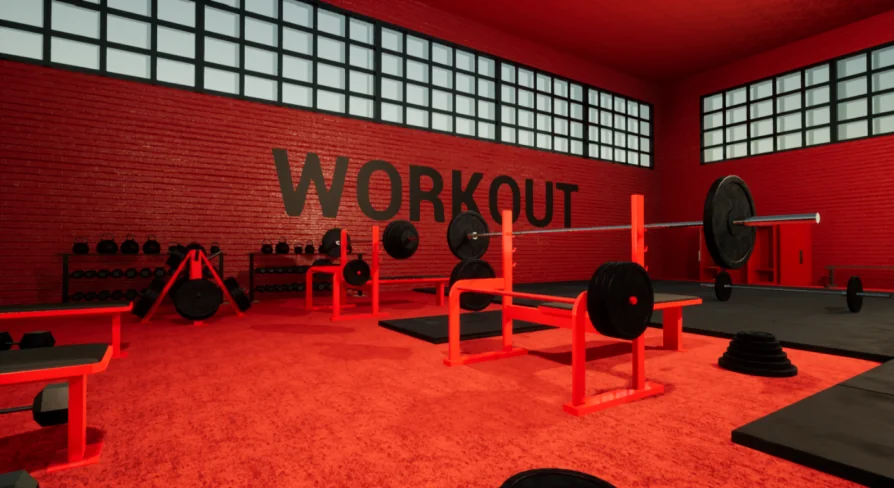
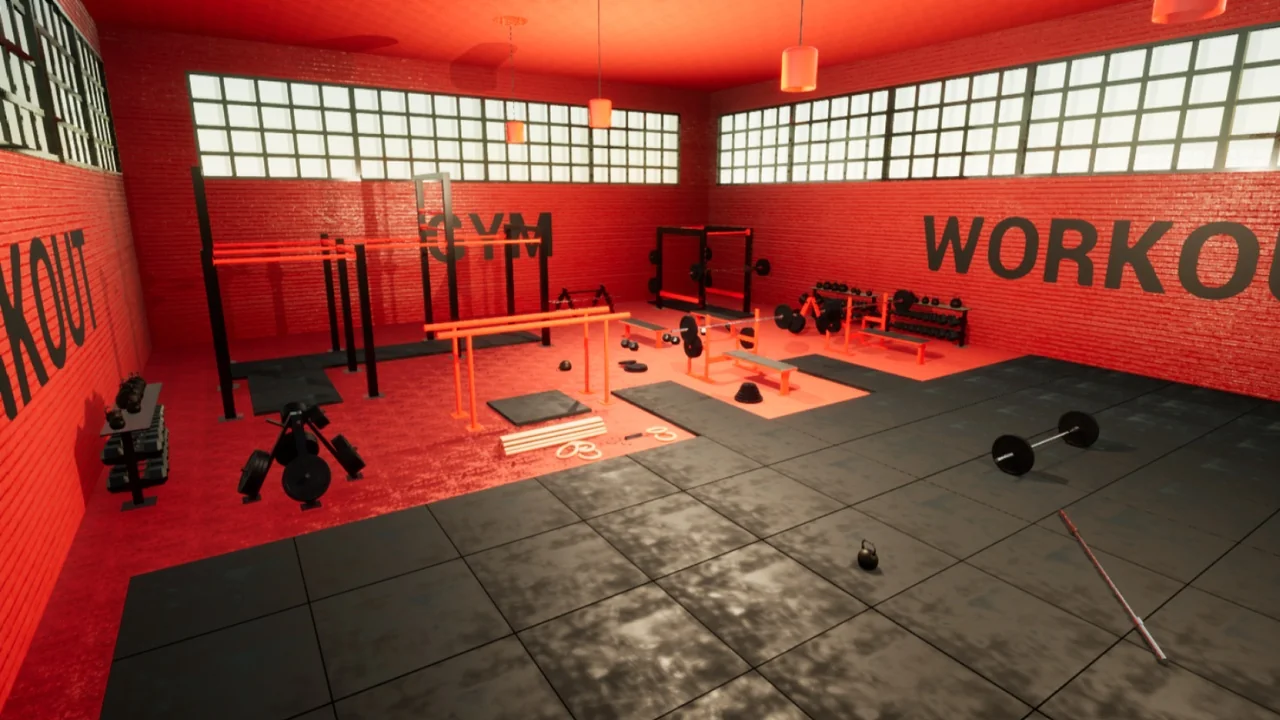
Workout gym is a modular set of 33 sports-equipment objects with 49 materials and instance materials, made for game levels and architectural visualization.
A gym is one of those interiors that has to work twice over. In a game level it becomes a space players move through, so the pieces need to hold up in real time and read clearly from any angle. In an architectural visualization it carries the whole frame, and the eye lands on materials, color, and how the equipment sits in the room. The Workout gym set is put together with both of those situations in mind rather than committing to one.
What's actually in the package is straightforward: 33 objects covering sports equipment, and 49 materials and instance materials. The set is tagged modular, realistic, sport, and workout. Those four words describe how it is meant to be assembled more than they describe a style.
Sports equipment as 33 separate objects
The count matters more than it looks. Thirty-three objects means the equipment is not delivered as one merged prop or a single baked scene. Each piece can be placed, shifted, rotated, or left out. A layout with equipment clustered into one zone and open floor around it is possible. So is a denser arrangement that fills the space.
That separateness is what the modular tag is pointing at. Modular in this context means the gym is assembled from parts, and you decide the arrangement. Need a room that reads as a working gym from the doorway? Place most of the objects. Need a smaller training corner inside a larger building? Use a subset and let the rest of the package sit unused. The same 33 objects cover both cases without re-authoring anything.
For level work, that granularity also keeps collision and placement decisions in your hands. For visualization, it lets you match the equipment layout to the floor plan instead of forcing the plan to fit a fixed asset.
Changing the color of the gym
The set lets you choose and change the color of the gym. That is the detail that most affects how the asset gets used day to day, because it means the same gym can appear in more than one project without looking like the same room twice.
The 49 materials and instance materials are what makes that practical. Instance materials exist to sit on top of a base material and vary it — which is exactly the structure a recolor workflow needs. Rather than rebuilding materials from scratch for each variation, the color decision happens at the instance level and the underlying material stays intact.
In practice this gives a few different habits. A project might lock in one palette early and keep it consistent across every room that uses the set. Another might push color toward a specific mood — cooler and more clinical in one scene, warmer in another. Because the change happens through materials, swapping a palette does not require touching object placement at all. The layout you built survives the recolor.
Two palettes from one set of 33 objects
It is worth thinking about the color feature alongside the object count rather than separately. Thirty-three placeable objects give you layout variety; the material layer gives you palette variety. Combined, one gym set can produce interiors that differ in both arrangement and tone, which is a meaningful amount of variation to get from a single package. If two scenes in the same project both need a gym, they don't have to look like duplicates.
Where the realistic tag earns its place
Realistic is the other tag worth taking literally. It sets an expectation about proportion and surface treatment — equipment that reads as actual gym hardware rather than stylized stand-ins. That matters most in architectural visualization, where the gym is usually one room inside a larger building and has to sit convincingly next to everything else in the render.
For game work, realism tends to be a question of degree. A realistic gym set fits a contemporary setting, an urban interior, a training facility — environments where the player expects the space to look like somewhere real. The visual style carries across the equipment and the materials together, so a scene assembled from these parts stays coherent instead of mixing register.
Assembling a gym for a game versus a render
The two target uses pull the set in slightly different directions, and it helps to know which one you're building for before you start placing objects.
In a game, the priority is the player's path through the space. That means deciding early which equipment sits against walls and which stands in open floor, and using the 33 objects to shape movement rather than just to fill area. The modular structure supports this directly — pieces are independent, so the layout can be revised without rebuilding the room.
In architectural visualization, the priority shifts to completeness and color harmony. A visualization usually wants the gym to look fully equipped when viewed from the camera angles that matter, and it wants the palette to belong to the rest of the building. Here the recolor capability does most of the work: match the gym's color to the surrounding interior, then adjust equipment placement to suit the floor plan and sightlines.
Neither approach requires the full 33 objects. Both benefit from the fact that the choice is yours.
Who gets the most out of it
Environment artists building game interiors who need a gym that can be rearranged per level will find the object-level structure the useful part. Architectural visualization artists will lean harder on the material side, since color matching and a fully equipped look are what a rendered interior demands. Anyone working on a project that needs a gym in more than one place gets the strongest case: 33 objects, 49 materials and instance materials, and a color scheme you can change rather than accept as fixed.
 Tools
 Tools
 Tools
 Tools