"95fdaf16012263fa"{"id":"1002366","slug":"yippy-kawaii","title":"Yippy Kawaii","category":"Animals","engine":"4.26+,5.0+","assetVersion":"","engineVersion":"Engine Version: 4.26+,5.0+","tag":"Animals","accent":"blue","visual":"mech","summary":"Yippy Kawaii is a lowpoly cat, rabbit and bear character set with 45 colors, 36 accessories and 17 animations, shown in Unity3D with notes on the UE version.","platform":"Unreal Engine","indexPolicy":"index","publishedAt":"2026-11-06T07:25:01.140Z","updatedAt":"2026-11-06T07:25:01.140Z","sourceNotes":[],"fileContents":[],"compatibility":["Unreal Engine","Engine Version: 4.26+,5.0+"],"featuredImage":{"alt":"Yippy Kawaii","src":"/wp-content/uploads/published/2026/11/ab7e34fe1083-df58e703-6d7f-47f2-8e80-cd2d5179b8c7-d8fde8e822.webp"},"hasDownloadLink":true,"downloads":0,"terms":[{"taxonomy":"category","slug":"animals","name":"Animals"}],"galleryImages":[{"src":"/wp-content/uploads/published/2026/11/ec3d622b3060-0100f20a-587b-435d-a56a-456442f224ce-1a7535797d.webp","alt":"Yippy Kawaii"}],"accessPanel":{"kind":"resource","title":"Get this resource","eyebrow":"Free resource","message":"3DCGHUB is the service provider for this listing. Access is fulfilled through the official publisher channel.","fileName":"Content.7z","safetyNote":"Resources are manually reviewed before listing to improve quality and reduce obvious risks.","actionLabel":"Get this resource","resourceType":"Resource archive","versions":[]},"contentHtml":"\u003cp\u003eThink about the scenes this kind of cast belongs in before thinking about the files. A pastel dollhouse interior with a cat perched on a shelf. A cartoon forest path where a rabbit and a bear idle behind the player. A holiday corner that needs one seasonal detail to read as festive. Yippy Kawaii is a three-character set for those spaces — a cat, a rabbit and a bear, lowpoly and doll-like in tone, with enough color and accessory spread that the same three animals can fill several scenes without looking repeated.\u003c/p\u003e \u003ch2\u003eWhere the cat, rabbit and bear come from\u003c/h2\u003e \u003cp\u003eThe characters trace back to a crochet dolls store. That origin shows in the shape language: rounded bodies, soft proportions, the sort of silhouette you would expect from yarn figures scaled up into game-ready characters. The tag set leans the same direction — Doll, Cute, Bunny, Rabbit, Cat, Bear, Cartoon, with Lowpoly and Fantasy sitting alongside them to place the set inside stylized rather than realistic projects.\u003c/p\u003e \u003cp\u003eThat distinction is worth stating plainly. Nothing here aims at anatomical realism. A crochet doll reference gives you characters that read instantly at small screen sizes, which is what a dollhouse shelf, a menu screen, or a background NPC needs.\u003c/p\u003e \u003ch2\u003eDressing three animals with 45 colors and 36 accessories\u003c/h2\u003e \u003cp\u003eThe customization layer is where the set earns its keep. Each character draws from 45 colors and 36 accessories, so the cat, rabbit and bear are starting points rather than fixed designs. Swap colors and the same bear reads as a different character in a different scene. Add an accessory and it reads as a themed variant.\u003c/p\u003e \u003cp\u003eOne of the tags is Santa, which points at holiday dressing as a supported direction — a seasonal pass over the same cast rather than a separate purchase of festive models. The rest of the accessory range is not spelled out item by item, but the count is large enough that three animals can be spread across a cast of background characters, shopkeepers, pets or villagers without obvious duplication.\u003c/p\u003e \u003cp\u003eFor a small project, that is usually the deciding factor. Three models give you three characters; three models with a wide color and accessory spread give you a population.\u003c/p\u003e \u003ch2\u003eSeventeen animations, shown in Unity3D\u003c/h2\u003e \u003cp\u003eThe set carries 17 animations. The animation example is presented in Unity3D, so the motion set is demonstrated inside that engine, with the characters moving as intended in a Unity scene. Treat that sample as the reference for how the clips are meant to read in context — how the doll proportions carry through a walk, an idle, or a gesture.\u003c/p\u003e \u003cp\u003eSeventeen clips across three animals covers the ordinary ground: the states a stylized character cycles through during normal play. For a project structured through ambient characters — a shop, a village, a cozy room — that count is enough to keep the cast from standing frozen between interactions.\u003c/p\u003e \u003ch3\u003eWorking from the Unity3D example\u003c/h3\u003e \u003cp\u003eBecause the demonstration lives in Unity3D, that engine is the smoothest place to start. You can open the example, watch how the clips behave on the cat, rabbit and bear, then decide where each animation fits in your own state logic. The doll-like proportions make the animation style forgiving: soft, readable motion rather than precise physical accuracy.\u003c/p\u003e \u003ch2\u003eThe Unreal Engine version ships without the script and Toon shader\u003c/h2\u003e \u003cp\u003eThis is the detail to plan around. The UE version does not include the script, and it does not include the Toon shader. The characters and their animations are there; the driving script and the cel-style shading that gives the set its flat, cartoon finish are not.\u003c/p\u003e \u003cp\u003eIn practice that means an Unreal project needs two things supplied from your side before the cast looks and behaves like the Unity demonstration. First, a replacement toon material — your own shading setup to recover the flat cartoon look implied by the Cartoon tag. Second, a script to drive the animations, since the behavior logic is not part of the UE package.\u003c/p\u003e \u003cp\u003eNeither is unusual work for an Unreal developer, but both take time, and the difference between the two engine versions should be clear to whoever scopes the task. A team expecting a drop-in toon-shaded character in UE will be doing setup that a Unity team will not.\u003c/p\u003e \u003ch2\u003eMatching the cast to a fantasy or cartoon project\u003c/h2\u003e \u003cp\u003eThe lowpoly build and the Fantasy and Cartoon tags place this set in a specific neighborhood. Cozy builders, mobile titles, stylized RPG towns, holiday events, and anything with a dollhouse or toy aesthetic are the natural fit. The bear and rabbit work as forest wildlife; the cat works as a shop companion, a familiar, or a household pet. With the Santa-adjacent dressing, the same characters can carry a winter update.\u003c/p\u003e \u003cp\u003eWhat the set will not do is pass in a realistic or gritty scene. The crochet-doll proportions and flat cartoon intent make that clear before anyone opens the files.\u003c/p\u003e \u003cp\u003eSmall teams building stylized games get the most from Yippy Kawaii: three lowpoly animals, a broad color and accessory range for cast variety, and 17 animations to keep them moving. Unity3D users get the demonstrated setup out of the box. Unreal Engine users get the same characters and clips, with the toon shading and animation script left as their own work.\u003c/p\u003e\n\n\u003ch2\u003eMore From The Same Workflow\u003c/h2\u003e\n\u003cul\u003e\n\u003cli\u003e\u003ca href=\"https://3dcghub.com/cute-hamsters/\" rel=\"noopener noreferrer\"\u003eCute Hamsters\u003c/a\u003e\u003c/li\u003e\n\u003cli\u003e\u003ca href=\"https://3dcghub.com/spiders-pack/\" rel=\"noopener noreferrer\"\u003eSpiders pack\u003c/a\u003e\u003c/li\u003e\n\u003cli\u003e\u003ca href=\"https://3dcghub.com/royal-crab-king-sebastian-rock-land-creature-red-crustacean-monster-18/\" rel=\"noopener noreferrer\"\u003eRoyal Crab - King Sebastian - Rock Land Creature - Red Crustacean Monster- #18\u003c/a\u003e\u003c/li\u003e\n\u003cli\u003e\u003ca href=\"https://3dcghub.com/rog-creatures-wolf/\" rel=\"noopener noreferrer\"\u003eROG Creatures: Wolf\u003c/a\u003e\u003c/li\u003e\n\u003cli\u003e\u003ca href=\"https://3dcghub.com/rog-creatures-mammoth/\" rel=\"noopener noreferrer\"\u003eROG Creatures: Mammoth\u003c/a\u003e\u003c/li\u003e\n\u003c/ul\u003e","contentTextLength":5389,"navigation":{"current":2,"total":4291,"previous":{"id":"1002367","slug":"zombie-mutant-2","title":"Zombie mutant 2","category":"Characters \u0026 Creatures","platform":"Unreal Engine","updatedAt":"2026-11-06T07:26:11.410Z"},"next":{"id":"1002365","slug":"workout-gym","title":"Workout gym","category":"Tools, Objects \u0026 Decor","platform":"Unreal Engine","updatedAt":"2026-11-06T07:24:02.887Z"}},"relatedResources":[{"id":"1002313","slug":"cute-hamsters","title":"Cute Hamsters","category":"Animals","engine":"4.20+,5.0+","assetVersion":"","engineVersion":"Engine Version: 4.20+,5.0+","tag":"Animals","accent":"blue","visual":"mech","summary":"Cute Hamsters packs 31 hamster characters and 12 animations, with a Unity3D animation example and a UE version that omits the script and Toon shader.","platform":"Unreal Engine","indexPolicy":"index","publishedAt":"2026-11-06T06:15:37.558Z","updatedAt":"2026-11-06T06:15:37.558Z","sourceNotes":[],"fileContents":[],"compatibility":["Unreal Engine","Engine Version: 4.20+,5.0+"],"featuredImage":{"alt":"Cute Hamsters","src":"/wp-content/uploads/published/2026/11/cd85b9463262-766c2630-3b0e-416b-a94d-4f2be305d982-f7b99950c0.webp"},"hasDownloadLink":true,"downloads":0},{"id":"1001364","slug":"spiders-pack","title":"Spiders pack","category":"Animals","engine":"4.23+,5.0+","assetVersion":"","engineVersion":"Engine Version: 4.23+,5.0+","tag":"Animals","accent":"blue","visual":"mech","summary":"Explore Spiders pack, featuring three unique meshes, six materials, and thirteen animations for cave, forest, and swamp fantasy creature encounters.","platform":"Unreal Engine","indexPolicy":"index","publishedAt":"2026-10-04T10:33:17.972Z","updatedAt":"2026-10-04T10:33:17.972Z","sourceNotes":[],"fileContents":[],"compatibility":["Unreal Engine","Engine Version: 4.23+,5.0+"],"featuredImage":{"alt":"Spiders pack","src":"/wp-content/uploads/published/2026/10/7fa8ce563f7a-bbb98fb7-f42c-41e4-b9bd-2282c79826c7-486fdee7a2.webp"},"hasDownloadLink":true,"downloads":3},{"id":"1002178","slug":"royal-crab-king-sebastian-rock-land-creature-red-crustacean-monster-18","title":"Royal Crab - King Sebastian - Rock Land Creature - Red Crustacean Monster- #18","category":"Animals","engine":"4.26+,5.0+","assetVersion":"","engineVersion":"Engine Version: 4.26+,5.0+","tag":"Animals","accent":"blue","visual":"character","summary":"Explore the Royal Crab King Sebastian asset, featuring 4K PBR textures, 30 custom animations, multi-software rigs, and Unreal Engine blueprint control.","platform":"Unreal Engine","indexPolicy":"index","publishedAt":"2026-10-29T14:19:55.812Z","updatedAt":"2026-10-29T14:19:55.812Z","sourceNotes":[],"fileContents":[],"compatibility":["Unreal Engine","Engine Version: 4.26+,5.0+"],"featuredImage":{"alt":"Royal Crab - King Sebastian - Rock Land Creature - Red Crustacean Monster- #18","src":"/wp-content/uploads/published/2026/10/980ee7efa3a6-b488c286-6cb2-4c07-9db7-06abcbe51f73-cd3f2676f4.webp"},"hasDownloadLink":true,"downloads":0}]}
Animals
Yippy Kawaii
Yippy Kawaii is a lowpoly cat, rabbit and bear character set with 45 colors, 36 accessories and 17 animations, shown in Unity3D with notes on the UE version.
Category:Unreal Engine,AnimalsPlatform: Unreal EngineEngine Version: 4.26+,5.0+Published: Nov 6, 2026
Animals
Resource overview
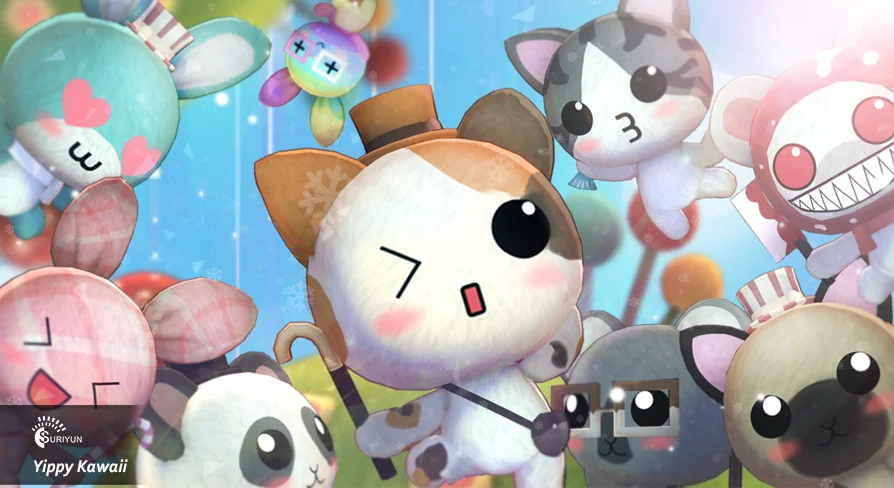
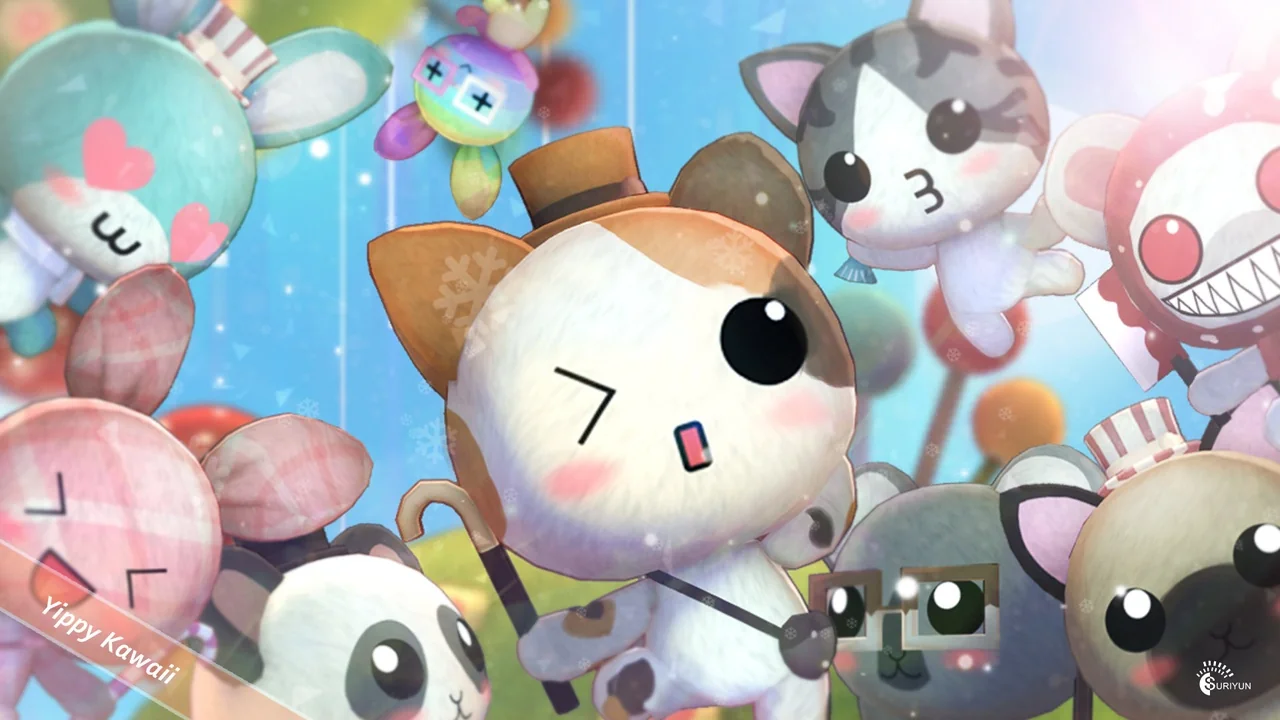
Think about the scenes this kind of cast belongs in before thinking about the files. A pastel dollhouse interior with a cat perched on a shelf. A cartoon forest path where a rabbit and a bear idle behind the player. A holiday corner that needs one seasonal detail to read as festive. Yippy Kawaii is a three-character set for those spaces — a cat, a rabbit and a bear, lowpoly and doll-like in tone, with enough color and accessory spread that the same three animals can fill several scenes without looking repeated.
Where the cat, rabbit and bear come from
The characters trace back to a crochet dolls store. That origin shows in the shape language: rounded bodies, soft proportions, the sort of silhouette you would expect from yarn figures scaled up into game-ready characters. The tag set leans the same direction — Doll, Cute, Bunny, Rabbit, Cat, Bear, Cartoon, with Lowpoly and Fantasy sitting alongside them to place the set inside stylized rather than realistic projects.
That distinction is worth stating plainly. Nothing here aims at anatomical realism. A crochet doll reference gives you characters that read instantly at small screen sizes, which is what a dollhouse shelf, a menu screen, or a background NPC needs.
Dressing three animals with 45 colors and 36 accessories
The customization layer is where the set earns its keep. Each character draws from 45 colors and 36 accessories, so the cat, rabbit and bear are starting points rather than fixed designs. Swap colors and the same bear reads as a different character in a different scene. Add an accessory and it reads as a themed variant.
One of the tags is Santa, which points at holiday dressing as a supported direction — a seasonal pass over the same cast rather than a separate purchase of festive models. The rest of the accessory range is not spelled out item by item, but the count is large enough that three animals can be spread across a cast of background characters, shopkeepers, pets or villagers without obvious duplication.
For a small project, that is usually the deciding factor. Three models give you three characters; three models with a wide color and accessory spread give you a population.
Seventeen animations, shown in Unity3D
The set carries 17 animations. The animation example is presented in Unity3D, so the motion set is demonstrated inside that engine, with the characters moving as intended in a Unity scene. Treat that sample as the reference for how the clips are meant to read in context — how the doll proportions carry through a walk, an idle, or a gesture.
Seventeen clips across three animals covers the ordinary ground: the states a stylized character cycles through during normal play. For a project structured through ambient characters — a shop, a village, a cozy room — that count is enough to keep the cast from standing frozen between interactions.
Working from the Unity3D example
Because the demonstration lives in Unity3D, that engine is the smoothest place to start. You can open the example, watch how the clips behave on the cat, rabbit and bear, then decide where each animation fits in your own state logic. The doll-like proportions make the animation style forgiving: soft, readable motion rather than precise physical accuracy.
The Unreal Engine version ships without the script and Toon shader
This is the detail to plan around. The UE version does not include the script, and it does not include the Toon shader. The characters and their animations are there; the driving script and the cel-style shading that gives the set its flat, cartoon finish are not.
In practice that means an Unreal project needs two things supplied from your side before the cast looks and behaves like the Unity demonstration. First, a replacement toon material — your own shading setup to recover the flat cartoon look implied by the Cartoon tag. Second, a script to drive the animations, since the behavior logic is not part of the UE package.
Neither is unusual work for an Unreal developer, but both take time, and the difference between the two engine versions should be clear to whoever scopes the task. A team expecting a drop-in toon-shaded character in UE will be doing setup that a Unity team will not.
Matching the cast to a fantasy or cartoon project
The lowpoly build and the Fantasy and Cartoon tags place this set in a specific neighborhood. Cozy builders, mobile titles, stylized RPG towns, holiday events, and anything with a dollhouse or toy aesthetic are the natural fit. The bear and rabbit work as forest wildlife; the cat works as a shop companion, a familiar, or a household pet. With the Santa-adjacent dressing, the same characters can carry a winter update.
What the set will not do is pass in a realistic or gritty scene. The crochet-doll proportions and flat cartoon intent make that clear before anyone opens the files.
Small teams building stylized games get the most from Yippy Kawaii: three lowpoly animals, a broad color and accessory range for cast variety, and 17 animations to keep them moving. Unity3D users get the demonstrated setup out of the box. Unreal Engine users get the same characters and clips, with the toon shading and animation script left as their own work.
 Animals
 Animals
 Animals
 Animals