"95fdaf16012263fa"{"id":"1002364","slug":"weapon-system","title":"Weapon System","category":"Humans","engine":"4.26+,5.0+","assetVersion":"","engineVersion":"Engine Version: 4.26+,5.0+","tag":"Humans","accent":"blue","visual":"mech","summary":"A Blueprint weapon setup whose shooting does not depend on the pawn, with a shooting component reworked in seconds and example objects free to modify.","platform":"Unreal Engine","indexPolicy":"index","publishedAt":"2026-11-06T07:23:16.717Z","updatedAt":"2026-11-06T07:23:16.717Z","sourceNotes":[],"fileContents":[],"compatibility":["Unreal Engine","Engine Version: 4.26+,5.0+"],"featuredImage":{"alt":"Weapon System","src":"/wp-content/uploads/published/2026/11/871654a39a95-2f790163-a6fa-4055-96a8-09d64d1aaec9-07b38572e2.webp"},"hasDownloadLink":true,"downloads":0,"terms":[{"taxonomy":"category","slug":"humans","name":"Humans"}],"galleryImages":[{"src":"/wp-content/uploads/published/2026/11/3302c7b050a0-5684b86b-8617-450b-94db-2d75d5a20055-b8544eaab8.webp","alt":"Weapon System"},{"src":"/wp-content/uploads/published/2026/11/3b046135784c-119b3203-8783-4898-9593-f7891deffd9c-dab99774c2.webp","alt":"Weapon System"},{"src":"/wp-content/uploads/published/2026/11/8c32b7c1a69f-c8807f62-55c6-42e7-9936-c0e64cd95bb4-fed71243d2.webp","alt":"Weapon System"},{"src":"/wp-content/uploads/published/2026/11/b9a3099a4bbc-a09e2147-1774-439c-8d61-83c91585df53-6afa8ad1ae.webp","alt":"Weapon System"},{"src":"/wp-content/uploads/published/2026/11/7428038267bb-00ceb57f-4dd8-46d6-82f8-2e274d8f6237-f2abcc615b.webp","alt":"Weapon System"},{"src":"/wp-content/uploads/published/2026/11/c2e36f62c0f1-377702b6-a72e-45a9-bcd7-f66cc56ad7a5-7d3f93faec.webp","alt":"Weapon System"},{"src":"/wp-content/uploads/published/2026/11/adf5a268b0b5-1f1c540a-ee01-4d46-ac6c-02cf22d7bd3a-bb1a79605c.webp","alt":"Weapon System"},{"src":"/wp-content/uploads/published/2026/11/4eda663225cb-0be91b80-2692-47b4-88ee-b4c9d3220afe-ae425fd6c2.webp","alt":"Weapon System"}],"accessPanel":{"kind":"resource","title":"Get this resource","eyebrow":"Free resource","message":"3DCGHUB is the service provider for this listing. Access is fulfilled through the official publisher channel.","fileName":"Weapon System.7z","safetyNote":"Resources are manually reviewed before listing to improve quality and reduce obvious risks.","actionLabel":"Get this resource","resourceType":"Resource archive","versions":[]},"contentHtml":"\u003cp\u003eA weapon in this project fires without the pawn doing the shooting manually. That single decision shapes everything else: the weapon carries its own firing behavior instead of waiting on character logic to trigger it, which is why the same weapons can be dropped into projects with different pawn setups. The entire system is assembled in Blueprint.\u003c/p\u003e \u003ch2\u003eShooting that does not route through the pawn\u003c/h2\u003e \u003cp\u003eMost weapon implementations assume the character owns the trigger. The pawn reads input, the pawn tells the weapon to fire, and the weapon becomes a passenger that only works with the character it was written against. Here the relationship is inverted. The weapon is not dependent on a pawn shooting manually, so pulling it into another project does not mean rebuilding the character half of the equation first.\u003c/p\u003e \u003cp\u003eThat matters when a project changes character, swaps a first-person body for a third-person one, or brings in a pawn that was never written with weapons in mind. The weapon continues to behave the way it behaves, and the work shifts to connecting the pawn to it rather than re-implementing the shot.\u003c/p\u003e \u003ch2\u003eThe shooting component and the two-second rework\u003c/h2\u003e \u003cp\u003eFiring logic lives in a shooting component system that was made to be easy to modify and easy to create against. The stated measure of that flexibility is blunt: changing the way a weapon fires is a two-second change. The adjustable layer is the firing behavior itself, kept in one place rather than scattered across a web of connected Blueprint graphs that have to be untangled before anything can be altered.\u003c/p\u003e \u003cp\u003ePractically, that means the difference between one weapon and another can sit in how the component is configured, not in a separate copy of the whole system. A project that wants a different firing rhythm, a different response, or a different feel is working on a compact piece of logic instead of restructuring the weapon from the ground up.\u003c/p\u003e \u003ch3\u003eEvery object in the project is an example\u003c/h3\u003e \u003cp\u003eNothing included is presented as final. The objects shown are examples you can modify and use — kept as working demonstrations of how the system is put together, not as locked content. They show the shape of a functioning weapon and can then be edited into whatever the project actually needs.\u003c/p\u003e \u003ch2\u003eWhat the package leaves out: meshes and particle effects\u003c/h2\u003e \u003cp\u003eThere are no particle effects for the weapons, and no weapon meshes beyond the default ones that ship with Unreal Engine 4. This is called out directly, and it is worth planning around. The system contributes behavior and structure; the visual side — the weapon models themselves and the muzzle flashes, impact sparks, and other effects that sell a shot — is left for the project to supply.\u003c/p\u003e \u003cp\u003eFor a team that already has weapon art, that is a clean split. For a team expecting a finished-looking shooter out of the box, the gap is real and needs to be filled before anything looks presentable. The default UE4 assets fill the slot in the meantime so the system can be tested.\u003c/p\u003e \u003ch2\u003eThe Megascans plugin prompt\u003c/h2\u003e \u003cp\u003eOpening the project can raise a request for the Megascans plugin. It is a known issue, and the resolution is simple: the system does not use Megascans at all, so the prompt can safely be ignored. Nothing in the weapon behavior depends on it. Treat the request as noise rather than as a missing dependency that will break the setup.\u003c/p\u003e \u003ch2\u003eFirst-person and third-person shooter contexts\u003c/h2\u003e \u003cp\u003eThe system sits in shooter territory in both of the common camera arrangements, first person and third person, with Blueprint scripting carrying the logic and animation blueprint work connected to it. Because the weapon does not require the pawn to shoot manually, moving between a first-person view and a third-person one does not force a rewrite of the firing behavior — the camera and the body change, the weapon logic stays put.\u003c/p\u003e \u003cp\u003eThat range makes it useful beyond a pure shooter as well. Any project that needs a functioning weapon quickly — a prototype, a mechanics test, a scene where a character has to fire something — can start from this and adjust the example objects rather than building a firing system from scratch.\u003c/p\u003e \u003ch2\u003eWho benefits most\u003c/h2\u003e \u003cp\u003eTeams that already own their weapon models and effects get the cleanest fit, since the missing art is exactly what they are not missing. So do developers working across several projects at once, where a weapon that ignores the pawn saves the trouble of re-implementing shooting each time a character changes. Anyone who needs to iterate on how a weapon fires will find the shortest path here, because the firing behavior is compact and quick to change.\u003c/p\u003e \u003cp\u003eThe strongest concrete takeaway: this is behavior without art. It gives you weapons that fire independently of the pawn, a shooting component you can reshape in seconds, and example objects that are open to editing — and it asks you to bring the meshes and particle effects yourself.\u003c/p\u003e\n\n\u003ch2\u003eMore From The Same Workflow\u003c/h2\u003e\n\u003cul\u003e\n\u003cli\u003e\u003ca href=\"https://3dcghub.com/melee-ai-fp-tp-two-hands/\" rel=\"noopener noreferrer\"\u003eMelee+ (AI+FP/TP+Two Hands)\u003c/a\u003e\u003c/li\u003e\n\u003cli\u003e\u003ca href=\"https://3dcghub.com/modular-bandits-pack/\" rel=\"noopener noreferrer\"\u003eModular Bandits Pack\u003c/a\u003e\u003c/li\u003e\n\u003cli\u003e\u003ca href=\"https://3dcghub.com/survivor-girl-1-modular/\" rel=\"noopener noreferrer\"\u003eSurvivor Girl 1 (Modular)\u003c/a\u003e\u003c/li\u003e\n\u003cli\u003e\u003ca href=\"https://3dcghub.com/hero-for-rpg-modular-pbr/\" rel=\"noopener noreferrer\"\u003eHero for RPG : Modular PBR\u003c/a\u003e\u003c/li\u003e\n\u003cli\u003e\u003ca href=\"https://3dcghub.com/tempest-ninja-shadows-series-stealth/\" rel=\"noopener noreferrer\"\u003eTempest Ninja - Shadows Series Stealth\u003c/a\u003e\u003c/li\u003e\n\u003c/ul\u003e","contentTextLength":5036,"navigation":{"current":4,"total":4291,"previous":{"id":"1002365","slug":"workout-gym","title":"Workout gym","category":"Tools, Objects \u0026 Decor","platform":"Unreal Engine","updatedAt":"2026-11-06T07:24:02.887Z"},"next":{"id":"1002363","slug":"watches","title":"Watches","category":"Electronics \u0026 Technology","platform":"Unreal Engine","updatedAt":"2026-11-06T07:22:21.351Z"}},"relatedResources":[{"id":"1001104","slug":"melee-ai-fp-tp-two-hands","title":"Melee+ (AI+FP/TP+Two Hands)","category":"Humans","engine":"4.27,5.0+","assetVersion":"","engineVersion":"Engine Version: 4.27,5.0+","tag":"Humans","accent":"blue","visual":"mech","summary":"Blueprint melee framework with any weapon in any hand, first/third-person mode, physical hit tracing, and AI combatants in one component.","platform":"Unreal Engine","indexPolicy":"index","publishedAt":"2026-09-07T05:37:02.505Z","updatedAt":"2026-09-07T05:37:02.505Z","sourceNotes":[],"fileContents":[],"compatibility":["Unreal Engine","Engine Version: 4.27,5.0+"],"featuredImage":{"alt":"Melee+ (AI+FP/TP+Two Hands)","src":"/wp-content/uploads/published/2026/09/95aab0609514-0da9baa9-edf9-478f-9dc5-f7fd3543196c-18d8ad0965.webp"},"hasDownloadLink":true,"downloads":0},{"id":"24931","slug":"modular-bandits-pack","title":"Modular Bandits Pack","category":"Humans","engine":"5.0+","assetVersion":"Engine version: 5.0+","engineVersion":"","tag":"Humans","accent":"blue","visual":"character","summary":"A modular character set with over 400 interchangeable modules and 24 presets gives projects a fast way to shape bandits, soldiers, and other modern combat figures. The pack uses one UE5 skeleton, supports Tall/Masculine body types, and includes bonus weapon...","platform":"Unreal Engine","indexPolicy":"index","publishedAt":"2026-04-17T14:06:19.000Z","updatedAt":"2026-04-20T06:12:35.000Z","sourceNotes":[],"fileContents":[],"compatibility":["Unreal Engine","Engine version: 5.0+"],"featuredImage":{"alt":"Modular Bandits Pack","src":"https://3dcghub.com/wp-content/uploads/2026/04/3560f0420e1e_e8dff1c7-0139-47b4-9622-cea0bf11d010.webp"},"hasDownloadLink":true,"downloads":9},{"id":"1000206","slug":"survivor-girl-1-modular","title":"Survivor Girl 1 (Modular)","category":"Humans","engine":"4.26+,5.0+","assetVersion":"","engineVersion":"Engine Version: 4.26+,5.0+","tag":"Humans","accent":"blue","visual":"mech","summary":"A fully rigged, modular female character model designed for apocalyptic survival games, featuring facial blendshapes, 4K PBR textures, and low-poly weapons.","platform":"Unreal Engine","indexPolicy":"index","publishedAt":"2026-06-23T19:35:44.835Z","updatedAt":"2026-06-23T19:35:44.835Z","sourceNotes":[],"fileContents":[],"compatibility":["Unreal Engine","Engine Version: 4.26+,5.0+"],"featuredImage":{"alt":"Survivor Girl 1 (Modular)","src":"/wp-content/uploads/published/2026/06/ea003c542fdd-d82dc264-87e2-40e6-a96c-2a4b916b4cb7-25e2910de6.webp"},"hasDownloadLink":true,"downloads":5}]}
Humans
Weapon System
A Blueprint weapon setup whose shooting does not depend on the pawn, with a shooting component reworked in seconds and example objects free to modify.
Category:Unreal Engine,HumansPlatform: Unreal EngineEngine Version: 4.26+,5.0+Published: Nov 6, 2026
Humans
Resource overview
A weapon in this project fires without the pawn doing the shooting manually. That single decision shapes everything else: the weapon carries its own firing behavior instead of waiting on character logic to trigger it, which is why the same weapons can be dropped into projects with different pawn setups. The entire system is assembled in Blueprint.
Shooting that does not route through the pawn
Most weapon implementations assume the character owns the trigger. The pawn reads input, the pawn tells the weapon to fire, and the weapon becomes a passenger that only works with the character it was written against. Here the relationship is inverted. The weapon is not dependent on a pawn shooting manually, so pulling it into another project does not mean rebuilding the character half of the equation first.
That matters when a project changes character, swaps a first-person body for a third-person one, or brings in a pawn that was never written with weapons in mind. The weapon continues to behave the way it behaves, and the work shifts to connecting the pawn to it rather than re-implementing the shot.
The shooting component and the two-second rework
Firing logic lives in a shooting component system that was made to be easy to modify and easy to create against. The stated measure of that flexibility is blunt: changing the way a weapon fires is a two-second change. The adjustable layer is the firing behavior itself, kept in one place rather than scattered across a web of connected Blueprint graphs that have to be untangled before anything can be altered.
Practically, that means the difference between one weapon and another can sit in how the component is configured, not in a separate copy of the whole system. A project that wants a different firing rhythm, a different response, or a different feel is working on a compact piece of logic instead of restructuring the weapon from the ground up.
Every object in the project is an example
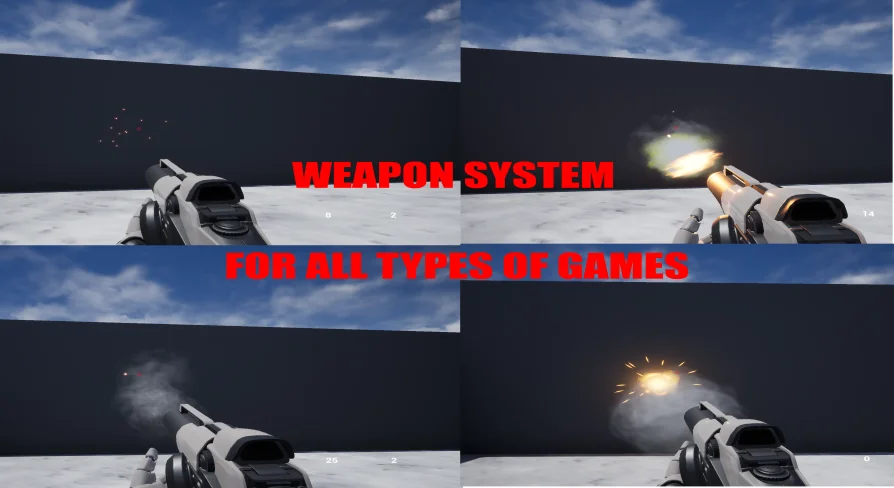
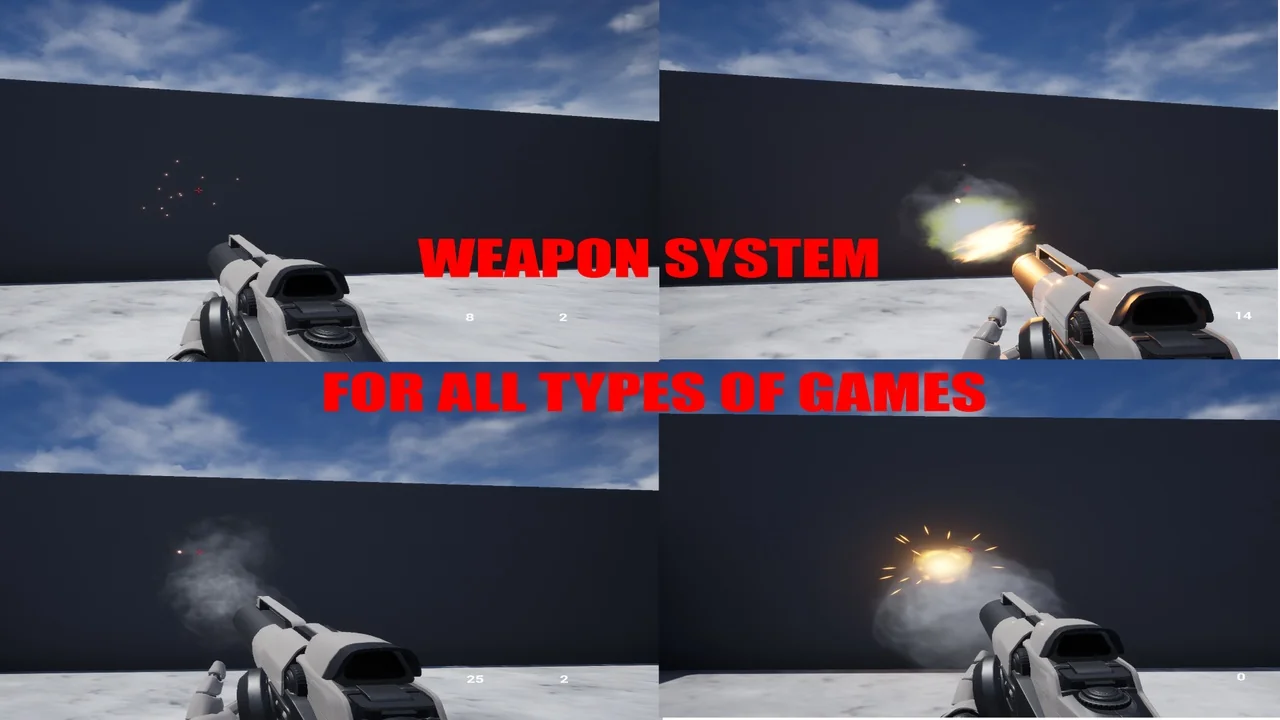
Nothing included is presented as final. The objects shown are examples you can modify and use — kept as working demonstrations of how the system is put together, not as locked content. They show the shape of a functioning weapon and can then be edited into whatever the project actually needs.
What the package leaves out: meshes and particle effects
There are no particle effects for the weapons, and no weapon meshes beyond the default ones that ship with Unreal Engine 4. This is called out directly, and it is worth planning around. The system contributes behavior and structure; the visual side — the weapon models themselves and the muzzle flashes, impact sparks, and other effects that sell a shot — is left for the project to supply.
For a team that already has weapon art, that is a clean split. For a team expecting a finished-looking shooter out of the box, the gap is real and needs to be filled before anything looks presentable. The default UE4 assets fill the slot in the meantime so the system can be tested.
The Megascans plugin prompt
Opening the project can raise a request for the Megascans plugin. It is a known issue, and the resolution is simple: the system does not use Megascans at all, so the prompt can safely be ignored. Nothing in the weapon behavior depends on it. Treat the request as noise rather than as a missing dependency that will break the setup.
First-person and third-person shooter contexts
The system sits in shooter territory in both of the common camera arrangements, first person and third person, with Blueprint scripting carrying the logic and animation blueprint work connected to it. Because the weapon does not require the pawn to shoot manually, moving between a first-person view and a third-person one does not force a rewrite of the firing behavior — the camera and the body change, the weapon logic stays put.
That range makes it useful beyond a pure shooter as well. Any project that needs a functioning weapon quickly — a prototype, a mechanics test, a scene where a character has to fire something — can start from this and adjust the example objects rather than building a firing system from scratch.
Who benefits most
Teams that already own their weapon models and effects get the cleanest fit, since the missing art is exactly what they are not missing. So do developers working across several projects at once, where a weapon that ignores the pawn saves the trouble of re-implementing shooting each time a character changes. Anyone who needs to iterate on how a weapon fires will find the shortest path here, because the firing behavior is compact and quick to change.
The strongest concrete takeaway: this is behavior without art. It gives you weapons that fire independently of the pawn, a shooting component you can reshape in seconds, and example objects that are open to editing — and it asks you to bring the meshes and particle effects yourself.
 Humans
 Humans
 Humans
 Humans