"c68a05d5e51405b3"{"id":"1000711","slug":"vehicles-vol-12-emergency-response-low-poly","title":"Vehicles VOL.12- Emergency Response (Low Poly)","category":"Service \u0026 Commercial Vehicles","engine":"5.1+","assetVersion":"","engineVersion":"Engine Version: 5.1+","tag":"Service","accent":"blue","visual":"mech","summary":"Seven emergency response vehicles with split meshes, 4K channel-packed textures, master material controls, Lumen support, and custom branding for Unreal Engine","platform":"Unreal Engine","publishedAt":"2026-07-24T02:26:51.479Z","updatedAt":"2026-07-24T02:26:51.479Z","sourceNotes":[],"fileContents":[],"compatibility":["Unreal Engine","Engine Version: 5.1+"],"featuredImage":{"alt":"Vehicles VOL.12- Emergency Response (Low Poly)","src":"/wp-content/uploads/published/2026/07/730427ce7704-1028ccea-5fa7-4469-9018-b9b7722bb7fb-d40c3a37b3.webp"},"hasDownloadLink":true,"downloads":1,"terms":[{"taxonomy":"category","slug":"service-and-commercial-vehicles","name":"Service \u0026 Commercial Vehicles"}],"galleryImages":[{"src":"/wp-content/uploads/published/2026/07/b94125a4302a-9b321f48-1b3a-44b1-affc-10b89cc76e63-2427642e7a.webp","alt":"Vehicles VOL.12- Emergency Response (Low Poly)"},{"src":"/wp-content/uploads/published/2026/07/73bda3f62833-1b27bd2e-00fe-4929-b820-0ad7e3fc1a35-0223330b26.webp","alt":"Vehicles VOL.12- Emergency Response (Low Poly)"},{"src":"/wp-content/uploads/published/2026/07/243b793578dd-ff47571d-1ac7-4a07-8594-385389ff568e-75205e587e.webp","alt":"Vehicles VOL.12- Emergency Response (Low Poly)"},{"src":"/wp-content/uploads/published/2026/07/4cbba4ac0dc5-6189b99f-d1d4-4844-90f4-544cff39936f-8b68e2b438.webp","alt":"Vehicles VOL.12- Emergency Response (Low Poly)"},{"src":"/wp-content/uploads/published/2026/07/401d1543bc58-9927e9e8-9e89-45b6-bac1-3596db39dfcf-6284b97c1d.webp","alt":"Vehicles VOL.12- Emergency Response (Low Poly)"},{"src":"/wp-content/uploads/published/2026/07/c726463e734d-7997dc03-373e-44df-8b37-98c7f90af648-aacfca2e1b.webp","alt":"Vehicles VOL.12- Emergency Response (Low Poly)"},{"src":"/wp-content/uploads/published/2026/07/0d7a4fa3d7e8-e0c56382-20b1-43af-b253-8c3069802fe6-a48fc795e9.webp","alt":"Vehicles VOL.12- Emergency Response (Low Poly)"},{"src":"/wp-content/uploads/published/2026/07/129962a9de0f-52bcce7a-319e-46e9-b1d4-0dea9d2f5e44-06b3a0fe9b.webp","alt":"Vehicles VOL.12- Emergency Response (Low Poly)"},{"src":"/wp-content/uploads/published/2026/07/ec8476220cfa-f4404de4-50a9-4510-a747-433bb3465695-23a3f50382.webp","alt":"Vehicles VOL.12- Emergency Response (Low Poly)"},{"src":"/wp-content/uploads/published/2026/07/8718fa75ec93-14b8b572-637f-4346-af11-4652a43d49b3-2a3959ff56.webp","alt":"Vehicles VOL.12- Emergency Response (Low Poly)"}],"accessPanel":{"kind":"resource","title":"Download this resource","eyebrow":"Free Download","message":"Log in or create a free account to start your download.","fileName":"Content.7z","safetyNote":"Resources are manually reviewed before listing to improve quality and reduce obvious risks.","actionLabel":"Download Free","resourceType":"Resource archive"},"contentHtml":"\u003ch2\u003eDropping Vehicles into an Unreal Engine Scene\u003c/h2\u003e\n\u003cp\u003eSetting up emergency response assets in Unreal Engine often means wrestling with rigid vehicle rigs, pre-baked animation data, and branding that cannot ship without legal headaches. Vehicles VOL.12 takes a narrower path. It delivers seven cars, trucks, and support vehicles as static prop assets without bones or animations. This orientation changes how you think about implementation: characters are not stepping out of these vehicles, doors are not swinging open on spline tracks, and no animation blueprint ties you down. You are placing fully detailed models directly into a level and letting the material system carry the visual variation.\u003c/p\u003e\n\n\u003cp\u003eEach vehicle comes with split meshes, so individual parts can be isolated, swapped, or hidden as a scene requires. For an emergency response setup, that split-mesh structure matters when you want to hide detachable components, dress a crash scene with scattered debris, or simply give a damaged vehicle a battle-worn silhouette without touching the main body. Because the assets lack skeletons, you avoid the overhead of skeleton imports and animation state machines. The focus stays on visual fidelity and placement rather than rig management.\u003c/p\u003e\n\n\u003cp\u003eThe project includes everything pictured, with all assets, maps, and materials created within Unreal Engine itself. That internal creation pipeline means the textures, shader logic, and Lookup Tables were built to talk to each other inside the engine rather than being translated from an external renderer and retrofitted later. For level artists, this reduces the friction of matching an asset's look to a target scene lighting setup.\u003c/p\u003e\n\n\u003ch2\u003eMaster Material Controls Across the Emergency Response Lineup\u003c/h2\u003e\n\u003cp\u003eA single master material setup controls the majority of the props and models in the set. Rather than maintaining a library of disconnected material instances for each vehicle, you work from a shared base and drive variation through exposed parameters. The master material provides additional controls for roughness, albedo, normals, and more, which lets you tune how each emergency vehicle reads under different lighting conditions without opening a texture editor or reimporting maps.\u003c/p\u003e\n\n\u003cp\u003eThe painted areas on every vehicle are tintable. This single feature carries a lot of weight in an emergency response context. Fire trucks, ambulances, and other service vehicles often need to match a specific municipal color scheme or stand out against a particular environment. With tintable painted zones, you can shift a fire engine from a deep red to a muted emergency-services orange, or push an ambulance's stripe color to match a custom department identity, all from the material instance rather than a texture repaint.\u003c/p\u003e\n\n\u003cp\u003eTexture sets run at 4K resolution, and the set uses channel-packed Roughness, Metalness, and Ambient Occlusion. Channel packing keeps the three data-driven grayscale maps inside single texture channels instead of spreading them across separate files. Fewer texture lookups mean leaner memory usage and fewer samplers feeding the master material, which directly affects how cleanly the assets integrate into larger scenes where texture memory is already under pressure.\u003c/p\u003e\n\n\u003ch3\u003eLumen Support and Post-Processing Integration\u003c/h3\u003e\n\u003cp\u003eThe product supports Lumen for Unreal Engine 5.0 and above. Lumen's dynamic global illumination reacts to the painted tintable surfaces and the channel-packed material data, so emergency lights, vehicle reflections, and ambient bounce respond in real time as the scene lighting shifts. Because the assets are static props, Lumen's surface evaluation focuses on geometry and material response rather than skeletal deformation, which keeps performance focused on what you actually see.\u003c/p\u003e\n\n\u003cp\u003eA realistic post-processing and Lookup Table setup ships with the set. The LUT controls the final color grading response, giving vehicles a consistent tonal finish across different lighting environments. For emergency scenes where players often move through varied lighting—from bright exteriors to dim interiors—the LUT helps maintain a unified visual tone so a fire truck reads the same way under a midday sky and inside a darkened garage.\u003c/p\u003e\n\n\u003ch2\u003eCustom Branding and Model Detail\u003c/h2\u003e\n\u003cp\u003eEvery branding element and label across the seven vehicles was custom-made by the studio. This removes legal concerns around using real-world emergency service insignia, manufacturer logos, or municipal department names that carry trademark or licensing restrictions. For developers building commercial projects, this means the vehicles can appear in shipped work without a separate clearance pass. The custom branding also extends to the small details: door labels, vehicle numbers, and service markings are fictional, but they sit alongside the tintable painted areas as part of the same material-driven surface system.\u003c/p\u003e\n\n\u003cp\u003eEach model is fully detailed from all sides. Emergency vehicles in a game environment rarely sit in a single orientation; a fire truck parked at an intersection, an ambulance stopped at a roadside, or a response truck loading at a station will be seen from multiple angles as players or cameras move around them. Full peripheral detail means the vehicles hold up under orbiting camera work, open-world traversal, and cinematic framing without revealing a flat backface or an undetailed underside that breaks immersion.\u003c/p\u003e\n\n\u003cp\u003eThe set is optimized for games. Combined with the prop-only nature of the assets, this optimization points toward a workflow where the vehicles serve as environmental dressing, hero props, or background dressing in populated scenes rather than playable, drivable units. The low-poly designation in the resource name aligns with this: the geometry is built for real-time rendering load, and the 4K textures and master material controls handle the visual heavy lifting.\u003c/p\u003e\n\n\u003ch2\u003eExpanding Beyond Cars: Tagged Support Vehicles and Compatibility\u003c/h2\u003e\n\u003cp\u003eThe tags for the set extend well beyond standard cars. Alongside Car, Truck, and Ambulance, the tags include Helicopter, Quadcopter, Plane, and Caravan. This positions the emergency response lineup as a broader incident-scene toolkit rather than a standalone car pack. A level designer building a multi-vehicle emergency response scenario can stage ground vehicles alongside aerial support units and transport craft using the same material system and rendering pipeline.\u003c/p\u003e\n\n\u003cp\u003eAdditional tags such as Firefighter, Fire, Emergency, Help, and Retro frame the set's intended use: staging response incidents, disaster scenes, and retro-styled service environments. The Retro tag suggests these vehicles carry a design language that leans away from current modern service vehicle styling, which fits productions set in earlier time periods or stylized worlds where contemporary emergency vehicle silhouettes would feel out of place.\u003c/p\u003e\n\n\u003cp\u003e3DCGHUB editor notes flag compatibility with Meridian 1988: Cedar Point School - Modular Environment (VOL 57). This environmental pairing gives the emergency vehicles a grounded staging ground: a school modular environment that can serve as an incident site, a gathering point, or a structural backdrop for the response vehicles. The compatibility note means the vehicle scale, material finish, and post-process response are suited to dropping directly into that modular environment without manual rebalancing.\u003c/p\u003e\n\n\u003ch2\u003eNanite and Production-Readiness\u003c/h2\u003e\n\u003cp\u003eThe Nanite tag appears alongside the asset set. Nanite's virtualized geometry system in Unreal Engine works with the static, non-animated prop structure of these vehicles. Because the assets have no bones or animation, Nanite can process their geometry at the detail level required for cinematic close-ups or streamed open-world scenes without dealing with skeletal mesh overhead.\u003c/p\u003e\n\n\u003cp\u003eArt was created by Dekogon Studios artists, and the quality target across the set is realistic AAA-quality visuals and style. The fidelity bar applies to both the surface finish and the model construction. For production teams, this means the emergency response vehicles arrive at a finish level that holds up against other AAA-grade environment assets without requiring surface rework or material rebuilding before placing them in a shipped scene.\u003c/p\u003e\n\n\u003cp\u003eThe combination of a master material, channel-packed textures, Lumen support, Nanite compatibility, and custom branding covers the core implementation stages from import to final render. The absence of bones and animations keeps the dependency list short. The tintable paint zones and post-processing LUT give scene leads fine-grained control over the final look. For teams assembling emergency response scenes in Unreal Engine 5.0+, the set provides the required static assets, material controls, and rendering support to stage incidents without clearing third-party branding or building vehicle materials from scratch.\u003c/p\u003e\n\n\u003ch2\u003eExplore Similar Assets\u003c/h2\u003e\n\u003cul\u003e\n\u003cli\u003e\u003ca href=\"https://3dcghub.com/vehicles-vol-8-construction-low-poly/\" title=\"Vehicles VOL.8 - Construction (Low Poly)\"\u003eVehicles VOL.8 - Construction (Low Poly)\u003c/a\u003e\u003c/li\u003e\n\u003cli\u003e\u003ca href=\"https://3dcghub.com/vehicles-vol-1-small-rides-nanite-and-low-poly/\" title=\"Vehicles VOL.1 - Small Rides (Nanite and Low Poly)\"\u003eVehicles VOL.1 - Small Rides (Nanite and Low Poly)\u003c/a\u003e\u003c/li\u003e\n\u003cli\u003e\u003ca href=\"https://3dcghub.com/vehicles-vol-10-military-low-poly/\" title=\"Vehicles VOL.10 - Military (Low Poly)\"\u003eVehicles VOL.10 - Military (Low Poly)\u003c/a\u003e\u003c/li\u003e\n\u003cli\u003e\u003ca href=\"https://3dcghub.com/vehicles-vol-9-future-cars-low-poly/\" title=\"Vehicles VOL.9- Future Cars (Low Poly)\"\u003eVehicles VOL.9- Future Cars (Low Poly)\u003c/a\u003e\u003c/li\u003e\n\u003cli\u003e\u003ca href=\"https://3dcghub.com/vehicles-vol-4-retro-cars-low-poly/\" title=\"Vehicles VOL.4 - Retro Cars (Low Poly)\"\u003eVehicles VOL.4 - Retro Cars (Low Poly)\u003c/a\u003e\u003c/li\u003e\n\u003c/ul\u003e","contentTextLength":9042,"navigation":{"current":1292,"total":3860,"previous":{"id":"1000712","slug":"venona","title":"Venona","category":"Humans","platform":"Unreal Engine","updatedAt":"2026-07-24T02:31:25.959Z"},"next":{"id":"1000710","slug":"vehicles-vol-10-military-low-poly","title":"Vehicles VOL.10 - Military (Low Poly)","category":"Military","platform":"Unreal Engine","updatedAt":"2026-07-24T02:19:57.675Z"}},"relatedResources":[{"id":"1001797","slug":"city-bus","title":"City bus","category":"Service \u0026 Commercial Vehicles","engine":"5.0+","assetVersion":"","engineVersion":"Engine Version: 5.0+","tag":"Service","accent":"blue","visual":"city","summary":"A vintage low-poly City bus asset featuring Nanite support for Unreal Engine 5.0, UE 4.27 compatibility, 4K textures, and dynamic lighting behavior.","platform":"Unreal Engine","publishedAt":"2026-10-21T07:49:51.255Z","updatedAt":"2026-10-21T07:49:51.255Z","sourceNotes":[],"fileContents":[],"compatibility":["Unreal Engine","Engine Version: 5.0+"],"featuredImage":{"alt":"City bus","src":"/wp-content/uploads/published/2026/10/10f3adf7987f-13748bc2-20d6-4b21-b3d2-3d471aa22608-6f3d43709e.webp"},"hasDownloadLink":true,"downloads":1},{"id":"1000708","slug":"vehicles-vol-8-construction-low-poly","title":"Vehicles VOL.8 - Construction (Low Poly)","category":"Service \u0026 Commercial Vehicles","engine":"5.1+","assetVersion":"","engineVersion":"Engine Version: 5.1+","tag":"Service","accent":"blue","visual":"mech","summary":"Five low poly construction vehicles with split meshes, 4k textures, tintable paint, channel-packed masks, and Lumen support for Unreal Engine 5.0+.","platform":"Unreal Engine","publishedAt":"2026-07-24T02:01:37.218Z","updatedAt":"2026-07-24T02:01:37.218Z","sourceNotes":[],"fileContents":[],"compatibility":["Unreal Engine","Engine Version: 5.1+"],"featuredImage":{"alt":"Vehicles VOL.8 - Construction (Low Poly)","src":"/wp-content/uploads/published/2026/07/1bc037cfd4dd-22a5dc7d-32d4-46c5-a07d-b3c0b5646832-327eb923cb.webp"},"hasDownloadLink":true,"downloads":0},{"id":"1000709","slug":"vehicles-vol-9-future-cars-low-poly","title":"Vehicles VOL.9- Future Cars (Low Poly)","category":"Cars \u0026 Trucks","engine":"5.3+","assetVersion":"","engineVersion":"Engine Version: 5.3+","tag":"Cars \u0026 Trucks","accent":"blue","visual":"mech","summary":"Seven futuristic low-poly car props with 4K textures, channel-packed maps, tintable paint, and Lumen support for Unreal Engine 5.0+.","platform":"Unreal Engine","publishedAt":"2026-07-24T02:11:02.648Z","updatedAt":"2026-10-21T04:23:37.954Z","sourceNotes":[],"fileContents":[],"compatibility":["Unreal Engine","Engine Version: 5.3+"],"featuredImage":{"alt":"Vehicles VOL.9- Future Cars (Low Poly)","src":"/wp-content/uploads/published/2026/07/1299c7959656-ce73ca95-e379-4b7d-9098-f38abd0ef20e-72885a4f92.webp"},"hasDownloadLink":true,"downloads":2}]}
Service
Vehicles VOL.12- Emergency Response (Low Poly)
Seven emergency response vehicles with split meshes, 4K channel-packed textures, master material controls, Lumen support, and custom branding for Unreal Engine
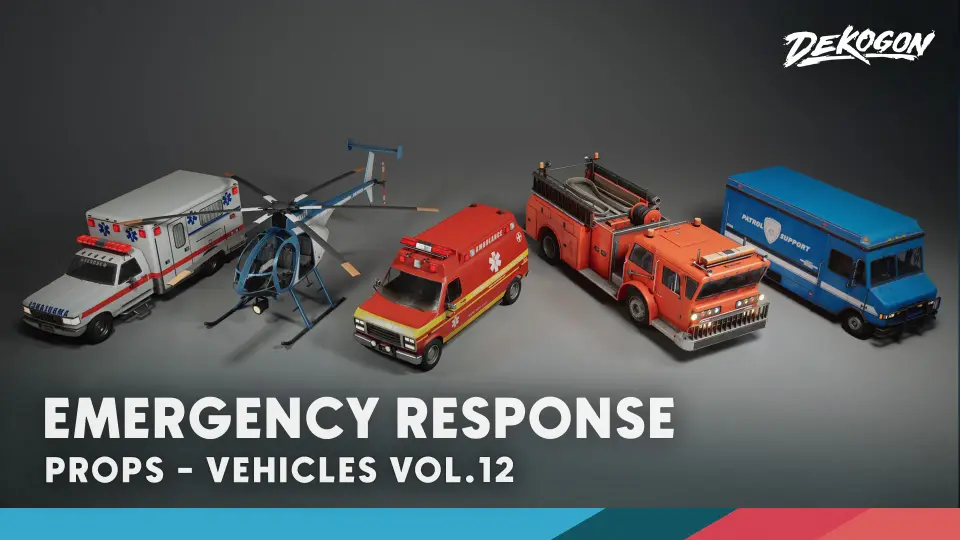
Setting up emergency response assets in Unreal Engine often means wrestling with rigid vehicle rigs, pre-baked animation data, and branding that cannot ship without legal headaches. Vehicles VOL.12 takes a narrower path. It delivers seven cars, trucks, and support vehicles as static prop assets without bones or animations. This orientation changes how you think about implementation: characters are not stepping out of these vehicles, doors are not swinging open on spline tracks, and no animation blueprint ties you down. You are placing fully detailed models directly into a level and letting the material system carry the visual variation.
Each vehicle comes with split meshes, so individual parts can be isolated, swapped, or hidden as a scene requires. For an emergency response setup, that split-mesh structure matters when you want to hide detachable components, dress a crash scene with scattered debris, or simply give a damaged vehicle a battle-worn silhouette without touching the main body. Because the assets lack skeletons, you avoid the overhead of skeleton imports and animation state machines. The focus stays on visual fidelity and placement rather than rig management.
The project includes everything pictured, with all assets, maps, and materials created within Unreal Engine itself. That internal creation pipeline means the textures, shader logic, and Lookup Tables were built to talk to each other inside the engine rather than being translated from an external renderer and retrofitted later. For level artists, this reduces the friction of matching an asset's look to a target scene lighting setup.
Master Material Controls Across the Emergency Response Lineup
A single master material setup controls the majority of the props and models in the set. Rather than maintaining a library of disconnected material instances for each vehicle, you work from a shared base and drive variation through exposed parameters. The master material provides additional controls for roughness, albedo, normals, and more, which lets you tune how each emergency vehicle reads under different lighting conditions without opening a texture editor or reimporting maps.
The painted areas on every vehicle are tintable. This single feature carries a lot of weight in an emergency response context. Fire trucks, ambulances, and other service vehicles often need to match a specific municipal color scheme or stand out against a particular environment. With tintable painted zones, you can shift a fire engine from a deep red to a muted emergency-services orange, or push an ambulance's stripe color to match a custom department identity, all from the material instance rather than a texture repaint.
Texture sets run at 4K resolution, and the set uses channel-packed Roughness, Metalness, and Ambient Occlusion. Channel packing keeps the three data-driven grayscale maps inside single texture channels instead of spreading them across separate files. Fewer texture lookups mean leaner memory usage and fewer samplers feeding the master material, which directly affects how cleanly the assets integrate into larger scenes where texture memory is already under pressure.
Lumen Support and Post-Processing Integration
The product supports Lumen for Unreal Engine 5.0 and above. Lumen's dynamic global illumination reacts to the painted tintable surfaces and the channel-packed material data, so emergency lights, vehicle reflections, and ambient bounce respond in real time as the scene lighting shifts. Because the assets are static props, Lumen's surface evaluation focuses on geometry and material response rather than skeletal deformation, which keeps performance focused on what you actually see.
A realistic post-processing and Lookup Table setup ships with the set. The LUT controls the final color grading response, giving vehicles a consistent tonal finish across different lighting environments. For emergency scenes where players often move through varied lighting—from bright exteriors to dim interiors—the LUT helps maintain a unified visual tone so a fire truck reads the same way under a midday sky and inside a darkened garage.
Custom Branding and Model Detail
Every branding element and label across the seven vehicles was custom-made by the studio. This removes legal concerns around using real-world emergency service insignia, manufacturer logos, or municipal department names that carry trademark or licensing restrictions. For developers building commercial projects, this means the vehicles can appear in shipped work without a separate clearance pass. The custom branding also extends to the small details: door labels, vehicle numbers, and service markings are fictional, but they sit alongside the tintable painted areas as part of the same material-driven surface system.
Each model is fully detailed from all sides. Emergency vehicles in a game environment rarely sit in a single orientation; a fire truck parked at an intersection, an ambulance stopped at a roadside, or a response truck loading at a station will be seen from multiple angles as players or cameras move around them. Full peripheral detail means the vehicles hold up under orbiting camera work, open-world traversal, and cinematic framing without revealing a flat backface or an undetailed underside that breaks immersion.
The set is optimized for games. Combined with the prop-only nature of the assets, this optimization points toward a workflow where the vehicles serve as environmental dressing, hero props, or background dressing in populated scenes rather than playable, drivable units. The low-poly designation in the resource name aligns with this: the geometry is built for real-time rendering load, and the 4K textures and master material controls handle the visual heavy lifting.
Expanding Beyond Cars: Tagged Support Vehicles and Compatibility
The tags for the set extend well beyond standard cars. Alongside Car, Truck, and Ambulance, the tags include Helicopter, Quadcopter, Plane, and Caravan. This positions the emergency response lineup as a broader incident-scene toolkit rather than a standalone car pack. A level designer building a multi-vehicle emergency response scenario can stage ground vehicles alongside aerial support units and transport craft using the same material system and rendering pipeline.
Additional tags such as Firefighter, Fire, Emergency, Help, and Retro frame the set's intended use: staging response incidents, disaster scenes, and retro-styled service environments. The Retro tag suggests these vehicles carry a design language that leans away from current modern service vehicle styling, which fits productions set in earlier time periods or stylized worlds where contemporary emergency vehicle silhouettes would feel out of place.
3DCGHUB editor notes flag compatibility with Meridian 1988: Cedar Point School - Modular Environment (VOL 57). This environmental pairing gives the emergency vehicles a grounded staging ground: a school modular environment that can serve as an incident site, a gathering point, or a structural backdrop for the response vehicles. The compatibility note means the vehicle scale, material finish, and post-process response are suited to dropping directly into that modular environment without manual rebalancing.
Nanite and Production-Readiness
The Nanite tag appears alongside the asset set. Nanite's virtualized geometry system in Unreal Engine works with the static, non-animated prop structure of these vehicles. Because the assets have no bones or animation, Nanite can process their geometry at the detail level required for cinematic close-ups or streamed open-world scenes without dealing with skeletal mesh overhead.
Art was created by Dekogon Studios artists, and the quality target across the set is realistic AAA-quality visuals and style. The fidelity bar applies to both the surface finish and the model construction. For production teams, this means the emergency response vehicles arrive at a finish level that holds up against other AAA-grade environment assets without requiring surface rework or material rebuilding before placing them in a shipped scene.
The combination of a master material, channel-packed textures, Lumen support, Nanite compatibility, and custom branding covers the core implementation stages from import to final render. The absence of bones and animations keeps the dependency list short. The tintable paint zones and post-processing LUT give scene leads fine-grained control over the final look. For teams assembling emergency response scenes in Unreal Engine 5.0+, the set provides the required static assets, material controls, and rendering support to stage incidents without clearing third-party branding or building vehicle materials from scratch.
 Service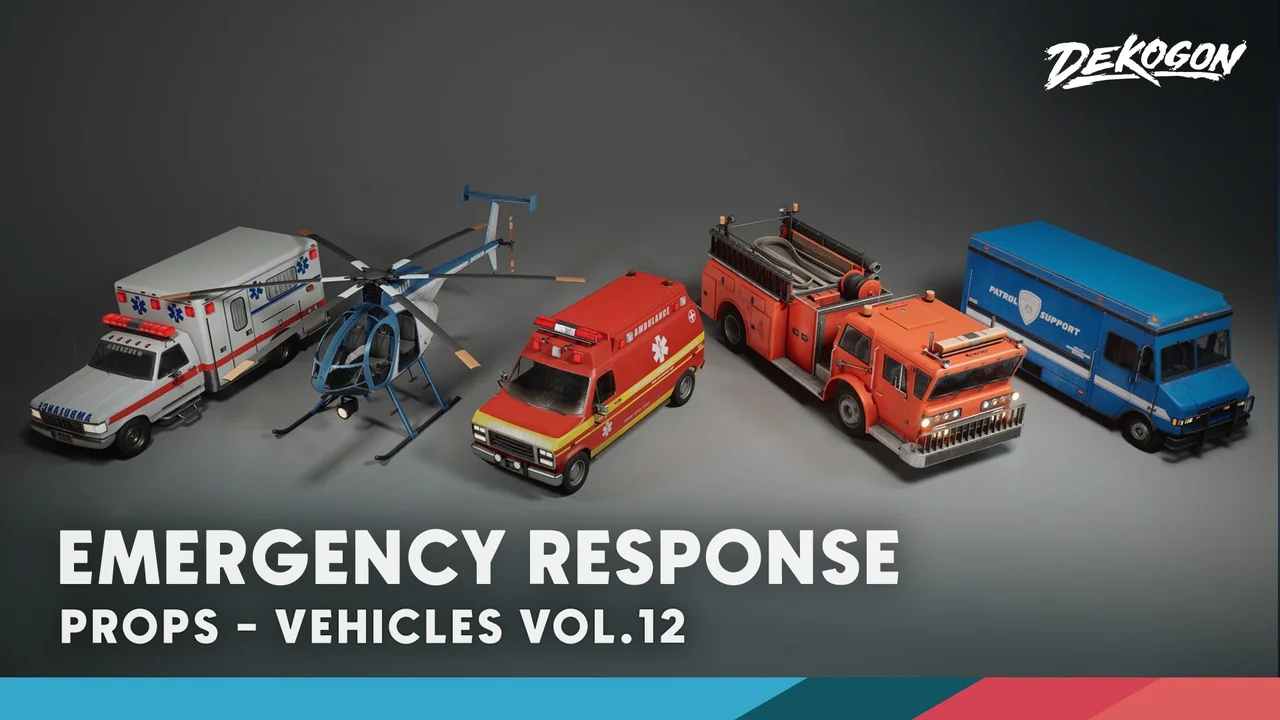
 Service
 Service
 Cars & Trucks