"7066dd76da796369"{"id":"14749","slug":"usurfacemesh-grid-projection-sculpting","title":"USurfaceMesh (Grid Projection Sculpting)","category":"Engine Tools","engine":"4.26 - 4.27,5.0 - 5.3","assetVersion":"Engine version: 4.26 - 4.27,5.0 - 5.3","engineVersion":"4.23","tag":"Engine Tools","accent":"blue","visual":"animation","summary":"USurfaceMesh (Grid Projection Sculpting) is a powerful editor-only tool designed to create custom-fit static meshes. It allows developers to project meshes onto surfaces and use height data for detailed terrain blending.","platform":"Unreal Engine","publishedAt":"2026-03-11T19:17:02.000Z","updatedAt":"2026-04-19T15:45:41.000Z","sourceNotes":[],"fileContents":[],"compatibility":["Unreal Engine","Engine version: 4.26 - 4.27,5.0 - 5.3"],"featuredImage":{"alt":"USurfaceMesh (Grid Projection Sculpting)","src":"https://3dcghub.com/wp-content/uploads/2026/03/aebbc98e-ec1e-4e98-a4c3-ef6e7c74033e.webp"},"hasDownloadLink":true,"downloads":0,"terms":[{"taxonomy":"category","slug":"engine-tools-tools-and-plugins","name":"Engine Tools"},{"taxonomy":"post_tag","slug":"environment","name":"Environment"},{"taxonomy":"post_tag","slug":"materials","name":"Materials"},{"taxonomy":"post_tag","slug":"plugins","name":"Plugins"},{"taxonomy":"post_tag","slug":"textures","name":"Textures"},{"taxonomy":"post_tag","slug":"tools","name":"Tools"},{"taxonomy":"post_tag","slug":"unreal-engine-5","name":"Unreal Engine 5"}],"galleryImages":[{"src":"https://3dcghub.com/wp-content/uploads/2026/03/f93dde5a23fb_89b59247-7c28-4b64-810c-9d104fe86c76.webp","alt":"USurfaceMesh (Grid Projection Sculpting)"},{"src":"https://3dcghub.com/wp-content/uploads/2026/03/66b6c1ae7d91_b3521302-f320-4f7a-a73c-98ead0fe25eb.webp","alt":"USurfaceMesh (Grid Projection Sculpting)"},{"src":"https://3dcghub.com/wp-content/uploads/2026/03/8bdb1b0028f2_2f7714f3-cc00-4a3b-a486-f7dc7059ddf6.webp","alt":"USurfaceMesh (Grid Projection Sculpting)"},{"src":"https://3dcghub.com/wp-content/uploads/2026/03/1506147b8961_56e80cad-dbe7-4756-8708-99efe60451cf.webp","alt":"USurfaceMesh (Grid Projection Sculpting)"},{"src":"https://3dcghub.com/wp-content/uploads/2026/03/168929351736_8d6812e7-7227-4017-8ce1-d623c3356167.webp","alt":"USurfaceMesh (Grid Projection Sculpting)"},{"src":"https://3dcghub.com/wp-content/uploads/2026/03/e03cac21ef20_0469f3f9-c004-4589-b440-36bc477092d9.webp","alt":"USurfaceMesh (Grid Projection Sculpting)"},{"src":"https://3dcghub.com/wp-content/uploads/2026/03/3d2be118a748_c59306ff-4297-4cca-aa24-a284a8dd8a99.webp","alt":"USurfaceMesh (Grid Projection Sculpting)"},{"src":"https://3dcghub.com/wp-content/uploads/2026/03/afb405dc7565_f86999db-9a0a-4f32-b317-02a6bd364ceb.webp","alt":"USurfaceMesh (Grid Projection Sculpting)"}],"accessPanel":{"kind":"resource","title":"Access this resource","eyebrow":"Free Download","message":"Log in or create a free account to start your download.","fileName":"USurfaceMesh 4.26-5.3.7z","safetyNote":"All resources are 100% manually reviewed to eliminate all risks.","actionLabel":"Download Free","resourceType":"Resource archive"},"contentHtml":"\u003ch2\u003eVersatile Mesh Projection and Customization\u003c/h2\u003e\n\u003cp\u003eUSurfaceMesh (Grid Projection Sculpting) is a grid-based multipurpose tool designed to streamline the creation of terrain-blended assets. This plugin enables users to generate custom-fit static meshes that can be placed anywhere within a scene. By projecting a mesh onto the surface of another mesh or landscape, creators can ensure a perfect fit for rocks and cliffs. Consequently, this workflow reduces the time spent manually aligning environmental assets.\u003c/p\u003e\n\u003cp\u003eThe plugin offers extensive customization options through height textures. Users can project the mesh and then apply various height noises and detail textures to create unique variations. Moreover, the tool allows for stamping a mesh to a surface and recreating it if further changes are required. This flexibility makes it an essential asset for detailed environmental design within the Unreal Editor.\u003c/p\u003e\n\n\u003ch2\u003eAdvanced Surface Data Capture\u003c/h2\u003e\n\u003cp\u003eOne of the standout features of USurfaceMesh (Grid Projection Sculpting) is the ability to capture the height of the surface below. This data is rendered out as render target textures, which can be utilized repeatedly throughout the plugin to produce multiple variations. Additionally, users can mask and flatten the mesh using specific settings and textures provided by the developer. While preview images may feature third-party assets, any material can be applied to the static meshes built with this tool.\u003c/p\u003e\n\n\u003ch2\u003eSpecialized Editing and Painting Tools\u003c/h2\u003e\n\u003cp\u003eThe creator has introduced several specialized tools within the suite to enhance the modeling process. For instance, the USurfaceMeshEdit tool includes mesh editing features, such as removing polygons that are hidden from view. This optimization can be used on any static mesh to improve performance. Furthermore, the USurfaceMeshPaint tool allows for painting vertex colors or rendering data to a texture using surface information. This specific tool is versatile enough to be used on any static mesh in your project.\u003c/p\u003e\n\n\u003ch2\u003eVersion 1.3 and Workflow Enhancements\u003c/h2\u003e\n\u003cp\u003eRecent updates have expanded the capabilities of USurfaceMesh (Grid Projection Sculpting) significantly. Version 1.3 introduced the ability to warp meshes along a spline and improved world-aligned texture sampling. The \"Apply to Landscape\" feature now uses surface data to paint landscape layers directly. Therefore, the displaced meshes match world-aligned texture nodes within Unreal Engine materials more accurately than before.\u003c/p\u003e\n\n\u003ch2\u003ePowerful Simulation and Displacement Options\u003c/h2\u003e\n\u003cp\u003eEarlier versions of the plugin also added advanced simulation features like water and thermal erosion. Creators can generate FlowMaps or use curves to define edges and heights. Additionally, the plugin supports vector displacement textures, vertical warping, and selectable removal of mesh parts. Because this is an editor-only plugin, all mesh creation and modification happen directly within the Unreal Editor environment. This ensures a streamlined pipeline for developers focusing on high-quality terrain and rock formations.\u003c/p\u003e\n\n\u003ch2\u003eClosing Notes\u003c/h2\u003e\n\u003cp\u003eUSurfaceMesh (Grid Projection Sculpting) provides a robust set of tools for developers looking to create integrated environmental assets. From height capture to advanced erosion simulations, the plugin offers professional-grade features for mesh manipulation. By utilizing these grid-based projection tools, creators can achieve highly detailed and optimized results for any 3D environment.\u003c/p\u003e\n\n\u003ch2\u003eExplore Similar Assets\u003c/h2\u003e\n\u003cul\u003e\n\u003cli\u003e\u003ca href=\"https://3dcghub.com/extile-plus-ultimate-non-tiling-material-toolkit-for-unreal-engine-environments/\" title=\"EXTILE PLUS -Ultimate Non-Tiling Material Toolkit for Unreal Engine Environments\"\u003eEXTILE PLUS -Ultimate Non-Tiling Material Toolkit for Unreal Engine Environments\u003c/a\u003e\u003c/li\u003e\n\u003cli\u003e\u003ca href=\"https://3dcghub.com/ultimate-template-unrealengine-2d-dialogue-inventory-system-save/\" title=\"ULTIMATE Template UnrealEngine || 2D + Dialogue + Inventory system + Save | |\"\u003eULTIMATE Template UnrealEngine || 2D + Dialogue + Inventory system + Save | |\u003c/a\u003e\u003c/li\u003e\n\u003cli\u003e\u003ca href=\"https://3dcghub.com/daz-to-unreal/\" title=\"Daz To Unreal\"\u003eDaz To Unreal\u003c/a\u003e\u003c/li\u003e\n\u003cli\u003e\u003ca href=\"https://3dcghub.com/blueprint-generator-ai-kibibyte-labs-engine-assistant/\" title=\"Blueprint Generator Ai – Kibibyte Labs (Engine Assistant)\"\u003eBlueprint Generator Ai – Kibibyte Labs (Engine Assistant)\u003c/a\u003e\u003c/li\u003e\n\u003cli\u003e\u003ca href=\"https://3dcghub.com/sci-fi-environment-engine-room/\" title=\"Sci-fi Environment Engine Room\"\u003eSci-fi Environment Engine Room\u003c/a\u003e\u003c/li\u003e\n\u003c/ul\u003e\n\n\u003ch2\u003eAsset Gallery\u003c/h2\u003e","contentTextLength":3772,"navigation":{"current":3408,"total":4016,"previous":{"id":"14758","slug":"vibeue","title":"VibeUE","category":"Engine Tools","platform":"Unreal Engine","updatedAt":"2026-04-19T15:45:41.000Z"},"next":{"id":"14724","slug":"uiws-unified-interactive-water-system","title":"UIWS - Unified Interactive Water System","category":"Engine Tools","platform":"Unreal Engine","updatedAt":"2026-04-19T15:45:41.000Z"}},"relatedResources":[{"id":"14777","slug":"voxel-plugin-pro-legacy","title":"Voxel Plugin Pro Legacy","category":"Engine Tools","engine":"4.22 -4.27, 5.0 - 5.7","assetVersion":"Engine version: 4.22 -4.27, 5.0 - 5.7","engineVersion":"Asset Version:1.0 - 2.0.8","tag":"Engine Tools","accent":"blue","visual":"animation","summary":"Create infinite, fully volumetric landscapes in Unreal Engine with Voxel Plugin Pro Legacy. This tool offers runtime editing, procedural generation, and surface sculpting for advanced environment design.","platform":"Unreal Engine","publishedAt":"2026-03-11T19:24:08.000Z","updatedAt":"2026-04-19T15:45:40.000Z","sourceNotes":[],"fileContents":[],"compatibility":["Unreal Engine","Engine version: 4.22 -4.27, 5.0 - 5.7","Asset Version: 1.0 - 2.0.8"],"featuredImage":{"alt":"Voxel Plugin Pro Legacy","src":"https://3dcghub.com/wp-content/uploads/2026/03/96bf1d13-25ff-4c47-a02e-8e0d855c1fd8.webp"},"hasDownloadLink":true,"downloads":4},{"id":"14375","slug":"proinstance-tools-plugin","title":"ProInstance Tools Plugin","category":"Engine Tools","engine":"4.24 - 4.27,5.0 - 5.6","assetVersion":"Engine version: 4.24 - 4.27,5.0 - 5.6","engineVersion":"Asset Version:1.27 -1.28","tag":"Engine Tools","accent":"blue","visual":"audio","summary":"The ProInstance Tools Plugin offers a lightweight solution for procedural mesh and actor placement. It simplifies repetitive level design tasks using unified settings and multiple placement types like Grid and Path.","platform":"Unreal Engine","publishedAt":"2026-03-11T17:48:54.000Z","updatedAt":"2026-04-19T15:45:47.000Z","sourceNotes":[],"fileContents":[],"compatibility":["Unreal Engine","Engine version: 4.24 - 4.27,5.0 - 5.6","Asset Version: 1.27 -1.28"],"featuredImage":{"alt":"ProInstance Tools Plugin","src":"https://3dcghub.com/wp-content/uploads/2026/03/de35cfdf-2302-4efa-9ede-fb4b27d94082.webp"},"hasDownloadLink":true,"downloads":1},{"id":"13742","slug":"blockout-tools-plugin","title":"Blockout Tools Plugin","category":"Engine Tools","engine":"1.51 - 4.5.3","assetVersion":"Engine version: 4.26 - 5.7","engineVersion":"Asset Version:1.51 - 4.5.3","tag":"Engine Tools","accent":"blue","visual":"luts","summary":"Streamline your environment design with the Blockout Tools Plugin. This lightweight toolset features 15 primitive elements and triplanar grid materials for rapid level prototyping in Unreal Engine.","platform":"Unreal Engine","publishedAt":"2026-03-11T09:52:02.000Z","updatedAt":"2026-07-29T16:09:39.794Z","sourceNotes":[],"fileContents":[],"compatibility":["Unreal Engine","Engine version: 4.26 - 5.7","Asset Version:1.51 - 4.5.3"],"featuredImage":{"alt":"Blockout Tools Plugin","src":"https://3dcghub.com/wp-content/uploads/2026/03/2e655f33-dfec-4888-9b31-c0aaa5b72ba1.webp"},"hasDownloadLink":true,"downloads":2}]}
Engine Tools
USurfaceMesh (Grid Projection Sculpting)
USurfaceMesh (Grid Projection Sculpting) is a powerful editor-only tool designed to create custom-fit static meshes. It allows developers to project meshes onto surfaces and use height data for detailed terrain blending.
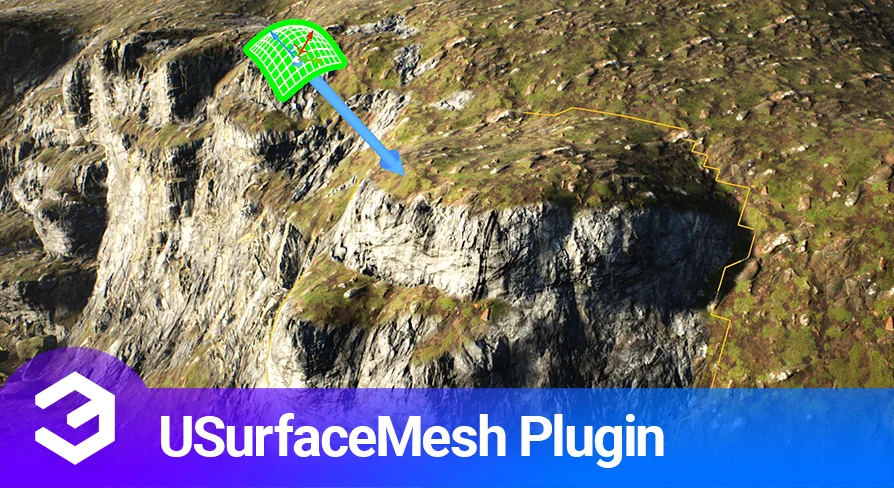
USurfaceMesh (Grid Projection Sculpting) is a grid-based multipurpose tool designed to streamline the creation of terrain-blended assets. This plugin enables users to generate custom-fit static meshes that can be placed anywhere within a scene. By projecting a mesh onto the surface of another mesh or landscape, creators can ensure a perfect fit for rocks and cliffs. Consequently, this workflow reduces the time spent manually aligning environmental assets.
The plugin offers extensive customization options through height textures. Users can project the mesh and then apply various height noises and detail textures to create unique variations. Moreover, the tool allows for stamping a mesh to a surface and recreating it if further changes are required. This flexibility makes it an essential asset for detailed environmental design within the Unreal Editor.
Advanced Surface Data Capture
One of the standout features of USurfaceMesh (Grid Projection Sculpting) is the ability to capture the height of the surface below. This data is rendered out as render target textures, which can be utilized repeatedly throughout the plugin to produce multiple variations. Additionally, users can mask and flatten the mesh using specific settings and textures provided by the developer. While preview images may feature third-party assets, any material can be applied to the static meshes built with this tool.
Specialized Editing and Painting Tools
The creator has introduced several specialized tools within the suite to enhance the modeling process. For instance, the USurfaceMeshEdit tool includes mesh editing features, such as removing polygons that are hidden from view. This optimization can be used on any static mesh to improve performance. Furthermore, the USurfaceMeshPaint tool allows for painting vertex colors or rendering data to a texture using surface information. This specific tool is versatile enough to be used on any static mesh in your project.
Version 1.3 and Workflow Enhancements
Recent updates have expanded the capabilities of USurfaceMesh (Grid Projection Sculpting) significantly. Version 1.3 introduced the ability to warp meshes along a spline and improved world-aligned texture sampling. The "Apply to Landscape" feature now uses surface data to paint landscape layers directly. Therefore, the displaced meshes match world-aligned texture nodes within Unreal Engine materials more accurately than before.
Powerful Simulation and Displacement Options
Earlier versions of the plugin also added advanced simulation features like water and thermal erosion. Creators can generate FlowMaps or use curves to define edges and heights. Additionally, the plugin supports vector displacement textures, vertical warping, and selectable removal of mesh parts. Because this is an editor-only plugin, all mesh creation and modification happen directly within the Unreal Editor environment. This ensures a streamlined pipeline for developers focusing on high-quality terrain and rock formations.
Closing Notes
USurfaceMesh (Grid Projection Sculpting) provides a robust set of tools for developers looking to create integrated environmental assets. From height capture to advanced erosion simulations, the plugin offers professional-grade features for mesh manipulation. By utilizing these grid-based projection tools, creators can achieve highly detailed and optimized results for any 3D environment.
 Engine Tools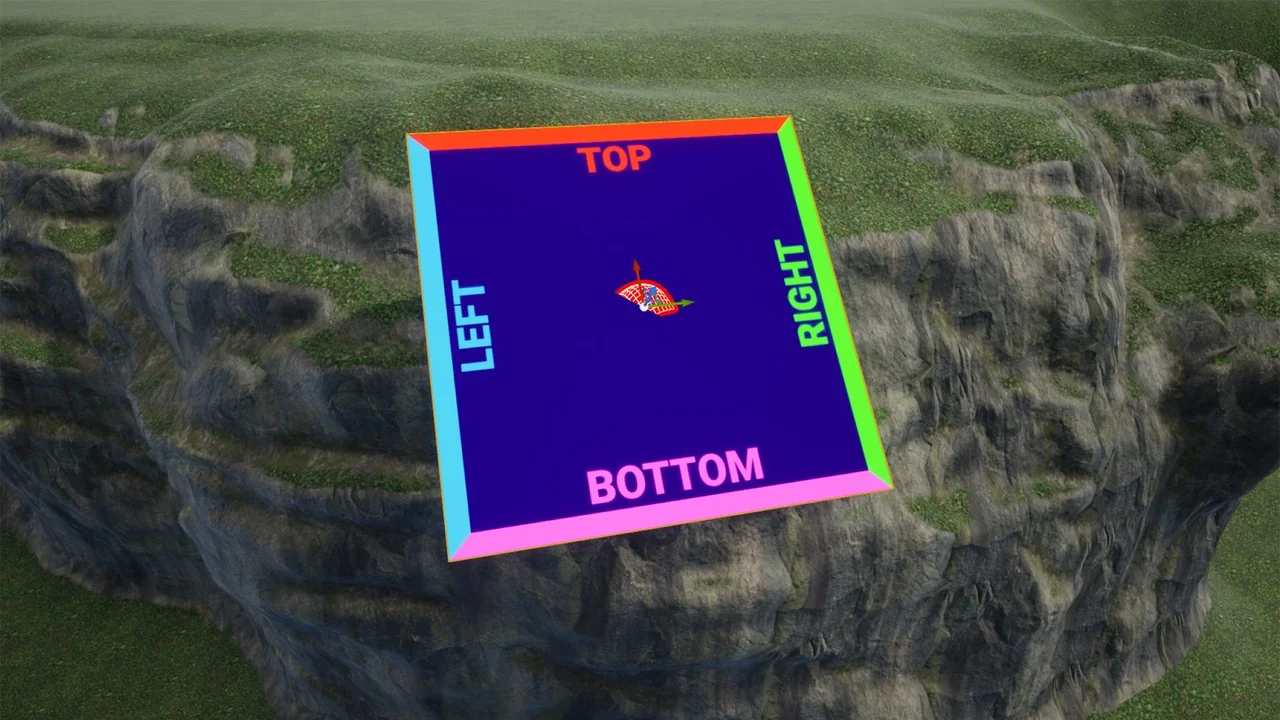
 Engine Tools
 Engine Tools
 Engine Tools