"26aaab8a5d5ed4fc"{"id":"22811","slug":"ultimate-crafting-system","title":"Ultimate Crafting System","category":"Game Toolkits","engine":"Original Unity version: 2021.3.15","assetVersion":"Original Unity version: 2021.3.15","engineVersion":"Asset Version:3.2","tag":"Game Toolkits","accent":"cyan","visual":"mech","summary":"The Ultimate Crafting System provides a technical framework for item management, recipe logic, and physical object placement in Unity. It bridges the gap between backend inventory data and front-end world-space interactions for both 2D and 3D environments.","platform":"Unity","publishedAt":"2026-04-06T14:07:28.000Z","updatedAt":"2026-04-19T15:37:01.000Z","sourceNotes":[],"fileContents":[],"compatibility":["Unity","Original Unity version: 2021.3.15","Asset Version: 3.2"],"featuredImage":{"alt":"Ultimate Crafting System","src":"https://3dcghub.com/wp-content/uploads/2026/04/09531b35ebea_4d5a4855-2fe9-4d8f-9c18-ceb6e5e17f95_1280x720_stretch.webp"},"hasDownloadLink":true,"downloads":2,"terms":[{"taxonomy":"category","slug":"game-toolkits","name":"Game Toolkits"},{"taxonomy":"post_tag","slug":"game-systems","name":"Game Systems"},{"taxonomy":"post_tag","slug":"tools","name":"Tools"},{"taxonomy":"post_tag","slug":"unity","name":"Unity"}],"galleryImages":[{"src":"https://3dcghub.com/wp-content/uploads/2026/04/c1c49df06de5_1562c8ce-d061-4bee-b08c-59cd4089b173_scaled.webp","alt":"Ultimate Crafting System"},{"src":"https://3dcghub.com/wp-content/uploads/2026/04/7cc58aced6bf_7fda572c-1f17-43ac-ba9b-954da6276726_scaled.webp","alt":"Ultimate Crafting System"},{"src":"https://3dcghub.com/wp-content/uploads/2026/04/0ccbd24d7737_59c240ab-0de2-481b-b87e-f099246f761b_scaled.webp","alt":"Ultimate Crafting System"},{"src":"https://3dcghub.com/wp-content/uploads/2026/04/e84d728bd5b4_d02eef26-c993-402d-8d08-b48fa3472f37_scaled.webp","alt":"Ultimate Crafting System"},{"src":"https://3dcghub.com/wp-content/uploads/2026/04/f4f386e6fc80_ea586542-6fe4-4977-bc11-024f21c397c4_scaled.webp","alt":"Ultimate Crafting System"},{"src":"https://3dcghub.com/wp-content/uploads/2026/04/e7a28f29227c_f9fe7e59-956c-46e3-91fa-2bd48cbe7237_scaled.webp","alt":"Ultimate Crafting System"},{"src":"https://3dcghub.com/wp-content/uploads/2026/04/6bdffd34cf1d_66b13800-20b3-4286-8f85-c2fbc6da4e3d_scaled.webp","alt":"Ultimate Crafting System"},{"src":"https://3dcghub.com/wp-content/uploads/2026/04/724eb949d907_1444ad67-0ad7-4c9b-9892-377bfca2d992_scaled.webp","alt":"Ultimate Crafting System"},{"src":"https://3dcghub.com/wp-content/uploads/2026/04/72950e0ef88d_1169fbfb-a6b9-42c0-a45c-1785c055b67e_scaled.webp","alt":"Ultimate Crafting System"},{"src":"https://3dcghub.com/wp-content/uploads/2026/04/b289aa69fee0_d30d1a82-ea7c-45b0-b432-dd3b59fef255_scaled.webp","alt":"Ultimate Crafting System"}],"accessPanel":{"kind":"resource","title":"Access this resource","eyebrow":"Free Download","message":"Log in or create a free account to start your download.","fileName":"Ultimate Crafting System v3.2 (12 Nov 2024).7z","safetyNote":"All resources are 100% manually reviewed to eliminate all risks.","actionLabel":"Download Free","resourceType":"Resource archive"},"contentHtml":"\u003ch2\u003eFramework for Item and Recipe Management\u003c/h2\u003e\n\nAt its core, the Ultimate Crafting System serves as a centralized hub for managing the data structures essential to crafting-heavy titles. The workflow centers on an interface-driven item creation process that allows developers to define item properties without deep-diving into code. This is supported by a category creation system, which enables the organization of data and attributes across various item types. \n\nCrafting logic is split between traditional recipe formats and table-based recipes. This flexibility allows for diverse gameplay styles, whether the project requires a simple list-based crafting menu or a more tactile, grid-aligned assembly process. The inclusion of an inventory system and support for unique item instances ensures that items maintain their specific data when moved between the player's inventory and the game world.\n\n\u003ch2\u003eWorld Interactions and Object Placement\u003c/h2\u003e\n\nThe system extends beyond UI-based menus into the physical game world. It includes specific mechanics for item tossing and pickup, as well as a gathering system to facilitate resource collection. For titles that involve building or engineering, the package provides a robust object placement and connection system. This allows players to position models in the scene and establish functional links between them. \n\nThese interactions are designed to work across different perspectives. The developer included both point-and-click third-person and first-person demo scenes to demonstrate how the systems adapt to different player viewpoints. Because the logic is not tied to a specific dimension, the tools are applicable to both 2D and 3D projects, including VR and AR environments.\n\n\u003ch2\u003eEnergy and Item Transfer Logic\u003c/h2\u003e\n\nA distinct feature of this system is the energy and item transfer framework. This goes beyond simple inventory management by providing a method to move resources or power between different objects in the game world. This is particularly useful for automation-style games or complex sci-fi environments where machines must be connected to power sources or storage containers. \n\nTo manage these complex interactions, a command system is included, allowing for more granular control over how the game logic handles various state changes. For programmers, the system is built to be extensible, permitting the modification of core behaviors to fit specific mechanical requirements that might fall outside of standard crafting tropes.\n\n\u003ch2\u003eAsset Integration and Demo Environments\u003c/h2\u003e\n\nThe package contains a substantial library of visual assets to help prototype and build environments. This includes over 100 models and 43 icons. These assets are showcased within specific demo scenes, such as a spaceship environment available in both first-person and third-person modes. These scenes are fully playable and serve as a template for how to integrate the crafting, gathering, and placement systems into a cohesive loop.\n\nThe technical foundation of the package is compatible with a wide range of Unity versions, starting from 2021.3.15 through Unity 6. It provides support for the Universal Render Pipeline (URP), High Definition Render Pipeline (HDRP), and the Built-in renderer, ensuring that the visual assets and logic systems can be used regardless of the project's graphical direction.\n\n\u003ch2\u003ePractical Implementation and Workflow\u003c/h2\u003e\n\nIntegrating this system into a production workflow involves utilizing the provided SerializeField support for efficient data handling within the Unity Editor. The package is organized to facilitate quick setup of basic crafting loops while leaving room for complex logic involving energy grids and item connectivity. With a total asset count of 759, the resource provides a dense foundation for developers looking to implement a complete item-to-world interaction cycle.\n\n\u003ch2\u003eContinue Browsing Similar Packs\u003c/h2\u003e\n\u003cul\u003e\n\u003cli\u003e\u003ca href=\"https://3dcghub.com/dialogue-system-for-unity/\" title=\"Dialogue System for Unity\"\u003eDialogue System for Unity\u003c/a\u003e\u003c/li\u003e\n\u003cli\u003e\u003ca href=\"https://3dcghub.com/ambient-sounds-interactive-soundscapes-for-unity-6/\" title=\"Ambient Sounds – Interactive Soundscapes for Unity 6\"\u003eAmbient Sounds – Interactive Soundscapes for Unity 6\u003c/a\u003e\u003c/li\u003e\n\u003cli\u003e\u003ca href=\"https://3dcghub.com/pegasus-flythroughs-for-unity-6/\" title=\"Pegasus – Flythroughs for Unity 6\"\u003ePegasus – Flythroughs for Unity 6\u003c/a\u003e\u003c/li\u003e\n\u003cli\u003e\u003ca href=\"https://3dcghub.com/motion-matching-for-unity/\" title=\"Motion Matching for Unity\"\u003eMotion Matching for Unity\u003c/a\u003e\u003c/li\u003e\n\u003cli\u003e\u003ca href=\"https://3dcghub.com/third-person-controller-humanoid-basics/\" title=\"Third Person Controller – Humanoid Basics\"\u003eThird Person Controller – Humanoid Basics\u003c/a\u003e\u003c/li\u003e\n\u003c/ul\u003e","contentTextLength":4075,"navigation":{"current":3255,"total":3400,"previous":{"id":"22822","slug":"uma-for-rpg-builder","title":"UMA for RPG Builder","category":"Game Toolkits","platform":"Unity","updatedAt":"2026-04-19T15:37:01.000Z"},"next":{"id":"22798","slug":"third-person-controller-humanoid-basics","title":"Third Person Controller - Humanoid Basics","category":"Game Toolkits","platform":"Unity","updatedAt":"2026-04-19T15:37:01.000Z"}},"relatedResources":[{"id":"22769","slug":"neofps-fps-controller-template-toolkit","title":"NeoFPS: FPS Controller, Template \u0026 Toolkit","category":"Game Toolkits","engine":"Original Unity version: 2021.3.45","assetVersion":"Original Unity version: 2021.3.45","engineVersion":"Asset Version:1.1.31","tag":"Game Toolkits","accent":"cyan","visual":"animation","summary":"NeoFPS provides a deep suite of systems for crafting polished first-person shooters in Unity, moving beyond simple character controllers into full-game architecture.","platform":"Unity","publishedAt":"2026-04-06T14:00:03.000Z","updatedAt":"2026-04-19T15:37:02.000Z","sourceNotes":[],"fileContents":[],"compatibility":["Unity","Original Unity version: 2021.3.45","Asset Version: 1.1.31"],"featuredImage":{"alt":"NeoFPS: FPS Controller, Template \u0026 Toolkit","src":"https://3dcghub.com/wp-content/uploads/2026/04/3c30f06b9cd8_e180bb30-c961-4bbf-b987-4d93fe068f54_1280x720_stretch.webp"},"hasDownloadLink":true,"downloads":0},{"id":"22779","slug":"quest-machine","title":"Quest Machine","category":"Game Toolkits","engine":"Original Unity version: 2020.3.0","assetVersion":"Original Unity version: 2020.3.0","engineVersion":"Asset Version:1.2.48.1","tag":"Game Toolkits","accent":"cyan","visual":"luts","summary":"Quest Machine provides a robust framework for Unity developers to implement complex quest logic through node-based design and automated procedural generation.","platform":"Unity","publishedAt":"2026-04-06T14:03:39.000Z","updatedAt":"2026-04-19T15:37:02.000Z","sourceNotes":[],"fileContents":[],"compatibility":["Unity","Original Unity version: 2020.3.0","Asset Version: 1.2.48.1"],"featuredImage":{"alt":"Quest Machine","src":"https://3dcghub.com/wp-content/uploads/2026/04/375340c01481_4acabad7-247c-471c-ac6f-0e42e0aa13d5_1280x720_stretch.webp"},"hasDownloadLink":true,"downloads":1},{"id":"22705","slug":"abilities-game-creator-2","title":"Abilities | Game Creator 2","category":"Game Toolkits","engine":"Original Unity version: 6000.2.2","assetVersion":"Original Unity version: 6000.2.2","engineVersion":"Asset Version:1.9.0","tag":"Game Toolkits","accent":"cyan","visual":"luts","summary":"The Abilities module provides a flexible, five-system framework for designing RPG skills without coding. From targeting and cooldown requirements to projectile-based impact logic, it streamlines the translation of design concepts into gameplay mechanics.","platform":"Unity","publishedAt":"2026-04-06T13:49:43.000Z","updatedAt":"2026-04-19T15:37:04.000Z","sourceNotes":[],"fileContents":[],"compatibility":["Unity","Original Unity version: 6000.2.2","Asset Version: 1.9.0"],"featuredImage":{"alt":"Abilities | Game Creator 2","src":"https://3dcghub.com/wp-content/uploads/2026/04/40349f0a430b_752239b3-993a-4c99-836d-ca515bfc3ba5_1280x720_stretch.webp"},"hasDownloadLink":true,"downloads":0}]}
Game Toolkits
Ultimate Crafting System
The Ultimate Crafting System provides a technical framework for item management, recipe logic, and physical object placement in Unity. It bridges the gap between backend inventory data and front-end world-space interactions for both 2D and 3D environments.
At its core, the Ultimate Crafting System serves as a centralized hub for managing the data structures essential to crafting-heavy titles. The workflow centers on an interface-driven item creation process that allows developers to define item properties without deep-diving into code. This is supported by a category creation system, which enables the organization of data and attributes across various item types.
Crafting logic is split between traditional recipe formats and table-based recipes. This flexibility allows for diverse gameplay styles, whether the project requires a simple list-based crafting menu or a more tactile, grid-aligned assembly process. The inclusion of an inventory system and support for unique item instances ensures that items maintain their specific data when moved between the player's inventory and the game world.
World Interactions and Object Placement
The system extends beyond UI-based menus into the physical game world. It includes specific mechanics for item tossing and pickup, as well as a gathering system to facilitate resource collection. For titles that involve building or engineering, the package provides a robust object placement and connection system. This allows players to position models in the scene and establish functional links between them.
These interactions are designed to work across different perspectives. The developer included both point-and-click third-person and first-person demo scenes to demonstrate how the systems adapt to different player viewpoints. Because the logic is not tied to a specific dimension, the tools are applicable to both 2D and 3D projects, including VR and AR environments.
Energy and Item Transfer Logic
A distinct feature of this system is the energy and item transfer framework. This goes beyond simple inventory management by providing a method to move resources or power between different objects in the game world. This is particularly useful for automation-style games or complex sci-fi environments where machines must be connected to power sources or storage containers.
To manage these complex interactions, a command system is included, allowing for more granular control over how the game logic handles various state changes. For programmers, the system is built to be extensible, permitting the modification of core behaviors to fit specific mechanical requirements that might fall outside of standard crafting tropes.
Asset Integration and Demo Environments
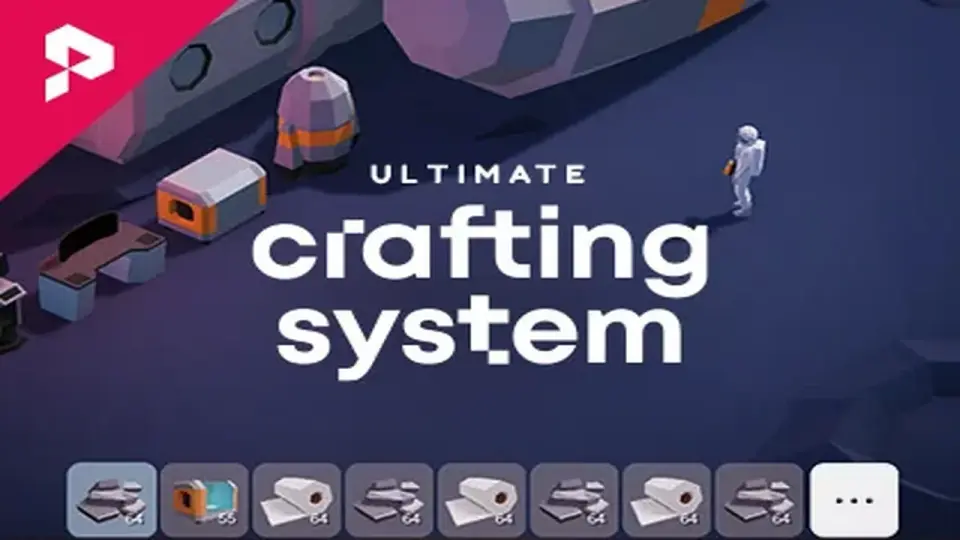
The package contains a substantial library of visual assets to help prototype and build environments. This includes over 100 models and 43 icons. These assets are showcased within specific demo scenes, such as a spaceship environment available in both first-person and third-person modes. These scenes are fully playable and serve as a template for how to integrate the crafting, gathering, and placement systems into a cohesive loop.
The technical foundation of the package is compatible with a wide range of Unity versions, starting from 2021.3.15 through Unity 6. It provides support for the Universal Render Pipeline (URP), High Definition Render Pipeline (HDRP), and the Built-in renderer, ensuring that the visual assets and logic systems can be used regardless of the project's graphical direction.
Practical Implementation and Workflow
Integrating this system into a production workflow involves utilizing the provided SerializeField support for efficient data handling within the Unity Editor. The package is organized to facilitate quick setup of basic crafting loops while leaving room for complex logic involving energy grids and item connectivity. With a total asset count of 759, the resource provides a dense foundation for developers looking to implement a complete item-to-world interaction cycle.
 Game Toolkits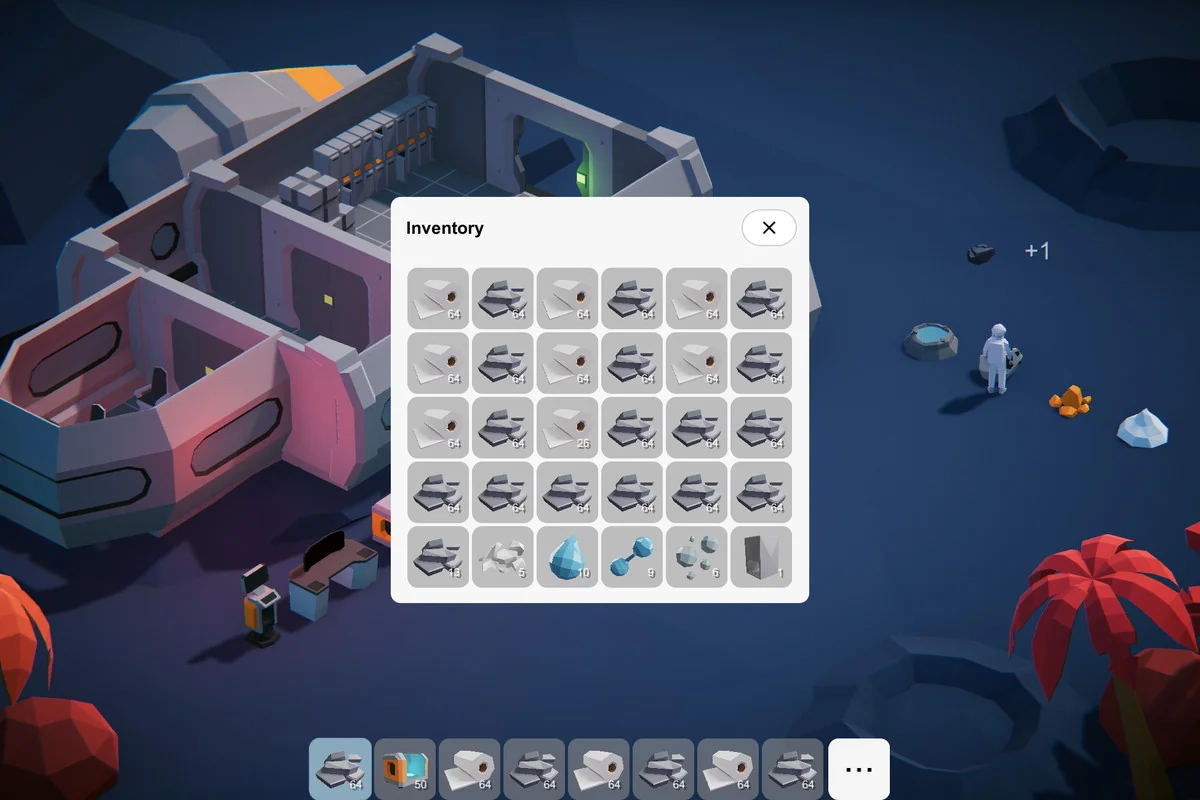
 Game Toolkits
 Game Toolkits
 Game Toolkits