"c68a05d5e51405b3"{"id":"22779","slug":"quest-machine","title":"Quest Machine","category":"Game Toolkits","engine":"Original Unity version: 2020.3.0","assetVersion":"Original Unity version: 2020.3.0","engineVersion":"Asset Version:1.2.48.1","tag":"Game Toolkits","accent":"cyan","visual":"luts","summary":"Quest Machine provides a robust framework for Unity developers to implement complex quest logic through node-based design and automated procedural generation.","platform":"Unity","publishedAt":"2026-04-06T14:03:39.000Z","updatedAt":"2026-04-19T15:37:02.000Z","sourceNotes":[],"fileContents":[],"compatibility":["Unity","Original Unity version: 2020.3.0","Asset Version: 1.2.48.1"],"featuredImage":{"alt":"Quest Machine","src":"https://3dcghub.com/wp-content/uploads/2026/04/375340c01481_4acabad7-247c-471c-ac6f-0e42e0aa13d5_1280x720_stretch.webp"},"hasDownloadLink":true,"downloads":3,"terms":[{"taxonomy":"category","slug":"game-toolkits","name":"Game Toolkits"},{"taxonomy":"post_tag","slug":"game-systems","name":"Game Systems"},{"taxonomy":"post_tag","slug":"tools","name":"Tools"},{"taxonomy":"post_tag","slug":"unity","name":"Unity"}],"galleryImages":[{"src":"https://3dcghub.com/wp-content/uploads/2026/04/9f708c0e03c7_c2df521b-ff60-4c2d-a660-cdc7097b271a_scaled.webp","alt":"Quest Machine"},{"src":"https://3dcghub.com/wp-content/uploads/2026/04/1e3523d73900_fd0fd5cd-8542-429f-9ad8-a4175552e6a9_scaled.webp","alt":"Quest Machine"},{"src":"https://3dcghub.com/wp-content/uploads/2026/04/875712b7c7d9_12d2afaa-01d4-411a-a406-98a2a6110bc8_scaled.webp","alt":"Quest Machine"},{"src":"https://3dcghub.com/wp-content/uploads/2026/04/dd9b496a1fbd_49168120-481c-4e73-9be6-5b51ede13a5c_scaled.webp","alt":"Quest Machine"},{"src":"https://3dcghub.com/wp-content/uploads/2026/04/ce6fd9c176c0_1084e1d4-9eb8-4a21-8a1b-e2a3d17455a8_scaled.webp","alt":"Quest Machine"},{"src":"https://3dcghub.com/wp-content/uploads/2026/04/0e95ab4160c6_c9ea9baa-eeb2-4b4c-8853-c3fb5ac0eaa5_scaled.webp","alt":"Quest Machine"},{"src":"https://3dcghub.com/wp-content/uploads/2026/04/93221b59f539_aebb45bc-3412-4e82-8223-16d9eee929dc_scaled.webp","alt":"Quest Machine"}],"accessPanel":{"kind":"resource","title":"Access this resource","eyebrow":"Free Download","message":"Log in or create a free account to start your download.","fileName":"Quest Machine v1.2.48.1.7z","safetyNote":"All resources are 100% manually reviewed to eliminate all risks.","actionLabel":"Download Free","resourceType":"Resource archive"},"contentHtml":"\u003ch2\u003eDynamic and Hand-Written Quest Logic\u003c/h2\u003e\n\u003cp\u003eQuest Machine is a comprehensive quest management framework designed for Unity developers who need to implement complex narrative structures and objective-based gameplay. The system is built to accommodate two distinct approaches to quest design: hand-written narratives and procedurally-generated objectives. This flexibility allows developers to maintain tight control over main story arcs while populating their game worlds with dynamic, repeatable content that responds to the player's actions.\u003c/p\u003e\n\u003cp\u003eFor hand-written content, the system utilizes a node-based editor. This visual approach moves quest creation away from traditional coding and into a designer-friendly interface. Because the editor is not locked into specific quest archetypes, it allows for the creation of unique mission structures that go beyond simple 'fetch' or 'kill' tasks. Designers can define complex branching logic and dependencies between different quest stages directly within the node graph.\u003c/p\u003e\n\u003cp\u003eThe procedural generation aspect of the system offers a different utility. It analyzes the current state of the game world to generate unlimited quests at runtime. This ensures that the game world remains active and provides the player with ongoing tasks based on the specific context of their environment. This dual-track capability makes the tool suitable for both linear, story-driven RPGs and open-ended sandbox titles where world-state consistency is vital.\u003c/p\u003e\n\n\u003ch2\u003eIntegrated UI and Feedback Components\u003c/h2\u003e\n\u003cp\u003eA significant portion of quest management involves communicating progress and availability to the player. Quest Machine includes a suite of UI components that handle these interactions out of the box. The system features a dedicated Quest Journal where players can review their active and completed objectives, alongside a Tracking HUD for real-time progress updates. For immediate feedback, an Alert HUD displays messages regarding quest state changes, such as when an objective is completed or a new task is accepted.\u003c/p\u003e\n\u003cp\u003eInteraction within the game world is facilitated through overhead indicators. These visual cues inform the player when a non-player character (NPC) has quest-related dialogue available, streamlining the discovery process. The UI system is built to be versatile, supporting various input methods including mouse, keyboard, joystick, and touch. This makes the tool adaptable for projects targeting different hardware, from desktop and consoles to mobile and VR devices.\u003c/p\u003e\n\n\u003ch2\u003eWorkflow Integration and Extension\u003c/h2\u003e\n\u003cp\u003eQuest Machine fits into a production workflow as a bridge between narrative design and technical implementation. It uses an event-based system to control object spawning and state changes, allowing developers to trigger world events based on quest progress without writing custom scripts for every interaction. For projects requiring deep customization, the system includes thoroughly documented source code and an extensive scripting API.\u003c/p\u003e\n\u003cp\u003eData management is handled through advanced text handling features. Developers can give specific characters unique dialects and localize quest content to reach different markets. The system also supports the import and export of quest data via CSV formats, making it compatible with external tools like Excel or Google Sheets for large-scale narrative editing. Additionally, the framework includes built-in save and load functionality, ensuring that quest states and player progress persist across scene changes and game sessions.\u003c/p\u003e\n\n\u003ch2\u003eBroad Compatibility and Asset Interoperability\u003c/h2\u003e\n\u003cp\u003eThe system is designed to work within a wide range of project types, supporting 2D, 3D, AR, and VR environments. It is compatible with Unity versions from 2019 through Unity 6, making it a stable choice for both legacy projects and those utilizing the latest engine updates. It also includes support for multiplayer game architectures.\u003c/p\u003e\n\u003cp\u003eOne of the primary strengths of the system is its extensive integration list with other popular Unity tools. It is built to work alongside various character controllers, inventory systems, and AI frameworks. Supported integrations include:\u003c/p\u003e\n\u003cul\u003e\n \u003cli\u003eCharacter Controllers: Invector Controllers, Opsive Character Controllers, and TopDown Engine.\u003c/li\u003e\n \u003cli\u003eInventory Systems: Inventory Engine, Inventory Pro, and Opsive Ultimate Inventory System.\u003c/li\u003e\n \u003cli\u003eAI and Behavior Tools: Behavior Designer and Emerald AI.\u003c/li\u003e\n \u003cli\u003eNarrative and Logic Tools: Dialogue System for Unity, PlayMaker, and articy:draft.\u003c/li\u003e\n \u003cli\u003eFrameworks: ORK Framework, RPG Builder, and uMMORPG.\u003c/li\u003e\n\u003c/ul\u003e\n\u003cp\u003eThis level of interoperability allows developers to build a cohesive production pipeline where the quest system communicates directly with the player's inventory, the AI's behavior, and the overarching dialogue logic.\u003c/p\u003e\n\n\u003ch2\u003ePractical Workflow Takeaway\u003c/h2\u003e\n\u003cp\u003eQuest Machine functions as a centralized hub for all objective-related logic in a Unity project. By utilizing the node-based editor for core story beats and the procedural engine for world-filling content, developers can reduce the time spent on manual quest scripting. The inclusion of ready-to-use UI components and broad third-party asset support ensures that the quest system can be integrated into existing project architectures with minimal friction, supporting a wide array of genres from platformers to complex RPGs.\u003c/p\u003e\n\n\u003ch2\u003eExplore Similar Assets\u003c/h2\u003e\n\u003cul\u003e\n\u003cli\u003e\u003ca href=\"https://3dcghub.com/dialogue-system-for-unity/\" title=\"Dialogue System for Unity\"\u003eDialogue System for Unity\u003c/a\u003e\u003c/li\u003e\n\u003cli\u003e\u003ca href=\"https://3dcghub.com/ambient-sounds-interactive-soundscapes-for-unity-6/\" title=\"Ambient Sounds – Interactive Soundscapes for Unity 6\"\u003eAmbient Sounds – Interactive Soundscapes for Unity 6\u003c/a\u003e\u003c/li\u003e\n\u003cli\u003e\u003ca href=\"https://3dcghub.com/pegasus-flythroughs-for-unity-6/\" title=\"Pegasus – Flythroughs for Unity 6\"\u003ePegasus – Flythroughs for Unity 6\u003c/a\u003e\u003c/li\u003e\n\u003cli\u003e\u003ca href=\"https://3dcghub.com/motion-matching-for-unity/\" title=\"Motion Matching for Unity\"\u003eMotion Matching for Unity\u003c/a\u003e\u003c/li\u003e\n\u003cli\u003e\u003ca href=\"https://3dcghub.com/neofps-fps-controller-template-toolkit/\" title=\"NeoFPS: FPS Controller, Template \u0026amp;amp; Toolkit\"\u003eNeoFPS: FPS Controller, Template \u0026amp; Toolkit\u003c/a\u003e\u003c/li\u003e\n\u003c/ul\u003e","contentTextLength":5516,"navigation":{"current":3712,"total":3860,"previous":{"id":"22788","slug":"rpg-cameras-controllers","title":"RPG Cameras \u0026 Controllers","category":"Game Toolkits","platform":"Unity","updatedAt":"2026-04-19T15:37:02.000Z"},"next":{"id":"22769","slug":"neofps-fps-controller-template-toolkit","title":"NeoFPS: FPS Controller, Template \u0026 Toolkit","category":"Game Toolkits","platform":"Unity","updatedAt":"2026-04-19T15:37:02.000Z"}},"relatedResources":[{"id":"22811","slug":"ultimate-crafting-system","title":"Ultimate Crafting System","category":"Game Toolkits","engine":"Original Unity version: 2021.3.15","assetVersion":"Original Unity version: 2021.3.15","engineVersion":"Asset Version:3.2","tag":"Game Toolkits","accent":"cyan","visual":"mech","summary":"The Ultimate Crafting System provides a technical framework for item management, recipe logic, and physical object placement in Unity. It bridges the gap between backend inventory data and front-end world-space interactions for both 2D and 3D environments.","platform":"Unity","publishedAt":"2026-04-06T14:07:28.000Z","updatedAt":"2026-04-19T15:37:01.000Z","sourceNotes":[],"fileContents":[],"compatibility":["Unity","Original Unity version: 2021.3.15","Asset Version: 3.2"],"featuredImage":{"alt":"Ultimate Crafting System","src":"https://3dcghub.com/wp-content/uploads/2026/04/09531b35ebea_4d5a4855-2fe9-4d8f-9c18-ceb6e5e17f95_1280x720_stretch.webp"},"hasDownloadLink":true,"downloads":2},{"id":"22705","slug":"abilities-game-creator-2","title":"Abilities | Game Creator 2","category":"Game Toolkits","engine":"Original Unity version: 6000.2.2","assetVersion":"Original Unity version: 6000.2.2","engineVersion":"Asset Version:1.9.0","tag":"Game Toolkits","accent":"cyan","visual":"luts","summary":"The Abilities module provides a flexible, five-system framework for designing RPG skills without coding. From targeting and cooldown requirements to projectile-based impact logic, it streamlines the translation of design concepts into gameplay mechanics.","platform":"Unity","publishedAt":"2026-04-06T13:49:43.000Z","updatedAt":"2026-04-19T15:37:04.000Z","sourceNotes":[],"fileContents":[],"compatibility":["Unity","Original Unity version: 6000.2.2","Asset Version: 1.9.0"],"featuredImage":{"alt":"Abilities | Game Creator 2","src":"https://3dcghub.com/wp-content/uploads/2026/04/40349f0a430b_752239b3-993a-4c99-836d-ca515bfc3ba5_1280x720_stretch.webp"},"hasDownloadLink":true,"downloads":1},{"id":"22723","slug":"dungeon-crawler-grid-controller","title":"Dungeon Crawler Grid Controller","category":"Game Toolkits","engine":"Original Unity version: 2020.3.0","assetVersion":"Original Unity version: 2020.3.0","engineVersion":"Asset Version:1.0.14","tag":"Game Toolkits","accent":"cyan","visual":"mech","summary":"This specialized controller brings the movement logic of classic first-person dungeon crawlers to modern Unity projects. It handles the complexities of grid-based navigation, interactions, and local multiplayer without requiring custom scripting.","platform":"Unity","publishedAt":"2026-04-06T13:52:32.000Z","updatedAt":"2026-04-19T15:37:04.000Z","sourceNotes":[],"fileContents":[],"compatibility":["Unity","Original Unity version: 2020.3.0","Asset Version: 1.0.14"],"featuredImage":{"alt":"Dungeon Crawler Grid Controller","src":"https://3dcghub.com/wp-content/uploads/2026/04/e87fea5a2a0a_fc54d159-8a95-4b2f-b53b-4519b13bc538_1280x720_stretch.webp"},"hasDownloadLink":true,"downloads":0}]}
Game Toolkits
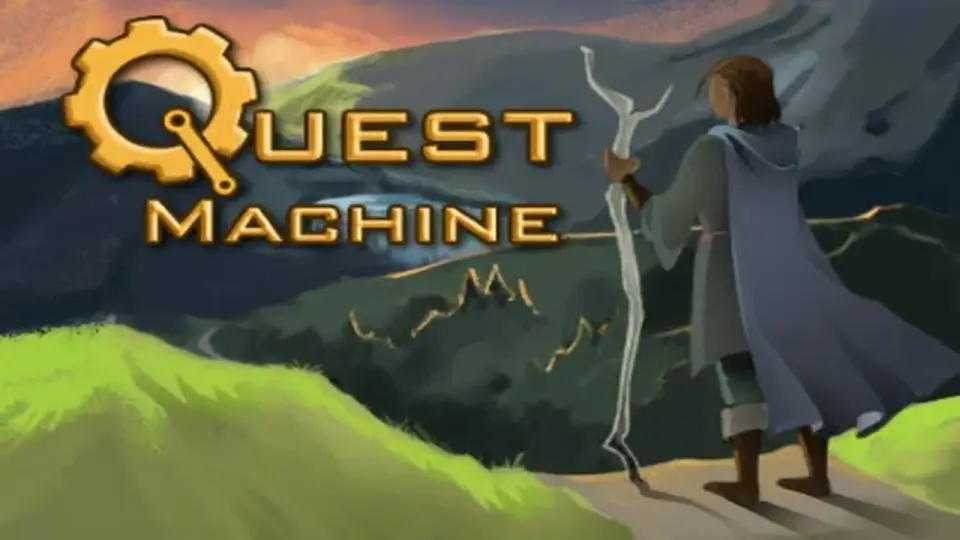
Quest Machine
Quest Machine provides a robust framework for Unity developers to implement complex quest logic through node-based design and automated procedural generation.
Quest Machine is a comprehensive quest management framework designed for Unity developers who need to implement complex narrative structures and objective-based gameplay. The system is built to accommodate two distinct approaches to quest design: hand-written narratives and procedurally-generated objectives. This flexibility allows developers to maintain tight control over main story arcs while populating their game worlds with dynamic, repeatable content that responds to the player's actions.
For hand-written content, the system utilizes a node-based editor. This visual approach moves quest creation away from traditional coding and into a designer-friendly interface. Because the editor is not locked into specific quest archetypes, it allows for the creation of unique mission structures that go beyond simple 'fetch' or 'kill' tasks. Designers can define complex branching logic and dependencies between different quest stages directly within the node graph.
The procedural generation aspect of the system offers a different utility. It analyzes the current state of the game world to generate unlimited quests at runtime. This ensures that the game world remains active and provides the player with ongoing tasks based on the specific context of their environment. This dual-track capability makes the tool suitable for both linear, story-driven RPGs and open-ended sandbox titles where world-state consistency is vital.
Integrated UI and Feedback Components
A significant portion of quest management involves communicating progress and availability to the player. Quest Machine includes a suite of UI components that handle these interactions out of the box. The system features a dedicated Quest Journal where players can review their active and completed objectives, alongside a Tracking HUD for real-time progress updates. For immediate feedback, an Alert HUD displays messages regarding quest state changes, such as when an objective is completed or a new task is accepted.
Interaction within the game world is facilitated through overhead indicators. These visual cues inform the player when a non-player character (NPC) has quest-related dialogue available, streamlining the discovery process. The UI system is built to be versatile, supporting various input methods including mouse, keyboard, joystick, and touch. This makes the tool adaptable for projects targeting different hardware, from desktop and consoles to mobile and VR devices.
Workflow Integration and Extension
Quest Machine fits into a production workflow as a bridge between narrative design and technical implementation. It uses an event-based system to control object spawning and state changes, allowing developers to trigger world events based on quest progress without writing custom scripts for every interaction. For projects requiring deep customization, the system includes thoroughly documented source code and an extensive scripting API.
Data management is handled through advanced text handling features. Developers can give specific characters unique dialects and localize quest content to reach different markets. The system also supports the import and export of quest data via CSV formats, making it compatible with external tools like Excel or Google Sheets for large-scale narrative editing. Additionally, the framework includes built-in save and load functionality, ensuring that quest states and player progress persist across scene changes and game sessions.
Broad Compatibility and Asset Interoperability
The system is designed to work within a wide range of project types, supporting 2D, 3D, AR, and VR environments. It is compatible with Unity versions from 2019 through Unity 6, making it a stable choice for both legacy projects and those utilizing the latest engine updates. It also includes support for multiplayer game architectures.
One of the primary strengths of the system is its extensive integration list with other popular Unity tools. It is built to work alongside various character controllers, inventory systems, and AI frameworks. Supported integrations include:
Character Controllers: Invector Controllers, Opsive Character Controllers, and TopDown Engine.
AI and Behavior Tools: Behavior Designer and Emerald AI.
Narrative and Logic Tools: Dialogue System for Unity, PlayMaker, and articy:draft.
Frameworks: ORK Framework, RPG Builder, and uMMORPG.
This level of interoperability allows developers to build a cohesive production pipeline where the quest system communicates directly with the player's inventory, the AI's behavior, and the overarching dialogue logic.
Practical Workflow Takeaway
Quest Machine functions as a centralized hub for all objective-related logic in a Unity project. By utilizing the node-based editor for core story beats and the procedural engine for world-filling content, developers can reduce the time spent on manual quest scripting. The inclusion of ready-to-use UI components and broad third-party asset support ensures that the quest system can be integrated into existing project architectures with minimal friction, supporting a wide array of genres from platformers to complex RPGs.
 Game Toolkits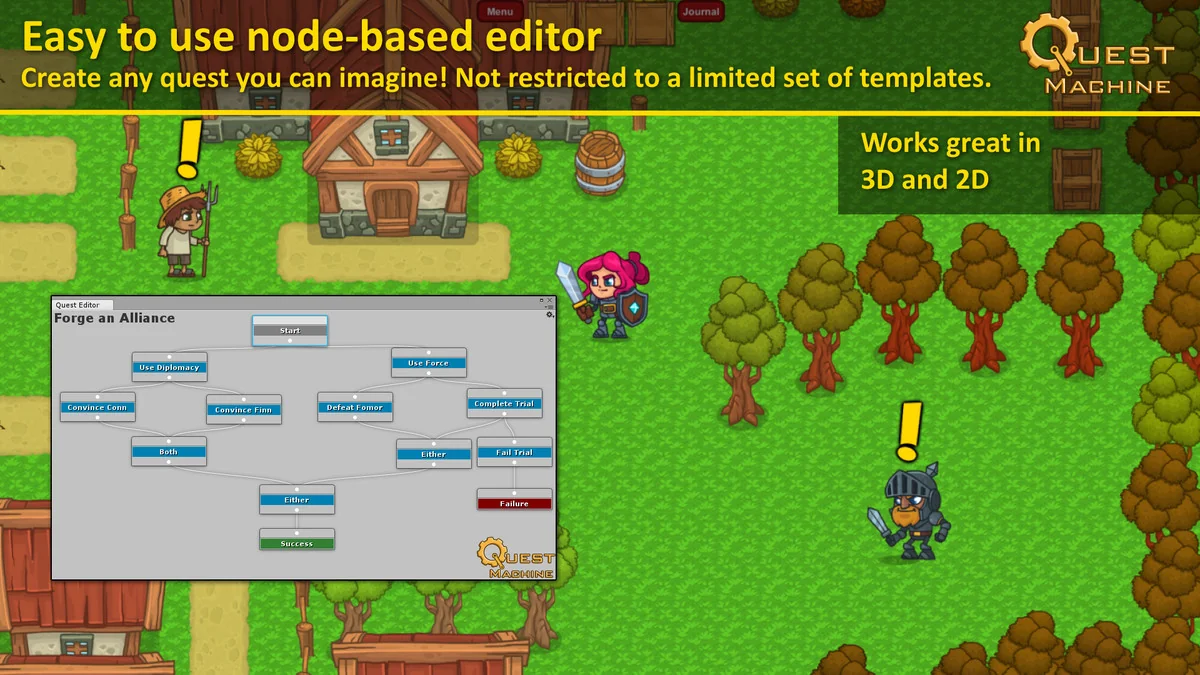
 Game Toolkits
 Game Toolkits
 Game Toolkits