"d3445b7710068d1e"{"id":"1003044","slug":"u3dhub-for-unreal-engine","title":"U3DHub for Unreal Engine – Direct In-Editor 3DCGHUB Resource Browser \u0026 One-Click Installer (UE 4.26–5.9)","category":"Engine Tools","engine":"UE 4.26–5.9","assetVersion":"","engineVersion":"","tag":"Engine Tools","accent":"blue","visual":"mech","summary":"Browse 3DCGHUB directly inside Unreal Editor 4.26–5.9 with full Unreal categories, Latest/Trending/Weekly/Monthly/All-Time feeds, engine compatibility checks, inline issue \u0026 update requests, non-blocking async project installation, and a live install progress bar. U3DHub 1.4.0 is a free, unrestricted Win64 editor plugin with SHA-256 verified downloads and automatic cloud accelerator sync.","platform":"Unreal Engine","indexPolicy":"index","publishedAt":"2026-11-25T22:20:03.398Z","updatedAt":"2026-11-27T16:54:42.140Z","sourceNotes":[],"fileContents":[],"compatibility":["Unreal Engine 4.26–5.9","Windows x64 (Win64)","Plugin Version: 1.3.0","Direct Download · No Quota Limit"],"featuredImage":{"alt":"U3DHub 1.3.0 running inside Unreal Editor 5.8 showing the Unreal Engine category tree, ranking feeds, and 4-column resource browser","src":"/wp-content/uploads/2026/11/u3dhub-unreal-plugin-1-3-0-en-cover.webp"},"hasDownloadLink":false,"downloads":0,"terms":[{"taxonomy":"category","slug":"engine-tools-tools-and-plugins","name":"Engine Tools"}],"galleryImages":[{"src":"/wp-content/uploads/2026/11/u3dhub-unreal-plugin-1-3-0-en-catalog.webp","alt":"U3DHub 1.3.0 full-screen 4-column Unreal Engine resource catalog with category tree and Latest/Trending/Weekly/Monthly/All-Time feeds"}],"accessPanel":{"kind":"resource","title":"Get this resource","safetyNote":"Free direct Win64 plugin download with SHA-256 verification. No account or daily download quota required.","href":"https://3dcghub.com/unreal-plugin/","fileFormat":".zip","resourceType":"Unreal Engine plugin","versions":[{"engine":"5.9","label":"Unreal Engine 5.9","platform":"Windows x64","status":"available","href":"https://3dcghub.com/wp-content/uploads/u3dhub/1.4.0/U3DHub-1.4.0-UE5.9-Win64.zip","note":"v1.4.0 · Direct ZIP (2.09 MB)"},{"engine":"5.8","label":"Unreal Engine 5.8","platform":"Windows x64","status":"available","href":"https://3dcghub.com/wp-content/uploads/u3dhub/1.4.0/U3DHub-1.4.0-UE5.8-Win64.zip","note":"v1.4.0 · Direct ZIP (2.09 MB)"},{"engine":"5.7","label":"Unreal Engine 5.7","platform":"Windows x64","status":"available","href":"https://3dcghub.com/wp-content/uploads/u3dhub/1.4.0/U3DHub-1.4.0-UE5.7-Win64.zip","note":"v1.4.0 · Direct ZIP (2.09 MB)"},{"engine":"5.6","label":"Unreal Engine 5.6","platform":"Windows x64","status":"available","href":"https://3dcghub.com/wp-content/uploads/u3dhub/1.4.0/U3DHub-1.4.0-UE5.6-Win64.zip","note":"v1.4.0 · Direct ZIP (2.14 MB)"},{"engine":"5.5","label":"Unreal Engine 5.5","platform":"Windows x64","status":"available","href":"https://3dcghub.com/wp-content/uploads/u3dhub/1.4.0/U3DHub-1.4.0-UE5.5-Win64.zip","note":"v1.4.0 · Direct ZIP (2.14 MB)"},{"engine":"5.4","label":"Unreal Engine 5.4","platform":"Windows x64","status":"available","href":"https://3dcghub.com/wp-content/uploads/u3dhub/1.4.0/U3DHub-1.4.0-UE5.4-Win64.zip","note":"v1.4.0 · Direct ZIP (2.15 MB)"},{"engine":"5.3","label":"Unreal Engine 5.3","platform":"Windows x64","status":"available","href":"https://3dcghub.com/wp-content/uploads/u3dhub/1.4.0/U3DHub-1.4.0-UE5.3-Win64.zip","note":"v1.4.0 · Direct ZIP (2.15 MB)"},{"engine":"5.2","label":"Unreal Engine 5.2","platform":"Windows x64","status":"available","href":"https://3dcghub.com/wp-content/uploads/u3dhub/1.4.0/U3DHub-1.4.0-UE5.2-Win64.zip","note":"v1.4.0 · Direct ZIP (2.09 MB)"},{"engine":"5.1","label":"Unreal Engine 5.1","platform":"Windows x64","status":"available","href":"https://3dcghub.com/wp-content/uploads/u3dhub/1.4.0/U3DHub-1.4.0-UE5.1-Win64.zip","note":"v1.4.0 · Direct ZIP (2.09 MB)"},{"engine":"5.0","label":"Unreal Engine 5.0","platform":"Windows x64","status":"available","href":"https://3dcghub.com/wp-content/uploads/u3dhub/1.4.0/U3DHub-1.4.0-UE5.0-Win64.zip","note":"v1.4.0 · Direct ZIP (2.06 MB)"},{"engine":"4.27","label":"Unreal Engine 4.27","platform":"Windows x64","status":"available","href":"https://3dcghub.com/wp-content/uploads/u3dhub/1.4.0/U3DHub-1.4.0-UE4.27-Win64.zip","note":"v1.4.0 · Direct ZIP (2.09 MB)"},{"engine":"4.26","label":"Unreal Engine 4.26","platform":"Windows x64","status":"available","href":"https://3dcghub.com/wp-content/uploads/u3dhub/1.4.0/U3DHub-1.4.0-UE4.26-Win64.zip","note":"v1.4.0 · Direct ZIP (1.92 MB)"}]},"contentHtml":"\u003ch2\u003eOverview\u003c/h2\u003e\n\u003cp\u003e\u003cstrong\u003eU3DHub 1.4.0\u003c/strong\u003e is the official 3DCGHUB editor plugin for \u003cstrong\u003eUnreal Engine 4.26, 4.27, 5.0, 5.1, 5.2, 5.3, 5.4, 5.5, 5.6, 5.7, 5.8, and 5.9\u003c/strong\u003e on Windows x64. Instead of manually downloading archives in a browser, extracting nested folders, and hunting for compatible engine paths, U3DHub brings the full Unreal Engine resource library directly into a native Unreal Editor tab with one-click project installation.\u003c/p\u003e\n\u003cp\u003eDownloading the U3DHub plugin package itself is \u003cstrong\u003ecompletely free and unrestricted\u003c/strong\u003e—it does not require a 3DCGHUB login, does not count toward any 24-hour curated transfer quota, and every engine build is delivered directly from 3DCGHUB with full SHA-256 verification.\u003c/p\u003e\n\n\u003ch2\u003eKey Features in U3DHub 1.4.0\u003c/h2\u003e\n\u003cul\u003e\n \u003cli\u003e\u003cstrong\u003eFull Unreal Engine 4.26–5.9 Support:\u003c/strong\u003e Native precompiled Win64 binaries for all 12 Unreal Engine releases from UE 4.26 through UE 5.9, including UE 4/5 toolbar styling, PNG/SVG icons, resumable HTTP Range transfers, and verified compatibility across every engine generation.\u003c/li\u003e\n \u003cli\u003e\u003cstrong\u003eNon-Blocking Async Install Pipeline \u0026amp; Live Progress Banner:\u003c/strong\u003e Archive extraction, dependency inspection, file staging, and project installation run asynchronously without freezing the Unreal Editor viewport, with an always-visible live activity progress bar right inside the U3DHub tab.\u003c/li\u003e\n \u003cli\u003e\u003cstrong\u003eIn-Editor Category Tree \u0026amp; Ranking Feeds:\u003c/strong\u003e Browse the full Unreal Engine category hierarchy directly inside the U3DHub sidebar and switch instantaneously between \u003cem\u003eLatest\u003c/em\u003e, \u003cem\u003eTrending\u003c/em\u003e, \u003cem\u003eWeekly\u003c/em\u003e, \u003cem\u003eMonthly\u003c/em\u003e, and \u003cem\u003eAll-Time\u003c/em\u003e feeds in a dense 4-column desktop layout.\u003c/li\u003e\n \u003cli\u003e\u003cstrong\u003eEngine Compatibility Guard \u0026amp; All-Card Update Requests:\u003c/strong\u003e U3DHub automatically compares your active Unreal Editor version against each resource\u0026apos;s supported range. Compatible assets install with one click, and every resource card offers an inline \u003cem\u003eRequest an update\u003c/em\u003e button so you can report broken assets, missing files, or newer engine versions directly inside the editor—with automatic email notification when updated.\u003c/li\u003e\n \u003cli\u003e\u003cstrong\u003eQuiet Update Check \u0026amp; Built-In Self-Updater:\u003c/strong\u003e When a newer C++ binary release is available, U3DHub quietly highlights the \u003cem\u003eCheck for updates\u003c/em\u003e button with a notification dot, verifies the SHA-256 checksum, stages the update safely, and activates it cleanly on the next editor restart. Catalog and portal UI improvements also load live from \u003ccode\u003ehttps://3dcghub.com/u3dhub/\u003c/code\u003e.\u003c/li\u003e\n \u003cli\u003e\u003cstrong\u003eUpdates Since Last Visit Banner:\u003c/strong\u003e Every time you reopen the U3DHub tab after a break, the portal checks how many Unreal Engine resources were added or updated while you were away and displays a compact notification banner so you can jump straight to the latest releases.\u003c/li\u003e\n \u003cli\u003e\u003cstrong\u003eAccount-Bound Cloud Accelerator Sync:\u003c/strong\u003e Bind your cloud accelerator key once to your 3DCGHUB account—either on the website or directly inside the U3DHub tab—and full-speed delivery automatically stays synchronized across your browser and every Unreal Editor installation signed into that account.\u003c/li\u003e\n \u003cli\u003e\u003cstrong\u003eBilingual Editor Interface:\u003c/strong\u003e Automatically adapts between English and Simplified Chinese based on your Unreal Editor language preference, and includes built-in one-click feedback and issue reporting directly to the 3DCGHUB team.\u003c/li\u003e\n\u003c/ul\u003e\n\n\u003ch2\u003eDirect Downloads (UE 4.26–5.9 · No Account or Quota Limit)\u003c/h2\u003e\n\u003cp\u003eChoose the precompiled Windows x64 package that matches your exact Unreal Engine minor version. Every ZIP below downloads directly without login or daily transfer restrictions. You can also view the standalone release page at \u003ca href=\"https://3dcghub.com/unreal-plugin/\" rel=\"noopener noreferrer\"\u003e3dcghub.com/unreal-plugin/\u003c/a\u003e.\u003c/p\u003e\n\u003cul\u003e\u003cli\u003e\u003cstrong\u003eUnreal Engine 5.9\u003c/strong\u003e (Windows x64 · 2.09 MB): \u003ca href=\"https://3dcghub.com/wp-content/uploads/u3dhub/1.4.0/U3DHub-1.4.0-UE5.9-Win64.zip\" rel=\"noopener noreferrer\"\u003eDownload U3DHub-1.4.0-UE5.9-Win64.zip\u003c/a\u003e — SHA-256: \u003ccode\u003e51e6faa2fe7d5b68…\u003c/code\u003e\u003c/li\u003e\u003cli\u003e\u003cstrong\u003eUnreal Engine 5.8\u003c/strong\u003e (Windows x64 · 2.09 MB): \u003ca href=\"https://3dcghub.com/wp-content/uploads/u3dhub/1.4.0/U3DHub-1.4.0-UE5.8-Win64.zip\" rel=\"noopener noreferrer\"\u003eDownload U3DHub-1.4.0-UE5.8-Win64.zip\u003c/a\u003e — SHA-256: \u003ccode\u003e14fde59c537035f4…\u003c/code\u003e\u003c/li\u003e\u003cli\u003e\u003cstrong\u003eUnreal Engine 5.7\u003c/strong\u003e (Windows x64 · 2.09 MB): \u003ca href=\"https://3dcghub.com/wp-content/uploads/u3dhub/1.4.0/U3DHub-1.4.0-UE5.7-Win64.zip\" rel=\"noopener noreferrer\"\u003eDownload U3DHub-1.4.0-UE5.7-Win64.zip\u003c/a\u003e — SHA-256: \u003ccode\u003e41138fd7a4243a64…\u003c/code\u003e\u003c/li\u003e\u003cli\u003e\u003cstrong\u003eUnreal Engine 5.6\u003c/strong\u003e (Windows x64 · 2.14 MB): \u003ca href=\"https://3dcghub.com/wp-content/uploads/u3dhub/1.4.0/U3DHub-1.4.0-UE5.6-Win64.zip\" rel=\"noopener noreferrer\"\u003eDownload U3DHub-1.4.0-UE5.6-Win64.zip\u003c/a\u003e — SHA-256: \u003ccode\u003e228642da0f005e4d…\u003c/code\u003e\u003c/li\u003e\u003cli\u003e\u003cstrong\u003eUnreal Engine 5.5\u003c/strong\u003e (Windows x64 · 2.14 MB): \u003ca href=\"https://3dcghub.com/wp-content/uploads/u3dhub/1.4.0/U3DHub-1.4.0-UE5.5-Win64.zip\" rel=\"noopener noreferrer\"\u003eDownload U3DHub-1.4.0-UE5.5-Win64.zip\u003c/a\u003e — SHA-256: \u003ccode\u003e70d2c7d9c1cf17b8…\u003c/code\u003e\u003c/li\u003e\u003cli\u003e\u003cstrong\u003eUnreal Engine 5.4\u003c/strong\u003e (Windows x64 · 2.15 MB): \u003ca href=\"https://3dcghub.com/wp-content/uploads/u3dhub/1.4.0/U3DHub-1.4.0-UE5.4-Win64.zip\" rel=\"noopener noreferrer\"\u003eDownload U3DHub-1.4.0-UE5.4-Win64.zip\u003c/a\u003e — SHA-256: \u003ccode\u003ebe2a241bd1327e20…\u003c/code\u003e\u003c/li\u003e\u003cli\u003e\u003cstrong\u003eUnreal Engine 5.3\u003c/strong\u003e (Windows x64 · 2.15 MB): \u003ca href=\"https://3dcghub.com/wp-content/uploads/u3dhub/1.4.0/U3DHub-1.4.0-UE5.3-Win64.zip\" rel=\"noopener noreferrer\"\u003eDownload U3DHub-1.4.0-UE5.3-Win64.zip\u003c/a\u003e — SHA-256: \u003ccode\u003e15badccbfaa24795…\u003c/code\u003e\u003c/li\u003e\u003cli\u003e\u003cstrong\u003eUnreal Engine 5.2\u003c/strong\u003e (Windows x64 · 2.09 MB): \u003ca href=\"https://3dcghub.com/wp-content/uploads/u3dhub/1.4.0/U3DHub-1.4.0-UE5.2-Win64.zip\" rel=\"noopener noreferrer\"\u003eDownload U3DHub-1.4.0-UE5.2-Win64.zip\u003c/a\u003e — SHA-256: \u003ccode\u003e6f52c42ea365a079…\u003c/code\u003e\u003c/li\u003e\u003cli\u003e\u003cstrong\u003eUnreal Engine 5.1\u003c/strong\u003e (Windows x64 · 2.09 MB): \u003ca href=\"https://3dcghub.com/wp-content/uploads/u3dhub/1.4.0/U3DHub-1.4.0-UE5.1-Win64.zip\" rel=\"noopener noreferrer\"\u003eDownload U3DHub-1.4.0-UE5.1-Win64.zip\u003c/a\u003e — SHA-256: \u003ccode\u003e26a67e751b9b8bce…\u003c/code\u003e\u003c/li\u003e\u003cli\u003e\u003cstrong\u003eUnreal Engine 5.0\u003c/strong\u003e (Windows x64 · 2.06 MB): \u003ca href=\"https://3dcghub.com/wp-content/uploads/u3dhub/1.4.0/U3DHub-1.4.0-UE5.0-Win64.zip\" rel=\"noopener noreferrer\"\u003eDownload U3DHub-1.4.0-UE5.0-Win64.zip\u003c/a\u003e — SHA-256: \u003ccode\u003ec3522b284a16a5d0…\u003c/code\u003e\u003c/li\u003e\u003cli\u003e\u003cstrong\u003eUnreal Engine 4.27\u003c/strong\u003e (Windows x64 · 2.09 MB): \u003ca href=\"https://3dcghub.com/wp-content/uploads/u3dhub/1.4.0/U3DHub-1.4.0-UE4.27-Win64.zip\" rel=\"noopener noreferrer\"\u003eDownload U3DHub-1.4.0-UE4.27-Win64.zip\u003c/a\u003e — SHA-256: \u003ccode\u003e9a373afcfc0a283e…\u003c/code\u003e\u003c/li\u003e\u003cli\u003e\u003cstrong\u003eUnreal Engine 4.26\u003c/strong\u003e (Windows x64 · 1.92 MB): \u003ca href=\"https://3dcghub.com/wp-content/uploads/u3dhub/1.4.0/U3DHub-1.4.0-UE4.26-Win64.zip\" rel=\"noopener noreferrer\"\u003eDownload U3DHub-1.4.0-UE4.26-Win64.zip\u003c/a\u003e — SHA-256: \u003ccode\u003eb26b096d6e1a8523…\u003c/code\u003e\u003c/li\u003e\u003c/ul\u003e\n\n\u003ch2\u003eInstallation Guide (2 Minutes)\u003c/h2\u003e\n\u003col\u003e\n \u003cli\u003e\u003cstrong\u003eClose Unreal Editor\u003c/strong\u003e for the project where you plan to install U3DHub.\u003c/li\u003e\n \u003cli\u003e\u003cstrong\u003eDownload the matching ZIP\u003c/strong\u003e for your Unreal Engine version (4.26 through 5.9) from the links above or the engine version cards on this page.\u003c/li\u003e\n \u003cli\u003e\u003cstrong\u003eExtract into your project Plugins folder:\u003c/strong\u003e Unzip so the plugin descriptor sits at \u003ccode\u003e\u0026lt;YourProject\u0026gt;/Plugins/U3DHub/U3DHub.uplugin\u003c/code\u003e (avoid double-nested folders such as \u003ccode\u003ePlugins/U3DHub/U3DHub/U3DHub.uplugin\u003c/code\u003e). To make U3DHub available across all projects for that engine version, extract to \u003ccode\u003e\u0026lt;UE_Version\u0026gt;/Engine/Plugins/Marketplace/U3DHub/\u003c/code\u003e instead.\u003c/li\u003e\n \u003cli\u003e\u003cstrong\u003eLaunch Unreal Editor:\u003c/strong\u003e Open your project normally. Confirm U3DHub is enabled under \u003cem\u003eEdit → Plugins\u003c/em\u003e (enabled by default once placed in \u003ccode\u003ePlugins/\u003c/code\u003e).\u003c/li\u003e\n \u003cli\u003e\u003cstrong\u003eOpen the U3DHub Tab:\u003c/strong\u003e Click the \u003cstrong\u003eU3DHub\u003c/strong\u003e icon on the Level Editor toolbar or open \u003cem\u003eWindow → U3DHub\u003c/em\u003e.\u003c/li\u003e\n\u003c/ol\u003e\n\n\u003ch2\u003eSign-In, Free Slow Lane, and Cloud Accelerator Limits\u003c/h2\u003e\n\u003cp\u003eDownloading the U3DHub plugin itself has no account requirement and no download cap. When installing curated Unreal Engine assets through the plugin, U3DHub uses the same transparent 3DCGHUB account rules as the website:\u003c/p\u003e\n\u003cul\u003e\n \u003cli\u003e\u003cstrong\u003eFree 3DCGHUB Account:\u003c/strong\u003e Sign in via secure PKCE OAuth inside Unreal Editor to access the free rate-limited lane for verified accounts (1 curated resource up to 50 MiB per rolling 24 hours).\u003c/li\u003e\n \u003cli\u003e\u003cstrong\u003eAccount-Bound Cloud Accelerator Key:\u003c/strong\u003e If you bind an accelerator key to your 3DCGHUB account, both the website and U3DHub unlock full-speed downloads and packages larger than 50 MiB automatically. Your account sidebar shows an \u003cem\u003eAccelerator active\u003c/em\u003e indicator whenever a live key is bound.\u003c/li\u003e\n \u003cli\u003e\u003cstrong\u003eSite-Side Daily Transfer Cap (15 / 24h):\u003c/strong\u003e Independent of your API key, 3DCGHUB enforces a site-wide allowance of up to \u003cstrong\u003e15 distinct curated resources per account every 24 hours\u003c/strong\u003e to keep delivery reliable for all creators. Re-downloading or reinstalling the same resource within 24 hours does not consume an additional slot.\u003c/li\u003e\n\u003c/ul\u003e\n\n\u003ch2\u003eCompatibility, Security \u0026amp; Support\u003c/h2\u003e\n\u003cp\u003eU3DHub 1.4.0 is compiled against official Unreal Engine 4.26 through 5.9 Windows x64 toolchains and verified with automated editor test suites (44/44 checks passing across UE 4.26, 4.27, 5.0, 5.1, 5.2, 5.3, 5.8, and 5.9). OAuth tokens are stored per user and never embedded into your project files, and download archives are validated before any asset is copied into \u003ccode\u003eContent/\u003c/code\u003e or \u003ccode\u003ePlugins/\u003c/code\u003e. If you encounter an issue or want to suggest a feature, use the \u003cem\u003eReport a problem\u003c/em\u003e button inside the U3DHub tab, click \u003cem\u003eRequest an update\u003c/em\u003e on any resource card, or submit a request via the \u003ca href=\"https://3dcghub.com/request/\" rel=\"noopener noreferrer\"\u003eResource Requests\u003c/a\u003e page.\u003c/p\u003e","contentTextLength":7555,"navigation":{"current":1,"total":4978,"next":{"id":"1003058","slug":"dynamic-medieval-flags-and-banners","title":"Dynamic Medieval Flags and Banners","category":"Buildings \u0026 Architecture","platform":"Unreal Engine","updatedAt":"2026-11-27T14:57:36.584Z"}},"relatedResources":[{"id":"1002905","slug":"agora-static-mesh-thumbnail-render-extension","title":"Agora Static Mesh Thumbnail Render Extension","category":"Engine Tools","engine":"4.26 - 5.3","assetVersion":"Asset Version: 1.0","engineVersion":"Engine Version: 4.26 - 5.3","tag":"Engine Tools","accent":"blue","visual":"mech","summary":"Display essential static mesh information and detailed preview data directly inside the Content Browser with the Agora editor plugin.","platform":"Unreal Engine","indexPolicy":"index","publishedAt":"2026-11-21T15:36:22.699Z","updatedAt":"2026-11-26T14:39:23.751Z","sourceNotes":[],"fileContents":[],"compatibility":["Unreal Engine","Asset Version: 1.0","Engine Version: 4.26 - 5.3"],"featuredImage":{"alt":"Agora Static Mesh Thumbnail Render Extension","src":"/wp-content/uploads/published/2026/11/8c3d61aa8314-3f9d0bfe-b027-4a68-a13c-54894f7c5712-19c9dd927b.webp"},"fileSizeBytes":23007956,"hasDownloadLink":true,"downloads":0},{"id":"13938","slug":"easy-pose","title":"Easy Pose","category":"Engine Tools","engine":"5.1 - 5.8","assetVersion":"Asset Version: 2.0.3","engineVersion":"Engine version: 5.1 - 5.8","tag":"Engine Tools","accent":"blue","visual":"audio","summary":"Easy Pose is a powerful tool designed to simplify animation retargeting through a one-click interface. It supports diverse bone structures and skeletal models, ensuring flawless results with minimal effort.","platform":"Unreal Engine","indexPolicy":"noindex","publishedAt":"2026-03-11T10:42:49.000Z","updatedAt":"2026-09-29T08:45:23.408Z","sourceNotes":[],"fileContents":[],"compatibility":["Unreal Engine","Asset Version: 2.0.3","Engine version: 5.1 - 5.8"],"featuredImage":{"alt":"Easy Pose","src":"https://3dcghub.com/wp-content/uploads/2026/03/5e2069bb-f3d3-4af9-8231-ad7018eafae3.webp"},"fileSizeBytes":67022642,"hasDownloadLink":true,"downloads":0},{"id":"1002925","slug":"multi-objects-renaming-tool-rename-assets-and-actors","title":"Multi Objects Renaming Tool (Rename Assets \u0026 Actors)","category":"Engine Tools","engine":"4.26 - 5.5","assetVersion":"Asset Version: 3.2","engineVersion":"Engine Version: 4.26 - 5.5","tag":"Engine Tools","accent":"blue","visual":"mech","summary":"Organize World Outliner actors and Content Browser assets efficiently with the Multi Objects Renaming Tool editor utility widget.","platform":"Unreal Engine","indexPolicy":"index","publishedAt":"2026-11-21T22:53:51.900Z","updatedAt":"2026-11-21T22:53:51.900Z","sourceNotes":[],"fileContents":[],"compatibility":["Unreal Engine","Asset Version: 3.2","Engine Version: 4.26 - 5.5"],"featuredImage":{"alt":"Multi Objects Renaming Tool (Rename Assets \u0026 Actors)","src":"/wp-content/uploads/published/2026/11/e4ad1476eaff-d274d83a-bdc9-4f78-acdf-db747eebc9f3-40fb639b66.webp"},"fileSizeBytes":1256849,"hasDownloadLink":true,"downloads":0}]}[{"id":4225,"sourceId":4225,"taxonomyId":4225,"taxonomy":"category","slug":"asset-library","name":"Asset Library","parentId":null,"count":0,"hasChildren":true,"href":"/","seoTitle":"Free Game Assets Library | 3DCGHUB","seoDescription":"Browse free Unreal Engine, Unity, Blender assets and game development tutorials on 3DCGHUB with previews, compatibility notes, and secure downloads.","sitemapEnabled":true,"children":[{"id":4227,"sourceId":4227,"taxonomyId":4227,"taxonomy":"category","slug":"blender-add-ons-plugins","name":"Blender Add-ons \u0026 Plugins","parentId":4225,"count":0,"hasChildren":false,"href":"/category/blender-add-ons-plugins/","seoTitle":"Free Blender Add-ons \u0026 Plugins | 3DCGHUB","seoDescription":"Browse free Blender Add-ons \u0026 Plugins tools for Blender on 3DCGHUB: curated downloads with preview images, compatibility notes and secure download access.","sitemapEnabled":true},{"id":514,"sourceId":514,"taxonomyId":514,"taxonomy":"category","slug":"unity-2","name":"Unity","parentId":4225,"count":0,"hasChildren":true,"href":"/category/unity-2/","seoTitle":"Free Unity Assets | 3DCGHUB","seoDescription":"Browse free Unity resources on 3DCGHUB: curated downloads with preview images, compatibility notes and secure download access.","sitemapEnabled":true,"children":[{"id":523,"sourceId":523,"taxonomyId":523,"taxonomy":"category","slug":"2d","name":"2D","parentId":514,"count":0,"hasChildren":true,"href":"/category/2d/","seoTitle":"Free Unity 2D | 3DCGHUB","seoDescription":"Browse free 2D assets for Unity on 3DCGHUB: curated downloads with preview images, compatibility notes and secure download access.","sitemapEnabled":true},{"id":515,"sourceId":515,"taxonomyId":515,"taxonomy":"category","slug":"3d-unity-2","name":"3D","parentId":514,"count":0,"hasChildren":true,"href":"/category/3d-unity-2/","seoTitle":"Free Unity 3D Assets | 3DCGHUB","seoDescription":"Browse free 3D assets for Unity on 3DCGHUB: curated downloads with preview images, compatibility notes and secure download access.","sitemapEnabled":true},{"id":565,"sourceId":565,"taxonomyId":565,"taxonomy":"category","slug":"add-ons","name":"Add-Ons","parentId":514,"count":0,"hasChildren":false,"href":"/category/add-ons/","seoTitle":"Free Unity Add-Ons | 3DCGHUB","seoDescription":"Browse free Add-Ons assets for Unity on 3DCGHUB: curated downloads with preview images, compatibility notes and secure download access.","sitemapEnabled":true},{"id":529,"sourceId":529,"taxonomyId":529,"taxonomy":"category","slug":"audio-unity-2","name":"Audio","parentId":514,"count":0,"hasChildren":true,"href":"/category/audio-unity-2/","seoTitle":"Free Unity Audio | 3DCGHUB","seoDescription":"Browse free Audio for Unity on 3DCGHUB: curated downloads with preview images, compatibility notes and secure download access.","sitemapEnabled":true},{"id":557,"sourceId":557,"taxonomyId":557,"taxonomy":"category","slug":"templates","name":"Templates","parentId":514,"count":0,"hasChildren":true,"href":"/category/templates/","seoTitle":"Free Unity Templates | 3DCGHUB","seoDescription":"Browse free Unity project templates on 3DCGHUB. Starter kits with previews, compatibility notes, and secure download access.","sitemapEnabled":true},{"id":533,"sourceId":533,"taxonomyId":533,"taxonomy":"category","slug":"tools-unity-2","name":"Tools","parentId":514,"count":0,"hasChildren":true,"href":"/category/tools-unity-2/","sitemapEnabled":true},{"id":554,"sourceId":554,"taxonomyId":554,"taxonomy":"category","slug":"vfx-unity-2","name":"VFX","parentId":514,"count":0,"hasChildren":true,"href":"/category/vfx-unity-2/","seoTitle":"Free Unity VFX | 3DCGHUB","seoDescription":"Browse free VFX for Unity on 3DCGHUB: curated downloads with preview images, compatibility notes and secure download access.","sitemapEnabled":true}]},{"id":511,"sourceId":511,"taxonomyId":511,"taxonomy":"category","slug":"unreal-engine-2","name":"Unreal Engine","parentId":4225,"count":0,"hasChildren":true,"href":"/category/unreal-engine-2/","seoTitle":"Free Unreal Engine Assets | 3DCGHUB","seoDescription":"Browse free Unreal Engine resources on 3DCGHUB: curated downloads with preview images, compatibility notes and secure download access.","sitemapEnabled":true,"children":[{"id":54,"sourceId":54,"taxonomyId":54,"taxonomy":"category","slug":"3d","name":"3D","parentId":511,"count":0,"hasChildren":true,"href":"/category/3d/","seoTitle":"Free Unreal Engine 3D | 3DCGHUB","seoDescription":"Browse free 3D assets for Unreal Engine on 3DCGHUB: curated downloads with preview images, compatibility notes and secure download access.","sitemapEnabled":true},{"id":441,"sourceId":441,"taxonomyId":441,"taxonomy":"category","slug":"animations","name":"Animations","parentId":511,"count":0,"hasChildren":true,"href":"/category/animations/","seoTitle":"Free Unreal Engine Animations | 3DCGHUB","seoDescription":"Browse free Animations for Unreal Engine on 3DCGHUB: curated downloads with preview images, compatibility notes and secure download access.","sitemapEnabled":true},{"id":446,"sourceId":446,"taxonomyId":446,"taxonomy":"category","slug":"audio","name":"Audio","parentId":511,"count":0,"hasChildren":true,"href":"/category/audio/","seoTitle":"Free Unreal Engine Audio Resources | 3DCGHUB","seoDescription":"Browse free Unreal Engine audio resources including sound effects, voices, dialogue, and ambient sounds. Curated free downloads on 3DCGHUB.","sitemapEnabled":true},{"id":466,"sourceId":466,"taxonomyId":466,"taxonomy":"category","slug":"game-systems","name":"Game Systems","parentId":511,"count":0,"hasChildren":true,"href":"/category/game-systems/","seoTitle":"Free Unreal Engine Game Systems | 3DCGHUB","seoDescription":"Browse free Game Systems tools for Unreal Engine on 3DCGHUB: curated downloads with preview images, compatibility notes and secure download access.","sitemapEnabled":true},{"id":478,"sourceId":478,"taxonomyId":478,"taxonomy":"category","slug":"game-templates","name":"Game Templates","parentId":511,"count":0,"hasChildren":true,"href":"/category/game-templates/","seoTitle":"Free Unreal Engine Game Templates | 3DCGHUB","seoDescription":"Browse free Game Templates for Unreal Engine on 3DCGHUB: curated downloads with preview images, compatibility notes and secure download access.","sitemapEnabled":true},{"id":432,"sourceId":432,"taxonomyId":432,"taxonomy":"category","slug":"hdri","name":"HDRI","parentId":511,"count":0,"hasChildren":true,"href":"/category/hdri/","seoTitle":"Free Unreal Engine HDRI | 3DCGHUB","seoDescription":"Browse free Unreal Engine HDRI skies and lighting maps on 3DCGHUB. Environment lighting with previews and secure downloads.","sitemapEnabled":true},{"id":228,"sourceId":228,"taxonomyId":228,"taxonomy":"category","slug":"material-and-textures","name":"Material \u0026 Textures","parentId":511,"count":0,"hasChildren":true,"href":"/category/material-and-textures/","seoTitle":"Free Unreal Engine Material \u0026 Textures | 3DCGHUB","seoDescription":"Browse free Material \u0026 Textures for Unreal Engine on 3DCGHUB: curated downloads with preview images, compatibility notes and secure download access.","sitemapEnabled":true},{"id":298,"sourceId":298,"taxonomyId":298,"taxonomy":"category","slug":"sprites-and-flipbooks","name":"Sprites \u0026 Flipbooks","parentId":511,"count":0,"hasChildren":true,"href":"/category/sprites-and-flipbooks/","seoTitle":"Free Unreal Engine Sprites \u0026 Flipbooks | 3DCGHUB","seoDescription":"Browse free Sprites \u0026 Flipbooks assets for Unreal Engine on 3DCGHUB: curated downloads with preview images, compatibility notes and secure download access.","sitemapEnabled":true},{"id":489,"sourceId":489,"taxonomyId":489,"taxonomy":"category","slug":"tools-and-plugins","name":"Tools \u0026 Plugins","parentId":511,"count":0,"hasChildren":true,"href":"/category/tools-and-plugins/","seoTitle":"Free Unreal Engine Tools \u0026 Plugins | 3DCGHUB","seoDescription":"Browse free Tools \u0026 Plugins for Unreal Engine on 3DCGHUB: curated downloads with preview images, compatibility notes and secure download access.","sitemapEnabled":true},{"id":459,"sourceId":459,"taxonomyId":459,"taxonomy":"category","slug":"ui","name":"UI","parentId":511,"count":0,"hasChildren":true,"href":"/category/ui/","seoTitle":"Free Unreal Engine UI | 3DCGHUB","seoDescription":"Browse free UI for Unreal Engine on 3DCGHUB: curated downloads with preview images, compatibility notes and secure download access.","sitemapEnabled":true},{"id":450,"sourceId":450,"taxonomyId":450,"taxonomy":"category","slug":"vfx","name":"VFX","parentId":511,"count":0,"hasChildren":true,"href":"/category/vfx/","seoTitle":"Free Unreal Engine VFX | 3DCGHUB","seoDescription":"Browse free VFX for Unreal Engine on 3DCGHUB: curated downloads with preview images, compatibility notes and secure download access.","sitemapEnabled":true}]}]},{"id":4222,"sourceId":4222,"taxonomyId":4222,"taxonomy":"category","slug":"tutorial-library","name":"Tutorial Library","parentId":null,"count":0,"hasChildren":false,"href":"/tutorials/","seoTitle":"Free Game Development Tutorial Library | 3DCGHUB","seoDescription":"Browse free game development tutorials for Unreal Engine, Unity, Blender, and more on 3DCGHUB with practical workflows and secure downloads.","sitemapEnabled":true}]
Resource screenshots
1 / 1
Asset drops
Daily Asset Drops
Follow 3DCGHUB on Telegram for daily Unreal, Unity & Blender drops and curated CC0 releases.
Free direct Win64 plugin download with SHA-256 verification. No account or daily download quota required.
Reviewed archive
Engine Tools
U3DHub for Unreal Engine – Direct In-Editor 3DCGHUB Resource Browser & One-Click Installer (UE 4.26–5.9)
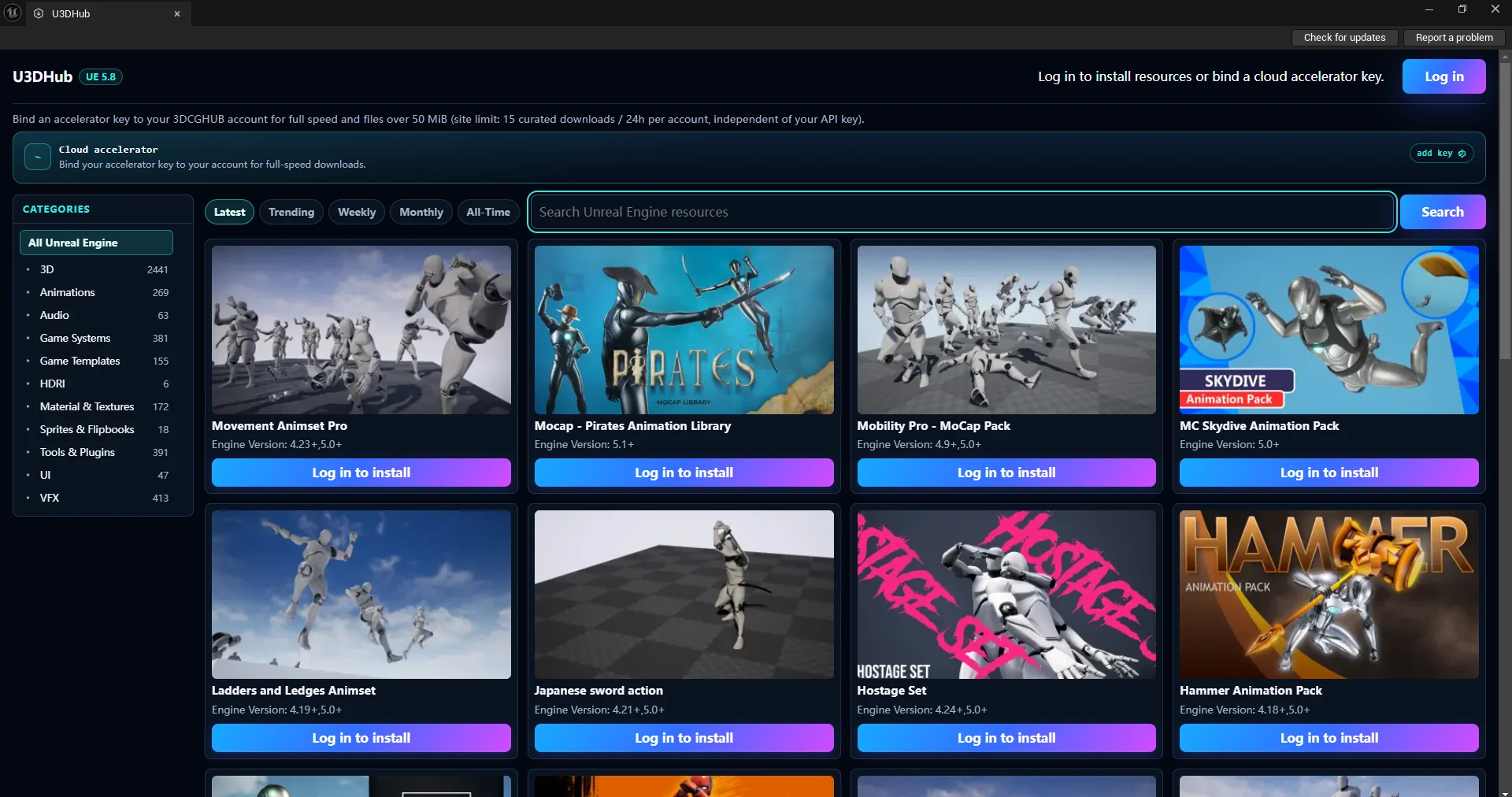
Browse 3DCGHUB directly inside Unreal Editor 4.26–5.9 with full Unreal categories, Latest/Trending/Weekly/Monthly/All-Time feeds, engine compatibility checks, inline issue & update requests, non-blocking async project installation, and a live install progress bar. U3DHub 1.4.0 is a free, unrestricted Win64 editor plugin with SHA-256 verified downloads and automatic cloud accelerator sync.
U3DHub 1.4.0 is the official 3DCGHUB editor plugin for Unreal Engine 4.26, 4.27, 5.0, 5.1, 5.2, 5.3, 5.4, 5.5, 5.6, 5.7, 5.8, and 5.9 on Windows x64. Instead of manually downloading archives in a browser, extracting nested folders, and hunting for compatible engine paths, U3DHub brings the full Unreal Engine resource library directly into a native Unreal Editor tab with one-click project installation.
Downloading the U3DHub plugin package itself is completely free and unrestricted—it does not require a 3DCGHUB login, does not count toward any 24-hour curated transfer quota, and every engine build is delivered directly from 3DCGHUB with full SHA-256 verification.
Key Features in U3DHub 1.4.0
Full Unreal Engine 4.26–5.9 Support: Native precompiled Win64 binaries for all 12 Unreal Engine releases from UE 4.26 through UE 5.9, including UE 4/5 toolbar styling, PNG/SVG icons, resumable HTTP Range transfers, and verified compatibility across every engine generation.
Non-Blocking Async Install Pipeline & Live Progress Banner: Archive extraction, dependency inspection, file staging, and project installation run asynchronously without freezing the Unreal Editor viewport, with an always-visible live activity progress bar right inside the U3DHub tab.
In-Editor Category Tree & Ranking Feeds: Browse the full Unreal Engine category hierarchy directly inside the U3DHub sidebar and switch instantaneously between Latest, Trending, Weekly, Monthly, and All-Time feeds in a dense 4-column desktop layout.
Engine Compatibility Guard & All-Card Update Requests: U3DHub automatically compares your active Unreal Editor version against each resource's supported range. Compatible assets install with one click, and every resource card offers an inline Request an update button so you can report broken assets, missing files, or newer engine versions directly inside the editor—with automatic email notification when updated.
Quiet Update Check & Built-In Self-Updater: When a newer C++ binary release is available, U3DHub quietly highlights the Check for updates button with a notification dot, verifies the SHA-256 checksum, stages the update safely, and activates it cleanly on the next editor restart. Catalog and portal UI improvements also load live from https://3dcghub.com/u3dhub/.
Updates Since Last Visit Banner: Every time you reopen the U3DHub tab after a break, the portal checks how many Unreal Engine resources were added or updated while you were away and displays a compact notification banner so you can jump straight to the latest releases.
Account-Bound Cloud Accelerator Sync: Bind your cloud accelerator key once to your 3DCGHUB account—either on the website or directly inside the U3DHub tab—and full-speed delivery automatically stays synchronized across your browser and every Unreal Editor installation signed into that account.
Bilingual Editor Interface: Automatically adapts between English and Simplified Chinese based on your Unreal Editor language preference, and includes built-in one-click feedback and issue reporting directly to the 3DCGHUB team.
Direct Downloads (UE 4.26–5.9 · No Account or Quota Limit)
Choose the precompiled Windows x64 package that matches your exact Unreal Engine minor version. Every ZIP below downloads directly without login or daily transfer restrictions. You can also view the standalone release page at 3dcghub.com/unreal-plugin/.
Close Unreal Editor for the project where you plan to install U3DHub.
Download the matching ZIP for your Unreal Engine version (4.26 through 5.9) from the links above or the engine version cards on this page.
Extract into your project Plugins folder: Unzip so the plugin descriptor sits at <YourProject>/Plugins/U3DHub/U3DHub.uplugin (avoid double-nested folders such as Plugins/U3DHub/U3DHub/U3DHub.uplugin). To make U3DHub available across all projects for that engine version, extract to <UE_Version>/Engine/Plugins/Marketplace/U3DHub/ instead.
Launch Unreal Editor: Open your project normally. Confirm U3DHub is enabled under Edit → Plugins (enabled by default once placed in Plugins/).
Open the U3DHub Tab: Click the U3DHub icon on the Level Editor toolbar or open Window → U3DHub.
Sign-In, Free Slow Lane, and Cloud Accelerator Limits
Downloading the U3DHub plugin itself has no account requirement and no download cap. When installing curated Unreal Engine assets through the plugin, U3DHub uses the same transparent 3DCGHUB account rules as the website:
Free 3DCGHUB Account: Sign in via secure PKCE OAuth inside Unreal Editor to access the free rate-limited lane for verified accounts (1 curated resource up to 50 MiB per rolling 24 hours).
Account-Bound Cloud Accelerator Key: If you bind an accelerator key to your 3DCGHUB account, both the website and U3DHub unlock full-speed downloads and packages larger than 50 MiB automatically. Your account sidebar shows an Accelerator active indicator whenever a live key is bound.
Site-Side Daily Transfer Cap (15 / 24h): Independent of your API key, 3DCGHUB enforces a site-wide allowance of up to 15 distinct curated resources per account every 24 hours to keep delivery reliable for all creators. Re-downloading or reinstalling the same resource within 24 hours does not consume an additional slot.
Compatibility, Security & Support
U3DHub 1.4.0 is compiled against official Unreal Engine 4.26 through 5.9 Windows x64 toolchains and verified with automated editor test suites (44/44 checks passing across UE 4.26, 4.27, 5.0, 5.1, 5.2, 5.3, 5.8, and 5.9). OAuth tokens are stored per user and never embedded into your project files, and download archives are validated before any asset is copied into Content/ or Plugins/. If you encounter an issue or want to suggest a feature, use the Report a problem button inside the U3DHub tab, click Request an update on any resource card, or submit a request via the Resource Requests page.
 Engine Tools
 Engine Tools
 Engine Tools