"c68a05d5e51405b3"{"id":"24988","slug":"tornado-generator-niagara-fluids","title":"Tornado Generator - Niagara Fluids","category":"Smoke","engine":"5.3+","assetVersion":"Engine version: 5.3+","engineVersion":"","tag":"Smoke","accent":"blue","visual":"character","summary":"Tornado Generator - Niagara Fluids centers on real-time control over shape, forces, and shader changes, making it easy to tune a tornado effect as a scene evolves. Its control set spans tornado shape, smoke and fire emission, particles, static meshes, and l...","platform":"Unreal Engine","publishedAt":"2026-04-17T15:47:59.000Z","updatedAt":"2026-04-20T06:12:34.000Z","sourceNotes":[],"fileContents":[],"compatibility":["Unreal Engine","Engine version: 5.3+"],"featuredImage":{"alt":"Tornado Generator - Niagara Fluids","src":"https://3dcghub.com/wp-content/uploads/2026/04/730b9b173146_802b54ff-b16c-4163-a18a-1723ba5a621f.webp"},"hasDownloadLink":true,"downloads":6,"terms":[{"taxonomy":"category","slug":"smoke","name":"Smoke"},{"taxonomy":"post_tag","slug":"environment","name":"Environment"},{"taxonomy":"post_tag","slug":"unreal-engine-5","name":"Unreal Engine 5"},{"taxonomy":"post_tag","slug":"vfx","name":"VFX"}],"galleryImages":[{"src":"https://3dcghub.com/wp-content/uploads/2026/04/af2dcccd0432_d120c3f1-6d64-42c8-a787-53e724b4f952.webp","alt":"Tornado Generator - Niagara Fluids"},{"src":"https://3dcghub.com/wp-content/uploads/2026/04/3ef9646e1cf1_db6ff16f-5780-441e-b30a-fed2273fd2e3.webp","alt":"Tornado Generator - Niagara Fluids"},{"src":"https://3dcghub.com/wp-content/uploads/2026/04/0bc2639d6f81_ae20bfe8-a423-4546-9430-e761b838256e.webp","alt":"Tornado Generator - Niagara Fluids"},{"src":"https://3dcghub.com/wp-content/uploads/2026/04/bf743e031b87_eea1a500-fee4-4975-9213-9f78a7b4ff83.webp","alt":"Tornado Generator - Niagara Fluids"},{"src":"https://3dcghub.com/wp-content/uploads/2026/04/7d93ad2e84a0_f168cab0-f33b-4d44-8695-c6d3407c4217.webp","alt":"Tornado Generator - Niagara Fluids"},{"src":"https://3dcghub.com/wp-content/uploads/2026/04/6d4e8d2745fc_c30b900b-906a-46db-b05f-09da3ca92f0e.webp","alt":"Tornado Generator - Niagara Fluids"},{"src":"https://3dcghub.com/wp-content/uploads/2026/04/0837f178c6d8_c66f586d-249e-4431-baa4-8e3861b42058.webp","alt":"Tornado Generator - Niagara Fluids"},{"src":"https://3dcghub.com/wp-content/uploads/2026/04/f2fc4aec35ee_c9d1d37d-330b-41ce-a8a4-9af995b856f4.webp","alt":"Tornado Generator - Niagara Fluids"},{"src":"https://3dcghub.com/wp-content/uploads/2026/04/cac6828f2a61_4d36ef9f-041a-4d01-892b-eaae48533cf8.webp","alt":"Tornado Generator - Niagara Fluids"},{"src":"https://3dcghub.com/wp-content/uploads/2026/04/4d0f9edc8c3d_b491fd8e-7449-4e34-80a2-99d4ea217861.webp","alt":"Tornado Generator - Niagara Fluids"}],"accessPanel":{"kind":"resource","title":"Access this resource","eyebrow":"Free Download","message":"Log in or create a free account to start your download.","fileName":"Content.7z","safetyNote":"All resources are 100% manually reviewed to eliminate all risks.","actionLabel":"Download Free","resourceType":"Resource archive"},"contentHtml":"\u003ch2\u003eShape, forces, and shader control in motion\u003c/h2\u003e \u003cp\u003eTornado Generator - Niagara Fluids focuses on live adjustment. Shape, forces, and shader changes can be modified in real time, which makes the effect practical for fast visual iteration rather than one fixed look. That kind of control is useful when a tornado needs to change its silhouette, intensity, or surface response while a scene is being assembled.\u003c/p\u003e \u003cp\u003eThe setup also appears in showcase, tutorial, and gameplay form on the Electric Dream map, giving the effect a clear presentation context. That matters for artists and developers who want to see the tornado working as part of an actual scene rather than as a disconnected effect.\u003c/p\u003e \u003ch2\u003eThe five control segments\u003c/h2\u003e \u003cp\u003eThe generator is divided into five main segments, each handling a different part of the effect. Together, they separate the tornado into visual layers and behavior controls instead of keeping everything locked into one single block of settings.\u003c/p\u003e \u003ch3\u003eTornado Shape\u003c/h3\u003e \u003cp\u003eThis segment handles the structure of the tornado itself. Because the shape can be changed in real time, it gives room to push the effect toward a tight column, a wider funnel, or another form that better fits the scene. The shape control is the part that establishes the overall silhouette before the surrounding motion and atmosphere are tuned.\u003c/p\u003e \u003ch3\u003eSmoke and Fire Emission Settings (Niagara Fluids)\u003c/h3\u003e \u003cp\u003eSmoke and fire are grouped together under Niagara Fluids emission settings. That pairing makes the tornado feel more active and layered, with the smoke and fire components working as separate but connected visual elements. For scene work, this provides a way to adjust the look of the plume and the heated core without treating them as unrelated effects.\u003c/p\u003e \u003ch3\u003eParticle Settings\u003c/h3\u003e \u003cp\u003eParticle settings give the tornado another layer of motion and texture. In practice, this is where smaller moving elements can help fill out the effect and keep it from reading as a simple static funnel. The particle layer supports the broader tornado form and adds detail around the main body of the effect.\u003c/p\u003e \u003ch3\u003eStatic Mesh Settings\u003c/h3\u003e \u003cp\u003eStatic mesh settings are included as part of the system, which means the tornado is not limited to fluid and particle behavior alone. Mesh-based elements can help the effect sit in a scene with more structure, especially when it needs a grounded visual presence alongside the animated components.\u003c/p\u003e \u003ch3\u003eLightning Settings\u003c/h3\u003e \u003cp\u003eLightning settings add a separate visual dimension to the tornado. With lightning handled as its own segment, the effect can carry a more dramatic look without folding every detail into the same control group. That separation makes the lightning easier to manage alongside the storm shape, smoke, fire, and particles.\u003c/p\u003e \u003ch2\u003eWorking with a large parameter set\u003c/h2\u003e \u003cp\u003eThe generator includes approximately 120 user parameters. That number signals a detailed control surface for artists who want to push the effect in different directions without rebuilding the whole setup each time. With that many editable parameters, the tornado can be shaped, pushed, and rebalanced as the scene changes.\u003c/p\u003e \u003cp\u003eThe practical value of a parameter-heavy setup is flexibility. A tornado used for gameplay may need to read clearly at a glance, while a cinematic version may need more emphasis on smoke, fire, or lightning. A broad parameter set gives room to shift those priorities while keeping the same core generator in place.\u003c/p\u003e \u003ch2\u003eExamples and Niagara Systems\u003c/h2\u003e \u003cp\u003eThe package includes 8 examples and 12 Niagara Systems. Those included systems make the effect easier to explore through multiple setups rather than a single locked presentation. The examples give a starting point for how the tornado can be viewed and adjusted, while the Niagara Systems provide the underlying structure for the effect itself.\u003c/p\u003e \u003cp\u003eFor a developer building a scene or an artist refining a shot, that combination makes the asset easier to approach from different angles. One setup may be closer to gameplay visibility, while another may lean toward a more theatrical cinematic look. The presence of several examples and multiple systems supports that kind of variation.\u003c/p\u003e \u003ch2\u003eUse in games and cinematics\u003c/h2\u003e \u003cp\u003eThe tornado generator is positioned for both games and cinematics. That dual use is supported by the real-time control over shape, forces, and shader changes, since those are the kinds of adjustments that matter when a scene needs fast iteration or a shot needs precise visual timing.\u003c/p\u003e \u003cp\u003eBecause the effect is split across tornado shape, smoke and fire emission, particles, static mesh settings, and lightning settings, it can be tuned as a layered storm effect instead of a single animated object. That gives the tornado a more adaptable role in a project, whether it appears as a gameplay event, a dramatic background hazard, or a centerpiece effect in a cinematic sequence.\u003c/p\u003e \u003cp\u003eThe package is set up to handle tornado scenes with a strong amount of control, a clear set of visual segments, and enough examples to support different ways of working with the effect.\u003c/p\u003e\n\n\u003ch2\u003eExplore Similar Assets\u003c/h2\u003e\n\u003cul\u003e\n\u003cli\u003e\u003ca href=\"https://3dcghub.com/advanced-unreal-engine-5-multiplayer-gameplay-programming/\" title=\"Advanced Unreal Engine 5 Multiplayer Gameplay Programming\"\u003eAdvanced Unreal Engine 5 Multiplayer Gameplay Programming\u003c/a\u003e\u003c/li\u003e\n\u003cli\u003e\u003ca href=\"https://3dcghub.com/niagara-beginners-to-advanced-in-unreal-engine-5/\" title=\"Niagara Beginners to advanced in Unreal Engine 5\"\u003eNiagara Beginners to advanced in Unreal Engine 5\u003c/a\u003e\u003c/li\u003e\n\u003cli\u003e\u003ca href=\"https://3dcghub.com/create-zelda-like-skills-with-c-in-unreal-engine-5-2/\" title=\"Create Zelda-like skills with C++ in unreal engine 5\"\u003eCreate Zelda-like skills with C++ in unreal engine 5\u003c/a\u003e\u003c/li\u003e\n\u003cli\u003e\u003ca href=\"https://3dcghub.com/main-menus-beginner-class-unreal-engine-5/\" title=\"Main Menus Beginner Class – Unreal Engine 5\"\u003eMain Menus Beginner Class – Unreal Engine 5\u003c/a\u003e\u003c/li\u003e\n\u003cli\u003e\u003ca href=\"https://3dcghub.com/create-zelda-like-skills-with-c-in-unreal-engine-5/\" title=\"Create Zelda-like skills with C++ in unreal engine 5\"\u003eCreate Zelda-like skills with C++ in unreal engine 5\u003c/a\u003e\u003c/li\u003e\n\u003c/ul\u003e","contentTextLength":5289,"navigation":{"current":2211,"total":3860,"previous":{"id":"25001","slug":"simple-procedural-walk","title":"Simple Procedural Walk","category":"Engine Tools","platform":"Unreal Engine","updatedAt":"2026-04-20T06:12:34.000Z"},"next":{"id":"24974","slug":"tick-optimization-toolkit","title":"Tick Optimization Toolkit","category":"Engine Tools","platform":"Unreal Engine","updatedAt":"2026-04-20T06:12:34.000Z"}},"relatedResources":[{"id":"16097","slug":"smoke-and-fire-spline-niagara-fluids","title":"Smoke and Fire Spline - Niagara Fluids","category":"Smoke","engine":"5.3+","assetVersion":"Engine version: 5.3+","engineVersion":"5.3","tag":"Smoke","accent":"blue","visual":"audio","summary":"Discover the Smoke and Fire Spline - Niagara Fluids system, a versatile tool for spawning realistic particles along splines. This asset features 115 user parameters and pre-designed effects like Liquid Nitrogen and Anomaly Energy.","platform":"Unreal Engine","publishedAt":"2026-03-12T16:14:00.000Z","updatedAt":"2026-04-19T15:44:37.000Z","sourceNotes":[],"fileContents":[],"compatibility":["Unreal Engine","Engine version: 5.3+"],"featuredImage":{"alt":"Smoke and Fire Spline - Niagara Fluids","src":"https://3dcghub.com/wp-content/uploads/2026/03/4dc5aa57-ecff-41cd-ba47-047476e6c174.webp"},"hasDownloadLink":true,"downloads":1},{"id":"16069","slug":"sandstorm-fx","title":"Sandstorm FX","category":"Smoke","engine":"5.0+","assetVersion":"Engine version: 5.0+","engineVersion":"5.0","tag":"Smoke","accent":"blue","visual":"city","summary":"Create immersive desert environments with the Sandstorm FX pack. This collection features massive storms, tornadoes, and customizable sand particles powered by Niagara and Blueprints.","platform":"Unreal Engine","publishedAt":"2026-03-12T16:13:38.000Z","updatedAt":"2026-04-19T15:44:37.000Z","sourceNotes":[],"fileContents":[],"compatibility":["Unreal Engine","Engine version: 5.0+"],"featuredImage":{"alt":"Sandstorm FX","src":"https://3dcghub.com/wp-content/uploads/2026/03/cf9b9379-085e-47fc-98cd-fcedb796123c.webp"},"hasDownloadLink":true,"downloads":1},{"id":"16082","slug":"smoke-fog-vfx-smoke-smoke-vfx-smoke-niagara-dust-fog","title":"Smoke \u0026 Fog VFX (Smoke, Smoke VFX, Smoke Niagara, Dust, Fog)","category":"Smoke","engine":"5.1+","assetVersion":"Engine version: 5.1+","engineVersion":"5.1","tag":"Smoke","accent":"blue","visual":"mech","summary":"Enhance your Unreal Engine environments with the Smoke \u0026 Fog VFX pack. This collection offers customizable fog, spline-based smoke plumes, and realistic exhaust effects for immersive game development.","platform":"Unreal Engine","publishedAt":"2026-03-12T16:13:25.000Z","updatedAt":"2026-04-19T15:44:37.000Z","sourceNotes":[],"fileContents":[],"compatibility":["Unreal Engine","Engine version: 5.1+"],"featuredImage":{"alt":"Smoke \u0026 Fog VFX (Smoke, Smoke VFX, Smoke Niagara, Dust, Fog)","src":"https://3dcghub.com/wp-content/uploads/2026/03/144f642b-ce72-45d1-aa91-13a133d612af.webp"},"hasDownloadLink":true,"downloads":0}]}
Smoke
Tornado Generator - Niagara Fluids
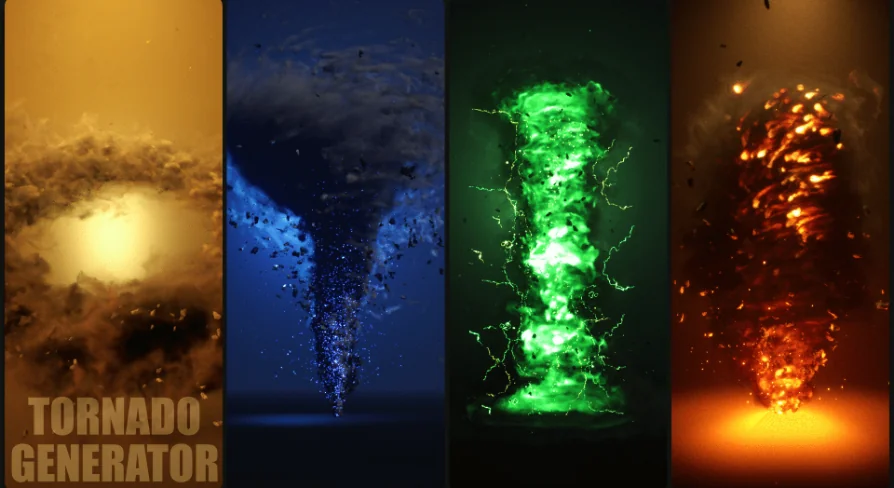
Tornado Generator - Niagara Fluids centers on real-time control over shape, forces, and shader changes, making it easy to tune a tornado effect as a scene evolves. Its control set spans tornado shape, smoke and fire emission, particles, static meshes, and l...
Tornado Generator - Niagara Fluids focuses on live adjustment. Shape, forces, and shader changes can be modified in real time, which makes the effect practical for fast visual iteration rather than one fixed look. That kind of control is useful when a tornado needs to change its silhouette, intensity, or surface response while a scene is being assembled.
The setup also appears in showcase, tutorial, and gameplay form on the Electric Dream map, giving the effect a clear presentation context. That matters for artists and developers who want to see the tornado working as part of an actual scene rather than as a disconnected effect.
The five control segments
The generator is divided into five main segments, each handling a different part of the effect. Together, they separate the tornado into visual layers and behavior controls instead of keeping everything locked into one single block of settings.
Tornado Shape
This segment handles the structure of the tornado itself. Because the shape can be changed in real time, it gives room to push the effect toward a tight column, a wider funnel, or another form that better fits the scene. The shape control is the part that establishes the overall silhouette before the surrounding motion and atmosphere are tuned.
Smoke and Fire Emission Settings (Niagara Fluids)
Smoke and fire are grouped together under Niagara Fluids emission settings. That pairing makes the tornado feel more active and layered, with the smoke and fire components working as separate but connected visual elements. For scene work, this provides a way to adjust the look of the plume and the heated core without treating them as unrelated effects.
Particle Settings
Particle settings give the tornado another layer of motion and texture. In practice, this is where smaller moving elements can help fill out the effect and keep it from reading as a simple static funnel. The particle layer supports the broader tornado form and adds detail around the main body of the effect.
Static Mesh Settings
Static mesh settings are included as part of the system, which means the tornado is not limited to fluid and particle behavior alone. Mesh-based elements can help the effect sit in a scene with more structure, especially when it needs a grounded visual presence alongside the animated components.
Lightning Settings
Lightning settings add a separate visual dimension to the tornado. With lightning handled as its own segment, the effect can carry a more dramatic look without folding every detail into the same control group. That separation makes the lightning easier to manage alongside the storm shape, smoke, fire, and particles.
Working with a large parameter set
The generator includes approximately 120 user parameters. That number signals a detailed control surface for artists who want to push the effect in different directions without rebuilding the whole setup each time. With that many editable parameters, the tornado can be shaped, pushed, and rebalanced as the scene changes.
The practical value of a parameter-heavy setup is flexibility. A tornado used for gameplay may need to read clearly at a glance, while a cinematic version may need more emphasis on smoke, fire, or lightning. A broad parameter set gives room to shift those priorities while keeping the same core generator in place.
Examples and Niagara Systems
The package includes 8 examples and 12 Niagara Systems. Those included systems make the effect easier to explore through multiple setups rather than a single locked presentation. The examples give a starting point for how the tornado can be viewed and adjusted, while the Niagara Systems provide the underlying structure for the effect itself.
For a developer building a scene or an artist refining a shot, that combination makes the asset easier to approach from different angles. One setup may be closer to gameplay visibility, while another may lean toward a more theatrical cinematic look. The presence of several examples and multiple systems supports that kind of variation.
Use in games and cinematics
The tornado generator is positioned for both games and cinematics. That dual use is supported by the real-time control over shape, forces, and shader changes, since those are the kinds of adjustments that matter when a scene needs fast iteration or a shot needs precise visual timing.
Because the effect is split across tornado shape, smoke and fire emission, particles, static mesh settings, and lightning settings, it can be tuned as a layered storm effect instead of a single animated object. That gives the tornado a more adaptable role in a project, whether it appears as a gameplay event, a dramatic background hazard, or a centerpiece effect in a cinematic sequence.
The package is set up to handle tornado scenes with a strong amount of control, a clear set of visual segments, and enough examples to support different ways of working with the effect.
 Smoke
Smoke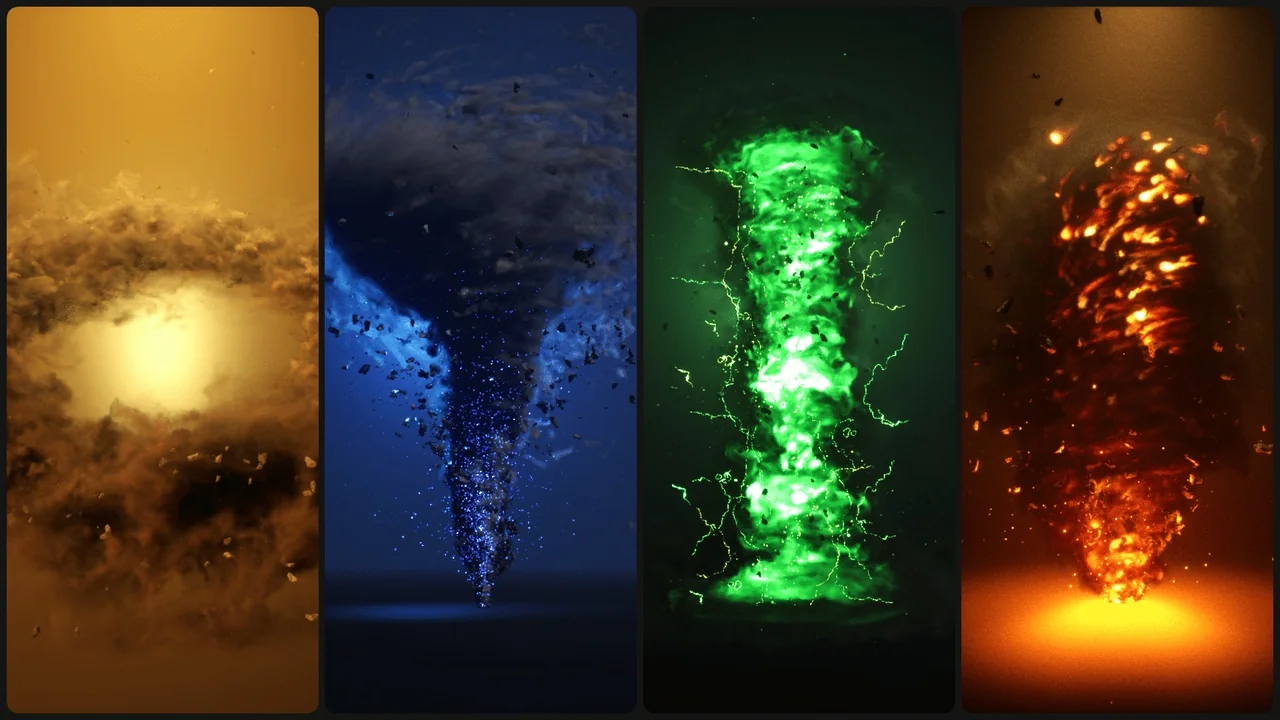
 Smoke
Smoke Smoke
Smoke Smoke
Smoke