"031373f479d9561a"{"id":"1000240","slug":"the-backrooms-camcorder","title":"The Backrooms + Camcorder","category":"Procedural Systems","engine":"4.26+,5.0+","assetVersion":"","engineVersion":"Engine Version: 4.26+,5.0+","tag":"Procedural Systems","accent":"blue","visual":"mech","summary":"A modular horror environment and fully rigged camcorder blueprint featuring a working SceneCapture display, dynamic battery states, and customizable walls.","platform":"Unreal Engine","publishedAt":"2026-06-30T18:29:06.920Z","updatedAt":"2026-06-30T18:29:06.920Z","sourceNotes":[],"fileContents":[],"compatibility":["Unreal Engine","Engine Version: 4.26+,5.0+"],"featuredImage":{"alt":"The Backrooms + Camcorder","src":"/wp-content/uploads/published/2026/06/d79c06bbb16f-fa97678e-705e-47ed-9d4e-4dd056686640-8182b9b025.webp"},"hasDownloadLink":true,"downloads":1,"terms":[{"taxonomy":"category","slug":"procedural-systems","name":"Procedural Systems"}],"galleryImages":[{"src":"/wp-content/uploads/published/2026/06/6ce4edcb4c4c-b0983fd2-83aa-426f-8b59-e7ac3355bbfa-1dce856479.webp","alt":"The Backrooms + Camcorder"},{"src":"/wp-content/uploads/published/2026/06/072e4881c1a6-ecd73064-0513-42a0-861a-ee57d6f3df4f-f184bf76a0.webp","alt":"The Backrooms + Camcorder"},{"src":"/wp-content/uploads/published/2026/06/eaab43b12ac8-fbb7f4c3-5752-4808-91a2-91cb5396d17d-93873a89b6.webp","alt":"The Backrooms + Camcorder"},{"src":"/wp-content/uploads/published/2026/06/6e9b1d111363-578f78d6-62d3-4902-a728-cc91161362d6-99c7a0f49d.webp","alt":"The Backrooms + Camcorder"},{"src":"/wp-content/uploads/published/2026/06/7137515fdc56-87682e72-682d-4eff-815d-7a3307225e5e-ced9ed1d02.webp","alt":"The Backrooms + Camcorder"},{"src":"/wp-content/uploads/published/2026/06/280d6c2ff39c-42ee4526-1688-4a87-96f1-948ed3a20b61-ec18a52793.webp","alt":"The Backrooms + Camcorder"}],"accessPanel":{"kind":"resource","title":"Download this resource","eyebrow":"Free Download","message":"Log in or create a free account to start your download.","fileName":"TheBackrooms.7z","safetyNote":"Resources are manually reviewed before listing to improve quality and reduce obvious risks.","actionLabel":"Download Free","resourceType":"Resource archive"},"contentHtml":"\u003cp\u003eDeveloping realistic horror simulations often requires environments that feel expansive, disorienting, and claustrophobic all at once. This resource provides the foundational structural pieces for generating a classic liminal space, paired directly with an interactive viewing device to navigate it. The system combines modular architectural elements with a fully rigged, blueprint-driven camera prop, allowing developers to establish a playable maze immediately. By focusing on customizable materials and real-time display rendering, the asset supports complex environmental storytelling without requiring an extensive library of unique meshes.\u003c/p\u003e \u003ch2\u003eStructuring a Liminal Maze Simulation\u003c/h2\u003e \u003cp\u003eThe environmental side of the package is built entirely around an optimized collection of 20 static meshes and 20 textures. These assets maintain a relatively lowpoly baseline geometry while relying on an advanced material pipeline to deliver realistic visual fidelity. The modular wall pieces are designed to snap together effortlessly, forming the continuous, looping corridors typical of a backrooms maze.\u003c/p\u003e \u003cp\u003eWhen building out expansive liminal spaces, visual repetition is a primary concern. To address this, the included materials support highly customizable material colors and dedicated dirt masks. Developers can shift the surface hues of the walls and apply varying layers of grime across different sections of the map, breaking up the tiling effect of the core textures. The material setup also utilizes Parallax Occlusion Mapping (POM) alongside standard PBR workflows. POM gives flat architectural surfaces a physical sense of depth, ensuring that the walls and floors react convincingly to changing light angles without increasing the actual polygon count of the modular meshes.\u003c/p\u003e \u003ch2\u003eLighting Architectures: Lumen and Static Baking\u003c/h2\u003e \u003cp\u003eIllumination plays a defining role in any horror environment, and the provided example maps demonstrate two distinct technical approaches for rendering the modular walls. The first environment is a 40x40m map configured exclusively for static lighting. This setup provides a template for baked lightmaps, ensuring stable performance and precise, pre-calculated shadow casting for projects aiming at strict optimization targets.\u003c/p\u003e \u003cp\u003eThe second environment scales up to a 60x60m maze designed entirely around dynamic lighting. Utilizing Lumen, this larger layout calculates global illumination, light bounces, and ambient occlusion in real-time. The contrast between these two example maps provides a clear structural guide for integrating the modular assets into both legacy rendering pipelines and modern, fully dynamic lighting systems.\u003c/p\u003e \u003ch2\u003eDiegetic Navigation via the Camcorder Blueprint\u003c/h2\u003e \u003cp\u003eNavigating these sprawling, dimly lit spaces is handled through a specialized, rigged camcorder driven by a single comprehensive Blueprint and one Skeletal Mesh. The device is entirely self-contained and utilizes 9 dedicated textures to achieve its realistic PBR finish. Its most prominent feature is the working display screen, which is powered by a SceneCapture component. Rather than relying on a traditional static user interface overlay on the player's screen, the blueprint renders the active environment directly onto the camcorder's physical flip-out display in real-time. This creates a deeply diegetic viewing experience where the player watches the horror simulation unfold directly through the lens of the handheld prop.\u003c/p\u003e \u003cp\u003eBeyond the live video feed, the camcorder blueprint includes multiple interactive states designed to enhance the realism of the device. It features integrated recording lights that visually indicate when the camera is active. The internal logic also manages a battery loading level that can be toggled across three distinct visual states: 1 bar, 2 bars, and 3 bars. This specific feature allows developers to tie the blueprint into their own gameplay loops, draining the battery over time or restoring it when the player triggers specific events in the maze, communicating power levels directly through the physical model rather than a standard HUD.\u003c/p\u003e \u003ch2\u003eInput Mechanics and Holding Animations\u003c/h2\u003e \u003cp\u003eTo seamlessly integrate the device into a first-person character setup, the package includes dedicated holding animations that dictate how the skeletal mesh sits and sways in the player's hands. The blueprint logic is tied to a specific set of input bindings for immediate testing and gameplay deployment.\u003c/p\u003e \u003cp\u003ePressing the F key commands the system to equip or unequip the camcorder, smoothly transitioning the player between empty hands and holding the active device. The Left Mouse Button allows the player to bring the device closer, shifting their perspective to look directly at the SceneCapture display and focus entirely on the camera's feed. Finally, pressing the R key toggles the camera's front light. This mechanic is especially critical when exploring the 60x60m dynamic lighting map, as the front light casts a real-time beam into the environment, interacting directly with the POM materials and dirt masks on the modular walls.\u003c/p\u003e \u003cp\u003eIntegrating these tools provides a complete loop for a complex horror simulation: a vast, customizable maze to explore, and a highly animated blueprint to view it through. The strict separation of the 20 environmental meshes and the standalone camcorder blueprint ensures that either element can be scaled, modified, or extracted for different liminal projects. Because the entire camcorder logic is housed within a single Blueprint, developers can easily migrate the rigged skeletal mesh, its 9 textures, and the SceneCapture mechanics into existing character controllers without untangling a web of interdependent scripts. Whether constructing a tightly constrained 40x40m static corridor or an expansive 60x60m dynamically lit labyrinth, the combination of modular architecture and diegetic camera mechanics establishes a ready-to-play foundation for realistic exploration.\u003c/p\u003e\n\n\u003ch2\u003eContinue Browsing Similar Packs\u003c/h2\u003e\n\u003cul\u003e\n\u003cli\u003e\u003ca href=\"https://3dcghub.com/rain-thunder-system/\" title=\"Rain Thunder System\"\u003eRain Thunder System\u003c/a\u003e\u003c/li\u003e\n\u003cli\u003e\u003ca href=\"https://3dcghub.com/water-fountain/\" title=\"Water Fountain\"\u003eWater Fountain\u003c/a\u003e\u003c/li\u003e\n\u003cli\u003e\u003ca href=\"https://3dcghub.com/aquatic-surface/\" title=\"Aquatic Surface\"\u003eAquatic Surface\u003c/a\u003e\u003c/li\u003e\n\u003cli\u003e\u003ca href=\"https://3dcghub.com/realistic-moon/\" title=\"Realistic Moon\"\u003eRealistic Moon\u003c/a\u003e\u003c/li\u003e\n\u003cli\u003e\u003ca href=\"https://3dcghub.com/easy-level-generator/\" title=\"Easy Level Generator\"\u003eEasy Level Generator\u003c/a\u003e\u003c/li\u003e\n\u003c/ul\u003e","contentTextLength":6058,"navigation":{"current":1109,"total":3223,"previous":{"id":"1000241","slug":"victorian-train-station-and-railroad-modular-set","title":"Victorian Train Station and Railroad Modular Set","category":"Industrial","platform":"Unreal Engine","updatedAt":"2026-06-30T19:27:29.377Z"},"next":{"id":"1000239","slug":"starsphere","title":"StarSphere","category":"Procedural Systems","platform":"Unreal Engine","updatedAt":"2026-06-30T18:21:56.068Z"}},"relatedResources":[{"id":"1001029","slug":"smart-spline-generator","title":"Smart Spline Generator","category":"Procedural Systems","engine":"4.26+,5.0+","assetVersion":"","engineVersion":"Engine Version: 4.26+,5.0+","tag":"Procedural Systems","accent":"blue","visual":"mech","summary":"Generate ivy, vines, ropes, and fences that align to any surface in UE. 100% Blueprint spline tool with bridge mechanics, mesh optimization, and Merge Actor sup","platform":"Unreal Engine","publishedAt":"2026-08-23T12:07:57.773Z","updatedAt":"2026-08-23T12:07:57.773Z","sourceNotes":[],"fileContents":[],"compatibility":["Unreal Engine","Engine Version: 4.26+,5.0+"],"featuredImage":{"alt":"Smart Spline Generator","src":"/wp-content/uploads/published/2026/08/f90a16a3c76e-b9721aca-557f-4b86-ba96-1d0847842373-d8e9d64b13.webp"},"hasDownloadLink":true,"downloads":1},{"id":"1000770","slug":"easysky-multiplayer-ready-dynamic-day-night-cycle","title":"EasySky Multiplayer Ready Dynamic Day / Night Cycle","category":"Procedural Systems","engine":"4.26+,5.0+","assetVersion":"","engineVersion":"Engine Version: 4.26+,5.0+","tag":"Procedural Systems","accent":"blue","visual":"mech","summary":"Blueprint-driven Unreal Engine skybox with dynamic day/night cycle, multiplayer-ready, drag-and-drop setup, and profiled performance optimized for PC, console,","platform":"Unreal Engine","publishedAt":"2026-07-28T17:44:38.260Z","updatedAt":"2026-07-28T17:44:38.260Z","sourceNotes":[],"fileContents":[],"compatibility":["Unreal Engine","Engine Version: 4.26+,5.0+"],"featuredImage":{"alt":"EasySky Multiplayer Ready Dynamic Day / Night Cycle","src":"/wp-content/uploads/published/2026/07/f5f310659cea-2d9fdec0-ac02-44d7-83d4-ed86e198a14c-018be534e4.webp"},"hasDownloadLink":true,"downloads":0},{"id":"1000133","slug":"rain-thunder-system","title":"Rain Thunder System","category":"Procedural Systems","engine":"4.26+,5.0+","assetVersion":"","engineVersion":"Engine Version: 4.26+,5.0+","tag":"Procedural Systems","accent":"blue","visual":"mech","summary":"Rain Thunder System adds dynamic rain, thunder, mist, wetness changes, camera droplets, and a DemoMap, including a roof-edge dripping update.","platform":"Unreal Engine","publishedAt":"2026-06-11T16:58:22.935Z","updatedAt":"2026-06-11T16:58:22.935Z","sourceNotes":[],"fileContents":[],"compatibility":["Unreal Engine","Engine Version: 4.26+,5.0+"],"featuredImage":{"alt":"Rain Thunder System","src":"/wp-content/uploads/published/2026/06/38d9b7e2fff1-1123f071-2c08-4e84-8f38-544dc7f8cb69-f659ccd99a.webp"},"hasDownloadLink":true,"downloads":3}]}
Procedural Systems
The Backrooms + Camcorder
A modular horror environment and fully rigged camcorder blueprint featuring a working SceneCapture display, dynamic battery states, and customizable walls.
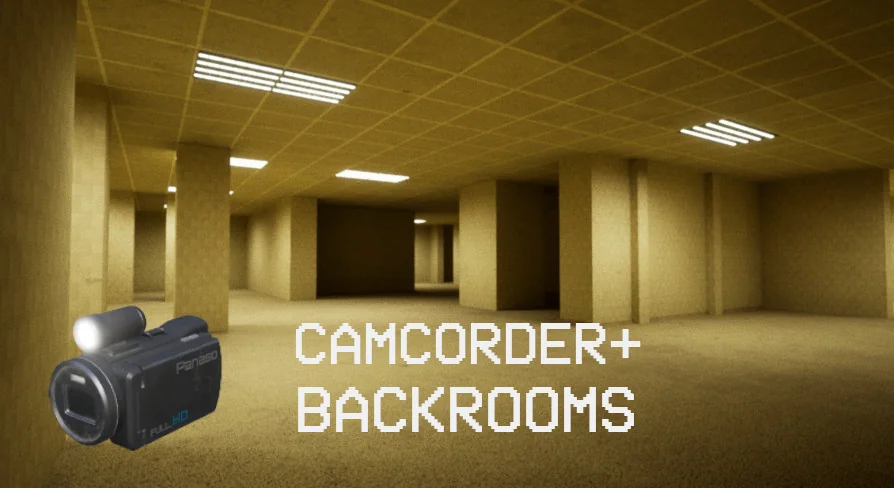
Developing realistic horror simulations often requires environments that feel expansive, disorienting, and claustrophobic all at once. This resource provides the foundational structural pieces for generating a classic liminal space, paired directly with an interactive viewing device to navigate it. The system combines modular architectural elements with a fully rigged, blueprint-driven camera prop, allowing developers to establish a playable maze immediately. By focusing on customizable materials and real-time display rendering, the asset supports complex environmental storytelling without requiring an extensive library of unique meshes.
Structuring a Liminal Maze Simulation
The environmental side of the package is built entirely around an optimized collection of 20 static meshes and 20 textures. These assets maintain a relatively lowpoly baseline geometry while relying on an advanced material pipeline to deliver realistic visual fidelity. The modular wall pieces are designed to snap together effortlessly, forming the continuous, looping corridors typical of a backrooms maze.
When building out expansive liminal spaces, visual repetition is a primary concern. To address this, the included materials support highly customizable material colors and dedicated dirt masks. Developers can shift the surface hues of the walls and apply varying layers of grime across different sections of the map, breaking up the tiling effect of the core textures. The material setup also utilizes Parallax Occlusion Mapping (POM) alongside standard PBR workflows. POM gives flat architectural surfaces a physical sense of depth, ensuring that the walls and floors react convincingly to changing light angles without increasing the actual polygon count of the modular meshes.
Lighting Architectures: Lumen and Static Baking
Illumination plays a defining role in any horror environment, and the provided example maps demonstrate two distinct technical approaches for rendering the modular walls. The first environment is a 40x40m map configured exclusively for static lighting. This setup provides a template for baked lightmaps, ensuring stable performance and precise, pre-calculated shadow casting for projects aiming at strict optimization targets.
The second environment scales up to a 60x60m maze designed entirely around dynamic lighting. Utilizing Lumen, this larger layout calculates global illumination, light bounces, and ambient occlusion in real-time. The contrast between these two example maps provides a clear structural guide for integrating the modular assets into both legacy rendering pipelines and modern, fully dynamic lighting systems.
Diegetic Navigation via the Camcorder Blueprint
Navigating these sprawling, dimly lit spaces is handled through a specialized, rigged camcorder driven by a single comprehensive Blueprint and one Skeletal Mesh. The device is entirely self-contained and utilizes 9 dedicated textures to achieve its realistic PBR finish. Its most prominent feature is the working display screen, which is powered by a SceneCapture component. Rather than relying on a traditional static user interface overlay on the player's screen, the blueprint renders the active environment directly onto the camcorder's physical flip-out display in real-time. This creates a deeply diegetic viewing experience where the player watches the horror simulation unfold directly through the lens of the handheld prop.
Beyond the live video feed, the camcorder blueprint includes multiple interactive states designed to enhance the realism of the device. It features integrated recording lights that visually indicate when the camera is active. The internal logic also manages a battery loading level that can be toggled across three distinct visual states: 1 bar, 2 bars, and 3 bars. This specific feature allows developers to tie the blueprint into their own gameplay loops, draining the battery over time or restoring it when the player triggers specific events in the maze, communicating power levels directly through the physical model rather than a standard HUD.
Input Mechanics and Holding Animations
To seamlessly integrate the device into a first-person character setup, the package includes dedicated holding animations that dictate how the skeletal mesh sits and sways in the player's hands. The blueprint logic is tied to a specific set of input bindings for immediate testing and gameplay deployment.
Pressing the F key commands the system to equip or unequip the camcorder, smoothly transitioning the player between empty hands and holding the active device. The Left Mouse Button allows the player to bring the device closer, shifting their perspective to look directly at the SceneCapture display and focus entirely on the camera's feed. Finally, pressing the R key toggles the camera's front light. This mechanic is especially critical when exploring the 60x60m dynamic lighting map, as the front light casts a real-time beam into the environment, interacting directly with the POM materials and dirt masks on the modular walls.
Integrating these tools provides a complete loop for a complex horror simulation: a vast, customizable maze to explore, and a highly animated blueprint to view it through. The strict separation of the 20 environmental meshes and the standalone camcorder blueprint ensures that either element can be scaled, modified, or extracted for different liminal projects. Because the entire camcorder logic is housed within a single Blueprint, developers can easily migrate the rigged skeletal mesh, its 9 textures, and the SceneCapture mechanics into existing character controllers without untangling a web of interdependent scripts. Whether constructing a tightly constrained 40x40m static corridor or an expansive 60x60m dynamically lit labyrinth, the combination of modular architecture and diegetic camera mechanics establishes a ready-to-play foundation for realistic exploration.
 Procedural Systems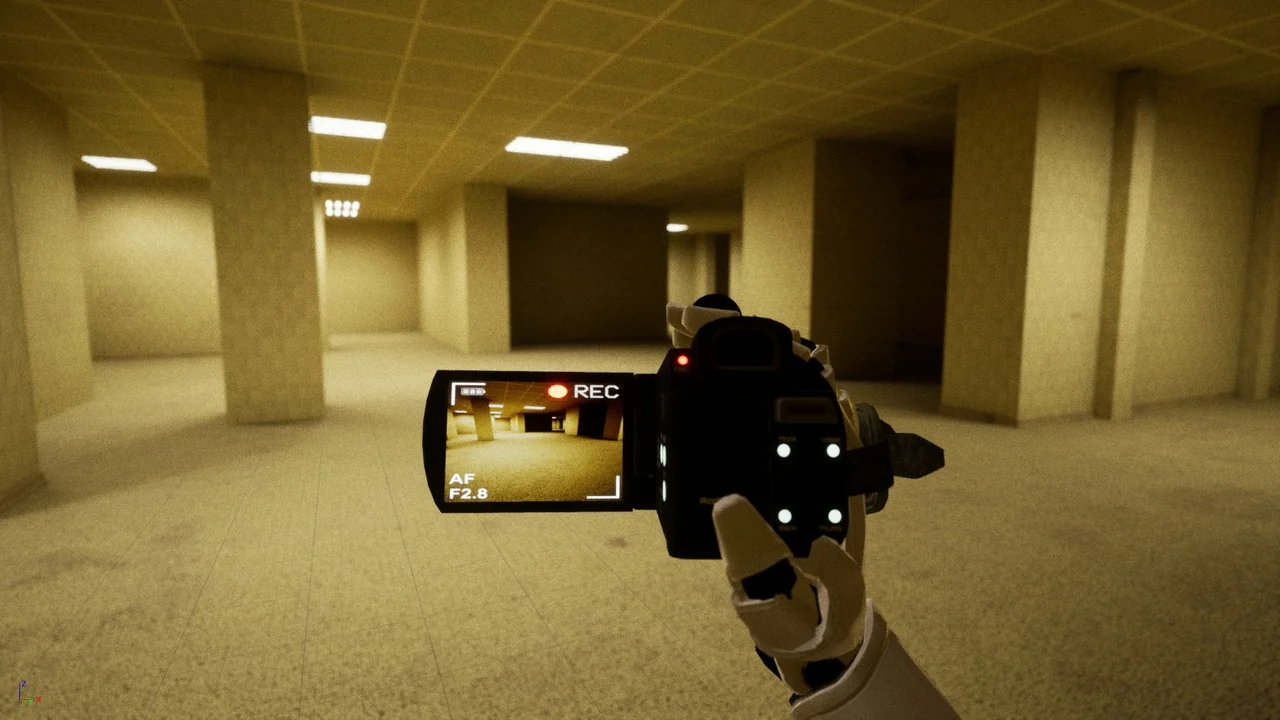
 Procedural Systems
 Procedural Systems
 Procedural Systems