"031373f479d9561a"{"id":"1000239","slug":"starsphere","title":"StarSphere","category":"Procedural Systems","engine":"5.0+","assetVersion":"","engineVersion":"Engine Version: 5.0+","tag":"Procedural Systems","accent":"blue","visual":"mech","summary":"StarSphere is a UE4 asset collection featuring parameterized space skyboxes, a multi-layered planet shader, a 6 DoF camera, and space dust blueprints.","platform":"Unreal Engine","publishedAt":"2026-06-30T18:21:56.068Z","updatedAt":"2026-06-30T18:21:56.068Z","sourceNotes":[],"fileContents":[],"compatibility":["Unreal Engine","Engine Version: 5.0+"],"featuredImage":{"alt":"StarSphere","src":"/wp-content/uploads/published/2026/06/9fb62700424c-c4f70540-e417-48fc-b3c3-b30e935e816f-16a83cf843.webp"},"hasDownloadLink":true,"downloads":0,"terms":[{"taxonomy":"category","slug":"procedural-systems","name":"Procedural Systems"}],"galleryImages":[{"src":"/wp-content/uploads/published/2026/06/cb66df53a50e-58e19478-fd08-417c-bc75-295817b109cd-f3808610db.webp","alt":"StarSphere"},{"src":"/wp-content/uploads/published/2026/06/f969bd633731-9ef8e25c-f54b-4fb0-b973-32b92762f671-a1eb3b9b50.webp","alt":"StarSphere"},{"src":"/wp-content/uploads/published/2026/06/af80561b4a01-a26b0ff3-d611-42e8-92e4-537aed4f86ff-d9f1efed5b.webp","alt":"StarSphere"},{"src":"/wp-content/uploads/published/2026/06/90453528eb1a-8b78c2b9-2e6a-46b9-b1b5-9a038c0ce643-f811c9f305.webp","alt":"StarSphere"},{"src":"/wp-content/uploads/published/2026/06/8af1f92364d4-59d201db-8e8a-4a50-bbac-4bb12c641da4-b46541bc34.webp","alt":"StarSphere"},{"src":"/wp-content/uploads/published/2026/06/c9fd76dea159-22da0433-cbce-414c-8fc7-63b557101e59-c8f251f586.webp","alt":"StarSphere"},{"src":"/wp-content/uploads/published/2026/06/39cb7198a1bf-dbc3d9b8-8dbd-4b4d-9e2e-49696fe55ee2-26f74cbecb.webp","alt":"StarSphere"},{"src":"/wp-content/uploads/published/2026/06/3a8ac74fa2a7-59047c64-b0f8-4115-941f-98124416eea9-aebc4baead.webp","alt":"StarSphere"},{"src":"/wp-content/uploads/published/2026/06/84d21df6916b-e6630684-8ab6-4c1a-836d-7e290b14f8d1-5803b7f387.webp","alt":"StarSphere"},{"src":"/wp-content/uploads/published/2026/06/afe6b908ae8d-780d4101-6f75-48c7-900b-a339ccbbc346-6b706642ad.webp","alt":"StarSphere"}],"accessPanel":{"kind":"resource","title":"Download this resource","eyebrow":"Free Download","message":"Log in or create a free account to start your download.","fileName":"Content.7z","safetyNote":"Resources are manually reviewed before listing to improve quality and reduce obvious risks.","actionLabel":"Download Free","resourceType":"Resource archive"},"contentHtml":"\u003ch2\u003eConstructing Deep Space Environments\u003c/h2\u003e\u003cp\u003eWhen developing science fiction titles, space flight simulators, or cinematic orbit sequences, the cosmic backdrop is often the most prominent visual element on screen. It sets the tone, scale, and atmosphere of the entire project. StarSphere provides a structured collection of assets specifically built to generate these deep space skyboxes within Unreal Engine 4. Rather than relying entirely on static, pre-rendered panoramas that offer limited flexibility, this package utilizes parameterized materials and layered systems to construct space environments that can adapt to different lighting conditions and project requirements.\u003c/p\u003e\u003ch2\u003eThe Core StarSphere Layers\u003c/h2\u003e\u003cp\u003eThe foundation of the environment is built upon the static StarSphere setup. This system utilizes eight adjustable layers combined with six distinct decal positions to construct the visual depth of the cosmos. Because these elements are driven by parameterized materials, environment artists have direct control over how these layers blend together. This structure allows developers to dial in different star densities, vibrant nebulae, and distinct cosmic landmarks to achieve an unlimited number of visual variations from a single master setup. By adjusting parameters rather than swapping out massive textures, developers can quickly iterate on the look and feel of their galaxy to match specific art directions or narrative moods.\u003c/p\u003e\u003ch3\u003eActor Translation and Directional Light Alignment\u003c/h3\u003e\u003cp\u003eDuring active gameplay in a space setting, maintaining the illusion of an infinite, unreachable void is critical for immersion. To address this structural challenge, the StarSphere includes functionality to lock the sphere's translation directly to the player actor. This ensures that no matter how far a spacecraft travels through the level, the player will never artificially approach or clip through the skybox boundaries, keeping the stars perpetually at a distance. Additionally, the sphere's rotation can be aligned directly to the scene's directional light source. This alignment ensures that the brightest parts of the skybox always cast light in a direction that makes sense for the 3D meshes, asteroids, and ships within the playable area.\u003c/p\u003e\u003ch3\u003eProcedural Generation with Dynamic StarSphere\u003c/h3\u003e\u003cp\u003eFor projects that require varied environments on the fly, the package includes a dynamic StarSphere variant. This version introduces a \"randomize on begin play\" function. When a new level or instance loads, the dynamic system automatically shuffles the parameterized layers and decal positions, generating a uniquely configured skybox backdrop without requiring manual artist intervention for every single level.\u003c/p\u003e\u003ch2\u003eBuilding Worlds with the Planet Shader\u003c/h2\u003e\u003cp\u003eA compelling space scene often requires more than just distant stars; it needs local celestial bodies to anchor the composition. The included planet shader provides a specialized method for placing detailed worlds within the skybox. This planetary system utilizes two separate meshes driven by material instances to independently define the solid surface of the planet and its surrounding atmosphere. \u003c/p\u003e\u003cp\u003eThe planet surface itself is constructed using three distinct texture levels: the base surface terrain, an overlapping cloud layer, and city night lights. This three-tiered texture setup allows developers to simulate complex, habitable worlds where illuminated population centers become visible on the dark side of the globe as it rotates away from the directional light source.\u003c/p\u003e\u003ch3\u003eAtmospheric Scattering and Eclipses\u003c/h3\u003e\u003cp\u003eSurrounding the solid surface mesh is a secondary mesh dedicated entirely to atmospheric phenomena. This atmosphere level employs a faked Rayleigh scattering effect. By simulating the way light disperses through gases without the heavy performance cost of true volumetric rendering, this shader gives the edge of the planet a realistic, glowing halo that reacts to the position of the sun. Furthermore, this atmospheric system supports a dedicated eclipse effect, allowing creators to stage dramatic, high-contrast lighting scenarios where celestial bodies obscure the primary directional light, casting deep shadows across the environment.\u003c/p\u003e\u003ch2\u003eImplementing the Physics-Based 6 DoF Camera Actor\u003c/h2\u003e\u003cp\u003eSpace environments fundamentally change how cameras and players navigate, stripping away the friction and gravity of terrestrial games. To support this zero-gravity movement, the package includes a physics-based 6 DoF (Six Degrees of Freedom) camera actor. This blueprint is designed to simulate the frictionless drift and full-axis rotational movement characteristic of spacecraft or floating astronauts. \u003c/p\u003e\u003cp\u003eDevelopers have direct parameter control over the maximum linear and angular velocity, as well as the linear and angular acceleration. By tuning these physics parameters, creators can accurately dictate how sluggish or responsive the camera feels, allowing them to match the heavy, drifting mass of a large cargo freighter or the rapid, twitchy agility of a small fighter probe.\u003c/p\u003e\u003ch2\u003eSimulating Velocity with the Space Dust Effect Blueprint\u003c/h2\u003e\u003cp\u003eIn the vast vacuum of space, it can be notoriously difficult for players to gauge their own speed or trajectory due to the lack of nearby static reference points. The space dust effect Blueprint addresses this common design problem by providing continuous visual cues for velocity. Instead of filling the entire massive level with a computationally expensive global particle system, this Blueprint intelligently repositions an emitter sphere directly in the path of the player pawn. \u003c/p\u003e\u003cp\u003eAs the player moves, the emitter continuously spawns space dust particles that streak past the camera, effectively selling the illusion of forward momentum. To optimize performance and customize the visual intensity, developers can control the update rate of the emitter, set a minimum actor velocity required to trigger the dust generation, and adjust the emitter's position offset relative to the pawn.\u003c/p\u003e\u003ch2\u003eMobile Optimization and Performance Scope\u003c/h2\u003e\u003cp\u003eNot all space exploration projects are built exclusively for high-end desktop or console hardware. Recognizing the strict performance constraints of mobile game development, StarSphere also provides a dedicated set of materials and textures specifically optimized for mobile applications. This ensures that the layered skyboxes and space environments can maintain their visual depth and functionality on devices with stricter rendering budgets and memory limitations, allowing developers to scale their sci-fi projects across multiple platforms.\u003c/p\u003e\u003cp\u003eOriginally featured as a Monthly Unreal Engine Sponsored Content product for September 2020, this toolkit provides far more than static background images. By combining highly adjustable, parameterized skybox layers with functional gameplay blueprints like the physics-based 6 DoF camera and velocity-driven space dust, it equips sci-fi environment artists and space-sim programmers with the foundational elements needed to build fully navigable, customizable cosmic backdrops in Unreal Engine 4.\u003c/p\u003e\n\n\u003ch2\u003eExplore Similar Assets\u003c/h2\u003e\n\u003cul\u003e\n\u003cli\u003e\u003ca href=\"https://3dcghub.com/procedural-mesh-blueprint/\" title=\"Procedural Mesh Blueprint\"\u003eProcedural Mesh Blueprint\u003c/a\u003e\u003c/li\u003e\n\u003cli\u003e\u003ca href=\"https://3dcghub.com/easy-rain/\" title=\"Easy Rain\"\u003eEasy Rain\u003c/a\u003e\u003c/li\u003e\n\u003cli\u003e\u003ca href=\"https://3dcghub.com/radio-system-and-interaction/\" title=\"Radio System and Interaction\"\u003eRadio System and Interaction\u003c/a\u003e\u003c/li\u003e\n\u003cli\u003e\u003ca href=\"https://3dcghub.com/infinity-weather/\" title=\"Infinity Weather\"\u003eInfinity Weather\u003c/a\u003e\u003c/li\u003e\n\u003cli\u003e\u003ca href=\"https://3dcghub.com/physically-based-earth/\" title=\"Physically Based Earth\"\u003ePhysically Based Earth\u003c/a\u003e\u003c/li\u003e\n\u003c/ul\u003e","contentTextLength":7179,"navigation":{"current":1110,"total":3223,"previous":{"id":"1000240","slug":"the-backrooms-camcorder","title":"The Backrooms + Camcorder","category":"Procedural Systems","platform":"Unreal Engine","updatedAt":"2026-06-30T18:29:06.920Z"},"next":{"id":"1000238","slug":"mgt-multiplayer-gravity-template","title":"MGT Multiplayer Gravity Template","category":"Gameplay Features","platform":"Unreal Engine","updatedAt":"2026-06-30T18:11:03.499Z"}},"relatedResources":[{"id":"1000407","slug":"ultimate-archvis-kit","title":"Ultimate Archvis Kit","category":"Procedural Systems","engine":"5.1+","assetVersion":"","engineVersion":"Engine Version: 5.1+","tag":"Procedural Systems","accent":"blue","visual":"mech","summary":"A comprehensive Blueprint toolkit for architectural visualization, featuring dynamic UI controls, material swapping, interactive lighting, and profile managemen","platform":"Unreal Engine","publishedAt":"2026-07-08T11:46:44.936Z","updatedAt":"2026-07-08T11:46:44.936Z","sourceNotes":[],"fileContents":[],"compatibility":["Unreal Engine","Engine Version: 5.1+"],"featuredImage":{"alt":"Ultimate Archvis Kit","src":"/wp-content/uploads/published/2026/07/060c703e9991-c4935242-c4ab-41df-bdd0-12d5f98e689c-b6473af33f.webp"},"hasDownloadLink":true,"downloads":0},{"id":"27443","slug":"procedural-mesh-blueprint","title":"Procedural Mesh Blueprint","category":"Procedural Systems","engine":"V2","assetVersion":"Engine version: 5.4+","engineVersion":"Asset Version: V2","tag":"Procedural Systems","accent":"blue","visual":"animation","summary":"Procedural Mesh Blueprint uses PCG to place child meshes on a parent mesh with a drag-and-drop workflow for environment artists. It focuses on overgrown details such as moss, grass, ivy, vines, and roots, while also supporting conversion back to static meshes.","platform":"Unreal Engine","publishedAt":"2026-04-25T12:18:37.000Z","updatedAt":"2026-07-05T06:17:14.277Z","sourceNotes":[],"fileContents":[],"compatibility":["Unreal Engine","Engine version: 5.4+","Asset Version: V2"],"featuredImage":{"alt":"Procedural Mesh Blueprint","src":"https://3dcghub.com/wp-content/uploads/2026/04/9f239b1c495b_e8794242-68b2-45e1-84c7-de84a7b8a153.webp"},"hasDownloadLink":true,"downloads":0},{"id":"11369","slug":"easy-rain","title":"Easy Rain","category":"Procedural Systems","engine":"5.4+","assetVersion":"Engine version: 5.4+","engineVersion":"5.3","tag":"Procedural Systems","accent":"blue","visual":"luts","summary":"Easy Rain is a comprehensive Blueprint system that harnesses Niagara particles to create photorealistic weather effects. From light drizzles to stormy summer downpours, this tool offers high performance and deep customization for artists.","platform":"Unreal Engine","publishedAt":"2026-03-05T17:09:01.000Z","updatedAt":"2026-04-19T15:48:13.000Z","sourceNotes":[],"fileContents":[],"compatibility":["Unreal Engine","Engine version: 5.4+"],"featuredImage":{"alt":"Easy Rain","src":"https://3dcghub.com/wp-content/uploads/2026/03/fbfa88dc-7eef-45e3-867c-fad1aa6421d1.webp"},"hasDownloadLink":true,"downloads":4}]}
Procedural Systems
StarSphere
StarSphere is a UE4 asset collection featuring parameterized space skyboxes, a multi-layered planet shader, a 6 DoF camera, and space dust blueprints.
When developing science fiction titles, space flight simulators, or cinematic orbit sequences, the cosmic backdrop is often the most prominent visual element on screen. It sets the tone, scale, and atmosphere of the entire project. StarSphere provides a structured collection of assets specifically built to generate these deep space skyboxes within Unreal Engine 4. Rather than relying entirely on static, pre-rendered panoramas that offer limited flexibility, this package utilizes parameterized materials and layered systems to construct space environments that can adapt to different lighting conditions and project requirements.
The Core StarSphere Layers
The foundation of the environment is built upon the static StarSphere setup. This system utilizes eight adjustable layers combined with six distinct decal positions to construct the visual depth of the cosmos. Because these elements are driven by parameterized materials, environment artists have direct control over how these layers blend together. This structure allows developers to dial in different star densities, vibrant nebulae, and distinct cosmic landmarks to achieve an unlimited number of visual variations from a single master setup. By adjusting parameters rather than swapping out massive textures, developers can quickly iterate on the look and feel of their galaxy to match specific art directions or narrative moods.
Actor Translation and Directional Light Alignment
During active gameplay in a space setting, maintaining the illusion of an infinite, unreachable void is critical for immersion. To address this structural challenge, the StarSphere includes functionality to lock the sphere's translation directly to the player actor. This ensures that no matter how far a spacecraft travels through the level, the player will never artificially approach or clip through the skybox boundaries, keeping the stars perpetually at a distance. Additionally, the sphere's rotation can be aligned directly to the scene's directional light source. This alignment ensures that the brightest parts of the skybox always cast light in a direction that makes sense for the 3D meshes, asteroids, and ships within the playable area.
Procedural Generation with Dynamic StarSphere
For projects that require varied environments on the fly, the package includes a dynamic StarSphere variant. This version introduces a "randomize on begin play" function. When a new level or instance loads, the dynamic system automatically shuffles the parameterized layers and decal positions, generating a uniquely configured skybox backdrop without requiring manual artist intervention for every single level.
Building Worlds with the Planet Shader
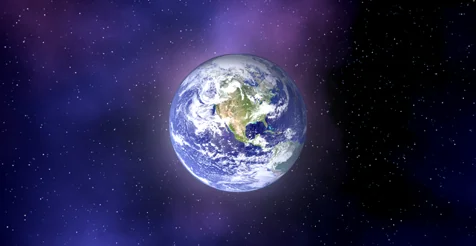
A compelling space scene often requires more than just distant stars; it needs local celestial bodies to anchor the composition. The included planet shader provides a specialized method for placing detailed worlds within the skybox. This planetary system utilizes two separate meshes driven by material instances to independently define the solid surface of the planet and its surrounding atmosphere.
The planet surface itself is constructed using three distinct texture levels: the base surface terrain, an overlapping cloud layer, and city night lights. This three-tiered texture setup allows developers to simulate complex, habitable worlds where illuminated population centers become visible on the dark side of the globe as it rotates away from the directional light source.
Atmospheric Scattering and Eclipses
Surrounding the solid surface mesh is a secondary mesh dedicated entirely to atmospheric phenomena. This atmosphere level employs a faked Rayleigh scattering effect. By simulating the way light disperses through gases without the heavy performance cost of true volumetric rendering, this shader gives the edge of the planet a realistic, glowing halo that reacts to the position of the sun. Furthermore, this atmospheric system supports a dedicated eclipse effect, allowing creators to stage dramatic, high-contrast lighting scenarios where celestial bodies obscure the primary directional light, casting deep shadows across the environment.
Implementing the Physics-Based 6 DoF Camera Actor
Space environments fundamentally change how cameras and players navigate, stripping away the friction and gravity of terrestrial games. To support this zero-gravity movement, the package includes a physics-based 6 DoF (Six Degrees of Freedom) camera actor. This blueprint is designed to simulate the frictionless drift and full-axis rotational movement characteristic of spacecraft or floating astronauts.
Developers have direct parameter control over the maximum linear and angular velocity, as well as the linear and angular acceleration. By tuning these physics parameters, creators can accurately dictate how sluggish or responsive the camera feels, allowing them to match the heavy, drifting mass of a large cargo freighter or the rapid, twitchy agility of a small fighter probe.
Simulating Velocity with the Space Dust Effect Blueprint
In the vast vacuum of space, it can be notoriously difficult for players to gauge their own speed or trajectory due to the lack of nearby static reference points. The space dust effect Blueprint addresses this common design problem by providing continuous visual cues for velocity. Instead of filling the entire massive level with a computationally expensive global particle system, this Blueprint intelligently repositions an emitter sphere directly in the path of the player pawn.
As the player moves, the emitter continuously spawns space dust particles that streak past the camera, effectively selling the illusion of forward momentum. To optimize performance and customize the visual intensity, developers can control the update rate of the emitter, set a minimum actor velocity required to trigger the dust generation, and adjust the emitter's position offset relative to the pawn.
Mobile Optimization and Performance Scope
Not all space exploration projects are built exclusively for high-end desktop or console hardware. Recognizing the strict performance constraints of mobile game development, StarSphere also provides a dedicated set of materials and textures specifically optimized for mobile applications. This ensures that the layered skyboxes and space environments can maintain their visual depth and functionality on devices with stricter rendering budgets and memory limitations, allowing developers to scale their sci-fi projects across multiple platforms.
Originally featured as a Monthly Unreal Engine Sponsored Content product for September 2020, this toolkit provides far more than static background images. By combining highly adjustable, parameterized skybox layers with functional gameplay blueprints like the physics-based 6 DoF camera and velocity-driven space dust, it equips sci-fi environment artists and space-sim programmers with the foundational elements needed to build fully navigable, customizable cosmic backdrops in Unreal Engine 4.
 Procedural Systems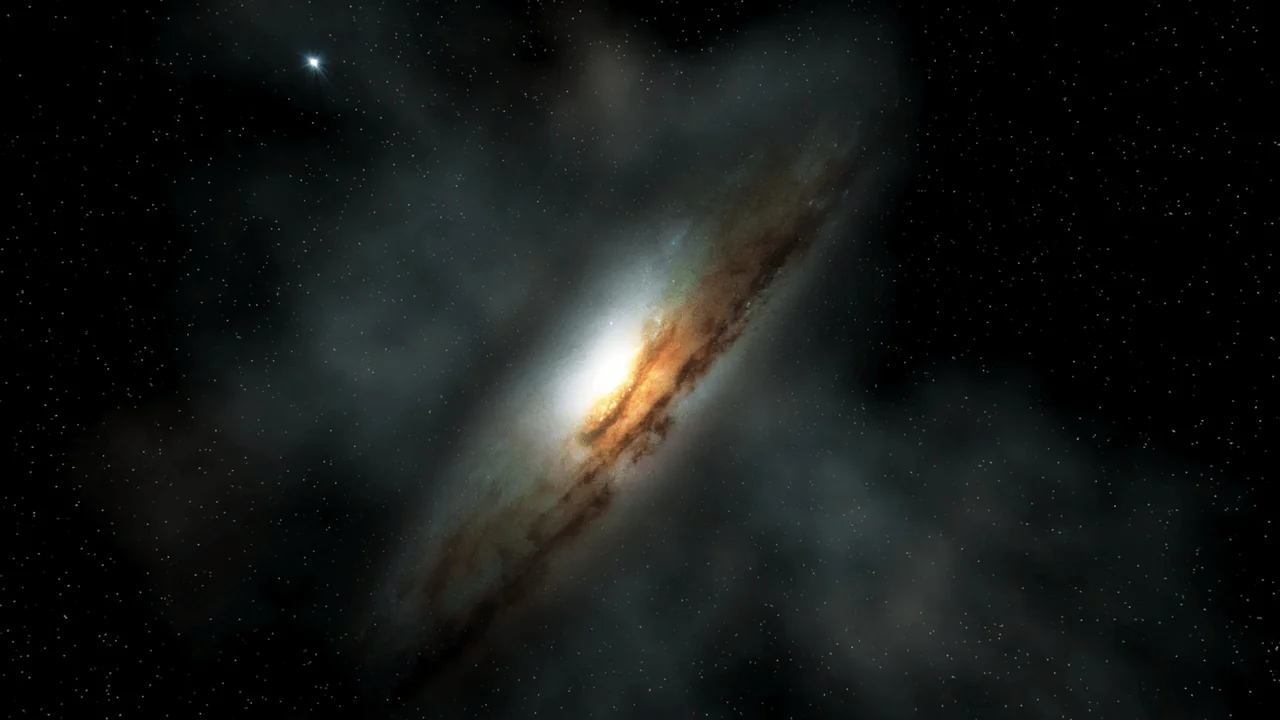
 Procedural Systems
 Procedural Systems
 Procedural Systems