"0148f1904a9b0d16"{"id":"1002617","slug":"surface-forge-v1-1-5","title":"Surface Forge v1.1.5","category":"Nature \u0026 Terrain","engine":"5.3+","assetVersion":"","engineVersion":"Engine Version: 5.3+","tag":"Nature \u0026 Terrain","accent":"blue","visual":"mech","summary":"Explore Surface Forge v1.1.5 for Unreal Engine 5, featuring six-layer material blending, Nanite displacement, procedural puddles, and Decal Forge 1.2.","platform":"Unreal Engine","indexPolicy":"index","publishedAt":"2026-11-14T09:12:11.306Z","updatedAt":"2026-11-14T09:12:11.306Z","sourceNotes":[],"fileContents":[],"compatibility":["Unreal Engine","Engine Version: 5.3+"],"featuredImage":{"alt":"Surface Forge v1.1.5","src":"/wp-content/uploads/published/2026/11/9b1fb685657b-4a60d091-d977-4135-a17f-61496dd894a1-0bc4ef1c23.webp"},"hasDownloadLink":true,"downloads":0,"terms":[{"taxonomy":"category","slug":"nature-and-terrain","name":"Nature \u0026 Terrain"}],"galleryImages":[{"src":"/wp-content/uploads/published/2026/11/8bf301efef0b-5bf16117-265b-4be0-bd10-7cae83c86926-3100b7944c.webp","alt":"Surface Forge v1.1.5"},{"src":"/wp-content/uploads/published/2026/11/22a30ce5849a-98112001-6694-46fd-8e09-6bfd61a8d403-c6fd1a9ecb.webp","alt":"Surface Forge v1.1.5"},{"src":"/wp-content/uploads/published/2026/11/faade789193a-e8a0ab53-2b5a-42c8-8a25-a3427fc11e73-fbefda26ac.webp","alt":"Surface Forge v1.1.5"},{"src":"/wp-content/uploads/published/2026/11/dfd6cfc4b658-cb8be2fa-dfc8-49a9-b944-6a1786fc8aae-4d7306c435.webp","alt":"Surface Forge v1.1.5"},{"src":"/wp-content/uploads/published/2026/11/ad49777966d1-25c9da8d-bc25-4ad6-ae0b-a020c9459655-fe706dcbb5.webp","alt":"Surface Forge v1.1.5"},{"src":"/wp-content/uploads/published/2026/11/189ba1383b60-75a3a5cb-5b01-405e-b518-10686d8ea7d7-8839446a16.webp","alt":"Surface Forge v1.1.5"},{"src":"/wp-content/uploads/published/2026/11/5a4c8ebbad62-47e72896-7418-4d08-84d4-ad41e21b0901-f1ed3e2ce2.webp","alt":"Surface Forge v1.1.5"},{"src":"/wp-content/uploads/published/2026/11/e329ac564ed0-de5c1d59-007c-40ac-9468-fa800665b22d-e0a04e6933.webp","alt":"Surface Forge v1.1.5"}],"accessPanel":{"kind":"resource","title":"Get this resource","eyebrow":"Free resource","message":"Download this resource in your browser.","fileName":"Surface_Forge_v_1_1_5.7z","safetyNote":"Resources are manually reviewed before listing to improve quality and reduce obvious risks.","actionLabel":"Get this resource","resourceType":"Resource archive","versions":[]},"contentHtml":"\u003ch2\u003eArchitectural and Environmental Material Blending in Surface Forge\u003c/h2\u003e\u003cp\u003eConstructing believable environments in modern game engines requires transitioning between contrasting surfaces without exposing artificial seams or relying on repetitive tiling textures. Combining dressed stone foundations with muddy soil, laying asphalt against gravel shoulders, or feathering moss into porous rock traditionally requires separate custom shaders or laborious manual asset setup. Surface Forge addresses these challenges as a cinematic-grade environment surfacing framework for Unreal Engine 5, unifying multi-surface blending, Nanite geometric displacement, and procedural environmental detailing into a consolidated production pipeline.\u003c/p\u003e\u003cp\u003eThe system is built to serve architecture, landscapes, roads, rocks, hero assets, and organic environments within a single workflow. Rather than treating static props and terrain as isolated shading problems, the framework establishes a shared physical logic across scenes. Material transitions maintain physical weight because the underlying shading network prioritizes height-based edge blending over simple opacity crossfades. Texture data crests and settles along topological elevations, allowing coarse gravel to lodge within stone cracks or fine dirt to pool inside pavement grooves. This architecture preserves geometric presence whether scenes are rendered in cinematic passes or executed within high-end real-time viewport environments.\u003c/p\u003e\u003ch2\u003eSix-Layer Composition and Procedural Masking Controls\u003c/h2\u003e\u003cp\u003eAt the center of the framework is a six-layer material blending system that gives artists precise control over multi-textured assets. Surface distribution can be authored manually using standard vertex painting or mesh painting workflows, while procedural rules automate the underlying spatial placement. The system incorporates dedicated slope and curvature layers that calculate mesh orientation dynamically. Steep inclines automatically reveal underlying cliff or rock textures, while concave crevices collect sediment, grime, or moisture through automated curvature detection.\u003c/p\u003e\u003cp\u003eA dedicated snow accumulation layer functions alongside these spatial masks, blanketing upward-facing surfaces according to directional rules so assets retain natural coverage even when repositioned within a level. Version 1.1.5 introduces a dedicated Blend Material Function designed specifically for six-way blend control, standardizing layer hierarchy and interaction. This release also resolves legacy input mapping issues by correcting inverted green and blue paint channels, ensuring that imported brush strokes and vertex color assignments function consistently across custom asset libraries. Layer blending stability has been refined alongside edge transition quality, allowing clean delineation between varied materials without excessive shader complexity.\u003c/p\u003e\u003ch2\u003eNanite Displacement and Height Handling Across the Surface Pipeline\u003c/h2\u003e\u003cp\u003eHigh-fidelity structural detailing within Surface Forge is driven by native Nanite displacement support, allowing texture height maps to displace geometry directly inside Unreal Engine 5. For workflows balancing geometric density, the framework provides Parallax Occlusion Mapping (POM) complete with silhouette rendering and self-shadowing capabilities. Version 1.1.5 expands POM control by adding per-layer POM height rotation settings alongside an art-directable custom light vector direction, enabling artists to align POM micro-shadows precisely with scene lighting setups.\u003c/p\u003e\u003cp\u003eThe height displacement POM fix introduced in version 1.1.5 natively supports Unreal Engine 5.5 and later, addressing core engine limitations that restrict this behavior in Unreal Engine 5.3 and 5.4. To prevent high-intensity displacement from breaking open polygon borders along hard edges, the workflow utilizes displacement edge masking and paintable height suppression. Artists can also utilize a dedicated Blender companion tool designed to mask or chamfer mesh borders in a single click, preparing clean displacement boundaries on custom meshes before importing them into Unreal Engine. Within the engine, Unreal Engine's native Modelling Tools are recommended to refine bevels and prepare geometry for stable displacement calculations.\u003c/p\u003e\u003ch2\u003eEnvironmental Weathering Systems and Decal Forge Integration\u003c/h2\u003e\u003cp\u003eEnvironmental realism depends heavily on dynamic weathering, which the system delivers through procedural wetness and precipitation layers. The integrated puddle framework deposits water across both static meshes and landscapes, complete with surface ripples, running drips, dynamic droplets, and customizable wetness masks. Snow and puddle painting logic allows artists to selectively paint puddles or snow cover onto surfaces, establishing realistic moisture buildup inside depressions, wheel ruts, and architectural drainage pathways.\u003c/p\u003e\u003cp\u003eWeathering passes are further expanded through the built-in inclusion of Decal Forge 1.2. This procedural decal system features automatic surface alignment, precision projection bounds, enhanced parallax projection, and shadow-casting POM decals. Decal Forge 1.2 carries its own puddle, ripple, drip, and droplet behaviors, letting artists scatter local stains, damage patches, and water pools without altering underlying base materials. These decals integrate improved UV breakup logic to reduce pattern repetition across vast structural elements, helping maintain visual variation across broad structural faces.\u003c/p\u003e\u003ch2\u003eProjection Mapping Workflows and Engine Requirements\u003c/h2\u003e\u003cp\u003eTo eliminate texture stretching across complex, non-planar meshes, the framework provides several projection modes, including Triplanar projection, World Aligned Texture (WAT) projection, and local projection workflows. Shading errors common to procedural projections are addressed through correct normal rotation handling across all projection modes, paired with independent texture rotation controls and axis scaling. An integrated UV breakup system systematically disrupts visible tiling patterns, preventing repetitive artifacts when mapping expansive terrain expanses, massive cliffs, or long roadways.\u003c/p\u003e\u003cp\u003eMaterial instances are structured through an optimized instruction count designed to support Megascans-compatible assets and ORDp (Occlusion, Roughness, Displacement) texture packing. Surface Forge also supports Runtime Virtual Texture (RVT) blending, allowing placed props and hero rocks to sample and inherit the color, wetness, and tone of the surrounding landscape to eliminate hard intersection borders. Operating the system requires Unreal Engine 5.3 through 5.8. Mesh painting workflows require the native Mesh Paint Plugin and Virtual Texture support enabled within project settings, while vertex painting is active by default. Surface Forge functions within an extended ecosystem of Unreal Engine tools that includes World Forge for landscape auto-materials, Cloud Forge Complete for VDB clouds, Atmos Forge for atmospheric lighting, Nebula Forge, and Cosmic Forge planetary and asteroid systems.\u003c/p\u003e\n\n\u003ch2\u003eExplore Similar Assets\u003c/h2\u003e\n\u003cul\u003e\n\u003cli\u003e\u003ca href=\"https://3dcghub.com/grass-landscape-material-vol-i/\" rel=\"noopener noreferrer\"\u003eGrass Landscape Material Vol. I\u003c/a\u003e\u003c/li\u003e\n\u003cli\u003e\u003ca href=\"https://3dcghub.com/forest-landscape-materials-vol-i/\" rel=\"noopener noreferrer\"\u003eForest Landscape Materials Vol.I\u003c/a\u003e\u003c/li\u003e\n\u003cli\u003e\u003ca href=\"https://3dcghub.com/sand-vol-40-hand-painted-textures/\" rel=\"noopener noreferrer\"\u003eSand Vol.40 - Hand Painted Textures\u003c/a\u003e\u003c/li\u003e\n\u003cli\u003e\u003ca href=\"https://3dcghub.com/stylized-egypt-textures-rpg-environment/\" rel=\"noopener noreferrer\"\u003eStylized Egypt Textures - RPG Environment\u003c/a\u003e\u003c/li\u003e\n\u003cli\u003e\u003ca href=\"https://3dcghub.com/martian-surface/\" rel=\"noopener noreferrer\"\u003eMartian Surface\u003c/a\u003e\u003c/li\u003e\n\u003c/ul\u003e","contentTextLength":7222,"navigation":{"current":24,"total":4543,"previous":{"id":"1002618","slug":"ultimate-character","title":"Ultimate Character","category":"Action-Adventure","platform":"Unreal Engine","updatedAt":"2026-11-14T09:13:01.059Z"},"next":{"id":"1002616","slug":"stylized-rogue","title":"Stylized rogue","category":"Characters \u0026 Creatures","platform":"Unreal Engine","updatedAt":"2026-11-14T09:11:01.826Z"}},"relatedResources":[{"id":"1001211","slug":"grass-landscape-material-vol-i","title":"Grass Landscape Material Vol. I","category":"Nature \u0026 Terrain","engine":"5.0+","assetVersion":"","engineVersion":"Engine Version: 5.0+","tag":"Nature \u0026 Terrain","accent":"blue","visual":"luts","summary":"Examine Grass Landscape Material Vol. I, featuring photoscanned 3mx3m grass and mud surfaces with multiple displacement methods for realistic terrains.","platform":"Unreal Engine","indexPolicy":"index","publishedAt":"2026-09-19T08:44:44.049Z","updatedAt":"2026-09-19T08:44:44.049Z","sourceNotes":[],"fileContents":[],"compatibility":["Unreal Engine","Engine Version: 5.0+"],"featuredImage":{"alt":"Grass Landscape Material Vol. I","src":"/wp-content/uploads/published/2026/09/223a06048e45-13f8af89-33ba-43d2-bfbb-9135eb638f57-b26e938f50.webp"},"hasDownloadLink":true,"downloads":2},{"id":"1001210","slug":"forest-landscape-materials-vol-i","title":"Forest Landscape Materials Vol.I","category":"Nature \u0026 Terrain","engine":"5.0+","assetVersion":"","engineVersion":"Engine Version: 5.0+","tag":"Nature \u0026 Terrain","accent":"blue","visual":"luts","summary":"Examine Forest Landscape Materials Vol.I, featuring 3mx3m photo-scanned coniferous forest surfaces with multiple displacement methods.","platform":"Unreal Engine","indexPolicy":"index","publishedAt":"2026-09-19T08:43:08.399Z","updatedAt":"2026-09-19T08:43:08.399Z","sourceNotes":[],"fileContents":[],"compatibility":["Unreal Engine","Engine Version: 5.0+"],"featuredImage":{"alt":"Forest Landscape Materials Vol.I","src":"/wp-content/uploads/published/2026/09/b61bfba68fd5-e493231b-b7cb-4dda-a978-64109746a3b0-09225789f5.webp"},"hasDownloadLink":true,"downloads":0},{"id":"1001907","slug":"sand-vol-40-hand-painted-textures","title":"Sand Vol.40 - Hand Painted Textures","category":"Nature \u0026 Terrain","engine":"4.22+,5.0+","assetVersion":"","engineVersion":"Engine Version: 4.22+,5.0+","tag":"Nature \u0026 Terrain","accent":"blue","visual":"luts","summary":"Examine Sand Vol.40 - Hand Painted Textures, featuring 7 tillable 2048px PBR surfaces designed for stylized deserts, rocky grit, and fantasy environments.","platform":"Unreal Engine","indexPolicy":"index","publishedAt":"2026-10-22T11:45:22.411Z","updatedAt":"2026-10-22T11:45:22.411Z","sourceNotes":[],"fileContents":[],"compatibility":["Unreal Engine","Engine Version: 4.22+,5.0+"],"featuredImage":{"alt":"Sand Vol.40 - Hand Painted Textures","src":"/wp-content/uploads/published/2026/10/1da18eae57da-85e5c46c-0333-4304-94ba-a4edf0bbbb9d-8949436dd0.webp"},"hasDownloadLink":true,"downloads":1}]}
Nature & Terrain
Surface Forge v1.1.5
Explore Surface Forge v1.1.5 for Unreal Engine 5, featuring six-layer material blending, Nanite displacement, procedural puddles, and Decal Forge 1.2.
Architectural and Environmental Material Blending in Surface Forge
Constructing believable environments in modern game engines requires transitioning between contrasting surfaces without exposing artificial seams or relying on repetitive tiling textures. Combining dressed stone foundations with muddy soil, laying asphalt against gravel shoulders, or feathering moss into porous rock traditionally requires separate custom shaders or laborious manual asset setup. Surface Forge addresses these challenges as a cinematic-grade environment surfacing framework for Unreal Engine 5, unifying multi-surface blending, Nanite geometric displacement, and procedural environmental detailing into a consolidated production pipeline.
The system is built to serve architecture, landscapes, roads, rocks, hero assets, and organic environments within a single workflow. Rather than treating static props and terrain as isolated shading problems, the framework establishes a shared physical logic across scenes. Material transitions maintain physical weight because the underlying shading network prioritizes height-based edge blending over simple opacity crossfades. Texture data crests and settles along topological elevations, allowing coarse gravel to lodge within stone cracks or fine dirt to pool inside pavement grooves. This architecture preserves geometric presence whether scenes are rendered in cinematic passes or executed within high-end real-time viewport environments.
Six-Layer Composition and Procedural Masking Controls
At the center of the framework is a six-layer material blending system that gives artists precise control over multi-textured assets. Surface distribution can be authored manually using standard vertex painting or mesh painting workflows, while procedural rules automate the underlying spatial placement. The system incorporates dedicated slope and curvature layers that calculate mesh orientation dynamically. Steep inclines automatically reveal underlying cliff or rock textures, while concave crevices collect sediment, grime, or moisture through automated curvature detection.
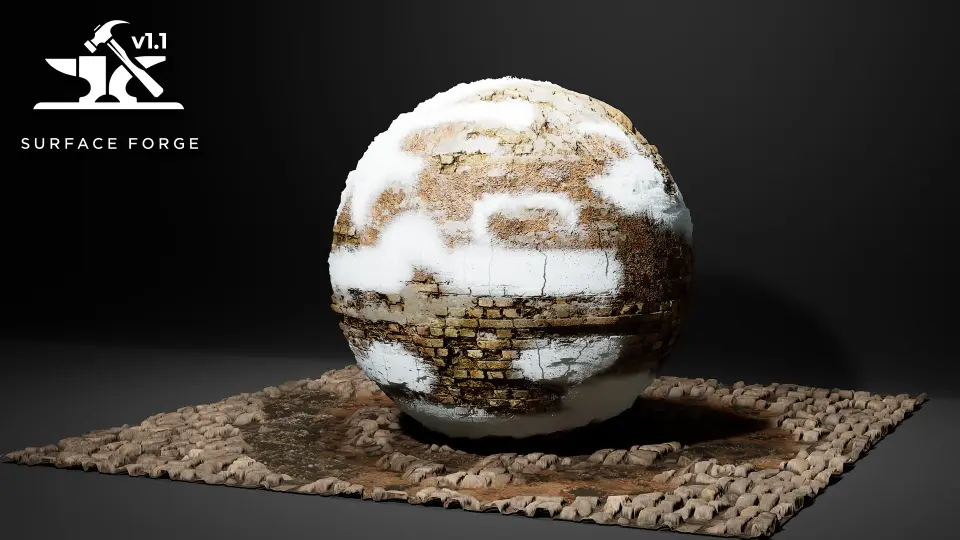
A dedicated snow accumulation layer functions alongside these spatial masks, blanketing upward-facing surfaces according to directional rules so assets retain natural coverage even when repositioned within a level. Version 1.1.5 introduces a dedicated Blend Material Function designed specifically for six-way blend control, standardizing layer hierarchy and interaction. This release also resolves legacy input mapping issues by correcting inverted green and blue paint channels, ensuring that imported brush strokes and vertex color assignments function consistently across custom asset libraries. Layer blending stability has been refined alongside edge transition quality, allowing clean delineation between varied materials without excessive shader complexity.
Nanite Displacement and Height Handling Across the Surface Pipeline
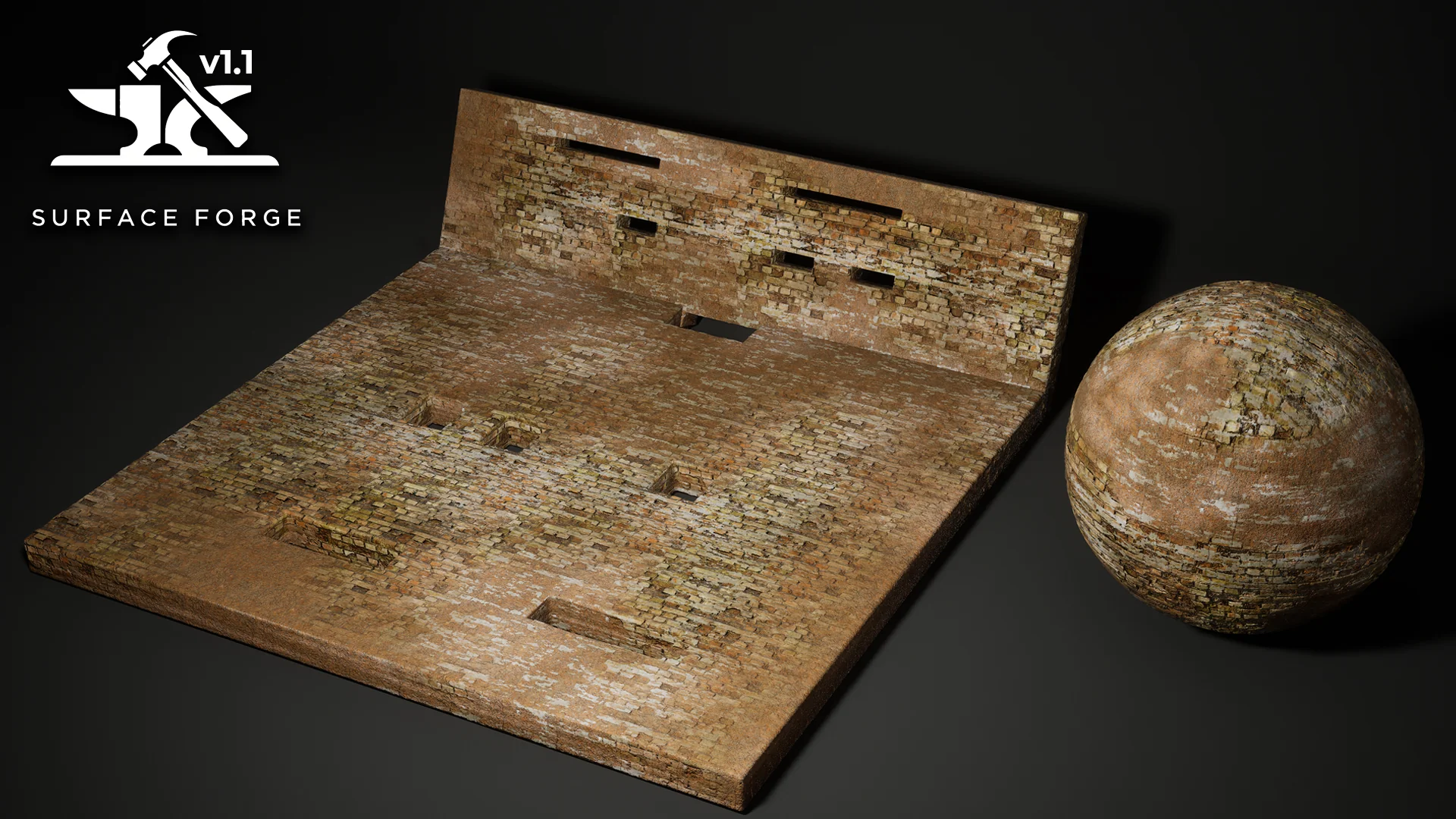
High-fidelity structural detailing within Surface Forge is driven by native Nanite displacement support, allowing texture height maps to displace geometry directly inside Unreal Engine 5. For workflows balancing geometric density, the framework provides Parallax Occlusion Mapping (POM) complete with silhouette rendering and self-shadowing capabilities. Version 1.1.5 expands POM control by adding per-layer POM height rotation settings alongside an art-directable custom light vector direction, enabling artists to align POM micro-shadows precisely with scene lighting setups.
The height displacement POM fix introduced in version 1.1.5 natively supports Unreal Engine 5.5 and later, addressing core engine limitations that restrict this behavior in Unreal Engine 5.3 and 5.4. To prevent high-intensity displacement from breaking open polygon borders along hard edges, the workflow utilizes displacement edge masking and paintable height suppression. Artists can also utilize a dedicated Blender companion tool designed to mask or chamfer mesh borders in a single click, preparing clean displacement boundaries on custom meshes before importing them into Unreal Engine. Within the engine, Unreal Engine's native Modelling Tools are recommended to refine bevels and prepare geometry for stable displacement calculations.
Environmental Weathering Systems and Decal Forge Integration
Environmental realism depends heavily on dynamic weathering, which the system delivers through procedural wetness and precipitation layers. The integrated puddle framework deposits water across both static meshes and landscapes, complete with surface ripples, running drips, dynamic droplets, and customizable wetness masks. Snow and puddle painting logic allows artists to selectively paint puddles or snow cover onto surfaces, establishing realistic moisture buildup inside depressions, wheel ruts, and architectural drainage pathways.
Weathering passes are further expanded through the built-in inclusion of Decal Forge 1.2. This procedural decal system features automatic surface alignment, precision projection bounds, enhanced parallax projection, and shadow-casting POM decals. Decal Forge 1.2 carries its own puddle, ripple, drip, and droplet behaviors, letting artists scatter local stains, damage patches, and water pools without altering underlying base materials. These decals integrate improved UV breakup logic to reduce pattern repetition across vast structural elements, helping maintain visual variation across broad structural faces.
Projection Mapping Workflows and Engine Requirements
To eliminate texture stretching across complex, non-planar meshes, the framework provides several projection modes, including Triplanar projection, World Aligned Texture (WAT) projection, and local projection workflows. Shading errors common to procedural projections are addressed through correct normal rotation handling across all projection modes, paired with independent texture rotation controls and axis scaling. An integrated UV breakup system systematically disrupts visible tiling patterns, preventing repetitive artifacts when mapping expansive terrain expanses, massive cliffs, or long roadways.
Material instances are structured through an optimized instruction count designed to support Megascans-compatible assets and ORDp (Occlusion, Roughness, Displacement) texture packing. Surface Forge also supports Runtime Virtual Texture (RVT) blending, allowing placed props and hero rocks to sample and inherit the color, wetness, and tone of the surrounding landscape to eliminate hard intersection borders. Operating the system requires Unreal Engine 5.3 through 5.8. Mesh painting workflows require the native Mesh Paint Plugin and Virtual Texture support enabled within project settings, while vertex painting is active by default. Surface Forge functions within an extended ecosystem of Unreal Engine tools that includes World Forge for landscape auto-materials, Cloud Forge Complete for VDB clouds, Atmos Forge for atmospheric lighting, Nebula Forge, and Cosmic Forge planetary and asteroid systems.
 Nature & Terrain
 Nature & Terrain
 Nature & Terrain
 Nature & Terrain