"c14ff6bd758dadb1"{"id":"1001761","slug":"space-scenes","title":"Space Scenes","category":"Sky \u0026 Space","engine":"4.26+,5.0+","assetVersion":"","engineVersion":"Engine Version: 4.26+,5.0+","tag":"Sky \u0026 Space","accent":"blue","visual":"mech","summary":"Construct sci-fi levels with Space Scenes for Unreal Engine, featuring 10 prebuilt environments, configurable planets, orbital stations, and debris fields.","platform":"Unreal Engine","publishedAt":"2026-10-20T03:07:34.480Z","updatedAt":"2026-10-20T03:07:34.480Z","sourceNotes":[],"fileContents":[],"compatibility":["Unreal Engine","Engine Version: 4.26+,5.0+"],"featuredImage":{"alt":"Space Scenes","src":"/wp-content/uploads/published/2026/10/d27997a31a2e-6e3ab253-57cf-49de-83f6-45bedbfcb7c8-13282f6b85.webp"},"hasDownloadLink":true,"downloads":0,"terms":[{"taxonomy":"category","slug":"sky-and-space","name":"Sky \u0026 Space"}],"galleryImages":[{"src":"/wp-content/uploads/published/2026/10/f65f90a60b97-b9a971ea-d921-41ca-aa9d-e849bf37ef6f-886109b33f.webp","alt":"Space Scenes"},{"src":"/wp-content/uploads/published/2026/10/be93143248c8-a7589897-b387-40a3-883f-8b93caa0c508-ad62c69b5e.webp","alt":"Space Scenes"},{"src":"/wp-content/uploads/published/2026/10/bbb4aed9ece1-d715ae13-7369-49af-8a63-c5ee00394a3c-1d1df27571.webp","alt":"Space Scenes"},{"src":"/wp-content/uploads/published/2026/10/3ccb727050ed-ab2a59bd-71e5-4c22-a5fe-064f0757585b-4d09069a8c.webp","alt":"Space Scenes"},{"src":"/wp-content/uploads/published/2026/10/86f97dcd5e37-d61835b3-285e-4444-a0cd-e4b96e9bc08a-a209f2d3cd.webp","alt":"Space Scenes"},{"src":"/wp-content/uploads/published/2026/10/27f4a72f4271-7e46fa2b-dd30-464a-8e54-3976ef848ca2-0d2d2f5839.webp","alt":"Space Scenes"},{"src":"/wp-content/uploads/published/2026/10/5bb18a6eca36-c346c625-62c6-42d2-a3b9-dca528b5ca54-0881e52711.webp","alt":"Space Scenes"},{"src":"/wp-content/uploads/published/2026/10/0b15af963da4-15e55a01-4884-4c8e-9aba-87e813065792-a8e50329e2.webp","alt":"Space Scenes"},{"src":"/wp-content/uploads/published/2026/10/d2f92defc29f-a770b020-7747-4b56-9f64-9abcadd47d57-acb0dbe668.webp","alt":"Space Scenes"}],"accessPanel":{"kind":"resource","title":"Download this resource","eyebrow":"Free Download","message":"Log in or create a free account to start your download.","fileName":"Content.7z","safetyNote":"Resources are manually reviewed before listing to improve quality and reduce obvious risks.","actionLabel":"Download Free","resourceType":"Resource archive"},"contentHtml":"\u003ch2\u003eDeploying Example Space Environments and Skyboxes\u003c/h2\u003e\u003cp\u003eConstructing believable extraterrestrial space requires balancing immense visual scale against manageable rendering performance. Space Scenes addresses this balance by offering ten distinct example space environments ready for fast staging. Level designers can open an example scene immediately to study lighting balances, backdrop placement, and asset density, or use them as functional foundations for cosmic levels across action, RPG, and combat titles.\u003c/p\u003e\u003cp\u003eThe package simplifies scene staging by relying on skyboxes coupled with distinct lighting markers. Deep space voids gain form through varied cosmic backdrops that establish regional identity across different gameplay zones. Setting up a project begins with loading these environments, referencing the included quickstart guide and documentation to map out celestial coordinates, mesh placements, and lighting values. Because the foundational space setups are already assembled, developers skip the laborious task of manually coordinating star backdrops, ambient intensities, and spatial orientation.\u003c/p\u003e\u003ch2\u003eCelestial Staging with Configurable Planets and Dying Stars\u003c/h2\u003e\u003cp\u003eAt the center of space-themed level design sits planetary and stellar focal points. Space Scenes contains configurable planets that allow creators to manipulate surface features, colors, and atmospheres directly to match specific biome or lore requirements. Rather than locking developers into a single rigid sphere texture, the configurable setup offers control over the celestial body's appearance, establishing immediate scale against passing spacecraft or nearby stations.\u003c/p\u003e\u003cp\u003eComplementing the planetary systems is a dying star mesh that serves as a dramatic primary light source or narrative centerpiece. Surrounding these high-energy assets, the pack supplies particle effects, including power shields and atmospheric mist. Power shields provide immediate visual indicators for defensive barriers, energy fields, or protected facilities, while space mist breaks up empty voids with subtle volumetric textures. These particle systems layer directly into planetary orbits or contested outposts, giving empty space tangible depth and shifting radiance.\u003c/p\u003e\u003ch2\u003eSpace Stations and Orbital Infrastructure\u003c/h2\u003e\u003cp\u003ePopulating space environments requires mechanical landmarks that direct player movement and support gameplay encounters. Space Scenes delivers several distinct operational and tactical space stations:\u003c/p\u003e\u003cul\u003e\u003cli\u003e\u003cstrong\u003eTesla Coil SpaceStation:\u003c/strong\u003e A dedicated orbital structure tailored for high-energy outposts, electrical hazards, or defense perimeters.\u003c/li\u003e\u003cli\u003e\u003cstrong\u003eRecharge Space Station:\u003c/strong\u003e An animated orbital platform with moving mechanical parts that indicate live service, energy transfers, or active maintenance docks.\u003c/li\u003e\u003cli\u003e\u003cstrong\u003eEnergy Draining Station:\u003c/strong\u003e An industrial facility mesh configured for resource extraction, hostile drain mechanics, or tactical capture points.\u003c/li\u003e\u003cli\u003e\u003cstrong\u003eMothership Front:\u003c/strong\u003e A massive structural mesh representing the forward section of a capital warship, suitable for perimeter defenses, blockade encounters, or mission hubs.\u003c/li\u003e\u003c/ul\u003e\u003cp\u003eThe animated Recharge Space Station introduces movement to otherwise static space vistas. Motion cues from the station's moving components help players differentiate between functional gameplay points and background dressing. Combining these industrial installations with particle power shields allows creators to build functional dockyards, contested extraction outposts, or dangerous combat arenas without piecing together industrial kits from scratch.\u003c/p\u003e\u003ch2\u003eAsteroid Belts and the Spaceship Graveyard Props Spawner\u003c/h2\u003e\u003cp\u003eNavigational hazards and environmental cover are critical for space combat and exploration levels. Space Scenes provides static meshes of asteroids alongside dedicated space pillars to construct complex obstacle courses, mining operations, or defensive cover in open orbit. Asteroid belts can be arranged to channel player ships through tight corridors, restrict line of sight, or frame central mission targets.\u003c/p\u003e\u003cp\u003eFor derelict zones, battlefield remnants, and salvage grounds, the package incorporates a dedicated spaceship graveyard setup. This includes broken spaceship meshes alongside an automated props spawner. The spawner distributes wreckage and debris throughout a designated radius, significantly reducing the manual workload required to dress a catastrophic battle site. Rather than hand-placing dozens of shattered hull segments, developers can configure the spawner to generate natural drift patterns and varied salvage points, pairing broken hulls with drifting asteroid clusters and dense space mist to evoke an authentic aftermath.\u003c/p\u003e\u003ch2\u003eModular Architecture and Hyper Template Compatibility\u003c/h2\u003e\u003cp\u003eBuilt under the development philosophy of Hyper, the technical organization behind Space Scenes emphasizes modularity and code clarity. The architecture relies on segmented functionality, placing modules logically across the project hierarchy so creators can integrate specific assets without dragging unnecessary overhead into their master branch. This structured approach avoids chaotic blueprints and tangled dependency networks, giving teams direct access to individual meshes, materials, and spawners.\u003c/p\u003e\u003cp\u003eThe asset package is built to satisfy key non-functional engineering requirements, specifically maintainability, scalability, usability, flexibility, and runtime performance. Because it adheres to Hyper's standardized Unreal Engine ecosystem, Space Scenes integrates cleanly with the Hyper Multiplayer Survival Template Pro [MST] V4 framework. Teams developing multiplayer survival or crafting games can drop these cosmic vistas directly into their server-authoritative setups, relying on clean structural logic that does not conflict with underlying gameplay loops.\u003c/p\u003e\u003ch2\u003eDocumentation, Testing, and Developer Support\u003c/h2\u003e\u003cp\u003eImplementation is backed by an assortment of support resources designed to eliminate integration friction. Developers have access to an online demo, video demonstrations, and written reviews that showcase asset behavior and real-time performance before deployment. The included quickstart guide and documentation outline exact configuration steps for the asteroid spawners, configurable planet materials, and animated stations.\u003c/p\u003e\u003cp\u003eFor teams seeking deeper architectural familiarity, community support is available through Discord, alongside creator-led courses covering foundational Unreal Engine 5 development and the architecture of extensive multiplayer survival frameworks. These resources clarify why specific structural decisions are made across the modules, providing developers with clear pathways to maintain, scale, and tailor their space environments throughout long-term production cycles.\u003c/p\u003e\n\n\u003ch2\u003eMore From The Same Workflow\u003c/h2\u003e\n\u003cul\u003e\n\u003cli\u003e\u003ca href=\"https://3dcghub.com/space-creator/\" title=\"Space Creator\"\u003eSpace Creator\u003c/a\u003e\u003c/li\u003e\n\u003cli\u003e\u003ca href=\"https://3dcghub.com/moon-landscape/\" title=\"Moon Landscape\"\u003eMoon Landscape\u003c/a\u003e\u003c/li\u003e\n\u003cli\u003e\u003ca href=\"https://3dcghub.com/space-creator-pro/\" title=\"Space Creator Pro\"\u003eSpace Creator Pro\u003c/a\u003e\u003c/li\u003e\n\u003cli\u003e\u003ca href=\"https://3dcghub.com/asteroids-planet/\" title=\"Asteroids Planet\"\u003eAsteroids Planet\u003c/a\u003e\u003c/li\u003e\n\u003cli\u003e\u003ca href=\"https://3dcghub.com/volumetric-space-nebula-procedural-generator/\" title=\"Volumetric Space Nebula Procedural Generator\"\u003eVolumetric Space Nebula Procedural Generator\u003c/a\u003e\u003c/li\u003e\n\u003c/ul\u003e","contentTextLength":6833,"navigation":{"current":22,"total":3719,"previous":{"id":"1001762","slug":"stylized-cyberpunk-arcade-environment-stylized-cyberpunk-arcade-cyberpunk","title":"Stylized Cyberpunk Arcade Environment ( Stylized Cyberpunk Arcade Cyberpunk )","category":"Cyberpunk","platform":"Unreal Engine","updatedAt":"2026-10-20T03:08:08.463Z"},"next":{"id":"1001760","slug":"shrubland-landscape-environment-landscape-arid-landscape-plain-landscape","title":"Shrubland Landscape Environment ( Landscape , Arid Landscape , Plain Landscape )","category":"Desert","platform":"Unreal Engine","updatedAt":"2026-10-20T03:05:59.117Z"}},"relatedResources":[{"id":"9775","slug":"space-creator","title":"Space Creator","category":"Sky \u0026 Space","engine":"4.26+,5.0+","assetVersion":"","engineVersion":"Engine version: 4.26+,5.0+","tag":"Sky \u0026 Space","accent":"blue","visual":"city","summary":"Space Creator offers a powerful set of Blueprints and Materials for building cinematic space environments. It allows developers to customize planets and stars directly within the scene using an intuitive interface.","platform":"Unreal Engine","publishedAt":"2026-03-01T17:48:55.000Z","updatedAt":"2026-08-30T15:40:37.415Z","sourceNotes":[],"fileContents":[],"compatibility":["Unreal Engine","Engine version: 4.26+,5.0+"],"featuredImage":{"alt":"Space Creator","src":"https://3dcghub.com/wp-content/uploads/2026/03/850660b1-cb44-434f-8806-94576d61159c.webp"},"hasDownloadLink":true,"downloads":1},{"id":"9747","slug":"moon-landscape","title":"Moon Landscape","category":"Sky \u0026 Space","engine":"4.26+,5.0+","assetVersion":"Engine version: 4.26+,5.0+","engineVersion":"5.0","tag":"Sky \u0026 Space","accent":"blue","visual":"city","summary":"Enhance your cosmic scenes with this detailed Moon Landscape. It features a massive 8129x8129 surface, unique material layers, and realistic background assets like planet Earth and a starry sky.","platform":"Unreal Engine","publishedAt":"2026-03-01T17:43:23.000Z","updatedAt":"2026-04-19T15:51:01.000Z","sourceNotes":[],"fileContents":[],"compatibility":["Unreal Engine","Engine version: 4.26+,5.0+"],"featuredImage":{"alt":"Moon Landscape","src":"https://3dcghub.com/wp-content/uploads/2026/03/0c3bb51b-8fd3-4b08-93a2-b69c5d7ee79a.webp"},"hasDownloadLink":true,"downloads":1},{"id":"1001572","slug":"space-creator-pro","title":"Space Creator Pro","category":"Sky \u0026 Space","engine":"5.0+","assetVersion":"","engineVersion":"Engine Version: 5.0+","tag":"Sky \u0026 Space","accent":"blue","visual":"mech","summary":"Build film-quality celestial scenes using Space Creator Pro, featuring 16K skyboxes, parametric planets, star systems, black holes, and asteroid fields.","platform":"Unreal Engine","publishedAt":"2026-10-10T04:06:11.432Z","updatedAt":"2026-10-10T04:06:11.432Z","sourceNotes":[],"fileContents":[],"compatibility":["Unreal Engine","Engine Version: 5.0+"],"featuredImage":{"alt":"Space Creator Pro","src":"/wp-content/uploads/published/2026/10/c621ed20932e-311b762b-9e14-46b4-ad3c-fda4b077a28e-d09556b24c.webp"},"hasDownloadLink":true,"downloads":2}]}
Sky & Space
Space Scenes
Construct sci-fi levels with Space Scenes for Unreal Engine, featuring 10 prebuilt environments, configurable planets, orbital stations, and debris fields.
Constructing believable extraterrestrial space requires balancing immense visual scale against manageable rendering performance. Space Scenes addresses this balance by offering ten distinct example space environments ready for fast staging. Level designers can open an example scene immediately to study lighting balances, backdrop placement, and asset density, or use them as functional foundations for cosmic levels across action, RPG, and combat titles.
The package simplifies scene staging by relying on skyboxes coupled with distinct lighting markers. Deep space voids gain form through varied cosmic backdrops that establish regional identity across different gameplay zones. Setting up a project begins with loading these environments, referencing the included quickstart guide and documentation to map out celestial coordinates, mesh placements, and lighting values. Because the foundational space setups are already assembled, developers skip the laborious task of manually coordinating star backdrops, ambient intensities, and spatial orientation.
Celestial Staging with Configurable Planets and Dying Stars
At the center of space-themed level design sits planetary and stellar focal points. Space Scenes contains configurable planets that allow creators to manipulate surface features, colors, and atmospheres directly to match specific biome or lore requirements. Rather than locking developers into a single rigid sphere texture, the configurable setup offers control over the celestial body's appearance, establishing immediate scale against passing spacecraft or nearby stations.
Complementing the planetary systems is a dying star mesh that serves as a dramatic primary light source or narrative centerpiece. Surrounding these high-energy assets, the pack supplies particle effects, including power shields and atmospheric mist. Power shields provide immediate visual indicators for defensive barriers, energy fields, or protected facilities, while space mist breaks up empty voids with subtle volumetric textures. These particle systems layer directly into planetary orbits or contested outposts, giving empty space tangible depth and shifting radiance.
Space Stations and Orbital Infrastructure
Populating space environments requires mechanical landmarks that direct player movement and support gameplay encounters. Space Scenes delivers several distinct operational and tactical space stations:
Tesla Coil SpaceStation: A dedicated orbital structure tailored for high-energy outposts, electrical hazards, or defense perimeters.
Recharge Space Station: An animated orbital platform with moving mechanical parts that indicate live service, energy transfers, or active maintenance docks.
Energy Draining Station: An industrial facility mesh configured for resource extraction, hostile drain mechanics, or tactical capture points.
Mothership Front: A massive structural mesh representing the forward section of a capital warship, suitable for perimeter defenses, blockade encounters, or mission hubs.
The animated Recharge Space Station introduces movement to otherwise static space vistas. Motion cues from the station's moving components help players differentiate between functional gameplay points and background dressing. Combining these industrial installations with particle power shields allows creators to build functional dockyards, contested extraction outposts, or dangerous combat arenas without piecing together industrial kits from scratch.
Asteroid Belts and the Spaceship Graveyard Props Spawner
Navigational hazards and environmental cover are critical for space combat and exploration levels. Space Scenes provides static meshes of asteroids alongside dedicated space pillars to construct complex obstacle courses, mining operations, or defensive cover in open orbit. Asteroid belts can be arranged to channel player ships through tight corridors, restrict line of sight, or frame central mission targets.
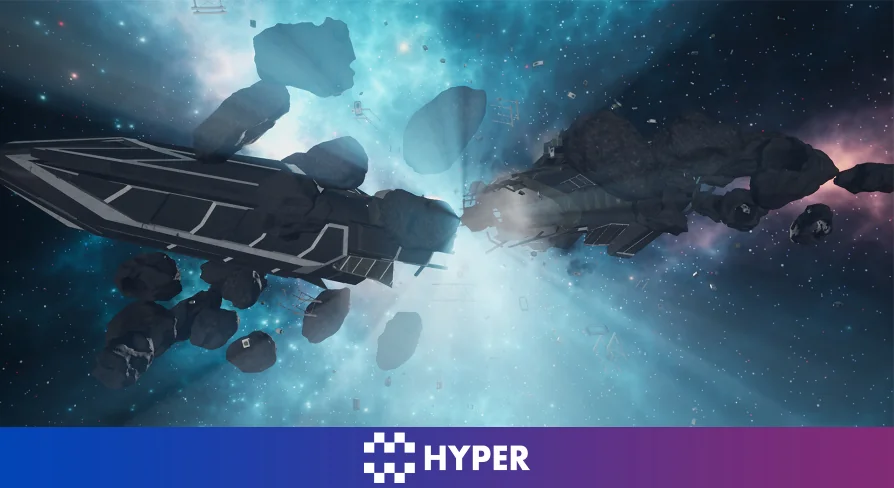
For derelict zones, battlefield remnants, and salvage grounds, the package incorporates a dedicated spaceship graveyard setup. This includes broken spaceship meshes alongside an automated props spawner. The spawner distributes wreckage and debris throughout a designated radius, significantly reducing the manual workload required to dress a catastrophic battle site. Rather than hand-placing dozens of shattered hull segments, developers can configure the spawner to generate natural drift patterns and varied salvage points, pairing broken hulls with drifting asteroid clusters and dense space mist to evoke an authentic aftermath.
Modular Architecture and Hyper Template Compatibility
Built under the development philosophy of Hyper, the technical organization behind Space Scenes emphasizes modularity and code clarity. The architecture relies on segmented functionality, placing modules logically across the project hierarchy so creators can integrate specific assets without dragging unnecessary overhead into their master branch. This structured approach avoids chaotic blueprints and tangled dependency networks, giving teams direct access to individual meshes, materials, and spawners.
The asset package is built to satisfy key non-functional engineering requirements, specifically maintainability, scalability, usability, flexibility, and runtime performance. Because it adheres to Hyper's standardized Unreal Engine ecosystem, Space Scenes integrates cleanly with the Hyper Multiplayer Survival Template Pro [MST] V4 framework. Teams developing multiplayer survival or crafting games can drop these cosmic vistas directly into their server-authoritative setups, relying on clean structural logic that does not conflict with underlying gameplay loops.
Documentation, Testing, and Developer Support
Implementation is backed by an assortment of support resources designed to eliminate integration friction. Developers have access to an online demo, video demonstrations, and written reviews that showcase asset behavior and real-time performance before deployment. The included quickstart guide and documentation outline exact configuration steps for the asteroid spawners, configurable planet materials, and animated stations.
For teams seeking deeper architectural familiarity, community support is available through Discord, alongside creator-led courses covering foundational Unreal Engine 5 development and the architecture of extensive multiplayer survival frameworks. These resources clarify why specific structural decisions are made across the modules, providing developers with clear pathways to maintain, scale, and tailor their space environments throughout long-term production cycles.
 Sky & Space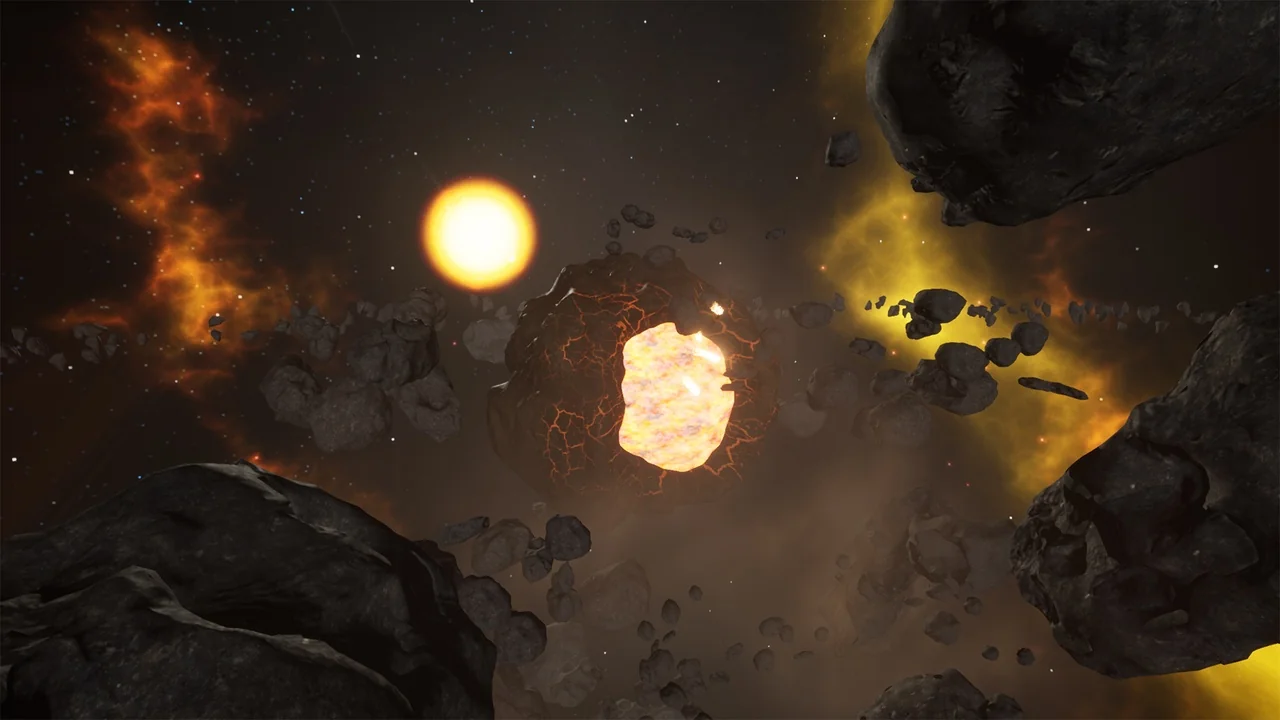
 Sky & Space
 Sky & Space
 Sky & Space