"7066dd76da796369"{"id":"1000136","slug":"shadersource-tropical-ocean-tool","title":"SHADERSOURCE - Tropical Ocean Tool","category":"Ocean","engine":"4.26+,5.0+","assetVersion":"","engineVersion":"Engine Version: 4.26+,5.0+","tag":"Ocean","accent":"blue","visual":"mech","summary":"A Tropical Ocean Blueprint for Unreal Engine scenes with shoreline waves, spline-based island tracing, caustics, underwater effects, and simple setup.","platform":"Unreal Engine","publishedAt":"2026-06-12T07:50:40.444Z","updatedAt":"2026-06-12T07:50:40.444Z","sourceNotes":[],"fileContents":[],"compatibility":["Unreal Engine","Engine Version: 4.26+,5.0+"],"featuredImage":{"alt":"SHADERSOURCE - Tropical Ocean Tool","src":"/wp-content/uploads/published/2026/06/e3b62e14a2f4-a7203325-e897-4532-86c2-14e3ee1fd7b8-d0a112e247.webp"},"hasDownloadLink":true,"downloads":0,"terms":[{"taxonomy":"category","slug":"ocean","name":"Ocean"}],"galleryImages":[{"src":"/wp-content/uploads/published/2026/06/47e905357bb5-c3b3e1d7-b72e-4223-8175-cc3d36de36cf-c943b3d0d8.webp","alt":"SHADERSOURCE - Tropical Ocean Tool"},{"src":"/wp-content/uploads/published/2026/06/2cd8580cc719-53c393e2-f91c-482a-83b8-287803121aea-a7d6f5ed57.webp","alt":"SHADERSOURCE - Tropical Ocean Tool"},{"src":"/wp-content/uploads/published/2026/06/503e58b68922-28a1d1f8-6f63-4890-8cac-23bc1f2b7a61-c194825543.webp","alt":"SHADERSOURCE - Tropical Ocean Tool"},{"src":"/wp-content/uploads/published/2026/06/221a130d213e-bd1338fd-14bf-4465-9c77-e8e2477493f2-cd2058ed59.webp","alt":"SHADERSOURCE - Tropical Ocean Tool"},{"src":"/wp-content/uploads/published/2026/06/b282af441718-50a863de-f1a2-4372-8ea7-8a28e23a0efc-c9a14488f4.webp","alt":"SHADERSOURCE - Tropical Ocean Tool"},{"src":"/wp-content/uploads/published/2026/06/f6050e98a86b-10460440-4d55-4eaf-93c1-c8b253ff0a3a-bde7166fba.webp","alt":"SHADERSOURCE - Tropical Ocean Tool"},{"src":"/wp-content/uploads/published/2026/06/f75c22624e0a-f48a66b1-0b2a-42af-90c4-229c344f4723-a79ee0c976.webp","alt":"SHADERSOURCE - Tropical Ocean Tool"},{"src":"/wp-content/uploads/published/2026/06/f5c361295860-6810fcc8-80e3-40d0-aee1-959891ac6c7f-7f76b8c45b.webp","alt":"SHADERSOURCE - Tropical Ocean Tool"},{"src":"/wp-content/uploads/published/2026/06/10333ede6239-94d23d1b-8e6e-4b61-b9ca-18bc06ea220e-ef8808d6d3.webp","alt":"SHADERSOURCE - Tropical Ocean Tool"},{"src":"/wp-content/uploads/published/2026/06/aedcf3cc54ec-019d6dbf-348a-4b07-bf63-e59f9a5e4744-89f323b8a9.webp","alt":"SHADERSOURCE - Tropical Ocean Tool"}],"accessPanel":{"kind":"resource","title":"Download this resource","eyebrow":"Free Download","message":"Log in or create a free account to start your download.","fileName":"Content.7z","safetyNote":"Resources are manually reviewed before listing to improve quality and reduce obvious risks.","actionLabel":"Download Free","resourceType":"Resource archive"},"contentHtml":"\u003cp\u003eBeach environments usually fall apart when the water feels detached from the land. SHADERSOURCE - Tropical Ocean Tool aims directly at that problem with a Tropical Ocean Blueprint shaped by crashing waves that flow up onto the shoreline. Instead of treating the ocean as a flat backdrop, it pushes the water toward the sand and around islands, which gives tropical scenes, beach fronts, and shoreline spaces a more active edge.\u003c/p\u003e\u003cp\u003eThe tool also layers in caustics, simple water motion, and underwater effects. That combination keeps the focus on a complete coastal presentation rather than a surface shader alone. In practice, it supports scenes where the water needs to read from above the surface and from below it, while still remaining easy to place and adjust inside the level.\u003c/p\u003e\u003cp\u003eThis was presented as a Monthly Unreal Engine Sponsored Content product for April 2020, and its setup is framed in a straightforward way. The core workflow starts with placing the BP_WaterShader into the level and scaling it to the size needed for the scene. From there, wave spawning can be toggled, islands can be added, and spline tracing can be used to shape how the shoreline interaction behaves.\u003c/p\u003e\u003ch2\u003eTropical Ocean shoreline behavior instead of static water\u003c/h2\u003e\u003cp\u003eThe strongest identity of this tool is the way it handles the beach line. The waves are not described as distant ocean swells or a general-purpose water material. They are crashing waves that move up onto the shoreline, which makes the asset most relevant for coastal spaces where the meeting point between land and water needs visible motion.\u003c/p\u003e\u003cp\u003eThat emphasis changes how the tool fits into environment work. A tropical island scene, a sandy beach stretch, or a stone-lined coast can use the shader to create movement where players and cameras are likely to linger. The tags attached to it reinforce that focus: underwater, stone, beach, water, realistic, wave, ocean, tool, island, spline, and sand. Those words point toward a specific type of environment rather than a broad water solution for every kind of map.\u003c/p\u003e\u003cp\u003eCaustics and underwater post-processing effects extend that scene role. Caustics help support the look of sunlit water interaction, while underwater effects give the tool relevance when the camera passes below the surface. Even without a long technical breakdown, the combination suggests a resource that is meant to make the shoreline and nearshore zone feel alive from multiple viewpoints.\u003c/p\u003e\u003ch2\u003eBP_WaterShader setup in the level\u003c/h2\u003e\u003cp\u003eThe setup process is intentionally direct. The BP_WaterShader is dropped into the level and then scaled to the desired size. This is relevant because it keeps the first step focused on scene layout rather than on a complicated construction process. The ocean area can be matched to the space being built, whether the beach is compact or spread across a wider shoreline.\u003c/p\u003e\u003cp\u003eOnce the blueprint is placed, the next stage is about enabling and shaping wave behavior. The spawning waves feature can be toggled, which gives control over whether that animated shoreline effect is active. This is a practical detail for scene iteration. A creator can place the water, judge the composition, and then switch wave spawning as needed while refining the environment.\u003c/p\u003e\u003cp\u003eThe wording around use stays simple on purpose: place the blueprint, scale it, add islands, trace islands with splines, and watch the beach come to life with waves. That sequence gives a clear picture of how the resource is meant to be implemented. It is not framed as a deeply code-heavy setup. The workflow is visual and scene-facing, with the spline system acting as the main way to direct how the water interacts with landforms.\u003c/p\u003e\u003ch2\u003eSpline tracing for islands and wave direction\u003c/h2\u003e\u003cp\u003eThe spline system is where the Tropical Ocean Tool becomes more than a drop-in surface. Waves can be toggled on and off with an easy spline system used to trace beaches and determine the direction of waves. That detail is important because shoreline water rarely looks convincing if the motion ignores the shape of the coast. By tracing the beach, the creator can align the wave behavior with the actual contours of the environment.\u003c/p\u003e\u003cp\u003eThe tool also supports automatic tracing of islands with splines. For island-heavy scenes, that can keep the workflow focused on arranging the landforms and then letting the shoreline logic follow them. The mention of automatic tracing suggests a faster path for setting up water interaction around island shapes, especially when compared with handling each area as a fully manual task.\u003c/p\u003e\u003cp\u003eThere is also an option to add a new wave spawner spline that can be modified manually. That keeps the tool flexible. Automatic tracing can cover one side of the workflow, but manual adjustment remains available when a scene needs something more specific. If a shoreline has unusual contours, or if a creator wants to adjust where waves originate and how they travel, the new wave spawner spline provides that direct intervention.\u003c/p\u003e\u003cp\u003eBetween beach tracing, wave direction control, automatic island tracing, and manually modifiable wave spawner splines, the implementation stays focused on shaping motion around geography. The resource is not only about making water visible. It is about making the coast read correctly through controlled wave behavior.\u003c/p\u003e\u003ch2\u003eCaustics, simple water motion, and underwater effects\u003c/h2\u003e\u003cp\u003eVisually, the tool is defined by a small but focused set of effects. It includes caustics, simple water motion, and underwater effects, with underwater post-processing effects called out alongside the caustics. Those details establish the look of the asset without overreaching into claims that are not stated.\u003c/p\u003e\u003cp\u003eSimple water motion suggests the surface is not static even outside the crashing wave behavior. Caustics help sell the light response associated with clear tropical water. Underwater post-processing effects extend the scene below the surface, which matters in projects where the camera may dip underwater or where the waterline needs to feel coherent from different angles.\u003c/p\u003e\u003cp\u003eTaken together, these elements make the tool suitable for scenes that want a readable tropical shoreline mood. The tags around realistic, ocean, sand, beach, and underwater all point in the same direction. This is not framed as stylized water or a generic liquid setup. It sits closer to a natural coastal presentation with a particular emphasis on islands and beaches.\u003c/p\u003e\u003ch2\u003eGenerate Mesh Distance Fields is not optional for correct display\u003c/h2\u003e\u003cp\u003eOne setup note stands out because it affects whether the shader displays correctly at all: \u003cem\u003eGenerate Mesh Distance Fields\u003c/em\u003e Needs to be enabled under Lighting within Project Settings and then Render Settings. Without that setting turned on, the water shader will not display correctly.\u003c/p\u003e\u003cp\u003eThat requirement is a practical part of implementation, not a minor footnote. Anyone placing the BP_WaterShader and expecting the ocean effect to appear properly needs that project configuration in place first. Since the rest of the workflow is intentionally easy to follow, this setting becomes one of the most important checks before evaluating the result in the level.\u003c/p\u003e\u003cp\u003eThere is also a playable demo, documentation, and a changelog associated with the tool. Those elements indicate that the resource is supported with material beyond the blueprint itself, although the key immediate requirement remains the project setting for mesh distance fields.\u003c/p\u003e\u003ch2\u003eWhere SHADERSOURCE - Tropical Ocean Tool fits best\u003c/h2\u003e\u003cp\u003eThis tool makes the most sense in projects that need the shoreline to do visible work. If the scene calls for islands, sandy beaches, stone coasts, underwater views, or a more active ocean edge, the combination of shoreline waves, splines, caustics, and underwater effects speaks directly to that need. The workflow stays focused on placement and shaping rather than on abstract configuration: add the water blueprint, scale it, trace the coast, control wave spawning, and refine the wave path with splines.\u003c/p\u003e\u003cp\u003eFor creators building tropical or beach-centered environments in Unreal Engine, its value is clearest when land and water need to interact in a readable way. The final check is straightforward: if the project needs waves flowing onto the shoreline and around traced islands, and if mesh distance fields are enabled so the shader displays correctly, this is the kind of water tool that matches that job closely.\u003c/p\u003e\n\n\u003ch2\u003eExplore Similar Assets\u003c/h2\u003e\n\u003cul\u003e\n\u003cli\u003e\u003ca href=\"https://3dcghub.com/shader-world-plugin-procedural-terrain-oceans-foliage-gpu-accelerated/\" title=\"Shader World Plugin : Procedural Terrain, Oceans, Foliage, GPU-accelerated\"\u003eShader World Plugin : Procedural Terrain, Oceans, Foliage, GPU-accelerated\u003c/a\u003e\u003c/li\u003e\n\u003cli\u003e\u003ca href=\"https://3dcghub.com/tropical-village/\" title=\"Tropical Village\"\u003eTropical Village\u003c/a\u003e\u003c/li\u003e\n\u003cli\u003e\u003ca href=\"https://3dcghub.com/abandoned-hut-in-tropical-island-survival-abandoned-tropicall-island-jungle/\" title=\"Abandoned Hut in Tropical Island ( Survival Abandoned Tropicall Island Jungle )\"\u003eAbandoned Hut in Tropical Island ( Survival Abandoned Tropicall Island Jungle )\u003c/a\u003e\u003c/li\u003e\n\u003cli\u003e\u003ca href=\"https://3dcghub.com/shadersource-procedural-water-foliage-tool/\" title=\"SHADERSOURCE - Procedural Water Foliage Tool\"\u003eSHADERSOURCE - Procedural Water Foliage Tool\u003c/a\u003e\u003c/li\u003e\n\u003cli\u003e\u003ca href=\"https://3dcghub.com/tropical-house-plants/\" title=\"Tropical House Plants\"\u003eTropical House Plants\u003c/a\u003e\u003c/li\u003e\n\u003c/ul\u003e","contentTextLength":8620,"navigation":{"current":2031,"total":4016,"previous":{"id":"1000137","slug":"side-scroller-shooter-kit-v1-1","title":"Side Scroller Shooter Kit v1.1","category":"Shooter","platform":"Unreal Engine","updatedAt":"2026-06-12T08:11:24.509Z"},"next":{"id":"1000135","slug":"rpg-monster-wave-2-polyart","title":"RPG Monster Wave 2 Polyart","category":"Creatures","platform":"Unity","updatedAt":"2026-06-12T07:35:29.720Z"}},"relatedResources":[{"id":"8092","slug":"abandoned-hut-in-tropical-island-survival-abandoned-tropicall-island-jungle","title":"Abandoned Hut in Tropical Island ( Survival Abandoned Tropicall Island Jungle )","category":"Forest \u0026 Jungle","engine":"4.27,5.0+","assetVersion":"Engine version: 4.27,5.0+","engineVersion":"5.0","tag":"Forest \u0026 Jungle","accent":"blue","visual":"city","summary":"Create immersive survival environments with this detailed abandoned hut pack. Featuring a unique backstory and modular tools, it is perfect for post-apocalyptic tropical settings.","platform":"Unreal Engine","publishedAt":"2026-02-22T16:52:15.000Z","updatedAt":"2026-04-19T15:55:34.000Z","sourceNotes":[],"fileContents":[],"compatibility":["Unreal Engine","Engine version: 4.27,5.0+"],"featuredImage":{"alt":"Abandoned Hut in Tropical Island ( Survival Abandoned Tropicall Island Jungle )","src":"https://3dcghub.com/wp-content/uploads/2026/02/dc585e7a-f072-4a9e-b2c8-267f737f5299.webp"},"hasDownloadLink":true,"downloads":0},{"id":"11554","slug":"shadersource-procedural-water-foliage-tool","title":"SHADERSOURCE - Procedural Water Foliage Tool","category":"Procedural Systems","engine":"4.27,5.0+","assetVersion":"Engine version: 4.27,5.0+","engineVersion":"4.19","tag":"Procedural Systems","accent":"blue","visual":"character","summary":"Streamline your environment design with the SHADERSOURCE - Procedural Water Foliage Tool. This asset pack provides automated blueprints and PBR materials for realistic aquatic scenes.","platform":"Unreal Engine","publishedAt":"2026-03-05T17:47:13.000Z","updatedAt":"2026-04-19T15:48:10.000Z","sourceNotes":[],"fileContents":[],"compatibility":["Unreal Engine","Engine version: 4.27,5.0+"],"featuredImage":{"alt":"SHADERSOURCE - Procedural Water Foliage Tool","src":"https://3dcghub.com/wp-content/uploads/2026/03/942d40d2-4f9c-4d28-bb9a-6eca0ba332ae.webp"},"hasDownloadLink":true,"downloads":0},{"id":"14579","slug":"shader-world-plugin-procedural-terrain-oceans-foliage-gpu-accelerated","title":"Shader World Plugin : Procedural Terrain, Oceans, Foliage, GPU-accelerated","category":"Engine Tools","engine":"4.27,5.0 - 5.4","assetVersion":"Engine version: 4.27,5.0 - 5.4","engineVersion":"4.26","tag":"Engine Tools","accent":"blue","visual":"character","summary":"Shader World Plugin offers a high-performance alternative to native Unreal Engine landscapes, utilizing GPU acceleration for real-time world generation. It supports massive scales and is fully editable within packaged games.","platform":"Unreal Engine","publishedAt":"2026-03-11T18:34:57.000Z","updatedAt":"2026-04-19T15:45:44.000Z","sourceNotes":[],"fileContents":[],"compatibility":["Unreal Engine","Engine version: 4.27,5.0 - 5.4"],"featuredImage":{"alt":"Shader World Plugin : Procedural Terrain, Oceans, Foliage, GPU-accelerated","src":"https://3dcghub.com/wp-content/uploads/2026/03/0922900f-bc2e-416c-a177-0cef84bcdbc8.webp"},"hasDownloadLink":true,"downloads":0}]}
Ocean
SHADERSOURCE - Tropical Ocean Tool
A Tropical Ocean Blueprint for Unreal Engine scenes with shoreline waves, spline-based island tracing, caustics, underwater effects, and simple setup.
Category:Unreal Engine,OceanPlatform: Unreal EngineEngine Version: 4.26+,5.0+Published: Jun 12, 2026
Ocean
Resource overview
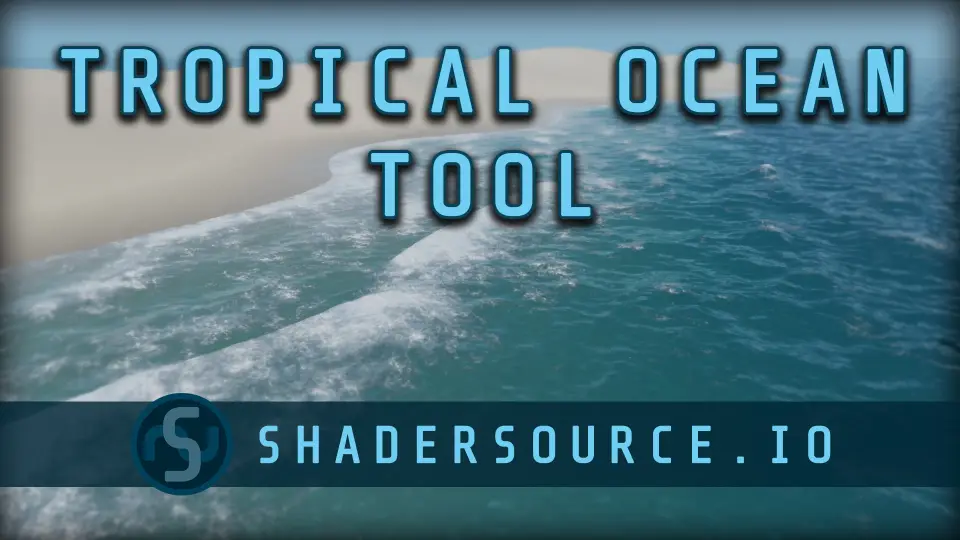
Beach environments usually fall apart when the water feels detached from the land. SHADERSOURCE - Tropical Ocean Tool aims directly at that problem with a Tropical Ocean Blueprint shaped by crashing waves that flow up onto the shoreline. Instead of treating the ocean as a flat backdrop, it pushes the water toward the sand and around islands, which gives tropical scenes, beach fronts, and shoreline spaces a more active edge.
The tool also layers in caustics, simple water motion, and underwater effects. That combination keeps the focus on a complete coastal presentation rather than a surface shader alone. In practice, it supports scenes where the water needs to read from above the surface and from below it, while still remaining easy to place and adjust inside the level.
This was presented as a Monthly Unreal Engine Sponsored Content product for April 2020, and its setup is framed in a straightforward way. The core workflow starts with placing the BP_WaterShader into the level and scaling it to the size needed for the scene. From there, wave spawning can be toggled, islands can be added, and spline tracing can be used to shape how the shoreline interaction behaves.
Tropical Ocean shoreline behavior instead of static water
The strongest identity of this tool is the way it handles the beach line. The waves are not described as distant ocean swells or a general-purpose water material. They are crashing waves that move up onto the shoreline, which makes the asset most relevant for coastal spaces where the meeting point between land and water needs visible motion.
That emphasis changes how the tool fits into environment work. A tropical island scene, a sandy beach stretch, or a stone-lined coast can use the shader to create movement where players and cameras are likely to linger. The tags attached to it reinforce that focus: underwater, stone, beach, water, realistic, wave, ocean, tool, island, spline, and sand. Those words point toward a specific type of environment rather than a broad water solution for every kind of map.
Caustics and underwater post-processing effects extend that scene role. Caustics help support the look of sunlit water interaction, while underwater effects give the tool relevance when the camera passes below the surface. Even without a long technical breakdown, the combination suggests a resource that is meant to make the shoreline and nearshore zone feel alive from multiple viewpoints.
BP_WaterShader setup in the level
The setup process is intentionally direct. The BP_WaterShader is dropped into the level and then scaled to the desired size. This is relevant because it keeps the first step focused on scene layout rather than on a complicated construction process. The ocean area can be matched to the space being built, whether the beach is compact or spread across a wider shoreline.
Once the blueprint is placed, the next stage is about enabling and shaping wave behavior. The spawning waves feature can be toggled, which gives control over whether that animated shoreline effect is active. This is a practical detail for scene iteration. A creator can place the water, judge the composition, and then switch wave spawning as needed while refining the environment.
The wording around use stays simple on purpose: place the blueprint, scale it, add islands, trace islands with splines, and watch the beach come to life with waves. That sequence gives a clear picture of how the resource is meant to be implemented. It is not framed as a deeply code-heavy setup. The workflow is visual and scene-facing, with the spline system acting as the main way to direct how the water interacts with landforms.
Spline tracing for islands and wave direction
The spline system is where the Tropical Ocean Tool becomes more than a drop-in surface. Waves can be toggled on and off with an easy spline system used to trace beaches and determine the direction of waves. That detail is important because shoreline water rarely looks convincing if the motion ignores the shape of the coast. By tracing the beach, the creator can align the wave behavior with the actual contours of the environment.
The tool also supports automatic tracing of islands with splines. For island-heavy scenes, that can keep the workflow focused on arranging the landforms and then letting the shoreline logic follow them. The mention of automatic tracing suggests a faster path for setting up water interaction around island shapes, especially when compared with handling each area as a fully manual task.
There is also an option to add a new wave spawner spline that can be modified manually. That keeps the tool flexible. Automatic tracing can cover one side of the workflow, but manual adjustment remains available when a scene needs something more specific. If a shoreline has unusual contours, or if a creator wants to adjust where waves originate and how they travel, the new wave spawner spline provides that direct intervention.
Between beach tracing, wave direction control, automatic island tracing, and manually modifiable wave spawner splines, the implementation stays focused on shaping motion around geography. The resource is not only about making water visible. It is about making the coast read correctly through controlled wave behavior.
Caustics, simple water motion, and underwater effects
Visually, the tool is defined by a small but focused set of effects. It includes caustics, simple water motion, and underwater effects, with underwater post-processing effects called out alongside the caustics. Those details establish the look of the asset without overreaching into claims that are not stated.
Simple water motion suggests the surface is not static even outside the crashing wave behavior. Caustics help sell the light response associated with clear tropical water. Underwater post-processing effects extend the scene below the surface, which matters in projects where the camera may dip underwater or where the waterline needs to feel coherent from different angles.
Taken together, these elements make the tool suitable for scenes that want a readable tropical shoreline mood. The tags around realistic, ocean, sand, beach, and underwater all point in the same direction. This is not framed as stylized water or a generic liquid setup. It sits closer to a natural coastal presentation with a particular emphasis on islands and beaches.
Generate Mesh Distance Fields is not optional for correct display
One setup note stands out because it affects whether the shader displays correctly at all: Generate Mesh Distance Fields Needs to be enabled under Lighting within Project Settings and then Render Settings. Without that setting turned on, the water shader will not display correctly.
That requirement is a practical part of implementation, not a minor footnote. Anyone placing the BP_WaterShader and expecting the ocean effect to appear properly needs that project configuration in place first. Since the rest of the workflow is intentionally easy to follow, this setting becomes one of the most important checks before evaluating the result in the level.
There is also a playable demo, documentation, and a changelog associated with the tool. Those elements indicate that the resource is supported with material beyond the blueprint itself, although the key immediate requirement remains the project setting for mesh distance fields.
Where SHADERSOURCE - Tropical Ocean Tool fits best
This tool makes the most sense in projects that need the shoreline to do visible work. If the scene calls for islands, sandy beaches, stone coasts, underwater views, or a more active ocean edge, the combination of shoreline waves, splines, caustics, and underwater effects speaks directly to that need. The workflow stays focused on placement and shaping rather than on abstract configuration: add the water blueprint, scale it, trace the coast, control wave spawning, and refine the wave path with splines.
For creators building tropical or beach-centered environments in Unreal Engine, its value is clearest when land and water need to interact in a readable way. The final check is straightforward: if the project needs waves flowing onto the shoreline and around traced islands, and if mesh distance fields are enabled so the shader displays correctly, this is the kind of water tool that matches that job closely.
 Ocean
Ocean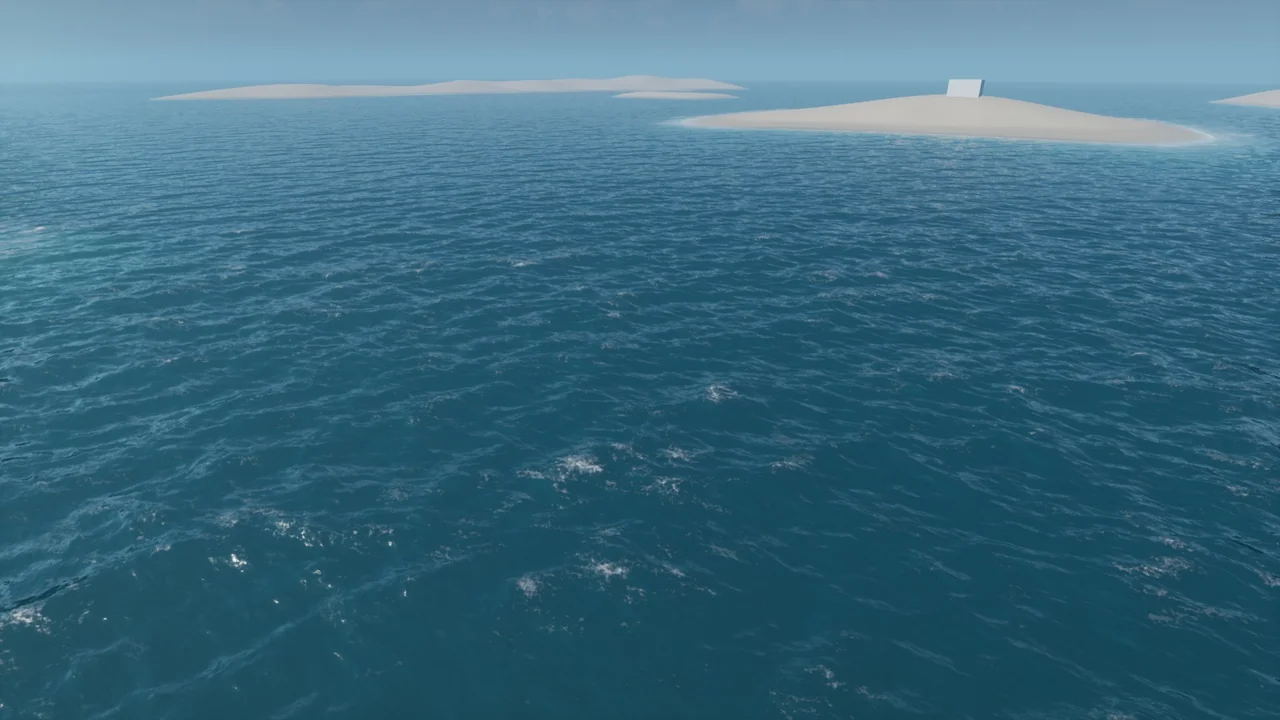
 Forest & Jungle
 Procedural Systems
 Engine Tools