"efaa631e936fd3ee"{"id":"1002184","slug":"runtime-gizmo-transform-tool","title":"Runtime Gizmo (Transform Tool)","category":"Gameplay Features","engine":"5.2+","assetVersion":"","engineVersion":"Engine Version: 5.2+","tag":"Gameplay Features","accent":"blue","visual":"mech","summary":"Add runtime transform gizmos to static mesh actors in Unreal Engine. Control location, rotation, and scale in PIE, standalone, and shipping builds.","platform":"Unreal Engine","publishedAt":"2026-10-29T14:25:28.511Z","updatedAt":"2026-10-29T14:25:28.511Z","sourceNotes":[],"fileContents":[],"compatibility":["Unreal Engine","Engine Version: 5.2+"],"featuredImage":{"alt":"Runtime Gizmo (Transform Tool)","src":"/wp-content/uploads/published/2026/10/3b0cebedcd2c-9b70053c-85c7-4206-add3-4e0f6a0291e6-543fea1641.webp"},"hasDownloadLink":true,"downloads":0,"terms":[{"taxonomy":"category","slug":"gameplay-features","name":"Gameplay Features"}],"galleryImages":[{"src":"/wp-content/uploads/published/2026/10/41216646603d-52804b37-5732-4f88-bbcc-fb78691622c5-ebaab7252f.webp","alt":"Runtime Gizmo (Transform Tool)"},{"src":"/wp-content/uploads/published/2026/10/ff3b0d1fba47-ef86f396-f7fe-4282-9ea1-7017ea0e8d1f-d672cb7f82.webp","alt":"Runtime Gizmo (Transform Tool)"},{"src":"/wp-content/uploads/published/2026/10/3cb22badc872-ad71f7e9-e34c-417f-b9d2-ecdea4d085c8-1fb70f2d61.webp","alt":"Runtime Gizmo (Transform Tool)"},{"src":"/wp-content/uploads/published/2026/10/99445c9f1b23-164deba9-68da-4296-b36e-580dc4998982-04aca34624.webp","alt":"Runtime Gizmo (Transform Tool)"}],"accessPanel":{"kind":"resource","title":"Download this resource","eyebrow":"Free Download","message":"Log in or create a free account to start your download.","fileName":"Content.7z","safetyNote":"Resources are manually reviewed before listing to improve quality and reduce obvious risks.","actionLabel":"Download Free","resourceType":"Resource archive"},"contentHtml":"\u003cp\u003eManipulating assets inside an active Unreal Engine session requires a direct, tactile interface that translates cursor movement into accurate 3D spatial adjustments. Runtime Gizmo (Transform Tool) supplies that interaction layer by rendering visual transform widgets over static mesh actors during live execution. Rather than requiring users or players to type coordinates into UI fields, the system provides on-screen handles that mirror the familiar manipulation workflows found in standard digital content creation suites.\u003c/p\u003e \u003ch2\u003eDirecting Location, Rotation, and Scale Through Mouse Interaction\u003c/h2\u003e\n\u003cp\u003eThe core capability of the tool centers on three-axis spatial modification applied directly to static mesh actors. Users can select an object in the scene and immediately alter its location, rotation, and scale using intuitive mouse dragging. The visual styling and interactive response closely match the native gizmos available in the Unreal Engine viewport, which lowers the learning curve for anyone already accustomed to working in 3D development environments.\u003c/p\u003e\n\u003cp\u003eBy translating screen-space mouse input into world-space adjustments, the tool handles coordinate updates smoothly. Translation handles allow precise dragging along designated axes, rotation rings facilitate angular adjustments, and scale handles allow proportional or axial resizing. These transforms update the target actor in real time, giving immediate visual feedback as meshes are moved across the environment.\u003c/p\u003e \u003ch2\u003eIndependent Blueprint Architecture Free from Editor Code\u003c/h2\u003e\n\u003cp\u003eA frequent challenge when implementing transform handles inside runtime projects is the engine's strict separation between runtime modules and editor-only code. Native Unreal editor gizmos rely on internal editor libraries that cannot be compiled into packaged game clients. Runtime Gizmo (Transform Tool) resolves this limitation by operating completely independently of editor code, relying strictly on a pure Blueprint implementation.\u003c/p\u003e\n\u003cp\u003eBecause the logic is constructed entirely within Blueprints without third-party asset dependencies or external code libraries, integrating the asset into existing project structures remains simple. The underlying mechanics function identically across multiple operational modes:\u003c/p\u003e\n\u003cul\u003e\n\u003cli\u003ePlay in Editor (PIE) testing sessions\u003c/li\u003e\n\u003cli\u003eStandalone game sessions run outside the main editor process\u003c/li\u003e\n\u003cli\u003eFully compiled and packaged shipping distributions\u003c/li\u003e\n\u003c/ul\u003e\n\u003cp\u003eThe system is also compatible alongside existing multiplayer and interactive frameworks, including implementations utilizing Dynamic Voice Chat System (VoIP), ensuring that spatial manipulation tools can coexist with communication pipelines without conflicts.\u003c/p\u003e \u003ch2\u003eTransform Controls for Player Housing and Customization Systems\u003c/h2\u003e\n\u003cp\u003ePlayer-driven world modification relies heavily on intuitive placement systems. In games featuring housing mechanics, base building, or room decoration, giving players granular control over their surroundings elevates the customization experience. Runtime Gizmo (Transform Tool) provides the practical scaffolding required to let players arrange furniture, props, and structural decorations exactly as they envision.\u003c/p\u003e\n\u003cp\u003eInstead of locking items to coarse tile grids or restricting placement to predefined snap points, developers can enable full spatial editing. Players can rotate an item to rest flush against an angled wall, slide decorative objects across surfaces with fine adjustments, or resize specific props to fit within constrained spaces. Because the interaction takes place through direct mouse manipulation, the placement feels immediate and tactile rather than abstract.\u003c/p\u003e \u003ch2\u003ePowering Runtime Map Editors and In-Game Modding Tools\u003c/h2\u003e\n\u003cp\u003eAllowing a community to build custom levels or alter environments directly inside a title demands accessible tools that do not require opening the full engine suite. Integrating runtime gizmos forms the foundational interaction loop of in-game level builders, sandbox creation modes, and modding interfaces.\u003c/p\u003e\n\u003cp\u003eWithin a runtime map editor, level designers and players can spawn static mesh components and position them freely across the scene. The ability to manipulate location, orientation, and dimensions dynamically enables rapid prototyping of game spaces, obstacle courses, or combat arenas. Because the tool operates cleanly inside shipping builds, creators can distribute fully functional level-editing toolsets directly to end users without exposing proprietary project source code or relying on external development environments.\u003c/p\u003e \u003ch2\u003eEnvironment Iteration for Packaged ArchViz Projects\u003c/h2\u003e\n\u003cp\u003eArchitectural visualization workflows frequently require real-time collaboration with clients who may not possess technical knowledge of 3D modeling packages or game engine interfaces. When presenting architectural models, commercial spaces, or residential layouts inside a packaged executable, the ability to alter the environment on the fly proves invaluable.\u003c/p\u003e\n\u003cp\u003eUsing Runtime Gizmo (Transform Tool), visualizers can grant clients and stakeholders direct agency over interior configurations during a live walkthrough. Furniture sets can be shifted to evaluate walking paths, fixtures can be rotated to review lighting angles, and structural static meshes can be resized to visualize alternative spatial dimensions. By executing these modifications inside shipping builds without requiring a return to the editor to recompile the scene, design reviews become fluid, interactive design sessions.\u003c/p\u003e\n\n\u003ch2\u003eRelated Resources Worth Checking\u003c/h2\u003e\n\u003cul\u003e\n\u003cli\u003e\u003ca href=\"https://3dcghub.com/path-tracer-toolkit/\" title=\"Path Tracer Toolkit\"\u003ePath Tracer Toolkit\u003c/a\u003e\u003c/li\u003e\n\u003cli\u003e\u003ca href=\"https://3dcghub.com/battle-royale-zone-with-minimap/\" title=\"Battle Royale Zone With Minimap\"\u003eBattle Royale Zone With Minimap\u003c/a\u003e\u003c/li\u003e\n\u003cli\u003e\u003ca href=\"https://3dcghub.com/modular-limb-damage-system/\" title=\"Modular Limb Damage System\"\u003eModular Limb Damage System\u003c/a\u003e\u003c/li\u003e\n\u003cli\u003e\u003ca href=\"https://3dcghub.com/flex-pool-actor-pooling-system/\" title=\"Flex Pool - Actor Pooling System\"\u003eFlex Pool - Actor Pooling System\u003c/a\u003e\u003c/li\u003e\n\u003cli\u003e\u003ca href=\"https://3dcghub.com/significance-optimizer-game-thread-cpu-optimization/\" title=\"Significance Optimizer - Game Thread/CPU Optimization\"\u003eSignificance Optimizer - Game Thread/CPU Optimization\u003c/a\u003e\u003c/li\u003e\n\u003c/ul\u003e","contentTextLength":5639,"navigation":{"current":101,"total":4209,"previous":{"id":"1002185","slug":"samantha-cyberpunk-girl","title":"Samantha - Cyberpunk girl","category":"Characters \u0026 Creatures","platform":"Unreal Engine","updatedAt":"2026-10-29T14:26:36.100Z"},"next":{"id":"1002183","slug":"runtime-datatable","title":"Runtime DataTable","category":"Engine Tools","platform":"Unreal Engine","updatedAt":"2026-10-29T14:24:23.892Z"}},"relatedResources":[{"id":"11043","slug":"path-tracer-toolkit","title":"Path Tracer Toolkit","category":"Gameplay Features","engine":"4.27,5.0+","assetVersion":"Engine version: 4.27,5.0+","engineVersion":"4.27","tag":"Gameplay Features","accent":"blue","visual":"city","summary":"The Path Tracer Toolkit provides a comprehensive Blueprint solution for generating paths and borders manually or via runtime point arrays. It includes advanced customization, procedural materials, and performance-optimizing texture baking.","platform":"Unreal Engine","publishedAt":"2026-03-03T16:47:08.000Z","updatedAt":"2026-04-19T15:49:51.000Z","sourceNotes":[],"fileContents":[],"compatibility":["Unreal Engine","Engine version: 4.27,5.0+"],"featuredImage":{"alt":"Path Tracer Toolkit","src":"https://3dcghub.com/wp-content/uploads/2026/03/fd42f630-b95d-4396-bf4a-af676428ed24.webp"},"hasDownloadLink":true,"downloads":1},{"id":"10577","slug":"battle-royale-zone-with-minimap","title":"Battle Royale Zone With Minimap","category":"Gameplay Features","engine":"4.27,5.0+","assetVersion":"Engine version: 4.27,5.0+","engineVersion":"4.23","tag":"Gameplay Features","accent":"blue","visual":"audio","summary":"Enhance your survival game with a Battle Royale Zone With Minimap system that tracks zone transitions and actor locations at runtime. This tool includes a configurable zone and an interactive overview map.","platform":"Unreal Engine","publishedAt":"2026-03-03T15:45:05.000Z","updatedAt":"2026-04-19T15:49:59.000Z","sourceNotes":[],"fileContents":[],"compatibility":["Unreal Engine","Engine version: 4.27,5.0+"],"featuredImage":{"alt":"Battle Royale Zone With Minimap","src":"https://3dcghub.com/wp-content/uploads/2026/03/17fb69dc-4ff9-487a-ba07-954a7ee7931e.webp"},"hasDownloadLink":true,"downloads":0},{"id":"1001105","slug":"modular-limb-damage-system","title":"Modular Limb Damage System","category":"Gameplay Features","engine":"5.7","assetVersion":"Asset Version: 1.0","engineVersion":"Engine Version: 5.7","tag":"Gameplay Features","accent":"blue","visual":"mech","summary":"C++-driven Unreal Engine 5 plugin for runtime limb damage with bone-based damage, per-limb health, partial/full destruction, physics-driven detachment, and repl","platform":"Unreal Engine","publishedAt":"2026-09-07T05:41:59.387Z","updatedAt":"2026-09-07T05:41:59.387Z","sourceNotes":[],"fileContents":[],"compatibility":["Unreal Engine","Asset Version: 1.0","Engine Version: 5.7"],"featuredImage":{"alt":"Modular Limb Damage System","src":"/wp-content/uploads/published/2026/09/3f6190758daa-041a1d38-6d71-4125-b85c-f2635d7c5f8e-96e662065b.webp"},"hasDownloadLink":true,"downloads":1}]}
Gameplay Features
Runtime Gizmo (Transform Tool)
Add runtime transform gizmos to static mesh actors in Unreal Engine. Control location, rotation, and scale in PIE, standalone, and shipping builds.
Manipulating assets inside an active Unreal Engine session requires a direct, tactile interface that translates cursor movement into accurate 3D spatial adjustments. Runtime Gizmo (Transform Tool) supplies that interaction layer by rendering visual transform widgets over static mesh actors during live execution. Rather than requiring users or players to type coordinates into UI fields, the system provides on-screen handles that mirror the familiar manipulation workflows found in standard digital content creation suites.
Directing Location, Rotation, and Scale Through Mouse Interaction
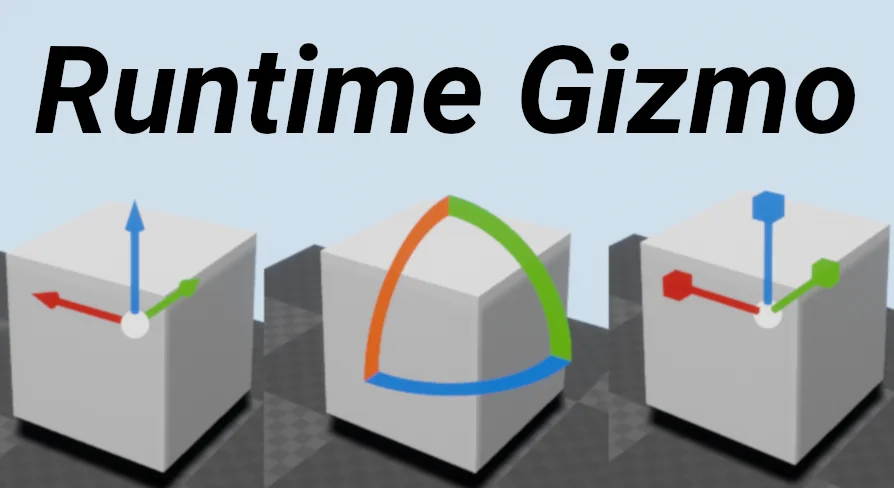
The core capability of the tool centers on three-axis spatial modification applied directly to static mesh actors. Users can select an object in the scene and immediately alter its location, rotation, and scale using intuitive mouse dragging. The visual styling and interactive response closely match the native gizmos available in the Unreal Engine viewport, which lowers the learning curve for anyone already accustomed to working in 3D development environments.
By translating screen-space mouse input into world-space adjustments, the tool handles coordinate updates smoothly. Translation handles allow precise dragging along designated axes, rotation rings facilitate angular adjustments, and scale handles allow proportional or axial resizing. These transforms update the target actor in real time, giving immediate visual feedback as meshes are moved across the environment.
Independent Blueprint Architecture Free from Editor Code
A frequent challenge when implementing transform handles inside runtime projects is the engine's strict separation between runtime modules and editor-only code. Native Unreal editor gizmos rely on internal editor libraries that cannot be compiled into packaged game clients. Runtime Gizmo (Transform Tool) resolves this limitation by operating completely independently of editor code, relying strictly on a pure Blueprint implementation.
Because the logic is constructed entirely within Blueprints without third-party asset dependencies or external code libraries, integrating the asset into existing project structures remains simple. The underlying mechanics function identically across multiple operational modes:
Play in Editor (PIE) testing sessions
Standalone game sessions run outside the main editor process
Fully compiled and packaged shipping distributions
The system is also compatible alongside existing multiplayer and interactive frameworks, including implementations utilizing Dynamic Voice Chat System (VoIP), ensuring that spatial manipulation tools can coexist with communication pipelines without conflicts.
Transform Controls for Player Housing and Customization Systems
Player-driven world modification relies heavily on intuitive placement systems. In games featuring housing mechanics, base building, or room decoration, giving players granular control over their surroundings elevates the customization experience. Runtime Gizmo (Transform Tool) provides the practical scaffolding required to let players arrange furniture, props, and structural decorations exactly as they envision.
Instead of locking items to coarse tile grids or restricting placement to predefined snap points, developers can enable full spatial editing. Players can rotate an item to rest flush against an angled wall, slide decorative objects across surfaces with fine adjustments, or resize specific props to fit within constrained spaces. Because the interaction takes place through direct mouse manipulation, the placement feels immediate and tactile rather than abstract.
Powering Runtime Map Editors and In-Game Modding Tools
Allowing a community to build custom levels or alter environments directly inside a title demands accessible tools that do not require opening the full engine suite. Integrating runtime gizmos forms the foundational interaction loop of in-game level builders, sandbox creation modes, and modding interfaces.
Within a runtime map editor, level designers and players can spawn static mesh components and position them freely across the scene. The ability to manipulate location, orientation, and dimensions dynamically enables rapid prototyping of game spaces, obstacle courses, or combat arenas. Because the tool operates cleanly inside shipping builds, creators can distribute fully functional level-editing toolsets directly to end users without exposing proprietary project source code or relying on external development environments.
Environment Iteration for Packaged ArchViz Projects
Architectural visualization workflows frequently require real-time collaboration with clients who may not possess technical knowledge of 3D modeling packages or game engine interfaces. When presenting architectural models, commercial spaces, or residential layouts inside a packaged executable, the ability to alter the environment on the fly proves invaluable.
Using Runtime Gizmo (Transform Tool), visualizers can grant clients and stakeholders direct agency over interior configurations during a live walkthrough. Furniture sets can be shifted to evaluate walking paths, fixtures can be rotated to review lighting angles, and structural static meshes can be resized to visualize alternative spatial dimensions. By executing these modifications inside shipping builds without requiring a return to the editor to recompile the scene, design reviews become fluid, interactive design sessions.
 Gameplay Features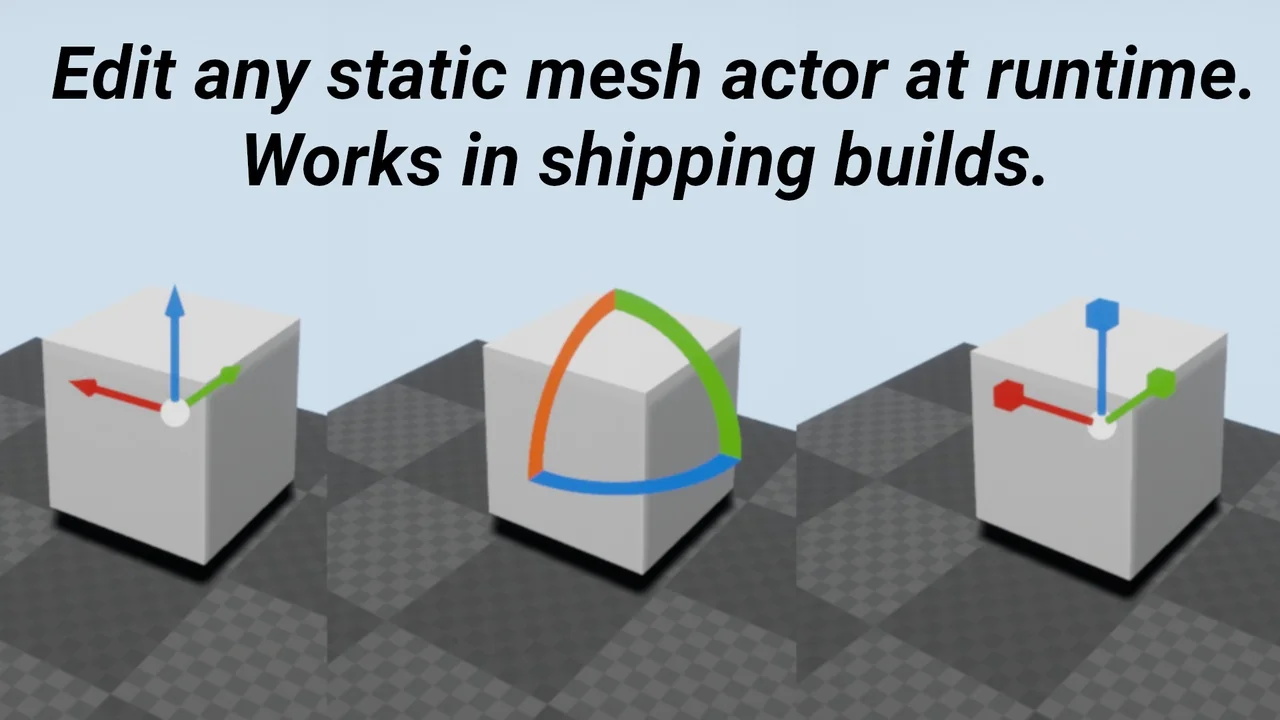
 Gameplay Features
 Gameplay Features
 Gameplay Features