"efaa631e936fd3ee"{"id":"1002183","slug":"runtime-datatable","title":"Runtime DataTable","category":"Engine Tools","engine":"5.4","assetVersion":"Asset Version: 5.4.2","engineVersion":"Engine Version: 5.4","tag":"Engine Tools","accent":"blue","visual":"mech","summary":"Load and export CSV files and Google Sheets directly at runtime into FStruct and UObject arrays inside Unreal Engine with Runtime DataTable.","platform":"Unreal Engine","publishedAt":"2026-10-29T14:24:23.892Z","updatedAt":"2026-10-29T14:24:23.892Z","sourceNotes":[],"fileContents":[],"compatibility":["Unreal Engine","Asset Version: 5.4.2","Engine Version: 5.4"],"featuredImage":{"alt":"Runtime DataTable","src":"/wp-content/uploads/published/2026/10/dfaa0450afb9-8d540243-d704-496f-98fa-afa60b1e66df-f67f8a141f.webp"},"hasDownloadLink":true,"downloads":0,"terms":[{"taxonomy":"category","slug":"engine-tools-tools-and-plugins","name":"Engine Tools"}],"galleryImages":[{"src":"/wp-content/uploads/published/2026/10/21766a9a52ba-90e712c1-19bb-4c07-ab27-25c4fef36013-7464438432.webp","alt":"Runtime DataTable"},{"src":"/wp-content/uploads/published/2026/10/5080c9cd284f-b1b9c323-cea7-4fa7-98a9-3630f0eec9f1-db5972d34a.webp","alt":"Runtime DataTable"},{"src":"/wp-content/uploads/published/2026/10/6f1793f058af-98b4652e-a979-434f-b2bf-35e423f0f7e1-bc157b5dd2.webp","alt":"Runtime DataTable"},{"src":"/wp-content/uploads/published/2026/10/97ddbc47e729-6688c65d-0ba1-4b47-b0a7-325ba4c68820-cc0a200b68.webp","alt":"Runtime DataTable"}],"accessPanel":{"kind":"resource","title":"Download this resource","eyebrow":"Free Download","message":"Log in or create a free account to start your download.","fileName":"Runtime DataTable.7z","safetyNote":"Resources are manually reviewed before listing to improve quality and reduce obvious risks.","actionLabel":"Download Free","resourceType":"Resource archive"},"contentHtml":"\u003ch2\u003eMoving Beyond Static Design-Time Tables in Unreal Engine\u003c/h2\u003e\n\u003cp\u003eUnreal Engine includes a built-in Data Table system out of the box, yet that native system operates strictly at design time within the editor. Whenever a project demands dynamic data updates during active play sessions, the native workflow falls short. Runtime DataTable, frequently abbreviated as RDT, addresses this specific constraint by executing spreadsheet operations entirely while the application is active.\u003c/p\u003e\n\u003cp\u003eBy bringing tabular data ingestion into active play, developers can feed external configurations into a running title without requiring editor restarts or asset re-import cycles. The plugin operates while the game is running, granting direct control over dynamic game balancing, externally loaded dialog tables, or user-driven spreadsheet variables. Because the native engine workflow treats data tables as static assets baked ahead of time, moving this parsing capability into the runtime pipeline fundamentally changes how projects handle dynamic text-based data.\u003c/p\u003e \u003ch2\u003ePopulating FStruct and UObject Arrays from CSV Text\u003c/h2\u003e\n\u003cp\u003eAt the center of the plugin is a conversion pipeline that accepts Comma-Separated Values documents and matches their textual data against engine properties.\u003c/p\u003e\n\u003cp\u003eA typical CSV document stores variable identifiers and raw text entries. Runtime DataTable reads these textual definitions and maps them directly to the target variables of an FStruct or a UObject. Rather than leaving the information as raw strings that require manual parsing inside script graphs, RDT converts the text into the appropriate native property types. Once converted, the plugin automatically fills an array of that designated FStruct or UObject type with the processed entries, streamlining how structured records move from plain text into native engine variables.\u003c/p\u003e \u003ch2\u003eFetching Data from Disk and Cloud-Based Google Sheets\u003c/h2\u003e\n\u003cp\u003eData sources are not confined to pre-packaged project directories or local storage volumes.\u003c/p\u003e\n\u003cp\u003eThe system can load a standard CSV file directly from disk, but it also features native network capabilities for fetching remote tables. It can download a public Google Sheet or connect to a private Google Sheet using proper authorization. This capability allows teams to maintain their game tuning or configuration tables in a live cloud environment, pulling updated parameters into active game instances whenever needed. The entire toolset of easyCSV is included in full within the plugin, positioning it alongside related tools such as GSheets Operator and the Spreadsheet Master Bundle.\u003c/p\u003e \u003ch2\u003eExporting Live In-Memory Data via Google Sheets and CSV Export\u003c/h2\u003e\n\u003cp\u003eData pipelines often require two-way communication rather than one-way ingestion.\u003c/p\u003e\n\u003cp\u003eStarting in version 4.27.4, the plugin introduced full support for CSV export, enabling the reverse of its standard ingestion flow. Instead of solely reading spreadsheets to populate variables, RDT can inspect an array of existing FStructs or UObjects inside an active project. It reads the live member values directly from memory while the game or application is actively running and serializes that information out as a properly formatted CSV. These generated files can be written directly to local storage disks or sent upstream to Google Sheets, providing a reliable mechanism to save live session telemetry, capture in-game analytics, or output dynamic state data generated during runtime execution.\u003c/p\u003e \u003ch2\u003eBlueprint and Code Execution Flows with Completion Callbacks\u003c/h2\u003e\n\u003cp\u003eBecause network requests and large disk operations take variable amounts of time, RDT is built with an event-driven execution structure.\u003c/p\u003e\n\u003cp\u003eWhen the plugin initiates a download from a Google Sheet or loads a CSV from disk, it attempts to parse the content and update the target array of FStruct or UObject items. Once that update attempt finishes, the plugin executes a user-defined function to explicitly signal completion. This callback pattern ensures that downstream gameplay code or Blueprint graphs do not attempt to read unpopulated arrays prematurely. Supporting both Blueprint and native code workflows, the system reliably integrates into custom game loops where other game systems depend on confirmed data delivery before proceeding.\u003c/p\u003e\n\n\u003ch2\u003eMore From The Same Workflow\u003c/h2\u003e\n\u003cul\u003e\n\u003cli\u003e\u003ca href=\"https://3dcghub.com/runtime-load-fbx/\" title=\"Runtime Load FBX\"\u003eRuntime Load FBX\u003c/a\u003e\u003c/li\u003e\n\u003cli\u003e\u003ca href=\"https://3dcghub.com/levelcontroller2-transform-levels-at-runtime-in-realtime/\" title=\"LevelController2 (Transform Levels At Runtime In Realtime)\"\u003eLevelController2 (Transform Levels At Runtime In Realtime)\u003c/a\u003e\u003c/li\u003e\n\u003cli\u003e\u003ca href=\"https://3dcghub.com/runtime-audio-importer/\" title=\"Runtime Audio Importer\"\u003eRuntime Audio Importer\u003c/a\u003e\u003c/li\u003e\n\u003cli\u003e\u003ca href=\"https://3dcghub.com/runtime-speech-recognizer-real-time-offline-ai/\" title=\"Runtime Speech Recognizer (Real-Time, Offline, AI)\"\u003eRuntime Speech Recognizer (Real-Time, Offline, AI)\u003c/a\u003e\u003c/li\u003e\n\u003cli\u003e\u003ca href=\"https://3dcghub.com/runtime-archiver-zip-oodle-tar-lz4-gzip/\" title=\"Runtime Archiver (Zip, Oodle, Tar, LZ4, GZip)\"\u003eRuntime Archiver (Zip, Oodle, Tar, LZ4, GZip)\u003c/a\u003e\u003c/li\u003e\n\u003c/ul\u003e","contentTextLength":4440,"navigation":{"current":102,"total":4209,"previous":{"id":"1002184","slug":"runtime-gizmo-transform-tool","title":"Runtime Gizmo (Transform Tool)","category":"Gameplay Features","platform":"Unreal Engine","updatedAt":"2026-10-29T14:25:28.511Z"},"next":{"id":"1002182","slug":"ruins-constructor","title":"Ruins constructor","category":"Game Development Resource","platform":"Unreal Engine","updatedAt":"2026-10-29T14:23:51.657Z"}},"relatedResources":[{"id":"1001755","slug":"runtime-load-fbx","title":"Runtime Load FBX","category":"Engine Tools","engine":"5.0","assetVersion":"Asset Version: 1.2.0","engineVersion":"Engine Version: 5.0","tag":"Engine Tools","accent":"blue","visual":"mech","summary":"Runtime Load FBX brings external static FBX models directly into packaged Unreal builds, supporting procedural setups, MQTT workflows, and dynamic pipelines.","platform":"Unreal Engine","publishedAt":"2026-10-20T03:00:02.880Z","updatedAt":"2026-10-28T12:37:19.536Z","sourceNotes":[],"fileContents":[],"compatibility":["Unreal Engine","Asset Version: 1.2.0","Engine Version: 5.0"],"featuredImage":{"alt":"Runtime Load FBX","src":"/wp-content/uploads/published/2026/10/a6b48dd50373-b12ce29f-0648-4984-a3b6-d316181a13e4-3ac3b542bb.webp"},"hasDownloadLink":true,"downloads":0},{"id":"1001532","slug":"levelcontroller2-transform-levels-at-runtime-in-realtime","title":"LevelController2 (Transform Levels At Runtime In Realtime)","category":"Engine Tools","engine":"5.1 - 5.4","assetVersion":"Asset Version: 2.1.0","engineVersion":"Engine Version: 5.1 - 5.4","tag":"Engine Tools","accent":"blue","visual":"mech","summary":"Transform Unreal Engine levels and maps in real time using LevelController2 blueprint functions, dynamic origin points, and custom script actors.","platform":"Unreal Engine","publishedAt":"2026-10-09T17:25:41.854Z","updatedAt":"2026-10-09T17:25:41.854Z","sourceNotes":[],"fileContents":[],"compatibility":["Unreal Engine","Asset Version: 2.1.0","Engine Version: 5.1 - 5.4"],"featuredImage":{"alt":"LevelController2 (Transform Levels At Runtime In Realtime)","src":"/wp-content/uploads/published/2026/10/e55083799225-d316f296-9d30-494e-b533-f4e2dfddc51a-7437c66bae.webp"},"hasDownloadLink":true,"downloads":0},{"id":"1001270","slug":"runtime-audio-importer","title":"Runtime Audio Importer","category":"Engine Tools","engine":"4.25 - 5.4","assetVersion":"Asset Version:1.0","engineVersion":"Engine Version:4.25 - 5.4","tag":"Engine Tools","accent":"blue","visual":"audio","summary":"Import, stream, transcode, and capture audio dynamically in Unreal Engine with Silero VAD, WebRTC AEC3, and MetaSounds support.","platform":"Unreal Engine","publishedAt":"2026-09-30T05:55:43.013Z","updatedAt":"2026-09-30T05:55:43.013Z","sourceNotes":[],"fileContents":[],"compatibility":["Unreal Engine","Asset Version:1.0","Engine Version:4.25 - 5.4"],"featuredImage":{"alt":"Runtime Audio Importer","src":"/wp-content/uploads/published/2026/09/8cf4c02a40c0-2a686112-515f-40d0-adc2-99fad2dbe78f-771eb1241f.webp"},"hasDownloadLink":true,"downloads":1}]}
Engine Tools
Runtime DataTable
Load and export CSV files and Google Sheets directly at runtime into FStruct and UObject arrays inside Unreal Engine with Runtime DataTable.
Moving Beyond Static Design-Time Tables in Unreal Engine
Unreal Engine includes a built-in Data Table system out of the box, yet that native system operates strictly at design time within the editor. Whenever a project demands dynamic data updates during active play sessions, the native workflow falls short. Runtime DataTable, frequently abbreviated as RDT, addresses this specific constraint by executing spreadsheet operations entirely while the application is active.
By bringing tabular data ingestion into active play, developers can feed external configurations into a running title without requiring editor restarts or asset re-import cycles. The plugin operates while the game is running, granting direct control over dynamic game balancing, externally loaded dialog tables, or user-driven spreadsheet variables. Because the native engine workflow treats data tables as static assets baked ahead of time, moving this parsing capability into the runtime pipeline fundamentally changes how projects handle dynamic text-based data.
Populating FStruct and UObject Arrays from CSV Text
At the center of the plugin is a conversion pipeline that accepts Comma-Separated Values documents and matches their textual data against engine properties.
A typical CSV document stores variable identifiers and raw text entries. Runtime DataTable reads these textual definitions and maps them directly to the target variables of an FStruct or a UObject. Rather than leaving the information as raw strings that require manual parsing inside script graphs, RDT converts the text into the appropriate native property types. Once converted, the plugin automatically fills an array of that designated FStruct or UObject type with the processed entries, streamlining how structured records move from plain text into native engine variables.
Fetching Data from Disk and Cloud-Based Google Sheets
Data sources are not confined to pre-packaged project directories or local storage volumes.
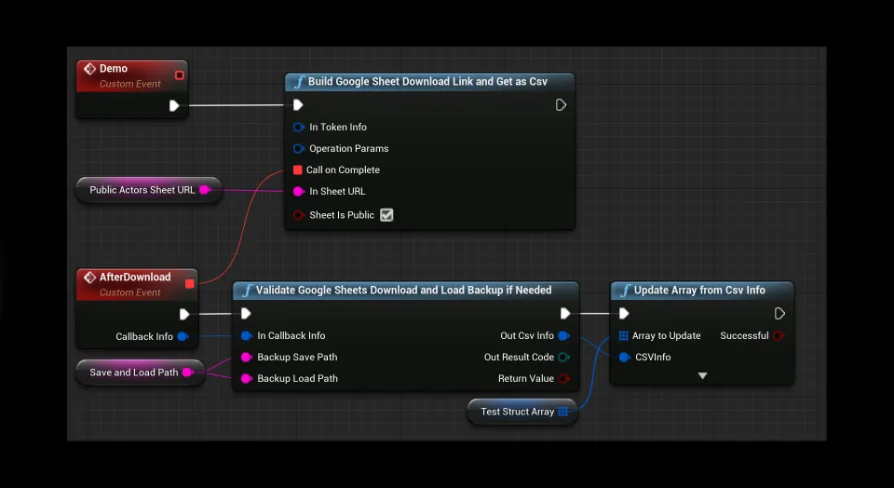
The system can load a standard CSV file directly from disk, but it also features native network capabilities for fetching remote tables. It can download a public Google Sheet or connect to a private Google Sheet using proper authorization. This capability allows teams to maintain their game tuning or configuration tables in a live cloud environment, pulling updated parameters into active game instances whenever needed. The entire toolset of easyCSV is included in full within the plugin, positioning it alongside related tools such as GSheets Operator and the Spreadsheet Master Bundle.
Exporting Live In-Memory Data via Google Sheets and CSV Export
Data pipelines often require two-way communication rather than one-way ingestion.
Starting in version 4.27.4, the plugin introduced full support for CSV export, enabling the reverse of its standard ingestion flow. Instead of solely reading spreadsheets to populate variables, RDT can inspect an array of existing FStructs or UObjects inside an active project. It reads the live member values directly from memory while the game or application is actively running and serializes that information out as a properly formatted CSV. These generated files can be written directly to local storage disks or sent upstream to Google Sheets, providing a reliable mechanism to save live session telemetry, capture in-game analytics, or output dynamic state data generated during runtime execution.
Blueprint and Code Execution Flows with Completion Callbacks
Because network requests and large disk operations take variable amounts of time, RDT is built with an event-driven execution structure.
When the plugin initiates a download from a Google Sheet or loads a CSV from disk, it attempts to parse the content and update the target array of FStruct or UObject items. Once that update attempt finishes, the plugin executes a user-defined function to explicitly signal completion. This callback pattern ensures that downstream gameplay code or Blueprint graphs do not attempt to read unpopulated arrays prematurely. Supporting both Blueprint and native code workflows, the system reliably integrates into custom game loops where other game systems depend on confirmed data delivery before proceeding.
 Engine Tools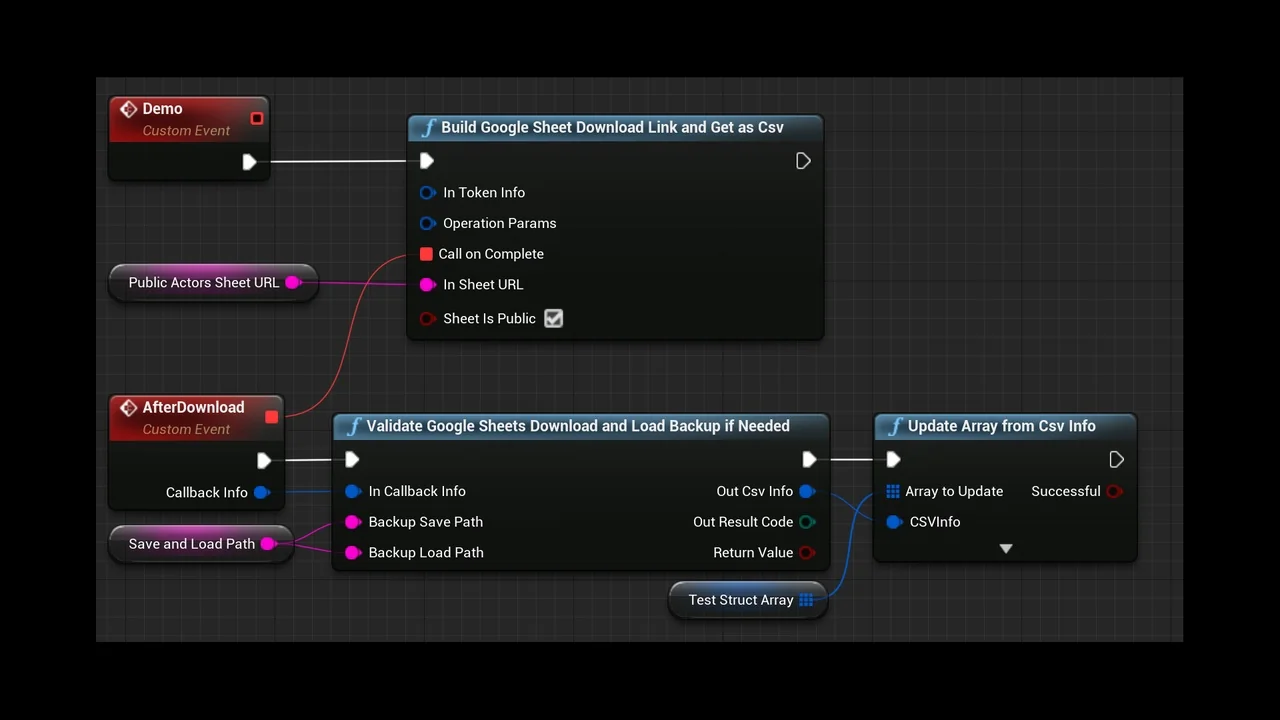
 Engine Tools
 Engine Tools
 Engine Tools