"c14ff6bd758dadb1"{"id":"1001755","slug":"runtime-load-fbx","title":"Runtime Load FBX","category":"Engine Tools","engine":"5.0","assetVersion":"Asset Version: 1.2.0","engineVersion":"Engine Version: 5.0","tag":"Engine Tools","accent":"blue","visual":"mech","summary":"Runtime Load FBX brings external static FBX models directly into packaged Unreal builds, supporting procedural setups, MQTT workflows, and dynamic pipelines.","platform":"Unreal Engine","publishedAt":"2026-10-20T03:00:02.880Z","updatedAt":"2026-10-20T03:00:02.880Z","sourceNotes":[],"fileContents":[],"compatibility":["Unreal Engine","Asset Version: 1.2.0","Engine Version: 5.0"],"featuredImage":{"alt":"Runtime Load FBX","src":"/wp-content/uploads/published/2026/10/a6b48dd50373-b12ce29f-0648-4984-a3b6-d316181a13e4-3ac3b542bb.webp"},"hasDownloadLink":true,"downloads":0,"terms":[{"taxonomy":"category","slug":"engine-tools-tools-and-plugins","name":"Engine Tools"}],"galleryImages":[{"src":"/wp-content/uploads/published/2026/10/19c375832628-8d349d77-d608-430c-abaf-d451b2bd3be6-dddf5ba016.webp","alt":"Runtime Load FBX"},{"src":"/wp-content/uploads/published/2026/10/fa14b3513e6d-bb792ce6-bcf9-4511-b377-31a7f5ff7ad6-6f53b47cef.webp","alt":"Runtime Load FBX"},{"src":"/wp-content/uploads/published/2026/10/e7968d5cb218-7e6ecc7a-6efb-4d9b-b3a1-de174547c974-1a2eb45725.webp","alt":"Runtime Load FBX"}],"accessPanel":{"kind":"resource","title":"Download this resource","eyebrow":"Free Download","message":"Log in or create a free account to start your download.","fileName":"Runtime Load Fbx.7z","safetyNote":"Resources are manually reviewed before listing to improve quality and reduce obvious risks.","actionLabel":"Download Free","resourceType":"Resource archive"},"contentHtml":"\u003ch2\u003eBringing External FBX Models into Packaged Applications\u003c/h2\u003e\u003cp\u003eInteractive 3D applications often face a strict barrier once compiled and exported: geometry is usually baked into cooked archives, preventing direct ingestion of new 3D assets from an end user's disk or an external server. Applications suited to product visualization, dynamic architectural review, and customizable sandbox tools frequently demand the ability to import geometry on the fly. Runtime Load FBX targets this exact pipeline constraint by allowing projects to dynamically load FBX models when running after packaging.\u003c/p\u003e\u003cp\u003eStandard production pipelines require developers to import geometry into the editor, configure materials, cook the project, and package the final build. When end users need to test proprietary models, inspect CAD exports converted to FBX, or load custom geometry on demand, cooking becomes an obstacle. Enabling runtime loading directly within a packaged build allows the application to remain compact and modular. Assets can sit in local directories or user-specified folders, loading into the scene graph only when summoned by the application's runtime logic.\u003c/p\u003e\u003ch2\u003eProcedural Generation and Dynamic Static Meshes\u003c/h2\u003e\u003cp\u003eProcedural environments rely on algorithmic rules to assemble geometry, alter scene layouts, and inject custom variations into an active session. Because Runtime Load FBX carries procedural workflow capabilities, it fits directly into systems where scene elements cannot be determined prior to launch. Generating levels or spatial visualizations procedurally often involves instantiating dynamic geometry based on runtime parameters or external configuration files.\u003c/p\u003e\u003cp\u003eConsider an automated layout tool that generates warehouse interiors, factory floors, or exhibition spaces. Instead of limiting the software to a predefined internal library, procedural routines can query a local directory, locate incoming static FBX models, and parse them directly into the environment. The mesh data appears in the interactive world instantly, adopting procedural placement rules such as randomized distributions, boundary snapping, or automated alignment to spatial grids.\u003c/p\u003e\u003cp\u003eThis capability transforms a packaged executable from a closed environment into a flexible layout engine capable of rendering newly generated static assets without rebuilding the project binary.\u003c/p\u003e\u003ch2\u003eInteractive Deployments alongside Mqtt Client Workflows\u003c/h2\u003e\u003cp\u003eIndustrial applications, IoT dashboards, and automated simulation tools frequently link game engine visualization to network messaging protocols. Compatibility with Mqtt Client expands the practical operational context of Runtime Load FBX. In setups where an MQTT broker publishes status updates, telemetry, or user requests, packaged builds can act as responsive visualization clients.\u003c/p\u003e\u003cp\u003eA remote sensor, an industrial automation hub, or a web interface can broadcast an MQTT message signaling that a specific part or architectural revision has been placed into a shared network folder. Upon receiving the payload, the application can trigger Runtime Load FBX to ingest that specific static FBX model into the active level. This establishes a continuous loop between real-world network events and dynamic in-engine rendering, creating a streamlined pipeline for remote monitoring, live industrial staging, and networked multi-user visual reviews.\u003c/p\u003e\u003ch2\u003eThe Scope of Runtime Load FBX without Model Animation\u003c/h2\u003e\u003cp\u003eClarity regarding technical boundaries is critical when planning a dynamic asset pipeline. Runtime Load FBX specifically focuses on geometry ingestion; model animation is not supported. Projects requiring dynamic skeletal meshes, blend shapes, running character avatars, or complex articulated armatures must look to alternative rigging solutions.\u003c/p\u003e\u003cp\u003eRestricting ingestion to static geometry keeps the runtime focus clean and predictable. Static assets bypass the processing overhead associated with bone hierarchies, skinning evaluations, and animation blending graphs. The tool operates with predictable performance across architectural components, mechanical parts, terrain chunks, interior props, and structural framing. Developers can design their runtime importers around static visualization, optimizing collision generation, spatial queries, and material assignments specifically for rigid meshes.\u003c/p\u003e\u003ch2\u003eEvaluating Implementation with Blueprint Examples and Multi-Language Docs\u003c/h2\u003e\u003cp\u003eTesting and integrating runtime file operations into an existing project can often present structural questions regarding node sequences, file path formatting, and mesh spawning. The developer provides a complete demo Blueprint implementation to demonstrate the exact execution flow required to call and populate geometry within a level. Exploring this reference setup allows technical artists and gameplay programmers to see how function calls hook into standard game framework events.\u003c/p\u003e\u003cp\u003eFor evaluation outside the native project environment, a standalone demo executable is also available. Running the precompiled demonstration makes it straightforward to observe the speed, visual accuracy, and memory behavior of runtime loading without needing to set up a fresh project or compile C++ code first. Documentation is provided in both English and Chinese, offering accessible guidance for international teams managing custom integration pipelines across diverse production environments.\u003c/p\u003e\u003ch2\u003eProject Profiles that Benefit Most\u003c/h2\u003e\u003cp\u003eRuntime Load FBX fills an essential niche for developers building interactive viewers, dynamic configurators, and procedural simulation tools. Teams creating architectural walkthroughs where clients regularly bring their own static FBX designs benefit directly from avoiding the re-baking process. Industrial software teams coupling live telemetry with visual assets through Mqtt Client gain a direct path from external data triggers to in-scene geometry spawning. By pairing static mesh ingestion with packaged executables, the plugin bridges the gap between static shipping builds and dynamic external content pipelines.\u003c/p\u003e\n\n\u003ch2\u003eExplore Similar Assets\u003c/h2\u003e\n\u003cul\u003e\n\u003cli\u003e\u003ca href=\"https://3dcghub.com/levelcontroller2-transform-levels-at-runtime-in-realtime/\" title=\"LevelController2 (Transform Levels At Runtime In Realtime)\"\u003eLevelController2 (Transform Levels At Runtime In Realtime)\u003c/a\u003e\u003c/li\u003e\n\u003cli\u003e\u003ca href=\"https://3dcghub.com/gltfruntime/\" title=\"glTFRuntime\"\u003eglTFRuntime\u003c/a\u003e\u003c/li\u003e\n\u003cli\u003e\u003ca href=\"https://3dcghub.com/runtime-audio-importer/\" title=\"Runtime Audio Importer\"\u003eRuntime Audio Importer\u003c/a\u003e\u003c/li\u003e\n\u003cli\u003e\u003ca href=\"https://3dcghub.com/runtime-speech-recognizer-real-time-offline-ai/\" title=\"Runtime Speech Recognizer (Real-Time, Offline, AI)\"\u003eRuntime Speech Recognizer (Real-Time, Offline, AI)\u003c/a\u003e\u003c/li\u003e\n\u003cli\u003e\u003ca href=\"https://3dcghub.com/runtime-archiver-zip-oodle-tar-lz4-gzip/\" title=\"Runtime Archiver (Zip, Oodle, Tar, LZ4, GZip)\"\u003eRuntime Archiver (Zip, Oodle, Tar, LZ4, GZip)\u003c/a\u003e\u003c/li\u003e\n\u003c/ul\u003e","contentTextLength":6240,"navigation":{"current":28,"total":3719,"previous":{"id":"1001756","slug":"sci-fi-character-03-yakuza","title":"Sci-Fi Character 03 (Yakuza)","category":"Characters \u0026 Creatures","platform":"Unreal Engine","updatedAt":"2026-10-20T03:00:59.681Z"},"next":{"id":"1001754","slug":"roads-n-streets","title":"Roads n Streets","category":"Streets \u0026 Construction","platform":"Unreal Engine","updatedAt":"2026-10-20T02:59:39.016Z"}},"relatedResources":[{"id":"1001532","slug":"levelcontroller2-transform-levels-at-runtime-in-realtime","title":"LevelController2 (Transform Levels At Runtime In Realtime)","category":"Engine Tools","engine":"5.1 - 5.4","assetVersion":"Asset Version: 2.1.0","engineVersion":"Engine Version: 5.1 - 5.4","tag":"Engine Tools","accent":"blue","visual":"mech","summary":"Transform Unreal Engine levels and maps in real time using LevelController2 blueprint functions, dynamic origin points, and custom script actors.","platform":"Unreal Engine","publishedAt":"2026-10-09T17:25:41.854Z","updatedAt":"2026-10-09T17:25:41.854Z","sourceNotes":[],"fileContents":[],"compatibility":["Unreal Engine","Asset Version: 2.1.0","Engine Version: 5.1 - 5.4"],"featuredImage":{"alt":"LevelController2 (Transform Levels At Runtime In Realtime)","src":"/wp-content/uploads/published/2026/10/e55083799225-d316f296-9d30-494e-b533-f4e2dfddc51a-7437c66bae.webp"},"hasDownloadLink":true,"downloads":0},{"id":"1000119","slug":"gltfruntime","title":"glTFRuntime","category":"Engine Tools","engine":"5.5","assetVersion":"","engineVersion":"Engine Version: 5.5","tag":"Engine Tools","accent":"blue","visual":"mech","summary":"An Unreal Engine plugin designed to load standard glTF files at runtime, supporting skeletal meshes, curve animations, and Blueprint manipulation.","platform":"Unreal Engine","publishedAt":"2026-06-09T14:53:46.900Z","updatedAt":"2026-06-09T14:53:46.900Z","sourceNotes":[],"fileContents":[],"compatibility":["Unreal Engine","Engine Version: 5.5"],"featuredImage":{"alt":"glTFRuntime","src":"/wp-content/uploads/published/2026/06/cb80459054a8-8ee01090-10e2-4390-8a85-915c0daec12b-3c5858961f.webp"},"hasDownloadLink":true,"downloads":0},{"id":"1001270","slug":"runtime-audio-importer","title":"Runtime Audio Importer","category":"Engine Tools","engine":"4.25 - 5.4","assetVersion":"Asset Version:1.0","engineVersion":"Engine Version:4.25 - 5.4","tag":"Engine Tools","accent":"blue","visual":"audio","summary":"Import, stream, transcode, and capture audio dynamically in Unreal Engine with Silero VAD, WebRTC AEC3, and MetaSounds support.","platform":"Unreal Engine","publishedAt":"2026-09-30T05:55:43.013Z","updatedAt":"2026-09-30T05:55:43.013Z","sourceNotes":[],"fileContents":[],"compatibility":["Unreal Engine","Asset Version:1.0","Engine Version:4.25 - 5.4"],"featuredImage":{"alt":"Runtime Audio Importer","src":"/wp-content/uploads/published/2026/09/8cf4c02a40c0-2a686112-515f-40d0-adc2-99fad2dbe78f-771eb1241f.webp"},"hasDownloadLink":true,"downloads":1}]}
Bringing External FBX Models into Packaged Applications
Interactive 3D applications often face a strict barrier once compiled and exported: geometry is usually baked into cooked archives, preventing direct ingestion of new 3D assets from an end user's disk or an external server. Applications suited to product visualization, dynamic architectural review, and customizable sandbox tools frequently demand the ability to import geometry on the fly. Runtime Load FBX targets this exact pipeline constraint by allowing projects to dynamically load FBX models when running after packaging.
Standard production pipelines require developers to import geometry into the editor, configure materials, cook the project, and package the final build. When end users need to test proprietary models, inspect CAD exports converted to FBX, or load custom geometry on demand, cooking becomes an obstacle. Enabling runtime loading directly within a packaged build allows the application to remain compact and modular. Assets can sit in local directories or user-specified folders, loading into the scene graph only when summoned by the application's runtime logic.
Procedural Generation and Dynamic Static Meshes
Procedural environments rely on algorithmic rules to assemble geometry, alter scene layouts, and inject custom variations into an active session. Because Runtime Load FBX carries procedural workflow capabilities, it fits directly into systems where scene elements cannot be determined prior to launch. Generating levels or spatial visualizations procedurally often involves instantiating dynamic geometry based on runtime parameters or external configuration files.
Consider an automated layout tool that generates warehouse interiors, factory floors, or exhibition spaces. Instead of limiting the software to a predefined internal library, procedural routines can query a local directory, locate incoming static FBX models, and parse them directly into the environment. The mesh data appears in the interactive world instantly, adopting procedural placement rules such as randomized distributions, boundary snapping, or automated alignment to spatial grids.
This capability transforms a packaged executable from a closed environment into a flexible layout engine capable of rendering newly generated static assets without rebuilding the project binary.
Industrial applications, IoT dashboards, and automated simulation tools frequently link game engine visualization to network messaging protocols. Compatibility with Mqtt Client expands the practical operational context of Runtime Load FBX. In setups where an MQTT broker publishes status updates, telemetry, or user requests, packaged builds can act as responsive visualization clients.
A remote sensor, an industrial automation hub, or a web interface can broadcast an MQTT message signaling that a specific part or architectural revision has been placed into a shared network folder. Upon receiving the payload, the application can trigger Runtime Load FBX to ingest that specific static FBX model into the active level. This establishes a continuous loop between real-world network events and dynamic in-engine rendering, creating a streamlined pipeline for remote monitoring, live industrial staging, and networked multi-user visual reviews.
The Scope of Runtime Load FBX without Model Animation
Clarity regarding technical boundaries is critical when planning a dynamic asset pipeline. Runtime Load FBX specifically focuses on geometry ingestion; model animation is not supported. Projects requiring dynamic skeletal meshes, blend shapes, running character avatars, or complex articulated armatures must look to alternative rigging solutions.
Restricting ingestion to static geometry keeps the runtime focus clean and predictable. Static assets bypass the processing overhead associated with bone hierarchies, skinning evaluations, and animation blending graphs. The tool operates with predictable performance across architectural components, mechanical parts, terrain chunks, interior props, and structural framing. Developers can design their runtime importers around static visualization, optimizing collision generation, spatial queries, and material assignments specifically for rigid meshes.
Evaluating Implementation with Blueprint Examples and Multi-Language Docs
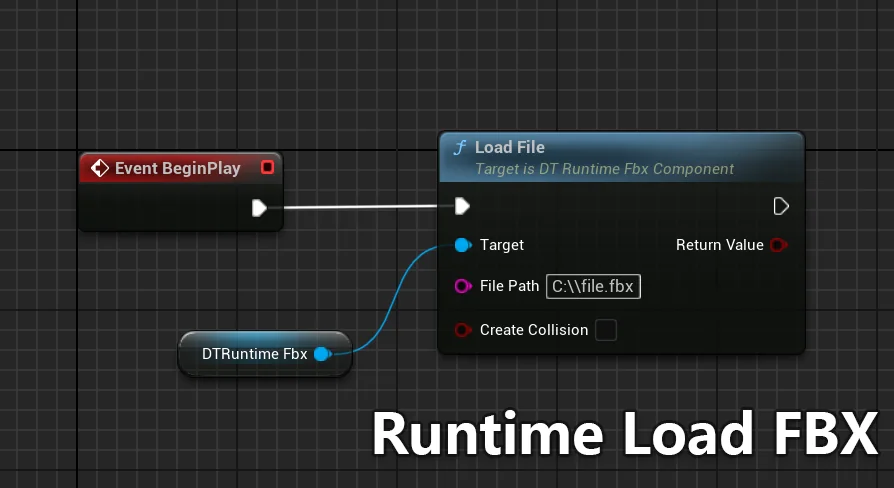
Testing and integrating runtime file operations into an existing project can often present structural questions regarding node sequences, file path formatting, and mesh spawning. The developer provides a complete demo Blueprint implementation to demonstrate the exact execution flow required to call and populate geometry within a level. Exploring this reference setup allows technical artists and gameplay programmers to see how function calls hook into standard game framework events.
For evaluation outside the native project environment, a standalone demo executable is also available. Running the precompiled demonstration makes it straightforward to observe the speed, visual accuracy, and memory behavior of runtime loading without needing to set up a fresh project or compile C++ code first. Documentation is provided in both English and Chinese, offering accessible guidance for international teams managing custom integration pipelines across diverse production environments.
Project Profiles that Benefit Most
Runtime Load FBX fills an essential niche for developers building interactive viewers, dynamic configurators, and procedural simulation tools. Teams creating architectural walkthroughs where clients regularly bring their own static FBX designs benefit directly from avoiding the re-baking process. Industrial software teams coupling live telemetry with visual assets through Mqtt Client gain a direct path from external data triggers to in-scene geometry spawning. By pairing static mesh ingestion with packaged executables, the plugin bridges the gap between static shipping builds and dynamic external content pipelines.
 Engine Tools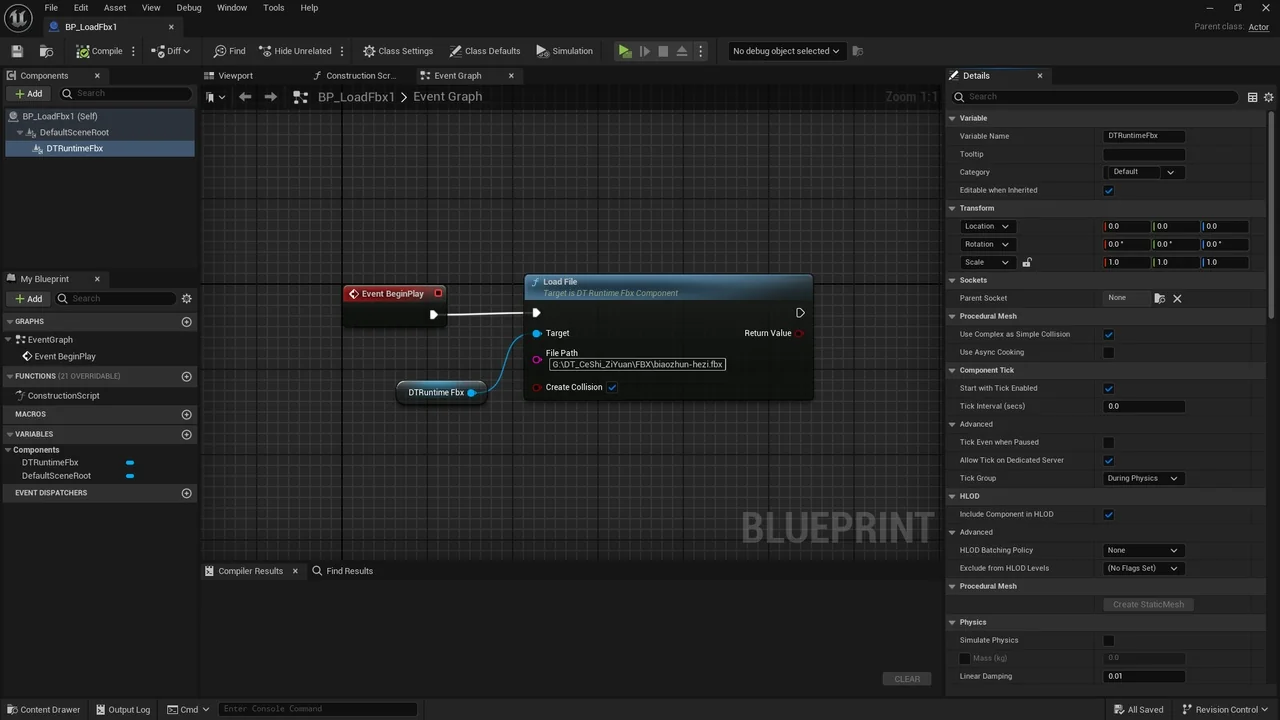
 Engine Tools
 Engine Tools
 Engine Tools