"c14ff6bd758dadb1"{"id":"1001754","slug":"roads-n-streets","title":"Roads n Streets","category":"Streets \u0026 Construction","engine":"4.26+,5.0+","assetVersion":"","engineVersion":"Engine Version: 4.26+,5.0+","tag":"Streets","accent":"blue","visual":"mech","summary":"Roads n Streets provides procedural asphalt and cobblestone materials, spline meshes, and static parts designed for the Landscape Spline Tool.","platform":"Unreal Engine","publishedAt":"2026-10-20T02:59:39.016Z","updatedAt":"2026-10-20T02:59:39.016Z","sourceNotes":[],"fileContents":[],"compatibility":["Unreal Engine","Engine Version: 4.26+,5.0+"],"featuredImage":{"alt":"Roads n Streets","src":"/wp-content/uploads/published/2026/10/e21e2124a741-f3836343-9a61-44fc-a959-973c424de309-50ea50d7a7.webp"},"hasDownloadLink":true,"downloads":0,"terms":[{"taxonomy":"category","slug":"streets-and-construction","name":"Streets \u0026 Construction"}],"galleryImages":[{"src":"/wp-content/uploads/published/2026/10/e8f196d4264f-9e815fdd-33bd-4a10-af0c-14a0960ca568-6954898b80.webp","alt":"Roads n Streets"},{"src":"/wp-content/uploads/published/2026/10/cb9d05ba2a27-71a8d7f7-7349-4278-8131-0c58cad92192-d7a8ce6593.webp","alt":"Roads n Streets"},{"src":"/wp-content/uploads/published/2026/10/335d85908000-4ac05471-c735-40db-9948-e1ab560dbb3f-ee36aff04b.webp","alt":"Roads n Streets"},{"src":"/wp-content/uploads/published/2026/10/6ee67b5eb551-b6e9040c-a15d-4812-9b6b-82659b3e6d4d-5b96da59d0.webp","alt":"Roads n Streets"},{"src":"/wp-content/uploads/published/2026/10/f4c1073d05c2-44ea4174-45a3-4919-80ea-2f5b5881795d-28169a42f1.webp","alt":"Roads n Streets"},{"src":"/wp-content/uploads/published/2026/10/a56db2ed7bf0-ce16db4b-fb9e-420a-a7d0-2760db90497d-0987d51eae.webp","alt":"Roads n Streets"},{"src":"/wp-content/uploads/published/2026/10/cbc81546fd73-22a3b36d-cc0a-4eba-8bc9-b62875063a8f-26639c20c7.webp","alt":"Roads n Streets"},{"src":"/wp-content/uploads/published/2026/10/838c286b8aba-63ae63cb-0250-4901-a445-4fde093cddcd-5208453d7d.webp","alt":"Roads n Streets"},{"src":"/wp-content/uploads/published/2026/10/6302fa2d0895-986cec6b-89e7-4c07-8c3b-458011c54412-5d8fe24efd.webp","alt":"Roads n Streets"}],"accessPanel":{"kind":"resource","title":"Download this resource","eyebrow":"Free Download","message":"Log in or create a free account to start your download.","fileName":"Content.7z","safetyNote":"Resources are manually reviewed before listing to improve quality and reduce obvious risks.","actionLabel":"Download Free","resourceType":"Resource archive"},"contentHtml":"\u003ch2\u003eMandatory Substance Plugin Configuration\u003c/h2\u003e\u003cp\u003eWorking with Roads n Streets begins with a crucial setup requirement: the Substance Plugin must be installed and active in the project. If the plugin is absent, the pack will appear completely empty and will not function. This occurs because the materials inside the package are procedural generators built via Substance Designer rather than simple static bitmap references. The plugin provides the runtime architecture required to interpret, read, and expose the parameters of the Substance archive files. Ensuring the plugin is properly enabled in your project settings prior to opening the assets prevents empty folders and missing material references.\u003c/p\u003e\u003ch2\u003eProcedural Texture Generation for Asphalt and Cobblestone\u003c/h2\u003e\u003cp\u003eAt the center of Roads n Streets is procedural surface generation. Rather than supplying fixed, unchangeable diffuse and normal maps, the pack operates as a dynamic texture generator created inside Substance Designer. This procedural engine produces diverse surface treatments, specifically targeting asphalt road types and cobblestone road types.\u003c/p\u003e\u003cp\u003eBecause the textures are generated procedurally, surface characteristics are not locked to a single artistic look. Roads can shift between smooth highway-style asphalt, distressed urban road paving, or traditional stone-patterned surfaces. The underlying Substance graphs evaluate the procedural rules directly, providing the visual variation needed to represent distinct street and pathway conditions across different environment scenes.\u003c/p\u003e\u003ch2\u003eLandscape Spline Tool Workflows and Tessellation Setup\u003c/h2\u003e\u003cp\u003eRoad network construction frequently relies on curves, elevation changes, and terrain hugging. Roads n Streets accommodates this through three modular Substance materials specifically built and configured for tessellation. These materials are prepared directly for deployment with the Landscape Spline Tool, enabling physical surface displacement along spline paths.\u003c/p\u003e\u003cp\u003eTo support tessellation along a spline, the underlying geometry must feature sufficient geometric density to displace properly. The pack provides one basic subdivided spline mesh part tailored for the Landscape Spline Tool. Applying the tessellated Substance materials to this subdivided mesh allows road geometry to deform and displace cleanly without polygon stretching or visual breakdown. For projects with unique profile requirements or distinct curb dimensions, developers can bypass the included subdivided spline piece and use their own custom-modeled spline meshes with the same materials.\u003c/p\u003e\u003ch2\u003eIncluded Static Mesh Street Parts and Modular Pieces\u003c/h2\u003e\u003cp\u003eAlongside the spline-focused assets, Roads n Streets contains nine static mesh street parts. These static elements complement continuous road paths by offering rigid pieces for specific road layout segments, transitions, or intersections where traditional spline stretching may not be ideal.\u003c/p\u003e\u003cp\u003eBy combining the nine static mesh pieces with the subdivided spline mesh component, projects can mix flexible, sweeping spline paths with fixed-dimension street segments. The modular materials apply across these meshes, maintaining visual consistency between continuous spline-driven roads and isolated static street sections.\u003c/p\u003e\u003ch2\u003eSubstance Instance Controls and 11 Built-In Presets\u003c/h2\u003e\u003cp\u003eTo provide immediate utility out of the box, Roads n Streets includes 11 preset materials ready for immediate placement on meshes. These presets demonstrate the range of asphalt and cobblestone varieties achievable through the generator.\u003c/p\u003e\u003cp\u003eFine-tuning or altering the appearance of any preset is handled directly inside the project directory structure. By navigating to the textures folder, users can open the Substance instance controls for each material. Inside these instance controls, the procedural parameters can be modified on demand, updating the surface appearance, color adjustments, surface wear, and road patterns. This architecture makes it unnecessary to exit the engine or modify raw source graphs when adjusting road wear, material balance, or street markings.\u003c/p\u003e\u003ch2\u003eResolution Scalability from 32x32 to 4K\u003c/h2\u003e\u003cp\u003eA major technical advantage of procedural Substance materials is dynamic resolution scaling. Because Roads n Streets functions as a texture generator, texture maps are not permanently hard-coded to a single static resolution. Instead, users can define and alter the generated texture resolution on the fly.\u003c/p\u003e\u003cp\u003eResolutions can be adjusted freely across a broad range, scaling from compact 32x32 textures suitable for distant background roads or extreme optimization targets, all the way up to sharp 4K textures for hero roads and close-up camera angles. Modifying resolution is handled directly within the Substance parameters, allowing projects to balance memory footprints, platform constraints, and visual fidelity across multiple platforms without manually resizing texture files in external graphic software.\u003c/p\u003e\u003ch2\u003eSubstance Mega Bundle Compatibility\u003c/h2\u003e\u003cp\u003eRoads n Streets functions in alignment with the Substance Mega Bundle ecosystem. By maintaining procedural parameter standards and shared Substance Plugin dependencies, the assets fit seamlessly alongside other Substance-driven environment libraries. When deployed into active production, the combination of procedural cobblestone and asphalt materials, scalable resolutions from 32x32 to 4K, spline-ready tessellation, and modular static meshes provides a structured framework for building custom road networks across landscaped terrain.\u003c/p\u003e\n\n\u003ch2\u003eExplore Similar Assets\u003c/h2\u003e\n\u003cul\u003e\n\u003cli\u003e\u003ca href=\"https://3dcghub.com/brushify-country-roads-pack/\" title=\"Brushify - Country Roads Pack\"\u003eBrushify - Country Roads Pack\u003c/a\u003e\u003c/li\u003e\n\u003cli\u003e\u003ca href=\"https://3dcghub.com/road-pack-set-01-lowpoly-gameready/\" title=\"Road Pack Set 01/LowPoly/GameReady\"\u003eRoad Pack Set 01/LowPoly/GameReady\u003c/a\u003e\u003c/li\u003e\n\u003cli\u003e\u003ca href=\"https://3dcghub.com/brushify-natural-roads-pack/\" title=\"Brushify - Natural Roads Pack\"\u003eBrushify - Natural Roads Pack\u003c/a\u003e\u003c/li\u003e\n\u003cli\u003e\u003ca href=\"https://3dcghub.com/the-rally-point-environment-rally-point-scifi-scifi-sci-fi-sci-fi-rally/\" title=\"The Rally Point Environment ( Rally Point Scifi Scifi Sci-Fi Sci-Fi Rally )\"\u003eThe Rally Point Environment ( Rally Point Scifi Scifi Sci-Fi Sci-Fi Rally )\u003c/a\u003e\u003c/li\u003e\n\u003cli\u003e\u003ca href=\"https://3dcghub.com/fire-hydrant-package/\" title=\"Fire Hydrant Package\"\u003eFire Hydrant Package\u003c/a\u003e\u003c/li\u003e\n\u003c/ul\u003e","contentTextLength":5701,"navigation":{"current":29,"total":3719,"previous":{"id":"1001755","slug":"runtime-load-fbx","title":"Runtime Load FBX","category":"Engine Tools","platform":"Unreal Engine","updatedAt":"2026-10-20T03:00:02.880Z"},"next":{"id":"1001753","slug":"realistic-sport-wheels-2-unreal-engine","title":"Realistic Sport Wheels 2 - Unreal Engine","category":"Cars \u0026 Trucks","platform":"Unreal Engine","updatedAt":"2026-10-20T02:58:25.840Z"}},"relatedResources":[{"id":"1000941","slug":"brushify-country-roads-pack","title":"Brushify - Country Roads Pack","category":"Streets \u0026 Construction","engine":"4.26+,5.0+","assetVersion":"","engineVersion":"Engine Version: 4.26+,5.0+","tag":"Streets","accent":"blue","visual":"mech","summary":"Spline-based country roads for UE5 with parallax road materials, roadwork props, barricade spline blueprint, and a landscape auto material for biome-rich terrai","platform":"Unreal Engine","publishedAt":"2026-08-10T04:31:02.697Z","updatedAt":"2026-08-10T04:31:02.697Z","sourceNotes":[],"fileContents":[],"compatibility":["Unreal Engine","Engine Version: 4.26+,5.0+"],"featuredImage":{"alt":"Brushify - Country Roads Pack","src":"/wp-content/uploads/published/2026/08/89a8ea838abe-02383cd9-3898-4a87-a534-50332f6212bd-86fba8c86b.webp"},"hasDownloadLink":true,"downloads":0},{"id":"1000329","slug":"road-pack-set-01-lowpoly-gameready","title":"Road Pack Set 01/LowPoly/GameReady","category":"Streets \u0026 Construction","engine":"5.5+","assetVersion":"","engineVersion":"Engine Version: 5.5+","tag":"Streets","accent":"blue","visual":"mech","summary":"A realistic, game-ready 3D road model pack featuring adjustable geometry, tileable 4K textures, and native support for 3ds Max, Blender 3.6, and Unreal Engine 5","platform":"Unreal Engine","publishedAt":"2026-07-05T06:52:03.569Z","updatedAt":"2026-07-05T06:52:03.569Z","sourceNotes":[],"fileContents":[],"compatibility":["Unreal Engine","Engine Version: 5.5+"],"featuredImage":{"alt":"Road Pack Set 01/LowPoly/GameReady","src":"/wp-content/uploads/published/2026/07/da9d0d7fcca1-663c9106-e861-4194-8fcc-912284f12527-ac1439e523.webp"},"hasDownloadLink":true,"downloads":0},{"id":"9811","slug":"brushify-natural-roads-pack","title":"Brushify - Natural Roads Pack","category":"Streets \u0026 Construction","engine":"5.3+","assetVersion":"Engine version: 5.3+","engineVersion":"4.24","tag":"Streets","accent":"blue","visual":"city","summary":"The Brushify - Natural Roads Pack provides high-quality road materials and splines for Unreal Engine 5.4. It includes a ready-made level, 12 unique road textures, and a modular landscape auto-material system.","platform":"Unreal Engine","publishedAt":"2026-03-02T14:05:29.000Z","updatedAt":"2026-04-19T15:50:59.000Z","sourceNotes":[],"fileContents":[],"compatibility":["Unreal Engine","Engine version: 5.3+"],"featuredImage":{"alt":"Brushify - Natural Roads Pack","src":"https://3dcghub.com/wp-content/uploads/2026/03/43ba4979-4fa8-4786-8723-35691e7e07d4.webp"},"hasDownloadLink":true,"downloads":2}]}
Streets
Roads n Streets
Roads n Streets provides procedural asphalt and cobblestone materials, spline meshes, and static parts designed for the Landscape Spline Tool.
Working with Roads n Streets begins with a crucial setup requirement: the Substance Plugin must be installed and active in the project. If the plugin is absent, the pack will appear completely empty and will not function. This occurs because the materials inside the package are procedural generators built via Substance Designer rather than simple static bitmap references. The plugin provides the runtime architecture required to interpret, read, and expose the parameters of the Substance archive files. Ensuring the plugin is properly enabled in your project settings prior to opening the assets prevents empty folders and missing material references.
Procedural Texture Generation for Asphalt and Cobblestone
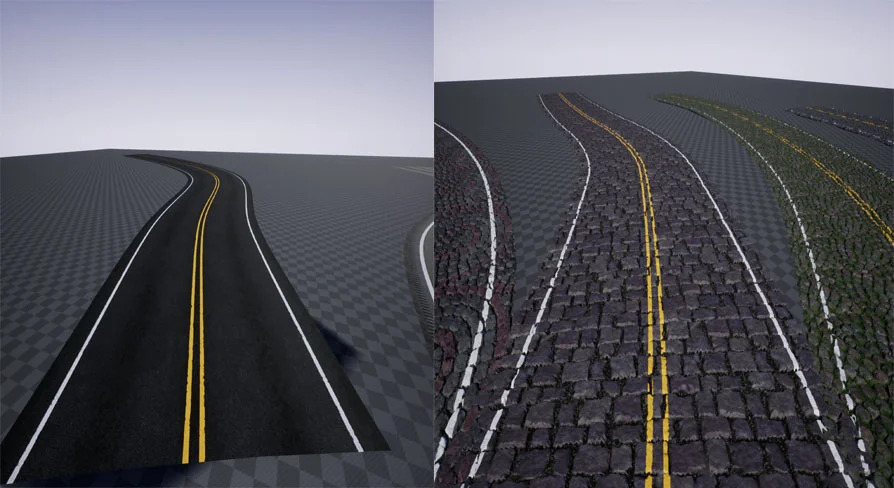
At the center of Roads n Streets is procedural surface generation. Rather than supplying fixed, unchangeable diffuse and normal maps, the pack operates as a dynamic texture generator created inside Substance Designer. This procedural engine produces diverse surface treatments, specifically targeting asphalt road types and cobblestone road types.
Because the textures are generated procedurally, surface characteristics are not locked to a single artistic look. Roads can shift between smooth highway-style asphalt, distressed urban road paving, or traditional stone-patterned surfaces. The underlying Substance graphs evaluate the procedural rules directly, providing the visual variation needed to represent distinct street and pathway conditions across different environment scenes.
Landscape Spline Tool Workflows and Tessellation Setup
Road network construction frequently relies on curves, elevation changes, and terrain hugging. Roads n Streets accommodates this through three modular Substance materials specifically built and configured for tessellation. These materials are prepared directly for deployment with the Landscape Spline Tool, enabling physical surface displacement along spline paths.
To support tessellation along a spline, the underlying geometry must feature sufficient geometric density to displace properly. The pack provides one basic subdivided spline mesh part tailored for the Landscape Spline Tool. Applying the tessellated Substance materials to this subdivided mesh allows road geometry to deform and displace cleanly without polygon stretching or visual breakdown. For projects with unique profile requirements or distinct curb dimensions, developers can bypass the included subdivided spline piece and use their own custom-modeled spline meshes with the same materials.
Included Static Mesh Street Parts and Modular Pieces
Alongside the spline-focused assets, Roads n Streets contains nine static mesh street parts. These static elements complement continuous road paths by offering rigid pieces for specific road layout segments, transitions, or intersections where traditional spline stretching may not be ideal.
By combining the nine static mesh pieces with the subdivided spline mesh component, projects can mix flexible, sweeping spline paths with fixed-dimension street segments. The modular materials apply across these meshes, maintaining visual consistency between continuous spline-driven roads and isolated static street sections.
Substance Instance Controls and 11 Built-In Presets
To provide immediate utility out of the box, Roads n Streets includes 11 preset materials ready for immediate placement on meshes. These presets demonstrate the range of asphalt and cobblestone varieties achievable through the generator.
Fine-tuning or altering the appearance of any preset is handled directly inside the project directory structure. By navigating to the textures folder, users can open the Substance instance controls for each material. Inside these instance controls, the procedural parameters can be modified on demand, updating the surface appearance, color adjustments, surface wear, and road patterns. This architecture makes it unnecessary to exit the engine or modify raw source graphs when adjusting road wear, material balance, or street markings.
Resolution Scalability from 32x32 to 4K
A major technical advantage of procedural Substance materials is dynamic resolution scaling. Because Roads n Streets functions as a texture generator, texture maps are not permanently hard-coded to a single static resolution. Instead, users can define and alter the generated texture resolution on the fly.
Resolutions can be adjusted freely across a broad range, scaling from compact 32x32 textures suitable for distant background roads or extreme optimization targets, all the way up to sharp 4K textures for hero roads and close-up camera angles. Modifying resolution is handled directly within the Substance parameters, allowing projects to balance memory footprints, platform constraints, and visual fidelity across multiple platforms without manually resizing texture files in external graphic software.
Substance Mega Bundle Compatibility
Roads n Streets functions in alignment with the Substance Mega Bundle ecosystem. By maintaining procedural parameter standards and shared Substance Plugin dependencies, the assets fit seamlessly alongside other Substance-driven environment libraries. When deployed into active production, the combination of procedural cobblestone and asphalt materials, scalable resolutions from 32x32 to 4K, spline-ready tessellation, and modular static meshes provides a structured framework for building custom road networks across landscaped terrain.
 Streets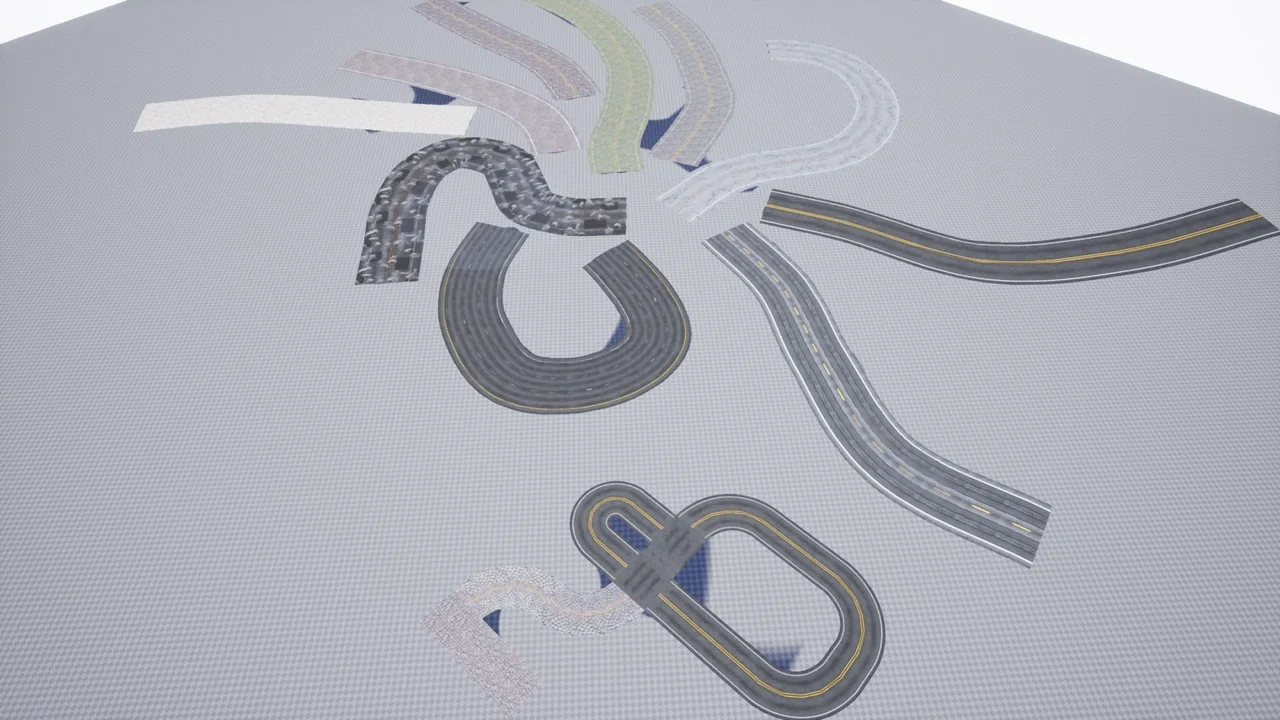
 Streets
 Streets
 Streets