"26aaab8a5d5ed4fc"{"id":"22271","slug":"retro-horror-template","title":"Retro Horror Template","category":"Systems","engine":"Original Unity version: 2022.2.23","assetVersion":"Original Unity version: 2022.2.23","engineVersion":"Asset Version:3.0.3","tag":"Systems","accent":"cyan","visual":"audio","summary":"A comprehensive framework designed to simplify the creation of horror games inspired by the 32-bit and 64-bit console eras, providing source code and specialized editor tools.","platform":"Unity","publishedAt":"2026-04-06T07:33:40.000Z","updatedAt":"2026-04-19T15:42:07.000Z","sourceNotes":[],"fileContents":[],"compatibility":["Unity","Original Unity version: 2022.2.23","Asset Version: 3.0.3"],"featuredImage":{"alt":"Retro Horror Template","src":"https://3dcghub.com/wp-content/uploads/2026/04/bb001723a0cb_d963ea22-0225-4f81-b4c3-c67285f49f99_1280x720_stretch.webp"},"hasDownloadLink":true,"downloads":0,"terms":[{"taxonomy":"category","slug":"systems","name":"Systems"},{"taxonomy":"post_tag","slug":"game-systems","name":"Game Systems"},{"taxonomy":"post_tag","slug":"templates","name":"Templates"},{"taxonomy":"post_tag","slug":"unity","name":"Unity"}],"galleryImages":[{"src":"https://3dcghub.com/wp-content/uploads/2026/04/674533a9ddff_1f0a80d4-bd63-4b04-bfab-c4bb32a9d1e0_scaled.webp","alt":"Retro Horror Template"},{"src":"https://3dcghub.com/wp-content/uploads/2026/04/60b8ae986480_875e9ceb-a431-4e14-a973-896fb1c4acba_scaled.webp","alt":"Retro Horror Template"},{"src":"https://3dcghub.com/wp-content/uploads/2026/04/d90958ab5f8b_baadb58b-d428-4498-938f-dfe178ea5ca6_scaled.webp","alt":"Retro Horror Template"},{"src":"https://3dcghub.com/wp-content/uploads/2026/04/8ed8c3db174c_e2a2aa07-7cfa-49b8-9467-1a323dd80915_scaled.webp","alt":"Retro Horror Template"},{"src":"https://3dcghub.com/wp-content/uploads/2026/04/eb837ed9cb5f_2de9cd6a-fc2d-43ce-a64d-01071baccd3f_scaled.webp","alt":"Retro Horror Template"},{"src":"https://3dcghub.com/wp-content/uploads/2026/04/e4d8d3e89dc1_c56effd4-adfd-4a57-9da8-8abe9f4cbff5_scaled.webp","alt":"Retro Horror Template"},{"src":"https://3dcghub.com/wp-content/uploads/2026/04/adaab4a151ec_ab8f1dd4-5061-4217-b64c-eb1f2ac7cc63_scaled.webp","alt":"Retro Horror Template"},{"src":"https://3dcghub.com/wp-content/uploads/2026/04/c9de9160c10c_b5d8202f-2f22-4981-83d9-c75143df2028_scaled.webp","alt":"Retro Horror Template"},{"src":"https://3dcghub.com/wp-content/uploads/2026/04/01255c10ec3f_52c5bd86-b4fd-4b05-bf0b-dd0e8fe13109_scaled.webp","alt":"Retro Horror Template"},{"src":"https://3dcghub.com/wp-content/uploads/2026/04/b7f047946ce6_e9487f33-c543-4fee-bd48-53d4f4bf3689_scaled.webp","alt":"Retro Horror Template"}],"accessPanel":{"kind":"resource","title":"Access this resource","eyebrow":"Free Download","message":"Log in or create a free account to start your download.","fileName":"Retro Horror Template v3.0.3.7z","safetyNote":"All resources are 100% manually reviewed to eliminate all risks.","actionLabel":"Download Free","resourceType":"Resource archive"},"contentHtml":"\u003ch2\u003eFramework for 5th-Generation Horror Mechanics\u003c/h2\u003e\n\u003cp\u003eThe Retro Horror Template is a framework for Unity designed to facilitate the creation of horror games that replicate the specific mechanics and aesthetics of the PSX and N64 era. It includes the full source code and is built to function with both the original and the new Unity input systems. By default, the package is configured for the Universal Render Pipeline (URP), aligning with modern rendering standards while maintaining a retro focus.\u003c/p\u003e\n\u003cp\u003eThe package contains 1,341 assets, providing a substantial base for developers to establish core systems such as tank movement, low-poly environments, and classic interaction styles seen in titles like Silent Hill or Dino Crisis. To assist with initial project setup, the developer has utilized AI for certain placeholder textures and promotional content, allowing users to see the systems in a functional context immediately upon import.\u003c/p\u003e\n\n\u003ch2\u003eEditor Tools and Workflow Enhancements\u003c/h2\u003e\n\u003cp\u003eThe template introduces several specialized windows and tools within the Unity Editor to streamline the development process. A Player Spawn Selector Window allows for precise control over character placement, while the Inventory Manager Window provides a centralized interface for handling game items. For debugging during active play sessions, the framework includes a RuntimeDebug window tool.\u003c/p\u003e\n\u003cp\u003eLevel design is supported by features like AmbientAreas and an Invisible Collision Shape tool. Developers can also utilize the Match Camera FOV component to ensure visual consistency across different perspectives. The inclusion of a QuickSaver component allows for the implementation of save points that can be triggered by specific events, such as when a player enters a designated trigger zone.\u003c/p\u003e\n\n\u003ch2\u003eRefined Movement and Combat Systems\u003c/h2\u003e\n\u003cp\u003eRecent updates have focused heavily on the stability of movement and combat. The framework supports multiple movement styles, including classic tank controls and alternate movement schemes. Specific improvements have been made to the AnimSpeedSetter components, which now support acceleration and deceleration damping values for smoother character transitions. The combat system, handled via the Combatant component, includes the ability to deactivate attacks or damageables as needed for specific gameplay sequences.\u003c/p\u003e\n\u003cp\u003eThe save and load system has undergone revisions to prevent issues such as character duplication upon reloading. Additionally, the framework handles status effects more strictly, ensuring they are not applied during cutscenes to prevent gameplay logic from interfering with narrative moments.\u003c/p\u003e\n\n\u003ch2\u003eInventory, Items, and Interaction\u003c/h2\u003e\n\u003cp\u003eThe inventory system has been updated to be more flexible, replacing fixed equipment slots with a string-based system. This change allows developers to add custom equipment slots depending on the specific needs of their game. Items can be configured to be used automatically upon pickup through the UseOnPickup toggle on the PickupItem component. A new ItemPicker component further expands how players interact with the game world.\u003c/p\u003e\n\u003cp\u003eDocumentation and lore-gathering—a staple of the genre—are managed through an integrated DocumentEditor. The system now supports returning to a document list automatically after a single document is closed, and localized text support has been added for UI elements like the QuickSaver location string.\u003c/p\u003e\n\n\u003ch2\u003eCinematics and Environmental Presentation\u003c/h2\u003e\n\u003cp\u003eFor narrative delivery, the template integrates with Unity’s Timeline through the DialogLine clip. The CinematicPlayer now includes Start and End events, giving developers hooks to trigger logic when a cutscene begins or concludes. Visual transitions are handled by immediate LetterBox and Fade events, which help establish the cinematic framing typical of retro horror titles. The package also addresses level management issues, such as fixing map overlaps to ensure that complex environments load and display correctly as the player progresses.\u003c/p\u003e\n\n\u003ch2\u003eRelated Resources Worth Checking\u003c/h2\u003e\n\u003cul\u003e\n\u003cli\u003e\u003ca href=\"https://3dcghub.com/pop-blocks-puzzle-match-kit/\" title=\"POP BLOCKS Puzzle Match Kit\"\u003ePOP BLOCKS Puzzle Match Kit\u003c/a\u003e\u003c/li\u003e\n\u003cli\u003e\u003ca href=\"https://3dcghub.com/modular-multiplayer-fps-engine-mirror-mmfpse/\" title=\"Modular Multiplayer FPS Engine (Mirror) (MMFPSE)\"\u003eModular Multiplayer FPS Engine (Mirror) (MMFPSE)\u003c/a\u003e\u003c/li\u003e\n\u003cli\u003e\u003ca href=\"https://3dcghub.com/mech-combat-kit/\" title=\"Mech Combat Kit\"\u003eMech Combat Kit\u003c/a\u003e\u003c/li\u003e\n\u003cli\u003e\u003ca href=\"https://3dcghub.com/match-3-jelly-garden-kit/\" title=\"Match 3 Jelly Garden Kit\"\u003eMatch 3 Jelly Garden Kit\u003c/a\u003e\u003c/li\u003e\n\u003cli\u003e\u003ca href=\"https://3dcghub.com/j-zoo-bubble-shooter/\" title=\"J Zoo Bubble Shooter\"\u003eJ Zoo Bubble Shooter\u003c/a\u003e\u003c/li\u003e\n\u003c/ul\u003e","contentTextLength":4178,"navigation":{"current":3194,"total":3400,"previous":{"id":"22164","slug":"first-person-narrative-adventures-complete-puzzle-engine","title":"First person narrative adventures + complete puzzle engine","category":"Systems","platform":"Unity","updatedAt":"2026-04-19T15:42:08.000Z"},"next":{"id":"22258","slug":"pop-blocks-puzzle-match-kit","title":"POP BLOCKS Puzzle Match Kit","category":"Systems","platform":"Unity","updatedAt":"2026-04-19T15:42:07.000Z"}},"relatedResources":[{"id":"22066","slug":"advanced-horror-fps-kit-for-mobile-and-pc-first-person-shooter-horror","title":"Advanced Horror FPS Kit for Mobile and PC - First Person Shooter Horror","category":"Systems","engine":"Original Unity version: 2022.3.23","assetVersion":"Original Unity version: 2022.3.23","engineVersion":"Asset Version:5.2.1","tag":"Systems","accent":"cyan","visual":"city","summary":"A comprehensive template for Unity developers, the Advanced Horror FPS Kit provides a foundation for survival and puzzle-based horror games with native support for both PC and mobile inputs.","platform":"Unity","publishedAt":"2026-03-28T06:05:12.000Z","updatedAt":"2026-04-19T15:42:10.000Z","sourceNotes":[],"fileContents":[],"compatibility":["Unity","Original Unity version: 2022.3.23","Asset Version: 5.2.1"],"featuredImage":{"alt":"Advanced Horror FPS Kit for Mobile and PC - First Person Shooter Horror","src":"https://3dcghub.com/wp-content/uploads/2026/03/4f2e5b667c33_258d4019-c147-4d23-8aa4-47e614e18fce_1280x720_stretch.webp"},"hasDownloadLink":true,"downloads":0},{"id":"3949","slug":"urban-interior-props-pack-vol-2","title":"Urban Interior Props Pack Vol.2","category":"Electronics \u0026 Technology","engine":"4.26+,5.0+","assetVersion":"Engine version: 4.26+,5.0+","engineVersion":"4.12","tag":"Electronics","accent":"blue","visual":"mech","summary":"Enhance your game's atmosphere with the Urban Interior Props Pack Vol.2. This collection features low-poly Soviet-era furniture perfect for horror and urban gam","platform":"Unreal Engine","publishedAt":"2026-02-09T12:45:49.000Z","updatedAt":"2026-04-19T15:57:32.000Z","sourceNotes":[],"fileContents":[],"compatibility":["Unreal Engine","Engine version: 4.26+,5.0+"],"featuredImage":{"alt":"Urban Interior Props Pack Vol.2","src":"https://3dcghub.com/wp-content/uploads/2026/02/1dba841b-56d1-4401-94d1-ff647a97805d.webp"},"hasDownloadLink":true,"downloads":0},{"id":"21343","slug":"retro-american-garage","title":"Retro american garage","category":"Environments","engine":"Original Unity version: 2019.4.16","assetVersion":"Original Unity version: 2019.4.16","engineVersion":"Asset Version:1.0","tag":"Environments","accent":"cyan","visual":"city","summary":"This complete interior scene provides a specialized workshop environment centered around vintage racing. It includes two detailed vehicles with functional pivot points and a vast collection of workshop props and awards.","platform":"Unity","publishedAt":"2026-03-27T05:58:25.000Z","updatedAt":"2026-04-19T15:42:27.000Z","sourceNotes":[],"fileContents":[],"compatibility":["Unity","Original Unity version: 2019.4.16","Asset Version: 1.0"],"featuredImage":{"alt":"Retro american garage","src":"https://3dcghub.com/wp-content/uploads/2026/03/1b7b53d96a40_02803df6-e501-4539-a056-48c6809a2b42_1280x720_stretch.webp"},"hasDownloadLink":true,"downloads":0}]}
Systems
Retro Horror Template
A comprehensive framework designed to simplify the creation of horror games inspired by the 32-bit and 64-bit console eras, providing source code and specialized editor tools.
The Retro Horror Template is a framework for Unity designed to facilitate the creation of horror games that replicate the specific mechanics and aesthetics of the PSX and N64 era. It includes the full source code and is built to function with both the original and the new Unity input systems. By default, the package is configured for the Universal Render Pipeline (URP), aligning with modern rendering standards while maintaining a retro focus.
The package contains 1,341 assets, providing a substantial base for developers to establish core systems such as tank movement, low-poly environments, and classic interaction styles seen in titles like Silent Hill or Dino Crisis. To assist with initial project setup, the developer has utilized AI for certain placeholder textures and promotional content, allowing users to see the systems in a functional context immediately upon import.
Editor Tools and Workflow Enhancements
The template introduces several specialized windows and tools within the Unity Editor to streamline the development process. A Player Spawn Selector Window allows for precise control over character placement, while the Inventory Manager Window provides a centralized interface for handling game items. For debugging during active play sessions, the framework includes a RuntimeDebug window tool.
Level design is supported by features like AmbientAreas and an Invisible Collision Shape tool. Developers can also utilize the Match Camera FOV component to ensure visual consistency across different perspectives. The inclusion of a QuickSaver component allows for the implementation of save points that can be triggered by specific events, such as when a player enters a designated trigger zone.
Refined Movement and Combat Systems
Recent updates have focused heavily on the stability of movement and combat. The framework supports multiple movement styles, including classic tank controls and alternate movement schemes. Specific improvements have been made to the AnimSpeedSetter components, which now support acceleration and deceleration damping values for smoother character transitions. The combat system, handled via the Combatant component, includes the ability to deactivate attacks or damageables as needed for specific gameplay sequences.
The save and load system has undergone revisions to prevent issues such as character duplication upon reloading. Additionally, the framework handles status effects more strictly, ensuring they are not applied during cutscenes to prevent gameplay logic from interfering with narrative moments.
Inventory, Items, and Interaction
The inventory system has been updated to be more flexible, replacing fixed equipment slots with a string-based system. This change allows developers to add custom equipment slots depending on the specific needs of their game. Items can be configured to be used automatically upon pickup through the UseOnPickup toggle on the PickupItem component. A new ItemPicker component further expands how players interact with the game world.
Documentation and lore-gathering—a staple of the genre—are managed through an integrated DocumentEditor. The system now supports returning to a document list automatically after a single document is closed, and localized text support has been added for UI elements like the QuickSaver location string.
Cinematics and Environmental Presentation
For narrative delivery, the template integrates with Unity’s Timeline through the DialogLine clip. The CinematicPlayer now includes Start and End events, giving developers hooks to trigger logic when a cutscene begins or concludes. Visual transitions are handled by immediate LetterBox and Fade events, which help establish the cinematic framing typical of retro horror titles. The package also addresses level management issues, such as fixing map overlaps to ensure that complex environments load and display correctly as the player progresses.
 Systems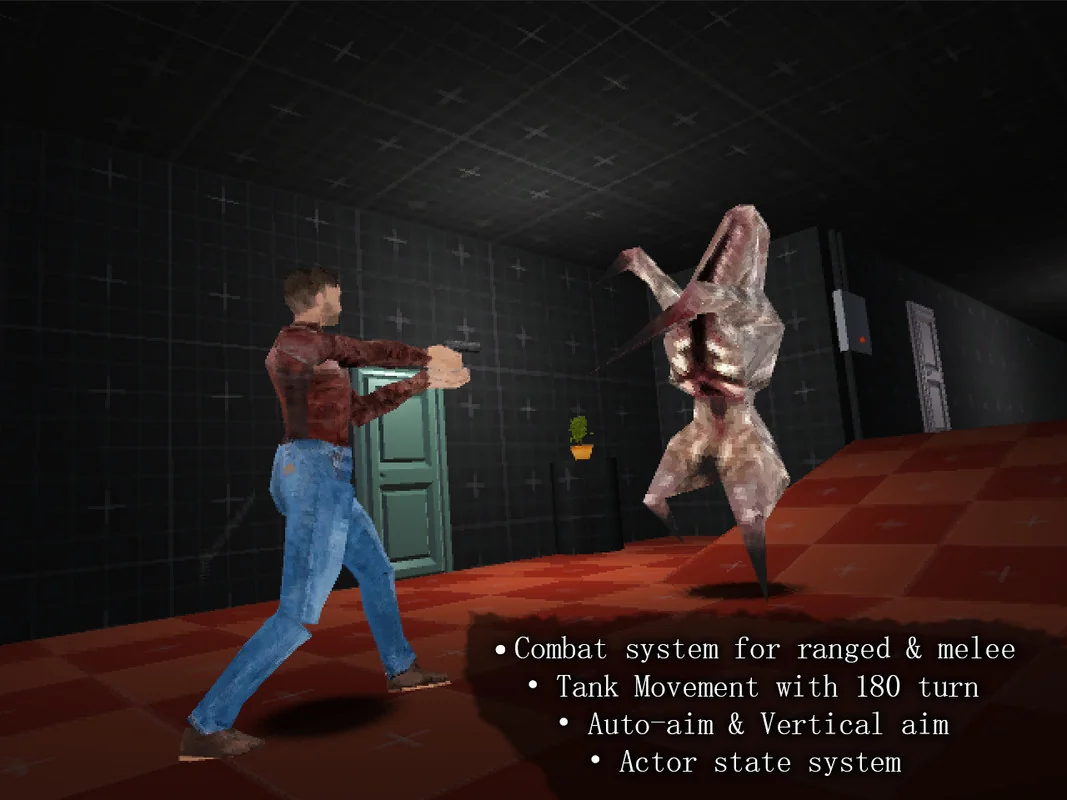
 Systems
 Electronics
 Environments