"7066dd76da796369"{"id":"14415","slug":"radar-chart-widget","title":"Radar Chart Widget","category":"Engine Tools","engine":"4.26 - 5.4","assetVersion":"Engine version: 4.26 - 5.4","engineVersion":"4.24","tag":"Engine Tools","accent":"blue","visual":"animation","summary":"Enhance your game's user interface with the Radar Chart Widget, a tool designed for clear data comparison. This interactive asset supports mouse input and fits various genres from RPGs to simulations.","platform":"Unreal Engine","publishedAt":"2026-03-11T18:00:22.000Z","updatedAt":"2026-04-19T15:45:46.000Z","sourceNotes":[],"fileContents":[],"compatibility":["Unreal Engine","Engine version: 4.26 - 5.4"],"featuredImage":{"alt":"Radar Chart Widget","src":"https://3dcghub.com/wp-content/uploads/2026/03/eb10402c-0b17-4798-8362-faacfeac8e7e.webp"},"hasDownloadLink":true,"downloads":0,"terms":[{"taxonomy":"category","slug":"engine-tools-tools-and-plugins","name":"Engine Tools"},{"taxonomy":"post_tag","slug":"2d-assets","name":"2D Assets"},{"taxonomy":"post_tag","slug":"gui%e5%9b%be%e6%a0%87%e5%8c%85","name":"GUI图标包"},{"taxonomy":"post_tag","slug":"plugins","name":"Plugins"},{"taxonomy":"post_tag","slug":"radar-chart","name":"Radar Chart"},{"taxonomy":"post_tag","slug":"rpg","name":"RPG"},{"taxonomy":"post_tag","slug":"ui","name":"UI"}],"galleryImages":[{"src":"https://3dcghub.com/wp-content/uploads/2026/03/a18b9296830e_9fe6cf5a-27ed-4e76-8337-d4fe3718c06f.webp","alt":"Radar Chart Widget"},{"src":"https://3dcghub.com/wp-content/uploads/2026/03/66410ffb9b1b_f575420e-85e7-49ed-998f-fe9622c9b45b.webp","alt":"Radar Chart Widget"},{"src":"https://3dcghub.com/wp-content/uploads/2026/03/64180749a7bc_569f8d91-4abc-4294-97f3-d7e5157dcf54.webp","alt":"Radar Chart Widget"},{"src":"https://3dcghub.com/wp-content/uploads/2026/03/23602c204f4a_d7dfaa32-f66b-4d37-b7bf-6033cb7aa8ab.webp","alt":"Radar Chart Widget"},{"src":"https://3dcghub.com/wp-content/uploads/2026/03/6fc949e214a9_b88ea048-d3c8-447e-acd4-7001e0f61bbe.webp","alt":"Radar Chart Widget"},{"src":"https://3dcghub.com/wp-content/uploads/2026/03/cf4744495600_9de3d59f-ef02-42f7-92f9-46fea0a65271.webp","alt":"Radar Chart Widget"},{"src":"https://3dcghub.com/wp-content/uploads/2026/03/dc18c388528f_1e43243f-e8ce-4dd1-9078-509fef55ee0d.webp","alt":"Radar Chart Widget"},{"src":"https://3dcghub.com/wp-content/uploads/2026/03/8e7743673e50_00e62dc7-0550-44f6-a638-bfc47c6d7c24.webp","alt":"Radar Chart Widget"}],"accessPanel":{"kind":"resource","title":"Access this resource","eyebrow":"Free Download","message":"Log in or create a free account to start your download.","fileName":"Radar Chart Widget 4.26 -5.4.7z","safetyNote":"All resources are 100% manually reviewed to eliminate all risks.","actionLabel":"Download Free","resourceType":"Resource archive"},"contentHtml":"\u003ch2\u003eEnhance Data Clarity with the Radar Chart Widget\u003c/h2\u003e\n\u003cp\u003eThe \u003cstrong\u003eRadar Chart Widget\u003c/strong\u003e is a specialized tool designed to help developers display complex information in a clear, visual format. By using this asset, creators can ensure that players understand and compare statistics with ease. This type of chart is particularly effective when you need to represent multiple data points simultaneously without overwhelming the user.\u003c/p\u003e\n\n\u003cp\u003eVisualization is key to a professional user interface. However, static images often fail to provide the depth required for modern gaming. This widget solves that problem by providing a dynamic way to present character stats, item attributes, or mission progress.\u003c/p\u003e\n\n\u003ch2\u003eFully Interactive User Interface\u003c/h2\u003e\n\u003cp\u003eOne of the primary benefits of this asset is its high level of engagement. The \u003cstrong\u003eRadar Chart Widget\u003c/strong\u003e is fully interactive and supports mouse input. Consequently, players can engage directly with the data presented on the screen. This interaction makes the HUD feel more responsive and integrated into the gameplay experience.\u003c/p\u003e\n\n\u003cp\u003eOn top of that, the developer focused on making the data comparable. Therefore, users can quickly identify strengths and weaknesses at a glance. Because the interface is intuitive, it reduces the learning curve for new players. Moreover, the interactive nature of the widget allows for more advanced HUD designs.\u003c/p\u003e\n\n\u003ch2\u003eVersatile Genre Applications\u003c/h2\u003e\n\u003cp\u003eThe \u003cstrong\u003eRadar Chart Widget\u003c/strong\u003e is highly adaptable across various game styles. It is most prominent in the following genres:\u003c/p\u003e\n\u003cul\u003e\n \u003cli\u003eFighting games for character attribute comparisons.\u003c/li\u003e\n \u003cli\u003e(J)RPGs for displaying complex party statistics.\u003c/li\u003e\n \u003cli\u003eShooters for weapon handling and equipment data.\u003c/li\u003e\n \u003cli\u003eMOBAs for hero power levels and scaling.\u003c/li\u003e\n \u003cli\u003eSimulation titles for resource and environmental management.\u003c/li\u003e\n\u003c/ul\u003e\n\n\u003cp\u003eIn addition to these specific categories, the widget is suitable for many other applications where data visualization is required. Whether you are building a complex RPG or a tactical simulation, this graph provides a professional solution for your interface needs.\u003c/p\u003e\n\n\u003ch2\u003eTechnical Integration\u003c/h2\u003e\n\u003cp\u003eThis resource is built to be accessible for various project versions. The creator has ensured compatibility across several engine iterations, including 4.25, 4.27, 5.0, and 5.7. Such broad support allows developers to integrate the widget into existing workflows without significant hurdles. Each version maintains the core functionality of the interactive graph, ensuring a consistent experience regardless of the engine version used.\u003c/p\u003e\n\n\u003ch2\u003eFinal Take\u003c/h2\u003e\n\u003cp\u003eThe clearest takeaway is that the Radar Chart Widget is an essential asset for any developer looking to improve their game's data presentation. It combines interactivity with a clean aesthetic to deliver a superior user experience. By implementing this tool, you can provide your players with an easy-to-understand visualization of their progress and stats. Therefore, it is a valuable addition to any modern game development toolkit.\u003c/p\u003e\n\n\u003ch2\u003eMore From The Same Workflow\u003c/h2\u003e\n\u003cul\u003e\n\u003cli\u003e\u003ca href=\"https://3dcghub.com/quick-merge-skeletal-mesh/\" title=\"Quick Merge Skeletal Mesh\"\u003eQuick Merge Skeletal Mesh\u003c/a\u003e\u003c/li\u003e\n\u003cli\u003e\u003ca href=\"https://3dcghub.com/hand-painted-weapon-equipment-icons-weapon-icons-equipment-icons-rpg-icons/\" title=\"Hand Painted Weapon \u0026amp;amp; Equipment Icons (Weapon Icons, Equipment Icons, RPG Icons)\"\u003eHand Painted Weapon \u0026amp; Equipment Icons (Weapon Icons, Equipment Icons, RPG Icons)\u003c/a\u003e\u003c/li\u003e\n\u003cli\u003e\u003ca href=\"https://3dcghub.com/motionui/\" title=\"MotionUI\"\u003eMotionUI\u003c/a\u003e\u003c/li\u003e\n\u003cli\u003e\u003ca href=\"https://3dcghub.com/ue4-mannequin-dynamic-suit-pack-pbr/\" title=\"UE4 Mannequin Dynamic Suit Pack (PBR)\"\u003eUE4 Mannequin Dynamic Suit Pack (PBR)\u003c/a\u003e\u003c/li\u003e\n\u003cli\u003e\u003ca href=\"https://3dcghub.com/building-interior-cubemap-material-function/\" title=\"Building Interior Cubemap Material Function\"\u003eBuilding Interior Cubemap Material Function\u003c/a\u003e\u003c/li\u003e\n\u003c/ul\u003e\n\n\u003ch2\u003eAsset Gallery\u003c/h2\u003e","contentTextLength":3177,"navigation":{"current":3393,"total":4016,"previous":{"id":"14450","slug":"rdsplinetools-rd-tools-pro","title":"rdSplineTools (rd Tools Pro)","category":"Engine Tools","platform":"Unreal Engine","updatedAt":"2026-04-19T15:45:46.000Z"},"next":{"id":"14481","slug":"ripx","title":"RipX","category":"Engine Tools","platform":"Unreal Engine","updatedAt":"2026-04-19T15:45:45.000Z"}},"relatedResources":[{"id":"14251","slug":"multiscreen","title":"MultiScreen","category":"Engine Tools","engine":"4.27,5.0 - 5.3","assetVersion":"Engine version: 4.27,5.0 - 5.3","engineVersion":"4.23","tag":"Engine Tools","accent":"blue","visual":"animation","summary":"MultiScreen is a versatile tool for managing multiple visual outputs. It converts camera feeds and actor data into customizable widgets during runtime.","platform":"Unreal Engine","publishedAt":"2026-03-11T17:09:50.000Z","updatedAt":"2026-04-19T15:45:50.000Z","sourceNotes":[],"fileContents":[],"compatibility":["Unreal Engine","Engine version: 4.27,5.0 - 5.3"],"featuredImage":{"alt":"MultiScreen","src":"https://3dcghub.com/wp-content/uploads/2026/03/f25398ca-a0ed-4f56-bb29-3d7b1e153051.webp"},"hasDownloadLink":true,"downloads":1},{"id":"28498","slug":"ascent-ui-tools-gamepad-navigation-ui-framework","title":"Ascent UI Tools - Gamepad Navigation \u0026 UI Framework","category":"Engine Tools","engine":"5.4 - 5.5","assetVersion":"Engine version: 5.4 - 5.5","engineVersion":"Asset Version:2.1 - 2.2","tag":"Engine Tools","accent":"blue","visual":"mech","summary":"Ascent UI Tools - Gamepad Navigation \u0026 UI Framework targets one of the slower parts of interface work: getting menus and widgets functional across gamepad-driven flows without heavy setup. It combines automatic navigation, sample menu structures, map-relate...","platform":"Unreal Engine","publishedAt":"2026-05-16T07:36:07.000Z","updatedAt":"2026-05-16T07:36:08.000Z","sourceNotes":[],"fileContents":[],"compatibility":["Unreal Engine","Engine version: 5.4 - 5.5","Asset Version: 2.1 - 2.2"],"featuredImage":{"alt":"Ascent UI Tools - Gamepad Navigation \u0026 UI Framework","src":"https://3dcghub.com/wp-content/uploads/2026/05/afa2df11869c_886c04f5-3515-4d43-a22c-ca4bd799f76f.webp"},"hasDownloadLink":true,"downloads":1},{"id":"14084","slug":"journeymans-minimap","title":"Journeyman's Minimap","category":"Engine Tools","engine":"4.15 - 5.8","assetVersion":"Asset Version: 1.2","engineVersion":"Engine version: 4.15 - 5.8","tag":"Engine Tools","accent":"blue","visual":"luts","summary":"Journeyman's Minimap offers a robust and flexible solution for creating professional navigation systems in Unreal Engine. It features deep icon customization, dynamic background rendering, and a versatile Fog of War system.","platform":"Unreal Engine","publishedAt":"2026-03-11T15:41:11.000Z","updatedAt":"2026-09-29T09:16:18.015Z","sourceNotes":[],"fileContents":[],"compatibility":["Unreal Engine","Asset Version: 1.2","Engine version: 4.15 - 5.8"],"featuredImage":{"alt":"Journeyman's Minimap","src":"https://3dcghub.com/wp-content/uploads/2026/03/15004687-fa86-47a7-8b1e-a6b4374fbeec.webp"},"hasDownloadLink":true,"downloads":2}]}
Engine Tools
Radar Chart Widget
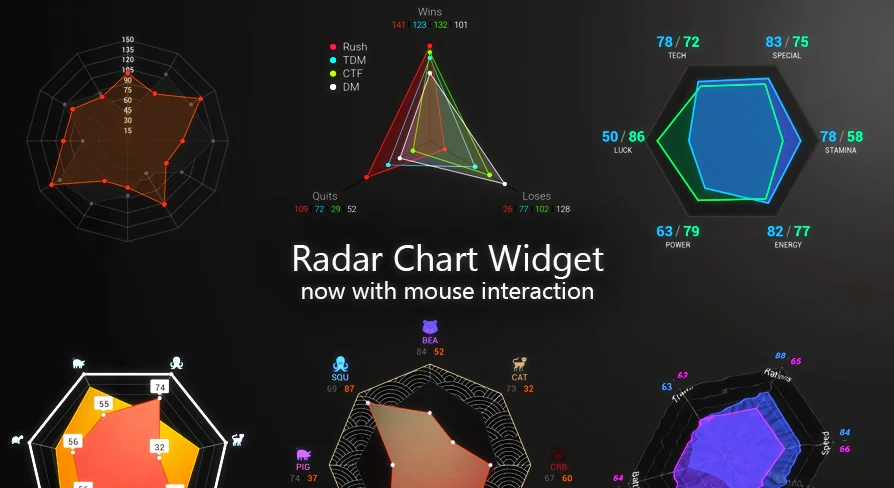
Enhance your game's user interface with the Radar Chart Widget, a tool designed for clear data comparison. This interactive asset supports mouse input and fits various genres from RPGs to simulations.
The Radar Chart Widget is a specialized tool designed to help developers display complex information in a clear, visual format. By using this asset, creators can ensure that players understand and compare statistics with ease. This type of chart is particularly effective when you need to represent multiple data points simultaneously without overwhelming the user.
Visualization is key to a professional user interface. However, static images often fail to provide the depth required for modern gaming. This widget solves that problem by providing a dynamic way to present character stats, item attributes, or mission progress.
Fully Interactive User Interface
One of the primary benefits of this asset is its high level of engagement. The Radar Chart Widget is fully interactive and supports mouse input. Consequently, players can engage directly with the data presented on the screen. This interaction makes the HUD feel more responsive and integrated into the gameplay experience.
On top of that, the developer focused on making the data comparable. Therefore, users can quickly identify strengths and weaknesses at a glance. Because the interface is intuitive, it reduces the learning curve for new players. Moreover, the interactive nature of the widget allows for more advanced HUD designs.
Versatile Genre Applications
The Radar Chart Widget is highly adaptable across various game styles. It is most prominent in the following genres:
Fighting games for character attribute comparisons.
(J)RPGs for displaying complex party statistics.
Shooters for weapon handling and equipment data.
MOBAs for hero power levels and scaling.
Simulation titles for resource and environmental management.
In addition to these specific categories, the widget is suitable for many other applications where data visualization is required. Whether you are building a complex RPG or a tactical simulation, this graph provides a professional solution for your interface needs.
Technical Integration
This resource is built to be accessible for various project versions. The creator has ensured compatibility across several engine iterations, including 4.25, 4.27, 5.0, and 5.7. Such broad support allows developers to integrate the widget into existing workflows without significant hurdles. Each version maintains the core functionality of the interactive graph, ensuring a consistent experience regardless of the engine version used.
Final Take
The clearest takeaway is that the Radar Chart Widget is an essential asset for any developer looking to improve their game's data presentation. It combines interactivity with a clean aesthetic to deliver a superior user experience. By implementing this tool, you can provide your players with an easy-to-understand visualization of their progress and stats. Therefore, it is a valuable addition to any modern game development toolkit.
 Engine Tools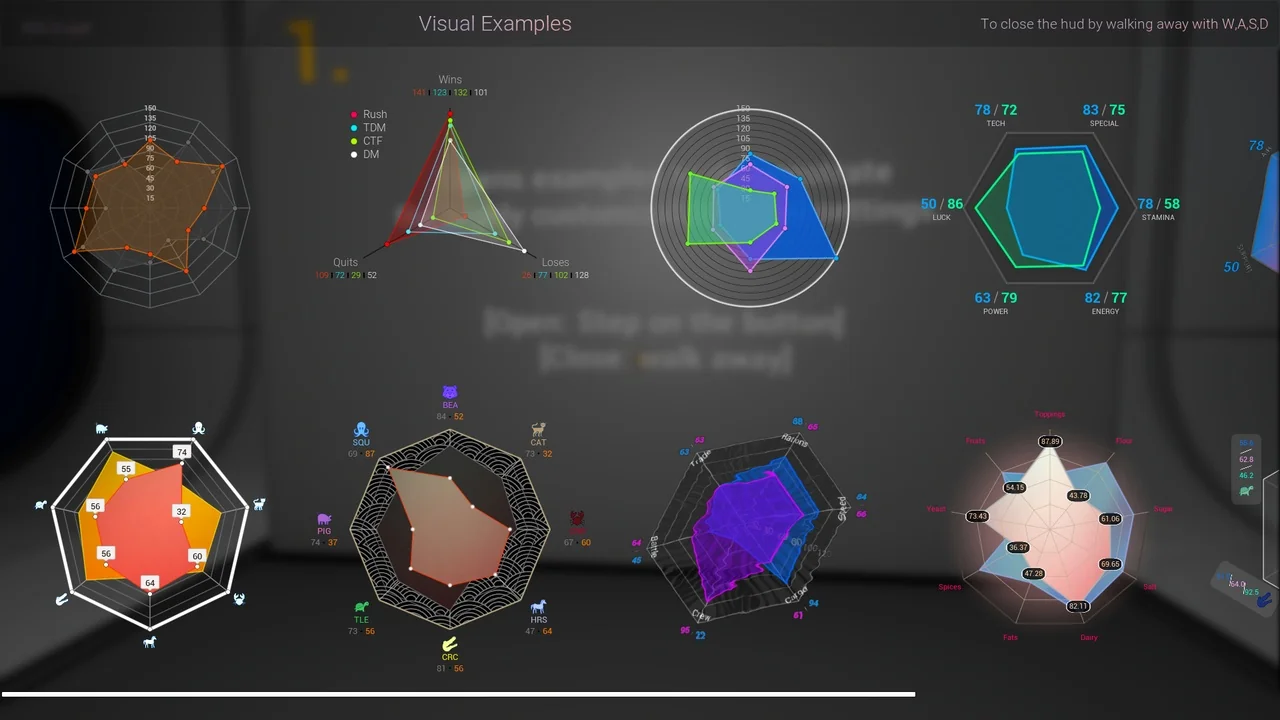
 Engine Tools
 Engine Tools
 Engine Tools