"1a0e4ac4dc71d030"{"id":"1001242","slug":"physical-interaction-system","title":"Physical Interaction System","category":"Action-Adventure","engine":"5.0+","assetVersion":"","engineVersion":"Engine Version: 5.0+","tag":"Action-Adventure","accent":"blue","visual":"mech","summary":"Explore the Physical Interaction System, a Blueprint-based tool offering unconventional sticky-finger physics control for pushing, pulling, and lifting.","platform":"Unreal Engine","publishedAt":"2026-09-23T14:52:33.060Z","updatedAt":"2026-09-23T14:52:33.060Z","sourceNotes":[],"fileContents":[],"compatibility":["Unreal Engine","Engine Version: 5.0+"],"featuredImage":{"alt":"Physical Interaction System","src":"/wp-content/uploads/published/2026/09/24e7f044221c-0f26abf6-c101-43f6-9245-e22a863ae391-2327758717.webp"},"hasDownloadLink":true,"downloads":0,"terms":[{"taxonomy":"category","slug":"action-adventure","name":"Action-Adventure"}],"galleryImages":[{"src":"/wp-content/uploads/published/2026/09/d9094cfd98d4-341b57b7-0551-4b5a-a404-e02e4a030581-69307d2a1f.webp","alt":"Physical Interaction System"},{"src":"/wp-content/uploads/published/2026/09/1c63661190b8-5be1acc9-dcb7-4187-a375-68693aa4cd8a-4362ce41e9.webp","alt":"Physical Interaction System"},{"src":"/wp-content/uploads/published/2026/09/0848ca4dd265-9c167afc-fb3a-490b-aa1d-219df481fa31-a867827c94.webp","alt":"Physical Interaction System"},{"src":"/wp-content/uploads/published/2026/09/ad5df27f968a-20e4ae86-c617-48e1-b844-9694d60f9546-a80411c7ae.webp","alt":"Physical Interaction System"},{"src":"/wp-content/uploads/published/2026/09/58106d772250-589745e8-cd10-4d47-ba2a-7b9178336ad2-32fe6e686e.webp","alt":"Physical Interaction System"},{"src":"/wp-content/uploads/published/2026/09/fd7afbbe6bb3-799d8f87-1810-4075-907d-fe651979ae62-25e754824b.webp","alt":"Physical Interaction System"},{"src":"/wp-content/uploads/published/2026/09/89b7d9490587-de704018-87e7-4977-a4b1-b3223b228552-bda175b7f5.webp","alt":"Physical Interaction System"},{"src":"/wp-content/uploads/published/2026/09/cb6cfda6b78f-c2700398-7990-424e-8264-8f8ecc8a2b25-68de7f2798.webp","alt":"Physical Interaction System"}],"accessPanel":{"kind":"resource","title":"Download this resource","eyebrow":"Free Download","message":"Log in or create a free account to start your download.","fileName":"Content.7z","safetyNote":"Resources are manually reviewed before listing to improve quality and reduce obvious risks.","actionLabel":"Download Free","resourceType":"Resource archive"},"contentHtml":"\u003ch2\u003eRethinking Direct Object Control with the Physical Interaction System\u003c/h2\u003e\u003cp\u003eHandling dynamic physics objects inside game engines frequently runs into rigid constraints and unnatural movement profiles. Standard interaction models rely heavily on predefined grab sockets, fixed parent-child hierarchies, or static animations that interrupt active physics simulations.\u003c/p\u003e\u003cp\u003eThe Physical Interaction System departs from traditional handling by prioritizing direct, intuitive physical authority over dynamic objects. Rather than forcing an interaction through standard pickup templates, the mechanics rely on an unconventional control style intended to expand gameplay opportunities. By decoupling interaction from standard rigid-body snapping, developers gain the freedom to establish tactile connections with props, assemblies, and environmental fixtures. This distinct method broadens mechanical possibilities, permitting real-time handling that feels fluid while preserving the physical attributes of the objects involved.\u003c/p\u003e\u003ch2\u003ePush, Pull, Lift, and Lower via the Sticky Finger Mechanic\u003c/h2\u003e\u003cp\u003eAt the center of this unconventional interaction is a sticky-finger mechanic that drives direct, tactile forces.\u003c/p\u003e\u003cp\u003eInstead of requiring dedicated grab components across every target, the mechanic functions as an adhesive contact point capable of directional influence. Users can push objects across flat surfaces, pull heavy pieces toward a focal point, lift dynamic items cleanly upward, and lower them back down into place with continuous control. This tactile model lets the player guide objects through direct movement rather than executing canned scripts. Because pushing, pulling, lifting, and lowering stem from continuous physical engagement, objects retain their native weight and momentum during movement. The adhesive contact point allows fine steering, dragging, and tilting across surfaces, making irregular geometric meshes interact naturally without needing custom animation sequences.\u003c/p\u003e\u003ch2\u003eBlueprint Examples and Constructing Custom Physical Devices\u003c/h2\u003e\u003cp\u003eVisual scripting within Blueprint houses the entire interactive logic, giving developers a modular base for physical mechanics.\u003c/p\u003e\u003cp\u003eMultiple built-in examples demonstrate how the interaction logic drives different dynamic entities right out of the box. These functional setups illustrate how basic contact forces convert into meaningful mechanics, whether nudging loose items or steering dynamic contraptions. The architecture is intentionally open-ended, allowing creators to invent their own devices rather than limiting scenes to the supplied samples. Designers can harness the underlying Blueprint framework to power complex machinery, such as mechanical levers, pull-down latches, physical cranes, sliding barriers, or balancing platforms. Because the code is accessible in Blueprint, linking interactive inputs to new mechanical structures requires zero changes to the underlying physics philosophy.\u003c/p\u003e\u003ch2\u003eReviewing Known Problems for Playroom and Interactive Sandboxes\u003c/h2\u003e\u003cp\u003ePhysics-heavy playroom spaces push simulation engines to their computational boundaries, making pre-planning essential.\u003c/p\u003e\u003cp\u003eUnconventional manipulation mechanics inherently stress simulation solvers, particularly when extreme forces collide with complex mesh colliders. For this reason, reviewing the documented known problems is an essential preliminary step before deploying the system into complex sandbox environments. Understanding these documented friction points, clipping thresholds, or constraint limitations allows developers to construct levels that play to the system's strengths. By factoring known physics quirks into the design of interactive playroom levels, creators can set up stable mass thresholds, calibrate joint stiffness, and ensure that rapid pushing or lifting forces do not compromise level geometry or cause erratic physics spasms during runtime.\u003c/p\u003e\u003ch2\u003eProcedural Level Generator Compatibility and Production Placement\u003c/h2\u003e\u003cp\u003ePhysical sandboxes become substantially more versatile when integrated into automated layout workflows.\u003c/p\u003e\u003cp\u003eThe Physical Interaction System features compatibility with Procedural Level Generator, permitting dynamic interactive setups within algorithmically assembled scenes. Populating generated rooms, corridors, and obstacle areas with physical objects transforms static environment seeds into reactive puzzle layouts. In an active production pipeline, this combination fits naturally into physics-driven puzzle games, sandbox testing chambers, and experimental spatial puzzles where players solve navigational problems using direct manipulation. By pairing algorithmic floorplans with custom mechanical devices and sticky-finger physics, developers can generate fresh interactive challenges without needing to place and script every moving part by hand.\u003c/p\u003e\n\n\u003ch2\u003eRelated Resources Worth Checking\u003c/h2\u003e\n\u003cul\u003e\n\u003cli\u003e\u003ca href=\"https://3dcghub.com/uipf-unified-interactive-physical-foliage/\" title=\"UIPF - Unified Interactive Physical Foliage\"\u003eUIPF - Unified Interactive Physical Foliage\u003c/a\u003e\u003c/li\u003e\n\u003cli\u003e\u003ca href=\"https://3dcghub.com/physical-rope/\" title=\"Physical Rope\"\u003ePhysical Rope\u003c/a\u003e\u003c/li\u003e\n\u003cli\u003e\u003ca href=\"https://3dcghub.com/interaction-system/\" title=\"Interaction System\"\u003eInteraction System\u003c/a\u003e\u003c/li\u003e\n\u003cli\u003e\u003ca href=\"https://3dcghub.com/dynamic-ragdoll/\" title=\"Dynamic Ragdoll\"\u003eDynamic Ragdoll\u003c/a\u003e\u003c/li\u003e\n\u003cli\u003e\u003ca href=\"https://3dcghub.com/hyper-multiplayer-survival-template-pro-mst-v4/\" title=\"Hyper Multiplayer Survival Template Pro [MST] V4\"\u003eHyper Multiplayer Survival Template Pro [MST] V4\u003c/a\u003e\u003c/li\u003e\n\u003c/ul\u003e","contentTextLength":4959,"navigation":{"current":16,"total":3200,"previous":{"id":"1001243","slug":"simple-crouch-animations","title":"Simple Crouch Animations","category":"Action-Adventure","platform":"Unreal Engine","updatedAt":"2026-09-23T14:56:08.904Z"},"next":{"id":"1001241","slug":"multiplayer-ragdoll","title":"Multiplayer Ragdoll","category":"Action-Adventure","platform":"Unreal Engine","updatedAt":"2026-09-23T14:47:54.395Z"}},"relatedResources":[{"id":"14707","slug":"uipf-unified-interactive-physical-foliage","title":"UIPF - Unified Interactive Physical Foliage","category":"Engine Tools","engine":"5.3","assetVersion":"Engine version: 5.3","engineVersion":"4.20","tag":"Engine Tools","accent":"blue","visual":"audio","summary":"UIPF - Unified Interactive Physical Foliage provides a high-performance solution for adding realistic interaction to game environments, from swaying grass to bendy plants.","platform":"Unreal Engine","publishedAt":"2026-03-11T19:07:09.000Z","updatedAt":"2026-04-19T15:45:41.000Z","sourceNotes":[],"fileContents":[],"compatibility":["Unreal Engine","Engine version: 5.3"],"featuredImage":{"alt":"UIPF - Unified Interactive Physical Foliage","src":"https://3dcghub.com/wp-content/uploads/2026/03/416e817c-b004-49bf-9a26-9c0ef3ecf7f6.webp"},"hasDownloadLink":true,"downloads":2},{"id":"15291","slug":"physical-rope","title":"Physical Rope","category":"Procedural Systems","engine":"5.3","assetVersion":"Engine version: 5.3","engineVersion":"Asset Version:2.0","tag":"Procedural Systems","accent":"blue","visual":"city","summary":"Physical Rope provides a realistic, physically collidable, and simulatable solution for game development. This Blueprint-based asset allows for advanced interactions with environmental objects.","platform":"Unreal Engine","publishedAt":"2026-03-12T08:31:31.000Z","updatedAt":"2026-04-19T15:44:51.000Z","sourceNotes":[],"fileContents":[],"compatibility":["Unreal Engine","Engine version: 5.3","Asset Version: 2.0"],"featuredImage":{"alt":"Physical Rope","src":"https://3dcghub.com/wp-content/uploads/2026/03/354e56ff-3064-4abd-ae86-5393e1075bef.webp"},"hasDownloadLink":true,"downloads":0},{"id":"1001238","slug":"interaction-system","title":"Interaction System","category":"Action-Adventure","engine":"Version details listed","assetVersion":"","engineVersion":"","tag":"Action-Adventure","accent":"blue","visual":"mech","summary":"A modular, Blueprint-based starter kit built for rapid Unreal Engine 5 integration, suited for stylized nature biomes and interactive scene design.","platform":"Unreal Engine","publishedAt":"2026-09-21T03:51:17.965Z","updatedAt":"2026-09-21T03:51:17.965Z","sourceNotes":[],"fileContents":[],"compatibility":["Unreal Engine"],"featuredImage":{"alt":"Interaction System","src":"/wp-content/uploads/published/2026/09/89cb92998a2f-3d313b24-87c7-4a4c-a978-5521a4db4560-00555b9a06.webp"},"hasDownloadLink":true,"downloads":1}]}
Action-Adventure
Physical Interaction System
Explore the Physical Interaction System, a Blueprint-based tool offering unconventional sticky-finger physics control for pushing, pulling, and lifting.
Rethinking Direct Object Control with the Physical Interaction System
Handling dynamic physics objects inside game engines frequently runs into rigid constraints and unnatural movement profiles. Standard interaction models rely heavily on predefined grab sockets, fixed parent-child hierarchies, or static animations that interrupt active physics simulations.
The Physical Interaction System departs from traditional handling by prioritizing direct, intuitive physical authority over dynamic objects. Rather than forcing an interaction through standard pickup templates, the mechanics rely on an unconventional control style intended to expand gameplay opportunities. By decoupling interaction from standard rigid-body snapping, developers gain the freedom to establish tactile connections with props, assemblies, and environmental fixtures. This distinct method broadens mechanical possibilities, permitting real-time handling that feels fluid while preserving the physical attributes of the objects involved.
Push, Pull, Lift, and Lower via the Sticky Finger Mechanic
At the center of this unconventional interaction is a sticky-finger mechanic that drives direct, tactile forces.
Instead of requiring dedicated grab components across every target, the mechanic functions as an adhesive contact point capable of directional influence. Users can push objects across flat surfaces, pull heavy pieces toward a focal point, lift dynamic items cleanly upward, and lower them back down into place with continuous control. This tactile model lets the player guide objects through direct movement rather than executing canned scripts. Because pushing, pulling, lifting, and lowering stem from continuous physical engagement, objects retain their native weight and momentum during movement. The adhesive contact point allows fine steering, dragging, and tilting across surfaces, making irregular geometric meshes interact naturally without needing custom animation sequences.
Blueprint Examples and Constructing Custom Physical Devices
Visual scripting within Blueprint houses the entire interactive logic, giving developers a modular base for physical mechanics.
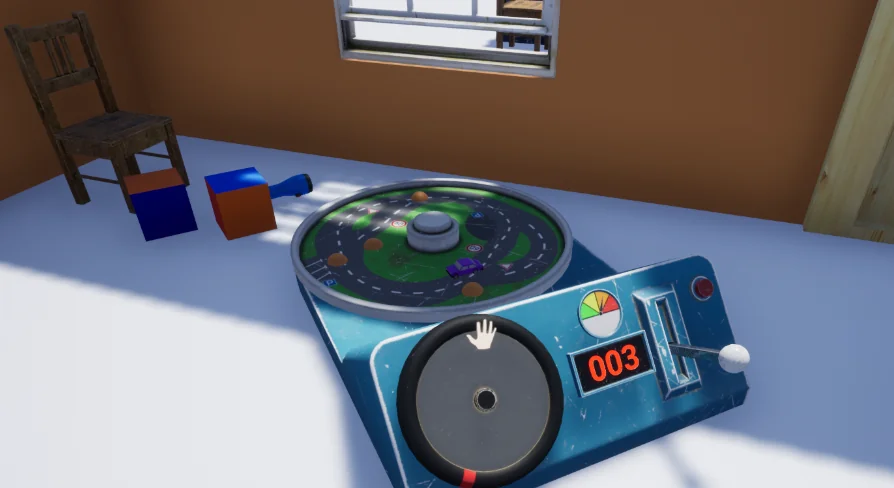
Multiple built-in examples demonstrate how the interaction logic drives different dynamic entities right out of the box. These functional setups illustrate how basic contact forces convert into meaningful mechanics, whether nudging loose items or steering dynamic contraptions. The architecture is intentionally open-ended, allowing creators to invent their own devices rather than limiting scenes to the supplied samples. Designers can harness the underlying Blueprint framework to power complex machinery, such as mechanical levers, pull-down latches, physical cranes, sliding barriers, or balancing platforms. Because the code is accessible in Blueprint, linking interactive inputs to new mechanical structures requires zero changes to the underlying physics philosophy.
Reviewing Known Problems for Playroom and Interactive Sandboxes
Physics-heavy playroom spaces push simulation engines to their computational boundaries, making pre-planning essential.
Unconventional manipulation mechanics inherently stress simulation solvers, particularly when extreme forces collide with complex mesh colliders. For this reason, reviewing the documented known problems is an essential preliminary step before deploying the system into complex sandbox environments. Understanding these documented friction points, clipping thresholds, or constraint limitations allows developers to construct levels that play to the system's strengths. By factoring known physics quirks into the design of interactive playroom levels, creators can set up stable mass thresholds, calibrate joint stiffness, and ensure that rapid pushing or lifting forces do not compromise level geometry or cause erratic physics spasms during runtime.
Procedural Level Generator Compatibility and Production Placement
Physical sandboxes become substantially more versatile when integrated into automated layout workflows.
The Physical Interaction System features compatibility with Procedural Level Generator, permitting dynamic interactive setups within algorithmically assembled scenes. Populating generated rooms, corridors, and obstacle areas with physical objects transforms static environment seeds into reactive puzzle layouts. In an active production pipeline, this combination fits naturally into physics-driven puzzle games, sandbox testing chambers, and experimental spatial puzzles where players solve navigational problems using direct manipulation. By pairing algorithmic floorplans with custom mechanical devices and sticky-finger physics, developers can generate fresh interactive challenges without needing to place and script every moving part by hand.
 Action-Adventure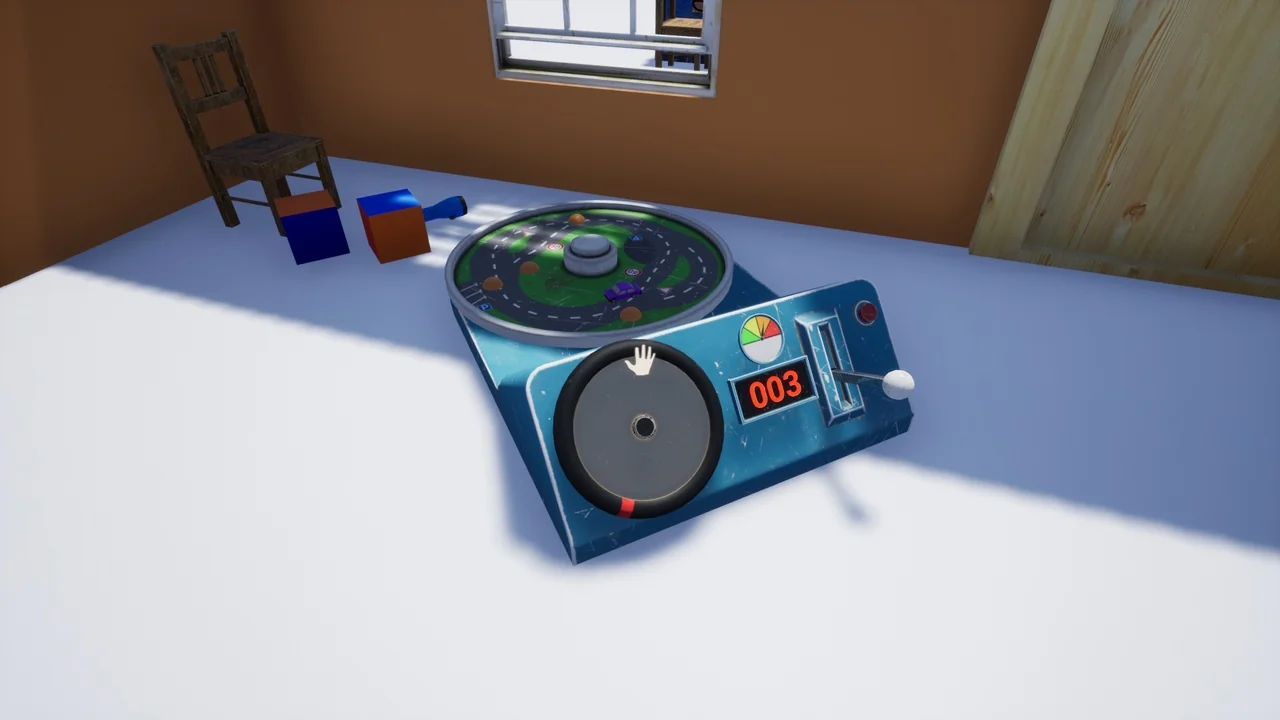
 Engine Tools
 Procedural Systems
 Action-Adventure