"7779633244466edf"{"id":"1003046","slug":"open-and-close-animation-pack","title":"Open And Close Animation Pack","category":"Variety","engine":"4.24+,5.0+","assetVersion":"","engineVersion":"4.24+,5.0+","tag":"Variety","accent":"blue","visual":"animation","summary":"Implement interactive door, box, and container manipulation using animations built directly for the Unreal Engine 4 Skeleton.","platform":"Unreal Engine","indexPolicy":"index","publishedAt":"2026-11-26T14:01:25.362Z","updatedAt":"2026-11-26T14:01:25.362Z","sourceNotes":[],"fileContents":[],"compatibility":["Unreal Engine","Engine Version: 4.24+,5.0+"],"featuredImage":{"alt":"Open And Close Animation Pack","src":"/wp-content/uploads/published/2026/11/54d1b7f462c8-dc2e797f-12e9-4545-9a94-7eaafe8fd76c-e8f22afccc.webp"},"fileSizeBytes":22296563,"hasDownloadLink":true,"downloads":0,"terms":[{"taxonomy":"category","slug":"variety-animations","name":"Variety"}],"galleryImages":[{"src":"/wp-content/uploads/published/2026/11/d05985a7a7bf-7b0f8289-874b-431a-8d8a-a6c784c8ca04-62d10c4fa4.webp","alt":"Open And Close Animation Pack"},{"src":"/wp-content/uploads/published/2026/11/55b98866b9ca-e338c4f1-53fa-4b59-96fd-a81b76003469-55388a5336.webp","alt":"Open And Close Animation Pack"},{"src":"/wp-content/uploads/published/2026/11/a7b08cfd8a90-a0d2ea3f-9cae-4f88-9dfa-50fa9d12b18c-2b626d41ff.webp","alt":"Open And Close Animation Pack"},{"src":"/wp-content/uploads/published/2026/11/a6cbe62c53f4-fc9462cb-b680-4d13-b6ba-a2a349131e0c-3883e95668.webp","alt":"Open And Close Animation Pack"},{"src":"/wp-content/uploads/published/2026/11/04804516af8e-da76cee7-2211-4163-957d-5daae89a0a6e-a6c51884d2.webp","alt":"Open And Close Animation Pack"}],"accessPanel":{"kind":"resource","title":"Get this resource","safetyNote":"Resources are manually reviewed before listing to improve quality and reduce obvious risks.","fileFormat":".7z","resourceType":"Resource archive","versions":[]},"contentHtml":"\u003cp\u003eIntegrating physical environment manipulation into a project requires animation clips that align precisely with standard skeletal hierarchies. The Open And Close Animation Pack addresses this gameplay requirement by delivering interaction sequences built specifically for the Unreal Engine 4 Skeleton. By relying on this standardized bone hierarchy, the included clips slot into standard character rigs without preliminary remapping or structural adjustments to the skeleton tree.\u003c/p\u003e \u003ch2\u003eTargeting the Unreal Engine 4 Skeleton in the Animation Pack\u003c/h2\u003e\n\u003cp\u003eAuthoring interaction data directly on the Unreal Engine 4 Skeleton ensures immediate compatibility with standard humanoid character setups. When an animation relies on native UE4 bone naming and joint orientations, technical animators avoid the typical friction of reconciling differing rest poses or mismatched roll axes. The clavicle, shoulder, elbow, wrist, and individual finger joints follow the reference transforms established by the engine's default mannequin. Hand placement during reaching phases, spine curvature during forward leans, and the clearance of the arms relative to the torso remain predictable across standard assets.\u003c/p\u003e\n\u003cp\u003eIn practice, utilizing clips authored for this skeleton allows gameplay programmers to drop interaction assets directly into existing Animation Blueprints. State machines handling locational triggers or contextual button presses can feed these clips into montage slots. Because the underlying proportions match the engine's primary humanoid reference, the motions can also feed into layered blending nodes, such as applying an arm interaction on an upper-body slot while the lower body continues through a locomotion blend space or stays planted in an idle stance.\u003c/p\u003e \u003ch2\u003eDoor and Container Mechanics Using Open and Close Sequences\u003c/h2\u003e\n\u003cp\u003eThe collection provides an assortment of simple animations driven by interacting with doors, boxes, and other simple containers. These specific environmental elements represent the most frequent touchpoints in level exploration, narrative discovery, and systemic adventure designs. Players encounter hinged partitions, storage crates, and utility boxes across virtually every genre, requiring character motions that clearly telegraph the act of unlatching, swinging, or lifting an obstruction.\u003c/p\u003e\n\u003cp\u003eBy classifying the motions as simple animations, the authoring focuses on clear, unencumbered movements rather than highly stylized or exaggerated physical performances. For doors, this means the character model cleanly approaches, establishes contact with the handle or panel, and executes the swinging motion without extraneous flourishes that could cause clipping against adjacent doorframes or architectural trim. The motions provide clean spatial arcs that give technical designers the necessary windows to align door hinge rotations with the character's hand trajectory.\u003c/p\u003e\n\u003cp\u003eWhen interacting with boxes and simple containers, verticality and hand positioning shift downward. Reaching toward a tabletop crate, a floor-mounted chest, or a small latch mechanism demands dedicated posture shifts. The collection supplies movements that manage this transition, stabilizing the character's center of mass while the hands engage with the target prop. Having these container movements isolated from complex cinematic choreography ensures that the timing remains responsive, allowing gameplay interactions to complete within practical timeframes that respect player input.\u003c/p\u003e \u003ch2\u003eIntegrating Person Character Interactions with Props\u003c/h2\u003e\n\u003cp\u003eFiled under the person category, the animation set focuses entirely on human movement dynamics. Simulating a person manipulating an inanimate object requires balancing realism with functional gameplay execution. If an interaction motion takes too long to reach the contact point, player input feels sluggish; if it snaps instantly, the physical connection between the character and the world disappears. The motions in this pack maintain a readable rhythm that communicates weight, grasp, and follow-through.\u003c/p\u003e\n\u003cp\u003eTo implement these interactions reliably within an Unreal Engine level, developers typically coordinate the character's animation sequence with the target actor's internal timeline or physics constraints. When a player triggers an interaction on a closed container, the character model can snap or blend into an aligned interaction vector using motion warping or standard transform interpolation. Once aligned, the appropriate animation plays, driving the hand toward the known prop coordinate while the container's blueprint concurrently drives the lid or door rotation.\u003c/p\u003e\n\u003cp\u003eBecause the movements stay simple and focused on common human physical actions, they support broad utility across varied game settings. A person opening a wooden crate in a period setting follows essentially the same physical mechanics as a character opening a metal storage case in a modern or futuristic environment. The absence of hyper-specific weapon handling, unusual physical quirks, or extreme pacing allows developers to apply these container interactions across diverse narrative scenarios.\u003c/p\u003e \u003ch2\u003eTracking Updates and Library Expansion Across the Pack\u003c/h2\u003e\n\u003cp\u003eIterative adjustments continue to refine the collection's baseline utility. Update 1 brought the addition of one extra animation to the existing roster, expanding the variety of interaction options available to developers. While individual animation additions may appear subtle in scale, even a single targeted motion can address an alternate approach angle, a different hand dominance, or a distinct container profile that previously lacked coverage.\u003c/p\u003e\n\u003cp\u003eWhen integrating updates into an active production environment, maintaining consistent bone hierarchies is critical. Because subsequent additions maintain the standard Unreal Engine 4 Skeleton configuration, bringing updated assets into an established project structure requires no restructuring of existing animation data tables, montage structures, or gameplay tags. The updated animation integrates directly alongside the original assortment, ready to be assigned to new container types or alternative opening mechanics within the project's interaction framework.\u003c/p\u003e\n\n\u003ch2\u003eExplore Similar Assets\u003c/h2\u003e\n\u003cul\u003e\n\u003cli\u003e\u003ca href=\"https://3dcghub.com/open-world-animset/\" rel=\"noopener noreferrer\"\u003eOpen World Animset\u003c/a\u003e\u003c/li\u003e\n\u003cli\u003e\u003ca href=\"https://3dcghub.com/knife-mocapanimpack-1-3/\" rel=\"noopener noreferrer\"\u003eKnife MocapAnimPack 1.3\u003c/a\u003e\u003c/li\u003e\n\u003cli\u003e\u003ca href=\"https://3dcghub.com/56-animations-for-creatures/\" rel=\"noopener noreferrer\"\u003e56 Animations For Creatures\u003c/a\u003e\u003c/li\u003e\n\u003cli\u003e\u003ca href=\"https://3dcghub.com/swimming-animations/\" rel=\"noopener noreferrer\"\u003eSwimming Animations\u003c/a\u003e\u003c/li\u003e\n\u003cli\u003e\u003ca href=\"https://3dcghub.com/motorbike-interact-animations-pack/\" rel=\"noopener noreferrer\"\u003eMotorbike Interact Animations Pack\u003c/a\u003e\u003c/li\u003e\n\u003c/ul\u003e","contentTextLength":6326,"navigation":{"current":247,"total":5166,"previous":{"id":"1003047","slug":"orientalism-dual-blade-anim-set","title":"Orientalism Dual Blade Anim Set","category":"Combat","platform":"Unreal Engine","updatedAt":"2026-11-26T14:01:54.972Z"},"next":{"id":"1003045","slug":"office-desk-mocap-pack","title":"Office Desk - MoCap Pack","category":"Variety","platform":"Unreal Engine","updatedAt":"2026-11-26T14:00:44.170Z"}},"relatedResources":[{"id":"1001583","slug":"open-world-animset","title":"Open World Animset","category":"Variety","engine":"4.8+,5.0+","assetVersion":"","engineVersion":"4.8+,5.0+","tag":"Variety","accent":"blue","visual":"mech","summary":"Over 500 motion capture animations for humanoid character movement, traversal, cover mechanics, firearm handling, and melee combat.","platform":"Unreal Engine","indexPolicy":"index","publishedAt":"2026-10-10T08:55:24.492Z","updatedAt":"2026-10-10T08:55:24.492Z","sourceNotes":[],"fileContents":[],"compatibility":["Unreal Engine","Engine Version: 4.8+,5.0+"],"featuredImage":{"alt":"Open World Animset","src":"/wp-content/uploads/published/2026/10/5316a1357041-5e3578f2-c647-450e-a63b-ea83d2aa1e89-94597b32fa.webp"},"fileSizeBytes":129240752,"hasDownloadLink":true,"downloads":2},{"id":"1002071","slug":"knife-mocapanimpack-1-3","title":"Knife MocapAnimPack 1.3","category":"Variety","engine":"4.27+,5.0+","assetVersion":"","engineVersion":"4.27+,5.0+","tag":"Variety","accent":"blue","visual":"mech","summary":"A close look at Knife MocapAnimPack 1.3, covering stand and crouch movement styles, combat melee attacks, hit reactions, and UE4 to UE5 retargeting.","platform":"Unreal Engine","indexPolicy":"index","publishedAt":"2026-10-26T15:32:58.910Z","updatedAt":"2026-10-26T15:32:58.910Z","sourceNotes":[],"fileContents":[],"compatibility":["Unreal Engine","Engine Version: 4.27+,5.0+"],"featuredImage":{"alt":"Knife MocapAnimPack 1.3","src":"/wp-content/uploads/published/2026/10/fcf5631e8a19-ba143fce-ffab-4c7c-b0fc-47a9ed5ead04-7123ed4f43.webp"},"fileSizeBytes":17314920,"hasDownloadLink":true,"downloads":4},{"id":"1001177","slug":"56-animations-for-creatures","title":"56 Animations For Creatures","category":"Variety","engine":"5.0+","assetVersion":"","engineVersion":"5.0+","tag":"Variety","accent":"blue","visual":"animation","summary":"A close look at 56 Animations For Creatures, built on the UE mannequin for sharp zombie and monster character motion across FPS device setups.","platform":"Unreal Engine","indexPolicy":"index","publishedAt":"2026-09-17T03:52:43.278Z","updatedAt":"2026-09-17T03:52:43.278Z","sourceNotes":[],"fileContents":[],"compatibility":["Unreal Engine","Engine Version: 5.0+"],"featuredImage":{"alt":"56 Animations For Creatures","src":"/wp-content/uploads/published/2026/09/a57403d3f5b5-aa553beb-7f69-43c0-8b40-75601ea80adc-01814dbc83.webp"},"fileSizeBytes":16884873,"hasDownloadLink":true,"downloads":5}]}[{"id":4225,"sourceId":4225,"taxonomyId":4225,"taxonomy":"category","slug":"asset-library","name":"Asset Library","parentId":null,"count":0,"hasChildren":true,"href":"/","seoTitle":"Free Game Assets Library | 3DCGHUB","seoDescription":"Browse free Unreal Engine, Unity, Blender assets and game development tutorials on 3DCGHUB with previews, compatibility notes, and secure downloads.","sitemapEnabled":true,"children":[{"id":4227,"sourceId":4227,"taxonomyId":4227,"taxonomy":"category","slug":"blender-add-ons-plugins","name":"Blender Add-ons \u0026 Plugins","parentId":4225,"count":0,"hasChildren":false,"href":"/category/blender-add-ons-plugins/","seoTitle":"Free Blender Add-ons \u0026 Plugins | 3DCGHUB","seoDescription":"Browse free Blender Add-ons \u0026 Plugins tools for Blender on 3DCGHUB: curated downloads with preview images, compatibility notes and secure download access.","sitemapEnabled":true},{"id":514,"sourceId":514,"taxonomyId":514,"taxonomy":"category","slug":"unity-2","name":"Unity","parentId":4225,"count":0,"hasChildren":true,"href":"/category/unity-2/","seoTitle":"Free Unity Assets | 3DCGHUB","seoDescription":"Browse free Unity resources on 3DCGHUB: curated downloads with preview images, compatibility notes and secure download access.","sitemapEnabled":true,"children":[{"id":523,"sourceId":523,"taxonomyId":523,"taxonomy":"category","slug":"2d","name":"2D","parentId":514,"count":0,"hasChildren":true,"href":"/category/2d/","seoTitle":"Free Unity 2D | 3DCGHUB","seoDescription":"Browse free 2D assets for Unity on 3DCGHUB: curated downloads with preview images, compatibility notes and secure download access.","sitemapEnabled":true},{"id":515,"sourceId":515,"taxonomyId":515,"taxonomy":"category","slug":"3d-unity-2","name":"3D","parentId":514,"count":0,"hasChildren":true,"href":"/category/3d-unity-2/","seoTitle":"Free Unity 3D Assets | 3DCGHUB","seoDescription":"Browse free 3D assets for Unity on 3DCGHUB: curated downloads with preview images, compatibility notes and secure download access.","sitemapEnabled":true},{"id":565,"sourceId":565,"taxonomyId":565,"taxonomy":"category","slug":"add-ons","name":"Add-Ons","parentId":514,"count":0,"hasChildren":false,"href":"/category/add-ons/","seoTitle":"Free Unity Add-Ons | 3DCGHUB","seoDescription":"Browse free Add-Ons assets for Unity on 3DCGHUB: curated downloads with preview images, compatibility notes and secure download access.","sitemapEnabled":true},{"id":529,"sourceId":529,"taxonomyId":529,"taxonomy":"category","slug":"audio-unity-2","name":"Audio","parentId":514,"count":0,"hasChildren":true,"href":"/category/audio-unity-2/","seoTitle":"Free Unity Audio | 3DCGHUB","seoDescription":"Browse free Audio for Unity on 3DCGHUB: curated downloads with preview images, compatibility notes and secure download access.","sitemapEnabled":true},{"id":557,"sourceId":557,"taxonomyId":557,"taxonomy":"category","slug":"templates","name":"Templates","parentId":514,"count":0,"hasChildren":true,"href":"/category/templates/","seoTitle":"Free Unity Templates | 3DCGHUB","seoDescription":"Browse free Unity project templates on 3DCGHUB. Starter kits with previews, compatibility notes, and secure download access.","sitemapEnabled":true},{"id":533,"sourceId":533,"taxonomyId":533,"taxonomy":"category","slug":"tools-unity-2","name":"Tools","parentId":514,"count":0,"hasChildren":true,"href":"/category/tools-unity-2/","sitemapEnabled":true},{"id":554,"sourceId":554,"taxonomyId":554,"taxonomy":"category","slug":"vfx-unity-2","name":"VFX","parentId":514,"count":0,"hasChildren":true,"href":"/category/vfx-unity-2/","seoTitle":"Free Unity VFX | 3DCGHUB","seoDescription":"Browse free VFX for Unity on 3DCGHUB: curated downloads with preview images, compatibility notes and secure download access.","sitemapEnabled":true}]},{"id":511,"sourceId":511,"taxonomyId":511,"taxonomy":"category","slug":"unreal-engine-2","name":"Unreal Engine","parentId":4225,"count":0,"hasChildren":true,"href":"/category/unreal-engine-2/","seoTitle":"Free Unreal Engine Assets | 3DCGHUB","seoDescription":"Browse free Unreal Engine resources on 3DCGHUB: curated downloads with preview images, compatibility notes and secure download access.","sitemapEnabled":true,"children":[{"id":54,"sourceId":54,"taxonomyId":54,"taxonomy":"category","slug":"3d","name":"3D","parentId":511,"count":0,"hasChildren":true,"href":"/category/3d/","seoTitle":"Free Unreal Engine 3D | 3DCGHUB","seoDescription":"Browse free 3D assets for Unreal Engine on 3DCGHUB: curated downloads with preview images, compatibility notes and secure download access.","sitemapEnabled":true},{"id":441,"sourceId":441,"taxonomyId":441,"taxonomy":"category","slug":"animations","name":"Animations","parentId":511,"count":0,"hasChildren":true,"href":"/category/animations/","seoTitle":"Free Unreal Engine Animations | 3DCGHUB","seoDescription":"Browse free Animations for Unreal Engine on 3DCGHUB: curated downloads with preview images, compatibility notes and secure download access.","sitemapEnabled":true},{"id":446,"sourceId":446,"taxonomyId":446,"taxonomy":"category","slug":"audio","name":"Audio","parentId":511,"count":0,"hasChildren":true,"href":"/category/audio/","seoTitle":"Free Unreal Engine Audio Resources | 3DCGHUB","seoDescription":"Browse free Unreal Engine audio resources including sound effects, voices, dialogue, and ambient sounds. Curated free downloads on 3DCGHUB.","sitemapEnabled":true},{"id":466,"sourceId":466,"taxonomyId":466,"taxonomy":"category","slug":"game-systems","name":"Game Systems","parentId":511,"count":0,"hasChildren":true,"href":"/category/game-systems/","seoTitle":"Free Unreal Engine Game Systems | 3DCGHUB","seoDescription":"Browse free Game Systems tools for Unreal Engine on 3DCGHUB: curated downloads with preview images, compatibility notes and secure download access.","sitemapEnabled":true},{"id":478,"sourceId":478,"taxonomyId":478,"taxonomy":"category","slug":"game-templates","name":"Game Templates","parentId":511,"count":0,"hasChildren":true,"href":"/category/game-templates/","seoTitle":"Free Unreal Engine Game Templates | 3DCGHUB","seoDescription":"Browse free Game Templates for Unreal Engine on 3DCGHUB: curated downloads with preview images, compatibility notes and secure download access.","sitemapEnabled":true},{"id":432,"sourceId":432,"taxonomyId":432,"taxonomy":"category","slug":"hdri","name":"HDRI","parentId":511,"count":0,"hasChildren":true,"href":"/category/hdri/","seoTitle":"Free Unreal Engine HDRI | 3DCGHUB","seoDescription":"Browse free Unreal Engine HDRI skies and lighting maps on 3DCGHUB. Environment lighting with previews and secure downloads.","sitemapEnabled":true},{"id":228,"sourceId":228,"taxonomyId":228,"taxonomy":"category","slug":"material-and-textures","name":"Material \u0026 Textures","parentId":511,"count":0,"hasChildren":true,"href":"/category/material-and-textures/","seoTitle":"Free Unreal Engine Material \u0026 Textures | 3DCGHUB","seoDescription":"Browse free Material \u0026 Textures for Unreal Engine on 3DCGHUB: curated downloads with preview images, compatibility notes and secure download access.","sitemapEnabled":true},{"id":298,"sourceId":298,"taxonomyId":298,"taxonomy":"category","slug":"sprites-and-flipbooks","name":"Sprites \u0026 Flipbooks","parentId":511,"count":0,"hasChildren":true,"href":"/category/sprites-and-flipbooks/","seoTitle":"Free Unreal Engine Sprites \u0026 Flipbooks | 3DCGHUB","seoDescription":"Browse free Sprites \u0026 Flipbooks assets for Unreal Engine on 3DCGHUB: curated downloads with preview images, compatibility notes and secure download access.","sitemapEnabled":true},{"id":489,"sourceId":489,"taxonomyId":489,"taxonomy":"category","slug":"tools-and-plugins","name":"Tools \u0026 Plugins","parentId":511,"count":0,"hasChildren":true,"href":"/category/tools-and-plugins/","seoTitle":"Free Unreal Engine Tools \u0026 Plugins | 3DCGHUB","seoDescription":"Browse free Tools \u0026 Plugins for Unreal Engine on 3DCGHUB: curated downloads with preview images, compatibility notes and secure download access.","sitemapEnabled":true},{"id":459,"sourceId":459,"taxonomyId":459,"taxonomy":"category","slug":"ui","name":"UI","parentId":511,"count":0,"hasChildren":true,"href":"/category/ui/","seoTitle":"Free Unreal Engine UI | 3DCGHUB","seoDescription":"Browse free UI for Unreal Engine on 3DCGHUB: curated downloads with preview images, compatibility notes and secure download access.","sitemapEnabled":true},{"id":450,"sourceId":450,"taxonomyId":450,"taxonomy":"category","slug":"vfx","name":"VFX","parentId":511,"count":0,"hasChildren":true,"href":"/category/vfx/","seoTitle":"Free Unreal Engine VFX | 3DCGHUB","seoDescription":"Browse free VFX for Unreal Engine on 3DCGHUB: curated downloads with preview images, compatibility notes and secure download access.","sitemapEnabled":true}]}]},{"id":4222,"sourceId":4222,"taxonomyId":4222,"taxonomy":"category","slug":"tutorial-library","name":"Tutorial Library","parentId":null,"count":0,"hasChildren":false,"href":"/tutorials/","seoTitle":"Free Game Development Tutorial Library | 3DCGHUB","seoDescription":"Browse free game development tutorials for Unreal Engine, Unity, Blender, and more on 3DCGHUB with practical workflows and secure downloads.","sitemapEnabled":true}]
Resource screenshots
1 / 5
Asset drops
Daily Asset Drops
Follow 3DCGHUB on Telegram for daily Unreal, Unity & Blender drops and curated CC0 releases.
Integrating physical environment manipulation into a project requires animation clips that align precisely with standard skeletal hierarchies. The Open And Close Animation Pack addresses this gameplay requirement by delivering interaction sequences built specifically for the Unreal Engine 4 Skeleton. By relying on this standardized bone hierarchy, the included clips slot into standard character rigs without preliminary remapping or structural adjustments to the skeleton tree.
Targeting the Unreal Engine 4 Skeleton in the Animation Pack
Authoring interaction data directly on the Unreal Engine 4 Skeleton ensures immediate compatibility with standard humanoid character setups. When an animation relies on native UE4 bone naming and joint orientations, technical animators avoid the typical friction of reconciling differing rest poses or mismatched roll axes. The clavicle, shoulder, elbow, wrist, and individual finger joints follow the reference transforms established by the engine's default mannequin. Hand placement during reaching phases, spine curvature during forward leans, and the clearance of the arms relative to the torso remain predictable across standard assets.
In practice, utilizing clips authored for this skeleton allows gameplay programmers to drop interaction assets directly into existing Animation Blueprints. State machines handling locational triggers or contextual button presses can feed these clips into montage slots. Because the underlying proportions match the engine's primary humanoid reference, the motions can also feed into layered blending nodes, such as applying an arm interaction on an upper-body slot while the lower body continues through a locomotion blend space or stays planted in an idle stance.
Door and Container Mechanics Using Open and Close Sequences
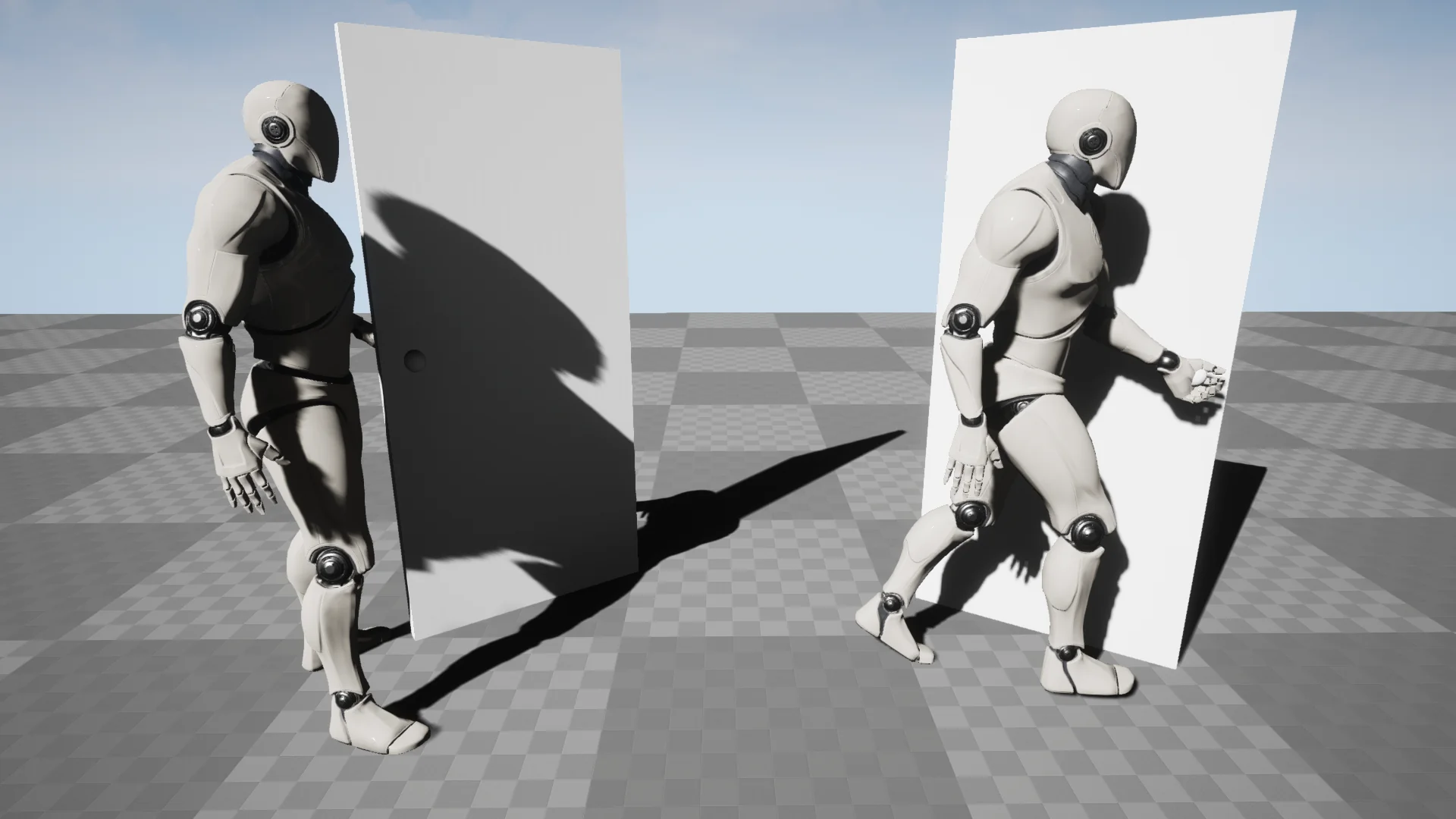
The collection provides an assortment of simple animations driven by interacting with doors, boxes, and other simple containers. These specific environmental elements represent the most frequent touchpoints in level exploration, narrative discovery, and systemic adventure designs. Players encounter hinged partitions, storage crates, and utility boxes across virtually every genre, requiring character motions that clearly telegraph the act of unlatching, swinging, or lifting an obstruction.
By classifying the motions as simple animations, the authoring focuses on clear, unencumbered movements rather than highly stylized or exaggerated physical performances. For doors, this means the character model cleanly approaches, establishes contact with the handle or panel, and executes the swinging motion without extraneous flourishes that could cause clipping against adjacent doorframes or architectural trim. The motions provide clean spatial arcs that give technical designers the necessary windows to align door hinge rotations with the character's hand trajectory.
When interacting with boxes and simple containers, verticality and hand positioning shift downward. Reaching toward a tabletop crate, a floor-mounted chest, or a small latch mechanism demands dedicated posture shifts. The collection supplies movements that manage this transition, stabilizing the character's center of mass while the hands engage with the target prop. Having these container movements isolated from complex cinematic choreography ensures that the timing remains responsive, allowing gameplay interactions to complete within practical timeframes that respect player input.
Integrating Person Character Interactions with Props
Filed under the person category, the animation set focuses entirely on human movement dynamics. Simulating a person manipulating an inanimate object requires balancing realism with functional gameplay execution. If an interaction motion takes too long to reach the contact point, player input feels sluggish; if it snaps instantly, the physical connection between the character and the world disappears. The motions in this pack maintain a readable rhythm that communicates weight, grasp, and follow-through.
To implement these interactions reliably within an Unreal Engine level, developers typically coordinate the character's animation sequence with the target actor's internal timeline or physics constraints. When a player triggers an interaction on a closed container, the character model can snap or blend into an aligned interaction vector using motion warping or standard transform interpolation. Once aligned, the appropriate animation plays, driving the hand toward the known prop coordinate while the container's blueprint concurrently drives the lid or door rotation.
Because the movements stay simple and focused on common human physical actions, they support broad utility across varied game settings. A person opening a wooden crate in a period setting follows essentially the same physical mechanics as a character opening a metal storage case in a modern or futuristic environment. The absence of hyper-specific weapon handling, unusual physical quirks, or extreme pacing allows developers to apply these container interactions across diverse narrative scenarios.
Tracking Updates and Library Expansion Across the Pack
Iterative adjustments continue to refine the collection's baseline utility. Update 1 brought the addition of one extra animation to the existing roster, expanding the variety of interaction options available to developers. While individual animation additions may appear subtle in scale, even a single targeted motion can address an alternate approach angle, a different hand dominance, or a distinct container profile that previously lacked coverage.
When integrating updates into an active production environment, maintaining consistent bone hierarchies is critical. Because subsequent additions maintain the standard Unreal Engine 4 Skeleton configuration, bringing updated assets into an established project structure requires no restructuring of existing animation data tables, montage structures, or gameplay tags. The updated animation integrates directly alongside the original assortment, ready to be assigned to new container types or alternative opening mechanics within the project's interaction framework.