"72afc5f8a809d018"{"id":"1002133","slug":"npc-blacksmith","title":"NPC Blacksmith","category":"Characters \u0026 Creatures","engine":"4.26+,5.0+","assetVersion":"","engineVersion":"Engine Version: 4.26+,5.0+","tag":"Characters","accent":"blue","visual":"character","summary":"Explore the NPC Blacksmith character kit, featuring modular body parts, forge props, 4K AORM textures, 4 LODs, and a dedicated UE5 Control Rig.","platform":"Unreal Engine","publishedAt":"2026-10-29T09:13:53.309Z","updatedAt":"2026-10-29T09:13:53.309Z","sourceNotes":[],"fileContents":[],"compatibility":["Unreal Engine","Engine Version: 4.26+,5.0+"],"featuredImage":{"alt":"NPC Blacksmith","src":"/wp-content/uploads/published/2026/10/2eb972717b44-c3d9c9ab-b472-4a34-b992-f3c4bea8b40f-10713d2ce9.webp"},"hasDownloadLink":true,"downloads":0,"terms":[{"taxonomy":"category","slug":"characters-and-creatures","name":"Characters \u0026 Creatures"}],"galleryImages":[{"src":"/wp-content/uploads/published/2026/10/8ca229127da2-3361fa2a-9704-4a58-806f-5c0f57b1e013-6f32b65803.webp","alt":"NPC Blacksmith"},{"src":"/wp-content/uploads/published/2026/10/0ffc988afb67-797a5e43-a92b-45d1-9586-3dc9a5ac9cf5-0882968090.webp","alt":"NPC Blacksmith"},{"src":"/wp-content/uploads/published/2026/10/10408a66f7d2-33f8b5ea-65ee-44ba-8ff8-066f390f8069-15400b044b.webp","alt":"NPC Blacksmith"},{"src":"/wp-content/uploads/published/2026/10/1c683995b938-ca3a7c02-c47a-4623-ad19-2858071db776-5ceb538eb0.webp","alt":"NPC Blacksmith"},{"src":"/wp-content/uploads/published/2026/10/06e2a790621a-b2217ae8-44f8-430e-a095-6106b2fff106-c6cce2d80e.webp","alt":"NPC Blacksmith"},{"src":"/wp-content/uploads/published/2026/10/f7858127a15c-c5c799c6-185b-414f-836e-b01ef0520069-ea1030e229.webp","alt":"NPC Blacksmith"},{"src":"/wp-content/uploads/published/2026/10/e83f7e8c09ad-87dff448-b08f-42c1-ba70-efb639f3bb4e-8ff88594c3.webp","alt":"NPC Blacksmith"},{"src":"/wp-content/uploads/published/2026/10/201261f7dca2-9fea88d3-0ba1-4982-94db-46970bb513ea-6dd1af2891.webp","alt":"NPC Blacksmith"}],"accessPanel":{"kind":"resource","title":"Download this resource","eyebrow":"Free Download","message":"Log in or create a free account to start your download.","fileName":"Content.7z","safetyNote":"Resources are manually reviewed before listing to improve quality and reduce obvious risks.","actionLabel":"Download Free","resourceType":"Resource archive"},"contentHtml":"\u003cp\u003ePopulating medieval settlements, bustling RPG towns, and fantasy outposts requires trade workers who fit their environment visually and mechanically. A village hub feels empty without the metallic ring of a hammer striking iron or the glow of an active hearth. The NPC Blacksmith serves precisely these production needs, delivering a stylized character package that combines modular human anatomy, distinct grooming elements, workshop environment props, and ready-to-run animation setups.\u003c/p\u003e \u003ch2\u003eModular Blacksmith Body Parts and Customization Elements\u003c/h2\u003e\n\u003cp\u003eCharacter variation is critical when designing game settlements, especially when multiple artisans or background workers share the same space. Rather than delivering a single, unchangeable mesh, the character is split into individual components that allow developers to alter appearances across different encounters.\u003c/p\u003e \u003cp\u003eThe core character kit includes two separate torso variants: Blacksmith Body 1 and Blacksmith Body 2. These options give artists alternative physical baselines to work with when staging different characters in a scene. Below the waist, dedicated leg geometry pairs with customizable garment layers. Visual accessories include a protective work apron and a utility belt, grounding the character in a functional tradesman aesthetic. Because the garments exist as distinct assets, they can be configured to represent a worker actively tending the fire or taking a brief respite from the forge.\u003c/p\u003e \u003cp\u003eHead customization expands this visual flexibility through separate grooming assets. The kit provides dedicated Hair, Beard, and Moustache meshes. Creators can assemble clean-shaven tradesmen, heavily bearded master smiths, or scruffy apprentices by interchanging these facial hair components. This modularity prevents character repetition across sprawling campaign maps where players frequently revisit local forges.\u003c/p\u003e \u003ch2\u003eAssembling Workspaces with the Anvil, Oven, and Forge Tools\u003c/h2\u003e\n\u003cp\u003eA craftsman is defined by their work environment. To establish a believable craft station, the package includes an extensive set of forge props and specialized smithing equipment, allowing environmental designers to stage complete interactive spaces without sourcing external decor.\u003c/p\u003e \u003cp\u003eThe workspace center is anchored by an Anvil, an Oven, a Table, and a Trough for cooling heated metals. To feed oxygen to the flames, a Bellows_forge asset is provided alongside integrated visual effects (VFX) that bring heat and atmosphere into the setting. These structural pieces form the physical boundaries of a functioning workshop stall, whether tucked into a stone castle courtyard or set inside an open-air village lean-to.\u003c/p\u003e \u003cp\u003eHandheld accessories and workbench clutter round out the scene. The asset supplies individual tools suited for every step of metalworking:\u003c/p\u003e\n\u003cul\u003e \u003cli\u003eA work Hammer for striking and shaping metal pieces\u003c/li\u003e \u003cli\u003eForceps for handling hot ingots safely from the hearth\u003c/li\u003e \u003cli\u003eA raw Blank that acts as the unformed workpiece during smithing sequences\u003c/li\u003e \u003cli\u003eA Whetstone for sharpening blades and refining finished edges\u003c/li\u003e \u003cli\u003eAssorted general Tools to scatter across tables or store near the hearth\u003c/li\u003e\n\u003c/ul\u003e \u003cp\u003eBy pairing the character with these matching props, level designers can choreograph believable background activity. The character can hold the forceps and blank against the anvil surface, cycle toward the bellows, or inspect refined edges against the whetstone.\u003c/p\u003e \u003ch2\u003eAnimation Blueprints and UE5 Control Rig Setup\u003c/h2\u003e\n\u003cp\u003eMotion completes the believability of an in-game artisan. The package incorporates preconfigured motion assets, including Blacksmith DEMO, Blacksmith ANIMATION 1, and Blacksmith ANIMATION 2. These sequences demonstrate working poses and active movement cycles tailored directly to smithing activities, giving developers an immediate foundation for background idling and looped tasks.\u003c/p\u003e \u003cp\u003eFor custom sequencing and adjustments directly inside Unreal Engine 5, the character features a dedicated UE5 Control Rig. This in-engine rigging pipeline lets technical animators and cinematics artists tweak arm placements, pose hands accurately around the hammer handle or forceps, and adapt standard keyframes to align with bespoke workshop layouts. When an anvil sits at an unusual height or a player triggers a custom dialogue interaction, the Control Rig facilitates fast pose corrections without requiring external digital content creation software.\u003c/p\u003e \u003cp\u003eUnderlying the animation setup are dedicated Blueprint and Animationblueprint assets. These scripts streamline the logic necessary to switch between idle postures, hammer strikes, and active ambient loops. By connecting gameplay triggers to the Animationblueprint, game programmers can tie the blacksmith's behavioral state directly to player proximity, active quest stages, or daytime work schedules.\u003c/p\u003e \u003ch2\u003eTexture Maps and 4-Stage LOD Optimization\u003c/h2\u003e\n\u003cp\u003eBalancing visual quality with rendering performance is essential for real-time projects, especially in dense town hubs where many animated characters and detailed props render simultaneously. The technical framework of this asset resolves that balance through structured LODs and high-resolution texture maps.\u003c/p\u003e \u003cp\u003eThe models include four distinct Level of Detail stages (LODs x 4). As players move away from the workshop into the wider environment, the mesh complexity steps down across four successive reductions. This level-of-detail hierarchy preserves crisp silhouette definition during intimate vendor interactions while safeguarding the frame rate when viewing busy town centers from a distance.\u003c/p\u003e \u003cp\u003eSurface rendering relies on comprehensive 4096 x 4096 texture sets. Each surface is supported by three primary map types:\u003c/p\u003e\n\u003cul\u003e \u003cli\u003eColor maps that establish the painted, stylized aesthetic of the character and equipment\u003c/li\u003e \u003cli\u003eNormal maps to project fine surface sculpts, folds in the apron, and bevels along the anvil without extra polygon overhead\u003c/li\u003e \u003cli\u003ePacked AORM maps combining Ambient Occlusion, Roughness, and Metallic data into single texture files\u003c/li\u003e\n\u003c/ul\u003e \u003cp\u003eThe AORM texture packing workflow optimizes memory bandwidth while delivering realistic PBR surface reactions. Cast iron tools display appropriate metallic reflectance, worn leather aprons exhibit soft roughness, and the recesses of the oven maintain grounded ambient shading under dynamic lighting systems.\u003c/p\u003e \u003ch2\u003eFitting Fantasy RPGs and Stylized Hub Environments\u003c/h2\u003e\n\u003cp\u003eStylized games with cartoon or lowpoly artistic directions often struggle to find background characters that match their aesthetic without looking overly simplistic. Because this asset is built with expressive stylized proportions and sharp 4K PBR textures, it integrates naturally into stylized fantasy adventures, survival crafting games, and management simulators.\u003c/p\u003e \u003cp\u003eSolo developers and mid-sized production teams benefit significantly from the comprehensive grouping of character variations, props, and animations within a single package. Rather than modeling tools, skinning garments, building animation logic, and rigging props separately, teams can drop the NPC Blacksmith into their level, connect the Animationblueprint, and instantly establish an atmospheric, functional workshop.\u003c/p\u003e\n\n\u003ch2\u003eMore From The Same Workflow\u003c/h2\u003e\n\u003cul\u003e\n\u003cli\u003e\u003ca href=\"https://3dcghub.com/survival-npc-maria-mimi-estrada/\" title=\"Survival NPC - Maria \u0026quot;Mimi\u0026quot; Estrada\"\u003eSurvival NPC - Maria \u0026quot;Mimi\u0026quot; Estrada\u003c/a\u003e\u003c/li\u003e\n\u003cli\u003e\u003ca href=\"https://3dcghub.com/goofy-npc/\" title=\"Goofy NPC\"\u003eGoofy NPC\u003c/a\u003e\u003c/li\u003e\n\u003cli\u003e\u003ca href=\"https://3dcghub.com/a-c-s-u-mantis/\" title=\"A.C.S.U. \u0026quot;MANTIS\u0026quot;\"\u003eA.C.S.U. \u0026quot;MANTIS\u0026quot;\u003c/a\u003e\u003c/li\u003e\n\u003cli\u003e\u003ca href=\"https://3dcghub.com/baker-character-npc-baker-character-worker-npc-sculpt-3d-model-man-art-old/\" title=\"Baker Character / NPC ( Baker Character Worker NPC Sculpt 3D Model Man Art Old )\"\u003eBaker Character / NPC ( Baker Character Worker NPC Sculpt 3D Model Man Art Old )\u003c/a\u003e\u003c/li\u003e\n\u003cli\u003e\u003ca href=\"https://3dcghub.com/black-girl-zahira-african-female-character-npc-vrhc/\" title=\"Black Girl Zahira African Female Character NPC VRHC\"\u003eBlack Girl Zahira African Female Character NPC VRHC\u003c/a\u003e\u003c/li\u003e\n\u003c/ul\u003e","contentTextLength":7322,"navigation":{"current":42,"total":4100,"previous":{"id":"1002134","slug":"old-kitchen","title":"Old Kitchen","category":"Tools, Objects \u0026 Decor","platform":"Unreal Engine","updatedAt":"2026-10-29T09:18:56.146Z"},"next":{"id":"1002132","slug":"niagara-weather","title":"Niagara Weather","category":"Weather","platform":"Unreal Engine","updatedAt":"2026-10-29T09:13:04.872Z"}},"relatedResources":[{"id":"1000550","slug":"survival-npc-maria-mimi-estrada","title":"Survival NPC - Maria \"Mimi\" Estrada","category":"Characters \u0026 Creatures","engine":"4.26+,5.0+","assetVersion":"","engineVersion":"Engine Version: 4.26+,5.0+","tag":"Characters","accent":"blue","visual":"character","summary":"AAA hero character with digital human pipeline, 8k textures, mocap animations, blendshapes, loadout accessories, and example maps for cinematic survival scenes.","platform":"Unreal Engine","publishedAt":"2026-07-15T06:11:10.481Z","updatedAt":"2026-07-15T06:11:10.481Z","sourceNotes":[],"fileContents":[],"compatibility":["Unreal Engine","Engine Version: 4.26+,5.0+"],"featuredImage":{"alt":"Survival NPC - Maria \"Mimi\" Estrada","src":"/wp-content/uploads/published/2026/07/7f6b7129a96f-53d4412e-1050-4c0d-afe0-d397fceb5e05-62c91f2044.webp"},"hasDownloadLink":true,"downloads":0},{"id":"1000615","slug":"goofy-npc","title":"Goofy NPC","category":"Characters \u0026 Creatures","engine":"5.4+","assetVersion":"","engineVersion":"Engine Version: 5.4+","tag":"Characters","accent":"blue","visual":"character","summary":"A rigged, MetaHuman-compatible Unreal Engine character asset with modular clothing, customizable materials, 52 ARKit blendshapes, and preset goofy characters.","platform":"Unreal Engine","publishedAt":"2026-07-20T20:43:34.110Z","updatedAt":"2026-07-20T20:43:34.110Z","sourceNotes":[],"fileContents":[],"compatibility":["Unreal Engine","Engine Version: 5.4+"],"featuredImage":{"alt":"Goofy NPC","src":"/wp-content/uploads/published/2026/07/d000632e0282-83d22a0a-83f4-4668-bbd2-061db77532bd-2b2171de8d.webp"},"hasDownloadLink":true,"downloads":0},{"id":"1452","slug":"a-c-s-u-mantis","title":"A.C.S.U. \"MANTIS\"","category":"Characters \u0026 Creatures","engine":"5.0+","assetVersion":"Engine version: 5.0+","engineVersion":"4.24","tag":"Characters","accent":"blue","visual":"character","summary":"Enhance your sci-fi game with the A.C.S.U. Mantis, a high-quality robotic soldier for Unreal Engine. Features 4K textures, multiple skins, and UE4 rigging.","platform":"Unreal Engine","publishedAt":"2026-02-06T18:30:12.000Z","updatedAt":"2026-04-19T15:58:10.000Z","sourceNotes":[],"fileContents":[],"compatibility":["Unreal Engine","Engine version: 5.0+"],"featuredImage":{"alt":"A.C.S.U. \"MANTIS\"","src":"https://3dcghub.com/wp-content/uploads/2026/02/86641504-ab89-4ac8-9178-076398f52dd9.webp"},"hasDownloadLink":true,"downloads":0}]}
Characters
NPC Blacksmith
Explore the NPC Blacksmith character kit, featuring modular body parts, forge props, 4K AORM textures, 4 LODs, and a dedicated UE5 Control Rig.
Populating medieval settlements, bustling RPG towns, and fantasy outposts requires trade workers who fit their environment visually and mechanically. A village hub feels empty without the metallic ring of a hammer striking iron or the glow of an active hearth. The NPC Blacksmith serves precisely these production needs, delivering a stylized character package that combines modular human anatomy, distinct grooming elements, workshop environment props, and ready-to-run animation setups.
Modular Blacksmith Body Parts and Customization Elements
Character variation is critical when designing game settlements, especially when multiple artisans or background workers share the same space. Rather than delivering a single, unchangeable mesh, the character is split into individual components that allow developers to alter appearances across different encounters.
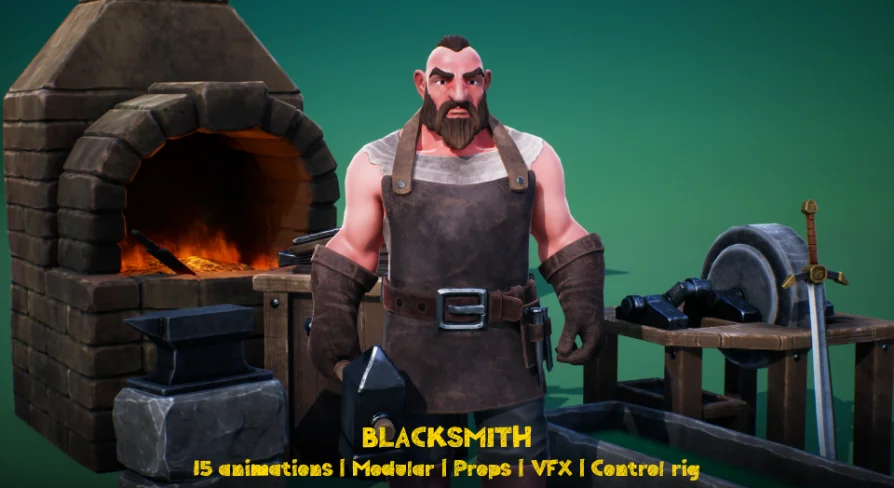
The core character kit includes two separate torso variants: Blacksmith Body 1 and Blacksmith Body 2. These options give artists alternative physical baselines to work with when staging different characters in a scene. Below the waist, dedicated leg geometry pairs with customizable garment layers. Visual accessories include a protective work apron and a utility belt, grounding the character in a functional tradesman aesthetic. Because the garments exist as distinct assets, they can be configured to represent a worker actively tending the fire or taking a brief respite from the forge.
Head customization expands this visual flexibility through separate grooming assets. The kit provides dedicated Hair, Beard, and Moustache meshes. Creators can assemble clean-shaven tradesmen, heavily bearded master smiths, or scruffy apprentices by interchanging these facial hair components. This modularity prevents character repetition across sprawling campaign maps where players frequently revisit local forges.
Assembling Workspaces with the Anvil, Oven, and Forge Tools
A craftsman is defined by their work environment. To establish a believable craft station, the package includes an extensive set of forge props and specialized smithing equipment, allowing environmental designers to stage complete interactive spaces without sourcing external decor.
The workspace center is anchored by an Anvil, an Oven, a Table, and a Trough for cooling heated metals. To feed oxygen to the flames, a Bellows_forge asset is provided alongside integrated visual effects (VFX) that bring heat and atmosphere into the setting. These structural pieces form the physical boundaries of a functioning workshop stall, whether tucked into a stone castle courtyard or set inside an open-air village lean-to.
Handheld accessories and workbench clutter round out the scene. The asset supplies individual tools suited for every step of metalworking:
A work Hammer for striking and shaping metal pieces
Forceps for handling hot ingots safely from the hearth
A raw Blank that acts as the unformed workpiece during smithing sequences
A Whetstone for sharpening blades and refining finished edges
Assorted general Tools to scatter across tables or store near the hearth
By pairing the character with these matching props, level designers can choreograph believable background activity. The character can hold the forceps and blank against the anvil surface, cycle toward the bellows, or inspect refined edges against the whetstone.
Animation Blueprints and UE5 Control Rig Setup
Motion completes the believability of an in-game artisan. The package incorporates preconfigured motion assets, including Blacksmith DEMO, Blacksmith ANIMATION 1, and Blacksmith ANIMATION 2. These sequences demonstrate working poses and active movement cycles tailored directly to smithing activities, giving developers an immediate foundation for background idling and looped tasks.
For custom sequencing and adjustments directly inside Unreal Engine 5, the character features a dedicated UE5 Control Rig. This in-engine rigging pipeline lets technical animators and cinematics artists tweak arm placements, pose hands accurately around the hammer handle or forceps, and adapt standard keyframes to align with bespoke workshop layouts. When an anvil sits at an unusual height or a player triggers a custom dialogue interaction, the Control Rig facilitates fast pose corrections without requiring external digital content creation software.
Underlying the animation setup are dedicated Blueprint and Animationblueprint assets. These scripts streamline the logic necessary to switch between idle postures, hammer strikes, and active ambient loops. By connecting gameplay triggers to the Animationblueprint, game programmers can tie the blacksmith's behavioral state directly to player proximity, active quest stages, or daytime work schedules.
Texture Maps and 4-Stage LOD Optimization
Balancing visual quality with rendering performance is essential for real-time projects, especially in dense town hubs where many animated characters and detailed props render simultaneously. The technical framework of this asset resolves that balance through structured LODs and high-resolution texture maps.
The models include four distinct Level of Detail stages (LODs x 4). As players move away from the workshop into the wider environment, the mesh complexity steps down across four successive reductions. This level-of-detail hierarchy preserves crisp silhouette definition during intimate vendor interactions while safeguarding the frame rate when viewing busy town centers from a distance.
Surface rendering relies on comprehensive 4096 x 4096 texture sets. Each surface is supported by three primary map types:
Color maps that establish the painted, stylized aesthetic of the character and equipment
Normal maps to project fine surface sculpts, folds in the apron, and bevels along the anvil without extra polygon overhead
Packed AORM maps combining Ambient Occlusion, Roughness, and Metallic data into single texture files
The AORM texture packing workflow optimizes memory bandwidth while delivering realistic PBR surface reactions. Cast iron tools display appropriate metallic reflectance, worn leather aprons exhibit soft roughness, and the recesses of the oven maintain grounded ambient shading under dynamic lighting systems.
Fitting Fantasy RPGs and Stylized Hub Environments
Stylized games with cartoon or lowpoly artistic directions often struggle to find background characters that match their aesthetic without looking overly simplistic. Because this asset is built with expressive stylized proportions and sharp 4K PBR textures, it integrates naturally into stylized fantasy adventures, survival crafting games, and management simulators.
Solo developers and mid-sized production teams benefit significantly from the comprehensive grouping of character variations, props, and animations within a single package. Rather than modeling tools, skinning garments, building animation logic, and rigging props separately, teams can drop the NPC Blacksmith into their level, connect the Animationblueprint, and instantly establish an atmospheric, functional workshop.
 Characters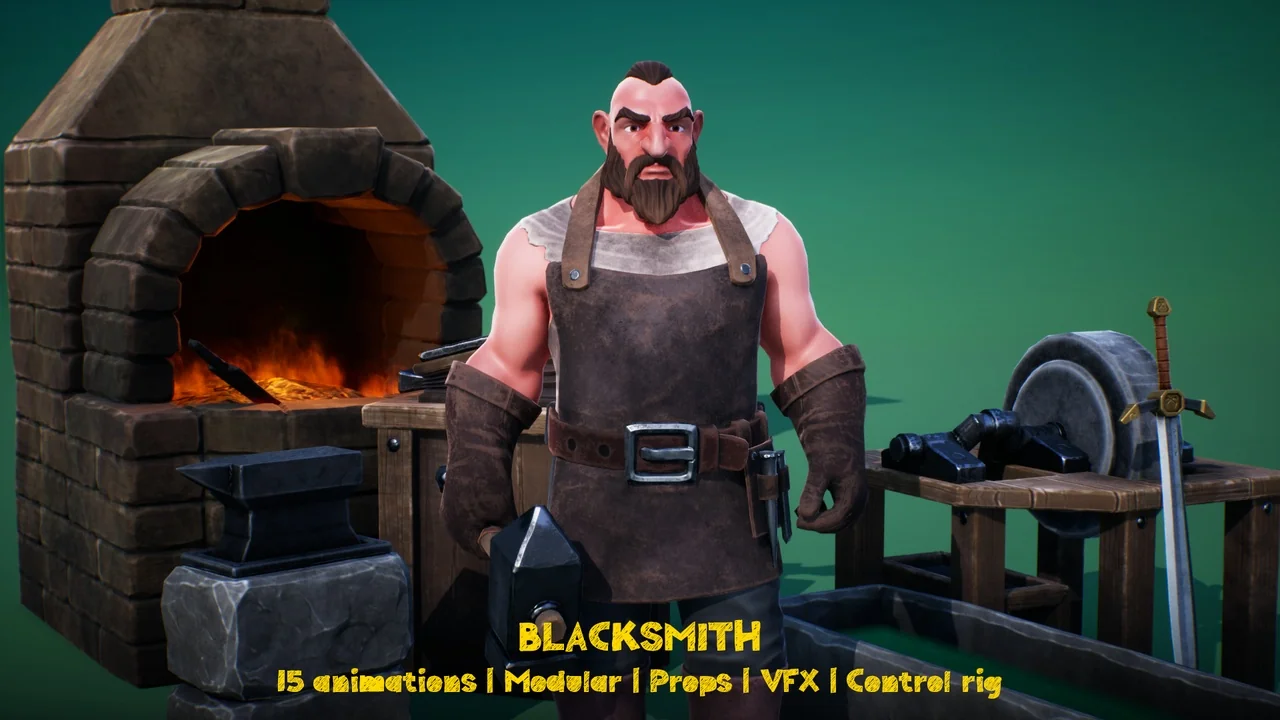
 Characters
 Characters
 Characters