"26aaab8a5d5ed4fc"{"id":"23018","slug":"native-share-plugin-for-android-ios","title":"Native Share Plugin for Android \u0026 iOS","category":"Integration","engine":"Original Unity version: 2022.3.17","assetVersion":"Original Unity version: 2022.3.17","engineVersion":"Asset Version:3.0","tag":"Integration","accent":"cyan","visual":"city","summary":"A streamlined utility for mobile developers to trigger native OS share sheets for images and videos without external SDK dependencies.","platform":"Unity","publishedAt":"2026-04-07T14:08:06.000Z","updatedAt":"2026-04-19T15:36:55.000Z","sourceNotes":[],"fileContents":[],"compatibility":["Unity","Original Unity version: 2022.3.17","Asset Version: 3.0"],"featuredImage":{"alt":"Native Share Plugin for Android \u0026 iOS","src":"https://3dcghub.com/wp-content/uploads/2026/04/fe64e9ea4122_04a9909d-dcca-4830-bfcf-d773a263b217_1280x720_stretch.webp"},"hasDownloadLink":true,"downloads":0,"terms":[{"taxonomy":"category","slug":"integration","name":"Integration"},{"taxonomy":"post_tag","slug":"plugins","name":"Plugins"},{"taxonomy":"post_tag","slug":"tools","name":"Tools"},{"taxonomy":"post_tag","slug":"unity","name":"Unity"}],"galleryImages":[{"src":"https://3dcghub.com/wp-content/uploads/2026/04/f8a4e9ba2dbc_7e24103b-d96a-4fb7-bc73-5c9734c8dea4_scaled.webp","alt":"Native Share Plugin for Android \u0026 iOS"},{"src":"https://3dcghub.com/wp-content/uploads/2026/04/c65e6164177f_c63b96cb-f1e1-44ad-aa4d-22c4c7cac1d4_scaled.webp","alt":"Native Share Plugin for Android \u0026 iOS"},{"src":"https://3dcghub.com/wp-content/uploads/2026/04/ca4b31db776e_b4861d92-4cfa-4dc0-867d-85a050416965_scaled.webp","alt":"Native Share Plugin for Android \u0026 iOS"},{"src":"https://3dcghub.com/wp-content/uploads/2026/04/5603e3124914_b1e3d5e9-6a0c-4c7d-8f1b-1c2bdfd0e94b_scaled.webp","alt":"Native Share Plugin for Android \u0026 iOS"},{"src":"https://3dcghub.com/wp-content/uploads/2026/04/9725cae78d21_8f25349b-f727-415b-8691-30007d366ae6_scaled.webp","alt":"Native Share Plugin for Android \u0026 iOS"},{"src":"https://3dcghub.com/wp-content/uploads/2026/04/195a6aab26d2_ceedf88d-c82c-4982-a90c-43946bc994ec_scaled.webp","alt":"Native Share Plugin for Android \u0026 iOS"},{"src":"https://3dcghub.com/wp-content/uploads/2026/04/3822d079b0c1_0e90da61-4195-4b94-9e6b-20abe9cbab82_scaled.webp","alt":"Native Share Plugin for Android \u0026 iOS"}],"accessPanel":{"kind":"resource","title":"Access this resource","eyebrow":"Free Download","message":"Log in or create a free account to start your download.","fileName":"Native Share For Android And iOS0 v3.0.7z","safetyNote":"All resources are 100% manually reviewed to eliminate all risks.","actionLabel":"Download Free","resourceType":"Resource archive"},"contentHtml":"\u003ch2\u003eNative Mobile Integration Without External SDKs\u003c/h2\u003e\n\nThe Native Share Plugin for Android and iOS is designed as a lightweight bridge between the Unity engine and the native sharing capabilities of mobile operating systems. One of the primary advantages of this specific implementation is the removal of external SDK requirements. In a standard mobile development workflow, social sharing often necessitates the integration of platform-specific libraries or heavy social media SDKs that can bloat the final build and introduce versioning conflicts. This tool bypasses those hurdles by utilizing the native share sheets already present in Android and iOS devices.\n\nBy operating through a single line of code, the plugin simplifies the process of passing data from the game environment to the user's installed applications. This approach allows developers to trigger the standard OS interface where users can select their preferred communication method, whether that is messaging apps, social media feeds, or cloud storage. \n\n\u003ch2\u003eSupported Media and Social Workflows\u003c/h2\u003e\n\nThe utility is built to handle multiple types of content that are common in modern mobile applications. Specifically, it facilitates the sharing of screenshots and videos directly from the game's runtime. For production teams, this functionality is essential for social features like \"Photo Modes\" or sharing high-score moments. \n\nWhen a share intent is triggered, the plugin can pass media to a variety of third-party platforms. The source material highlights compatibility with major services including WhatsApp, Instagram, and Facebook. Because it relies on the native OS share sheet, it is not limited to these specific apps; it can generally interact with any application on the user's device that is registered to receive share intents for images, videos, or files. This makes it a versatile tool for both games and utility-based mobile apps that require simple, reliable content distribution.\n\n\u003ch2\u003eTechnical Environment and Pipeline Support\u003c/h2\u003e\n\nVersion 3.1 of the plugin maintains compatibility across a wide range of Unity versions and rendering setups. It is verified for use in Unity 2022.3.17 and the newer 6000.2.2 release. This ensures that projects transitioning to the latest long-term support (LTS) versions or exploring the features of Unity 6 can maintain consistent sharing functionality.\n\nFrom a rendering perspective, the plugin is agnostic toward the visual pipeline used in the project. It fully supports:\n\u003cul\u003e\n \u003cli\u003eBuilt-in Render Pipeline\u003c/li\u003e\n \u003cli\u003eUniversal Render Pipeline (URP)\u003c/li\u003e\n \u003cli\u003eHigh Definition Render Pipeline (HDRP)\u003c/li\u003e\n \u003cli\u003eCustom Scriptable Render Pipelines (SRP)\u003c/li\u003e\n\u003c/ul\u003e\n\nThis broad compatibility is particularly useful for developers working on high-fidelity projects in HDRP or mobile-optimized titles in URP. Since the plugin handles the data transfer after the frame has been rendered or the video file has been encoded, it does not interfere with the specific rendering logic of the scene.\n\n\u003ch2\u003eBuild Optimization and Android Management\u003c/h2\u003e\n\nWith a total file size of only 748.7 KB and a package consisting of 21 assets, the plugin has a minimal footprint on the overall project size. This is a critical consideration for mobile developers who are often constrained by over-the-air (OTA) download limits on cellular networks. The package is delivered as a standard unitypackage, making it easy to import into existing project structures without complex installation steps.\n\nFor Android-specific builds, the plugin has been updated to utilize the latest Gradle libraries. This is a significant detail for developers who must keep their projects compliant with evolving Google Play Store requirements and modern Android build tools. By using current Gradle configurations, the plugin reduces the likelihood of build errors during the compilation phase, specifically regarding manifest merging and library dependencies. \n\n\u003ch2\u003ePractical Implementation in the Development Cycle\u003c/h2\u003e\n\nIntegrating the Native Share Plugin typically occurs during the UI and social systems phase of development. Rather than writing custom JNI (Java Native Interface) wrappers for Android or Objective-C code for iOS, the developer can call the sharing function directly within a C# script. This centralization of the codebase allows for easier maintenance and debugging.\n\nIn a real-world production scenario, a developer might use this plugin to enable a \"Share Your Progress\" button. When the user taps the button, the code captures the current screen buffer as a texture, saves it temporarily, and then passes the file path to the native sharing method. The OS then takes over, presenting the user with their familiar list of apps, ensuring a consistent user experience that matches the rest of their mobile environment.\n\n\u003ch2\u003eRelated Resources Worth Checking\u003c/h2\u003e\n\u003cul\u003e\n\u003cli\u003e\u003ca href=\"https://3dcghub.com/exporter-for-unreal-to-for-unity-2026/\" title=\"Exporter for Unreal to/for Unity 2026\"\u003eExporter for Unreal to/for Unity 2026\u003c/a\u003e\u003c/li\u003e\n\u003cli\u003e\u003ca href=\"https://3dcghub.com/dialogue-system-for-unity/\" title=\"Dialogue System for Unity\"\u003eDialogue System for Unity\u003c/a\u003e\u003c/li\u003e\n\u003cli\u003e\u003ca href=\"https://3dcghub.com/ambient-sounds-interactive-soundscapes-for-unity-6/\" title=\"Ambient Sounds – Interactive Soundscapes for Unity 6\"\u003eAmbient Sounds – Interactive Soundscapes for Unity 6\u003c/a\u003e\u003c/li\u003e\n\u003cli\u003e\u003ca href=\"https://3dcghub.com/pegasus-flythroughs-for-unity-6/\" title=\"Pegasus – Flythroughs for Unity 6\"\u003ePegasus – Flythroughs for Unity 6\u003c/a\u003e\u003c/li\u003e\n\u003cli\u003e\u003ca href=\"https://3dcghub.com/motion-matching-for-unity/\" title=\"Motion Matching for Unity\"\u003eMotion Matching for Unity\u003c/a\u003e\u003c/li\u003e\n\u003c/ul\u003e","contentTextLength":4961,"navigation":{"current":3274,"total":3400,"previous":{"id":"23031","slug":"opencv-for-unity","title":"OpenCV for Unity","category":"Integration","platform":"Unity","updatedAt":"2026-04-19T15:36:55.000Z"},"next":{"id":"23008","slug":"mobile-monetization-pro-v2-ads-iapin-app-purchase-more-android-ios","title":"Mobile Monetization Pro V2: Ads, IAP(In App Purchase) \u0026 More - Android \u0026 iOS","category":"Integration","platform":"Unity","updatedAt":"2026-04-19T15:36:55.000Z"}},"relatedResources":[{"id":"23008","slug":"mobile-monetization-pro-v2-ads-iapin-app-purchase-more-android-ios","title":"Mobile Monetization Pro V2: Ads, IAP(In App Purchase) \u0026 More - Android \u0026 iOS","category":"Integration","engine":"Original Unity version: 6000.2.6","assetVersion":"Original Unity version: 6000.2.6","engineVersion":"Asset Version:2.0.6","tag":"Integration","accent":"cyan","visual":"luts","summary":"Mobile Monetization Pro V2 provides a modular framework for integrating essential mobile services like IAP V5 and major ad networks into Unity projects. Designed to replace manual SDK configuration, it offers a pre-built pipeline for Android and iOS develop...","platform":"Unity","publishedAt":"2026-04-07T14:02:15.000Z","updatedAt":"2026-04-19T15:36:55.000Z","sourceNotes":[],"fileContents":[],"compatibility":["Unity","Original Unity version: 6000.2.6","Asset Version: 2.0.6"],"featuredImage":{"alt":"Mobile Monetization Pro V2: Ads, IAP(In App Purchase) \u0026 More - Android \u0026 iOS","src":"https://3dcghub.com/wp-content/uploads/2026/04/39d3cba4d05a_e5107281-d8f9-440f-81a2-5be02f7c845a_1280x720_stretch.webp"},"hasDownloadLink":true,"downloads":1},{"id":"22983","slug":"dlib-facelandmark-detector","title":"Dlib FaceLandmark Detector","category":"Integration","engine":"Original Unity version: 2021.3.45","assetVersion":"Original Unity version: 2021.3.45","engineVersion":"Asset Version:1.3.4","tag":"Integration","accent":"cyan","visual":"mech","summary":"Dlib FaceLandmark Detector brings the Dlib 19.7 C++ library to Unity, enabling high-speed facial landmark tracking and custom object detection through HOG features and regression tree ensembles.","platform":"Unity","publishedAt":"2026-04-07T13:54:00.000Z","updatedAt":"2026-04-19T15:36:56.000Z","sourceNotes":[],"fileContents":[],"compatibility":["Unity","Original Unity version: 2021.3.45","Asset Version: 1.3.4"],"featuredImage":{"alt":"Dlib FaceLandmark Detector","src":"https://3dcghub.com/wp-content/uploads/2026/04/38b2663cd8ba_3f0d96fe-dc3c-438d-8ae3-04bac505c6fe_1280x720_stretch.webp"},"hasDownloadLink":true,"downloads":0},{"id":"23031","slug":"opencv-for-unity","title":"OpenCV for Unity","category":"Integration","engine":"Original Unity version: 2021.3.45","assetVersion":"Original Unity version: 2021.3.45","engineVersion":"Asset Version:2.5.7","tag":"Integration","accent":"cyan","visual":"mech","summary":"OpenCV for Unity enables developers to integrate the extensive OpenCV Java API within the Unity engine, supporting real-time image processing and deep learning across desktop, mobile, and XR hardware.","platform":"Unity","publishedAt":"2026-04-07T14:08:14.000Z","updatedAt":"2026-04-19T15:36:55.000Z","sourceNotes":[],"fileContents":[],"compatibility":["Unity","Original Unity version: 2021.3.45","Asset Version: 2.5.7"],"featuredImage":{"alt":"OpenCV for Unity","src":"https://3dcghub.com/wp-content/uploads/2026/04/409179eccf27_8f905a36-2ea1-4233-8696-772a84f9102c_1280x720_stretch.webp"},"hasDownloadLink":true,"downloads":0}]}
Integration
Native Share Plugin for Android & iOS
A streamlined utility for mobile developers to trigger native OS share sheets for images and videos without external SDK dependencies.
The Native Share Plugin for Android and iOS is designed as a lightweight bridge between the Unity engine and the native sharing capabilities of mobile operating systems. One of the primary advantages of this specific implementation is the removal of external SDK requirements. In a standard mobile development workflow, social sharing often necessitates the integration of platform-specific libraries or heavy social media SDKs that can bloat the final build and introduce versioning conflicts. This tool bypasses those hurdles by utilizing the native share sheets already present in Android and iOS devices.
By operating through a single line of code, the plugin simplifies the process of passing data from the game environment to the user's installed applications. This approach allows developers to trigger the standard OS interface where users can select their preferred communication method, whether that is messaging apps, social media feeds, or cloud storage.
Supported Media and Social Workflows
The utility is built to handle multiple types of content that are common in modern mobile applications. Specifically, it facilitates the sharing of screenshots and videos directly from the game's runtime. For production teams, this functionality is essential for social features like "Photo Modes" or sharing high-score moments.
When a share intent is triggered, the plugin can pass media to a variety of third-party platforms. The source material highlights compatibility with major services including WhatsApp, Instagram, and Facebook. Because it relies on the native OS share sheet, it is not limited to these specific apps; it can generally interact with any application on the user's device that is registered to receive share intents for images, videos, or files. This makes it a versatile tool for both games and utility-based mobile apps that require simple, reliable content distribution.
Technical Environment and Pipeline Support
Version 3.1 of the plugin maintains compatibility across a wide range of Unity versions and rendering setups. It is verified for use in Unity 2022.3.17 and the newer 6000.2.2 release. This ensures that projects transitioning to the latest long-term support (LTS) versions or exploring the features of Unity 6 can maintain consistent sharing functionality.
From a rendering perspective, the plugin is agnostic toward the visual pipeline used in the project. It fully supports:
Built-in Render Pipeline
Universal Render Pipeline (URP)
High Definition Render Pipeline (HDRP)
Custom Scriptable Render Pipelines (SRP)
This broad compatibility is particularly useful for developers working on high-fidelity projects in HDRP or mobile-optimized titles in URP. Since the plugin handles the data transfer after the frame has been rendered or the video file has been encoded, it does not interfere with the specific rendering logic of the scene.
Build Optimization and Android Management
With a total file size of only 748.7 KB and a package consisting of 21 assets, the plugin has a minimal footprint on the overall project size. This is a critical consideration for mobile developers who are often constrained by over-the-air (OTA) download limits on cellular networks. The package is delivered as a standard unitypackage, making it easy to import into existing project structures without complex installation steps.
For Android-specific builds, the plugin has been updated to utilize the latest Gradle libraries. This is a significant detail for developers who must keep their projects compliant with evolving Google Play Store requirements and modern Android build tools. By using current Gradle configurations, the plugin reduces the likelihood of build errors during the compilation phase, specifically regarding manifest merging and library dependencies.
Practical Implementation in the Development Cycle
Integrating the Native Share Plugin typically occurs during the UI and social systems phase of development. Rather than writing custom JNI (Java Native Interface) wrappers for Android or Objective-C code for iOS, the developer can call the sharing function directly within a C# script. This centralization of the codebase allows for easier maintenance and debugging.
In a real-world production scenario, a developer might use this plugin to enable a "Share Your Progress" button. When the user taps the button, the code captures the current screen buffer as a texture, saves it temporarily, and then passes the file path to the native sharing method. The OS then takes over, presenting the user with their familiar list of apps, ensuring a consistent user experience that matches the rest of their mobile environment.
 Integration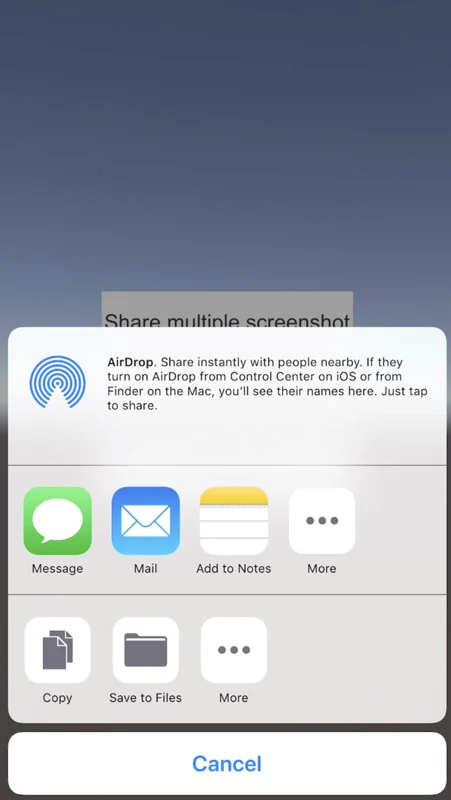
 Integration
 Integration
 Integration