"95fdaf16012263fa"{"id":"1002326","slug":"minimalist-interface-package-v2","title":"Minimalist Interface Package v2","category":"UI Kits / HUDs","engine":"4.26+,5.0+","assetVersion":"","engineVersion":"Engine Version: 4.26+,5.0+","tag":"UI Kits / HUDs","accent":"blue","visual":"mech","summary":"Minimalist Interface Package v2 brings Blueprint-built menus, HUDs, inventory, equipment, chat, speed meters, and console icons with opening animations.","platform":"Unreal Engine","indexPolicy":"index","publishedAt":"2026-11-06T06:31:53.081Z","updatedAt":"2026-11-06T06:31:53.081Z","sourceNotes":[],"fileContents":[],"compatibility":["Unreal Engine","Engine Version: 4.26+,5.0+"],"featuredImage":{"alt":"Minimalist Interface Package v2","src":"/wp-content/uploads/published/2026/11/66d255a1f710-9fce2ee7-5bfe-4e56-9037-cb9c8e4d67c4-f7f1ef46b3.webp"},"hasDownloadLink":true,"downloads":0,"terms":[{"taxonomy":"category","slug":"ui-kits-huds","name":"UI Kits / HUDs"}],"galleryImages":[{"src":"/wp-content/uploads/published/2026/11/5fb0c5621084-2141b4f5-b380-4250-9ac4-399420e56c2b-c4322b67e7.webp","alt":"Minimalist Interface Package v2"},{"src":"/wp-content/uploads/published/2026/11/f2c1db972dac-fb3d5539-65f6-488c-a4e6-6894576ef60a-87df4d2a0f.webp","alt":"Minimalist Interface Package v2"},{"src":"/wp-content/uploads/published/2026/11/6b44272249fe-3347fc89-ec1e-47db-8d8d-dfa85d372d47-c80b5f7c07.webp","alt":"Minimalist Interface Package v2"},{"src":"/wp-content/uploads/published/2026/11/2de154bc7d64-da9c0ef2-80b3-4aad-ade3-0e26e70190ea-c9505976f6.webp","alt":"Minimalist Interface Package v2"},{"src":"/wp-content/uploads/published/2026/11/c77f992a429b-cce44866-b589-4faf-bc15-c1ed92f14280-ddb1776e19.webp","alt":"Minimalist Interface Package v2"},{"src":"/wp-content/uploads/published/2026/11/c16caac6dd60-3235c920-09b2-42b8-8727-2b4c1016848a-faebabf94d.webp","alt":"Minimalist Interface Package v2"},{"src":"/wp-content/uploads/published/2026/11/6e1ca86fa494-7205e4b5-0b35-454a-b923-166d6b23f6dd-22b74f6a94.webp","alt":"Minimalist Interface Package v2"},{"src":"/wp-content/uploads/published/2026/11/395859c634da-95243da1-c6ac-461a-b254-156d0cb75e66-40d2de9792.webp","alt":"Minimalist Interface Package v2"},{"src":"/wp-content/uploads/published/2026/11/4d06fd36a466-ac5b487c-b252-4940-bf21-46ebc2e8ac78-4287964f5c.webp","alt":"Minimalist Interface Package v2"}],"accessPanel":{"kind":"resource","title":"Get this resource","eyebrow":"Free resource","message":"3DCGHUB is the service provider for this listing. Access is fulfilled through the official publisher channel.","fileName":"Minimalist Interface Package v2.7z","safetyNote":"Resources are manually reviewed before listing to improve quality and reduce obvious risks.","actionLabel":"Get this resource","resourceType":"Resource archive","versions":[]},"contentHtml":"\u003cp\u003eA project can open on a login screen, pass through a main menu and options, pause into a separate menu, then enter a shooter HUD, an RPG HUD, or a racing layout with speed meters. Minimalist Interface Package v2 groups those screens with a chatbox, equipment and inventory interfaces, and console icons. The collection is aimed at a consistent minimalist look across several game types, and every listed interface belongs to the same package rather than standing alone as a one-off screen.\u003c/p\u003e \u003ch2\u003eMinimalist Interface Package v2 as a connected menu and HUD set\u003c/h2\u003e\n\u003cp\u003eThe package is flexible for a wide variety of genres, with interfaces built for shooters, RPGs, racing games, and more. That range appears in the named pieces: an RPG HUD and a Shooter HUD sit alongside two Speed Meters for racing games. The interfaces are built to work with each other, which supports a consistent style when a project moves from a menu into gameplay. Design is the primary focus, so the set reads as a visual system first. The functional side is addressed through the Blueprint setup, which gives developers a seamless way of integrating functionality.\u003c/p\u003e \u003ch2\u003eBlueprint and WidgetBlueprint construction\u003c/h2\u003e\n\u003cp\u003eEvery interface is 100% built in Blueprints and WidgetBlueprints. Inside the editor, that means the menus, HUDs, and supporting screens are assembled as widget hierarchies with Blueprint logic, not handed over as flat visual art. The design focus remains visible in the layouts, while the construction method gives a team a direct way to connect the interfaces to project functionality. Because the widgets are Blueprint-based, edits to structure and behavior happen in the same environment as the UI itself.\u003c/p\u003e \u003ch2\u003eInventory, equipment, and chat sit alongside the main flow\u003c/h2\u003e\n\u003cp\u003eThe screen list reaches past the usual main menu and pause menu. A Chatbox covers in-game communication UI, while the Equipment Interface and Inventory Interface handle two separate player-facing screens. Console Icons are included among the interface elements. These pieces share the same minimalist direction as the Login Interface, Main Menu, Options Menu, and Pause Menu, so a project can move between setup screens, chat, and item screens without changing visual language. The inclusion of both RPG and Shooter HUDs, plus two Speed Meters for racing games, shows how the package spreads across genres while keeping one style.\u003c/p\u003e \u003cp\u003eThe named screens cover several stages of a game's interface flow: entry and login, menu navigation, in-session HUDs, player inventory and equipment, chat, and racing-specific speed readouts. That spread is why the set can support a project that crosses genre lines. A shooter HUD and an RPG HUD do different jobs, and the two Speed Meters are specific to racing, but all of them are built to coexist. The named items are the concrete pieces; the set leaves room for additional widgets beyond them.\u003c/p\u003e \u003ch2\u003eOpening animations, named hierarchies, and commented Blueprints\u003c/h2\u003e\n\u003cp\u003eAll widgets include opening animations, so each screen has an entrance rather than appearing as an abrupt swap. The hierarchies are properly named, letting a developer locate a panel, button, or label inside the Widget Blueprint tree without guessing at generic layer names. Blueprints are commented for easy editing, putting explanation directly where the logic is built. Those details affect how quickly a team can inspect, restyle, and extend the interfaces. They also keep several screens from the same set navigable in one project.\u003c/p\u003e \u003ch2\u003eScoreboard Data Tables and Structures\u003c/h2\u003e\n\u003cp\u003eThe Scoreboard is not limited to a visual layout. It includes Data Tables and Structures to aid developers in creating a functional score and stats system. The table and structure setup gives the scoreboard a place to organize the values it needs, while the widget presents them. Among the named widgets, the Scoreboard is the one specifically tied to Data Tables and Structures, which makes it the data-backed piece in the package. For a project that needs more than static numbers on screen, this is where the package reaches into score and stats work.\u003c/p\u003e \u003ch2\u003eWhat the v2 update adds to the set\u003c/h2\u003e\n\u003cp\u003eVersion 2 includes new widgets, and the package is set to include ongoing updates and additions. The widget collection is not fixed at the initial list; the set is intended to grow as updates and additions arrive. A team working with v2 gets the current menus, HUDs, inventory and equipment screens, chatbox, speed meters, console icons, and scoreboard support, with the expectation that more widgets will follow. The current package is built entirely in Blueprints and WidgetBlueprints, and v2 adds new widgets to that set.\u003c/p\u003e \u003ch2\u003eFitting the package to a project's UI plan\u003c/h2\u003e\n\u003cp\u003eA project that needs a login-to-menu-to-HUD flow in a clean, minimal style has a direct match in the named screens. Shooters, RPGs, and racing games are the genre examples the package calls out, and the presence of two speed meters gives racing layouts a specific starting point. The inventory, equipment, chat, and console icon pieces cover common UI stops beyond the main gameplay HUD. The scoreboard's Data Tables and Structures add a route into score and stats work. Where a project's interface needs line up with those pieces, the package provides a connected set with opening animations, organized hierarchies, and commented Blueprints. Where the visual direction or screen list differs significantly, the design-led focus becomes the main point of comparison.\u003c/p\u003e\n\n\u003ch2\u003eMore From The Same Workflow\u003c/h2\u003e\n\u003cul\u003e\n\u003cli\u003e\u003ca href=\"https://3dcghub.com/sdf-robo-progress-bars/\" rel=\"noopener noreferrer\"\u003eSDF Robo Progress Bars\u003c/a\u003e\u003c/li\u003e\n\u003cli\u003e\u003ca href=\"https://3dcghub.com/pro-hud-pack-horror-skin/\" rel=\"noopener noreferrer\"\u003ePro HUD Pack: Horror Skin\u003c/a\u003e\u003c/li\u003e\n\u003cli\u003e\u003ca href=\"https://3dcghub.com/advanced-hud-style-12/\" rel=\"noopener noreferrer\"\u003eAdvanced HUD-Style 12\u003c/a\u003e\u003c/li\u003e\n\u003cli\u003e\u003ca href=\"https://3dcghub.com/virtual-joystick-minimalist-pack/\" rel=\"noopener noreferrer\"\u003eVirtual Joystick Minimalist Pack\u003c/a\u003e\u003c/li\u003e\n\u003cli\u003e\u003ca href=\"https://3dcghub.com/gui-yellow-kid-2/\" rel=\"noopener noreferrer\"\u003eGUI - Yellow Kid\u003c/a\u003e\u003c/li\u003e\n\u003c/ul\u003e","contentTextLength":5579,"navigation":{"current":42,"total":4291,"previous":{"id":"1002327","slug":"mixed-vfx-pack-4-niagara","title":"Mixed Vfx Pack 4 (Niagara)","category":"Variety","platform":"Unreal Engine","updatedAt":"2026-11-06T06:32:51.943Z"},"next":{"id":"1002325","slug":"medieval-fantasy-buildings","title":"Medieval Fantasy Buildings","category":"Towns \u0026 Villages","platform":"Unreal Engine","updatedAt":"2026-11-06T06:30:44.639Z"}},"relatedResources":[{"id":"1002196","slug":"sdf-robo-progress-bars","title":"SDF Robo Progress Bars","category":"UI Kits / HUDs","engine":"4.26+,5.0+","assetVersion":"","engineVersion":"Engine Version: 4.26+,5.0+","tag":"UI Kits / HUDs","accent":"blue","visual":"mech","summary":"Explore SDF Robo Progress Bars, an advanced master material using signed distance functions for vector-sharp circular and rectangular interface meters.","platform":"Unreal Engine","indexPolicy":"index","publishedAt":"2026-10-29T14:39:35.924Z","updatedAt":"2026-10-29T14:39:35.924Z","sourceNotes":[],"fileContents":[],"compatibility":["Unreal Engine","Engine Version: 4.26+,5.0+"],"featuredImage":{"alt":"SDF Robo Progress Bars","src":"/wp-content/uploads/published/2026/10/4d90ae46e9d9-36a06d93-e903-4a91-953d-4bc4f2330691-4f39c6d6b4.webp"},"hasDownloadLink":true,"downloads":0},{"id":"1002155","slug":"pro-hud-pack-horror-skin","title":"Pro HUD Pack: Horror Skin","category":"UI Kits / HUDs","engine":"4.24+,5.0+","assetVersion":"","engineVersion":"Engine Version: 4.24+,5.0+","tag":"UI Kits / HUDs","accent":"blue","visual":"mech","summary":"Pro HUD Pack: Horror Skin provides navigational compass tools, minimaps, task alerts, and runtime HUD nodes tailored for horror and wargame interfaces.","platform":"Unreal Engine","indexPolicy":"index","publishedAt":"2026-10-29T09:59:23.096Z","updatedAt":"2026-10-29T09:59:23.096Z","sourceNotes":[],"fileContents":[],"compatibility":["Unreal Engine","Engine Version: 4.24+,5.0+"],"featuredImage":{"alt":"Pro HUD Pack: Horror Skin","src":"/wp-content/uploads/published/2026/10/2a99ef34b46b-984148b6-ffe2-475d-ba56-5890c73bd792-62e4a00883.webp"},"hasDownloadLink":true,"downloads":0},{"id":"1001858","slug":"advanced-hud-style-12","title":"Advanced HUD-Style 12","category":"UI Kits / HUDs","engine":"4.26+,5.0+","assetVersion":"","engineVersion":"Engine Version: 4.26+,5.0+","tag":"UI Kits / HUDs","accent":"blue","visual":"mech","summary":"An Action RPG interface system featuring level streaming across four maps, persistent settings, minimap pointers, and enhanced input updates.","platform":"Unreal Engine","indexPolicy":"index","publishedAt":"2026-10-22T10:52:37.375Z","updatedAt":"2026-10-22T10:52:37.375Z","sourceNotes":[],"fileContents":[],"compatibility":["Unreal Engine","Engine Version: 4.26+,5.0+"],"featuredImage":{"alt":"Advanced HUD-Style 12","src":"/wp-content/uploads/published/2026/10/6a724464fb23-fe0f8c74-09d6-42a7-acb0-add7cb7a8849-e91320c35a.webp"},"hasDownloadLink":true,"downloads":0}]}
UI Kits / HUDs
Minimalist Interface Package v2
Minimalist Interface Package v2 brings Blueprint-built menus, HUDs, inventory, equipment, chat, speed meters, and console icons with opening animations.
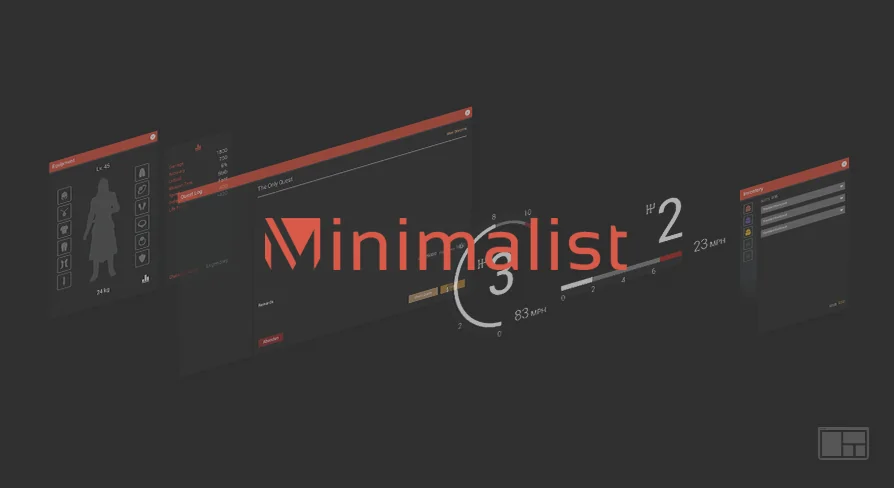
A project can open on a login screen, pass through a main menu and options, pause into a separate menu, then enter a shooter HUD, an RPG HUD, or a racing layout with speed meters. Minimalist Interface Package v2 groups those screens with a chatbox, equipment and inventory interfaces, and console icons. The collection is aimed at a consistent minimalist look across several game types, and every listed interface belongs to the same package rather than standing alone as a one-off screen.
Minimalist Interface Package v2 as a connected menu and HUD set
The package is flexible for a wide variety of genres, with interfaces built for shooters, RPGs, racing games, and more. That range appears in the named pieces: an RPG HUD and a Shooter HUD sit alongside two Speed Meters for racing games. The interfaces are built to work with each other, which supports a consistent style when a project moves from a menu into gameplay. Design is the primary focus, so the set reads as a visual system first. The functional side is addressed through the Blueprint setup, which gives developers a seamless way of integrating functionality.
Blueprint and WidgetBlueprint construction
Every interface is 100% built in Blueprints and WidgetBlueprints. Inside the editor, that means the menus, HUDs, and supporting screens are assembled as widget hierarchies with Blueprint logic, not handed over as flat visual art. The design focus remains visible in the layouts, while the construction method gives a team a direct way to connect the interfaces to project functionality. Because the widgets are Blueprint-based, edits to structure and behavior happen in the same environment as the UI itself.
Inventory, equipment, and chat sit alongside the main flow
The screen list reaches past the usual main menu and pause menu. A Chatbox covers in-game communication UI, while the Equipment Interface and Inventory Interface handle two separate player-facing screens. Console Icons are included among the interface elements. These pieces share the same minimalist direction as the Login Interface, Main Menu, Options Menu, and Pause Menu, so a project can move between setup screens, chat, and item screens without changing visual language. The inclusion of both RPG and Shooter HUDs, plus two Speed Meters for racing games, shows how the package spreads across genres while keeping one style.
The named screens cover several stages of a game's interface flow: entry and login, menu navigation, in-session HUDs, player inventory and equipment, chat, and racing-specific speed readouts. That spread is why the set can support a project that crosses genre lines. A shooter HUD and an RPG HUD do different jobs, and the two Speed Meters are specific to racing, but all of them are built to coexist. The named items are the concrete pieces; the set leaves room for additional widgets beyond them.
Opening animations, named hierarchies, and commented Blueprints
All widgets include opening animations, so each screen has an entrance rather than appearing as an abrupt swap. The hierarchies are properly named, letting a developer locate a panel, button, or label inside the Widget Blueprint tree without guessing at generic layer names. Blueprints are commented for easy editing, putting explanation directly where the logic is built. Those details affect how quickly a team can inspect, restyle, and extend the interfaces. They also keep several screens from the same set navigable in one project.
Scoreboard Data Tables and Structures
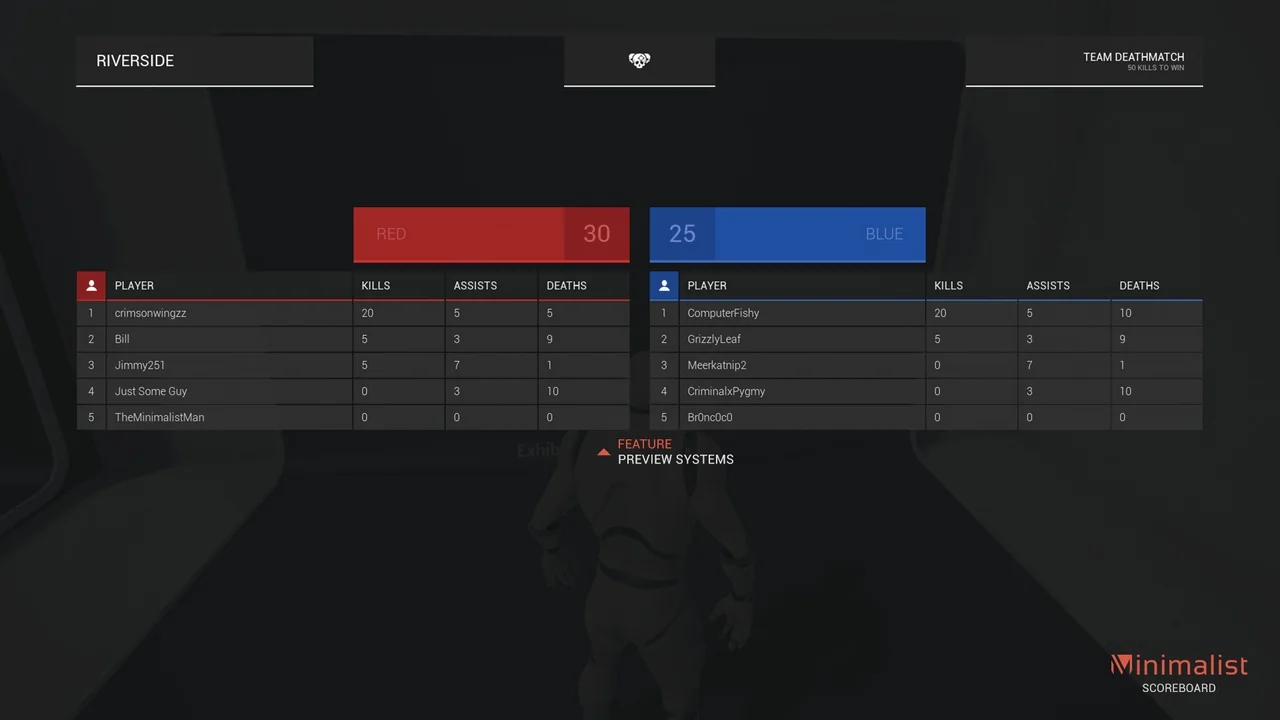
The Scoreboard is not limited to a visual layout. It includes Data Tables and Structures to aid developers in creating a functional score and stats system. The table and structure setup gives the scoreboard a place to organize the values it needs, while the widget presents them. Among the named widgets, the Scoreboard is the one specifically tied to Data Tables and Structures, which makes it the data-backed piece in the package. For a project that needs more than static numbers on screen, this is where the package reaches into score and stats work.
What the v2 update adds to the set
Version 2 includes new widgets, and the package is set to include ongoing updates and additions. The widget collection is not fixed at the initial list; the set is intended to grow as updates and additions arrive. A team working with v2 gets the current menus, HUDs, inventory and equipment screens, chatbox, speed meters, console icons, and scoreboard support, with the expectation that more widgets will follow. The current package is built entirely in Blueprints and WidgetBlueprints, and v2 adds new widgets to that set.
Fitting the package to a project's UI plan
A project that needs a login-to-menu-to-HUD flow in a clean, minimal style has a direct match in the named screens. Shooters, RPGs, and racing games are the genre examples the package calls out, and the presence of two speed meters gives racing layouts a specific starting point. The inventory, equipment, chat, and console icon pieces cover common UI stops beyond the main gameplay HUD. The scoreboard's Data Tables and Structures add a route into score and stats work. Where a project's interface needs line up with those pieces, the package provides a connected set with opening animations, organized hierarchies, and commented Blueprints. Where the visual direction or screen list differs significantly, the design-led focus becomes the main point of comparison.
 UI Kits / HUDs
 UI Kits / HUDs
 UI Kits / HUDs
 UI Kits / HUDs