"7ad89cffa44984cf"{"id":"1002546","slug":"mini-monsters","title":"Mini Monsters","category":"Creatures \u0026 Monsters","engine":"4.20+,5.0+","assetVersion":"","engineVersion":"Engine Version: 4.20+,5.0+","tag":"Creatures","accent":"blue","visual":"character","summary":"Explore the Mini Monsters package featuring 20 lowpoly cute creatures, five essential animations, and compatibility across Unity3D and Unreal Engine.","platform":"Unreal Engine","indexPolicy":"index","publishedAt":"2026-11-13T09:55:20.585Z","updatedAt":"2026-11-13T09:55:20.585Z","sourceNotes":[],"fileContents":[],"compatibility":["Unreal Engine","Engine Version: 4.20+,5.0+"],"featuredImage":{"alt":"Mini Monsters","src":"/wp-content/uploads/published/2026/11/76830c9b0add-407d8f70-28e6-4499-848b-80e414a4539a-a8637c0ef2.webp"},"hasDownloadLink":true,"downloads":0,"terms":[{"taxonomy":"category","slug":"creatures-and-monsters","name":"Creatures \u0026 Monsters"}],"galleryImages":[{"src":"/wp-content/uploads/published/2026/11/ecbce15e779d-7a07b7b3-cb41-4a1a-af7f-fba396192d29-f84a24a5f1.webp","alt":"Mini Monsters"},{"src":"/wp-content/uploads/published/2026/11/11a8b9b0ec77-0556f9f7-650e-4853-8721-c273ee45c27f-7186232cac.webp","alt":"Mini Monsters"},{"src":"/wp-content/uploads/published/2026/11/ef16d331a661-b2deb354-dcdc-4553-8955-84f053835711-afd75ca4c7.webp","alt":"Mini Monsters"},{"src":"/wp-content/uploads/published/2026/11/ba34584a6e37-ee660f60-b4d3-474b-a703-e7b1fc31af3d-99955bd6b8.webp","alt":"Mini Monsters"},{"src":"/wp-content/uploads/published/2026/11/c41943b9358d-5cd406a2-c21b-49a7-ad1f-b9d86a65d9b3-efa13e1e99.webp","alt":"Mini Monsters"}],"accessPanel":{"kind":"resource","title":"Get this resource","eyebrow":"Free resource","message":"Download this resource in your browser.","fileName":"Content.7z","safetyNote":"Resources are manually reviewed before listing to improve quality and reduce obvious risks.","actionLabel":"Get this resource","resourceType":"Resource archive","versions":[]},"contentHtml":"\u003ch2\u003eTwenty Mini Monsters for Stylized Worlds\u003c/h2\u003e\u003cp\u003eThe Mini Monsters package brings together twenty distinct creature characters built with a lowpoly aesthetic aimed at cute, vibrant game environments. Rather than presenting abstract or hyper-realistic beasts, the roster leans into recognizable animal forms and stylized fantasy creatures. Among the distinct forms represented within the collection are pigs, dogs, bunnies, bears, and monstrous variants. Each character maintains a lighthearted, approachable visual language that fits comfortably into colorful fantasy settings.\u003c/p\u003e\u003cp\u003ePopulating a game world with enemy rosters or friendly inhabitants requires variety so that encounters do not feel visually repetitive. Offering twenty different character designs allows developers to distribute varied fauna across different game regions. A woodland clearing might be home to the bunny and bear archetypes, while farming zones or village outskirts can feature the pig and dog designs. The specialized monster variants can serve as slightly more hostile or unexpected encounters in caves, ruins, or contested wilderness zones. Because all twenty entities share a unified lowpoly art direction, they sit naturally side by side without jarring shifts in geometric density or artistic tone.\u003c/p\u003e\u003cp\u003eThe simplified silhouette of each creature reinforces readability. In fast-paced interactive titles, players must immediately distinguish between different entity types at a distance. Distinct ear shapes on the bunny, snout contours on the pig, robust silhouettes on the bear, and the familiar posture of the dog give each character instant recognition during gameplay, even when rendered from an elevated camera angle or across busy mobile screens.\u003c/p\u003e\u003ch2\u003eMotion Sequences Across the Mini Monsters Collection\u003c/h2\u003e\u003cp\u003eEvery entity in the Mini Monsters library comes configured with five core animations: Idle, Move, Attack, Damage, and Die. These five states represent the functional bedrock of real-time character logic, allowing developers to establish a complete gameplay loop for each creature without needing to splice together disparate motion files from multiple sources.\u003c/p\u003e\u003cp\u003eThe Idle clip handles resting routines, calm observation, and pauses between actions. When an entity is stationed on guard duty, grazing in an open pasture, or waiting for a player character to enter its detection radius, the idle animation keeps the mesh alive through subtle postural shifts. The Move animation supplies continuous locomotion, handling walking, running, and pathfinding traversal across navmesh networks. Whether a pig wanders toward food or a bear charges a player boundary, the movement clip translates the creature through the environment with motion tuned to its lowpoly proportions.\u003c/p\u003e\u003cp\u003eCombat engagements rely on the remaining three clips to communicate the full lifecycle of an encounter:\u003c/p\u003e\u003cul\u003e\u003cli\u003e\u003cstrong\u003eAttack:\u003c/strong\u003e Drives offensive engagements, providing a clean strike or bite motion that can trigger hitboxes and combat event notifications.\u003c/li\u003e\u003cli\u003e\u003cstrong\u003eDamage:\u003c/strong\u003e Plays immediately upon receiving a hit, giving the player immediate visual feedback that an attack successfully connected and disrupted the creature.\u003c/li\u003e\u003cli\u003e\u003cstrong\u003eDie:\u003c/strong\u003e Concludes the combat sequence with a definitive defeat animation, dropping the character out of active combat before triggering item drops or entity despawning.\u003c/li\u003e\u003c/ul\u003e\u003cp\u003eBy keeping the animation count focused on these five essentials, the asset keeps state machines clean. Programmers and technical animators can establish a single, standardized animator controller or state machine template, verify that transitions between idle, movement, attacking, taking damage, and dying function correctly, and then duplicate that logic across all twenty mini monsters with minimal troubleshooting.\u003c/p\u003e\u003ch2\u003eEngine Considerations Between Unity3D and Unreal Engine\u003c/h2\u003e\u003cp\u003eTechnical integration differs depending on whether a project runs in Unity3D or Unreal Engine. In Unity3D, the package includes operational demonstration setups showing the full animation playback. The motion examples demonstrate how the idle, walk, strike, hurt, and death clips look when cycling in real time, serving as an active visual reference for how the characters behave under standard game engine conditions.\u003c/p\u003e\u003cp\u003eWhen importing the assets into Unreal Engine, developers should take note of specific environment differences. The Unreal Engine release does not include scripts or the dedicated toon shader featured in the Unity presentation. As a result, artists and technical directors targeting Unreal Engine will need to establish their own material pipelines to achieve a stylized surface look. Generating a custom cel-shading material, an unlit ramp shader, or a post-process outline within Unreal Engine allows the lowpoly geometry to retain its intended cute aesthetic. Behavior implementation also requires custom scripting inside Unreal Engine, meaning character movement components, AI perception blueprints, and animation montages must be constructed from the ground up using Unreal's native gameplay framework.\u003c/p\u003e\u003ch2\u003eDeploying Mini Monsters in MMO and Adventure Loops\u003c/h2\u003e\u003cp\u003eThe asset tags highlight explicit alignment with adventure games and massively multiplayer online (MMO) environments. Both genres frequently require substantial entity populations spread across vast virtual terrain. In an MMO ecosystem, client-side rendering performance is heavily dictated by mesh complexity and draw calls. Lowpoly characters minimize vertex and polygon overhead, enabling client hardware to smoothly render dozens of simultaneous entities during field battles, mob cluster spawns, or crowded town squares where players might congregate alongside creature companions.\u003c/p\u003e\u003cp\u003eAdventure games, whether single-player dungeon crawlers or open-world exploration titles, benefit directly from the thematic range. The pig, bunny, dog, and bear variants offer familiar creature types suitable for early progression zones, tutorial fields, or non-aggressive world dressing. As the player ventures deeper into wilderness territories, the dedicated monster models can step in as primary field combatants. Because the movement and combat sets are standardized across all twenty characters, adjusting encounter difficulty or enemy scaling does not require redesigning the underlying technical state machine.\u003c/p\u003e\u003cp\u003eBeyond standard enemy archetypes, the cute presentation makes these mini monsters natural fits for pet systems, summoning mechanics, companion allies, or collectible creature rosters. In titles featuring mount collection, farming routines, or minion management, the approachable proportions ensure the characters read as appealing and friendly rather than strictly adversarial.\u003c/p\u003e\u003ch2\u003eYippy Kawaii Compatibility and Stylistic Fit\u003c/h2\u003e\u003cp\u003eMaintaining stylistic harmony is one of the most persistent hurdles in modular game development. Mini Monsters is explicitly compatible with the Yippy Kawaii ecosystem, ensuring that studios building out whimsical, charming game environments can integrate these creatures alongside related models without visual conflict. The proportioning, low-polygon silhouette design, and expressive animal traits align directly with the cute visual rules of that asset line.\u003c/p\u003e\u003cp\u003eThis compatibility allows developers to plan expansive environments where props, buildings, human characters, and wild creatures share consistent edge flow, shading responses, and silhouette scale. Instead of spending production cycles manually remodeling or altering mismatched creature packs to fit a lighthearted project, technical artists can deploy the mini monsters directly into existing Yippy Kawaii scenes knowing that the artistic language remains coherent across every zone.\u003c/p\u003e\n\n\u003ch2\u003eContinue Browsing Similar Packs\u003c/h2\u003e\n\u003cul\u003e\n\u003cli\u003e\u003ca href=\"https://3dcghub.com/lizard-men/\" rel=\"noopener noreferrer\"\u003eLizard Men\u003c/a\u003e\u003c/li\u003e\n\u003cli\u003e\u003ca href=\"https://3dcghub.com/forestcreaturekit/\" rel=\"noopener noreferrer\"\u003eForestCreatureKit\u003c/a\u003e\u003c/li\u003e\n\u003cli\u003e\u003ca href=\"https://3dcghub.com/dragon-for-boss-monster-pbr/\" rel=\"noopener noreferrer\"\u003eDragon for Boss Monster : PBR\u003c/a\u003e\u003c/li\u003e\n\u003cli\u003e\u003ca href=\"https://3dcghub.com/demonkiller/\" rel=\"noopener noreferrer\"\u003eDemonKiller\u003c/a\u003e\u003c/li\u003e\n\u003cli\u003e\u003ca href=\"https://3dcghub.com/bones-dragon/\" rel=\"noopener noreferrer\"\u003eBones Dragon\u003c/a\u003e\u003c/li\u003e\n\u003c/ul\u003e","contentTextLength":7755,"navigation":{"current":31,"total":4499,"previous":{"id":"1002547","slug":"mistic","title":"Mistic","category":"Humans","platform":"Unreal Engine","updatedAt":"2026-11-13T09:56:17.654Z"},"next":{"id":"1002545","slug":"lizardman-shaman","title":"Lizardman (Shaman)","category":"Characters \u0026 Creatures","platform":"Unreal Engine","updatedAt":"2026-11-13T09:54:05.454Z"}},"relatedResources":[{"id":"1002078","slug":"lizard-men","title":"Lizard Men","category":"Creatures \u0026 Monsters","engine":"4.17+,5.0+","assetVersion":"","engineVersion":"Engine Version: 4.17+,5.0+","tag":"Creatures","accent":"blue","visual":"character","summary":"Explore Lizard Men, an optimized PBR character package featuring 7 weapons, 20 animations, handmade LODs, and blendshapes for VR, PC, and mobile projects.","platform":"Unreal Engine","indexPolicy":"index","publishedAt":"2026-10-26T15:47:52.118Z","updatedAt":"2026-10-26T15:47:52.118Z","sourceNotes":[],"fileContents":[],"compatibility":["Unreal Engine","Engine Version: 4.17+,5.0+"],"featuredImage":{"alt":"Lizard Men","src":"/wp-content/uploads/published/2026/10/98e1421032ad-e190581c-aafd-4312-a234-b6c42e0cd990-b8351461b9.webp"},"hasDownloadLink":true,"downloads":1},{"id":"1002550","slug":"monster-creatures","title":"Monster Creatures","category":"Creatures \u0026 Monsters","engine":"4.26+,5.0+","assetVersion":"","engineVersion":"Engine Version: 4.26+,5.0+","tag":"Creatures","accent":"blue","visual":"character","summary":"Explore the Monster Creatures asset pack featuring five rigged, semi-cartoon stylized characters, complete material setups, and full animation sets.","platform":"Unreal Engine","indexPolicy":"index","publishedAt":"2026-11-13T10:02:12.711Z","updatedAt":"2026-11-13T10:02:12.711Z","sourceNotes":[],"fileContents":[],"compatibility":["Unreal Engine","Engine Version: 4.26+,5.0+"],"featuredImage":{"alt":"Monster Creatures","src":"/wp-content/uploads/published/2026/11/dd70c212b5f8-4b353ef9-d2b2-4937-9579-3d68118bb0f1-b415c84de0.webp"},"hasDownloadLink":true,"downloads":0},{"id":"1002528","slug":"forestcreaturekit","title":"ForestCreatureKit","category":"Creatures \u0026 Monsters","engine":"4.24+,5.0+","assetVersion":"","engineVersion":"Engine Version: 4.24+,5.0+","tag":"Creatures","accent":"blue","visual":"character","summary":"Deploy custom-rigged spiders, bugs, and fantasy monsters with ForestCreatureKit, featuring dedicated skeletal meshes, animations, and animation blueprints.","platform":"Unreal Engine","indexPolicy":"index","publishedAt":"2026-11-13T09:21:17.724Z","updatedAt":"2026-11-13T09:21:17.724Z","sourceNotes":[],"fileContents":[],"compatibility":["Unreal Engine","Engine Version: 4.24+,5.0+"],"featuredImage":{"alt":"ForestCreatureKit","src":"/wp-content/uploads/published/2026/11/3772964cff64-d9f5c144-6368-44c2-a71c-a16f6499c972-ead8cbe33b.webp"},"hasDownloadLink":true,"downloads":0}]}
Creatures
Mini Monsters
Explore the Mini Monsters package featuring 20 lowpoly cute creatures, five essential animations, and compatibility across Unity3D and Unreal Engine.
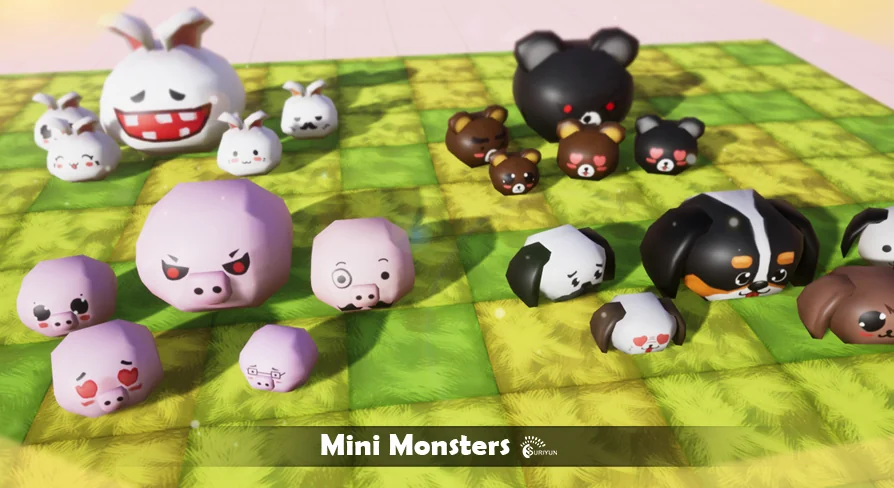
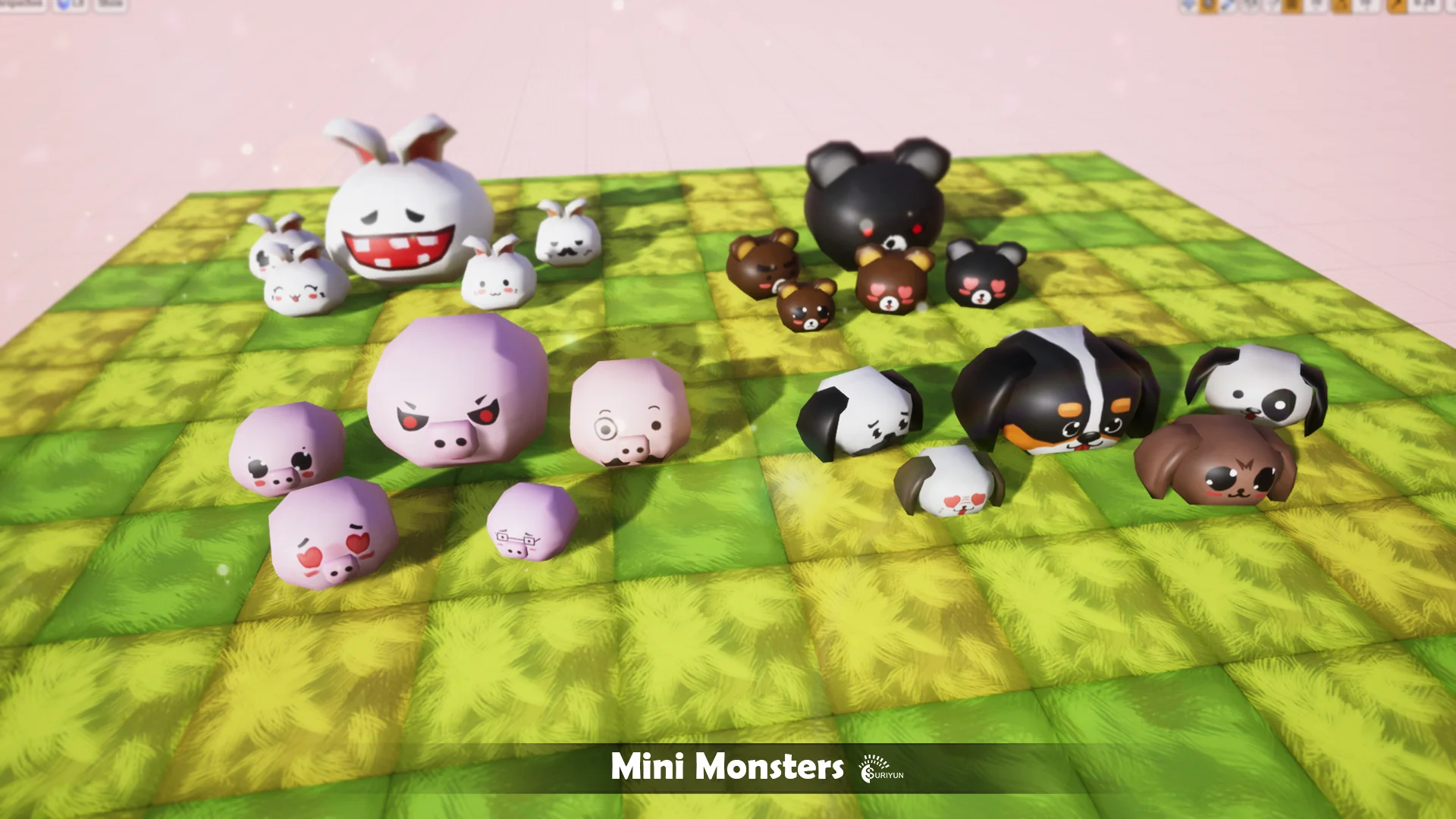
The Mini Monsters package brings together twenty distinct creature characters built with a lowpoly aesthetic aimed at cute, vibrant game environments. Rather than presenting abstract or hyper-realistic beasts, the roster leans into recognizable animal forms and stylized fantasy creatures. Among the distinct forms represented within the collection are pigs, dogs, bunnies, bears, and monstrous variants. Each character maintains a lighthearted, approachable visual language that fits comfortably into colorful fantasy settings.
Populating a game world with enemy rosters or friendly inhabitants requires variety so that encounters do not feel visually repetitive. Offering twenty different character designs allows developers to distribute varied fauna across different game regions. A woodland clearing might be home to the bunny and bear archetypes, while farming zones or village outskirts can feature the pig and dog designs. The specialized monster variants can serve as slightly more hostile or unexpected encounters in caves, ruins, or contested wilderness zones. Because all twenty entities share a unified lowpoly art direction, they sit naturally side by side without jarring shifts in geometric density or artistic tone.
The simplified silhouette of each creature reinforces readability. In fast-paced interactive titles, players must immediately distinguish between different entity types at a distance. Distinct ear shapes on the bunny, snout contours on the pig, robust silhouettes on the bear, and the familiar posture of the dog give each character instant recognition during gameplay, even when rendered from an elevated camera angle or across busy mobile screens.
Motion Sequences Across the Mini Monsters Collection
Every entity in the Mini Monsters library comes configured with five core animations: Idle, Move, Attack, Damage, and Die. These five states represent the functional bedrock of real-time character logic, allowing developers to establish a complete gameplay loop for each creature without needing to splice together disparate motion files from multiple sources.
The Idle clip handles resting routines, calm observation, and pauses between actions. When an entity is stationed on guard duty, grazing in an open pasture, or waiting for a player character to enter its detection radius, the idle animation keeps the mesh alive through subtle postural shifts. The Move animation supplies continuous locomotion, handling walking, running, and pathfinding traversal across navmesh networks. Whether a pig wanders toward food or a bear charges a player boundary, the movement clip translates the creature through the environment with motion tuned to its lowpoly proportions.
Combat engagements rely on the remaining three clips to communicate the full lifecycle of an encounter:
Attack: Drives offensive engagements, providing a clean strike or bite motion that can trigger hitboxes and combat event notifications.
Damage: Plays immediately upon receiving a hit, giving the player immediate visual feedback that an attack successfully connected and disrupted the creature.
Die: Concludes the combat sequence with a definitive defeat animation, dropping the character out of active combat before triggering item drops or entity despawning.
By keeping the animation count focused on these five essentials, the asset keeps state machines clean. Programmers and technical animators can establish a single, standardized animator controller or state machine template, verify that transitions between idle, movement, attacking, taking damage, and dying function correctly, and then duplicate that logic across all twenty mini monsters with minimal troubleshooting.
Engine Considerations Between Unity3D and Unreal Engine
Technical integration differs depending on whether a project runs in Unity3D or Unreal Engine. In Unity3D, the package includes operational demonstration setups showing the full animation playback. The motion examples demonstrate how the idle, walk, strike, hurt, and death clips look when cycling in real time, serving as an active visual reference for how the characters behave under standard game engine conditions.
When importing the assets into Unreal Engine, developers should take note of specific environment differences. The Unreal Engine release does not include scripts or the dedicated toon shader featured in the Unity presentation. As a result, artists and technical directors targeting Unreal Engine will need to establish their own material pipelines to achieve a stylized surface look. Generating a custom cel-shading material, an unlit ramp shader, or a post-process outline within Unreal Engine allows the lowpoly geometry to retain its intended cute aesthetic. Behavior implementation also requires custom scripting inside Unreal Engine, meaning character movement components, AI perception blueprints, and animation montages must be constructed from the ground up using Unreal's native gameplay framework.
Deploying Mini Monsters in MMO and Adventure Loops
The asset tags highlight explicit alignment with adventure games and massively multiplayer online (MMO) environments. Both genres frequently require substantial entity populations spread across vast virtual terrain. In an MMO ecosystem, client-side rendering performance is heavily dictated by mesh complexity and draw calls. Lowpoly characters minimize vertex and polygon overhead, enabling client hardware to smoothly render dozens of simultaneous entities during field battles, mob cluster spawns, or crowded town squares where players might congregate alongside creature companions.
Adventure games, whether single-player dungeon crawlers or open-world exploration titles, benefit directly from the thematic range. The pig, bunny, dog, and bear variants offer familiar creature types suitable for early progression zones, tutorial fields, or non-aggressive world dressing. As the player ventures deeper into wilderness territories, the dedicated monster models can step in as primary field combatants. Because the movement and combat sets are standardized across all twenty characters, adjusting encounter difficulty or enemy scaling does not require redesigning the underlying technical state machine.
Beyond standard enemy archetypes, the cute presentation makes these mini monsters natural fits for pet systems, summoning mechanics, companion allies, or collectible creature rosters. In titles featuring mount collection, farming routines, or minion management, the approachable proportions ensure the characters read as appealing and friendly rather than strictly adversarial.
Yippy Kawaii Compatibility and Stylistic Fit
Maintaining stylistic harmony is one of the most persistent hurdles in modular game development. Mini Monsters is explicitly compatible with the Yippy Kawaii ecosystem, ensuring that studios building out whimsical, charming game environments can integrate these creatures alongside related models without visual conflict. The proportioning, low-polygon silhouette design, and expressive animal traits align directly with the cute visual rules of that asset line.
This compatibility allows developers to plan expansive environments where props, buildings, human characters, and wild creatures share consistent edge flow, shading responses, and silhouette scale. Instead of spending production cycles manually remodeling or altering mismatched creature packs to fit a lighthearted project, technical artists can deploy the mini monsters directly into existing Yippy Kawaii scenes knowing that the artistic language remains coherent across every zone.
 Creatures
 Creatures
 Creatures
 Creatures