"a7cfa646d0d8ae55"{"id":"23164","slug":"mesh-baker","title":"Mesh Baker","category":"Modeling","engine":"Original Unity version: 2019.4.0","assetVersion":"Original Unity version: 2019.4.0","engineVersion":"Asset Version:3.39.0","tag":"Modeling","accent":"cyan","visual":"character","summary":"Mesh Baker is a performance optimization toolkit designed to reduce batches by combining meshes and materials. It offers a flexible, non-destructive workflow for managing complex scenes and character customization.","platform":"Unity","publishedAt":"2026-04-08T16:29:29.000Z","updatedAt":"2026-04-19T15:36:50.000Z","sourceNotes":[],"fileContents":[],"compatibility":["Unity","Original Unity version: 2019.4.0","Asset Version: 3.39.0"],"featuredImage":{"alt":"Mesh Baker","src":"https://3dcghub.com/wp-content/uploads/2026/04/daf098bcaf10_29daaf93-494f-4a68-a1e7-21b1b2521bec_1280x720_stretch.webp"},"hasDownloadLink":true,"downloads":1,"terms":[{"taxonomy":"category","slug":"modeling-tools-unity-2","name":"Modeling"},{"taxonomy":"post_tag","slug":"environment","name":"Environment"},{"taxonomy":"post_tag","slug":"tools","name":"Tools"},{"taxonomy":"post_tag","slug":"unity","name":"Unity"}],"galleryImages":[{"src":"https://3dcghub.com/wp-content/uploads/2026/04/0cf03b6d1154_61a5e89d-178c-4289-80f2-78e9659ebabb_scaled.webp","alt":"Mesh Baker"},{"src":"https://3dcghub.com/wp-content/uploads/2026/04/d78b7395deca_b0ea85d8-b4f4-407f-8b7c-22133a89cab8_scaled.webp","alt":"Mesh Baker"},{"src":"https://3dcghub.com/wp-content/uploads/2026/04/7a8547065f33_39ed3e31-ac09-417a-a96b-7511e7258e0b_scaled.webp","alt":"Mesh Baker"},{"src":"https://3dcghub.com/wp-content/uploads/2026/04/3fb5fbe87f10_d52b89f7-77af-495e-b93b-ba4be285bf87_scaled.webp","alt":"Mesh Baker"},{"src":"https://3dcghub.com/wp-content/uploads/2026/04/db6f1a32234a_b43bdd18-b376-4121-8d7b-8a98110b33f3_scaled.webp","alt":"Mesh Baker"},{"src":"https://3dcghub.com/wp-content/uploads/2026/04/40ccce74a8a0_b69f83ac-db46-41be-ade7-b7f97601902a_scaled.webp","alt":"Mesh Baker"}],"accessPanel":{"kind":"resource","title":"Access this resource","eyebrow":"Free Download","message":"Log in or create a free account to start your download.","fileName":"Mesh Baker 3.39.0.7z","safetyNote":"All resources are 100% manually reviewed to eliminate all risks.","actionLabel":"Download Free","resourceType":"Resource archive"},"contentHtml":"\u003ch2\u003eBatch Reduction and Draw Call Optimization\u003c/h2\u003e\n\u003cp\u003eMesh Baker serves as a central toolkit for Unity developers looking to improve runtime performance by addressing draw call counts. The primary function of the asset is to combine multiple meshes and materials into a single object, reducing the number of batches processed by the engine. Because it utilizes a non-destructive workflow, developers can optimize props and complex scenes without permanently altering the original source assets.\u003c/p\u003e\n\n\u003cp\u003eThe system is designed to handle large environments by providing tools to find, group, and combine meshes throughout a scene. This is particularly useful in complex scenarios where manual optimization would be time-prohibitive. Once combined, the toolkit can modify prop prefabs to utilize the newly created atlas materials, ensuring the scene remains organized while benefiting from the performance gains.\u003c/p\u003e\n\n\u003ch2\u003eMaterial Atlasing and Texture Arrays\u003c/h2\u003e\n\u003cp\u003eA significant portion of the Mesh Baker workflow involves material management. The tool can create Atlases or Texture Arrays for sets of props, allowing multiple objects to share a single draw call even if they originally used different textures. This functionality extends to materials that utilize color tints and props with multiple materials. \u003c/p\u003e\n\n\u003cp\u003eThe toolkit is built to handle specific texture behaviors, such as tiling textures, which often complicate standard combining processes. It also includes support for URP, HDRP, and Standard render pipelines. Beyond standard shaders, Mesh Baker is compatible with custom shaders, ensuring that specialized visual effects or material properties are preserved during the optimization process.\u003c/p\u003e\n\n\u003ch2\u003eSkinned Mesh and Character Customization\u003c/h2\u003e\n\u003cp\u003eFor character-heavy projects, the toolkit provides specific features for skinned meshes. Developers can combine, customize, and add props to skinned meshes, or create entirely customizable skinned mesh characters. The system handles complex geometry features like blend shapes and ensures that UVs, Normals, and Tangents are automatically adjusted during the merging process. This makes it possible to consolidate multiple character parts into a single mesh for better performance in games with numerous NPCs or customizable avatars.\u003c/p\u003e\n\n\u003ch2\u003eScene Analysis and Editor Integration\u003c/h2\u003e\n\u003cp\u003eThe Mesh Baker interface includes an Analyze Scene tab, which assists in identifying optimization opportunities. This part of the toolkit allows for filtering based on opacity, lightmap values, and layer masks. Recent updates have introduced pagination to the Texture Baker and Mesh Baker editors to improve the management of large object sets. \u003c/p\u003e\n\n\u003cp\u003eAdditional technical features include:\u003c/p\u003e\n\u003cul\u003e\n \u003cli\u003eSupport for lightmapping to ensure baked lighting remains consistent after combining.\u003c/li\u003e\n \u003cli\u003eThe ability to save combined meshes directly as assets via the MeshBakerEditor.\u003c/li\u003e\n \u003cli\u003eSupport for URP/HDRP surface types and transparency in URP.\u003c/li\u003e\n \u003cli\u003eA runtime API for developers who need to combine meshes dynamically during gameplay.\u003c/li\u003e\n \u003cli\u003eUnwrapUV2 functionality that detects unwrap failures and adjusts indexing automatically.\u003c/li\u003e\n\u003c/ul\u003e\n\n\u003ch2\u003eWorkflow Integration\u003c/h2\u003e\n\u003cp\u003eMesh Baker is designed to fit into various stages of production, from initial scene layout to final optimization passes. Because it supports a variety of shaders—including the URPUnlitTextureArray shader—it can be used across different visual styles and hardware targets. The toolkit's ability to group objects by scene parent or layer index allows for granular control over how objects are merged, ensuring that the resulting combined meshes are optimized for the specific visibility and culling needs of the project.\u003c/p\u003e\n\n\u003cp\u003eBy automating the adjustment of geometric data and providing a structured way to manage material atlases, the tool removes many of the manual steps associated with scene batching. This allows for a more iterative approach to performance tuning in both static environments and dynamic character systems.\u003c/p\u003e\n\n\u003ch2\u003eMore From The Same Workflow\u003c/h2\u003e\n\u003cul\u003e\n\u003cli\u003e\u003ca href=\"https://3dcghub.com/opencv-for-unity/\" title=\"OpenCV for Unity\"\u003eOpenCV for Unity\u003c/a\u003e\u003c/li\u003e\n\u003cli\u003e\u003ca href=\"https://3dcghub.com/exporter-for-unreal-to-for-unity-2026/\" title=\"Exporter for Unreal to/for Unity 2026\"\u003eExporter for Unreal to/for Unity 2026\u003c/a\u003e\u003c/li\u003e\n\u003cli\u003e\u003ca href=\"https://3dcghub.com/dialogue-system-for-unity/\" title=\"Dialogue System for Unity\"\u003eDialogue System for Unity\u003c/a\u003e\u003c/li\u003e\n\u003cli\u003e\u003ca href=\"https://3dcghub.com/ambient-sounds-interactive-soundscapes-for-unity-6/\" title=\"Ambient Sounds – Interactive Soundscapes for Unity 6\"\u003eAmbient Sounds – Interactive Soundscapes for Unity 6\u003c/a\u003e\u003c/li\u003e\n\u003cli\u003e\u003ca href=\"https://3dcghub.com/pegasus-flythroughs-for-unity-6/\" title=\"Pegasus – Flythroughs for Unity 6\"\u003ePegasus – Flythroughs for Unity 6\u003c/a\u003e\u003c/li\u003e\n\u003c/ul\u003e","contentTextLength":4134,"navigation":{"current":3056,"total":3167,"previous":{"id":"23170","slug":"runtime-asset-database","title":"Runtime Asset Database","category":"Modeling","platform":"Unity","updatedAt":"2026-04-19T15:36:50.000Z"},"next":{"id":"23208","slug":"blood-damage-effect","title":"Blood-Damage Effect","category":"Particles \u0026 Effects","platform":"Unity","updatedAt":"2026-04-19T15:36:49.000Z"}},"relatedResources":[{"id":"23148","slug":"convert-vertex-color-to-texture","title":"Convert Vertex Color To Texture","category":"Modeling","engine":"Original Unity version: 2019.4.0","assetVersion":"Original Unity version: 2019.4.0","engineVersion":"Asset Version:2025.2","tag":"Modeling","accent":"cyan","visual":"luts","summary":"This utility bridges the gap between vertex-based data and texture maps, offering both editor-time batch processing and real-time conversion through a dedicated extension method for the Unity Mesh class.","platform":"Unity","publishedAt":"2026-04-08T16:26:46.000Z","updatedAt":"2026-04-19T15:36:51.000Z","sourceNotes":[],"fileContents":[],"compatibility":["Unity","Original Unity version: 2019.4.0","Asset Version: 2025.2"],"featuredImage":{"alt":"Convert Vertex Color To Texture","src":"https://3dcghub.com/wp-content/uploads/2026/04/1a118c2a5dce_8ee094f3-4af6-4ba8-8da8-2c3729aec677_1280x720_stretch.webp"},"hasDownloadLink":true,"downloads":0},{"id":"23155","slug":"dynamic-mesh-cutter","title":"Dynamic Mesh Cutter","category":"Modeling","engine":"Original Unity version: 2020.3.33","assetVersion":"Original Unity version: 2020.3.33","engineVersion":"Asset Version:1.2.6","tag":"Modeling","accent":"cyan","visual":"mech","summary":"Dynamic Mesh Cutter provides a high-performance algorithm for splitting meshes at runtime via plane intersection, offering specific support for skinned meshes and ragdoll systems.","platform":"Unity","publishedAt":"2026-04-08T16:26:55.000Z","updatedAt":"2026-04-19T15:36:51.000Z","sourceNotes":[],"fileContents":[],"compatibility":["Unity","Original Unity version: 2020.3.33","Asset Version: 1.2.6"],"featuredImage":{"alt":"Dynamic Mesh Cutter","src":"https://3dcghub.com/wp-content/uploads/2026/04/f6b77f6f765a_22d1dac9-2265-4174-ab84-6cdce0e5a378_1280x720_stretch.webp"},"hasDownloadLink":true,"downloads":2},{"id":"23185","slug":"runtime-level-design-legacy","title":"Runtime Level Design (Legacy)","category":"Modeling","engine":"Original Unity version: 2019.4.15","assetVersion":"Original Unity version: 2019.4.15","engineVersion":"Asset Version:2.3.4","tag":"Modeling","accent":"cyan","visual":"city","summary":"A scripting system and API designed to facilitate the creation of runtime level editors and modding tools within Unity-based applications.","platform":"Unity","publishedAt":"2026-04-08T16:32:41.000Z","updatedAt":"2026-04-19T15:36:49.000Z","sourceNotes":[],"fileContents":[],"compatibility":["Unity","Original Unity version: 2019.4.15","Asset Version: 2.3.4"],"featuredImage":{"alt":"Runtime Level Design (Legacy)","src":"https://3dcghub.com/wp-content/uploads/2026/04/b10f0228a7af_94a47a21-91b5-46bd-a3d4-14e6d3deceb3_1280x720_stretch.webp"},"hasDownloadLink":true,"downloads":0}]}
Modeling
Mesh Baker
Mesh Baker is a performance optimization toolkit designed to reduce batches by combining meshes and materials. It offers a flexible, non-destructive workflow for managing complex scenes and character customization.
Mesh Baker serves as a central toolkit for Unity developers looking to improve runtime performance by addressing draw call counts. The primary function of the asset is to combine multiple meshes and materials into a single object, reducing the number of batches processed by the engine. Because it utilizes a non-destructive workflow, developers can optimize props and complex scenes without permanently altering the original source assets.
The system is designed to handle large environments by providing tools to find, group, and combine meshes throughout a scene. This is particularly useful in complex scenarios where manual optimization would be time-prohibitive. Once combined, the toolkit can modify prop prefabs to utilize the newly created atlas materials, ensuring the scene remains organized while benefiting from the performance gains.
Material Atlasing and Texture Arrays
A significant portion of the Mesh Baker workflow involves material management. The tool can create Atlases or Texture Arrays for sets of props, allowing multiple objects to share a single draw call even if they originally used different textures. This functionality extends to materials that utilize color tints and props with multiple materials.
The toolkit is built to handle specific texture behaviors, such as tiling textures, which often complicate standard combining processes. It also includes support for URP, HDRP, and Standard render pipelines. Beyond standard shaders, Mesh Baker is compatible with custom shaders, ensuring that specialized visual effects or material properties are preserved during the optimization process.
Skinned Mesh and Character Customization
For character-heavy projects, the toolkit provides specific features for skinned meshes. Developers can combine, customize, and add props to skinned meshes, or create entirely customizable skinned mesh characters. The system handles complex geometry features like blend shapes and ensures that UVs, Normals, and Tangents are automatically adjusted during the merging process. This makes it possible to consolidate multiple character parts into a single mesh for better performance in games with numerous NPCs or customizable avatars.
Scene Analysis and Editor Integration
The Mesh Baker interface includes an Analyze Scene tab, which assists in identifying optimization opportunities. This part of the toolkit allows for filtering based on opacity, lightmap values, and layer masks. Recent updates have introduced pagination to the Texture Baker and Mesh Baker editors to improve the management of large object sets.
Additional technical features include:
Support for lightmapping to ensure baked lighting remains consistent after combining.
The ability to save combined meshes directly as assets via the MeshBakerEditor.
Support for URP/HDRP surface types and transparency in URP.
A runtime API for developers who need to combine meshes dynamically during gameplay.
UnwrapUV2 functionality that detects unwrap failures and adjusts indexing automatically.
Workflow Integration
Mesh Baker is designed to fit into various stages of production, from initial scene layout to final optimization passes. Because it supports a variety of shaders—including the URPUnlitTextureArray shader—it can be used across different visual styles and hardware targets. The toolkit's ability to group objects by scene parent or layer index allows for granular control over how objects are merged, ensuring that the resulting combined meshes are optimized for the specific visibility and culling needs of the project.
By automating the adjustment of geometric data and providing a structured way to manage material atlases, the tool removes many of the manual steps associated with scene batching. This allows for a more iterative approach to performance tuning in both static environments and dynamic character systems.
 Modeling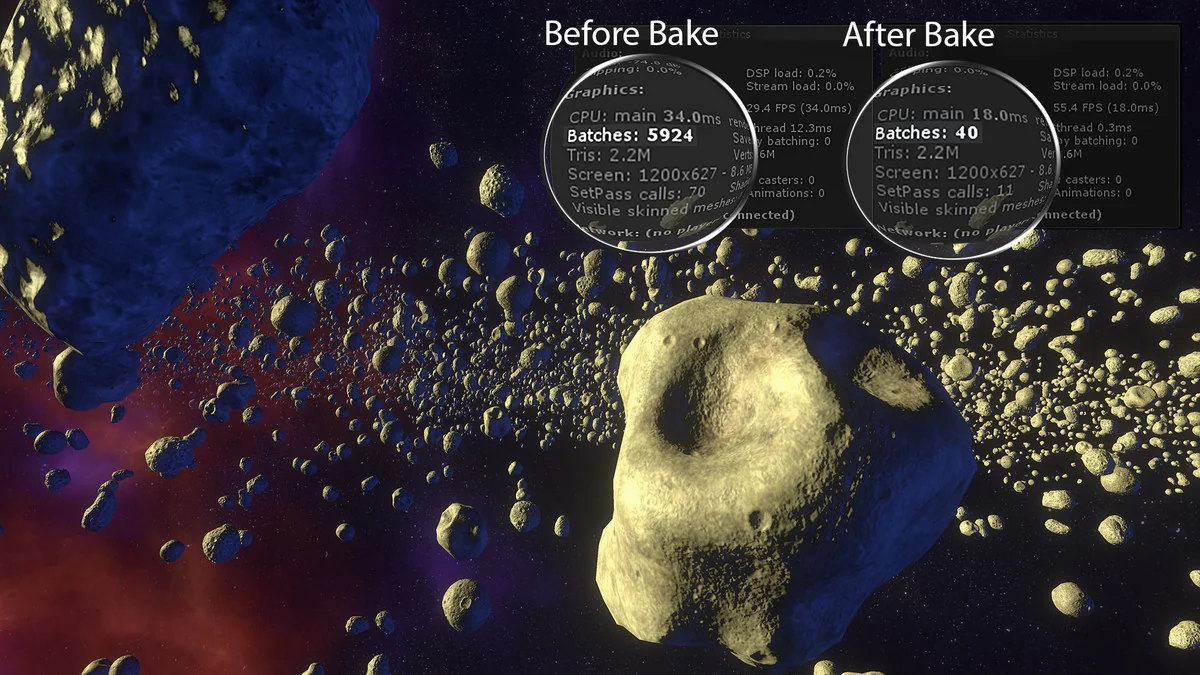
 Modeling
 Modeling
 Modeling