"a7cfa646d0d8ae55"{"id":"23208","slug":"blood-damage-effect","title":"Blood-Damage Effect","category":"Particles \u0026 Effects","engine":"Original Unity version: 5.0.0","assetVersion":"Original Unity version: 5.0.0","engineVersion":"Asset Version:1.1","tag":"Particles","accent":"cyan","visual":"audio","summary":"This tool renders dynamic blood splatter onto the screen as a visual health indicator, utilizing shaders and normal maps to simulate realistic light refraction and drying effects.","platform":"Unity","publishedAt":"2026-04-08T16:39:01.000Z","updatedAt":"2026-04-19T15:36:49.000Z","sourceNotes":[],"fileContents":[],"compatibility":["Unity","Original Unity version: 5.0.0","Asset Version: 1.1"],"featuredImage":{"alt":"Blood-Damage Effect","src":"https://3dcghub.com/wp-content/uploads/2026/04/4959311d7e10_d99e0d45-1444-4fff-b5ee-2c8664268f89_1280x720_stretch.webp"},"hasDownloadLink":true,"downloads":0,"terms":[{"taxonomy":"category","slug":"particles-and-effects","name":"Particles \u0026 Effects"},{"taxonomy":"post_tag","slug":"materials","name":"Materials"},{"taxonomy":"post_tag","slug":"unity","name":"Unity"},{"taxonomy":"post_tag","slug":"vfx","name":"VFX"}],"galleryImages":[{"src":"https://3dcghub.com/wp-content/uploads/2026/04/96388e170aea_1f92dfe6-0095-4ea2-a917-ab61d51cf87e_scaled.webp","alt":"Blood-Damage Effect"},{"src":"https://3dcghub.com/wp-content/uploads/2026/04/e9e356d28801_d40adf5c-19ad-4556-ac48-9946f0865b12_scaled.webp","alt":"Blood-Damage Effect"},{"src":"https://3dcghub.com/wp-content/uploads/2026/04/4c91fad3c4a0_bb14e828-00b6-4fcf-8f6c-98438b8b823b_scaled.webp","alt":"Blood-Damage Effect"},{"src":"https://3dcghub.com/wp-content/uploads/2026/04/fadca4c797fa_69a61d4a-73a1-4a41-8710-9b3f01237511_scaled.webp","alt":"Blood-Damage Effect"},{"src":"https://3dcghub.com/wp-content/uploads/2026/04/f1b930e34420_94a0e812-c1b9-4ce1-a315-d2c0a66f046b_scaled.webp","alt":"Blood-Damage Effect"},{"src":"https://3dcghub.com/wp-content/uploads/2026/04/5f3317310c3b_1bc1c65d-c9fc-4279-99ed-23a8e9f784de_scaled.webp","alt":"Blood-Damage Effect"},{"src":"https://3dcghub.com/wp-content/uploads/2026/04/b997d66e3da8_f5d0ad69-70c7-4bbb-b78f-9b4e8c09f3c1_scaled.webp","alt":"Blood-Damage Effect"}],"accessPanel":{"kind":"resource","title":"Access this resource","eyebrow":"Free Download","message":"Log in or create a free account to start your download.","fileName":"Blood-Damage Effect 1.1.7z","safetyNote":"All resources are 100% manually reviewed to eliminate all risks.","actionLabel":"Download Free","resourceType":"Resource archive"},"contentHtml":"\u003ch2\u003eDynamic Visual Feedback for Player Health\u003c/h2\u003e\u003cp\u003eThe Blood-Damage Effect serves as a post-processing solution for developers looking to communicate player damage through screen-space visuals rather than traditional UI elements. By rendering blood splatter directly onto the camera view, it provides an immediate indicator of health status. The tool is designed with dynamic behavior in mind, allowing the blood to appear on the screen and subsequently dry up or fade out over time, preventing the player's vision from remaining permanently obscured.\u003c/p\u003e\u003ch3\u003eSimulating Light Refraction and Liquid Behavior\u003c/h3\u003e\u003cp\u003eThe tool uses an advanced behavior system to move beyond simple 2D overlays. By utilizing normal maps included in the package, the shader simulates the refraction of light through the blood drops. This causes the game world behind the splatter to distort, mimicking the way liquid physically interacts with a lens or an eye. These optical distortions are central to the effect, providing a sense of depth and volume to the splatter as it reacts to the in-game environment.\u003c/p\u003e\u003ch3\u003eTechnical Implementation and Asset Contents\u003c/h3\u003e\u003cp\u003eThe implementation of the Blood-Damage Effect is handled through a streamlined set of 21 assets. The core logic is contained within a single shader and a corresponding script used to manipulate the visual parameters during gameplay. To provide visual variety for different damage scenarios, the creator has included:\u003c/p\u003e\u003cul\u003e\u003cli\u003eTwo variations of blood textures\u003c/li\u003e\u003cli\u003eTwo variations of blood normal maps\u003c/li\u003e\u003cli\u003eA demo scene for testing the implementation\u003c/li\u003e\u003c/ul\u003e\u003cp\u003eThe demo scene has been specifically updated to operate independently, meaning it no longer requires the Unity Standard Assets to function. This allows for a cleaner integration into existing projects where the standard asset library may not be present.\u003c/p\u003e\u003ch3\u003eEngine Compatibility and Rendering Pipeline\u003c/h3\u003e\u003cp\u003eThe asset was originally developed for Unity 5.0.0 and remains a lightweight addition to a project at approximately 6.8 MB. It includes support for the Linear color space, ensuring that the color math and lighting remain consistent with modern rendering standards. However, developers should note that the tool is intended for the built-in render pipeline; it does not currently support the Universal Render Pipeline (URP) or the High Definition Render Pipeline (HDRP). Projects utilizing these scriptable render pipelines would need to account for this limitation during the production phase.\u003c/p\u003e\n\n\u003ch2\u003eMore From The Same Workflow\u003c/h2\u003e\n\u003cul\u003e\n\u003cli\u003e\u003ca href=\"https://3dcghub.com/opencv-for-unity/\" title=\"OpenCV for Unity\"\u003eOpenCV for Unity\u003c/a\u003e\u003c/li\u003e\n\u003cli\u003e\u003ca href=\"https://3dcghub.com/exporter-for-unreal-to-for-unity-2026/\" title=\"Exporter for Unreal to/for Unity 2026\"\u003eExporter for Unreal to/for Unity 2026\u003c/a\u003e\u003c/li\u003e\n\u003cli\u003e\u003ca href=\"https://3dcghub.com/dialogue-system-for-unity/\" title=\"Dialogue System for Unity\"\u003eDialogue System for Unity\u003c/a\u003e\u003c/li\u003e\n\u003cli\u003e\u003ca href=\"https://3dcghub.com/ambient-sounds-interactive-soundscapes-for-unity-6/\" title=\"Ambient Sounds – Interactive Soundscapes for Unity 6\"\u003eAmbient Sounds – Interactive Soundscapes for Unity 6\u003c/a\u003e\u003c/li\u003e\n\u003cli\u003e\u003ca href=\"https://3dcghub.com/pegasus-flythroughs-for-unity-6/\" title=\"Pegasus – Flythroughs for Unity 6\"\u003ePegasus – Flythroughs for Unity 6\u003c/a\u003e\u003c/li\u003e\n\u003c/ul\u003e","contentTextLength":2664,"navigation":{"current":3057,"total":3167,"previous":{"id":"23164","slug":"mesh-baker","title":"Mesh Baker","category":"Modeling","platform":"Unity","updatedAt":"2026-04-19T15:36:50.000Z"},"next":{"id":"23198","slug":"paint-in-3d","title":"Paint in 3D","category":"Painting","platform":"Unity","updatedAt":"2026-04-19T15:36:49.000Z"}},"relatedResources":[{"id":"23365","slug":"see-through-shader","title":"See-through Shader","category":"Particles \u0026 Effects","engine":"Original Unity version: 2021.3.45","assetVersion":"Original Unity version: 2021.3.45","engineVersion":"Asset Version:1.8.6","tag":"Particles","accent":"cyan","visual":"city","summary":"The See-through Shader keeps playable characters visible even when they move behind walls, structures, or other meshes. It works without modifying the mesh and comes with tools that make the effect quick to set up in a project.","platform":"Unity","publishedAt":"2026-04-09T16:48:23.000Z","updatedAt":"2026-04-19T15:35:28.000Z","sourceNotes":[],"fileContents":[],"compatibility":["Unity","Original Unity version: 2021.3.45","Asset Version: 1.8.6"],"featuredImage":{"alt":"See-through Shader","src":"https://3dcghub.com/wp-content/uploads/2026/04/84b3e554d99e_4c3b4d7f-1c87-4855-b7d6-f6a2d3ca7f88_1280x720_stretch.webp"},"hasDownloadLink":true,"downloads":1},{"id":"23263","slug":"expanse-volumetric-skies-clouds-and-atmospheres-in-hdrp","title":"Expanse - Volumetric Skies, Clouds, and Atmospheres in HDRP","category":"Particles \u0026 Effects","engine":"Original Unity version: 2020.1.17","assetVersion":"Original Unity version: 2020.1.17","engineVersion":"Asset Version:1.7.0b","tag":"Particles","accent":"cyan","visual":"luts","summary":"Expanse is a volumetric sky tool for HDRP that helps shape skies, clouds, and fog banks directly in the editor. It combines physically based rendering, realtime adjustment, and animated weather controls for scenes that need changing atmospheres.","platform":"Unity","publishedAt":"2026-04-09T16:08:06.000Z","updatedAt":"2026-04-19T15:36:47.000Z","sourceNotes":[],"fileContents":[],"compatibility":["Unity","Original Unity version: 2020.1.17","Asset Version: 1.7.0b"],"featuredImage":{"alt":"Expanse - Volumetric Skies, Clouds, and Atmospheres in HDRP","src":"https://3dcghub.com/wp-content/uploads/2026/04/af7ee660ab60_117677bb-0c45-4601-8791-43191c7fc291_1280x720_stretch.webp"},"hasDownloadLink":true,"downloads":0},{"id":"23332","slug":"magic-mirror-pro-recursive-edition","title":"Magic Mirror Pro - Recursive Edition","category":"Particles \u0026 Effects","engine":"Original Unity version: 2018.4.36","assetVersion":"Original Unity version: 2018.4.36","engineVersion":"Asset Version:1.0.5","tag":"Particles","accent":"cyan","visual":"character","summary":"Magic Mirror Pro - Recursive Edition brings recursive reflections into Unity with support for mirror surfaces, a fix for recursive water reflections, and shadow rendering across recursion layers. It also includes tuning options for performance and layer con...","platform":"Unity","publishedAt":"2026-04-09T16:42:15.000Z","updatedAt":"2026-04-19T15:35:30.000Z","sourceNotes":[],"fileContents":[],"compatibility":["Unity","Original Unity version: 2018.4.36","Asset Version: 1.0.5"],"featuredImage":{"alt":"Magic Mirror Pro - Recursive Edition","src":"https://3dcghub.com/wp-content/uploads/2026/04/b07d38d4e685_ad753928-db93-4c48-b292-3aef98ed77a4_1280x720_stretch.webp"},"hasDownloadLink":true,"downloads":0}]}
Particles
Blood-Damage Effect
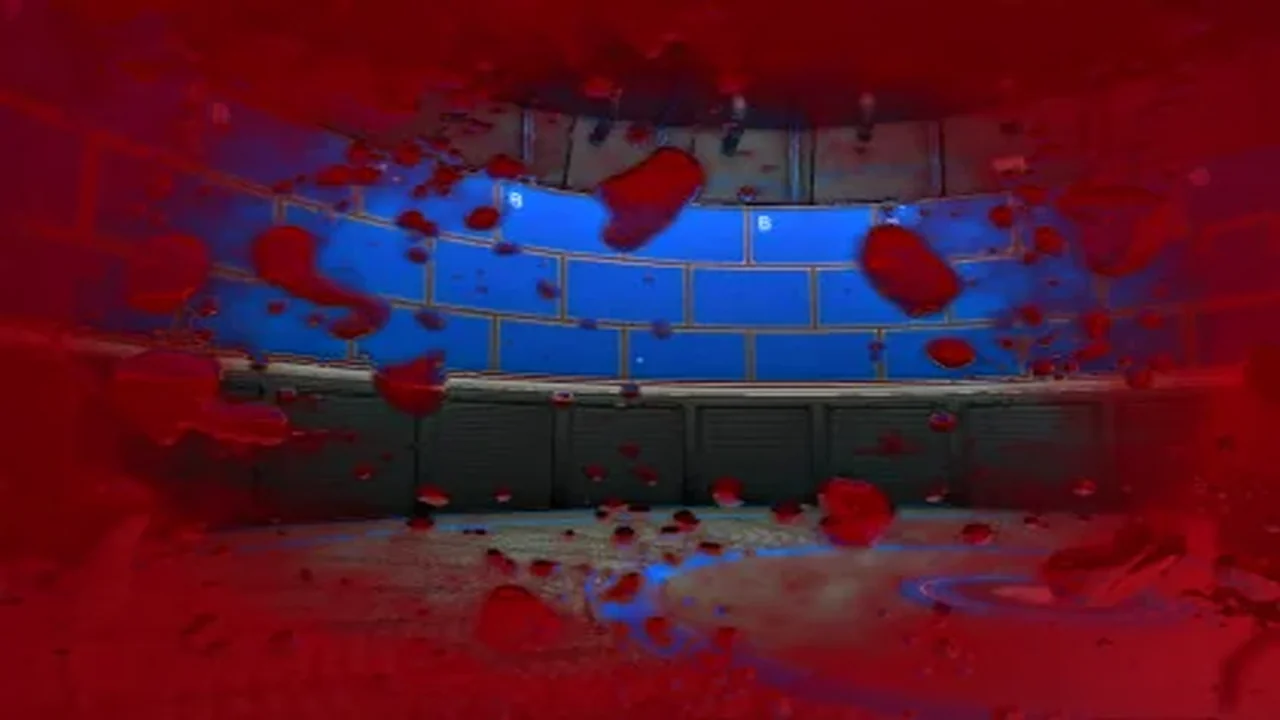
This tool renders dynamic blood splatter onto the screen as a visual health indicator, utilizing shaders and normal maps to simulate realistic light refraction and drying effects.
The Blood-Damage Effect serves as a post-processing solution for developers looking to communicate player damage through screen-space visuals rather than traditional UI elements. By rendering blood splatter directly onto the camera view, it provides an immediate indicator of health status. The tool is designed with dynamic behavior in mind, allowing the blood to appear on the screen and subsequently dry up or fade out over time, preventing the player's vision from remaining permanently obscured.
Simulating Light Refraction and Liquid Behavior
The tool uses an advanced behavior system to move beyond simple 2D overlays. By utilizing normal maps included in the package, the shader simulates the refraction of light through the blood drops. This causes the game world behind the splatter to distort, mimicking the way liquid physically interacts with a lens or an eye. These optical distortions are central to the effect, providing a sense of depth and volume to the splatter as it reacts to the in-game environment.
Technical Implementation and Asset Contents
The implementation of the Blood-Damage Effect is handled through a streamlined set of 21 assets. The core logic is contained within a single shader and a corresponding script used to manipulate the visual parameters during gameplay. To provide visual variety for different damage scenarios, the creator has included:
Two variations of blood textures
Two variations of blood normal maps
A demo scene for testing the implementation
The demo scene has been specifically updated to operate independently, meaning it no longer requires the Unity Standard Assets to function. This allows for a cleaner integration into existing projects where the standard asset library may not be present.
Engine Compatibility and Rendering Pipeline
The asset was originally developed for Unity 5.0.0 and remains a lightweight addition to a project at approximately 6.8 MB. It includes support for the Linear color space, ensuring that the color math and lighting remain consistent with modern rendering standards. However, developers should note that the tool is intended for the built-in render pipeline; it does not currently support the Universal Render Pipeline (URP) or the High Definition Render Pipeline (HDRP). Projects utilizing these scriptable render pipelines would need to account for this limitation during the production phase.
 Particles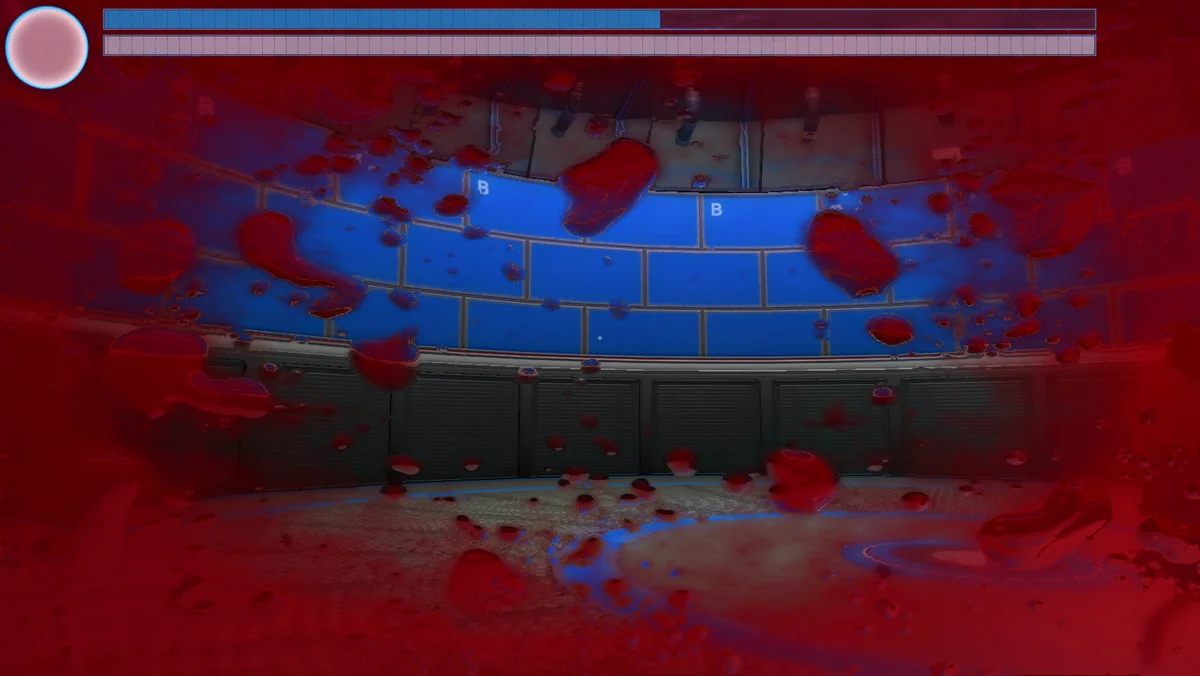
 Particles
 Particles
 Particles