"a7cfa646d0d8ae55"{"id":"23198","slug":"paint-in-3d","title":"Paint in 3D","category":"Painting","engine":"Original Unity version: 2021.3.0","assetVersion":"Original Unity version: 2021.3.0","engineVersion":"Asset Version:4.1.6","tag":"Painting","accent":"cyan","visual":"mech","summary":"Paint in 3D provides a specialized texture painting workflow for Unity, utilizing GPU acceleration to bypass the performance limitations of standard decal systems.","platform":"Unity","publishedAt":"2026-04-08T16:36:19.000Z","updatedAt":"2026-04-19T15:36:49.000Z","sourceNotes":[],"fileContents":[],"compatibility":["Unity","Original Unity version: 2021.3.0","Asset Version: 4.1.6"],"featuredImage":{"alt":"Paint in 3D","src":"https://3dcghub.com/wp-content/uploads/2026/04/f2dd7ae8e26d_fe940a2a-e4f0-488a-a33e-5d91c6e4c9d4_1280x720_stretch.webp"},"hasDownloadLink":true,"downloads":1,"terms":[{"taxonomy":"category","slug":"painting","name":"Painting"},{"taxonomy":"post_tag","slug":"textures","name":"Textures"},{"taxonomy":"post_tag","slug":"tools","name":"Tools"},{"taxonomy":"post_tag","slug":"unity","name":"Unity"}],"galleryImages":[{"src":"https://3dcghub.com/wp-content/uploads/2026/04/e4d50a2f90cd_bdb8229f-21ee-41e5-9d55-f606c810b813_scaled.webp","alt":"Paint in 3D"},{"src":"https://3dcghub.com/wp-content/uploads/2026/04/1236b45b01b2_3ab78aed-6f86-46ce-8669-2410ef87bfe0_scaled.webp","alt":"Paint in 3D"},{"src":"https://3dcghub.com/wp-content/uploads/2026/04/f764e000c5f2_a1f7380e-0424-4d73-a6ea-c98642de4c7c_scaled.webp","alt":"Paint in 3D"},{"src":"https://3dcghub.com/wp-content/uploads/2026/04/6bca203fbf6c_d1439911-ac6e-4056-b135-97e1cf88bd22_scaled.webp","alt":"Paint in 3D"},{"src":"https://3dcghub.com/wp-content/uploads/2026/04/3781be62ff66_2b7e9bc7-1540-4fd5-91c0-09739c4dd4fa_scaled.webp","alt":"Paint in 3D"},{"src":"https://3dcghub.com/wp-content/uploads/2026/04/70a4f978b9f5_7ba58a77-5979-40b2-8739-b6993b6b898f_scaled.webp","alt":"Paint in 3D"},{"src":"https://3dcghub.com/wp-content/uploads/2026/04/de587bc79d83_2b332231-713b-4082-8145-a51fc52f88fb_scaled.webp","alt":"Paint in 3D"},{"src":"https://3dcghub.com/wp-content/uploads/2026/04/c21abfa4fe73_eaac3e58-484d-4e7c-ad46-1edec768a4e8_scaled.webp","alt":"Paint in 3D"},{"src":"https://3dcghub.com/wp-content/uploads/2026/04/89847be29a1a_fe6bab9d-e4cf-4d65-b704-05b289c97c34_scaled.webp","alt":"Paint in 3D"},{"src":"https://3dcghub.com/wp-content/uploads/2026/04/081ebe089093_59413710-8f96-4240-bac9-d07c0a87d5b9_scaled.webp","alt":"Paint in 3D"}],"accessPanel":{"kind":"resource","title":"Access this resource","eyebrow":"Free Download","message":"Log in or create a free account to start your download.","fileName":"Paint in 3D v4.1.6.7z","safetyNote":"All resources are 100% manually reviewed to eliminate all risks.","actionLabel":"Download Free","resourceType":"Resource archive"},"contentHtml":"\u003ch2\u003eHigh-Performance Texture Painting Mechanics\u003c/h2\u003e\n\u003cp\u003ePaint in 3D is a texture painting solution for Unity designed to handle complex painting tasks without the performance overhead often associated with traditional decal systems. By utilizing GPU acceleration and extensive optimization, the package allows developers to apply paint millions of times while maintaining a stable framerate. This architecture makes it suitable for intensive use cases where objects are frequently modified or marked during gameplay.\u003c/p\u003e\n\u003cp\u003eBecause it operates as a texture painting system rather than a decal system, the paint is applied directly to the object's textures. This approach is compatible across a wide range of hardware, including desktop, mobile, WebGL, and VR. It integrates with both the Universal Render Pipeline (URP) and the High Definition Render Pipeline (HDRP), as well as custom shaders. Developers can select specific textures and blending modes to match their project's visual style.\u003c/p\u003e\n\n\u003ch2\u003eMesh Analysis and UV Optimization\u003c/h2\u003e\n\u003cp\u003eTo ensure paint is applied accurately, the package includes a dedicated Mesh Analysis tool. This utility scans mesh UV data to determine if it is suitable for painting. In instances where the UV layout is problematic, a built-in Mesh Fixer tool can automate the unwrapping process. This tool is capable of remapping existing textures to the new UV layout and fixing UV seams to prevent visual artifacts during the painting process.\u003c/p\u003e\n\n\u003ch2\u003ePainting Animated and Skinned Meshes\u003c/h2\u003e\n\u003cp\u003eOne of the more complex aspects of 3D painting is applying marks to moving objects. Paint in 3D supports skinned mesh painting, allowing for paint to be applied instantly to animated characters and objects using blendshapes. This is particularly useful for visual effects like character damage or environmental interactions where the target is in motion. Performance remains optimized for these scenarios, ensuring that the instant application of paint does not cause stuttering in high-action scenes.\u003c/p\u003e\n\n\u003ch2\u003eIntegration and Customization for Developers\u003c/h2\u003e\n\u003cp\u003eThe package is built with flexibility for programmers, including the full source code. This allows for deep customization and the ability to configure painting logic entirely through C# code. Several examples are provided to demonstrate how to trigger painting events programmatically. For projects requiring specific gameplay mechanics, a color counting system is included. This system can calculate the percentage of an object that has been painted or determine which team has covered the most surface area, facilitating mechanics for competitive or objective-based games.\u003c/p\u003e\n\n\u003ch2\u003eProduction Tools and Workflow Support\u003c/h2\u003e\n\u003cp\u003eBeyond the actual painting mechanics, the asset includes several utilities to manage the user experience. An automatic saving and loading system ensures that painted textures persist across sessions. The package also supports undo, redo, and erase functions, giving users precise control over their work. For VR development, the system is fully compatible and includes specialized demo scenes designed to showcase how painting interactions function within a virtual environment.\u003c/p\u003e\n\u003cp\u003eWith over eight years of regular updates, the toolset has expanded to include over 100 example scenes. these scenes serve as a practical reference for implementing the various features, from basic click-to-paint setups to complex skinned mesh interactions and color-tracking logic.\u003c/p\u003e\n\n\u003ch2\u003eContinue Browsing Similar Packs\u003c/h2\u003e\n\u003cul\u003e\n\u003cli\u003e\u003ca href=\"https://3dcghub.com/opencv-for-unity/\" title=\"OpenCV for Unity\"\u003eOpenCV for Unity\u003c/a\u003e\u003c/li\u003e\n\u003cli\u003e\u003ca href=\"https://3dcghub.com/exporter-for-unreal-to-for-unity-2026/\" title=\"Exporter for Unreal to/for Unity 2026\"\u003eExporter for Unreal to/for Unity 2026\u003c/a\u003e\u003c/li\u003e\n\u003cli\u003e\u003ca href=\"https://3dcghub.com/dialogue-system-for-unity/\" title=\"Dialogue System for Unity\"\u003eDialogue System for Unity\u003c/a\u003e\u003c/li\u003e\n\u003cli\u003e\u003ca href=\"https://3dcghub.com/ambient-sounds-interactive-soundscapes-for-unity-6/\" title=\"Ambient Sounds – Interactive Soundscapes for Unity 6\"\u003eAmbient Sounds – Interactive Soundscapes for Unity 6\u003c/a\u003e\u003c/li\u003e\n\u003cli\u003e\u003ca href=\"https://3dcghub.com/pegasus-flythroughs-for-unity-6/\" title=\"Pegasus – Flythroughs for Unity 6\"\u003ePegasus – Flythroughs for Unity 6\u003c/a\u003e\u003c/li\u003e\n\u003c/ul\u003e","contentTextLength":3633,"navigation":{"current":3058,"total":3167,"previous":{"id":"23208","slug":"blood-damage-effect","title":"Blood-Damage Effect","category":"Particles \u0026 Effects","platform":"Unity","updatedAt":"2026-04-19T15:36:49.000Z"},"next":{"id":"23185","slug":"runtime-level-design-legacy","title":"Runtime Level Design (Legacy)","category":"Modeling","platform":"Unity","updatedAt":"2026-04-19T15:36:49.000Z"}},"relatedResources":[{"id":"14545","slug":"runtime-vertex-paint-detection-plugin","title":"Runtime Vertex Paint \u0026 Detection Plugin","category":"Engine Tools","engine":"4.27,5.0 - 5.5,5.7","assetVersion":"Engine version: 4.27,5.0 - 5.5,5.7","engineVersion":"Asset Version:1.05 - 1.31.4","tag":"Engine Tools","accent":"blue","visual":"mech","summary":"Enhance your project with the Runtime Vertex Paint \u0026 Detection Plugin, a powerful tool for modifying vertex colors on static, skeletal, and dynamic meshes during runtime. It supports multi-threading and advanced detection for immersive gameplay mechanics.","platform":"Unreal Engine","publishedAt":"2026-03-11T18:24:12.000Z","updatedAt":"2026-04-19T15:45:44.000Z","sourceNotes":[],"fileContents":[],"compatibility":["Unreal Engine","Engine version: 4.27,5.0 - 5.5,5.7","Asset Version: 1.05 - 1.31.4"],"featuredImage":{"alt":"Runtime Vertex Paint \u0026 Detection Plugin","src":"https://3dcghub.com/wp-content/uploads/2026/03/c46e2bac-87de-40a2-8df4-bbe3d8633179.webp"},"hasDownloadLink":true,"downloads":2},{"id":"12288","slug":"car-paint","title":"Car Paint","category":"Building \u0026 Human-made","engine":"4.26+,5.0+","assetVersion":"Engine version: 4.26+,5.0+","engineVersion":"4.21","tag":"Building","accent":"blue","visual":"luts","summary":"This professional master material provides a comprehensive solution for car body surfaces. It includes textures for carbon fiber, metallic flakes, and scratches to achieve high-end realism.","platform":"Unreal Engine","publishedAt":"2026-03-07T12:10:04.000Z","updatedAt":"2026-04-19T15:48:00.000Z","sourceNotes":[],"fileContents":[],"compatibility":["Unreal Engine","Engine version: 4.26+,5.0+"],"featuredImage":{"alt":"Car Paint","src":"https://3dcghub.com/wp-content/uploads/2026/03/c89b29c7-9ba0-438d-9935-aae34ff331db.webp"},"hasDownloadLink":true,"downloads":0},{"id":"18392","slug":"fantasy-skybox","title":"Fantasy Skybox","category":"Sky","engine":"Original Unity version: 2021.3.0","assetVersion":"Original Unity version: 2021.3.0","engineVersion":"Asset Version:1.6.7","tag":"Sky","accent":"cyan","visual":"luts","summary":"Fantasy Skybox is a comprehensive environment package for Unity, featuring 178 ready-to-use skyboxes. It includes both cubemap and panoramic options with various weather and lighting conditions.","platform":"Unity","publishedAt":"2026-03-16T13:45:53.000Z","updatedAt":"2026-04-19T15:43:07.000Z","sourceNotes":[],"fileContents":[],"compatibility":["Unity","Original Unity version: 2021.3.0","Asset Version: 1.6.7"],"featuredImage":{"alt":"Fantasy Skybox","src":"https://3dcghub.com/wp-content/uploads/2026/03/36a6db568f4f_79966595-8c31-4818-9c5a-537941196ff1_1280x720_stretch.webp"},"hasDownloadLink":true,"downloads":0}]}
Painting
Paint in 3D
Paint in 3D provides a specialized texture painting workflow for Unity, utilizing GPU acceleration to bypass the performance limitations of standard decal systems.
Paint in 3D is a texture painting solution for Unity designed to handle complex painting tasks without the performance overhead often associated with traditional decal systems. By utilizing GPU acceleration and extensive optimization, the package allows developers to apply paint millions of times while maintaining a stable framerate. This architecture makes it suitable for intensive use cases where objects are frequently modified or marked during gameplay.
Because it operates as a texture painting system rather than a decal system, the paint is applied directly to the object's textures. This approach is compatible across a wide range of hardware, including desktop, mobile, WebGL, and VR. It integrates with both the Universal Render Pipeline (URP) and the High Definition Render Pipeline (HDRP), as well as custom shaders. Developers can select specific textures and blending modes to match their project's visual style.
Mesh Analysis and UV Optimization
To ensure paint is applied accurately, the package includes a dedicated Mesh Analysis tool. This utility scans mesh UV data to determine if it is suitable for painting. In instances where the UV layout is problematic, a built-in Mesh Fixer tool can automate the unwrapping process. This tool is capable of remapping existing textures to the new UV layout and fixing UV seams to prevent visual artifacts during the painting process.
Painting Animated and Skinned Meshes
One of the more complex aspects of 3D painting is applying marks to moving objects. Paint in 3D supports skinned mesh painting, allowing for paint to be applied instantly to animated characters and objects using blendshapes. This is particularly useful for visual effects like character damage or environmental interactions where the target is in motion. Performance remains optimized for these scenarios, ensuring that the instant application of paint does not cause stuttering in high-action scenes.
Integration and Customization for Developers
The package is built with flexibility for programmers, including the full source code. This allows for deep customization and the ability to configure painting logic entirely through C# code. Several examples are provided to demonstrate how to trigger painting events programmatically. For projects requiring specific gameplay mechanics, a color counting system is included. This system can calculate the percentage of an object that has been painted or determine which team has covered the most surface area, facilitating mechanics for competitive or objective-based games.
Production Tools and Workflow Support
Beyond the actual painting mechanics, the asset includes several utilities to manage the user experience. An automatic saving and loading system ensures that painted textures persist across sessions. The package also supports undo, redo, and erase functions, giving users precise control over their work. For VR development, the system is fully compatible and includes specialized demo scenes designed to showcase how painting interactions function within a virtual environment.
With over eight years of regular updates, the toolset has expanded to include over 100 example scenes. these scenes serve as a practical reference for implementing the various features, from basic click-to-paint setups to complex skinned mesh interactions and color-tracking logic.
 Painting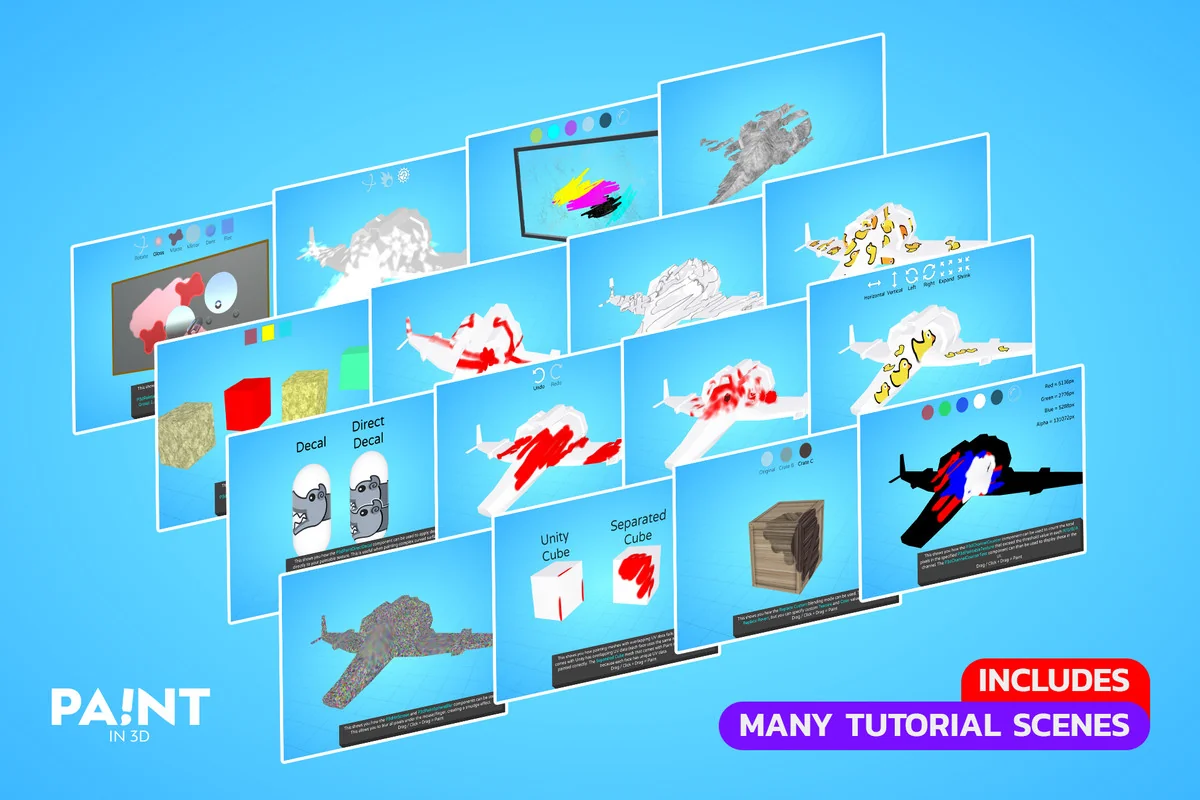
 Engine Tools
 Building
 Sky
Sky