"7e6fc58c410f2894"{"id":"23220","slug":"boing-kit-dynamic-bouncy-bones-grass-and-more","title":"Boing Kit: Dynamic Bouncy Bones, Grass, and More","category":"Particles \u0026 Effects","engine":"Original Unity version: 2019.4.15","assetVersion":"Original Unity version: 2019.4.15","engineVersion":"Asset Version:1.2.43","tag":"Particles","accent":"cyan","visual":"audio","summary":"Boing Kit provides a technical framework for adding bouncy, reactive movement to characters and environments within Unity. This toolset features specialized logic for bone chains, rotational constraints, and optimized reactor fields across major render pipe...","platform":"Unity","publishedAt":"2026-04-09T15:20:00.000Z","updatedAt":"2026-04-19T15:36:48.000Z","sourceNotes":[],"fileContents":[],"compatibility":["Unity","Original Unity version: 2019.4.15","Asset Version: 1.2.43"],"featuredImage":{"alt":"Boing Kit: Dynamic Bouncy Bones, Grass, and More","src":"https://3dcghub.com/wp-content/uploads/2026/04/193563bda3aa_e446bee3-32e4-4108-8ed5-669131516416_1280x720_stretch.webp"},"hasDownloadLink":true,"downloads":1,"terms":[{"taxonomy":"category","slug":"particles-and-effects","name":"Particles \u0026 Effects"},{"taxonomy":"post_tag","slug":"animation","name":"Animation"},{"taxonomy":"post_tag","slug":"unity","name":"Unity"},{"taxonomy":"post_tag","slug":"vfx","name":"VFX"}],"galleryImages":[{"src":"https://3dcghub.com/wp-content/uploads/2026/04/7a086956037d_b83c955f-1106-4838-85c1-02f14929657d_scaled.webp","alt":"Boing Kit: Dynamic Bouncy Bones, Grass, and More"},{"src":"https://3dcghub.com/wp-content/uploads/2026/04/a14bb1b09bb7_4e2224f3-e27b-4f93-93c9-a6cc18e1be05_scaled.webp","alt":"Boing Kit: Dynamic Bouncy Bones, Grass, and More"},{"src":"https://3dcghub.com/wp-content/uploads/2026/04/6f0d3634b327_d30f6715-897f-43d8-b4c5-e19291fcf0e2_scaled.webp","alt":"Boing Kit: Dynamic Bouncy Bones, Grass, and More"},{"src":"https://3dcghub.com/wp-content/uploads/2026/04/eb8aa43f6e7e_d642bc27-2ed1-422c-81a0-a83b29dd55ca_scaled.webp","alt":"Boing Kit: Dynamic Bouncy Bones, Grass, and More"},{"src":"https://3dcghub.com/wp-content/uploads/2026/04/0a55cb6a9f61_164af051-b537-440f-b3f6-e7ef5cb3c432_scaled.webp","alt":"Boing Kit: Dynamic Bouncy Bones, Grass, and More"},{"src":"https://3dcghub.com/wp-content/uploads/2026/04/cc3a796e2e0d_e179e1af-33e4-4390-b561-b50ddbf99328_scaled.webp","alt":"Boing Kit: Dynamic Bouncy Bones, Grass, and More"},{"src":"https://3dcghub.com/wp-content/uploads/2026/04/78488e7a8163_0017b014-3ca2-4db1-b4e8-cde05ff8e188_scaled.webp","alt":"Boing Kit: Dynamic Bouncy Bones, Grass, and More"}],"accessPanel":{"kind":"resource","title":"Access this resource","eyebrow":"Free Download","message":"Log in or create a free account to start your download.","fileName":"Boing Kit Dynamic Bouncy Bones, Grass, and More V1.2.43.7z","safetyNote":"All resources are 100% manually reviewed to eliminate all risks.","actionLabel":"Download Free","resourceType":"Resource archive"},"contentHtml":"\u003ch2\u003eDynamic Movement and Teleportation Logic\u003c/h2\u003e\n\u003cp\u003eBoing Kit is designed to integrate bouncy visual effects into Unity projects by focusing on procedural movement for bones, grass, and other environmental elements. A primary challenge in physics-based or bouncy effects is handling sudden movements, such as character teleportation. To address this, the developer has implemented specific methods within the \u003ccode\u003eBoingBehavior\u003c/code\u003e and \u003ccode\u003eBoingBones\u003c/code\u003e classes. By calling \u003ccode\u003eHandleTeleport()\u003c/code\u003e after an object is moved instantly across a scene, developers can prevent the sudden, erratic jumps in bouncy effects that typically occur when a physics-based system attempts to catch up to a new coordinate.\u003c/p\u003e\n\n\u003ch2\u003eBone Chains and Rotational Constraints\u003c/h2\u003e\n\u003cp\u003eThe kit provides dedicated components for managing bone-based animation, specifically through the \u003ccode\u003eBoingBones\u003c/code\u003e system. This implementation allows for reactive movement that respects existing animation data. Recent updates have focused on ensuring that animation blending is correctly respected by rotational effects, preventing conflicts between baked animations and procedural bounce. For more granular control, the tool includes options to lock rotational effects along specific axes. These constraints can be applied in either global or local space, allowing for specialized movement patterns where bounce is only desired on a single axis, such as a vertical bobbing motion or a side-to-side sway.\u003c/p\u003e\n\n\u003cp\u003eTo maintain stability, the system includes rebooting and rescanning logic for bone chains. The \u003ccode\u003eBoingBones.Reboot\u003c/code\u003e function handles cases where objects are instantiated at specific timings, ensuring that null reference exceptions are avoided during the initialization of complex bone hierarchies. Additionally, the inclusion of assembly definitions streamlines the compilation process within the Unity Editor.\u003c/p\u003e\n\n\u003ch2\u003eEnvironmental Interaction via Reactor Fields\u003c/h2\u003e\n\u003cp\u003eFor environmental effects like grass or interactive foliage, the toolkit utilizes reactor fields. These fields allow multiple interactable objects to influence the bouncy behavior of a mesh simultaneously. Technical refinements have addressed previous limitations where only a single reactor field would function at one time; the current iteration supports multiple active fields, ensuring that various effectors in a scene can contribute to the final deformation. In the High Definition Render Pipeline (HDRP), materials that sample these reactor fields are specifically tuned to render correctly in edit mode, even when utilizing newer versions like Unity 6.\u003c/p\u003e\n\n\u003ch2\u003eShader Integration and Pipeline Compatibility\u003c/h2\u003e\n\u003cp\u003eBoing Kit maintains compatibility across the Built-in, Universal Render Pipeline (URP), and HDRP workflows. For those working within URP and HDRP, the kit includes stock shaders and materials constructed using Unity’s Shader Graph. This approach allows for easier customization of how the bouncy effects interact with light and surface properties. The asset count totals 292 items, which include these pre-configured materials and the core logic components needed to drive the bouncy VFX.\u003c/p\u003e\n\n\u003ch2\u003ePerformance Optimizations and Resource Management\u003c/h2\u003e\n\u003cp\u003ePerformance is a significant focus in the kit’s development, particularly regarding memory management. The developer replaced standard \u003ccode\u003eMathf.Min\u003c/code\u003e and \u003ccode\u003eMathf.Max\u003c/code\u003e array-based calls with \u003ccode\u003eVectorUtil.MinComponent\u003c/code\u003e and \u003ccode\u003eVectorUtil.MaxComponent\u003c/code\u003e. This change was specifically implemented to remove garbage allocation, which can lead to performance stutters during runtime. Furthermore, the system is designed to skip the execution of disabled objects, ensuring that CPU cycles are not wasted on elements that are not currently visible or active in the scene.\u003c/p\u003e\n\n\u003cp\u003eWhen updating the tool, it is important to note that changes to the folder structure—including moved and renamed files—can disrupt existing builds. The recommended workflow for implementing updates is to remove the existing folder entirely before importing the latest package to ensure all file references are correctly mapped. This process prevents conflicts between legacy code and new optimizations like the improved float spring rest conditions and the refined effector logic found in \u003ccode\u003eBoingEffector.OnEnable\u003c/code\u003e and \u003ccode\u003eOnDisable\u003c/code\u003e overrides.\u003c/p\u003e\n\n\u003ch2\u003eMore From The Same Workflow\u003c/h2\u003e\n\u003cul\u003e\n\u003cli\u003e\u003ca href=\"https://3dcghub.com/opencv-for-unity/\" title=\"OpenCV for Unity\"\u003eOpenCV for Unity\u003c/a\u003e\u003c/li\u003e\n\u003cli\u003e\u003ca href=\"https://3dcghub.com/exporter-for-unreal-to-for-unity-2026/\" title=\"Exporter for Unreal to/for Unity 2026\"\u003eExporter for Unreal to/for Unity 2026\u003c/a\u003e\u003c/li\u003e\n\u003cli\u003e\u003ca href=\"https://3dcghub.com/dialogue-system-for-unity/\" title=\"Dialogue System for Unity\"\u003eDialogue System for Unity\u003c/a\u003e\u003c/li\u003e\n\u003cli\u003e\u003ca href=\"https://3dcghub.com/ambient-sounds-interactive-soundscapes-for-unity-6/\" title=\"Ambient Sounds – Interactive Soundscapes for Unity 6\"\u003eAmbient Sounds – Interactive Soundscapes for Unity 6\u003c/a\u003e\u003c/li\u003e\n\u003cli\u003e\u003ca href=\"https://3dcghub.com/pegasus-flythroughs-for-unity-6/\" title=\"Pegasus – Flythroughs for Unity 6\"\u003ePegasus – Flythroughs for Unity 6\u003c/a\u003e\u003c/li\u003e\n\u003c/ul\u003e\n\n\u003ch2\u003eAsset Gallery\u003c/h2\u003e","contentTextLength":4423,"navigation":{"current":3515,"total":3618,"previous":{"id":"23232","slug":"crest-water-4-urp-ocean-rivers-lakes","title":"Crest Water 4 URP (Ocean, Rivers \u0026 Lakes)","category":"Particles \u0026 Effects","platform":"Unity","updatedAt":"2026-04-19T15:36:48.000Z"},"next":{"id":"23279","slug":"glamor-advanced-image-effects","title":"GLAMOR Advanced Image Effects","category":"Particles \u0026 Effects","platform":"Unity","updatedAt":"2026-04-19T15:36:47.000Z"}},"relatedResources":[{"id":"23208","slug":"blood-damage-effect","title":"Blood-Damage Effect","category":"Particles \u0026 Effects","engine":"Original Unity version: 5.0.0","assetVersion":"Original Unity version: 5.0.0","engineVersion":"Asset Version:1.1","tag":"Particles","accent":"cyan","visual":"audio","summary":"This tool renders dynamic blood splatter onto the screen as a visual health indicator, utilizing shaders and normal maps to simulate realistic light refraction and drying effects.","platform":"Unity","publishedAt":"2026-04-08T16:39:01.000Z","updatedAt":"2026-04-19T15:36:49.000Z","sourceNotes":[],"fileContents":[],"compatibility":["Unity","Original Unity version: 5.0.0","Asset Version: 1.1"],"featuredImage":{"alt":"Blood-Damage Effect","src":"https://3dcghub.com/wp-content/uploads/2026/04/4959311d7e10_d99e0d45-1444-4fff-b5ee-2c8664268f89_1280x720_stretch.webp"},"hasDownloadLink":true,"downloads":0},{"id":"23365","slug":"see-through-shader","title":"See-through Shader","category":"Particles \u0026 Effects","engine":"Original Unity version: 2021.3.45","assetVersion":"Original Unity version: 2021.3.45","engineVersion":"Asset Version:1.8.6","tag":"Particles","accent":"cyan","visual":"city","summary":"The See-through Shader keeps playable characters visible even when they move behind walls, structures, or other meshes. It works without modifying the mesh and comes with tools that make the effect quick to set up in a project.","platform":"Unity","publishedAt":"2026-04-09T16:48:23.000Z","updatedAt":"2026-04-19T15:35:28.000Z","sourceNotes":[],"fileContents":[],"compatibility":["Unity","Original Unity version: 2021.3.45","Asset Version: 1.8.6"],"featuredImage":{"alt":"See-through Shader","src":"https://3dcghub.com/wp-content/uploads/2026/04/84b3e554d99e_4c3b4d7f-1c87-4855-b7d6-f6a2d3ca7f88_1280x720_stretch.webp"},"hasDownloadLink":true,"downloads":1},{"id":"23276","slug":"feel","title":"Feel","category":"Particles \u0026 Effects","engine":"5.2 - 6.1","assetVersion":"Original Unity version: 2019.4.3","engineVersion":"Asset Version:5.2 - 6.1","tag":"Particles","accent":"cyan","visual":"city","summary":"Feel gathers a large set of feedbacks and springs for moments that need motion, response, and extra punch. It reaches across camera work, UI, text, shaders, sounds, physics, and haptics through a single workflow.","platform":"Unity","publishedAt":"2026-04-09T16:28:21.000Z","updatedAt":"2026-10-09T05:54:10.435Z","sourceNotes":[],"fileContents":[],"compatibility":["Unity","Original Unity version: 2019.4.3","Asset Version:5.2 - 6.1"],"featuredImage":{"alt":"Feel","src":"https://3dcghub.com/wp-content/uploads/2026/04/7ebb1dbba7d2_173c8845-1063-44dc-aa55-65738aa93cce_1280x720_stretch.webp"},"hasDownloadLink":true,"downloads":16}]}
Particles
Boing Kit: Dynamic Bouncy Bones, Grass, and More
Boing Kit provides a technical framework for adding bouncy, reactive movement to characters and environments within Unity. This toolset features specialized logic for bone chains, rotational constraints, and optimized reactor fields across major render pipe...
Boing Kit is designed to integrate bouncy visual effects into Unity projects by focusing on procedural movement for bones, grass, and other environmental elements. A primary challenge in physics-based or bouncy effects is handling sudden movements, such as character teleportation. To address this, the developer has implemented specific methods within the BoingBehavior and BoingBones classes. By calling HandleTeleport() after an object is moved instantly across a scene, developers can prevent the sudden, erratic jumps in bouncy effects that typically occur when a physics-based system attempts to catch up to a new coordinate.
Bone Chains and Rotational Constraints
The kit provides dedicated components for managing bone-based animation, specifically through the BoingBones system. This implementation allows for reactive movement that respects existing animation data. Recent updates have focused on ensuring that animation blending is correctly respected by rotational effects, preventing conflicts between baked animations and procedural bounce. For more granular control, the tool includes options to lock rotational effects along specific axes. These constraints can be applied in either global or local space, allowing for specialized movement patterns where bounce is only desired on a single axis, such as a vertical bobbing motion or a side-to-side sway.
To maintain stability, the system includes rebooting and rescanning logic for bone chains. The BoingBones.Reboot function handles cases where objects are instantiated at specific timings, ensuring that null reference exceptions are avoided during the initialization of complex bone hierarchies. Additionally, the inclusion of assembly definitions streamlines the compilation process within the Unity Editor.
Environmental Interaction via Reactor Fields
For environmental effects like grass or interactive foliage, the toolkit utilizes reactor fields. These fields allow multiple interactable objects to influence the bouncy behavior of a mesh simultaneously. Technical refinements have addressed previous limitations where only a single reactor field would function at one time; the current iteration supports multiple active fields, ensuring that various effectors in a scene can contribute to the final deformation. In the High Definition Render Pipeline (HDRP), materials that sample these reactor fields are specifically tuned to render correctly in edit mode, even when utilizing newer versions like Unity 6.
Shader Integration and Pipeline Compatibility
Boing Kit maintains compatibility across the Built-in, Universal Render Pipeline (URP), and HDRP workflows. For those working within URP and HDRP, the kit includes stock shaders and materials constructed using Unity’s Shader Graph. This approach allows for easier customization of how the bouncy effects interact with light and surface properties. The asset count totals 292 items, which include these pre-configured materials and the core logic components needed to drive the bouncy VFX.
Performance Optimizations and Resource Management
Performance is a significant focus in the kit’s development, particularly regarding memory management. The developer replaced standard Mathf.Min and Mathf.Max array-based calls with VectorUtil.MinComponent and VectorUtil.MaxComponent. This change was specifically implemented to remove garbage allocation, which can lead to performance stutters during runtime. Furthermore, the system is designed to skip the execution of disabled objects, ensuring that CPU cycles are not wasted on elements that are not currently visible or active in the scene.
When updating the tool, it is important to note that changes to the folder structure—including moved and renamed files—can disrupt existing builds. The recommended workflow for implementing updates is to remove the existing folder entirely before importing the latest package to ensure all file references are correctly mapped. This process prevents conflicts between legacy code and new optimizations like the improved float spring rest conditions and the refined effector logic found in BoingEffector.OnEnable and OnDisable overrides.
 Particles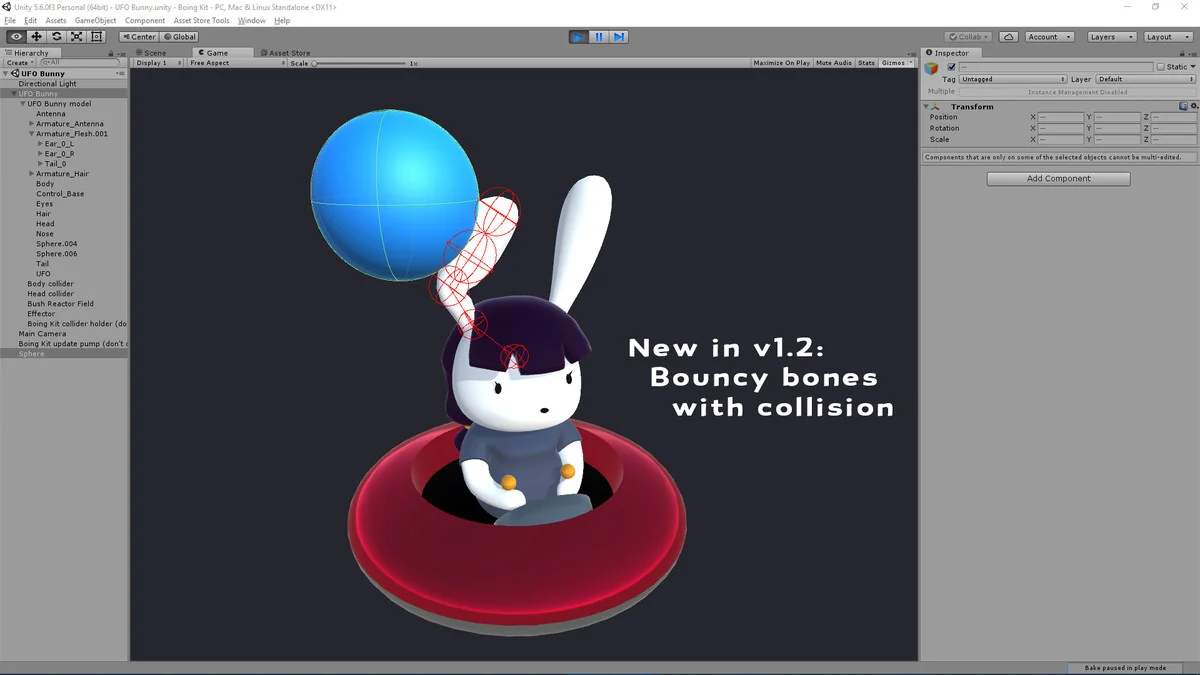
 Particles
 Particles
 Particles