"7e6fc58c410f2894"{"id":"24126","slug":"directx-11-grass-shader","title":"DirectX 11 Grass Shader","category":"DirectX 11","engine":"Original Unity version: 2017.1.0","assetVersion":"Original Unity version: 2017.1.0","engineVersion":"Asset Version:2.8.0","tag":"DirectX 11","accent":"cyan","visual":"animation","summary":"DirectX 11 Grass Shader adds GPU-generated grass blades to terrain and custom meshes, with CPU fallback for hardware that cannot use DirectX 11. It also includes grass painting tools, texture atlas creation, and interaction with characters, vehicles, and ot...","platform":"Unity","publishedAt":"2026-04-12T09:51:42.000Z","updatedAt":"2026-04-19T15:34:59.000Z","sourceNotes":[],"fileContents":[],"compatibility":["Unity","Original Unity version: 2017.1.0","Asset Version: 2.8.0"],"featuredImage":{"alt":"DirectX 11 Grass Shader","src":"https://3dcghub.com/wp-content/uploads/2026/04/405892c0b570_d64a9d22-792e-40e8-9d04-97b74c9b9ff4_1280x720_stretch.webp"},"hasDownloadLink":true,"downloads":0,"terms":[{"taxonomy":"category","slug":"unity-vfx-shaders-directx-11","name":"DirectX 11"},{"taxonomy":"post_tag","slug":"materials","name":"Materials"},{"taxonomy":"post_tag","slug":"unity","name":"Unity"},{"taxonomy":"post_tag","slug":"vfx","name":"VFX"}],"galleryImages":[{"src":"https://3dcghub.com/wp-content/uploads/2026/04/fe9b4fd79903_93583384-6755-4684-9be3-f86c9a224867_scaled.webp","alt":"DirectX 11 Grass Shader"},{"src":"https://3dcghub.com/wp-content/uploads/2026/04/f16f3ece94a9_006f1460-6a7e-413d-9369-5c71ffa7b226_scaled.webp","alt":"DirectX 11 Grass Shader"},{"src":"https://3dcghub.com/wp-content/uploads/2026/04/72de1351945d_c16b913b-09ec-4924-a0e1-baaf63ce3990_scaled.webp","alt":"DirectX 11 Grass Shader"},{"src":"https://3dcghub.com/wp-content/uploads/2026/04/10913917a1bb_b9bfb8b4-b67e-480d-bde1-9eb21018ef16_scaled.webp","alt":"DirectX 11 Grass Shader"},{"src":"https://3dcghub.com/wp-content/uploads/2026/04/5d22cfee9a21_2e2ebad6-bc94-489f-b575-69a5fb857baf_scaled.webp","alt":"DirectX 11 Grass Shader"},{"src":"https://3dcghub.com/wp-content/uploads/2026/04/e83aeda12cc9_2a52b39d-bc79-4da2-a208-8327bc1ce226_scaled.webp","alt":"DirectX 11 Grass Shader"},{"src":"https://3dcghub.com/wp-content/uploads/2026/04/b8c17ef881dd_a716b4b4-8b1e-42e0-8659-57f6d6df429a_scaled.webp","alt":"DirectX 11 Grass Shader"},{"src":"https://3dcghub.com/wp-content/uploads/2026/04/c0039c8437c3_dd26303f-0c5d-4ebc-9b10-d4e227d70af9_scaled.webp","alt":"DirectX 11 Grass Shader"},{"src":"https://3dcghub.com/wp-content/uploads/2026/04/55b043656aae_d10b80b3-7bc2-4751-8609-5c7bbce4c8d3_scaled.webp","alt":"DirectX 11 Grass Shader"},{"src":"https://3dcghub.com/wp-content/uploads/2026/04/9312742eff2c_cf0b8654-5a92-4c13-92ce-67e8b11887db_scaled.webp","alt":"DirectX 11 Grass Shader"}],"accessPanel":{"kind":"free-resource","title":"Access this resource","eyebrow":"Free Download","message":"Log in or create a free account to start your download.","fileName":"DirectX 11 Grass Shader v2.8.0 (20 Dec 2024).7z","safetyNote":"All resources are 100% manually reviewed to eliminate all risks.","actionLabel":"Download Free","resourceType":"Resource archive"},"contentHtml":"\u003ch2\u003ePutting grass into a scene\u003c/h2\u003e\u003cp\u003eDirectX 11 Grass Shader is a Unity VFX shader package for adding dense grass fields without placing every blade by hand. It generates individual blades directly on the GPU, which makes it a practical fit for scenes that need a large amount of ground cover and still have room for other gameplay systems to run. The setup is aimed at real production use rather than a one-off visual trick: it supports Unity terrain as well as custom meshes, so the grass can follow standard landscape surfaces or be applied to authored geometry.\u003c/p\u003e\u003cp\u003eThat makes it useful anywhere vegetation needs to read as part of the environment instead of a flat texture. Open fields, stylized biomes, fantasy ground cover, and unusual spaces like underwater scenes or alien landscapes are all covered by the assetâs stated flexibility. The shader is meant to scale from low-end to high-end hardware by shifting the work of blade generation to the GPU when DirectX 11 is available, while still keeping a fallback path for systems that cannot use it.\u003c/p\u003e\u003ch2\u003ePlacement tools and scene control\u003c/h2\u003e\u003cp\u003eThe package includes a grass painter, which gives direct control over where grass appears. That matters in production because vegetation placement is rarely uniform: walkable routes, gameplay landmarks, and focal areas often need clear treatment, while other patches need denser coverage. With painting tools and texture atlas creation tools included, the shader supports a workflow where the artist can shape the distribution of grass instead of relying on a fully automatic pass.\u003c/p\u003e\u003cp\u003eTexture atlases are part of that workflow as well. They give another layer of control for grass presentation, helping the creator build variations and organize the look of the vegetation. The package also includes tools for creating those atlases, so the process is not limited to applying a preset result. Combined with the detailed text documentation and video tutorials, the setup is built to help the user move from installation to a working result without having to guess how the pieces fit together.\u003c/p\u003e\u003cp\u003eSeveral other controls are called out as part of the long-term feature set: lighting modes, wind zones, moving platforms, and an advanced interaction system. Those are the kinds of elements that matter when grass is part of an active scene rather than a static backdrop. Wind zones give the vegetation motion, moving platforms keep grass usable in scenes with animated surfaces, and the interaction system allows the grass to react dynamically to characters, vehicles, or other game events.\u003c/p\u003e\u003ch2\u003eRendering paths and fallback behavior\u003c/h2\u003e\u003cp\u003eThe shader has native support for Windows with DirectX 11, PlayStation 4, and Xbox One. It also supports the Built-in render pipeline and the Universal render pipeline. For other platforms, the package relies on a CPU fallback system, which keeps the asset usable even when DirectX 11 is not an option.\u003c/p\u003e\u003cp\u003eThat fallback path is important because it changes how the shader can be used across projects. A scene can be built with the DirectX 11 path in mind and still retain a supported route for hardware or platforms that cannot take the same rendering approach. The latest release notes also mention support for grass fallback in URP, with the note that it is still somewhat experimental and may contain bugs. Another update fixes additional lights not working in URP Forward+, with the reminder that those lights only render correctly when grass is in âRandomize grass directionâ mode.\u003c/p\u003e\u003cp\u003eThe package also notes support for Curved World among third-party assets, while most other assets are expected to work without explicit support. That keeps the shader in a fairly practical position inside a larger project stack, especially when a scene is already using other Unity tools and systems.\u003c/p\u003e\u003ch2\u003eWhere it fits in production\u003c/h2\u003e\u003cp\u003eThis shader fits best in workflows where ground coverage needs to be fast to place, visually adjustable, and responsive to gameplay. It is not just a vegetation look; it is a system for building grass behavior around terrain, custom meshes, lighting, wind, and interaction. The combination of GPU-generated blades, CPU fallback, and multiple render pipeline options makes it suitable for teams that need one vegetation solution to cover more than one rendering path.\u003c/p\u003e\u003cp\u003eThe feature set also points to ongoing maintenance rather than a fixed one-time tool. Detailed text documentation, video tutorials, and release updates are part of that picture, and the current notes show active attention to URP behavior and lighting details. For projects that need grass to sit inside the rest of the scene logic, rather than outside it as decoration, DirectX 11 Grass Shader is structured around that kind of day-to-day use.\u003c/p\u003e\u003cp\u003eIn practical terms, it gives a Unity project a grass system that can be painted, tuned, and carried across supported rendering paths without changing the visual language of the scene every time the hardware changes.\u003c/p\u003e\n\n\u003ch2\u003eExplore Similar Assets\u003c/h2\u003e\n\u003cul\u003e\n\u003cli\u003e\u003ca href=\"https://3dcghub.com/toolkit-for-unity-physics-2026/\" title=\"Toolkit for Unity Physics 2026\"\u003eToolkit for Unity Physics 2026\u003c/a\u003e\u003c/li\u003e\n\u003cli\u003e\u003ca href=\"https://3dcghub.com/opencv-for-unity/\" title=\"OpenCV for Unity\"\u003eOpenCV for Unity\u003c/a\u003e\u003c/li\u003e\n\u003cli\u003e\u003ca href=\"https://3dcghub.com/exporter-for-unreal-to-for-unity-2026/\" title=\"Exporter for Unreal to/for Unity 2026\"\u003eExporter for Unreal to/for Unity 2026\u003c/a\u003e\u003c/li\u003e\n\u003cli\u003e\u003ca href=\"https://3dcghub.com/dialogue-system-for-unity/\" title=\"Dialogue System for Unity\"\u003eDialogue System for Unity\u003c/a\u003e\u003c/li\u003e\n\u003cli\u003e\u003ca href=\"https://3dcghub.com/ambient-sounds-interactive-soundscapes-for-unity-6/\" title=\"Ambient Sounds – Interactive Soundscapes for Unity 6\"\u003eAmbient Sounds – Interactive Soundscapes for Unity 6\u003c/a\u003e\u003c/li\u003e\n\u003c/ul\u003e","contentTextLength":5159,"navigation":{"current":3596,"total":3618,"previous":{"id":"24064","slug":"amplify-shader-pack","title":"Amplify Shader Pack","category":"Shaders","platform":"Unity","updatedAt":"2026-04-19T15:35:00.000Z"},"next":{"id":"24112","slug":"cyber-effects-shield","title":"Cyber Effects - Shield","category":"Shaders","platform":"Unity","updatedAt":"2026-04-19T15:34:59.000Z"}},"relatedResources":[{"id":"23365","slug":"see-through-shader","title":"See-through Shader","category":"Particles \u0026 Effects","engine":"Original Unity version: 2021.3.45","assetVersion":"Original Unity version: 2021.3.45","engineVersion":"Asset Version:1.8.6","tag":"Particles","accent":"cyan","visual":"city","summary":"The See-through Shader keeps playable characters visible even when they move behind walls, structures, or other meshes. It works without modifying the mesh and comes with tools that make the effect quick to set up in a project.","platform":"Unity","publishedAt":"2026-04-09T16:48:23.000Z","updatedAt":"2026-04-19T15:35:28.000Z","sourceNotes":[],"fileContents":[],"compatibility":["Unity","Original Unity version: 2021.3.45","Asset Version: 1.8.6"],"featuredImage":{"alt":"See-through Shader","src":"https://3dcghub.com/wp-content/uploads/2026/04/84b3e554d99e_4c3b4d7f-1c87-4855-b7d6-f6a2d3ca7f88_1280x720_stretch.webp"},"hasDownloadLink":true,"downloads":1},{"id":"24377","slug":"stylized-grass-shader-for-unity-2021-2023","title":"Stylized Grass Shader (for Unity 2021-2023)","category":"Shaders","engine":"Original Unity version: 2021.3.45","assetVersion":"Original Unity version: 2021.3.45","engineVersion":"Asset Version:1.2.0","tag":"Shaders","accent":"cyan","visual":"city","summary":"This shader focuses on grass that can move, bend, and fade in ways that stay readable in real projects, especially across URP scenes that need terrain blending and camera-aware coverage. It also includes integration paths for common foliage tools and a clea...","platform":"Unity","publishedAt":"2026-04-14T11:37:59.000Z","updatedAt":"2026-04-20T06:12:49.000Z","sourceNotes":[],"fileContents":[],"compatibility":["Unity","Original Unity version: 2021.3.45","Asset Version: 1.2.0"],"featuredImage":{"alt":"Stylized Grass Shader (for Unity 2021-2023)","src":"https://3dcghub.com/wp-content/uploads/2026/04/9a599a5125cd_37c9f313-c7af-4f2b-8bf1-ed9d4110d606_1280x720_stretch.webp"},"hasDownloadLink":true,"downloads":2},{"id":"24259","slug":"highlight-plus-2-all-in-one-outline-selection-effects","title":"Highlight Plus 2 - All in One Outline \u0026 Selection Effects","category":"Shaders","engine":"Original Unity version: 2022.3.24","assetVersion":"Original Unity version: 2022.3.24","engineVersion":"Asset Version:22.0.1","tag":"Shaders","accent":"cyan","visual":"luts","summary":"Highlight Plus 2 adds a single workflow for outlining, glowing, overlaying, and marking objects inside Unity scenes. It works across objects, characters, sprites, and several other scene elements while keeping the original materials and meshes intact.","platform":"Unity","publishedAt":"2026-04-12T10:26:01.000Z","updatedAt":"2026-04-19T15:34:55.000Z","sourceNotes":[],"fileContents":[],"compatibility":["Unity","Original Unity version: 2022.3.24","Asset Version: 22.0.1"],"featuredImage":{"alt":"Highlight Plus 2 - All in One Outline \u0026 Selection Effects","src":"https://3dcghub.com/wp-content/uploads/2026/04/48ad2b2744b8_03106861-a5bb-414a-bb34-8ea70794f46f_1280x720_stretch.webp"},"hasDownloadLink":true,"downloads":2}]}
DirectX 11
DirectX 11 Grass Shader
DirectX 11 Grass Shader adds GPU-generated grass blades to terrain and custom meshes, with CPU fallback for hardware that cannot use DirectX 11. It also includes grass painting tools, texture atlas creation, and interaction with characters, vehicles, and ot...
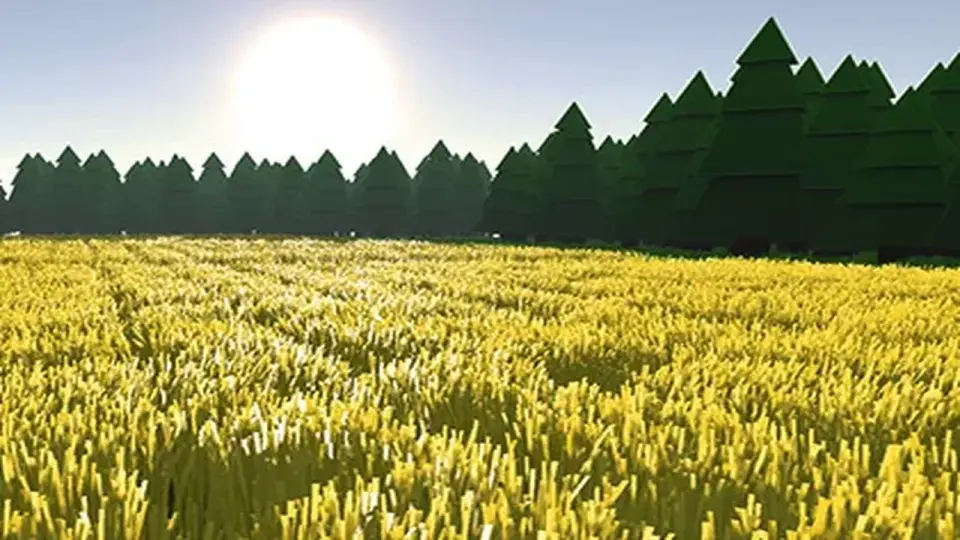
DirectX 11 Grass Shader is a Unity VFX shader package for adding dense grass fields without placing every blade by hand. It generates individual blades directly on the GPU, which makes it a practical fit for scenes that need a large amount of ground cover and still have room for other gameplay systems to run. The setup is aimed at real production use rather than a one-off visual trick: it supports Unity terrain as well as custom meshes, so the grass can follow standard landscape surfaces or be applied to authored geometry.
That makes it useful anywhere vegetation needs to read as part of the environment instead of a flat texture. Open fields, stylized biomes, fantasy ground cover, and unusual spaces like underwater scenes or alien landscapes are all covered by the assetâs stated flexibility. The shader is meant to scale from low-end to high-end hardware by shifting the work of blade generation to the GPU when DirectX 11 is available, while still keeping a fallback path for systems that cannot use it.
Placement tools and scene control
The package includes a grass painter, which gives direct control over where grass appears. That matters in production because vegetation placement is rarely uniform: walkable routes, gameplay landmarks, and focal areas often need clear treatment, while other patches need denser coverage. With painting tools and texture atlas creation tools included, the shader supports a workflow where the artist can shape the distribution of grass instead of relying on a fully automatic pass.
Texture atlases are part of that workflow as well. They give another layer of control for grass presentation, helping the creator build variations and organize the look of the vegetation. The package also includes tools for creating those atlases, so the process is not limited to applying a preset result. Combined with the detailed text documentation and video tutorials, the setup is built to help the user move from installation to a working result without having to guess how the pieces fit together.
Several other controls are called out as part of the long-term feature set: lighting modes, wind zones, moving platforms, and an advanced interaction system. Those are the kinds of elements that matter when grass is part of an active scene rather than a static backdrop. Wind zones give the vegetation motion, moving platforms keep grass usable in scenes with animated surfaces, and the interaction system allows the grass to react dynamically to characters, vehicles, or other game events.
Rendering paths and fallback behavior
The shader has native support for Windows with DirectX 11, PlayStation 4, and Xbox One. It also supports the Built-in render pipeline and the Universal render pipeline. For other platforms, the package relies on a CPU fallback system, which keeps the asset usable even when DirectX 11 is not an option.
That fallback path is important because it changes how the shader can be used across projects. A scene can be built with the DirectX 11 path in mind and still retain a supported route for hardware or platforms that cannot take the same rendering approach. The latest release notes also mention support for grass fallback in URP, with the note that it is still somewhat experimental and may contain bugs. Another update fixes additional lights not working in URP Forward+, with the reminder that those lights only render correctly when grass is in âRandomize grass directionâ mode.
The package also notes support for Curved World among third-party assets, while most other assets are expected to work without explicit support. That keeps the shader in a fairly practical position inside a larger project stack, especially when a scene is already using other Unity tools and systems.
Where it fits in production
This shader fits best in workflows where ground coverage needs to be fast to place, visually adjustable, and responsive to gameplay. It is not just a vegetation look; it is a system for building grass behavior around terrain, custom meshes, lighting, wind, and interaction. The combination of GPU-generated blades, CPU fallback, and multiple render pipeline options makes it suitable for teams that need one vegetation solution to cover more than one rendering path.
The feature set also points to ongoing maintenance rather than a fixed one-time tool. Detailed text documentation, video tutorials, and release updates are part of that picture, and the current notes show active attention to URP behavior and lighting details. For projects that need grass to sit inside the rest of the scene logic, rather than outside it as decoration, DirectX 11 Grass Shader is structured around that kind of day-to-day use.
In practical terms, it gives a Unity project a grass system that can be painted, tuned, and carried across supported rendering paths without changing the visual language of the scene every time the hardware changes.
 DirectX 11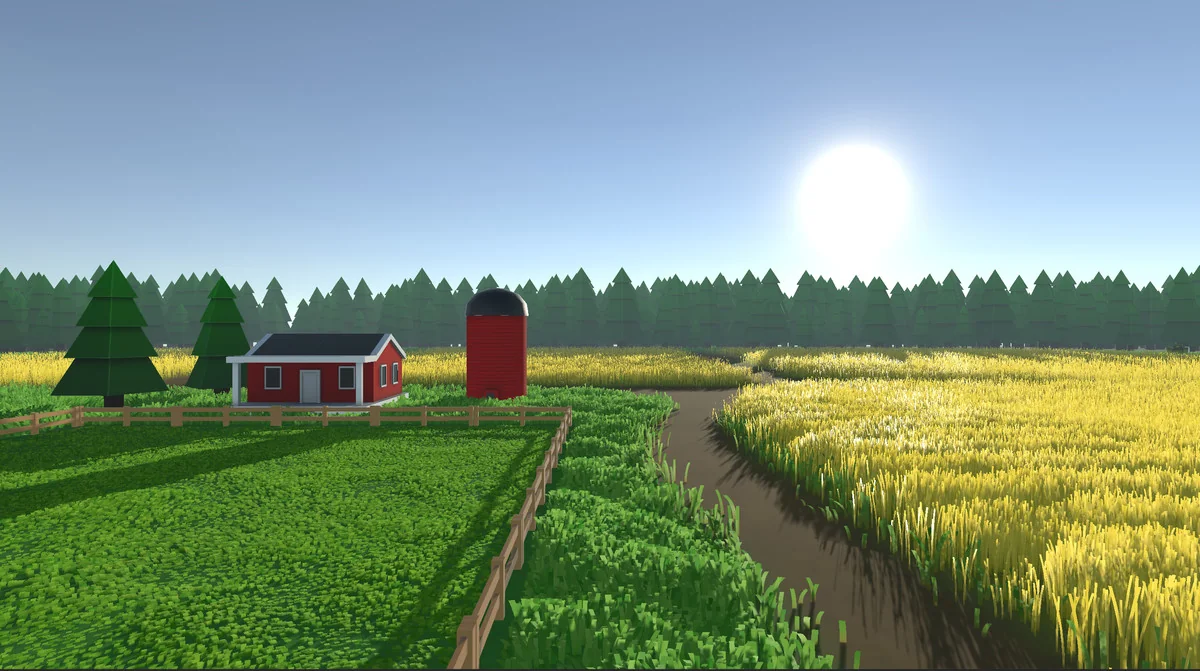
 Particles
 Shaders
 Shaders