"7e6fc58c410f2894"{"id":"23578","slug":"mesh-to-terrain","title":"Mesh to Terrain","category":"Terrain","engine":"Original Unity version: 2019.4.31","assetVersion":"Original Unity version: 2019.4.31","engineVersion":"Asset Version:2.5.1","tag":"Terrain","accent":"cyan","visual":"luts","summary":"Mesh to Terrain converts 3D terrain models from 3ds Max, Terragen, or another editor into Unity Terrains. It also turns model textures into Terrain Layers, can split a model into several terrains, and keeps multiple terrains aligned in the same place as the...","platform":"Unity","publishedAt":"2026-04-10T16:34:32.000Z","updatedAt":"2026-04-19T15:35:20.000Z","sourceNotes":[],"fileContents":[],"compatibility":["Unity","Original Unity version: 2019.4.31","Asset Version: 2.5.1"],"featuredImage":{"alt":"Mesh to Terrain","src":"https://3dcghub.com/wp-content/uploads/2026/04/bc90766b2593_68e59b15-cd92-425b-982c-331bfdac8ec8_1280x720_stretch.webp"},"hasDownloadLink":true,"downloads":0,"terms":[{"taxonomy":"category","slug":"terrain-tools-unity-2","name":"Terrain"},{"taxonomy":"post_tag","slug":"environment","name":"Environment"},{"taxonomy":"post_tag","slug":"tools","name":"Tools"},{"taxonomy":"post_tag","slug":"unity","name":"Unity"}],"galleryImages":[],"accessPanel":{"kind":"resource","title":"Access this resource","eyebrow":"Free Download","message":"Log in or create a free account to start your download.","fileName":"Mesh to Terrain v2.5.1 (11 Nov 2024).7z","safetyNote":"All resources are 100% manually reviewed to eliminate all risks.","actionLabel":"Download Free","resourceType":"Resource archive"},"contentHtml":"\u003ch2\u003eA mesh-to-terrain tool for Unity projects\u003c/h2\u003e\u003cp\u003eMesh to Terrain is a Unity tool focused on one very specific task: taking a 3D terrain model and turning it into Unity Terrains. It works with meshes created in 3ds Max, Terragen, or any other editor, so the starting point is not limited to one modeling package. That makes it useful when terrain work begins outside Unity and needs to be brought into a scene without rebuilding everything by hand.\u003c/p\u003e\u003cp\u003eThe package also covers more than a simple conversion pass. It can convert textures to Terrain Layers, generate terrain from several models, and split one model into several terrains. Those capabilities place it in the middle of a terrain production workflow rather than at the very end. Instead of treating the terrain as a finished import, it gives room for shaping, dividing, and organizing terrain data as it moves into Unity.\u003c/p\u003e\u003ch2\u003eWhat the conversion process handles\u003c/h2\u003e\u003cp\u003eThe central behavior is straightforward: a mesh-based terrain is converted into Unity terrain objects. The tool is set up to work with an unlimited number of models and terrains, so the conversion stage is not framed as a small one-off task. It is meant to handle terrain assets at a scale that can include multiple pieces of terrain data.\u003c/p\u003e\u003cp\u003eOne detail that stands out is placement. Terrains are created in the same place where the meshes already exist, which helps preserve the layout of the original model during conversion. That matters when a terrain model already fits into a scene or has been positioned carefully during authoring. The converted terrain stays aligned with that existing placement instead of starting from a separate location.\u003c/p\u003e\u003cp\u003eTexture conversion is part of the same flow. Mesh textures can be converted to terrain textures, and the package can also convert textures to Terrain Layers. That gives the terrain a clearer path from model-based material data into Unityâs terrain system, without leaving the process entirely manual.\u003c/p\u003e\u003ch2\u003eWorking across several models and several terrains\u003c/h2\u003e\u003cp\u003eMesh to Terrain is not limited to a single object. It can generate terrain from several models and also split one model into several terrains. That makes it relevant for larger terrain setups where a single mesh is too broad to stay in one piece, or where a scene is easier to manage when a terrain is divided into sections.\u003c/p\u003e\u003cp\u003eWhen multiple terrains are involved, the package is set up to produce a seamless result. That is especially important in workflows where a large surface has to be broken into parts while still reading as one continuous environment. The terrain pieces remain part of the same conversion process rather than becoming isolated segments that need to be reconciled later.\u003c/p\u003e\u003cp\u003eThere is also support for holes. If a terrain needs openings in specific places, that behavior is built into the package rather than added as an afterthought. In production terms, that can matter for paths, entrances, or terrain shapes that cannot remain fully filled in across the whole surface.\u003c/p\u003e\u003ch2\u003eHow it fits into scene setup and terrain cleanup\u003c/h2\u003e\u003cp\u003eThe package includes two ways to bring models into the conversion process: models can be added manually, or the tool can automatically detect all models in the layer. That gives some flexibility depending on how the scene is organized. In a controlled setup, manual selection keeps the process specific. In a broader scene, automatic detection reduces the need to track every object one by one.\u003c/p\u003e\u003cp\u003eAnother practical detail is that there is no need to manually add physics components. That keeps the workflow focused on terrain conversion rather than forcing extra cleanup steps before the terrain can be used. For projects where terrain data is coming in from external modeling tools, removing even a small amount of repetitive setup can make the handoff simpler.\u003c/p\u003e\u003cp\u003eThe package also includes a built-in update system. Alongside that, it offers optional integration with Huge Texture and Relief Terrain Pack. Those integrations place it in a wider Unity terrain toolset, but the core purpose remains the same: getting mesh-based terrain into Unity and keeping the conversion process workable across different scene sizes.\u003c/p\u003e\u003ch3\u003eFeature set in practical terms\u003c/h3\u003e\u003cul\u003e\u003cli\u003eUnlimited number of models and terrains to convert\u003c/li\u003e\u003cli\u003eTerrains created in the same place as the meshes\u003c/li\u003e\u003cli\u003eTexture conversion to Terrain Layers\u003c/li\u003e\u003cli\u003eSeamless results when working with multiple terrains\u003c/li\u003e\u003cli\u003eHole generation\u003c/li\u003e\u003cli\u003eManual model addition or automatic layer detection\u003c/li\u003e\u003cli\u003eNo manual physics component setup\u003c/li\u003e\u003cli\u003eOptional integration with Huge Texture and Relief Terrain Pack\u003c/li\u003e\u003cli\u003eBuilt-in update system\u003c/li\u003e\u003c/ul\u003e\u003ch2\u003eVersion note and project fit\u003c/h2\u003e\u003cp\u003eThe package is listed with version 2.5.4, and the latest release date is Jan 26. Those details place it as an actively maintained Unity terrain tool rather than a static import utility. For teams that already build terrain models in external editors, it fits into the step where those meshes need to become Unity terrains with textures and structure intact.\u003c/p\u003e\u003cp\u003eIt is especially relevant when the work starts as a 3D terrain model and needs to be carried into Unity without losing the placement of the mesh, the texture setup, or the ability to divide the surface into multiple parts. In that role, Mesh to Terrain is set up to handle conversion, terrain layering, splitting, and holes in one workflow, which makes it a focused option for terrain-heavy production pipelines.\u003c/p\u003e\n\n\u003ch2\u003eRelated Resources Worth Checking\u003c/h2\u003e\n\u003cul\u003e\n\u003cli\u003e\u003ca href=\"https://3dcghub.com/toolkit-for-unity-physics-2026/\" title=\"Toolkit for Unity Physics 2026\"\u003eToolkit for Unity Physics 2026\u003c/a\u003e\u003c/li\u003e\n\u003cli\u003e\u003ca href=\"https://3dcghub.com/opencv-for-unity/\" title=\"OpenCV for Unity\"\u003eOpenCV for Unity\u003c/a\u003e\u003c/li\u003e\n\u003cli\u003e\u003ca href=\"https://3dcghub.com/exporter-for-unreal-to-for-unity-2026/\" title=\"Exporter for Unreal to/for Unity 2026\"\u003eExporter for Unreal to/for Unity 2026\u003c/a\u003e\u003c/li\u003e\n\u003cli\u003e\u003ca href=\"https://3dcghub.com/dialogue-system-for-unity/\" title=\"Dialogue System for Unity\"\u003eDialogue System for Unity\u003c/a\u003e\u003c/li\u003e\n\u003cli\u003e\u003ca href=\"https://3dcghub.com/ambient-sounds-interactive-soundscapes-for-unity-6/\" title=\"Ambient Sounds – Interactive Soundscapes for Unity 6\"\u003eAmbient Sounds – Interactive Soundscapes for Unity 6\u003c/a\u003e\u003c/li\u003e\n\u003c/ul\u003e","contentTextLength":5587,"navigation":{"current":3547,"total":3618,"previous":{"id":"23581","slug":"microverse-core-collection","title":"MicroVerse - Core Collection","category":"Terrain","platform":"Unity","updatedAt":"2026-04-19T15:35:20.000Z"},"next":{"id":"23593","slug":"real-world-terrain","title":"Real World Terrain","category":"Terrain","platform":"Unity","updatedAt":"2026-04-19T15:35:19.000Z"}},"relatedResources":[{"id":"23581","slug":"microverse-core-collection","title":"MicroVerse - Core Collection","category":"Terrain","engine":"Original Unity version: 2021.3.29","assetVersion":"Original Unity version: 2021.3.29","engineVersion":"Asset Version:1.7.24","tag":"Terrain","accent":"cyan","visual":"city","summary":"MicroVerse - Core Collection brings together the main MicroVerse modules for live Unity environment creation. It keeps terrain, texture, vegetation, and path work editable in real time, with no baking or preview steps. The collection also includes a demo sc...","platform":"Unity","publishedAt":"2026-04-10T16:45:11.000Z","updatedAt":"2026-04-19T15:35:20.000Z","sourceNotes":[],"fileContents":[],"compatibility":["Unity","Original Unity version: 2021.3.29","Asset Version: 1.7.24"],"featuredImage":{"alt":"MicroVerse - Core Collection","src":"https://3dcghub.com/wp-content/uploads/2026/04/7f6db6711031_2e3ba79d-f340-40b3-87ac-547ab33afbc6_1280x720_stretch.webp"},"hasDownloadLink":true,"downloads":5},{"id":"23616","slug":"world-streamer-2","title":"World Streamer 2","category":"Terrain","engine":"Original Unity version: 2019.4.0","assetVersion":"Original Unity version: 2019.4.0","engineVersion":"Asset Version:1.7.5","tag":"Terrain","accent":"cyan","visual":"audio","summary":"World Streamer 2 focuses on loading and optimization rather than a fixed scene layout. It streams a game from disc, changes distant terrain into low-poly meshes, and keeps player movement going without loading screens.","platform":"Unity","publishedAt":"2026-04-10T16:55:17.000Z","updatedAt":"2026-04-19T15:35:18.000Z","sourceNotes":[],"fileContents":[],"compatibility":["Unity","Original Unity version: 2019.4.0","Asset Version: 1.7.5"],"featuredImage":{"alt":"World Streamer 2","src":"https://3dcghub.com/wp-content/uploads/2026/04/60555d3cabd6_ca56339c-47e8-4f67-a69e-899a6dabae93_1280x720_stretch.webp"},"hasDownloadLink":true,"downloads":0},{"id":"23604","slug":"voxelica-voxel-engine","title":"Voxelica - Voxel Engine","category":"Terrain","engine":"Original Unity version: 2022.3.62","assetVersion":"Original Unity version: 2022.3.62","engineVersion":"Asset Version:1.9.9.1","tag":"Terrain","accent":"cyan","visual":"mech","summary":"Voxelica - Voxel Engine brings voxel blocks into a scene as something you can generate, sculpt, convert, and save. It also covers multi-material voxel data, resolution control, and independent render pipeline behavior. The resource fits projects that need d...","platform":"Unity","publishedAt":"2026-04-10T16:45:27.000Z","updatedAt":"2026-04-19T15:35:18.000Z","sourceNotes":[],"fileContents":[],"compatibility":["Unity","Original Unity version: 2022.3.62","Asset Version: 1.9.9.1"],"featuredImage":{"alt":"Voxelica - Voxel Engine","src":"https://3dcghub.com/wp-content/uploads/2026/04/e761f89f671a_84422b46-caee-4e14-a4c2-9a8fd5c6ce88_1280x720_stretch.webp"},"hasDownloadLink":true,"downloads":1}]}
Terrain
Mesh to Terrain
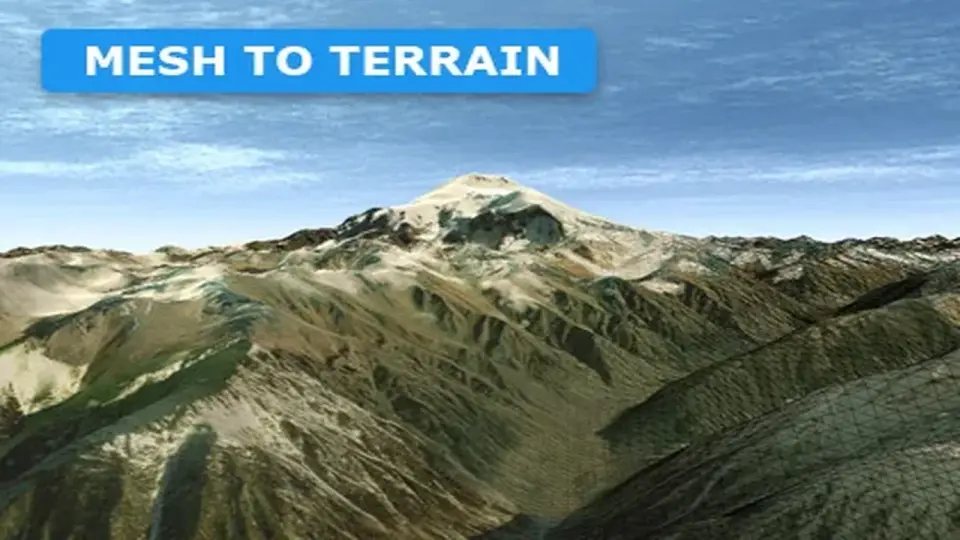
Mesh to Terrain converts 3D terrain models from 3ds Max, Terragen, or another editor into Unity Terrains. It also turns model textures into Terrain Layers, can split a model into several terrains, and keeps multiple terrains aligned in the same place as the...
Mesh to Terrain is a Unity tool focused on one very specific task: taking a 3D terrain model and turning it into Unity Terrains. It works with meshes created in 3ds Max, Terragen, or any other editor, so the starting point is not limited to one modeling package. That makes it useful when terrain work begins outside Unity and needs to be brought into a scene without rebuilding everything by hand.
The package also covers more than a simple conversion pass. It can convert textures to Terrain Layers, generate terrain from several models, and split one model into several terrains. Those capabilities place it in the middle of a terrain production workflow rather than at the very end. Instead of treating the terrain as a finished import, it gives room for shaping, dividing, and organizing terrain data as it moves into Unity.
What the conversion process handles
The central behavior is straightforward: a mesh-based terrain is converted into Unity terrain objects. The tool is set up to work with an unlimited number of models and terrains, so the conversion stage is not framed as a small one-off task. It is meant to handle terrain assets at a scale that can include multiple pieces of terrain data.
One detail that stands out is placement. Terrains are created in the same place where the meshes already exist, which helps preserve the layout of the original model during conversion. That matters when a terrain model already fits into a scene or has been positioned carefully during authoring. The converted terrain stays aligned with that existing placement instead of starting from a separate location.
Texture conversion is part of the same flow. Mesh textures can be converted to terrain textures, and the package can also convert textures to Terrain Layers. That gives the terrain a clearer path from model-based material data into Unityâs terrain system, without leaving the process entirely manual.
Working across several models and several terrains
Mesh to Terrain is not limited to a single object. It can generate terrain from several models and also split one model into several terrains. That makes it relevant for larger terrain setups where a single mesh is too broad to stay in one piece, or where a scene is easier to manage when a terrain is divided into sections.
When multiple terrains are involved, the package is set up to produce a seamless result. That is especially important in workflows where a large surface has to be broken into parts while still reading as one continuous environment. The terrain pieces remain part of the same conversion process rather than becoming isolated segments that need to be reconciled later.
There is also support for holes. If a terrain needs openings in specific places, that behavior is built into the package rather than added as an afterthought. In production terms, that can matter for paths, entrances, or terrain shapes that cannot remain fully filled in across the whole surface.
How it fits into scene setup and terrain cleanup
The package includes two ways to bring models into the conversion process: models can be added manually, or the tool can automatically detect all models in the layer. That gives some flexibility depending on how the scene is organized. In a controlled setup, manual selection keeps the process specific. In a broader scene, automatic detection reduces the need to track every object one by one.
Another practical detail is that there is no need to manually add physics components. That keeps the workflow focused on terrain conversion rather than forcing extra cleanup steps before the terrain can be used. For projects where terrain data is coming in from external modeling tools, removing even a small amount of repetitive setup can make the handoff simpler.
The package also includes a built-in update system. Alongside that, it offers optional integration with Huge Texture and Relief Terrain Pack. Those integrations place it in a wider Unity terrain toolset, but the core purpose remains the same: getting mesh-based terrain into Unity and keeping the conversion process workable across different scene sizes.
Feature set in practical terms
Unlimited number of models and terrains to convert
Terrains created in the same place as the meshes
Texture conversion to Terrain Layers
Seamless results when working with multiple terrains
Hole generation
Manual model addition or automatic layer detection
No manual physics component setup
Optional integration with Huge Texture and Relief Terrain Pack
Built-in update system
Version note and project fit
The package is listed with version 2.5.4, and the latest release date is Jan 26. Those details place it as an actively maintained Unity terrain tool rather than a static import utility. For teams that already build terrain models in external editors, it fits into the step where those meshes need to become Unity terrains with textures and structure intact.
It is especially relevant when the work starts as a 3D terrain model and needs to be carried into Unity without losing the placement of the mesh, the texture setup, or the ability to divide the surface into multiple parts. In that role, Mesh to Terrain is set up to handle conversion, terrain layering, splitting, and holes in one workflow, which makes it a focused option for terrain-heavy production pipelines.
 Terrain
 Terrain
 Terrain
 Terrain