"7e6fc58c410f2894"{"id":"23581","slug":"microverse-core-collection","title":"MicroVerse - Core Collection","category":"Terrain","engine":"Original Unity version: 2021.3.29","assetVersion":"Original Unity version: 2021.3.29","engineVersion":"Asset Version:1.7.24","tag":"Terrain","accent":"cyan","visual":"city","summary":"MicroVerse - Core Collection brings together the main MicroVerse modules for live Unity environment creation. It keeps terrain, texture, vegetation, and path work editable in real time, with no baking or preview steps. The collection also includes a demo sc...","platform":"Unity","publishedAt":"2026-04-10T16:45:11.000Z","updatedAt":"2026-04-19T15:35:20.000Z","sourceNotes":[],"fileContents":[],"compatibility":["Unity","Original Unity version: 2021.3.29","Asset Version: 1.7.24"],"featuredImage":{"alt":"MicroVerse - Core Collection","src":"https://3dcghub.com/wp-content/uploads/2026/04/7f6db6711031_2e3ba79d-f340-40b3-87ac-547ab33afbc6_1280x720_stretch.webp"},"hasDownloadLink":true,"downloads":5,"terms":[{"taxonomy":"category","slug":"terrain-tools-unity-2","name":"Terrain"},{"taxonomy":"post_tag","slug":"environment","name":"Environment"},{"taxonomy":"post_tag","slug":"textures","name":"Textures"},{"taxonomy":"post_tag","slug":"unity","name":"Unity"}],"galleryImages":[],"accessPanel":{"kind":"resource","title":"Access this resource","eyebrow":"Free Download","message":"Log in or create a free account to start your download.","fileName":"MicroVerse - Core Collection v1.7.24.7z","safetyNote":"All resources are 100% manually reviewed to eliminate all risks.","actionLabel":"Download Free","resourceType":"Resource archive"},"contentHtml":"\u003ch2\u003eWhen a terrain needs to stay editable\u003c/h2\u003e\u003cp\u003eUnity scenes that are still changing tend to need the same things again and again: terrain shaping, texture passes, vegetation placement, and paths that cut through the landscape. MicroVerse - Core Collection fits that kind of work because it keeps the scene live while those pieces are being built. There is no baking step, no waiting around for updates, and no preview window separating the work from the result. Everything stays visible and editable in real time.\u003c/p\u003e\u003cp\u003eThat makes the package relevant for outdoor environments where mountains, forests, grasslands, and path networks are being assembled piece by piece. The focus is not on locking a scene down early. It is on letting the terrain keep changing without interrupting the workflow.\u003c/p\u003e\u003ch2\u003eWhat the Core Collection brings together\u003c/h2\u003e\u003cp\u003eThe Core Collection gathers the main MicroVerse module along with MicroVerse-Ambiance, MicroVerse-Objects, MicroVerse-Splines, and MicroVerse-Vegetation. A demo is included as well, showing those assets used together. Rather than acting like a single isolated tool, it forms a small group of connected modules around the same live environment workflow.\u003c/p\u003e\u003cp\u003eMicroVerse itself is the central piece. It is a non-destructive, real-time environment creation system for Unity, built so updates happen immediately and changes remain open for revision. That structure is what gives the collection its practical value in an active scene-building process.\u003c/p\u003e\u003ch2\u003eHow the stamp system shapes the scene\u003c/h2\u003e\u003cp\u003eMicroVerse uses a stamp-based approach. In this system, everything is a stamp, and each stamp can affect the terrain in a different way. A stamp can modify terrain heights, procedurally texture the terrain, add trees, add grass, place prefabs in an area, or even add music and sound to a scene.\u003c/p\u003e\u003cp\u003eAreas can be defined in several ways: through shapes, textures, splines, or by painting directly in the scene. That gives a flexible way to control where each effect applies and how it influences the final result. Because every operation is real time and non-destructive, the scene can be adjusted at any point without having to rebuild the whole workflow from scratch.\u003c/p\u003e\u003cp\u003eMicroVerse also supports Copy/Paste stamp workflows, so captured areas of existing terrain can be moved around without damaging the original setup. There is also a \"Create from existing scene\" workflow, which captures existing terrain into stamps and lets the work continue non-destructively from there.\u003c/p\u003e\u003cp\u003eSince the scene is reconstructed from the beginning on every edit, changing the terrain resolution does not require a separate cleanup pass. The system simply reconstructs the terrain with the updated settings.\u003c/p\u003e\u003ch2\u003eMultiple tiles, biome transitions, and repeatable layouts\u003c/h2\u003e\u003cp\u003eThe package is written to work with multiple terrain tiles, which matters when a scene covers a larger area than one terrain piece. It is also intrinsically biome capable through its area falloff system, allowing terrain changes to blend across space rather than stopping at a hard edge.\u003c/p\u003e\u003cp\u003eThat structure supports scenes where different landscape types need to sit next to each other: textured mountains, forests, grasslands, and paths moving through them. Because the system updates live, the results can be pushed further or pulled back without losing the underlying setup.\u003c/p\u003e\u003cp\u003eStamps can also be grouped into prefabs and reused on new areas. Those prefab collections can be added to the Content Browser for quick access, which makes it easier to reuse the same stamped environment patterns across a project.\u003c/p\u003e\u003cp\u003eWith the MicroVerse Content Browser, fully textured and populated biomes can be created with a single drag and drop. Presets are available for these assets:\u003c/p\u003e\u003cul\u003e\u003cli\u003eCastle Valley Collection\u003c/li\u003e\u003cli\u003eCrest Ocean System\u003c/li\u003e\u003cli\u003eDreamScape Nature - Meadows\u003c/li\u003e\u003cli\u003eDreamScape Nature - Mountains\u003c/li\u003e\u003cli\u003eLandscape Ground Pack 2\u003c/li\u003e\u003cli\u003eMeadow Environment - Dynamic Nature\u003c/li\u003e\u003cli\u003eMountain Trees - Dynamic Nature\u003c/li\u003e\u003cli\u003eStampIt - Collection, plus all individual StampIt packs\u003c/li\u003e\u003cli\u003eSynty - Meadow Forest\u003c/li\u003e\u003cli\u003eTropical Forest Pack\u003c/li\u003e\u003c/ul\u003e\u003ch2\u003eWhere it fits in production\u003c/h2\u003e\u003cp\u003eMicroVerse - Core Collection sits well in a Unity workflow where terrain, vegetation, and layout still need room to change. It is especially practical for scenes that rely on terrain tiles, biome transitions, spline-defined areas, and repeatable stamp setups that need to be moved or reused without losing flexibility.\u003c/p\u003e\u003cp\u003eThe demo, the stamp-based editing model, the multi-tile support, and the Content Browser all point to the same kind of workflow: building environments while keeping them live. For projects that need that kind of ongoing control, the collection offers a direct way to keep the scene editable right through production.\u003c/p\u003e\n\n\u003ch2\u003eContinue Browsing Similar Packs\u003c/h2\u003e\n\u003cul\u003e\n\u003cli\u003e\u003ca href=\"https://3dcghub.com/toolkit-for-unity-physics-2026/\" title=\"Toolkit for Unity Physics 2026\"\u003eToolkit for Unity Physics 2026\u003c/a\u003e\u003c/li\u003e\n\u003cli\u003e\u003ca href=\"https://3dcghub.com/opencv-for-unity/\" title=\"OpenCV for Unity\"\u003eOpenCV for Unity\u003c/a\u003e\u003c/li\u003e\n\u003cli\u003e\u003ca href=\"https://3dcghub.com/exporter-for-unreal-to-for-unity-2026/\" title=\"Exporter for Unreal to/for Unity 2026\"\u003eExporter for Unreal to/for Unity 2026\u003c/a\u003e\u003c/li\u003e\n\u003cli\u003e\u003ca href=\"https://3dcghub.com/dialogue-system-for-unity/\" title=\"Dialogue System for Unity\"\u003eDialogue System for Unity\u003c/a\u003e\u003c/li\u003e\n\u003cli\u003e\u003ca href=\"https://3dcghub.com/ambient-sounds-interactive-soundscapes-for-unity-6/\" title=\"Ambient Sounds – Interactive Soundscapes for Unity 6\"\u003eAmbient Sounds – Interactive Soundscapes for Unity 6\u003c/a\u003e\u003c/li\u003e\n\u003c/ul\u003e","contentTextLength":4873,"navigation":{"current":3546,"total":3618,"previous":{"id":"23562","slug":"digger-pro-voxel-terrain-sculpting","title":"Digger PRO – Voxel Terrain Sculpting","category":"Terrain","platform":"Unity","updatedAt":"2026-04-19T15:35:21.000Z"},"next":{"id":"23578","slug":"mesh-to-terrain","title":"Mesh to Terrain","category":"Terrain","platform":"Unity","updatedAt":"2026-04-19T15:35:20.000Z"}},"relatedResources":[{"id":"18508","slug":"omni-animation-core-locomotion-pack","title":"Omni Animation - Core Locomotion Pack","category":"Animations","engine":"Original Unity version: 2021.3.0","assetVersion":"Original Unity version: 2021.3.0","engineVersion":"Asset Version:1.0.1","tag":"Animations","accent":"cyan","visual":"animation","summary":"Enhance your project's character movement with the Omni Animation - Core Locomotion Pack. This collection features 74 professional motion-capture animations cleaned for immediate production use.","platform":"Unity","publishedAt":"2026-03-16T16:29:36.000Z","updatedAt":"2026-04-19T15:43:03.000Z","sourceNotes":[],"fileContents":[],"compatibility":["Unity","Original Unity version: 2021.3.0","Asset Version: 1.0.1"],"featuredImage":{"alt":"Omni Animation - Core Locomotion Pack","src":"https://3dcghub.com/wp-content/uploads/2026/03/1c6a01340d56_5a127970-33e8-4c11-9956-cde9aee784bb_1280x720_stretch.webp"},"hasDownloadLink":true,"downloads":4},{"id":"23578","slug":"mesh-to-terrain","title":"Mesh to Terrain","category":"Terrain","engine":"Original Unity version: 2019.4.31","assetVersion":"Original Unity version: 2019.4.31","engineVersion":"Asset Version:2.5.1","tag":"Terrain","accent":"cyan","visual":"luts","summary":"Mesh to Terrain converts 3D terrain models from 3ds Max, Terragen, or another editor into Unity Terrains. It also turns model textures into Terrain Layers, can split a model into several terrains, and keeps multiple terrains aligned in the same place as the...","platform":"Unity","publishedAt":"2026-04-10T16:34:32.000Z","updatedAt":"2026-04-19T15:35:20.000Z","sourceNotes":[],"fileContents":[],"compatibility":["Unity","Original Unity version: 2019.4.31","Asset Version: 2.5.1"],"featuredImage":{"alt":"Mesh to Terrain","src":"https://3dcghub.com/wp-content/uploads/2026/04/bc90766b2593_68e59b15-cd92-425b-982c-331bfdac8ec8_1280x720_stretch.webp"},"hasDownloadLink":true,"downloads":0},{"id":"23604","slug":"voxelica-voxel-engine","title":"Voxelica - Voxel Engine","category":"Terrain","engine":"Original Unity version: 2022.3.62","assetVersion":"Original Unity version: 2022.3.62","engineVersion":"Asset Version:1.9.9.1","tag":"Terrain","accent":"cyan","visual":"mech","summary":"Voxelica - Voxel Engine brings voxel blocks into a scene as something you can generate, sculpt, convert, and save. It also covers multi-material voxel data, resolution control, and independent render pipeline behavior. The resource fits projects that need d...","platform":"Unity","publishedAt":"2026-04-10T16:45:27.000Z","updatedAt":"2026-04-19T15:35:18.000Z","sourceNotes":[],"fileContents":[],"compatibility":["Unity","Original Unity version: 2022.3.62","Asset Version: 1.9.9.1"],"featuredImage":{"alt":"Voxelica - Voxel Engine","src":"https://3dcghub.com/wp-content/uploads/2026/04/e761f89f671a_84422b46-caee-4e14-a4c2-9a8fd5c6ce88_1280x720_stretch.webp"},"hasDownloadLink":true,"downloads":1}]}
Terrain
MicroVerse - Core Collection
MicroVerse - Core Collection brings together the main MicroVerse modules for live Unity environment creation. It keeps terrain, texture, vegetation, and path work editable in real time, with no baking or preview steps. The collection also includes a demo sc...
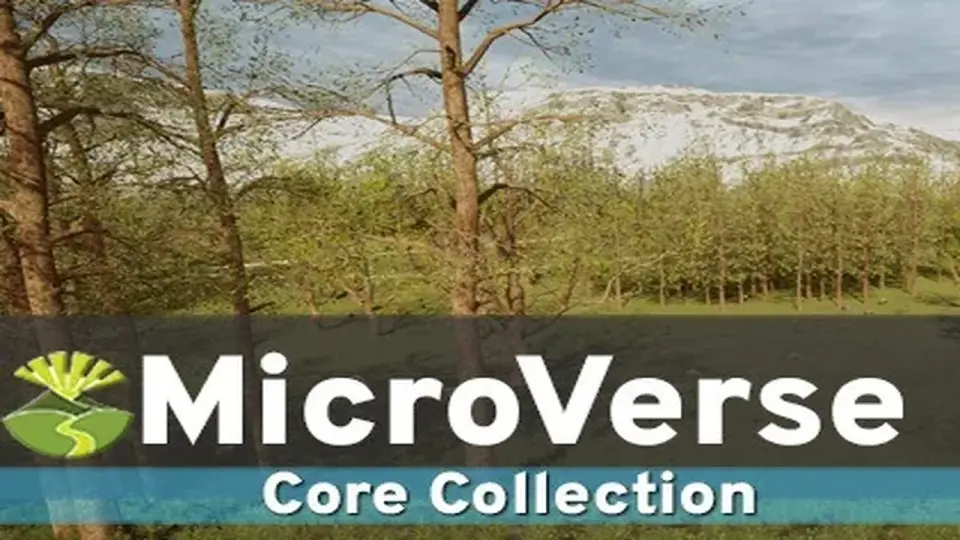
Unity scenes that are still changing tend to need the same things again and again: terrain shaping, texture passes, vegetation placement, and paths that cut through the landscape. MicroVerse - Core Collection fits that kind of work because it keeps the scene live while those pieces are being built. There is no baking step, no waiting around for updates, and no preview window separating the work from the result. Everything stays visible and editable in real time.
That makes the package relevant for outdoor environments where mountains, forests, grasslands, and path networks are being assembled piece by piece. The focus is not on locking a scene down early. It is on letting the terrain keep changing without interrupting the workflow.
What the Core Collection brings together
The Core Collection gathers the main MicroVerse module along with MicroVerse-Ambiance, MicroVerse-Objects, MicroVerse-Splines, and MicroVerse-Vegetation. A demo is included as well, showing those assets used together. Rather than acting like a single isolated tool, it forms a small group of connected modules around the same live environment workflow.
MicroVerse itself is the central piece. It is a non-destructive, real-time environment creation system for Unity, built so updates happen immediately and changes remain open for revision. That structure is what gives the collection its practical value in an active scene-building process.
How the stamp system shapes the scene
MicroVerse uses a stamp-based approach. In this system, everything is a stamp, and each stamp can affect the terrain in a different way. A stamp can modify terrain heights, procedurally texture the terrain, add trees, add grass, place prefabs in an area, or even add music and sound to a scene.
Areas can be defined in several ways: through shapes, textures, splines, or by painting directly in the scene. That gives a flexible way to control where each effect applies and how it influences the final result. Because every operation is real time and non-destructive, the scene can be adjusted at any point without having to rebuild the whole workflow from scratch.
MicroVerse also supports Copy/Paste stamp workflows, so captured areas of existing terrain can be moved around without damaging the original setup. There is also a "Create from existing scene" workflow, which captures existing terrain into stamps and lets the work continue non-destructively from there.
Since the scene is reconstructed from the beginning on every edit, changing the terrain resolution does not require a separate cleanup pass. The system simply reconstructs the terrain with the updated settings.
Multiple tiles, biome transitions, and repeatable layouts
The package is written to work with multiple terrain tiles, which matters when a scene covers a larger area than one terrain piece. It is also intrinsically biome capable through its area falloff system, allowing terrain changes to blend across space rather than stopping at a hard edge.
That structure supports scenes where different landscape types need to sit next to each other: textured mountains, forests, grasslands, and paths moving through them. Because the system updates live, the results can be pushed further or pulled back without losing the underlying setup.
Stamps can also be grouped into prefabs and reused on new areas. Those prefab collections can be added to the Content Browser for quick access, which makes it easier to reuse the same stamped environment patterns across a project.
With the MicroVerse Content Browser, fully textured and populated biomes can be created with a single drag and drop. Presets are available for these assets:
Castle Valley Collection
Crest Ocean System
DreamScape Nature - Meadows
DreamScape Nature - Mountains
Landscape Ground Pack 2
Meadow Environment - Dynamic Nature
Mountain Trees - Dynamic Nature
StampIt - Collection, plus all individual StampIt packs
Synty - Meadow Forest
Tropical Forest Pack
Where it fits in production
MicroVerse - Core Collection sits well in a Unity workflow where terrain, vegetation, and layout still need room to change. It is especially practical for scenes that rely on terrain tiles, biome transitions, spline-defined areas, and repeatable stamp setups that need to be moved or reused without losing flexibility.
The demo, the stamp-based editing model, the multi-tile support, and the Content Browser all point to the same kind of workflow: building environments while keeping them live. For projects that need that kind of ongoing control, the collection offers a direct way to keep the scene editable right through production.
 Terrain
 Animations
 Terrain
 Terrain