"7e6fc58c410f2894"{"id":"23604","slug":"voxelica-voxel-engine","title":"Voxelica - Voxel Engine","category":"Terrain","engine":"Original Unity version: 2022.3.62","assetVersion":"Original Unity version: 2022.3.62","engineVersion":"Asset Version:1.9.9.1","tag":"Terrain","accent":"cyan","visual":"mech","summary":"Voxelica - Voxel Engine brings voxel blocks into a scene as something you can generate, sculpt, convert, and save. It also covers multi-material voxel data, resolution control, and independent render pipeline behavior. The resource fits projects that need d...","platform":"Unity","publishedAt":"2026-04-10T16:45:27.000Z","updatedAt":"2026-04-19T15:35:18.000Z","sourceNotes":[],"fileContents":[],"compatibility":["Unity","Original Unity version: 2022.3.62","Asset Version: 1.9.9.1"],"featuredImage":{"alt":"Voxelica - Voxel Engine","src":"https://3dcghub.com/wp-content/uploads/2026/04/e761f89f671a_84422b46-caee-4e14-a4c2-9a8fd5c6ce88_1280x720_stretch.webp"},"hasDownloadLink":true,"downloads":1,"terms":[{"taxonomy":"category","slug":"terrain-tools-unity-2","name":"Terrain"},{"taxonomy":"post_tag","slug":"environment","name":"Environment"},{"taxonomy":"post_tag","slug":"materials","name":"Materials"},{"taxonomy":"post_tag","slug":"unity","name":"Unity"}],"galleryImages":[{"src":"https://3dcghub.com/wp-content/uploads/2026/04/508a9309c68d_a687b28e-3e98-4e51-85ab-4d33e26e733a_scaled.webp","alt":"Voxelica - Voxel Engine"},{"src":"https://3dcghub.com/wp-content/uploads/2026/04/f56b4bc7f9ae_91b25263-b15e-4920-a87c-8e84bcfdd13f_scaled.webp","alt":"Voxelica - Voxel Engine"},{"src":"https://3dcghub.com/wp-content/uploads/2026/04/64e1bf863a6e_72e53eb9-84b2-461f-adca-4fb39e1eb874_scaled.webp","alt":"Voxelica - Voxel Engine"},{"src":"https://3dcghub.com/wp-content/uploads/2026/04/a37fab6ad80b_bcc3d9dd-fbc9-4893-83ec-0fcc43fdbefd_scaled.webp","alt":"Voxelica - Voxel Engine"},{"src":"https://3dcghub.com/wp-content/uploads/2026/04/f2a4b78f228b_5187f884-0a31-49d5-a5f5-f88ddf3a870d_scaled.webp","alt":"Voxelica - Voxel Engine"},{"src":"https://3dcghub.com/wp-content/uploads/2026/04/b375f32353a2_ed07c5f6-58ed-41d7-b260-68f970657149_scaled.webp","alt":"Voxelica - Voxel Engine"},{"src":"https://3dcghub.com/wp-content/uploads/2026/04/f0bb7ef7895b_659fcee9-0a1f-4db8-a0a0-7f867704a704_scaled.webp","alt":"Voxelica - Voxel Engine"},{"src":"https://3dcghub.com/wp-content/uploads/2026/04/249af05acceb_0e0f381a-1b3e-4fe5-b059-fd84d00fb470_scaled.webp","alt":"Voxelica - Voxel Engine"}],"accessPanel":{"kind":"resource","title":"Access this resource","eyebrow":"Free Download","message":"Log in or create a free account to start your download.","fileName":"Voxelica - Voxel Engine v1.9.9.1 (13 Nov 2024).7z","safetyNote":"All resources are 100% manually reviewed to eliminate all risks.","actionLabel":"Download Free","resourceType":"Resource archive"},"contentHtml":"\u003ch2\u003eVoxel blocks that stay editable in the scene\u003c/h2\u003e\n\u003cp\u003eVoxelica - Voxel Engine gives a scene a voxel-based structure that can be shaped during editing or during gameplay. The workflow starts simply: voxel blocks can be generated by dragging prefabs into the scene. From there, those blocks can be sculpted, modified, and arranged into flexible structures that respond to the needs of the project.\u003c/p\u003e\n\u003cp\u003eThat makes the engine useful for destructible objects and environments, but it also reaches into volumetric data visualization. The same voxel behavior that supports gameplay destruction can also be used to represent data in a block-based form that is easy to inspect and reshape. Large terrains can be sculpted with the resolution-based sculpting system, and that happens both while editing and while the game is running.\u003c/p\u003e\n\u003cp\u003eThe practical appeal is direct: the asset treats voxels as something active in the scene rather than a static mesh replacement. Artists can shape form, and developers can use the same system for destruction, construction, or data display.\u003c/p\u003e \u003ch2\u003eConverting textures, meshes, and terrain into voxels\u003c/h2\u003e\n\u003cp\u003eA procedural voxel modifier is included for turning existing content into voxel representation. Texture slices, meshes, and terrains can all be transformed into voxels, which opens the door to workflows that begin with traditional assets and end with voxelized versions of the same forms.\u003c/p\u003e\n\u003cp\u003eThat conversion path matters for projects that want voxel behavior without starting from zero. A mesh can be brought into the voxel system, terrain can be reworked into a block structure, and texture slices can be used as part of the conversion process. The same setup also supports 3D reconstructions from scan image slices, making the engine relevant for detailed model creation from layered image data.\u003c/p\u003e\n\u003cp\u003eRather than locking the project into one creation method, the modifier keeps multiple inputs in play. That gives teams a way to move between standard geometry, terrain, and slice-based data while staying inside the voxel workflow.\u003c/p\u003e \u003ch2\u003eChoosing the right resolution for the task\u003c/h2\u003e\n\u003cp\u003eThe voxel resolution system is flexible enough to be matched to different targets. Low resolution can suit mobile use, medium resolution can fit games, and high resolution can be used for scientific applications such as CT scans. The point is not just technical granularity; it is the ability to choose a resolution that reflects how the voxel data will actually be used.\u003c/p\u003e\n\u003cp\u003eThat also connects back to sculpting. Since the engine supports resolution-based sculpting, larger terrains can be handled with more control during editing and gameplay. The voxel structure can stay coarse when speed matters or become more detailed when the application calls for closer inspection or finer form.\u003c/p\u003e\n\u003cp\u003eFor teams working across different kinds of projects, that flexibility keeps the engine from being limited to one visual style or one type of data. A mobile game, a terrain-driven scene, and a scan-based scientific visualization can all use the same voxel system with different resolution settings.\u003c/p\u003e \u003ch2\u003eVisual layers, materials, and saved voxel data\u003c/h2\u003e\n\u003cp\u003eThe visualization system is modular, and that shows up in the way hull generators can be attached to voxel generators. Multiple hull generators can be used to customize the appearance of voxel generators, giving the scene more than one visual layer to work with. The same setup can also be used to visualize data structures for stronger visual effects.\u003c/p\u003e\n\u003cp\u003eMulti-material support adds another layer of control. Multiple voxel maps can run in parallel, which creates a multi-material system and allows voxel data to expand dynamically. That is a useful setup when a project needs separate material behavior inside the same voxel framework instead of a single uniform surface.\u003c/p\u003e\n\u003cp\u003eSaving and loading are handled with the same focus on practical use. Voxel data can be saved directly in scene files or in scriptable objects through an integrated management system. During gameplay, voxels can also be stored in the persistent data path and loaded dynamically. That gives the engine a place in projects that need voxel state to persist between sessions or update while the game is running.\u003c/p\u003e \u003ch2\u003ePerformance, AR/VR use, and render pipeline notes\u003c/h2\u003e\n\u003cp\u003ePerformance can be boosted by adding the burst and collection package to the project, which connects the voxel system to the job and burst setup. That is the performance note that matters most for teams evaluating how the engine behaves under load.\u003c/p\u003e\n\u003cp\u003eThe engine is also positioned for AR and VR work. It was originally created for VR sculpting applications, and it is compatible on the target platform while operating independently. For AR, it works as a normal traditional game object that can be placed as augmentation inside an AR application. That makes the engine useful in both immersive sculpting workflows and augmented scenes.\u003c/p\u003e\n\u003cp\u003eRender pipeline behavior is equally straightforward. The voxel engine operates independently of the render pipeline. Experimental HDRP and URP content is included, but it is currently unsupported to keep the setup stable. That leaves the core voxel behavior separate from pipeline dependence, which is helpful when a project needs the voxel system to remain consistent across different rendering setups.\u003c/p\u003e\n\u003cp\u003eVoxelica is strongest when a project needs voxel blocks that can be generated, sculpted, converted from existing assets, layered with materials, saved, and deployed without tying the system to one rendering path. It gives artists and developers a concrete voxel workflow for destructible scenes, volumetric data, and VR or AR use.\u003c/p\u003e\n\n\u003ch2\u003eExplore Similar Assets\u003c/h2\u003e\n\u003cul\u003e\n\u003cli\u003e\u003ca href=\"https://3dcghub.com/toolkit-for-unity-physics-2026/\" title=\"Toolkit for Unity Physics 2026\"\u003eToolkit for Unity Physics 2026\u003c/a\u003e\u003c/li\u003e\n\u003cli\u003e\u003ca href=\"https://3dcghub.com/opencv-for-unity/\" title=\"OpenCV for Unity\"\u003eOpenCV for Unity\u003c/a\u003e\u003c/li\u003e\n\u003cli\u003e\u003ca href=\"https://3dcghub.com/exporter-for-unreal-to-for-unity-2026/\" title=\"Exporter for Unreal to/for Unity 2026\"\u003eExporter for Unreal to/for Unity 2026\u003c/a\u003e\u003c/li\u003e\n\u003cli\u003e\u003ca href=\"https://3dcghub.com/dialogue-system-for-unity/\" title=\"Dialogue System for Unity\"\u003eDialogue System for Unity\u003c/a\u003e\u003c/li\u003e\n\u003cli\u003e\u003ca href=\"https://3dcghub.com/ambient-sounds-interactive-soundscapes-for-unity-6/\" title=\"Ambient Sounds – Interactive Soundscapes for Unity 6\"\u003eAmbient Sounds – Interactive Soundscapes for Unity 6\u003c/a\u003e\u003c/li\u003e\n\u003c/ul\u003e","contentTextLength":5820,"navigation":{"current":3551,"total":3618,"previous":{"id":"23616","slug":"world-streamer-2","title":"World Streamer 2","category":"Terrain","platform":"Unity","updatedAt":"2026-04-19T15:35:18.000Z"},"next":{"id":"23658","slug":"component-names","title":"Component Names","category":"Utilities","platform":"Unity","updatedAt":"2026-04-19T15:35:17.000Z"}},"relatedResources":[{"id":"23327","slug":"lumina-gi-hdrp-real-time-voxel-global-illumination","title":"LUMINA GI HDRP: Real-Time Voxel Global Illumination","category":"Particles \u0026 Effects","engine":"Original Unity version: 2021.3.6","assetVersion":"Original Unity version: 2021.3.6","engineVersion":"Asset Version:2.1.1","tag":"Particles","accent":"cyan","visual":"audio","summary":"LUMINA GI HDRP brings voxel-based real-time global illumination into HDRP with a setup path that stays focused on scene lighting rather than screen-space tricks. It uses sun and mesh-shaped light sources, stays locally stable in motion, and comes with clear...","platform":"Unity","publishedAt":"2026-04-09T16:40:38.000Z","updatedAt":"2026-04-19T15:35:30.000Z","sourceNotes":[],"fileContents":[],"compatibility":["Unity","Original Unity version: 2021.3.6","Asset Version: 2.1.1"],"featuredImage":{"alt":"LUMINA GI HDRP: Real-Time Voxel Global Illumination","src":"https://3dcghub.com/wp-content/uploads/2026/04/725a6c6d7435_0d760a2d-5e05-472e-afd5-65cb3658c235_1280x720_stretch.webp"},"hasDownloadLink":true,"downloads":1},{"id":"23551","slug":"digger-terrain-caves-and-overhangs","title":"Digger – Terrain Caves and Overhangs","category":"Terrain","engine":"Original Unity version: 6000.0.71","assetVersion":"Original Unity version: 6000.0.71","engineVersion":"Asset Version:6.4","tag":"Terrain","accent":"cyan","visual":"character","summary":"Digger adds voxel-like sculpting to the Unity editor so caves, tunnels, and overhangs can be shaped directly on standard terrains. It keeps Unityâs terrain system in place while generating the extra geometry only where it is needed.","platform":"Unity","publishedAt":"2026-04-10T16:29:32.000Z","updatedAt":"2026-04-19T15:35:22.000Z","sourceNotes":[],"fileContents":[],"compatibility":["Unity","Original Unity version: 6000.0.71","Asset Version: 6.4"],"featuredImage":{"alt":"Digger – Terrain Caves and Overhangs","src":"https://3dcghub.com/wp-content/uploads/2026/04/5059503fac34_547d5c66-f33e-4bf7-ae7a-d4bfef630e78_1280x720_stretch.webp"},"hasDownloadLink":true,"downloads":0},{"id":"23578","slug":"mesh-to-terrain","title":"Mesh to Terrain","category":"Terrain","engine":"Original Unity version: 2019.4.31","assetVersion":"Original Unity version: 2019.4.31","engineVersion":"Asset Version:2.5.1","tag":"Terrain","accent":"cyan","visual":"luts","summary":"Mesh to Terrain converts 3D terrain models from 3ds Max, Terragen, or another editor into Unity Terrains. It also turns model textures into Terrain Layers, can split a model into several terrains, and keeps multiple terrains aligned in the same place as the...","platform":"Unity","publishedAt":"2026-04-10T16:34:32.000Z","updatedAt":"2026-04-19T15:35:20.000Z","sourceNotes":[],"fileContents":[],"compatibility":["Unity","Original Unity version: 2019.4.31","Asset Version: 2.5.1"],"featuredImage":{"alt":"Mesh to Terrain","src":"https://3dcghub.com/wp-content/uploads/2026/04/bc90766b2593_68e59b15-cd92-425b-982c-331bfdac8ec8_1280x720_stretch.webp"},"hasDownloadLink":true,"downloads":0}]}
Terrain
Voxelica - Voxel Engine
Voxelica - Voxel Engine brings voxel blocks into a scene as something you can generate, sculpt, convert, and save. It also covers multi-material voxel data, resolution control, and independent render pipeline behavior. The resource fits projects that need d...
Voxelica - Voxel Engine gives a scene a voxel-based structure that can be shaped during editing or during gameplay. The workflow starts simply: voxel blocks can be generated by dragging prefabs into the scene. From there, those blocks can be sculpted, modified, and arranged into flexible structures that respond to the needs of the project.
That makes the engine useful for destructible objects and environments, but it also reaches into volumetric data visualization. The same voxel behavior that supports gameplay destruction can also be used to represent data in a block-based form that is easy to inspect and reshape. Large terrains can be sculpted with the resolution-based sculpting system, and that happens both while editing and while the game is running.
The practical appeal is direct: the asset treats voxels as something active in the scene rather than a static mesh replacement. Artists can shape form, and developers can use the same system for destruction, construction, or data display.
Converting textures, meshes, and terrain into voxels
A procedural voxel modifier is included for turning existing content into voxel representation. Texture slices, meshes, and terrains can all be transformed into voxels, which opens the door to workflows that begin with traditional assets and end with voxelized versions of the same forms.
That conversion path matters for projects that want voxel behavior without starting from zero. A mesh can be brought into the voxel system, terrain can be reworked into a block structure, and texture slices can be used as part of the conversion process. The same setup also supports 3D reconstructions from scan image slices, making the engine relevant for detailed model creation from layered image data.
Rather than locking the project into one creation method, the modifier keeps multiple inputs in play. That gives teams a way to move between standard geometry, terrain, and slice-based data while staying inside the voxel workflow.
Choosing the right resolution for the task
The voxel resolution system is flexible enough to be matched to different targets. Low resolution can suit mobile use, medium resolution can fit games, and high resolution can be used for scientific applications such as CT scans. The point is not just technical granularity; it is the ability to choose a resolution that reflects how the voxel data will actually be used.
That also connects back to sculpting. Since the engine supports resolution-based sculpting, larger terrains can be handled with more control during editing and gameplay. The voxel structure can stay coarse when speed matters or become more detailed when the application calls for closer inspection or finer form.
For teams working across different kinds of projects, that flexibility keeps the engine from being limited to one visual style or one type of data. A mobile game, a terrain-driven scene, and a scan-based scientific visualization can all use the same voxel system with different resolution settings.
Visual layers, materials, and saved voxel data
The visualization system is modular, and that shows up in the way hull generators can be attached to voxel generators. Multiple hull generators can be used to customize the appearance of voxel generators, giving the scene more than one visual layer to work with. The same setup can also be used to visualize data structures for stronger visual effects.
Multi-material support adds another layer of control. Multiple voxel maps can run in parallel, which creates a multi-material system and allows voxel data to expand dynamically. That is a useful setup when a project needs separate material behavior inside the same voxel framework instead of a single uniform surface.
Saving and loading are handled with the same focus on practical use. Voxel data can be saved directly in scene files or in scriptable objects through an integrated management system. During gameplay, voxels can also be stored in the persistent data path and loaded dynamically. That gives the engine a place in projects that need voxel state to persist between sessions or update while the game is running.
Performance, AR/VR use, and render pipeline notes
Performance can be boosted by adding the burst and collection package to the project, which connects the voxel system to the job and burst setup. That is the performance note that matters most for teams evaluating how the engine behaves under load.
The engine is also positioned for AR and VR work. It was originally created for VR sculpting applications, and it is compatible on the target platform while operating independently. For AR, it works as a normal traditional game object that can be placed as augmentation inside an AR application. That makes the engine useful in both immersive sculpting workflows and augmented scenes.
Render pipeline behavior is equally straightforward. The voxel engine operates independently of the render pipeline. Experimental HDRP and URP content is included, but it is currently unsupported to keep the setup stable. That leaves the core voxel behavior separate from pipeline dependence, which is helpful when a project needs the voxel system to remain consistent across different rendering setups.
Voxelica is strongest when a project needs voxel blocks that can be generated, sculpted, converted from existing assets, layered with materials, saved, and deployed without tying the system to one rendering path. It gives artists and developers a concrete voxel workflow for destructible scenes, volumetric data, and VR or AR use.
 Terrain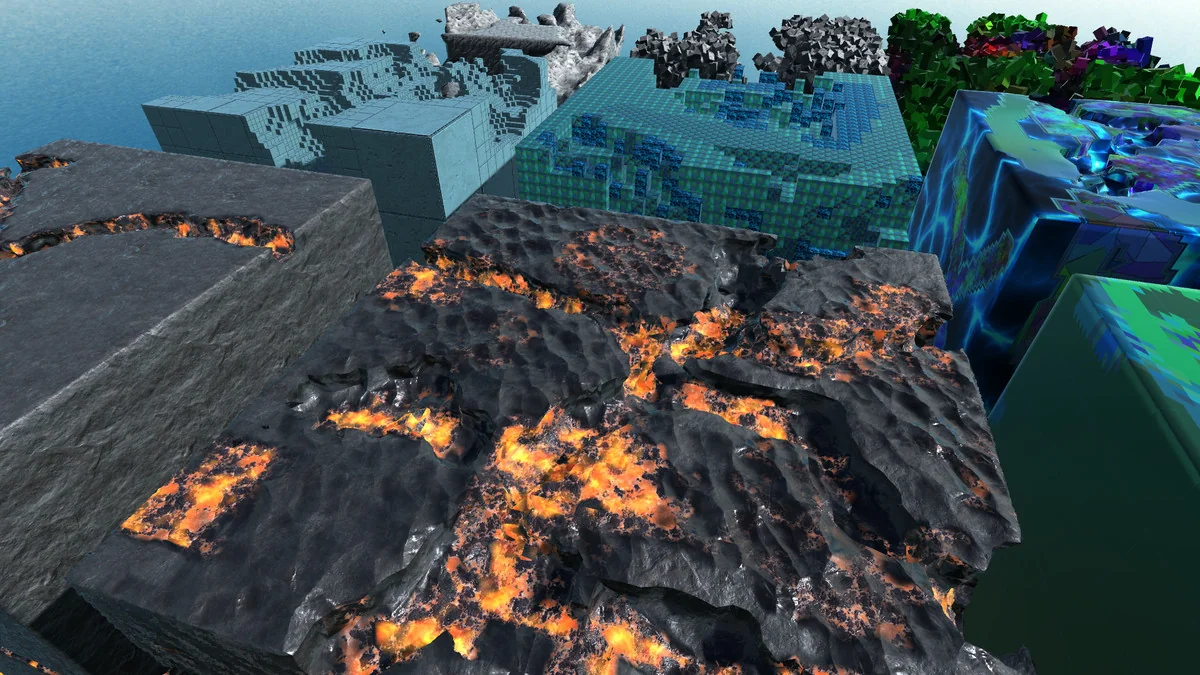
 Particles
 Terrain
 Terrain