"c14ff6bd758dadb1"{"id":"1000073","slug":"make-game-assets-easily-and-export-to-godot-unity-unreal","title":"Make Game Assets Easily And Export To Godot / Unity / Unreal","category":"Tutorial Library","engine":"File Content: video + English subtitles","assetVersion":"Video Language: English","engineVersion":"File Content: video + English subtitles","tag":"Tutorial Library","accent":"cyan","visual":"mech","summary":"An intermediate course on non-destructive modular modelling for low-poly props, buildings, vehicles, and exporting assets into Godot.","platform":"Unity","publishedAt":"2026-06-03T18:08:30.635Z","updatedAt":"2026-06-03T18:08:30.635Z","sourceNotes":[],"fileContents":[],"compatibility":["Unity","Video Language: English","File Content: video + English subtitles"],"featuredImage":{"alt":"Make Game Assets Easily And Export To Godot / Unity / Unreal","src":"/wp-content/uploads/published/2026/06/c75c0e78296c-2864316-deed-2-3e4e86e070.webp"},"hasDownloadLink":true,"downloads":0,"terms":[{"taxonomy":"category","slug":"tutorial-library","name":"Tutorial Library"}],"galleryImages":[],"accessPanel":{"kind":"resource","title":"Access this resource","eyebrow":"Free Download","message":"Log in or create a free account to start your download.","fileName":"Make Game Assets Easily And Export To Godot Unity Unreal.7z","safetyNote":"Resources are manually reviewed before listing to improve quality and reduce obvious risks.","actionLabel":"Download Free","resourceType":"Resource archive"},"contentHtml":"\u003cp\u003eWhen a project needs environmental props, modular structures, or a stylized vehicle without getting bogged down in destructive edits, a non-destructive modular workflow becomes especially useful. Make Game Assets Easily And Export To Godot / Unity / Unreal centers on that kind of production setup, teaching how to create game assets quickly while keeping the modelling process flexible.\u003c/p\u003e\u003cp\u003eThe course is positioned at an intermediate level and runs for 18 hours and 35 minutes. It was published on May 03, 2022, and is taught by the developer. The focus stays practical: low-poly 3D models, generative modelling, parametric modelling, environmental props, exporting assets, importing mesh into Godot, and setting up custom collision shapes.\u003c/p\u003e\u003ch2\u003eFrom simple props to modular buildings\u003c/h2\u003e\u003cp\u003eThe curriculum starts with an introduction, then moves into simple props before expanding into a simple modular asset, modular buildings, and a 1930's car. That sequence makes the course easy to read as a progression from smaller object work toward more structured and reusable modelling tasks.\u003c/p\u003e\u003cp\u003eSimple props are often where a workflow proves itself. They give enough room to practice shape creation, low-poly decision-making, and repeatable methods without the complexity of a large scene. From there, the shift to a simple modular asset introduces the logic of parts that can be reused, adjusted, and assembled. That is a meaningful step for anyone working on game environments, because modular thinking affects not just how assets look, but how quickly they can be produced and iterated.\u003c/p\u003e\u003cp\u003eModular buildings extend that same logic into a larger environment context. Instead of treating a structure as a single fixed object, the course places attention on a method that supports interchangeable or adjustable elements. In practice, that aligns with the broader emphasis on non-destructive modular modelling and parametric modelling. This gives a workflow where changes can remain manageable even as the asset grows more complex.\u003c/p\u003e\u003ch2\u003eNon-destructive modular modelling as the core workflow\u003c/h2\u003e\u003cp\u003eThe strongest thread running through the course is its commitment to non-destructive workflow. Rather than treating each model as a one-way process, the material is concerned with building assets quickly while preserving flexibility. That matters for artists and game designers who may need to revise proportions, repeat forms across multiple props, or adapt one idea into several usable variations.\u003c/p\u003e\u003cp\u003eGenerative modelling and parametric modelling reinforce that approach. Both point to a method where models are not just shaped manually once and finalized, but constructed in a way that allows controlled changes. Within a game asset pipeline, that can be especially useful for environmental work, where a set of related props or building pieces often needs consistency without becoming identical.\u003c/p\u003e\u003cp\u003eLow-poly 3D models remain a clear part of the training, so the workflow is not only about flexibility but also about game-ready simplicity in form. The course does not present modelling as an isolated technical exercise. It links modelling decisions to the practical needs of asset creation, export, and in-engine use.\u003c/p\u003e\u003ch2\u003eGodot export, mesh import, and custom collision shapes\u003c/h2\u003e\u003cp\u003eAlthough the title references Godot, Unity, and Unreal, the specific implementation details called out in the course material are most direct around Godot. Exporting assets is part of the learning path, and so is importing mesh into Godot. That makes the course relevant not only for creating models in Blender techniques at an intermediate level, but for carrying those assets into an engine workflow.\u003c/p\u003e\u003cp\u003eCustom collision shapes are another important part of that implementation side. For game development, collision is not just a technical afterthought. It affects how a player moves through a scene, how objects are interacted with, and how believable the environment feels in use. Including custom collision shapes alongside export and mesh import grounds the course in practical game integration rather than stopping at modelling alone.\u003c/p\u003e\u003cp\u003eThis setup is especially useful for people who want to bring their assets alive in Godot. The wording of the target audience makes that intention explicit. The course is not only about making objects that look finished in a modelling viewport. It addresses the next step: getting those meshes into a game engine context where they can function as part of a playable space.\u003c/p\u003e\u003ch2\u003eThe 1930's Car and environmental props in the same learning path\u003c/h2\u003e\u003cp\u003eOne of the more distinctive aspects of the curriculum is the combination of environmental props, modular buildings, and a 1930's car. That range suggests a course interested in transferable modelling methods rather than one narrow asset category. Environmental props teach scene support objects. Modular buildings cover repeatable architectural construction. A 1930's car adds a more recognizable hero-style object with its own shape language.\u003c/p\u003e\u003cp\u003eSeeing those topics together helps define the creative usage of the course. It suits learners who want to produce a wider slice of game-world content rather than only one class of asset. A prop workflow can feed a street scene. Modular buildings can establish the environment around it. A period vehicle such as a 1930's car can act as a focal object within that setting.\u003c/p\u003e\u003cp\u003eBecause the course keeps returning to non-destructive and modular principles, these different asset types are connected by process. The same emphasis on reusable structure, controlled variation, and manageable edits carries across them. That gives the training a coherent identity even though the assets themselves vary in scale and purpose.\u003c/p\u003e\u003ch2\u003eWho the intermediate Blender techniques are really for\u003c/h2\u003e\u003cp\u003eThe audience is clearly defined. Artists and game designers who want to learn how to bring their assets alive in Godot are a central fit. Game developers who want to expand their skill set are also directly addressed. The material also speaks to students who want to learn intermediate Blender techniques, as well as learners with some basic knowledge who are willing to work hard.\u003c/p\u003e\u003cp\u003eThat audience description sets the right expectation for the course. It is not framed as a first contact with 3D for complete beginners. Instead, it appears to assume some foundation and then build toward stronger asset creation habits. The intermediate level matches the topics: low-poly modelling alone can be approachable, but non-destructive workflow, generative modelling, parametric modelling, export, engine import, and collision setup together form a more involved pipeline.\u003c/p\u003e\u003cp\u003eFor someone already past the earliest basics, the benefit is not simply learning how to model one object at a time. It is learning a way of working that moves from asset construction to engine use. The course workload of 18 hours and 35 minutes also suggests room for that broader progression across several asset types and technical steps.\u003c/p\u003e\u003ch2\u003eWhere this course fits in a game asset pipeline\u003c/h2\u003e\u003cp\u003eAt its most practical, this course fits learners who need a structured path from creating low-poly assets to using them in a game context. The progression from simple props through modular assets and buildings to a 1930's car gives it enough range to feel grounded in actual production tasks. Exporting assets, importing mesh into Godot, and creating custom collision shapes keep the work tied to implementation instead of leaving it at the modelling stage.\u003c/p\u003e\u003cp\u003eArtists, game designers, game developers, and students with basic prior knowledge will get the most from it if they want intermediate Blender techniques linked to game-ready outcomes. The strongest reason to look at this course is simple: it stays focused on making assets quickly through non-destructive modular modelling, then carrying that work into practical engine use.\u003c/p\u003e\n\n\u003ch2\u003eMore From The Same Workflow\u003c/h2\u003e\n\u003cul\u003e\n\u003cli\u003e\u003ca href=\"https://3dcghub.com/make-a-horror-survival-game-in-unity/\" title=\"Make a horror survival game in Unity\"\u003eMake a horror survival game in Unity\u003c/a\u003e\u003c/li\u003e\n\u003cli\u003e\u003ca href=\"https://3dcghub.com/make-a-multiplayer-game-in-unity/\" title=\"Make a Multiplayer Game in Unity\"\u003eMake a Multiplayer Game in Unity\u003c/a\u003e\u003c/li\u003e\n\u003cli\u003e\u003ca href=\"https://3dcghub.com/make-a-match-three-puzzle-game-in-unity/\" title=\"Make a Match-Three Puzzle Game in Unity\"\u003eMake a Match-Three Puzzle Game in Unity\u003c/a\u003e\u003c/li\u003e\n\u003cli\u003e\u003ca href=\"https://3dcghub.com/make-a-2d-action-platformer-in-unreal-engine-5/\" title=\"Make a 2D Action Platformer in Unreal Engine 5\"\u003eMake a 2D Action Platformer in Unreal Engine 5\u003c/a\u003e\u003c/li\u003e\n\u003cli\u003e\u003ca href=\"https://3dcghub.com/create-a-complete-2d-survivors-style-game-in-godot-4/\" title=\"Create a Complete 2D Survivors Style Game in Godot 4\"\u003eCreate a Complete 2D Survivors Style Game in Godot 4\u003c/a\u003e\u003c/li\u003e\n\u003c/ul\u003e","contentTextLength":8046,"navigation":{"current":1789,"total":3719,"previous":{"id":"1000075","slug":"mastering-environment-design-with-unreal-engine-5","title":"Mastering Environment Design with Unreal Engine 5","category":"Unreal Engine","platform":"Unreal Engine","updatedAt":"2026-06-04T11:48:34.690Z"},"next":{"id":"1000072","slug":"low-poly-industrial-area","title":"Low Poly: Industrial Area","category":"Interior","platform":"Unreal Engine","updatedAt":"2026-06-02T10:41:38.173Z"}},"relatedResources":[{"id":"24285","slug":"make-a-horror-survival-game-in-unity","title":"Make a horror survival game in Unity","category":"Unity","engine":"Video language: English","assetVersion":"Video language: English","engineVersion":"File content: video + supporting files + English subtitles","tag":"Unity","accent":"cyan","visual":"city","summary":"This Unity course follows a complete horror survival project from setup through combat, menus, and export. It moves through player control, inventory handling, zombie encounters, save systems, and a final boss scene in a clear production order.","platform":"Unity","publishedAt":"2026-04-13T07:15:12.000Z","updatedAt":"2026-04-19T15:34:37.000Z","sourceNotes":[],"fileContents":[],"compatibility":["Unity","Video language: English","File content: video + supporting files + English subtitles"],"featuredImage":{"alt":"Make a horror survival game in Unity","src":"https://3dcghub.com/wp-content/uploads/2026/04/9d184af1a92b_2390368_3d6f_4.webp"},"hasDownloadLink":true,"downloads":2},{"id":"24541","slug":"make-a-match-three-puzzle-game-in-unity","title":"Make a Match-Three Puzzle Game in Unity","category":"Unity","engine":"Video language: English","assetVersion":"Video language: English","engineVersion":"File content: video + supporting files + English subtitles","tag":"Unity","accent":"cyan","visual":"audio","summary":"Make a Match-Three Puzzle Game in Unity is a 16h 9m intermediate course focused on building a tile-based 2D puzzle game from scratch. It suits Unity developers who already know basic C# scripting and want a structured path from core mechanics to mobile-read...","platform":"Unity","publishedAt":"2026-04-15T09:58:27.000Z","updatedAt":"2026-04-20T06:12:46.000Z","sourceNotes":[],"fileContents":[],"compatibility":["Unity","Video language: English","File content: video + supporting files + English subtitles"],"featuredImage":{"alt":"Make a Match-Three Puzzle Game in Unity","src":"https://3dcghub.com/wp-content/uploads/2026/04/884cab9427a1_942002_8051.webp"},"hasDownloadLink":true,"downloads":1},{"id":"24474","slug":"make-a-multiplayer-game-in-unity","title":"Make a Multiplayer Game in Unity","category":"Unity","engine":"Video language: English","assetVersion":"Video language: English","engineVersion":"File content: video + supporting files + English subtitles","tag":"Unity","accent":"cyan","visual":"mech","summary":"This Unity course walks through building a multiplayer game that connects to Photon Unity Network, spawns players over a network, and keeps key stats synchronized. It also covers menus, game modes, multiple levels, and room handling in a single project flow.","platform":"Unity","publishedAt":"2026-04-14T12:09:26.000Z","updatedAt":"2026-04-20T06:12:48.000Z","sourceNotes":[],"fileContents":[],"compatibility":["Unity","Video language: English","File content: video + supporting files + English subtitles"],"featuredImage":{"alt":"Make a Multiplayer Game in Unity","src":"https://3dcghub.com/wp-content/uploads/2026/04/7d16db9eaddb_5539734_b95e.webp"},"hasDownloadLink":true,"downloads":0}]}
Tutorial Library
Make Game Assets Easily And Export To Godot / Unity / Unreal
An intermediate course on non-destructive modular modelling for low-poly props, buildings, vehicles, and exporting assets into Godot.
Category:Unity,Tutorial LibraryPlatform: UnityVideo Language: EnglishFile Content: video + English subtitlesPublished: Jun 3, 2026
Tutorial Library
Resource overview
When a project needs environmental props, modular structures, or a stylized vehicle without getting bogged down in destructive edits, a non-destructive modular workflow becomes especially useful. Make Game Assets Easily And Export To Godot / Unity / Unreal centers on that kind of production setup, teaching how to create game assets quickly while keeping the modelling process flexible.
The course is positioned at an intermediate level and runs for 18 hours and 35 minutes. It was published on May 03, 2022, and is taught by the developer. The focus stays practical: low-poly 3D models, generative modelling, parametric modelling, environmental props, exporting assets, importing mesh into Godot, and setting up custom collision shapes.
From simple props to modular buildings
The curriculum starts with an introduction, then moves into simple props before expanding into a simple modular asset, modular buildings, and a 1930's car. That sequence makes the course easy to read as a progression from smaller object work toward more structured and reusable modelling tasks.
Simple props are often where a workflow proves itself. They give enough room to practice shape creation, low-poly decision-making, and repeatable methods without the complexity of a large scene. From there, the shift to a simple modular asset introduces the logic of parts that can be reused, adjusted, and assembled. That is a meaningful step for anyone working on game environments, because modular thinking affects not just how assets look, but how quickly they can be produced and iterated.
Modular buildings extend that same logic into a larger environment context. Instead of treating a structure as a single fixed object, the course places attention on a method that supports interchangeable or adjustable elements. In practice, that aligns with the broader emphasis on non-destructive modular modelling and parametric modelling. This gives a workflow where changes can remain manageable even as the asset grows more complex.
Non-destructive modular modelling as the core workflow
The strongest thread running through the course is its commitment to non-destructive workflow. Rather than treating each model as a one-way process, the material is concerned with building assets quickly while preserving flexibility. That matters for artists and game designers who may need to revise proportions, repeat forms across multiple props, or adapt one idea into several usable variations.
Generative modelling and parametric modelling reinforce that approach. Both point to a method where models are not just shaped manually once and finalized, but constructed in a way that allows controlled changes. Within a game asset pipeline, that can be especially useful for environmental work, where a set of related props or building pieces often needs consistency without becoming identical.
Low-poly 3D models remain a clear part of the training, so the workflow is not only about flexibility but also about game-ready simplicity in form. The course does not present modelling as an isolated technical exercise. It links modelling decisions to the practical needs of asset creation, export, and in-engine use.
Godot export, mesh import, and custom collision shapes
Although the title references Godot, Unity, and Unreal, the specific implementation details called out in the course material are most direct around Godot. Exporting assets is part of the learning path, and so is importing mesh into Godot. That makes the course relevant not only for creating models in Blender techniques at an intermediate level, but for carrying those assets into an engine workflow.
Custom collision shapes are another important part of that implementation side. For game development, collision is not just a technical afterthought. It affects how a player moves through a scene, how objects are interacted with, and how believable the environment feels in use. Including custom collision shapes alongside export and mesh import grounds the course in practical game integration rather than stopping at modelling alone.
This setup is especially useful for people who want to bring their assets alive in Godot. The wording of the target audience makes that intention explicit. The course is not only about making objects that look finished in a modelling viewport. It addresses the next step: getting those meshes into a game engine context where they can function as part of a playable space.
The 1930's Car and environmental props in the same learning path
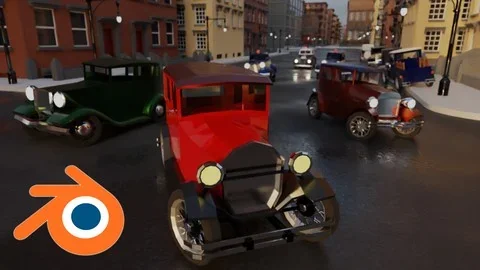
One of the more distinctive aspects of the curriculum is the combination of environmental props, modular buildings, and a 1930's car. That range suggests a course interested in transferable modelling methods rather than one narrow asset category. Environmental props teach scene support objects. Modular buildings cover repeatable architectural construction. A 1930's car adds a more recognizable hero-style object with its own shape language.
Seeing those topics together helps define the creative usage of the course. It suits learners who want to produce a wider slice of game-world content rather than only one class of asset. A prop workflow can feed a street scene. Modular buildings can establish the environment around it. A period vehicle such as a 1930's car can act as a focal object within that setting.
Because the course keeps returning to non-destructive and modular principles, these different asset types are connected by process. The same emphasis on reusable structure, controlled variation, and manageable edits carries across them. That gives the training a coherent identity even though the assets themselves vary in scale and purpose.
Who the intermediate Blender techniques are really for
The audience is clearly defined. Artists and game designers who want to learn how to bring their assets alive in Godot are a central fit. Game developers who want to expand their skill set are also directly addressed. The material also speaks to students who want to learn intermediate Blender techniques, as well as learners with some basic knowledge who are willing to work hard.
That audience description sets the right expectation for the course. It is not framed as a first contact with 3D for complete beginners. Instead, it appears to assume some foundation and then build toward stronger asset creation habits. The intermediate level matches the topics: low-poly modelling alone can be approachable, but non-destructive workflow, generative modelling, parametric modelling, export, engine import, and collision setup together form a more involved pipeline.
For someone already past the earliest basics, the benefit is not simply learning how to model one object at a time. It is learning a way of working that moves from asset construction to engine use. The course workload of 18 hours and 35 minutes also suggests room for that broader progression across several asset types and technical steps.
Where this course fits in a game asset pipeline
At its most practical, this course fits learners who need a structured path from creating low-poly assets to using them in a game context. The progression from simple props through modular assets and buildings to a 1930's car gives it enough range to feel grounded in actual production tasks. Exporting assets, importing mesh into Godot, and creating custom collision shapes keep the work tied to implementation instead of leaving it at the modelling stage.
Artists, game designers, game developers, and students with basic prior knowledge will get the most from it if they want intermediate Blender techniques linked to game-ready outcomes. The strongest reason to look at this course is simple: it stays focused on making assets quickly through non-destructive modular modelling, then carrying that work into practical engine use.
 Tutorial Library
 Unity
Unity Unity
Unity Unity
Unity