"c14ff6bd758dadb1"{"id":"1000072","slug":"low-poly-industrial-area","title":"Low Poly: Industrial Area","category":"Interior","engine":"Engine Version: 4.26+,5.0+","assetVersion":"Engine Version: 4.26+,5.0+","engineVersion":"","tag":"Interior","accent":"blue","visual":"mech","summary":"A modular low poly industrial environment pack for Unreal Engine, with interior and exterior models optimized for mobile, PC, and console scenes.","platform":"Unreal Engine","publishedAt":"2026-06-02T10:41:38.173Z","updatedAt":"2026-06-02T10:41:38.173Z","sourceNotes":[],"fileContents":[],"compatibility":["Unreal Engine","Engine Version: 4.26+,5.0+"],"featuredImage":{"alt":"Low Poly: Industrial Area","src":"/wp-content/uploads/published/2026/06/871346c6d2a3-0302622f-d676-41f0-a273-af8367837733-523939a548.webp"},"hasDownloadLink":true,"downloads":0,"terms":[{"taxonomy":"category","slug":"interior","name":"Interior"}],"galleryImages":[{"src":"/wp-content/uploads/published/2026/06/93c3e6938fc3-e1b0ac78-4a9d-4c69-b8b8-c36343788125-d5c79cf3b6.webp","alt":"Low Poly: Industrial Area"},{"src":"/wp-content/uploads/published/2026/06/a318857a6c66-e2210f34-0b91-4a73-ad8c-a0d3452e969d-370575792b.webp","alt":"Low Poly: Industrial Area"},{"src":"/wp-content/uploads/published/2026/06/dafdee4cfbd8-caf3a303-2e8a-4af1-9a0d-834cef2486bc-15c003304e.webp","alt":"Low Poly: Industrial Area"},{"src":"/wp-content/uploads/published/2026/06/688acf158962-ed31748a-bd80-47d5-bb9f-9b98847f3432-bc9feaf4ec.webp","alt":"Low Poly: Industrial Area"},{"src":"/wp-content/uploads/published/2026/06/49966c06f497-93d14b2c-2d84-4355-ab0a-bf77397a5860-11f7d3ddfd.webp","alt":"Low Poly: Industrial Area"},{"src":"/wp-content/uploads/published/2026/06/55eb7c6ea2b8-fd1fcf1d-22cc-4c93-939e-94f02df1eca9-09718029c4.webp","alt":"Low Poly: Industrial Area"},{"src":"/wp-content/uploads/published/2026/06/c10858ec077f-d4c79851-9731-4067-8476-4a1d4df8ed5b-6a1c387db8.webp","alt":"Low Poly: Industrial Area"},{"src":"/wp-content/uploads/published/2026/06/3eac4a16f0ea-3607ac6c-800c-4b94-ba7e-0e3078868093-1f48c2a3f1.webp","alt":"Low Poly: Industrial Area"},{"src":"/wp-content/uploads/published/2026/06/c90b9750b30a-9a4bbc5b-b63c-4b91-b0af-82cfe130b6d5-cde961c2c8.webp","alt":"Low Poly: Industrial Area"},{"src":"/wp-content/uploads/published/2026/06/288026b8ecf3-d60723df-b842-4bed-aa97-46c9394188f7-c1bfaed3ae.webp","alt":"Low Poly: Industrial Area"}],"accessPanel":{"kind":"resource","title":"Access this resource","eyebrow":"Free Download","message":"Log in or create a free account to start your download.","fileName":"Content.7z","safetyNote":"Resources are manually reviewed before listing to improve quality and reduce obvious risks.","actionLabel":"Download Free","resourceType":"Resource archive"},"contentHtml":"\u003cp\u003eGetting an industrial scene moving usually starts with structure rather than decoration, and Low Poly: Industrial Area is clearly anchored in that first production step. The pack is presented as a modular low poly industrial area set for game development, with assets intended to assemble factories, work zones, workshops, and larger industrial complexes. Instead of focusing on a single finished map, it supports the practical work of constructing an environment piece by piece inside Unreal Engine.\u003c/p\u003e\n\u003cp\u003eThat makes its role easy to place in a real workflow. It sits at the stage where a team needs reusable environment parts that can be arranged into different industrial layouts, whether the goal is a compact workshop scene or a much broader production site. The emphasis on modular construction suggests a pack that is meant to be placed, combined, and reconfigured repeatedly rather than used as a one-off backdrop.\u003c/p\u003e \u003ch2\u003eUnreal Engine setup and modular scene assembly\u003c/h2\u003e\n\u003cp\u003eThe package is fully Unreal Engine ready, which gives it an immediate production-facing identity. Rather than requiring conversion into another pipeline first, it is positioned to drop into Unreal Engine environment work directly. For teams and solo developers building levels in that ecosystem, this is the practical starting point: import the pack into the project, begin blocking out industrial spaces, and shape the scene through combinations of modular pieces.\u003c/p\u003e\n\u003cp\u003eThe pack’s modular focus is one of its clearest strengths. Industrial environments often depend on repetition with variation: walls, structural sections, work areas, storage-oriented spaces, and larger facility footprints need to connect without looking rigidly identical in every layout. A modular set supports that by letting the same group of assets form different footprints and pathways. In this case, the stated target includes factories and work zones, which places the pack in a part of production where layout flexibility matters as much as visual style.\u003c/p\u003e\n\u003cp\u003eThat flexibility also helps with scope changes during development. A smaller scene can be assembled as a workshop or limited industrial corner, while a larger map can grow outward into a more expansive complex. The pack is framed to cover that range, from small workshops to broad industrial areas, which is useful when a project’s level size is still evolving.\u003c/p\u003e \u003ch2\u003eFactories, workshops, and work zones in Low Poly: Industrial Area\u003c/h2\u003e\n\u003cp\u003eThe environment theme is firmly industrial, but not locked to a single narrowly defined location. Factories and work zones are the most direct examples, and the broader tag set around the pack points toward construction, storage, hangar, military, urban, and abandoned settings. Those tags do not turn it into separate genre packs, but they do show how the industrial theme can stretch across several scene types without leaving its core identity.\u003c/p\u003e\n\u003cp\u003eIn practice, that means the pack fits projects that need man-made spaces with a functional, production-oriented character. A factory floor, an industrial yard, a warehouse-like zone, or a sparse work site can all sit within the same visual family. The presence of both urban and isolated placement also matters. Some industrial packs only make sense when surrounded by a city, while others lean entirely toward remote compounds. This one is framed for both, making it useful for a dense city-edge facility as well as a standalone industrial outpost.\u003c/p\u003e\n\u003cp\u003eThe low poly style keeps that theme readable without relying on heavy visual complexity. Industrial scenes can become crowded quickly, especially when they include repeated structures and busy silhouettes. A low poly approach helps maintain clarity while still supporting detailed scenarios through layout and asset combination. That leaves less about individual hyper-detailed objects and more about assembling an environment that communicates purpose, scale, and navigable space.\u003c/p\u003e \u003ch2\u003eInterior and exterior combinations that shape the level\u003c/h2\u003e\n\u003cp\u003eOne of the more production-relevant details is the inclusion of models for both exterior and interior design. That expands the pack from simple facade building into fuller environment construction. Exterior assets help establish the industrial footprint from the outside, while interior pieces allow the scene to continue once the player or camera moves inside. For level design, that continuity is often more valuable than a pack that handles only one side of the environment.\u003c/p\u003e\n\u003cp\u003eBecause the pack supports unique and versatile combinations, it lends itself to layered scene building. Exterior areas can define entrances, yards, perimeter structures, or larger facility shapes. Interior areas can then develop workshops, enclosed work zones, or facility sections that feel connected to the outside shell. This inside-outside coverage is useful for games that move between traversal spaces and contained gameplay areas rather than staying in a single static view.\u003c/p\u003e\n\u003cp\u003eVersatility also matters when avoiding repetition. A modular industrial set is most useful when pieces can be recombined into noticeably different arrangements. The stated combination range suggests that the pack is meant to support multiple configurations, which helps in projects where several industrial areas must exist in the same game without reading as copied spaces.\u003c/p\u003e \u003ch2\u003ePerformance targets across mobile, PC, and console\u003c/h2\u003e\n\u003cp\u003eOptimization is another key part of where this pack fits in development. The models are described as optimized for seamless performance on mobile, PC, and console platforms. That makes the pack relevant not only for visual assembly but also for platform planning. Teams working across more than one target platform often need environment content that can hold up in different performance conditions, and this pack is positioned with that multi-platform use in mind.\u003c/p\u003e\n\u003cp\u003eFor mobile production, optimization can affect how practical an environment set is for larger layouts or repeated use throughout a project. On PC and console, optimized models still matter because industrial scenes tend to involve layered structures, multiple sightlines, and repeated assets across broad spaces. A pack that is already aimed at seamless performance is easier to place into active level building without immediately raising concerns about whether the environment style is too costly for the project’s scope.\u003c/p\u003e\n\u003cp\u003eThis does not turn the pack into a rendering feature showcase. Its value is more grounded: it gives developers a low poly industrial set that is prepared for game use across common platform targets. In a production workflow, that can reduce friction when a scene needs to move from prototype to a more complete playable environment.\u003c/p\u003e \u003ch2\u003eWhere the pack fits in industrial level design\u003c/h2\u003e\n\u003cp\u003eLow Poly: Industrial Area works best as an environment construction set instead of one-purpose scene. It belongs in the part of development where a team needs to build industrial spaces with enough flexibility to support different scales, layouts, and context. Factories, work zones, workshops, storage-related areas, and city-edge industrial spaces all fit naturally within its stated scope.\u003c/p\u003e\n\u003cp\u003eIt also suits projects that need industrial locations in more than one setting. Since it can support urban or isolated placement, the same pack can contribute to a city industrial district, a remote compound, or an abandoned-feeling facility without stepping outside its theme. Tags such as factory, construction, building, city, military, storage, and hangar reinforce that broad but coherent use case.\u003c/p\u003e\n\u003cp\u003eThe short practical takeaway is simple: if the production needs a modular low poly industrial environment in Unreal Engine, with interior and exterior coverage and optimization across mobile, PC, and console, this pack is structured for that job. Its strength is not novelty for its own sake, but reusable industrial scene building that can scale from a workshop to a larger complex.\u003c/p\u003e\n\n\u003ch2\u003eMore From The Same Workflow\u003c/h2\u003e\n\u003cul\u003e\n\u003cli\u003e\u003ca href=\"https://3dcghub.com/modular-hotel/\" title=\"Modular Hotel\"\u003eModular Hotel\u003c/a\u003e\u003c/li\u003e\n\u003cli\u003e\u003ca href=\"https://3dcghub.com/parking-garage/\" title=\"Parking Garage\"\u003eParking Garage\u003c/a\u003e\u003c/li\u003e\n\u003cli\u003e\u003ca href=\"https://3dcghub.com/urban-interior-props-pack/\" title=\"Urban Interior Props Pack\"\u003eUrban Interior Props Pack\u003c/a\u003e\u003c/li\u003e\n\u003cli\u003e\u003ca href=\"https://3dcghub.com/industrial-area-hangar/\" title=\"Industrial Area Hangar\"\u003eIndustrial Area Hangar\u003c/a\u003e\u003c/li\u003e\n\u003cli\u003e\u003ca href=\"https://3dcghub.com/spaceships-props-and-modular-environment-tiles-sci-fi-low-poly-voxel/\" title=\"Spaceships, props and modular environment tiles (sci-fi, low poly, voxel)\"\u003eSpaceships, props and modular environment tiles (sci-fi, low poly, voxel)\u003c/a\u003e\u003c/li\u003e\n\u003c/ul\u003e","contentTextLength":8074,"navigation":{"current":1790,"total":3719,"previous":{"id":"1000073","slug":"make-game-assets-easily-and-export-to-godot-unity-unreal","title":"Make Game Assets Easily And Export To Godot / Unity / Unreal","category":"Tutorial Library","platform":"Unity","updatedAt":"2026-06-03T18:08:30.635Z"},"next":{"id":"9225","slug":"medieval-village-pack-medieval-prop-medieval-market-medieval-house-medieval","title":"Medieval Village Pack (Medieval Prop, Medieval Market, Medieval House, Medieval)","category":"Medieval","platform":"Unreal Engine","updatedAt":"2026-05-31T15:48:05.105Z"}},"relatedResources":[{"id":"8918","slug":"modular-hotel","title":"Modular Hotel","category":"Interior","engine":"4.26+,5.0+","assetVersion":"Engine version: 4.26+,5.0+","engineVersion":"4.22","tag":"Interior","accent":"blue","visual":"city","summary":"Discover a fully modular hotel interior designed for modern game engines. This pack includes realistic furniture, PBR materials, and optimized meshes for seamless level design.","platform":"Unreal Engine","publishedAt":"2026-02-25T17:55:43.000Z","updatedAt":"2026-04-19T15:51:19.000Z","sourceNotes":[],"fileContents":[],"compatibility":["Unreal Engine","Engine version: 4.26+,5.0+"],"featuredImage":{"alt":"Modular Hotel","src":"https://3dcghub.com/wp-content/uploads/2026/02/cdb1c37a-bc28-40c5-9f65-63052cf71b7d.webp"},"hasDownloadLink":true,"downloads":1},{"id":"1001131","slug":"big-office","title":"Big Office","category":"Interior","engine":"4.26+,5.0+","assetVersion":"","engineVersion":"Engine Version: 4.26+,5.0+","tag":"Interior","accent":"blue","visual":"mech","summary":"Big Office is a low-poly UE5.1-ready environment with 18 interior spaces, from security and lounge areas to seven managers' rooms, a coffee shop, and more.","platform":"Unreal Engine","publishedAt":"2026-09-09T02:07:18.459Z","updatedAt":"2026-09-09T02:07:18.459Z","sourceNotes":[],"fileContents":[],"compatibility":["Unreal Engine","Engine Version: 4.26+,5.0+"],"featuredImage":{"alt":"Big Office","src":"/wp-content/uploads/published/2026/09/1fc67bdacb0e-912f6c79-55f8-4791-8fe7-bdb3422334af-659f2d3649.webp"},"hasDownloadLink":true,"downloads":1},{"id":"1001394","slug":"post-soviet-kitchen","title":"Post Soviet Kitchen","category":"Interior","engine":"4.15+,5.0+","assetVersion":"","engineVersion":"Engine Version: 4.15+,5.0+","tag":"Interior","accent":"blue","visual":"mech","summary":"Construct authentic, low-poly domestic interiors with Post Soviet Kitchen, featuring modular parts, centimeter-scale props, and realistic PBR wear.","platform":"Unreal Engine","publishedAt":"2026-10-04T17:17:29.857Z","updatedAt":"2026-10-04T17:17:29.857Z","sourceNotes":[],"fileContents":[],"compatibility":["Unreal Engine","Engine Version: 4.15+,5.0+"],"featuredImage":{"alt":"Post Soviet Kitchen","src":"/wp-content/uploads/published/2026/10/73dae7cfc5ee-e9552f87-02fd-45ee-ac04-af2044f54c63-bc89d0e776.webp"},"hasDownloadLink":true,"downloads":3}]}
Interior
Low Poly: Industrial Area
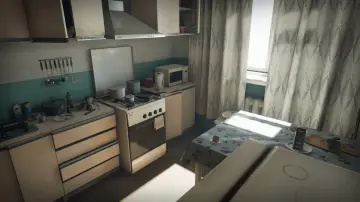
A modular low poly industrial environment pack for Unreal Engine, with interior and exterior models optimized for mobile, PC, and console scenes.
Category:Unreal Engine,InteriorPlatform: Unreal EngineEngine Version: 4.26+,5.0+Published: Jun 2, 2026
Interior
Resource overview
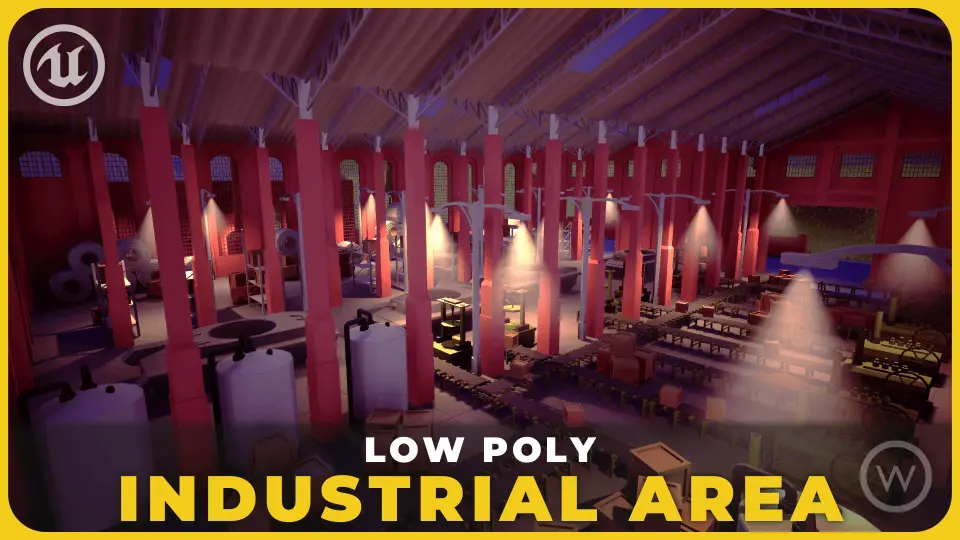
Getting an industrial scene moving usually starts with structure rather than decoration, and Low Poly: Industrial Area is clearly anchored in that first production step. The pack is presented as a modular low poly industrial area set for game development, with assets intended to assemble factories, work zones, workshops, and larger industrial complexes. Instead of focusing on a single finished map, it supports the practical work of constructing an environment piece by piece inside Unreal Engine.
That makes its role easy to place in a real workflow. It sits at the stage where a team needs reusable environment parts that can be arranged into different industrial layouts, whether the goal is a compact workshop scene or a much broader production site. The emphasis on modular construction suggests a pack that is meant to be placed, combined, and reconfigured repeatedly rather than used as a one-off backdrop.
Unreal Engine setup and modular scene assembly
The package is fully Unreal Engine ready, which gives it an immediate production-facing identity. Rather than requiring conversion into another pipeline first, it is positioned to drop into Unreal Engine environment work directly. For teams and solo developers building levels in that ecosystem, this is the practical starting point: import the pack into the project, begin blocking out industrial spaces, and shape the scene through combinations of modular pieces.
The pack’s modular focus is one of its clearest strengths. Industrial environments often depend on repetition with variation: walls, structural sections, work areas, storage-oriented spaces, and larger facility footprints need to connect without looking rigidly identical in every layout. A modular set supports that by letting the same group of assets form different footprints and pathways. In this case, the stated target includes factories and work zones, which places the pack in a part of production where layout flexibility matters as much as visual style.
That flexibility also helps with scope changes during development. A smaller scene can be assembled as a workshop or limited industrial corner, while a larger map can grow outward into a more expansive complex. The pack is framed to cover that range, from small workshops to broad industrial areas, which is useful when a project’s level size is still evolving.
Factories, workshops, and work zones in Low Poly: Industrial Area
The environment theme is firmly industrial, but not locked to a single narrowly defined location. Factories and work zones are the most direct examples, and the broader tag set around the pack points toward construction, storage, hangar, military, urban, and abandoned settings. Those tags do not turn it into separate genre packs, but they do show how the industrial theme can stretch across several scene types without leaving its core identity.
In practice, that means the pack fits projects that need man-made spaces with a functional, production-oriented character. A factory floor, an industrial yard, a warehouse-like zone, or a sparse work site can all sit within the same visual family. The presence of both urban and isolated placement also matters. Some industrial packs only make sense when surrounded by a city, while others lean entirely toward remote compounds. This one is framed for both, making it useful for a dense city-edge facility as well as a standalone industrial outpost.
The low poly style keeps that theme readable without relying on heavy visual complexity. Industrial scenes can become crowded quickly, especially when they include repeated structures and busy silhouettes. A low poly approach helps maintain clarity while still supporting detailed scenarios through layout and asset combination. That leaves less about individual hyper-detailed objects and more about assembling an environment that communicates purpose, scale, and navigable space.
Interior and exterior combinations that shape the level
One of the more production-relevant details is the inclusion of models for both exterior and interior design. That expands the pack from simple facade building into fuller environment construction. Exterior assets help establish the industrial footprint from the outside, while interior pieces allow the scene to continue once the player or camera moves inside. For level design, that continuity is often more valuable than a pack that handles only one side of the environment.
Because the pack supports unique and versatile combinations, it lends itself to layered scene building. Exterior areas can define entrances, yards, perimeter structures, or larger facility shapes. Interior areas can then develop workshops, enclosed work zones, or facility sections that feel connected to the outside shell. This inside-outside coverage is useful for games that move between traversal spaces and contained gameplay areas rather than staying in a single static view.
Versatility also matters when avoiding repetition. A modular industrial set is most useful when pieces can be recombined into noticeably different arrangements. The stated combination range suggests that the pack is meant to support multiple configurations, which helps in projects where several industrial areas must exist in the same game without reading as copied spaces.
Performance targets across mobile, PC, and console
Optimization is another key part of where this pack fits in development. The models are described as optimized for seamless performance on mobile, PC, and console platforms. That makes the pack relevant not only for visual assembly but also for platform planning. Teams working across more than one target platform often need environment content that can hold up in different performance conditions, and this pack is positioned with that multi-platform use in mind.
For mobile production, optimization can affect how practical an environment set is for larger layouts or repeated use throughout a project. On PC and console, optimized models still matter because industrial scenes tend to involve layered structures, multiple sightlines, and repeated assets across broad spaces. A pack that is already aimed at seamless performance is easier to place into active level building without immediately raising concerns about whether the environment style is too costly for the project’s scope.
This does not turn the pack into a rendering feature showcase. Its value is more grounded: it gives developers a low poly industrial set that is prepared for game use across common platform targets. In a production workflow, that can reduce friction when a scene needs to move from prototype to a more complete playable environment.
Where the pack fits in industrial level design
Low Poly: Industrial Area works best as an environment construction set instead of one-purpose scene. It belongs in the part of development where a team needs to build industrial spaces with enough flexibility to support different scales, layouts, and context. Factories, work zones, workshops, storage-related areas, and city-edge industrial spaces all fit naturally within its stated scope.
It also suits projects that need industrial locations in more than one setting. Since it can support urban or isolated placement, the same pack can contribute to a city industrial district, a remote compound, or an abandoned-feeling facility without stepping outside its theme. Tags such as factory, construction, building, city, military, storage, and hangar reinforce that broad but coherent use case.
The short practical takeaway is simple: if the production needs a modular low poly industrial environment in Unreal Engine, with interior and exterior coverage and optimization across mobile, PC, and console, this pack is structured for that job. Its strength is not novelty for its own sake, but reusable industrial scene building that can scale from a workshop to a larger complex.
 Interior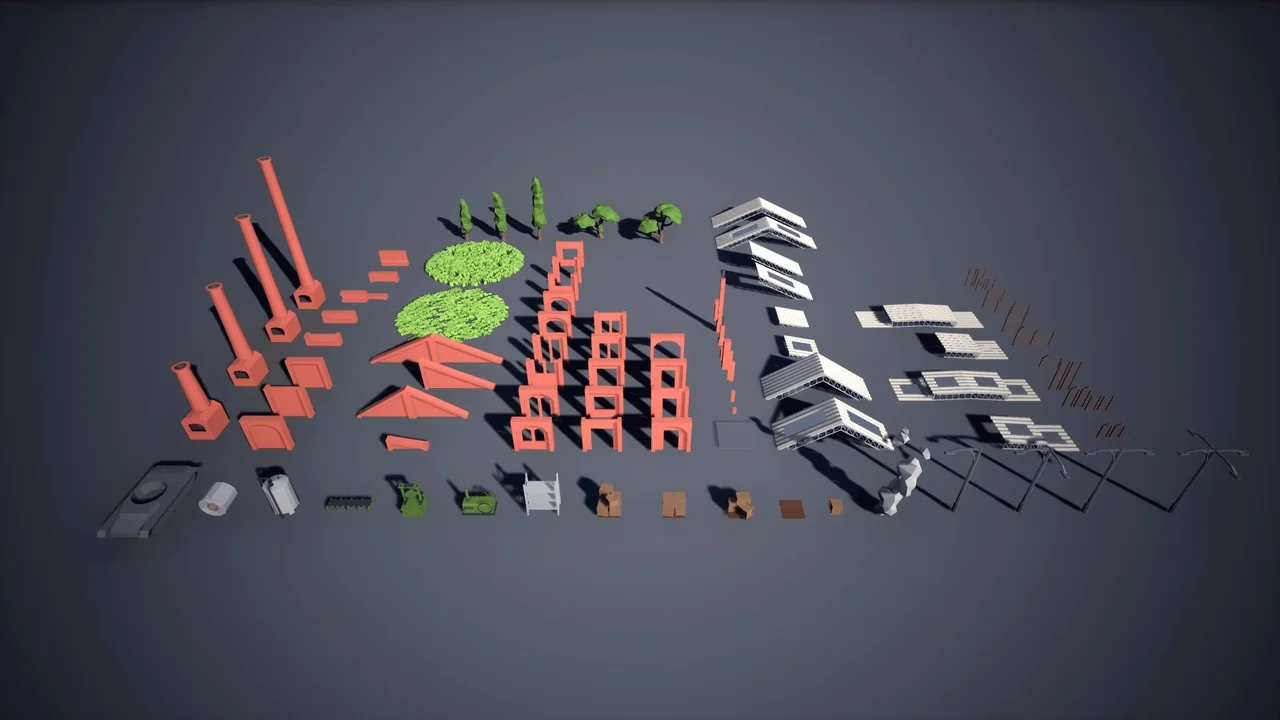
 Interior
 Interior
 Interior