"b00678cacce53329"{"id":"1002863","slug":"magic-circles-and-shields","title":"Magic Circles and Shields","category":"Spells \u0026 Combat","engine":"4.24+,5.0+","assetVersion":"","engineVersion":"Engine Version: 4.24+,5.0+","tag":"Spells \u0026 Combat","accent":"blue","visual":"mech","summary":"Explore 11 unique 3D magic circles and 4 shields featuring custom textures, loop duration controls, mobile distortion adjustments, and a demo scene.","platform":"Unreal Engine","indexPolicy":"index","publishedAt":"2026-11-20T12:45:36.364Z","updatedAt":"2026-11-20T12:45:36.364Z","sourceNotes":[],"fileContents":[],"compatibility":["Unreal Engine","Engine Version: 4.24+,5.0+"],"featuredImage":{"alt":"Magic Circles and Shields","src":"/wp-content/uploads/published/2026/11/b5bbce61447a-4a263956-4f19-4121-a398-515b2e7fb7aa-46dfb724fb.webp"},"fileSizeBytes":67001768,"hasDownloadLink":true,"downloads":0,"terms":[{"taxonomy":"category","slug":"spells-and-combat","name":"Spells \u0026 Combat"}],"galleryImages":[{"src":"/wp-content/uploads/published/2026/11/32f1a6f3cdef-d89a1d41-3077-469d-862f-0eab60af8726-a17b2e4c93.webp","alt":"Magic Circles and Shields"},{"src":"/wp-content/uploads/published/2026/11/d0f6426d5106-0359e328-f0cc-423b-819d-10106b1cfd7a-faae75dd3e.webp","alt":"Magic Circles and Shields"},{"src":"/wp-content/uploads/published/2026/11/3419cce5f69c-ed6c16a5-63d2-4822-8ac2-c149f4bac4cc-56e1ae0b62.webp","alt":"Magic Circles and Shields"},{"src":"/wp-content/uploads/published/2026/11/edf3ce92bb4b-ab40e9e0-746e-44d7-aa4d-89746e76f4e0-1e9d8f4c7e.webp","alt":"Magic Circles and Shields"},{"src":"/wp-content/uploads/published/2026/11/174e821080a6-a562dd93-0bd8-4567-aa38-7e1d49a55ba7-1e0efef550.webp","alt":"Magic Circles and Shields"},{"src":"/wp-content/uploads/published/2026/11/4775eb48013c-7b70d8b0-9df0-4856-b5ee-5b486ef34de3-74c1e4b8cc.webp","alt":"Magic Circles and Shields"},{"src":"/wp-content/uploads/published/2026/11/dddb520a3d84-47c9a2b7-7af3-4d53-87d0-3db50e5d7715-5ac02419ce.webp","alt":"Magic Circles and Shields"},{"src":"/wp-content/uploads/published/2026/11/5f0006ed4a5d-f69a0efc-f0e7-490f-b9ec-76bb3dc53b4e-318c3a879e.webp","alt":"Magic Circles and Shields"},{"src":"/wp-content/uploads/published/2026/11/52212fdac940-fe376505-b33d-451d-a12c-745f3ad8a98d-ec23940916.webp","alt":"Magic Circles and Shields"},{"src":"/wp-content/uploads/published/2026/11/af2c3f910837-793cfd3a-8192-414a-8419-6414f6016ec3-33bd6660b7.webp","alt":"Magic Circles and Shields"}],"accessPanel":{"kind":"resource","title":"Get this resource","safetyNote":"Resources are manually reviewed before listing to improve quality and reduce obvious risks.","fileName":"Content.7z","resourceType":"Resource archive","versions":[]},"contentHtml":"\u003ch2\u003eFantasy Environments and Arcane Grounding\u003c/h2\u003e\u003cp\u003eSpellcasting sequences, ritual sanctuaries, and contested defensive lines often require immediate visual clarity to signal high-tier magic. When constructing fantasy environments or real-time gameplay arenas, grounding an invocation within three-dimensional space anchors the player to the exact zone of influence. Rather than treating spell areas as flat decals or simple floor billboards, placing fully dimensional arcane rings establishes depth across uneven terrain, raised altars, and active combat zones. The presence of mystical barriers and glowing rings instantly communicates active wards, ongoing ceremonies, or incoming tactical effects.\u003c/p\u003e\u003cp\u003eIntegrating these elements into a scene creates clear spatial boundaries. A subterranean dungeon chamber holding an ancient summoner gains structural storytelling when bounded by distinct geometric runes, cascading sparks, and glowing defensive wards. In fast-paced skirmishes, an impenetrable barrier must visually register from multiple camera perspectives without flattening into the background. Because every effect and texture across the collection is distinct, individual abilities can be paired with specific visual themes rather than recycling identical patterns across different gameplay mechanics.\u003c/p\u003e\u003ch2\u003eVisual Dynamics of Magic Circles in Volumetric Space\u003c/h2\u003e\u003cp\u003eThe asset supplies 11 magic circles, with every single effect and texture crafted uniquely. Having eleven distinct variations provides substantial latitude when designing tiered spell hierarchies, elemental orders, or ritual intensities. Because all effects operate in full 3D, their components do not warp unnaturally when observed from low player-character angles, overhead tactical views, or drifting cinematic cameras. The volumetric quality allows floating glyphs, concentric rings, and rising energy columns to interact naturally with ambient level lighting and surrounding scene geometry.\u003c/p\u003e\u003cp\u003eSparkling particle bursts and cascading magical flows give these circles an active, kinetic presence. Instead of static boundary lines, the motion carries a sense of continuous arcane charging. Developers setting up complex boss encounters or multi-stage summoning events can designate specific circle designs to telegraph upcoming attacks or indicate charging milestones. When an encounter transitions into a more dangerous phase, swapping one unique magic circle layout for a more intricate, cascading pattern reinforces the escalation visually without requiring UI text or health bar notifications.\u003c/p\u003e\u003ch2\u003eDeploying Magic Shields for Protection Mechanics\u003c/h2\u003e\u003cp\u003eDefensive playstyles and protective barriers rely on distinct, instantly readable geometry. Within this set, 4 magic shields provide specialized visual forms tailored around protection and warding mechanics. Like the circles, each shield possesses its own unique texture and effect configuration, allowing creators to match different defensive signatures to distinct character classes, elemental resistances, or piece-of-equipment abilities.\u003c/p\u003e\u003cp\u003eIn practical combat encounters, placing a magic shield in front of a defending unit or anchoring it around a defensive perimeter establishes a readable boundary. The three-dimensional structure ensures that the barrier surface curves realistically around protected targets, projecting a tangible defensive volume rather than a flat plane. Fantasy scenes featuring defensive formations, fortified encampments, or enchanted relic pedestals benefit from the distinct textural styling of these shields, establishing an unmistakable visual cue that an active ward is deflecting incoming pressure.\u003c/p\u003e\u003ch2\u003eControlling Emitter Loops Across Duration Tabs\u003c/h2\u003e\u003cp\u003eBy default, all effects in the pack are configured to loop continuously. This default state suits persistent gameplay features, such as environmental barriers that remain active until an objective is destroyed, ritual circles that run indefinitely inside an arcane academy, or defensive auras cast by guardian sentries. The sustained motion maintains visual energy in the environment without abrupt cuts or repeated initiation spikes.\u003c/p\u003e\u003cp\u003eWhen an ability requires an instantaneous trigger, a brief parry shield, or a temporary casting ring that vanishes once an incantation completes, the looping behavior can be adjusted directly. Emitter loops can be set to 1 across all duration tabs within the effect hierarchy. Adjusting this single property transforms any of the continuous loops into a single-execution burst. This switch makes it straightforward to adapt the 11 magic circles and 4 magic shields into instantaneous impact guards, timed traps, projectile blast rings, or short-lived defensive deflections that execute their visual cycle once and clean up automatically.\u003c/p\u003e\u003ch2\u003eOptimizing Distortion Modules for Mobile Hardware\u003c/h2\u003e\u003cp\u003eVisual effects that incorporate refraction, heat waves, or energy bending rely heavily on distortion modules to warp the scene behind them. While these distortion passes enhance the sense of high-energy magical displacement on desktop platforms, they introduce notable fill-rate pressure and render-target overhead on low-power devices. For projects targeting mobile devices, the asset setup provides a clear optimization route: disable the distortion modules.\u003c/p\u003e\u003cp\u003eTurning off the distortion modules removes the expensive screen-space refractive lookups, safeguarding framerates on thermal-constrained and power-limited mobile chipsets. The core visual presentation remains intact through the unique textures, sparkling particle cascades, and geometric structures of the circles and shields. This adjustment allows developers to utilize the exact same assets across high-end desktop hardware and mobile builds by toggling a single visual sub-system to match the processing budget of the target platform.\u003c/p\u003e\u003ch2\u003eInspecting Effects Through the Included Demo Scene\u003c/h2\u003e\u003cp\u003eEvaluating particle timings, particle density, and material transparency in an empty scene can lead to inaccurate assumptions about performance and appearance. To streamline testing, the asset includes a dedicated demo scene file. Opening this demo scene allows artists and developers to immediately review all 11 magic circles and 4 magic shields placed in an active runtime context.\u003c/p\u003e\u003cp\u003eThe demo scene serves as a functional staging area where the interplay between the cascading particles, unique textures, and 3D positioning can be evaluated side by side. It provides a baseline reference for how the effects respond to camera rotations, ambient scene darkness, and overlapping geometry. Having this pre-configured environment speeds up technical assessment, letting creators inspect the duration tabs, test loop-count modifications, verify distortion toggles, and select the exact circle or shield needed before migrating the effect assets directly into production levels.\u003c/p\u003e\n\n\u003ch2\u003eMore From The Same Workflow\u003c/h2\u003e\n\u003cul\u003e\n\u003cli\u003e\u003ca href=\"https://3dcghub.com/modular-magic-circles/\" rel=\"noopener noreferrer\"\u003eModular Magic Circles\u003c/a\u003e\u003c/li\u003e\n\u003cli\u003e\u003ca href=\"https://3dcghub.com/ky-magic-chant-fx/\" rel=\"noopener noreferrer\"\u003eKY Magic Chant FX\u003c/a\u003e\u003c/li\u003e\n\u003cli\u003e\u003ca href=\"https://3dcghub.com/ky-barrier-shield-fx/\" rel=\"noopener noreferrer\"\u003eKY Barrier Shield FX\u003c/a\u003e\u003c/li\u003e\n\u003cli\u003e\u003ca href=\"https://3dcghub.com/magic-aura-vfx/\" rel=\"noopener noreferrer\"\u003eMagic Aura VFX\u003c/a\u003e\u003c/li\u003e\n\u003cli\u003e\u003ca href=\"https://3dcghub.com/magic-circles-and-shields-2/\" rel=\"noopener noreferrer\"\u003eMagic Circles and Shields 2\u003c/a\u003e\u003c/li\u003e\n\u003c/ul\u003e","contentTextLength":6960,"navigation":{"current":17,"total":4797,"previous":{"id":"1002864","slug":"stylized-vfx-starter-pack","title":"Stylized VFX Starter Pack","category":"Variety","platform":"Unreal Engine","updatedAt":"2026-11-20T12:47:00.035Z"},"next":{"id":"1002862","slug":"neonify-stylized-neon-stages-with-neon-ambience","title":"Neonify - Stylized Neon Stages with Neon Ambience","category":"Sci-Fi","platform":"Unreal Engine","updatedAt":"2026-11-20T12:44:26.339Z"}},"relatedResources":[{"id":"1002814","slug":"modular-magic-circles","title":"Modular Magic Circles","category":"Spells \u0026 Combat","engine":"4.24+,5.0+","assetVersion":"","engineVersion":"Engine Version: 4.24+,5.0+","tag":"Spells \u0026 Combat","accent":"blue","visual":"mech","summary":"Modular Magic Circles provides customizable stylized material effects for fantasy spells, featuring parameterized instances and an interactive showcase room.","platform":"Unreal Engine","indexPolicy":"index","publishedAt":"2026-11-20T07:49:33.103Z","updatedAt":"2026-11-20T07:49:33.103Z","sourceNotes":[],"fileContents":[],"compatibility":["Unreal Engine","Engine Version: 4.24+,5.0+"],"featuredImage":{"alt":"Modular Magic Circles","src":"/wp-content/uploads/published/2026/11/51a88441a75f-3b20c0df-6cd8-4c68-9f2e-3b2527629bf8-113504a1a6.webp"},"fileSizeBytes":90490241,"hasDownloadLink":true,"downloads":0},{"id":"1002796","slug":"ky-magic-chant-fx","title":"KY Magic Chant FX","category":"Spells \u0026 Combat","engine":"4.12+,5.0+","assetVersion":"","engineVersion":"Engine Version: 4.12+,5.0+","tag":"Spells \u0026 Combat","accent":"blue","visual":"mech","summary":"A detailed technical breakdown of KY Magic Chant FX, featuring 33 magic chant circle effects across Niagara and Cascade pipelines.","platform":"Unreal Engine","indexPolicy":"index","publishedAt":"2026-11-20T07:20:53.760Z","updatedAt":"2026-11-20T07:20:53.760Z","sourceNotes":[],"fileContents":[],"compatibility":["Unreal Engine","Engine Version: 4.12+,5.0+"],"featuredImage":{"alt":"KY Magic Chant FX","src":"/wp-content/uploads/published/2026/11/a9c693298b3d-459e9b4f-a1e9-427b-a42e-788f325a9537-a725cd44e2.webp"},"fileSizeBytes":54725656,"hasDownloadLink":true,"downloads":0},{"id":"1002795","slug":"ky-barrier-shield-fx","title":"KY Barrier Shield FX","category":"Spells \u0026 Combat","engine":"4.12+,5.0+","assetVersion":"","engineVersion":"Engine Version: 4.12+,5.0+","tag":"Spells \u0026 Combat","accent":"blue","visual":"mech","summary":"An analysis of KY Barrier Shield FX, featuring 23 magic barrier and shield effects across Cascade and Niagara systems for Unreal Engine 4.27 and beyond.","platform":"Unreal Engine","indexPolicy":"index","publishedAt":"2026-11-20T07:20:16.091Z","updatedAt":"2026-11-20T07:20:16.091Z","sourceNotes":[],"fileContents":[],"compatibility":["Unreal Engine","Engine Version: 4.12+,5.0+"],"featuredImage":{"alt":"KY Barrier Shield FX","src":"/wp-content/uploads/published/2026/11/8eec687c10a4-4676e615-caf5-46c3-98b5-7c22b166dcb3-250a86cf35.webp"},"fileSizeBytes":63393790,"hasDownloadLink":true,"downloads":0}]}
Resource screenshots
1 / 10
Join our channel
Follow 3DCGHUB on Telegram for new resource drops, migration updates, and community notices.
Spellcasting sequences, ritual sanctuaries, and contested defensive lines often require immediate visual clarity to signal high-tier magic. When constructing fantasy environments or real-time gameplay arenas, grounding an invocation within three-dimensional space anchors the player to the exact zone of influence. Rather than treating spell areas as flat decals or simple floor billboards, placing fully dimensional arcane rings establishes depth across uneven terrain, raised altars, and active combat zones. The presence of mystical barriers and glowing rings instantly communicates active wards, ongoing ceremonies, or incoming tactical effects.
Integrating these elements into a scene creates clear spatial boundaries. A subterranean dungeon chamber holding an ancient summoner gains structural storytelling when bounded by distinct geometric runes, cascading sparks, and glowing defensive wards. In fast-paced skirmishes, an impenetrable barrier must visually register from multiple camera perspectives without flattening into the background. Because every effect and texture across the collection is distinct, individual abilities can be paired with specific visual themes rather than recycling identical patterns across different gameplay mechanics.
Visual Dynamics of Magic Circles in Volumetric Space
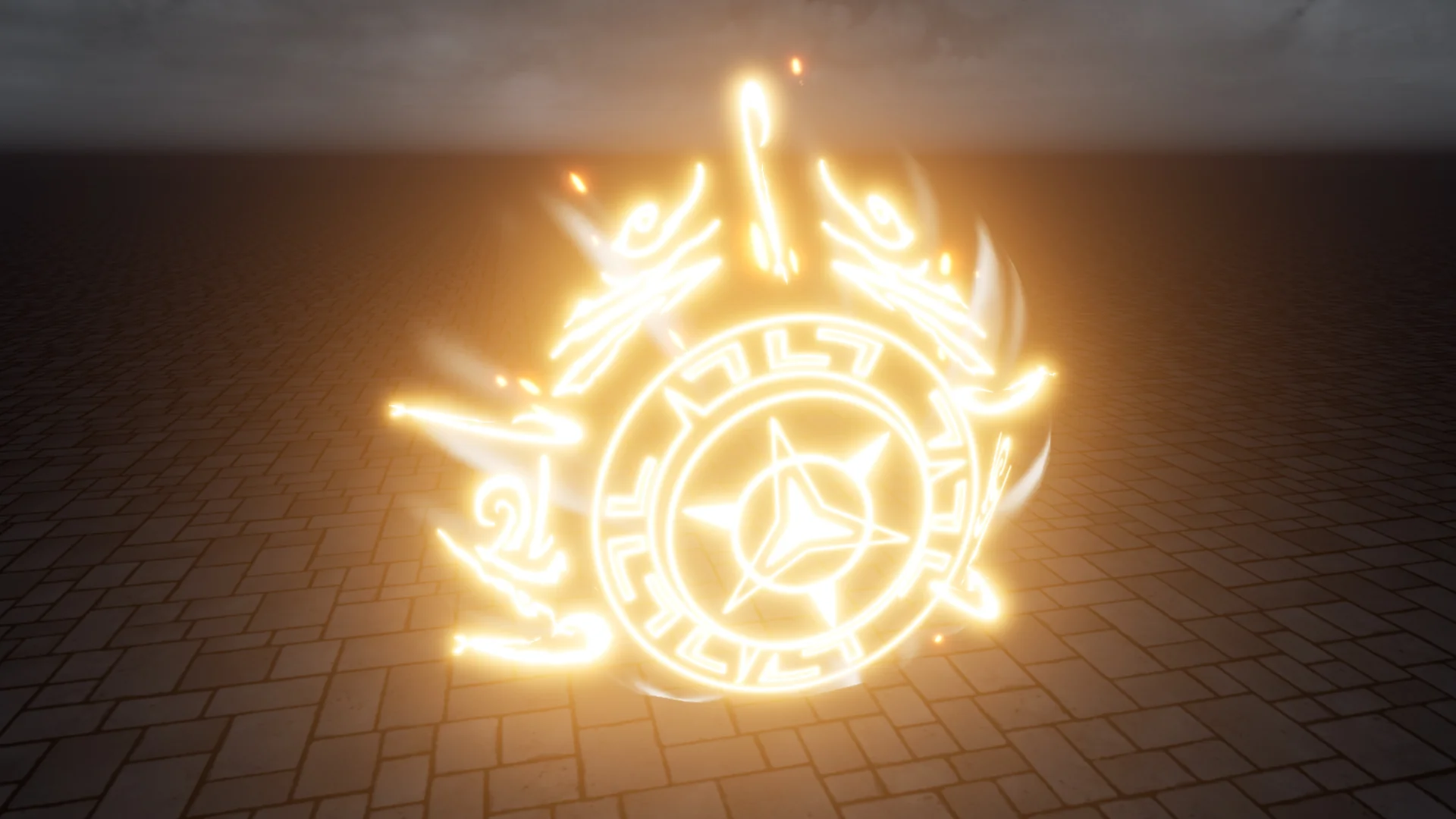
The asset supplies 11 magic circles, with every single effect and texture crafted uniquely. Having eleven distinct variations provides substantial latitude when designing tiered spell hierarchies, elemental orders, or ritual intensities. Because all effects operate in full 3D, their components do not warp unnaturally when observed from low player-character angles, overhead tactical views, or drifting cinematic cameras. The volumetric quality allows floating glyphs, concentric rings, and rising energy columns to interact naturally with ambient level lighting and surrounding scene geometry.
Sparkling particle bursts and cascading magical flows give these circles an active, kinetic presence. Instead of static boundary lines, the motion carries a sense of continuous arcane charging. Developers setting up complex boss encounters or multi-stage summoning events can designate specific circle designs to telegraph upcoming attacks or indicate charging milestones. When an encounter transitions into a more dangerous phase, swapping one unique magic circle layout for a more intricate, cascading pattern reinforces the escalation visually without requiring UI text or health bar notifications.
Deploying Magic Shields for Protection Mechanics
Defensive playstyles and protective barriers rely on distinct, instantly readable geometry. Within this set, 4 magic shields provide specialized visual forms tailored around protection and warding mechanics. Like the circles, each shield possesses its own unique texture and effect configuration, allowing creators to match different defensive signatures to distinct character classes, elemental resistances, or piece-of-equipment abilities.
In practical combat encounters, placing a magic shield in front of a defending unit or anchoring it around a defensive perimeter establishes a readable boundary. The three-dimensional structure ensures that the barrier surface curves realistically around protected targets, projecting a tangible defensive volume rather than a flat plane. Fantasy scenes featuring defensive formations, fortified encampments, or enchanted relic pedestals benefit from the distinct textural styling of these shields, establishing an unmistakable visual cue that an active ward is deflecting incoming pressure.
Controlling Emitter Loops Across Duration Tabs
By default, all effects in the pack are configured to loop continuously. This default state suits persistent gameplay features, such as environmental barriers that remain active until an objective is destroyed, ritual circles that run indefinitely inside an arcane academy, or defensive auras cast by guardian sentries. The sustained motion maintains visual energy in the environment without abrupt cuts or repeated initiation spikes.
When an ability requires an instantaneous trigger, a brief parry shield, or a temporary casting ring that vanishes once an incantation completes, the looping behavior can be adjusted directly. Emitter loops can be set to 1 across all duration tabs within the effect hierarchy. Adjusting this single property transforms any of the continuous loops into a single-execution burst. This switch makes it straightforward to adapt the 11 magic circles and 4 magic shields into instantaneous impact guards, timed traps, projectile blast rings, or short-lived defensive deflections that execute their visual cycle once and clean up automatically.
Optimizing Distortion Modules for Mobile Hardware
Visual effects that incorporate refraction, heat waves, or energy bending rely heavily on distortion modules to warp the scene behind them. While these distortion passes enhance the sense of high-energy magical displacement on desktop platforms, they introduce notable fill-rate pressure and render-target overhead on low-power devices. For projects targeting mobile devices, the asset setup provides a clear optimization route: disable the distortion modules.
Turning off the distortion modules removes the expensive screen-space refractive lookups, safeguarding framerates on thermal-constrained and power-limited mobile chipsets. The core visual presentation remains intact through the unique textures, sparkling particle cascades, and geometric structures of the circles and shields. This adjustment allows developers to utilize the exact same assets across high-end desktop hardware and mobile builds by toggling a single visual sub-system to match the processing budget of the target platform.
Inspecting Effects Through the Included Demo Scene
Evaluating particle timings, particle density, and material transparency in an empty scene can lead to inaccurate assumptions about performance and appearance. To streamline testing, the asset includes a dedicated demo scene file. Opening this demo scene allows artists and developers to immediately review all 11 magic circles and 4 magic shields placed in an active runtime context.
The demo scene serves as a functional staging area where the interplay between the cascading particles, unique textures, and 3D positioning can be evaluated side by side. It provides a baseline reference for how the effects respond to camera rotations, ambient scene darkness, and overlapping geometry. Having this pre-configured environment speeds up technical assessment, letting creators inspect the duration tabs, test loop-count modifications, verify distortion toggles, and select the exact circle or shield needed before migrating the effect assets directly into production levels.
 Spells & Combat
 Spells & Combat
 Spells & Combat